Choosing the right backup solution is a big decision for any IT team running virtual machines. If you use Proxmox VE, you've probably heard about both Proxmox Backup Server and Veeam. But which one fits your needs best? Let's break down what each offers, how they compare, and how you can back up your VMs with Vinchin as an alternative.
What Is Proxmox Backup Server
Proxmox Backup Server is open-source software built by the same team behind Proxmox VE. It's designed to work natively with Proxmox clusters and supports both KVM-based virtual machines and LXC containers. PBS focuses on simplicity, tight integration, and efficiency.
You install PBS on a dedicated server or VM, ideally running Debian Linux, and connect it directly to your Proxmox cluster through the web interface. Backups are incremental by default, using variable-length chunk-level deduplication to save space efficiently across similar data sets. Client-side encryption ensures data privacy before anything leaves your host.
PBS also supports offsite replication between servers for disaster recovery scenarios. Its licensing model is simple: free for all features unless you want enterprise support or access to stable update repositories through a paid subscription.
For security-conscious environments, PBS enables immutable backups when paired with ZFS snapshots or object-lock S3-compatible storage targets (Proxmox documentation). This means once written, backups cannot be altered or deleted until their retention period ends, a key defense against ransomware attacks.
What Is Veeam
Veeam Backup & Replication is a commercial backup suite known for its broad hypervisor support and deep feature set aimed at enterprise users. Since version 12.2 (late 2024), Veeam officially supports agentless backups of Proxmox VE virtual machines alongside VMware vSphere, Hyper-V, and Nutanix AHV, all managed from one console.
Veeam runs on Windows Server as its main management platform but deploys lightweight Linux worker proxies inside your Proxmox cluster automatically during setup to handle snapshot orchestration and data transfer tasks via the Proxmox REST API (Veeam documentation). This design keeps backup traffic efficient without manual proxy configuration.
It offers advanced features like application-aware backups, for SQL Server, Exchange, Active Directory, and instant VM recovery that lets you boot directly from backup storage if needed. You also get tape/cloud archiving options, detailed reporting dashboards with compliance tools built-in, plus granular restore capabilities down to individual files or application objects.
Licensing is per workload (VM or server) via Universal Licenses, costs scale with environment size but include vendor support agreements so businesses can rely on timely help if issues arise.
Proxmox Backup Server vs Veeam Features
Both solutions aim to protect your data, but their approaches differ in key ways:
PBS integrates natively into the Proxmox ecosystem, setup happens within the familiar web UI without extra agents or plugins required.
PBS backs up both KVM-based virtual machines and LXC containers, Veeam currently only handles KVM-based VMs on Proxmox, no container support yet.
PBS works only with Proxmox, Veeam covers VMware vSphere, Hyper-V, Nutanix AHV plus cloud workloads, all from one dashboard.
Both offer built-in deduplication but use different methods: PBS uses variable-length chunk deduplication optimized for homogeneous environments, Veeam uses fixed-block deduplication per backup file (with optional per-VM file limits). Real-world ratios range from about 3:1 up to 8:1 depending on data type.
Only Veeam provides true application-consistent backups using guest interaction services, which requires credentials inside each VM, to ensure transaction consistency for databases or mail servers.
With PBS you restore full VMs easily, file-level restore works by mounting images manually through its UI so you can browse contents before restoring files, a bit less seamless than some enterprise suites offer but still effective in practice (Proxmox Wiki). In contrast, Veeam lets you restore files or specific application objects directly from its console without needing to mount disks first.
Both can deliver immutable backups when paired with proper storage, PBS via ZFS snapshots/object-lock S3 targets, Veeam via Hardened Linux Repositories or object-lock cloud storage providers such as AWS S3/Azure/GCS.
PBS syncs encrypted backups between remote datastores quickly using built-in replication jobs, Veeam uses backup copy jobs that replicate data across sites or clouds according to flexible policies.
PBS keeps things simple, a single web UI covers most tasks but lacks deep reporting/auditing features found in enterprise suites like Veeam which offers detailed dashboards plus automation hooks via PowerShell/Python scripting interfaces.
PBS is free/open source unless you need paid support, costs are mainly hardware/storage related rather than software licenses alone. By contrast,Veeam's licensing grows with workload count but includes commercial SLAs along with compliance documentation out-of-the-box.
Performance Observations
Performance matters when backing up large environments:
Full/incremental backup speeds are similar when tuned well, both can achieve throughput of around 1–3 Gbps over modern networks given fast storage arrays beneath them (source: community benchmarks). Restore speeds depend more on underlying disk/network performance than software choice itself.
For very large-scale deployments above one hundred workloads,PBS tends toward lower resource usage due to its lean architecture while still scaling well.Veeam shines in centralized management at scale thanks to unified dashboards, even though it may require more infrastructure overhead upfront.
Limitations To Consider
Every solution has boundaries worth noting:
PBS limitations include: No native SaaS protection such as Microsoft365/Google Workspace, no item-level Exchange/SharePoint restores out-of-the-box, official support tied only to paid subscription plans if needed beyond community forums/documentation resources.
Veeam limitations include: No LXC container backup capability yet, requires Windows infrastructure at least for central management server even though worker proxies run Linux OS automatically deployed by setup wizard, more complex initial configuration steps especially in pure-Proxmox shops unfamiliar with Windows administration basics.Licensing costs rise quickly at scale compared to open-source alternatives.
How to Back Up Virtual Machines with Vinchin
If neither solution fully meets your needs, or if you want flexibility across platforms, consider Vinchin as an alternative backup tool.
Transitioning from traditional solutions like PBS and Veeam opens opportunities for broader compatibility and streamlined operations, this is where Vinchin Backup & Recovery stands out. Vinchin delivers comprehensive protection across diverse IT infrastructures by supporting over 19 virtualization platforms, including VMware, Hyper-V, and Proxmox VE, as well as physical servers, databases, plus both local and cloud file storage systems. For organizations planning migrations or upgrades,Vinchin offers exceptionally flexible migration capabilities that enable effortless full-system transfers between any supported virtualized environment, including physical-to-cloud moves, with just a few clicks.
To safeguard critical workloads, Vinchin provides robust real-time backup and replication features that create frequent recovery points while enabling automated failover. This dramatically reduces RPO/RTO metrics during outages. To guarantee reliability,it performs automatic integrity checks of all backup data,and validates recoverability of entire physical servers or virtual machines within isolated test environments.Building resilient disaster-recovery strategies becomes straightforward thanks to automated retention policies,data archiving/backups sent offsite/cloud, and easy creation of remote replicas, all ensuring rapid restoration after incidents.With an intuitive browser-based B/S web console featuring wizard-driven workflows, new users can quickly configure reliable protection routines.
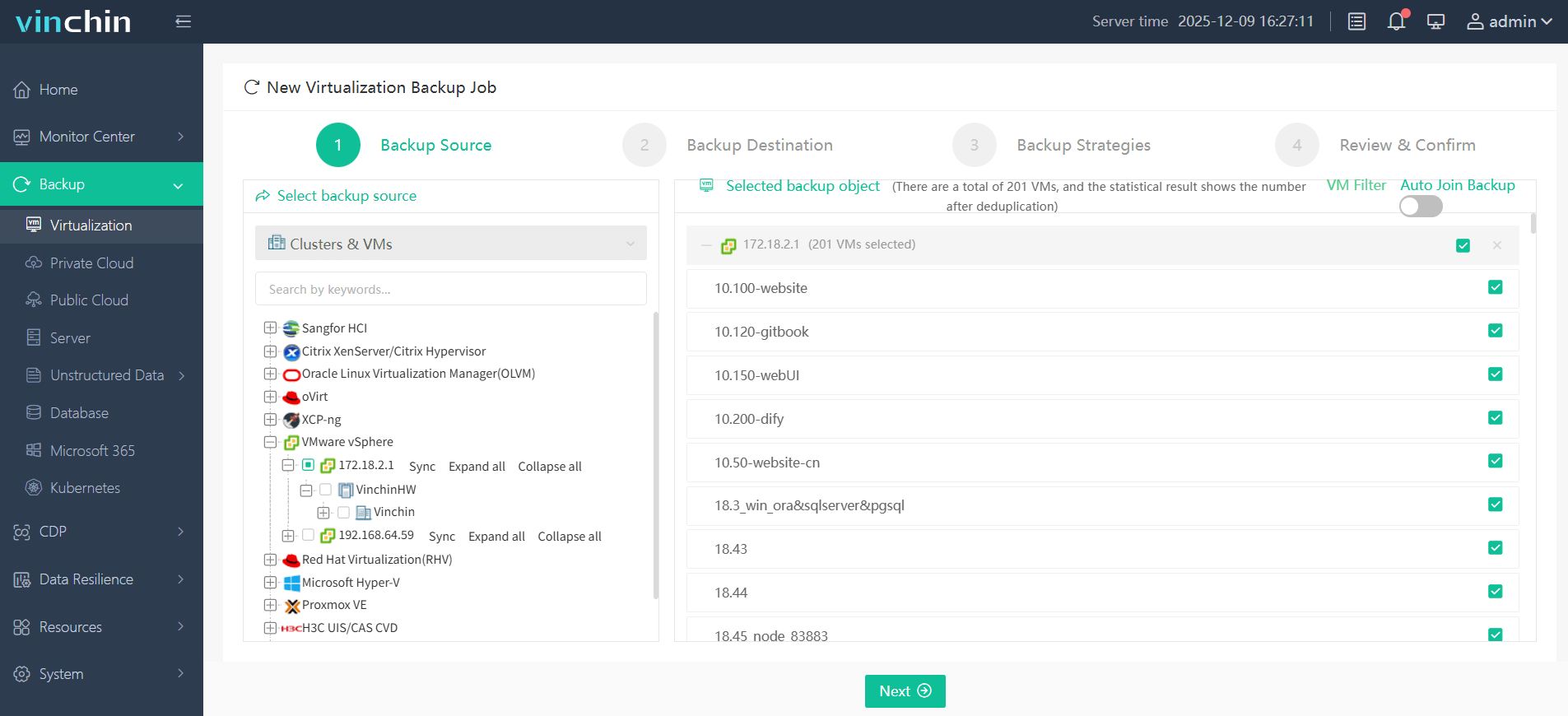
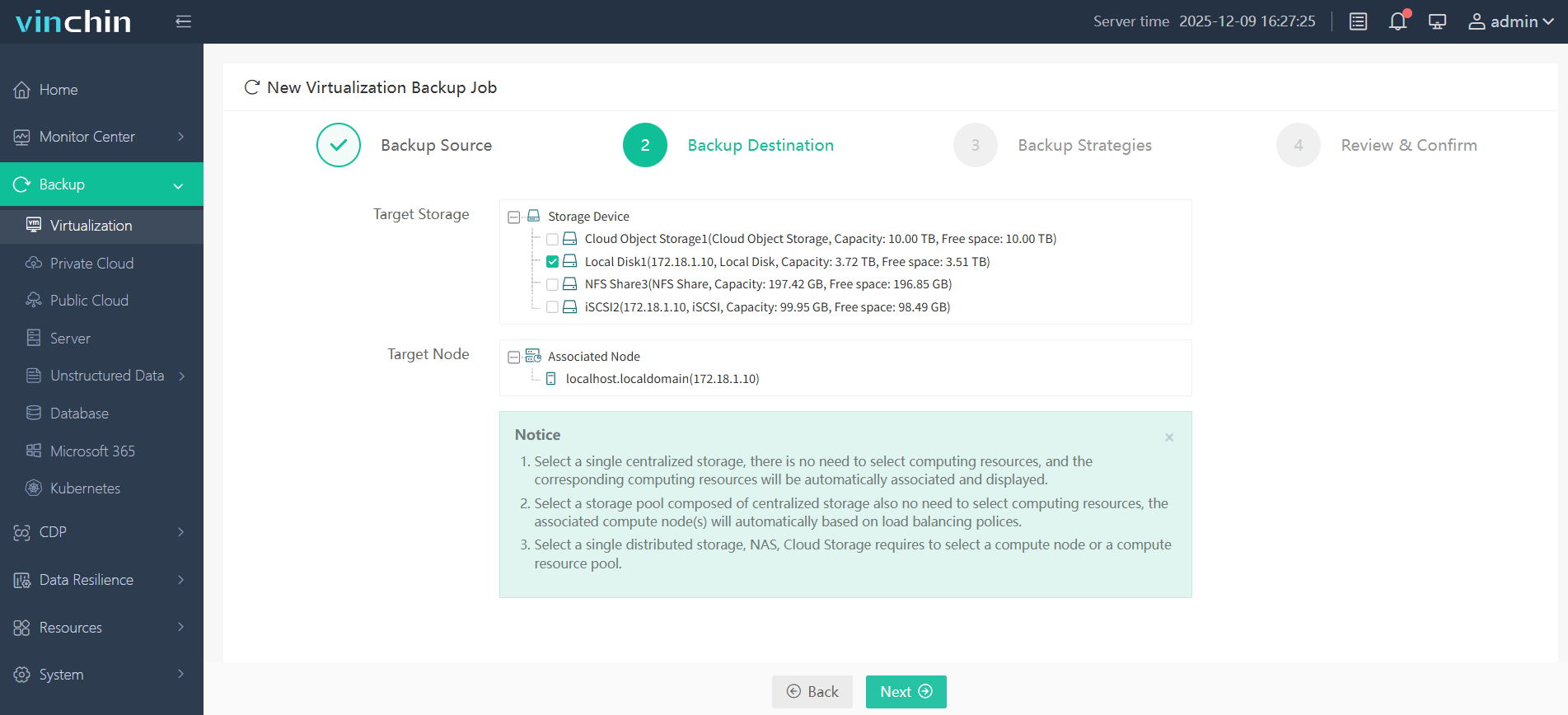
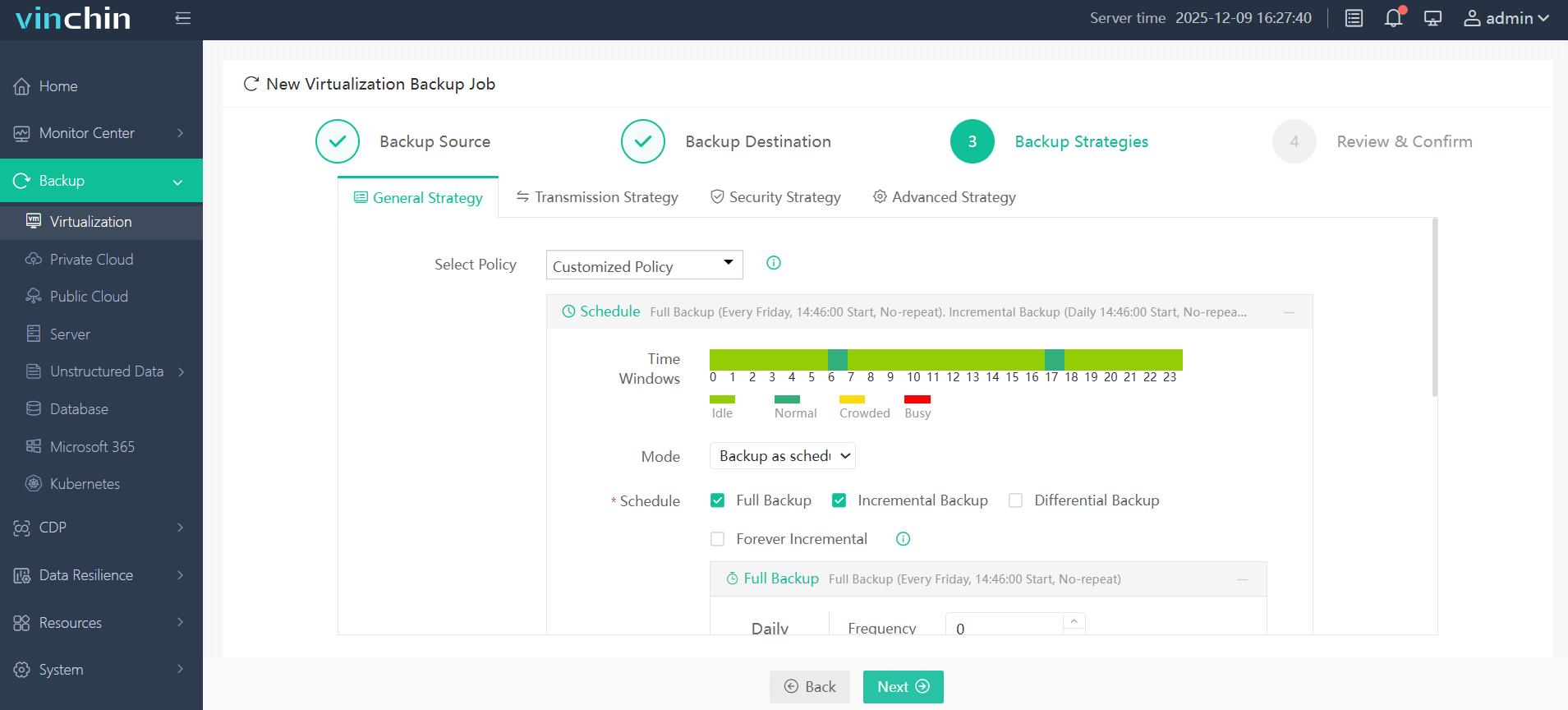
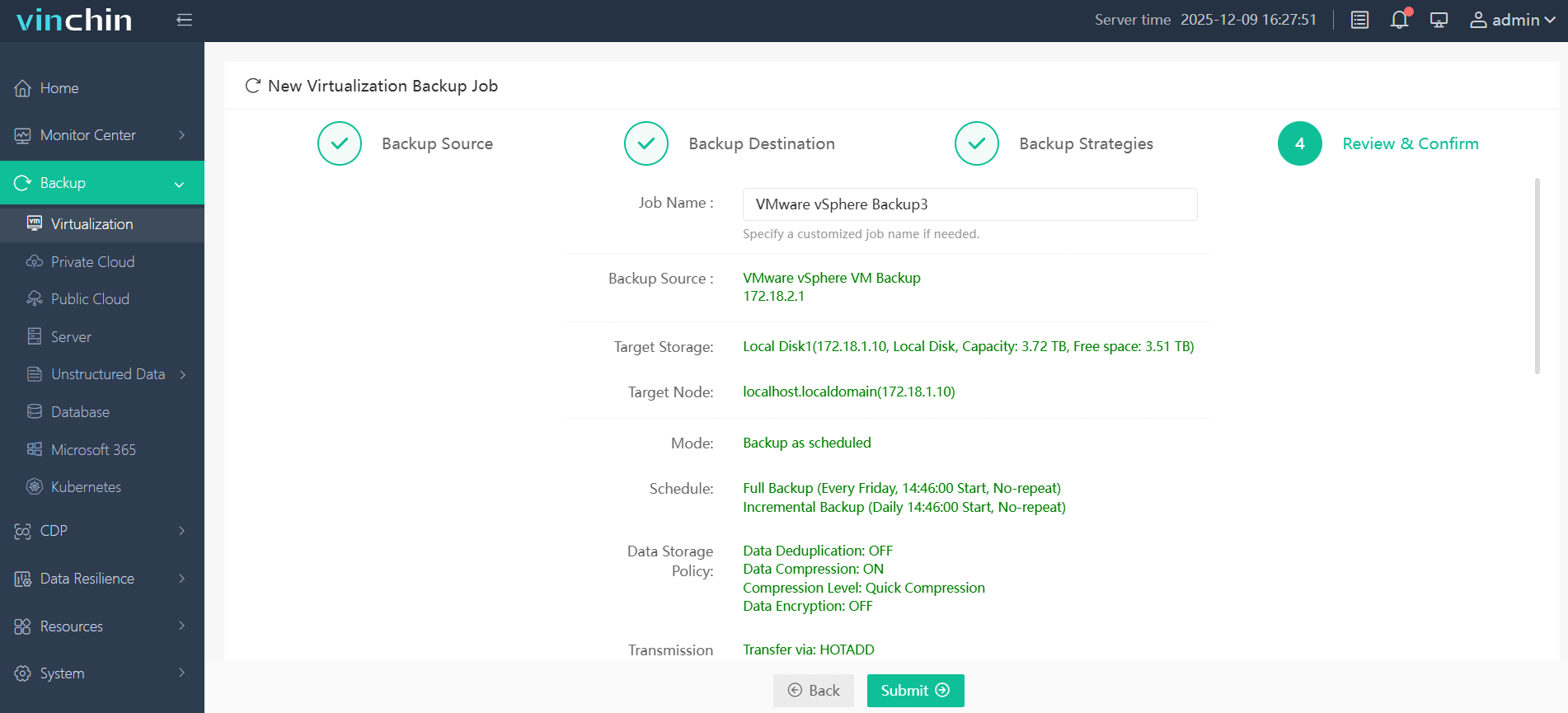
Backup VMware VMs for example:
Step 1: Select the VMware VM to back up;
Step 2: Choose the desired backup storage location;
Step 3: Configure your preferred strategy including schedule and retention settings
Step 4: Submit the job.
Vinchin Backup & Recovery comes with a generous 60-day free trial, comprehensive documentation,and responsive technical support so teams can deploy confidently while maximizing data safety.
Proxmox Backup Server vs Veeam FAQs
Q1: Can I back up LXC containers with Veeam?
No, only KVM-based virtual machines are supported by current versions of Veeam's plugin for Proxmox VE.
Q2: Does PBS cost anything if I don't buy a subscription?
No, the core product remains free forever, subscriptions add enterprise repository access/support only if needed.
Q3: Can I use both solutions together?
Yes, you can run both side-by-side as long as their schedules don't overlap on target resources.
Conclusion
Choosing between these two depends mostly on infrastructure mix,size,and feature needs, not just cost alone.For pure-Proxmox shops seeking simplicity,PBS shines.Mixed estates needing advanced app-aware restores may prefer paying more for what only enterprise suites like Veeam deliver today.If flexibility across platforms matters most,give Vinchin a try!