Ransomware, data tampering, and accidental deletion are no longer rare incidents, as they're daily risks in virtualization environments. Although Proxmox VE powers countless critical workloads, relying solely on snapshots and traditional backups can leave dangerous gaps in your defense.
What if the backup itself becomes a target? This is where immutable backups come into play. It offers a stronger layer of protection, ensuring your data remains intact even in the event of attacks or human error. Now, let’s walk through this guide to better understand Proxmox immutable backup.
What Is Immutable Backup in Proxmox VE?
Immutable backups in Proxmox VE refer to write-once, read-many (WORM) backups that cannot be modified, encrypted, or deleted for a defined retention period once it's created. In a Proxmox environment, immutability is often achieved by Proxmox Backup Server (PBS), which implements retention policies and protects backup data at the storage level. Immutable backups prevent any changes to stored data until the retention period expires.
How Proxmox Immutable Backups Work?
Immutable backups work by ensuring that once data is written, it cannot be modified or deleted within the specified time. In a Proxmox environment, this is particularly achieved by Proxmox Backup Server (PBS), which enforces data protection at the storage level rather than relying solely on user permissions.
When a backup is created, it is stored as a set of deduplicated, chunked blocks. These blocks are then protected by backup retention policies that define how long they must be preserved. During the retention period, the system prevents the backed-up data from any modification, deletion, or overwriting, even if the administrator attempts to delete it or if malicious activity occurs.
Besides, PBS uses integrity verification mechanisms such as checksums to ensure that backup data has not been tampered with. Even if someone gains unauthorized access, they cannot encrypt or corrupt existing immutable backups because the system enforces read-only behavior at the storage layer.
Once the retention period expires, the data can be safely deleted according to policy. This combination of enforced retention, storage-level protection, and integrity verification ensures that reliable recovery points are always available when needed.
Why Immutable Backups Are Critical for Modern Data Protection?
Modern IT environments face increasingly sophisticated threats, and traditional backups no longer ensure data security. Immutable backups have become an indispensable choice, as it directly solves the key shortcomings of traditional backups.
First, traditional backups have inherent limitations. Most of them rely on access controls and administration permissions to provide protection. If those credentials are leaked, backups can be modified or deleted just like productive data, making them unreliable in a real crisis.
Ransomware is another major driver. Today's attacks don't just encrypt primary data; they actively target backup repositories to cut recovery paths thoroughly. Once backups are encrypted or deleted, businesses have no other choice but to pay ransom. Immutable backups prevent ransomware by making sure the stored data cannot be altered or deleted.
Insider threats also pose a serious risk. Incorrect operations by administrators and employees can lead to backup corruption or deletion. Misconfiguration, human errors, or malicious intent can all compromise traditional backups. Immutable backups remove this risk by providing strict, system-level protection that even privileged users can't bypass.
Finally, backup deletion and retention risks are often overlooked. Incorrect retention policy, script errors, or automated cleanup tasks can remove critical recovery points unconsciously. Immutable backups lock data for a defined period, ensuring the recovery points are available when they're most needed.
In short, immutable backup is the last line of defense, guaranteeing that clean, recoverable data still exists even when everything else has been compromised.
Three Ways to Set Up Immutable Backups in Proxmox VE
Implementing immutable backups in Proxmox VE can be done in three ways: PBS, S3 Object Lock, or external immutable storage. Step-by-step guides are provided below. For a simpler option, skip ahead to the Vinchin solution.
Method 1: Using Proxmox Backup Server with Append-Only Mode
This is the most direct way to enable backup immutability in Proxmox environments using native tools.
Follow the steps below:
1. Install and deploy Proxmox Backup Server (PBS) on a dedicated host or VM.
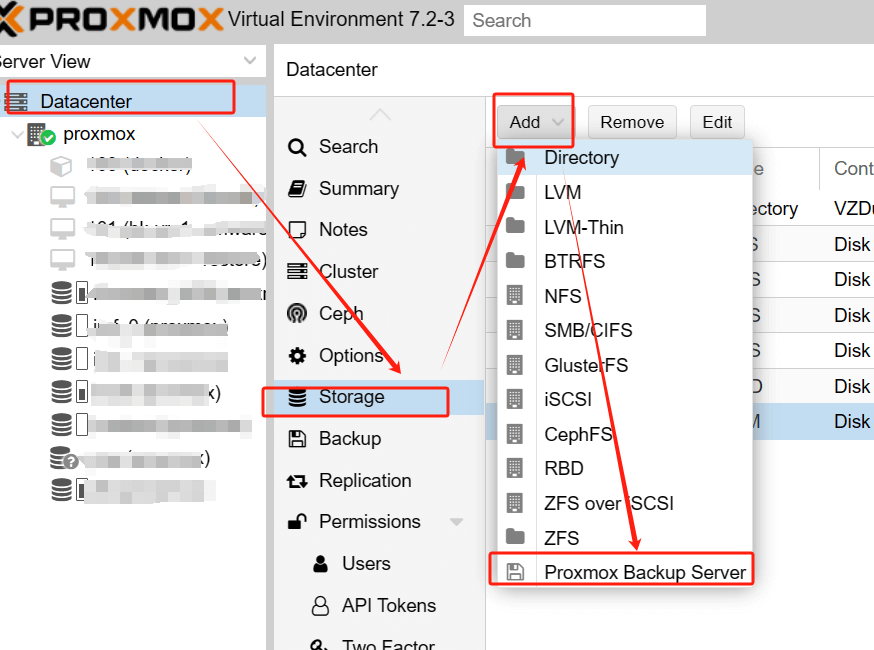
2. Create a backup datastore in PBS for storing VM backups.
3. Configure retention policies (e.g., daily/weekly/monthly backup retention rules).
4. Connect Proxmox VE to PBS by adding it as a backup storage target.
5. Schedule backup jobs in Proxmox VE and verify backups are being written to PBS properly.
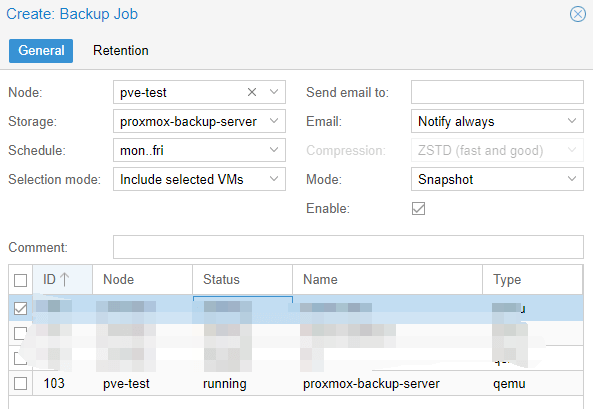
6. Enable Protection Mode on the datastore to prevent modification or deletion of existing backup data.
Method 2: Using S3 Object Lock (Object Storage-based Immutability)
S3 Object Lock works seamlessly with Proxmox Backup Server for off-site immutable backup storage.
Here is a step-by-step guideline:
1. Prepare S3-compatible object storage that supports Object Lock and create a dedicated bucket for backup data.
2. Enable Object Lock on the bucket and define a fixed retention period (compliance or governance mode).
3. Create an S3 storage entry in Proxmox Backup Server and connect to the target bucket.
4. Set up PBS backup datastore to store backup chunks on the S3 bucket.
5. Configure backup retention and compression rules within PBS as needed.
6. Link Proxmox VE to this PBS S3 storage and configure regular VM/CT backup tasks.
7. Run test backups and confirm that stored backup objects cannot be modified or deleted during the lock period.
Method 3: Using External Immutable Storage (NAS/Cloud with WORM)
This approach relies on external storage systems that natively support WORM (Write Once, Read Many) or immutable snapshots.
Check the following steps:
1. Deploy or access a NAS system or cloud storage platform that supports WORM/immutable snapshots.
2. Create a dedicated backup storage volume or share.
3. Enable immutability or snapshot locking features at the storage level.
4. Mount or connect the storage to Proxmox VE via NFS, SMB, or a supported protocol.
5. Configure backup jobs in Proxmox VE to write directly to this storage.
6. Verify that stored backups cannot be altered or deleted until the retention period expires.
Simplify Immutable Backup Deployment in Proxmox VE Using Vinchin
Proxmox VE supports immutable backups via PBS, S3 Object Lock, and WORM storage, but these require extra setup, storage planning, and ongoing maintenance. As environments grow more complex across platforms, ensuring data consistency and immutability at scale becomes challenging.
Considering this, enterprise-grade backup solutions like Vinchin's Backup and Recovery come into play. Vinchin supports over 15 virtual environments, including VMware, Proxmox VE, Hyper V, XenServer, oVirt, etc. While Vinchin does not currently provide true immutable backups, it utilizes storage-level protections for similar ransomware prevention capabilities.
Additionally, Vinchin supports instant recovery to rapidly resume business after system failures. It secures backup data with bank-level AES-256 encryption and password-protected recovery access, delivering reliable, enterprise-level data protection for all workloads.
It's easy to deploy immutable backups for Proxmox VE using Vinchin, just a few steps.
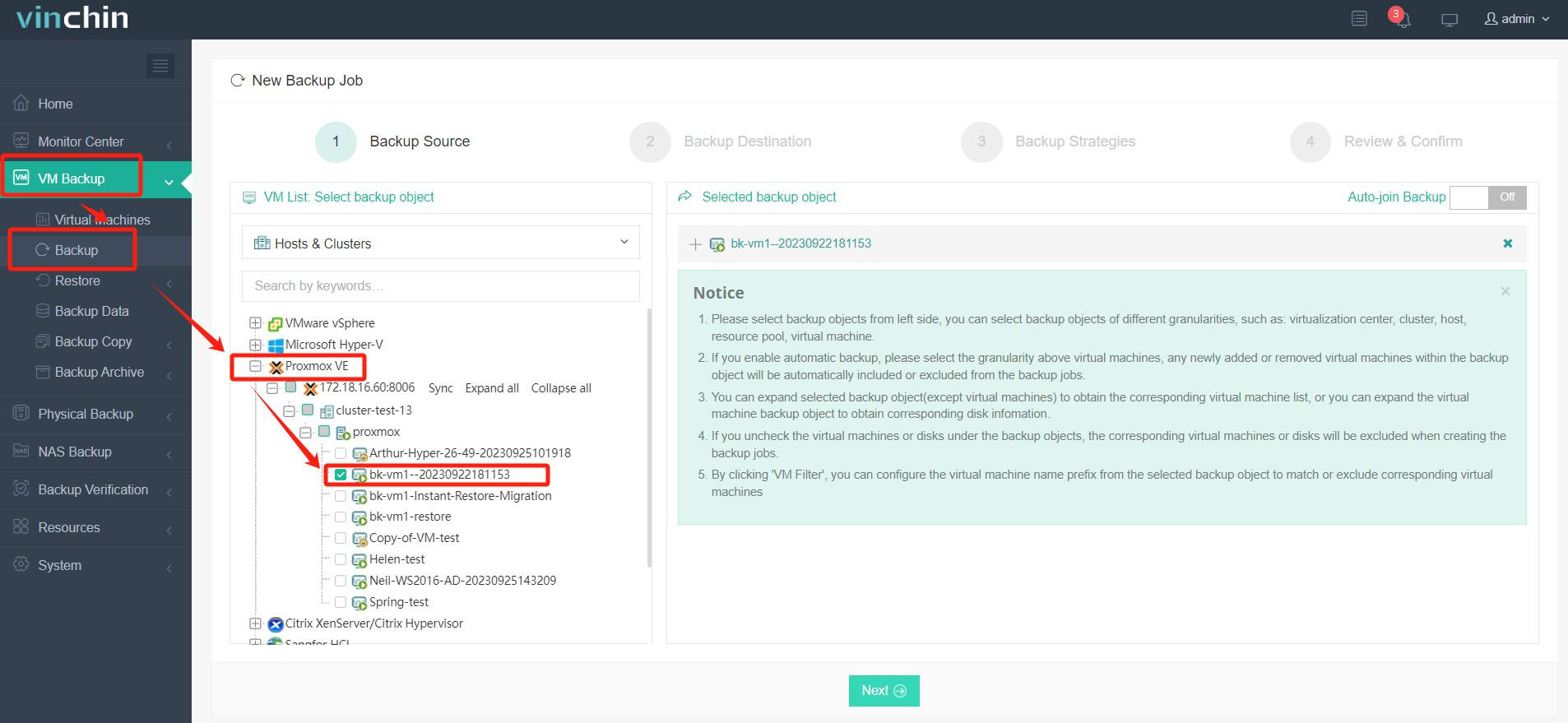
1. Navigate to VM Backup > Backup and create a new backup job. Select the target VM under the Proxmox VE platform as the backup source, confirm the object is added successfully, then click "Next".
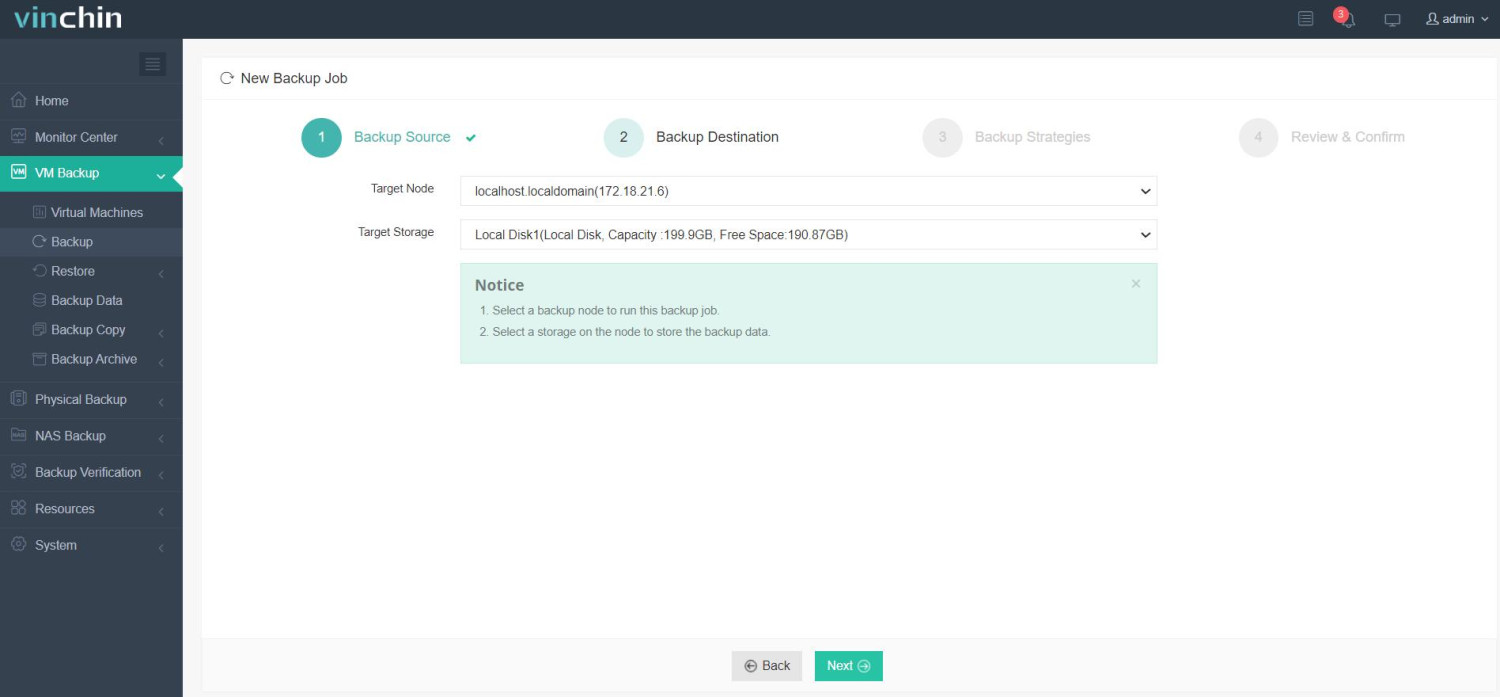
2. Configure the backup destination by selecting the backup node and storage location (e.g., local disk), ensuring sufficient free space is available.
3. Set the backup strategy, including backup mode and schedule (e.g., weekly full backups + daily incremental backups), and enable advanced options like compression or transfer threads as needed.
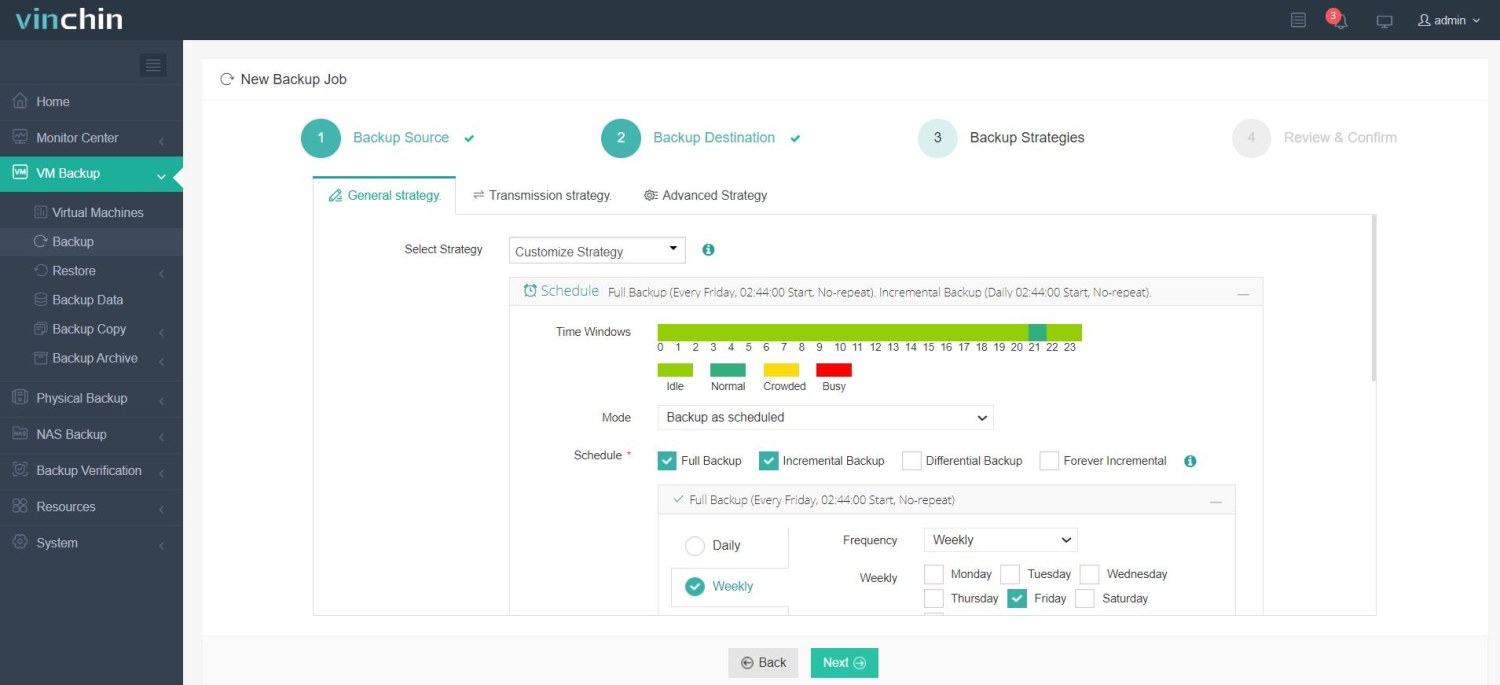
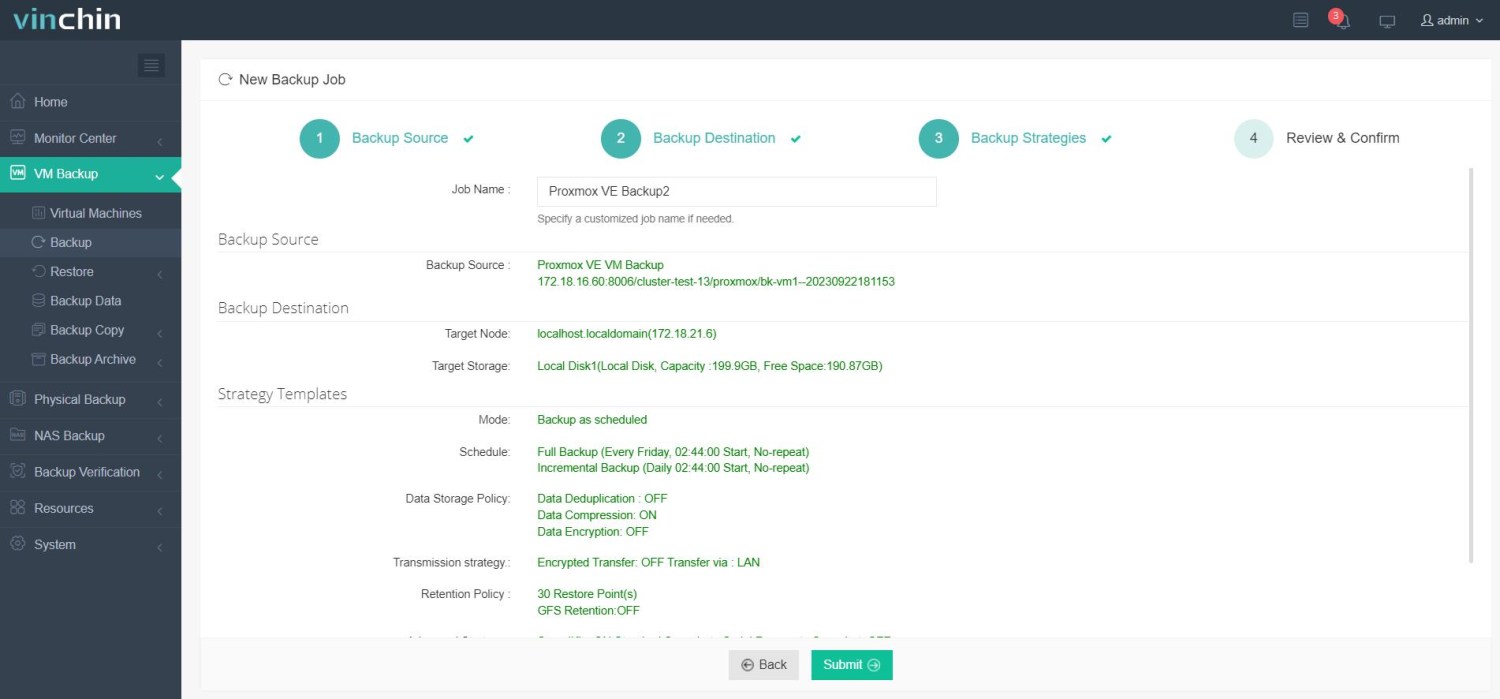
4. Verify all configurations (backup source, destination, and strategy) on the confirmation page, customize the job name, then submit to complete the backup job creation.
Recognized globally with top ratings and trusted by thousands of enterprises, Vinchin Backup & Recovery offers a fully featured 60-day free trial. Experience enterprise-grade data protection today!
Proxmox Immutable Backups FAQs
Q1: How to prevent Proxmox backup from tampering?
To do this, it’s essential to combine multiple protection measures.
First, use Proxmox Backup Server (PBS) with append-only mode and defined retention policies to ensure backups cannot be modified or deleted.
Second, isolating backup storage from the production environment can reduce attack risks and enforce strict access controls such as RBAC and MFA.
For stronger protection, choose store backups in off-site or object storage that supports backup immutability (e.g., WORM or Object Lock).
Additionally, enable encryption and regularly monitor backup activity to detect any suspicious behavior.
Q2: Can I set retention rules for Proxmox immutable backups?
Yes, you can. In Proxmox VE environments, you can define retention rules (such as keeping a set number of restore points or applying GFS policies) to automatically manage old backups. At the same time, by using Proxmox Backup Server features like append-only or protection mode, or integrating with S3 Object Lock, you can ensure that retained backups remain immutable and protected from modification or deletion.
Q3: What is the difference between immutable backup and air-gapped backup?
Immutable backups and air-gapped backups are both designed to protect your data, but they solve different risks in different ways.
Immutable backup means the backup data cannot be modified or deleted for a defined retention period. Even if an attacker gains access, they can’t encrypt or tamper with those backups. However, storage is still online and accessible, just protected by write-once rules.
Air-gapped backup, on the other hand, means the backup is physically or logically isolated from your main network, which is completely offline or disconnected. Because it’s not reachable, ransomware or attackers can’t access it at all.
Wrap Up
Proxmox immutable backups deliver powerful protection against modern ransomware threats, enabling reliable data recovery even in the event of severe security breaches. While PBS offers viable backup data management and storage for businesses and IT teams, Vinchin provides a far more streamlined alternative. Built on WORM protection principles, it enables comprehensive end-to-end data protection, keeping all backup data intact and permanently unalterable at every stage.