Imagine this: a single corrupted database record halts your entire application during peak business hours. You need that record back—fast—but restoring the whole server would take hours and disrupt everyone else’s work. This is where granular recovery technology makes all the difference.
Traditional backup solutions often force you to restore entire systems or large volumes just to retrieve one lost file or email. That approach wastes time and resources while increasing risk of overwriting good data with outdated information. Granular recovery technology changes this by letting you restore only what you need—quickly and precisely—so your business keeps running smoothly.
What Is Granular Recovery Technology?
Granular recovery technology allows you to restore specific items—such as files, folders, emails, database records—from a backup without recovering the whole system or volume. Instead of rolling back an entire server or application environment after accidental deletion or corruption, you can pinpoint exactly what’s missing or damaged.
This method relies on detailed indexing of backup data at creation time so every item becomes searchable later on demand. For example: if someone deletes a single email message by mistake in a busy mailbox environment, granular recovery lets you bring back just that message—not every inbox item from last week’s backup set.
In Kubernetes clusters or virtualized environments like VMware or Hyper-V platforms, granular recovery targets objects such as ConfigMaps, Secrets, persistent volume claims (PVCs), pods—or even individual files inside virtual machines—all without touching unrelated resources.
The core idea is simple but powerful: make backups “application-aware” so they catalog not just raw files but also metadata about relationships between items (like which database table belongs to which schema). This way you can search for any object quickly when disaster strikes—and recover it in minutes instead of hours.
Why Use Granular Recovery Technology
Why should operations teams care about granular recovery? The answer comes down to speed, efficiency, control—and compliance requirements that demand precision handling of sensitive data.
First is speed: when disaster hits—a deleted folder here; an overwritten configuration file there—you want users back online fast. Granular recovery slashes downtime because it restores only affected items rather than full servers or applications; this means less waiting around for big jobs to finish before normal operations resume.
Second comes efficiency: full restores consume extra storage space plus network bandwidth during transfer processes; they also require more CPU cycles on both source/destination hosts compared with targeted item-level restores using granular methods—which translates into lower costs over time as well as reduced disruption across production systems still running unaffected workloads nearby.
Third is control: restoring only what’s needed reduces risk of accidentally overwriting healthy data elsewhere in your environment since no broad rollback occurs outside selected objects' scope; this helps maintain integrity across complex infrastructures spanning multiple applications/databases/users at once—a major win for IT governance teams tasked with keeping everything compliant yet agile enough for rapid response scenarios too!
Finally there’s compliance/security value-adds: many regulations now require organizations prove ability both recover AND delete specific records upon request (think GDPR “right-to-be-forgotten” cases). With granular recovery technology built-in from day one these demands become much easier meet without exposing unnecessary datasets during routine maintenance windows either!
How Granular Recovery Technology Works
At its heart granular recovery depends on detailed indexing/cataloging mechanisms embedded within modern backup software platforms themselves—not just storing raw blocks/files but also capturing rich metadata describing structure/content/context around each object being protected over time (“application-aware indexing”).
When creating backups today most enterprise-grade solutions offer two main approaches:
Agent-based methods install lightweight agents directly inside guest OS/applications (ideal for deep-dive access into databases/email servers)
Agentless techniques operate externally via hypervisor APIs/snapshots (best suited VM-level protection)
Both approaches have pros/cons depending workload type/granularity required—but share same goal: enable precise search/browse functionality post-backup so admins can locate/recover individual items quickly whenever needed later down line!
A typical workflow looks like this:
1) Backup engine takes snapshot—including all relevant file system structures/application metadata
2) Indexer catalogs every object found inside snapshot using unique identifiers/timestamps/relationships
3) Catalog stored securely alongside actual backup image(s)—making future searches lightning-fast even across massive datasets!
4) When loss/corruption detected admin logs into web console/searches catalog using keywords/object names/date ranges/etc
5) Selected item(s) restored directly back original location OR alternate destination per policy settings—with rest environment untouched throughout process
Let’s look at some real-world examples:
In SQL Server environments admins may need restore single row/table after accidental deletion; here transaction log parsing combined with application-consistent backups enables safe point-in-time retrieval without impacting other tables/schemas nearby.
For virtual machines running Windows/Linux operating systems agentless VM snapshots allow browsing disk images via web interface then extracting only necessary files/folders out-of-band—no reboot required!
In Kubernetes clusters resource-level granularity means restoring lost ConfigMap/PVC/pod independently based on namespace/application context rather than rolling entire cluster state backward unnecessarily.
Application-consistent backups are essential prerequisites here—they ensure all open transactions/data writes flushed safely before snapshot taken so recovered objects always valid/useful post-restore! Without consistency guarantees partial/incomplete restores could introduce further errors downstream instead solving root problem initially encountered.
Step-by-Step Example Workflow
Let’s walk through how an administrator might perform a typical granular file restore operation:
1) Create regular scheduled backup job targeting desired VM/database/Kubernetes namespace/resource
2) Ensure job uses “application-consistent” mode if available (flush pending writes/logs prior snapshot)
3) Upon incident detection log into management console/web UI
4) Search indexed catalog using filename/object name/date range filters
5) Select target item(s); review dependency warnings if shown (e.g., linked registry entries/configurations may be required)
6) Click RESTORE button; choose original path OR specify alternate destination folder/namespace
7) Monitor progress bar/status messages until completion prompt appears
8) Validate restored object by opening/checking checksum/logging test results accordingly
Recovery Time Objective (RTO) metrics help measure how quickly service returns after incident—granular methods typically achieve sub-minute RTOs versus hours-long delays seen full-volume rollbacks!
For advanced users command-line tools like grep can assist searching large catalogs offline while checksum utilities verify integrity post-recovery before putting assets back into production rotation again.
Common Challenges in Granular Recovery
While granular recovery offers many benefits it also brings unique challenges that operations teams must plan around:
One issue involves performance overhead from constant indexing/cataloging activities especially when protecting high-change-rate workloads like transactional databases/email servers; tuning index frequency/storage location helps minimize impact here while still enabling fast searches later on demand…
Compatibility matters too—not every application supports true item-level extraction natively out-of-box! Some legacy platforms require custom scripts/plugins developed/tested thoroughly before relying them mission-critical situations going forward… Always check vendor documentation/support forums first if unsure about supported granularity levels per workload type involved!
Consistency remains another concern particularly distributed/cloud-native architectures where multiple replicas/nodes update simultaneously behind scenes… Ensuring atomicity/isolation during both backup AND restore phases prevents split-brain scenarios/data drift issues cropping up unexpectedly mid-operation!
Retention policies/storage planning play vital roles mitigating risks associated long-term archive growth/index bloat over years’ worth incremental snapshots piling up unchecked… Regular pruning/testing ensures catalogs remain responsive/reliable regardless dataset size scaling upward overtime…
Finally security/compliance best practices dictate strict role-based access controls/audit logging enabled everywhere possible—limiting who can initiate sensitive restores/tracking exactly what gets recovered when/how/by whom each time event occurs!
Vinchin Backup & Recovery for Kubernetes Granular Recovery
Vinchin Backup & Recovery is able to perform VM data recovery at file level. You can restore specific folders or files saved in a restore point to the production host using Vinchin Granular Restore. In case you mistakenly delete some files, this feature will help quickly retrieve certain files you want without needing to recover the whole virtual machine.
Vinchin's Granular Recovery lets you restore individual items—files, folders, emails or database entries—directly from any backup point via the web console without recovering the entire virtual machine. Using a browser-based interface you can browse backup snapshots, select and download specific files or folders, and start or stop recovery tasks without impacting ongoing backups or the production environment. By reorganizing backup data for on-demand access, granular recovery significantly shortens recovery time and reduces compute, storage and bandwidth usage compared with a full VM restore, making it a faster, more resource-efficient option for retrieving only the data you need.
Before performing granular recovery with Vinchin, you should have a VM backup created by Vinchin Backup & Recovery.
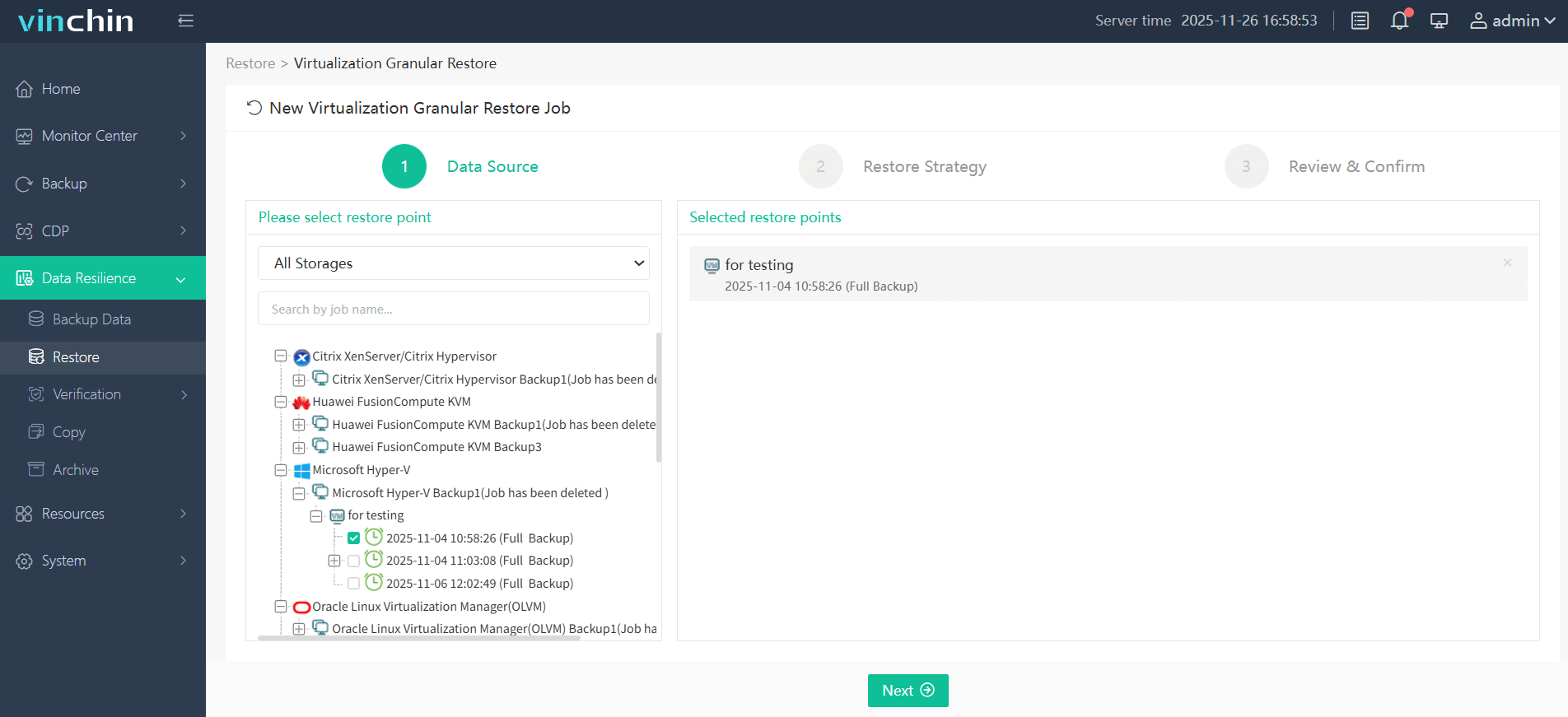
1. Select one restore point.
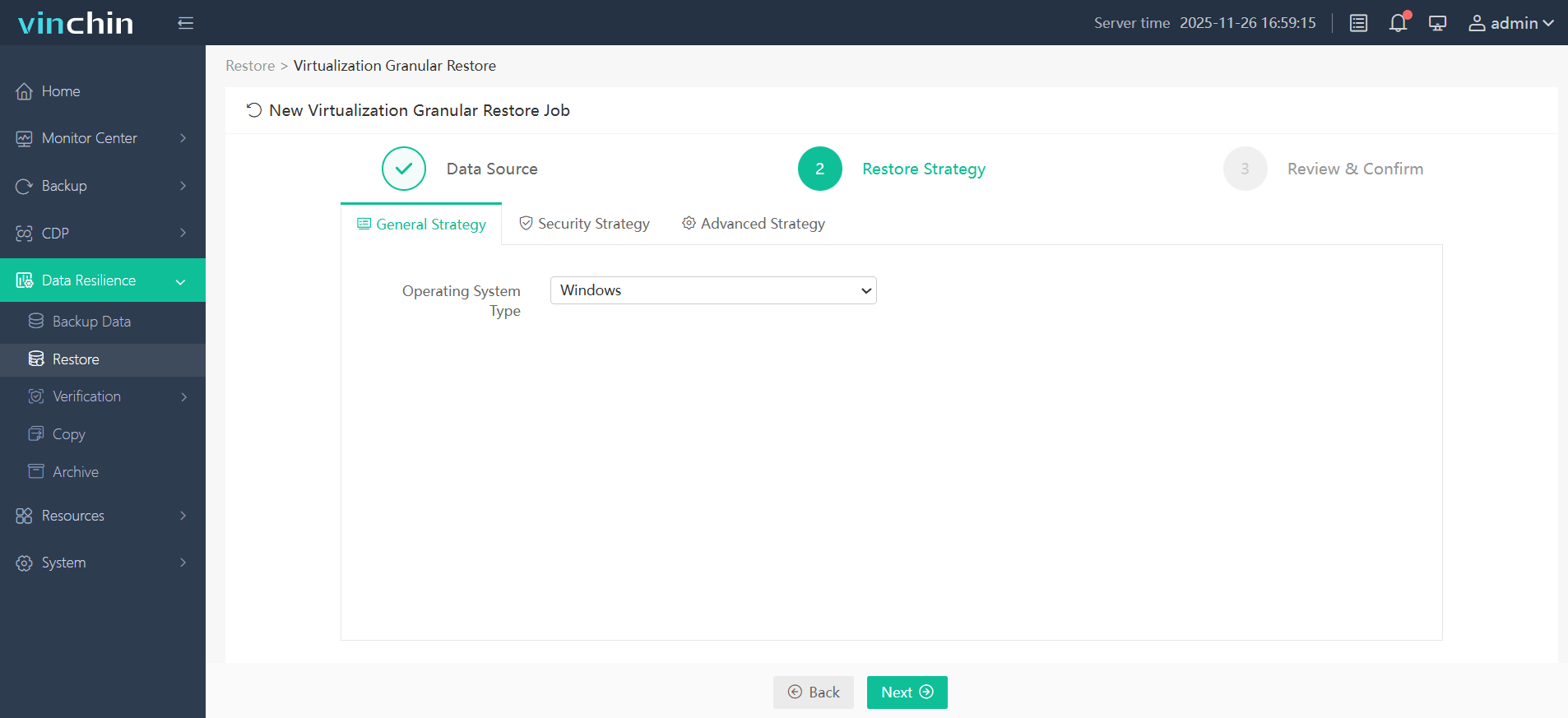
2. Configure restore strategy.
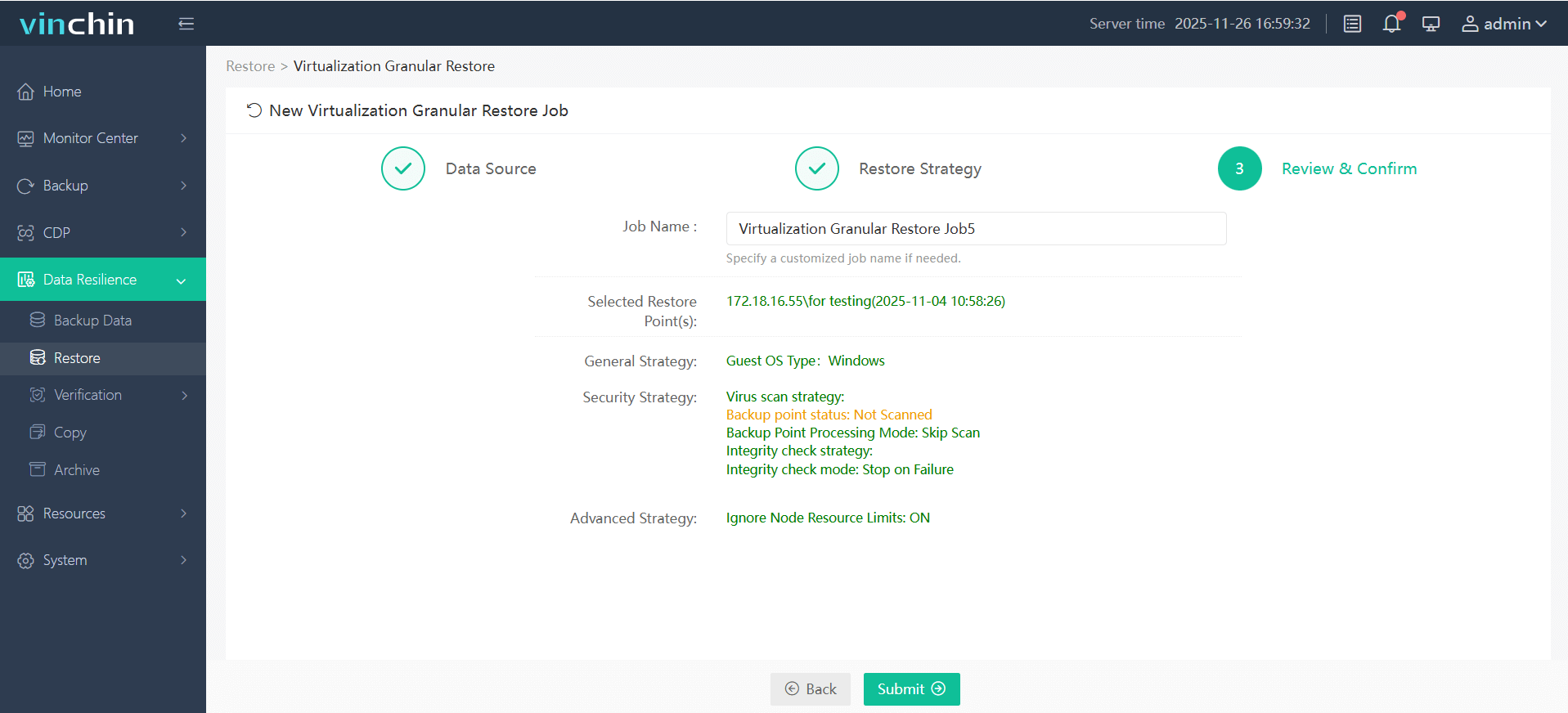
3. Submit the job.
4. Just click the download button on the right side to download the files or folders to the local machine.
And you will got these files on your computer.
Want to experience this efficient feature of Vinchin Backup & Recovery? you can also start to use this powerful system with a 60-day full-featured trial! Get the journey started today!
Granular Recovery Technology FAQs
Q1: Can I recover a single file from a full virtual machine backup if it has dependencies?
A1: Yes—with granular recovery you can select individual files but always check related configurations/registry entries are present too before returning asset live production use again.
Q2: How do I rehearse my team’s readiness for disaster using granular restores?
A2: Schedule regular test recoveries in isolated sandboxes validate procedures monitor RTO metrics document lessons learned improve response plans accordingly each cycle completed successfully together!
Q3: What security measures should I enable during sensitive item-level restores?
A3: Activate encryption role-based access controls audit logging features restrict actions track events comply internal/external standards confidently every step way moving forward.
Conclusion
Granular recovery technology has become non-negotiable in modern IT resilience strategies—it delivers faster precise less disruptive restores than ever before. Vinchin provides these capabilities through an easy-to-use platform backed by global trust; try their free trial today and experience smarter data protection firsthand!








