









Home Solutions Massive Endpoints Backup

The Importance of Endpoints Backup

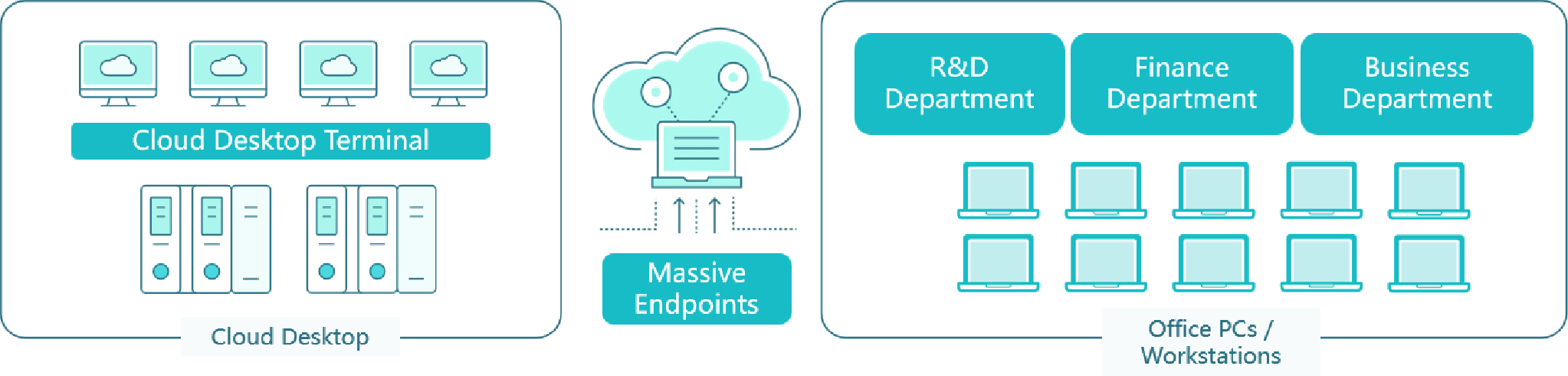
Corporate endpoints hold vast amounts of critical business data. However, these highly distributed devices remain constantly vulnerable to hardware loss, physical theft, and ransomware. Implementing a robust backup strategy is essential.

Mitigate Device Loss and Theft

Mitigate Device Loss and Theft

Employees frequently work remotely, making laptops highly susceptible to physical theft or unexpected hardware failures. Centralized backups ensure critical local files are never permanently lost.

Defend Against Ransomware

Defend Against Ransomware

Endpoints serve as the primary entry point for malware and phishing attacks. Secure, isolated backups provide a reliable safety net to restore uninfected data instantly after a breach.

Prevent Human Error

Prevent Human Error

Accidental file deletions or unauthorized overwrites can wipe out essential local documents. Continuous endpoint protection guarantees historical versions of critical files remain fully recoverable at any time.

Key Capabilities of Modern Endpoints Protection

Silent Background Execution

Silent Background Execution

Backups run seamlessly in the background without impacting system performance or interrupting employee productivity, ensuring continuous data protection during active work hours.

Network-Optimized Transmission

Network-Optimized Transmission

Utilizing advanced deduplication and compression, modern solutions minimize bandwidth consumption, allowing remote endpoints to back up efficiently even over unstable or slow network connections.

Granular File-Level Recovery

Granular File-Level Recovery

Administrators and users can rapidly search for and restore individual documents, spreadsheets, or specific folders without the need to roll back the entire device.

Centralized Policy Management

Centralized Policy Management

IT teams can seamlessly deploy, configure, and monitor backup schedules across thousands of distributed laptops and desktops globally from a single administrative dashboard.

Self-Service Restoration

Self-Service Restoration

Empowering end-users with a secure, intuitive portal allows them to recover their own lost or overwritten files instantly, significantly reducing the workload on IT helpdesks.

End-to-End Encryption

End-to-End Encryption

To safeguard sensitive corporate intellectual property, all endpoint backup data is strictly encrypted using enterprise-grade algorithms both during transmission and while at rest.

How Vinchin Performs Endpoints Protection

How Vinchin Performs Endpoints Protection

Key Benefits with Vinchin Endpoints Backup

Data Security Assurance

Provide comprehensive protection for massive endpoints through encrypted transmission across networks and secure storage at the backend, ensuring that sensitive business data remains safe from unauthorized access, tampering, or loss.

Data Security Assurance
High Backup Efficiency

High Backup Efficiency

Utilize multi-threaded transfer channels and configurable concurrent task settings to maximize backup throughput, allowing large volumes of data to be processed quickly without impacting network performance, even during peak hours.

Easy Operation & Management

Feature a user-friendly web management interface with intuitive capacity expansion, client deployment, and centralized monitoring capabilities, enabling IT teams to manage large-scale endpoint environments with minimal training and effort.

Easy Operation & Management
Cost-Effective

Cost-Effective

Deliver robust backup and recovery performance while optimizing resource usage, reducing operational expenses, and minimizing infrastructure investment, making it an economical solution for enterprises with massive endpoint environments.

Vinchin Wins Trust from Global Brands

Get Endpoints Protection Solution Now

Protect distributed corporate endpoints with reliable backup, centralized management, and rapid file recovery.

Free Trial * 60-day free trial
Talk to an Expert * Free solution assessment

Frequently Asked Questions

Q1: Can endpoint backups recover devices hit by ransomware?

A: Yes, administrators can quickly restore uninfected file versions to the original or new device. This effectively neutralizes the ransomware attack without needing to pay any demands.

Q2: Can I restore backup data to a new laptop?

A: Yes, modern solutions fully support cross-device restoration for seamless hardware migrations. You can easily transfer all historical data onto a newly provisioned computer.

Q3: How do endpoint backups handle duplicated corporate files?

A: Advanced deduplication technologies ensure that identical files across different devices are stored only once. This drastically reduces network bandwidth and overall storage consumption.

Q4: How does Vinchin simplify mass endpoint backup management?

A: Vinchin utilizes intelligent grouping to easily categorize your devices by OS or department. This allows administrators to apply uniform backup policies to entire groups simultaneously.