Modern enterprises run on data. In virtualized environments like Sangfor HCI, workloads are consolidated for efficiency but also become more vulnerable to disruption. Data loss, ransomware attacks, or system failures can stop business operations without warning. Regulatory demands and customer expectations make reliable backup strategies essential for keeping businesses running without interruption.
The Importance of Enterprise Business Continuity
Business continuity means your company keeps working even when disaster strikes. This could be a cyberattack, hardware failure, or simple human error. Without access to critical data and applications, companies face lost revenue and damaged reputations. Reliable backups are key to fast recovery.
Industry research shows downtime is costly. According to ITIC Reports & Survey Results, 97% of large enterprises with more than 1000 employees say that on average, a single hour of downtime per year costs their company over $100,000. Regulated industries risk fines or legal action if they cannot recover quickly from incidents.
Backups are not just about compliance, they protect your bottom line by reducing recovery time and limiting operational losses during outages.
Why This Matters for Enterprise Operations
A robust enterprise backup strategy protects against many threats that can disrupt business operations in Sangfor HCI environments. When workloads share infrastructure resources such as compute, storage, and networking components, a single incident can impact everything at once. Enterprises must prepare for these risks to avoid long downtimes or permanent data loss.
● Ransomware Attacks: Ransomware encrypts vital files across virtual machines and shared storage pools in Sangfor HCI clusters. Without secure backups stored offsite or offline, restoring clean copies becomes impossible. Attackers often target centralized systems because they maximize leverage over victims.
● Hardware Failure: Disk crashes or node outages can bring down multiple VMs at once due to resource pooling in hyper-converged setups. Even with redundancy features like RAID or clustering enabled within Sangfor HCI nodes, catastrophic failures still happen, especially during firmware bugs or cascading faults.
● Human Error: Mistakes such as accidental deletion of VMs or misconfigured policies can erase important data instantly. In complex environments managed by large teams under pressure, errors are inevitable unless there is an easy way to roll back changes using recent backups.
● Software Bugs & Failed Updates: Patch management is critical but risky; failed updates may corrupt VM images or break dependencies between services hosted on different nodes. Recovery from software-induced outages requires granular restore options so you don’t have to rebuild entire clusters from scratch.
● Natural Disasters: Floods, fires, earthquakes, or even power surges can destroy primary data centers hosting Sangfor HCI platforms. Offsite backups ensure you can recover business-critical workloads even if local infrastructure is gone.
The consequences of these risks include missed service-level agreements (SLAs), dissatisfied customers who cannot access services on time, regulatory penalties for non-compliance with data protection laws like GDPR or HIPAA, and lasting damage to brand reputation.
What Makes a Good Sangfor HCI Backup Strategy?
A good backup strategy does more than copy files and ensures rapid recovery while meeting compliance standards and scaling with your environment’s growth. Enterprises need solutions that adapt as their needs change while protecting against evolving threats both internal and external.
Scalability across clusters: Your backup solution should handle growing numbers of VMs spread across multiple Sangfor HCI clusters without performance bottlenecks or manual intervention during expansion projects.
Granular recovery options: File-level restores let you recover specific documents instead of rolling back entire virtual machines, saving time when only part of a workload is affected by corruption or deletion events.
Encryption standards: Strong encryption both in transit (using TLS) and at rest (AES 256-bit) protects sensitive information from interception during transfer between sites or theft from compromised storage devices (NIST Cryptographic Standards).
Retention policies: Flexible retention lets you balance regulatory requirements with storage costs by keeping daily snapshots for recent weeks but archiving older versions less frequently according to business needs.
Centralized management control: A unified dashboard simplifies monitoring job status across all protected assets; automated reporting helps spot problems early before they escalate into major incidents requiring emergency intervention by IT staff.
Best practices include scheduling regular automated backups (daily incremental plus weekly full), storing copies offsite via cloud integration or remote replication features built into modern backup tools like Vinchin Backup & Recovery, encrypting all backup traffic/data end-to-end using industry-standard protocols such as TLS/AES256; testing restores monthly on random samples; enabling real-time alerts via email/SMS/webhooks; documenting procedures so new team members understand how recovery works under pressure when minutes count most during crisis response scenarios.
Vinchin Backup & Recovery: Enterprise-Grade Protection for Sangfor HCI
For enterprises seeking robust protection in diverse virtualization environments, including Sangfor HCI, Vinchin Backup & Recovery stands out as a professional enterprise-grade VM backup solution supporting over 15 mainstream platforms such as VMware, Hyper-V, Proxmox, oVirt, OLVM, RHV, XCP-ng, XenServer, OpenStack, ZStack and more, with dedicated support for Sangfor HCI infrastructures.
Vinchin has a wide set of features, including agentless incremental backup for efficient resource use; deduplication and compression that optimize storage consumption; granular restore capabilities allowing file-level recovery; flexible scheduled backup strategies; and strong backup encryption ensuring end-to-end security compliance. These powerful features can minimize risk while streamlining daily operations.
The intuitive web console of Vinchin makes data protection straightforward:
Step 1: Select the Sangfor HCI VM to back up
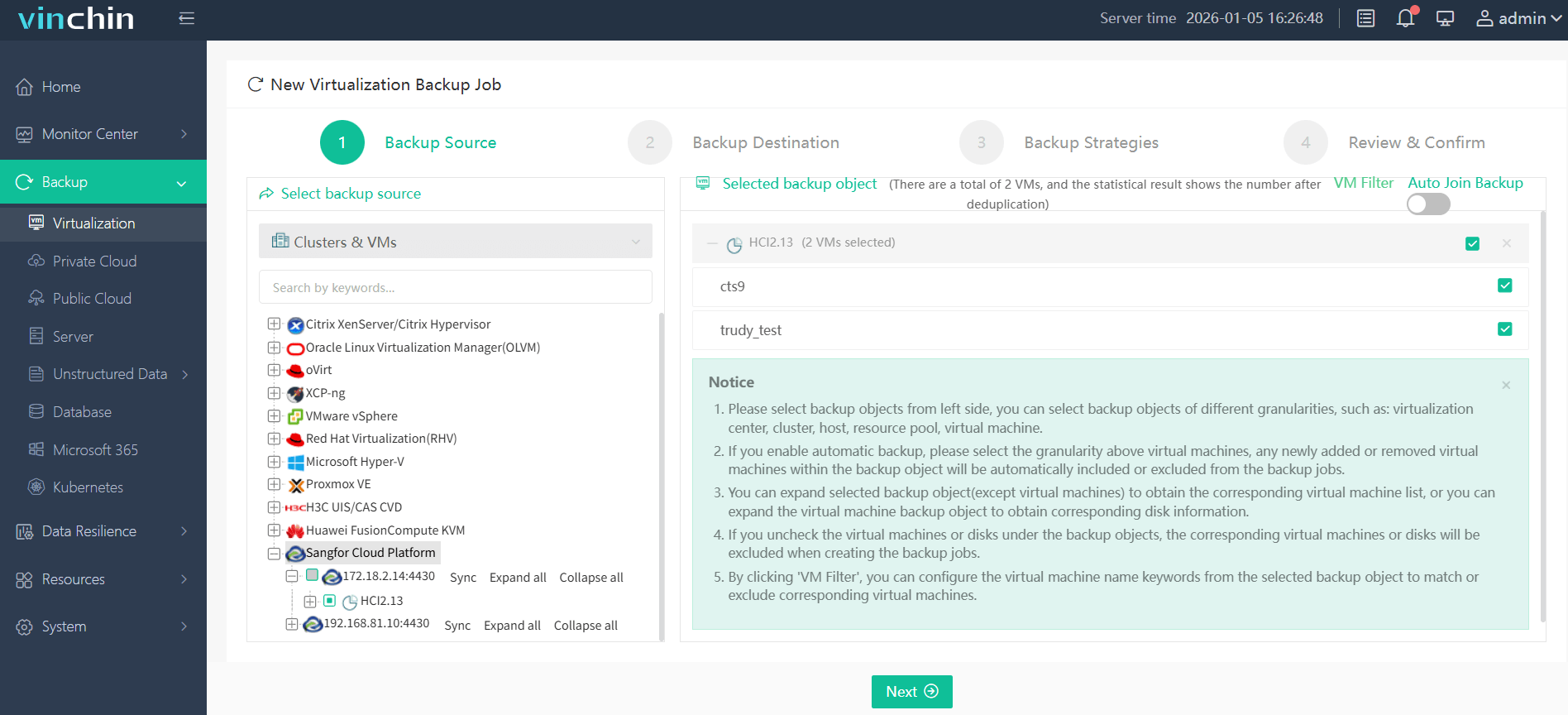
Step 2: Choose the backup storage

Step 3: Configure the backup strategy

Step 4: Submit the job
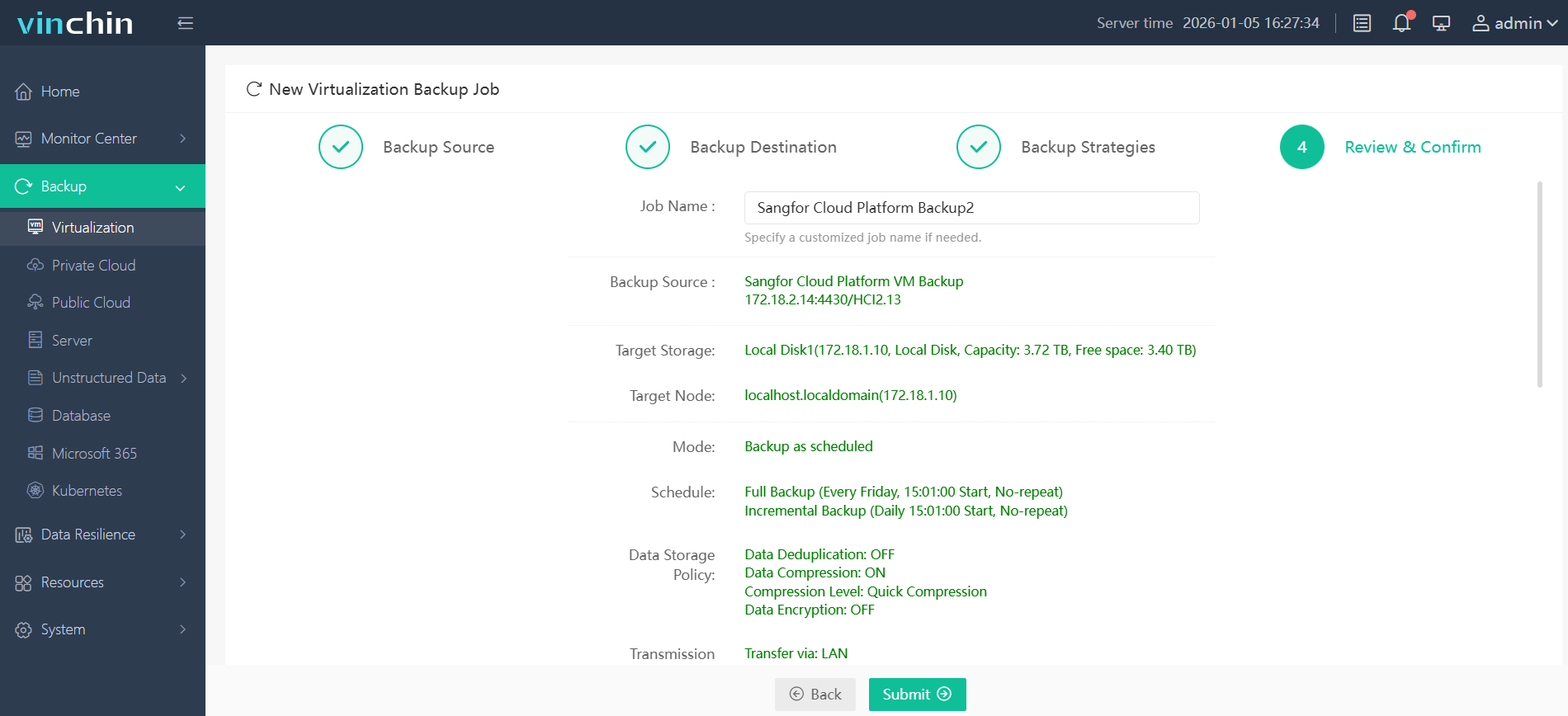
Thousands of global enterprises trust Vinchin Backup & Recovery for reliable data protection across hybrid infrastructures—try it yourself with a free 60-day full-featured trial today.
Best Sangfor HCI Backup Software FAQs
Q1: How does backup support business continuity on Sangfor HCI?
A1: It ensures fast restoration of VMs after failures or attacks so operations resume quickly with minimal disruption.
Q2: What risks arise if we lack dedicated backups?
A2: Data loss increases dramatically; recovery times lengthen; compliance violations become more likely during outages. For example many businesses never fully recover after severe unplanned downtime according to industry surveys.
Q3: Can backups help defend against ransomware?
A3: Yes; secure backups enable clean restores after an attack without having to pay ransom.
Conclusion
Reliable backup reduces downtime risk while supporting compliance mandates for enterprise continuity on platforms like Sangfor HCI.