China / Oracle
Video
How to Backup Oracle Databases with Vinchin Backup & Recovery in 3 Steps?
WATCH NOW


Business-critical Oracle databases require more than periodic backups. They need a protection strategy that preserves data consistency, maintains reliable recovery points, and keeps critical workloads recoverable as business and infrastructure requirements evolve.
A modern Oracle Database Protection strategy combines consistent backup, flexible recovery, and resilient data protection to help organizations safeguard critical database workloads, maintain recovery readiness, and support business continuity across diverse environments.

Protecting database data requires more than simply copying files. Recovery must preserve a usable and consistent database state.

Increasing database volumes and diverse infrastructure make backup windows, storage, and protection management more difficult.

Having backups does not guarantee successful recovery. Organizations need reliable recovery points and a practical recovery process.

Protect Oracle databases with backup processes designed to maintain data consistency and recoverability.

Maintain multiple recovery points to support recovery from accidental deletion, corruption, operational errors, and other disruptions.

Restore databases to a specific point in time when more granular recovery is required.

Use incremental protection and flexible scheduling to reduce backup windows and limit the impact on production workloads.

Validate backup integrity and recovery readiness before a real incident occurs.

Maintain additional copies in separate locations to strengthen resilience against infrastructure failures and site-level disasters.

Vinchin protects Oracle databases by integrating with Oracle RMAN/SBT to perform hot, application-consistent backups with minimal production impact. It enables multi-threaded transmission for faster transfers and simplifies RAC node authorization so one authorized instance can sync others automatically. Managed from a single console, Oracle backups are easy to schedule, restore to flexible targets, and fit into point-in-time and disaster-recovery workflows.
Vinchin connects directly to Oracle via RMAN, ensuring backup consistency and reliability without additional agents inside the database.
Full, Incremental, Differential, and Archive Log backup - all schedulable from a single web console without manually writing RMAN scripts.
Supports Oracle 11G through 21C - standalone and RAC - across CentOS, RHEL, Windows Server 2019, and Kylin V10 SP3.
Backup operations run through RMAN's controlled I/O management, keeping database performance stable with no significant disruption to production workloads.
Vinchin provides built-in backup encryption and compression to secure Oracle backup data and reduce storage consumption, alongside automated backup verification to confirm every backup is recoverable before you need it.
Protects Oracle Data Guard primary databases via RMAN. Following a primary-standby switchover, backup protection can be re-established on the new primary with straightforward agent redeployment.

Without local caching, it reads and streams data directly to the backup system. This ensures no impact on production storage and improves backup efficiency.

Automatically purges archived logs post-backup to free up space. Monitors the backup repository usage and triggers alerts when space is low, to prevent backup failures and production issues from storage exhaustion.

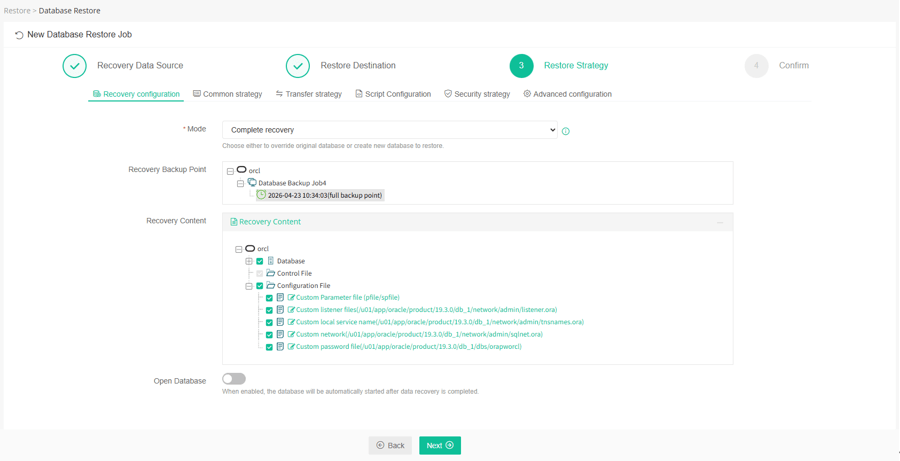
Restores database to any specific moment for flexible recovery from accidental deletions, logical errors, or corruption.
Every unprotected Oracle database is a risk your business can't afford. Start your free trial today!