Understanding Storage Snapshots
A storage snapshot is a point-in-time representation of a volume, file system, LUN, or dataset.
Unlike a full copy, most modern snapshots use:
Copy-on-Write (CoW)
Redirect-on-Write (RoW)
Technologies to record only changed blocks, making snapshot creation nearly instantaneous and highly space-efficient.
Typical use cases include: software upgrades, configuration changes, database maintenance, VM patching, and short-term rollback protection.
What Does Backup from Storage Snapshots Mean
Traditional backup workflows often read data directly from production storage.
Snapshot-based backup introduces an additional layer:
The backup application first triggers a storage snapshot.
Then, instead of reading active production data, it reads data from the snapshot and transfers it to a backup repository.
Backup from storage snapshots provides several advantages:
Reduce impact on production workloads
Faster backup windows
Consistent recovery points
Lower risk of backup-related performance bottlenecks
Snapshot vs. Backup: A Practical Distinction
To avoid confusion between snapshots and backups, the core technical differences are laid out below.
Comparison Dimension | Storage Snapshot | Independent Backup |
Storage Location | Exists on the same storage hardware as the original data | Stored on separate media, server, or off-site location |
Data Capture Type | Point-in-time reference; only tracks changed blocks from the base disk | Full or incremental independent copy of all VM data |
Recovery Speed | Near-instant rollback | Minutes to hours, depending on backup media and network |
Storage Footprint | Small at first (10-20% volume size); grows with data changes | Full data copy + incremental backup chains |
Ransomware Resistance | Very low; attackers often delete/encrypt all snapshots on the same array | High, especially immutable/WORM-locked backup repositories |
Disaster Recovery Value | Limited; site/storage | Excellent; off-site copies survive local hardware outages |
Recommended Retention | Short-term (hours to days only) | Long-term (weeks/months/years for compliance) |
Primary Use Cases | Quick rollbacks after errors, dev/test clones, shorten backup VM snapshot windows | Primary data protection, disaster recovery, and compliance archiving |
Practical Use Case Breakdown:
Snapshots: Ideal for short-term recovery (accidental deletions, broken app upgrades, configuration mistakes within hours). Fast granular rollback, but tied to the original storage's health.
Backups: Designed for catastrophic failures: hardware breakdown, ransomware encryption, full site loss, long-term compliance retention. Independent copies survive total loss of production infrastructure.
The Technical Workflow of Backup from Storage Snapshots
The typical workflow of backup from storage snapshots consists of several stages that allow backup software to protect data without directly impacting production workloads.
1. Prepare Application Consistency
Before creating a snapshot, the backup solution may coordinate with applications to ensure data consistency.
This prevents corruption caused by in-flight transactions.
2. Create the Storage Snapshot
The storage array generates a point-in-time snapshot of the volume, datastore, or file system.
Since only metadata and changed blocks are tracked, creation usually takes seconds regardless of data size.
3. Backup Software Reads the Snapshot
Instead of accessing live production data, the backup application reads from the snapshot copy.
4. Transfer Data to Backup Storage
The backup software copies data from the snapshot to a dedicated backup repository.
This step converts a temporary snapshot into a true backup copy.
5. Manage Retention and Deduplication
The backup platform applies: retention policies, compression, deduplication, encryption, immutability
6. Recovery Operations
When data loss occurs, administrators can restore from:
Recent issue
Restore directly from the storage snapshot for very fast recovery.
Major failure or ransomware
Restore from the backup repository, which is independent of the production storage.
Best Practices for Backup from Storage Snapshots
Follow these best practices:
1. Use snapshots for short-term recovery
Ideal snapshot scenarios include:
Failed upgrades
Application patches
Configuration rollbacks
Accidental changes
2. Export snapshot to independent backup storage
Snapshots become much more valuable when copied to:
Backup repositories
Secondary storage
Cloud object storage
Disaster recovery sites
This transforms a temporary restore point into a genuine backup asset.
3. Test recovery regularly
A backup is only useful if it can be restored.
Organizations should periodically validate:
Vinchin Backup & Recovery Handles Snapshot-Based Protection
Storage snapshots provide a fast and efficient way to capture point-in-time copies of data, but they are only part of a complete data protection strategy. While snapshots excel at short-term rollback and rapid recovery, they typically reside on the same production infrastructure and may not provide sufficient protection against hardware failures, site outages, or ransomware attacks.
Vinchin Backup & Recovery complements snapshot-based protection by creating independent backup copies that can be retained, managed, and restored when snapshots are no longer available. During backup operations, Vinchin leverages hypervisor snapshot technologies to capture consistent recovery points with minimal impact on running workloads. The backup data is then transferred to a dedicated backup repository, ensuring long-term protection beyond the limitations of snapshots.
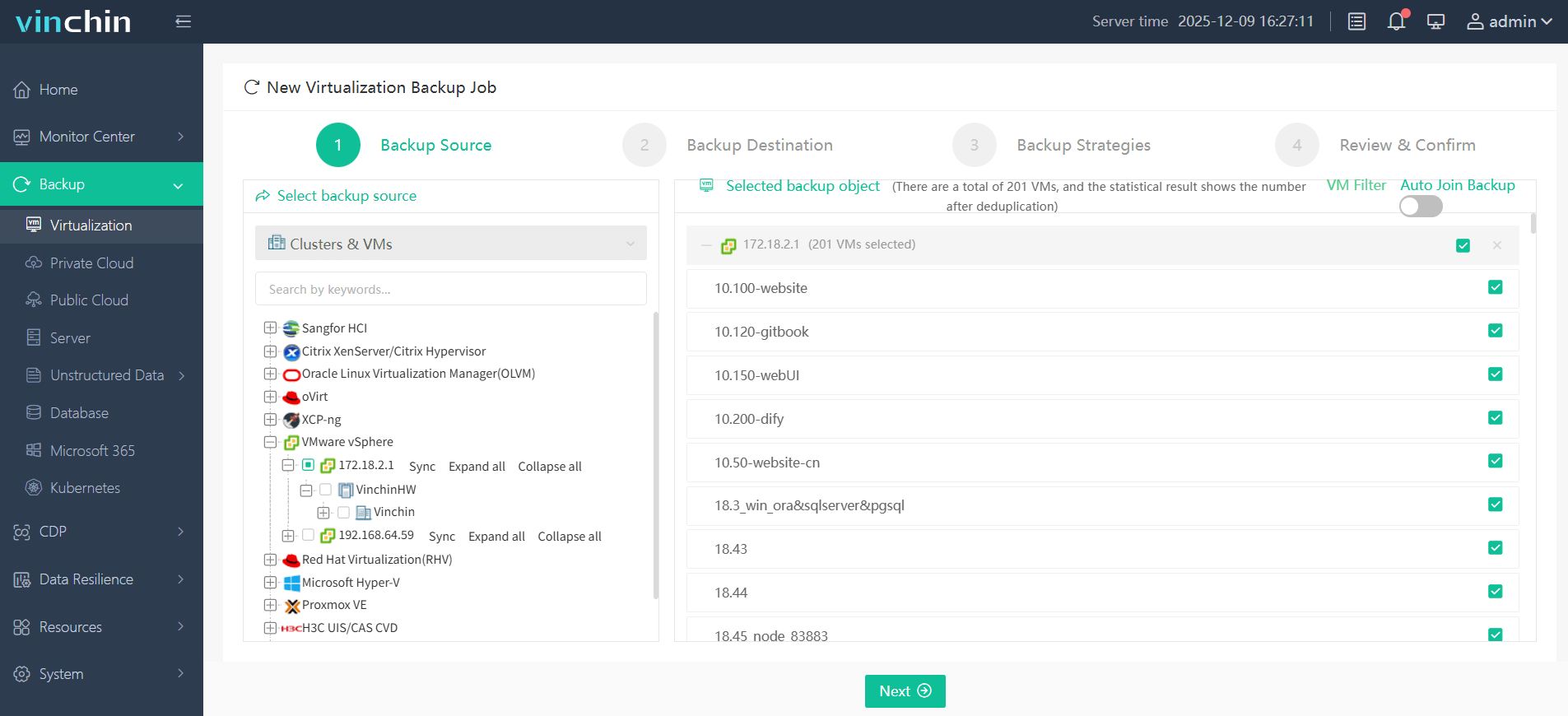
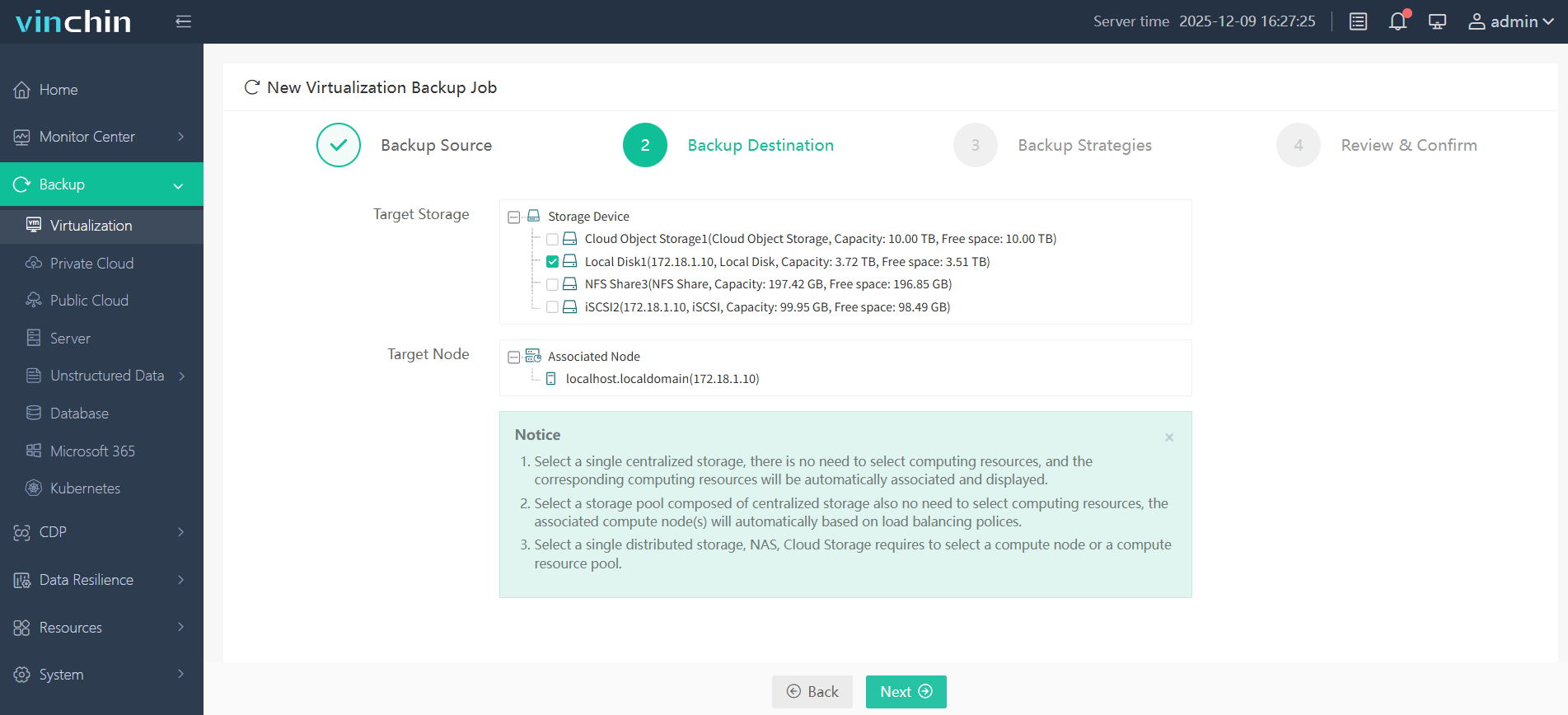
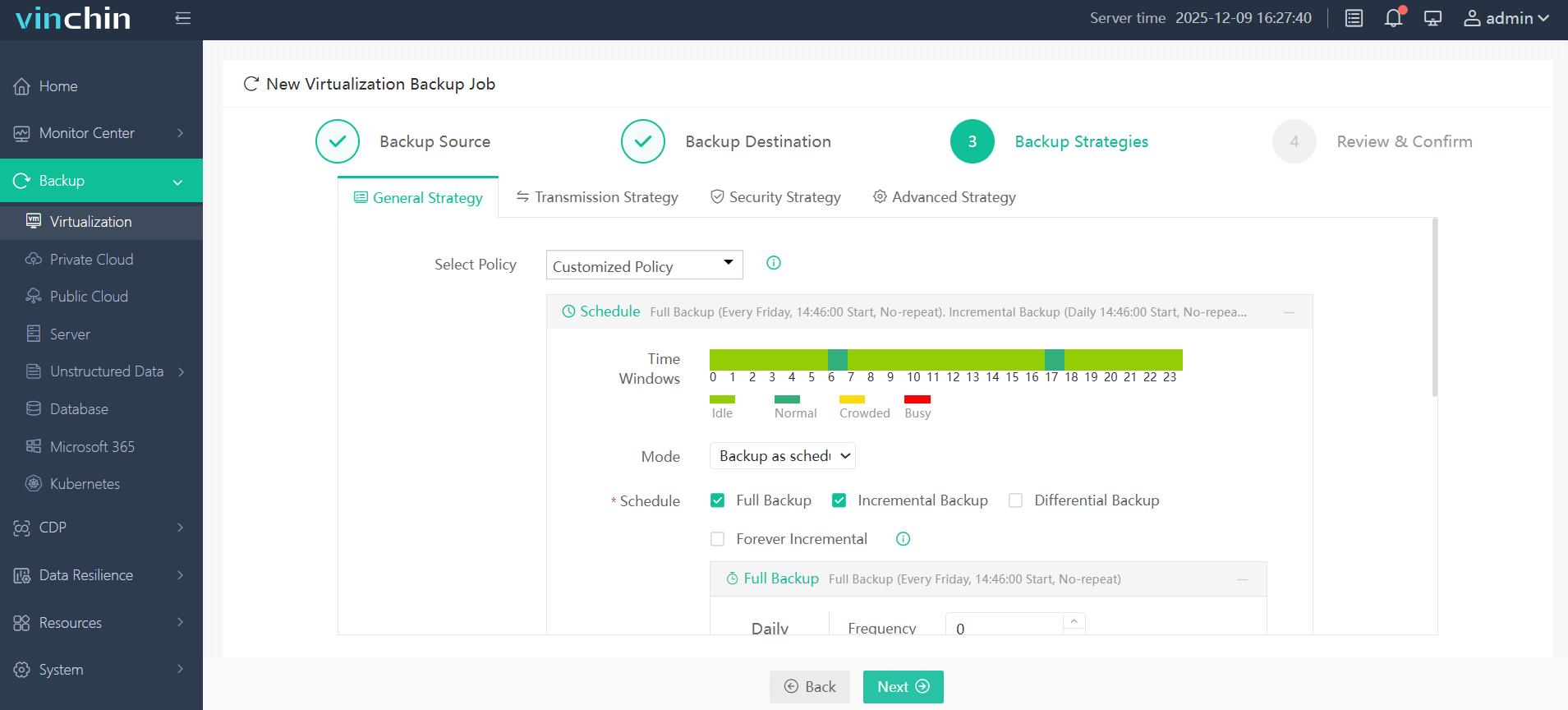
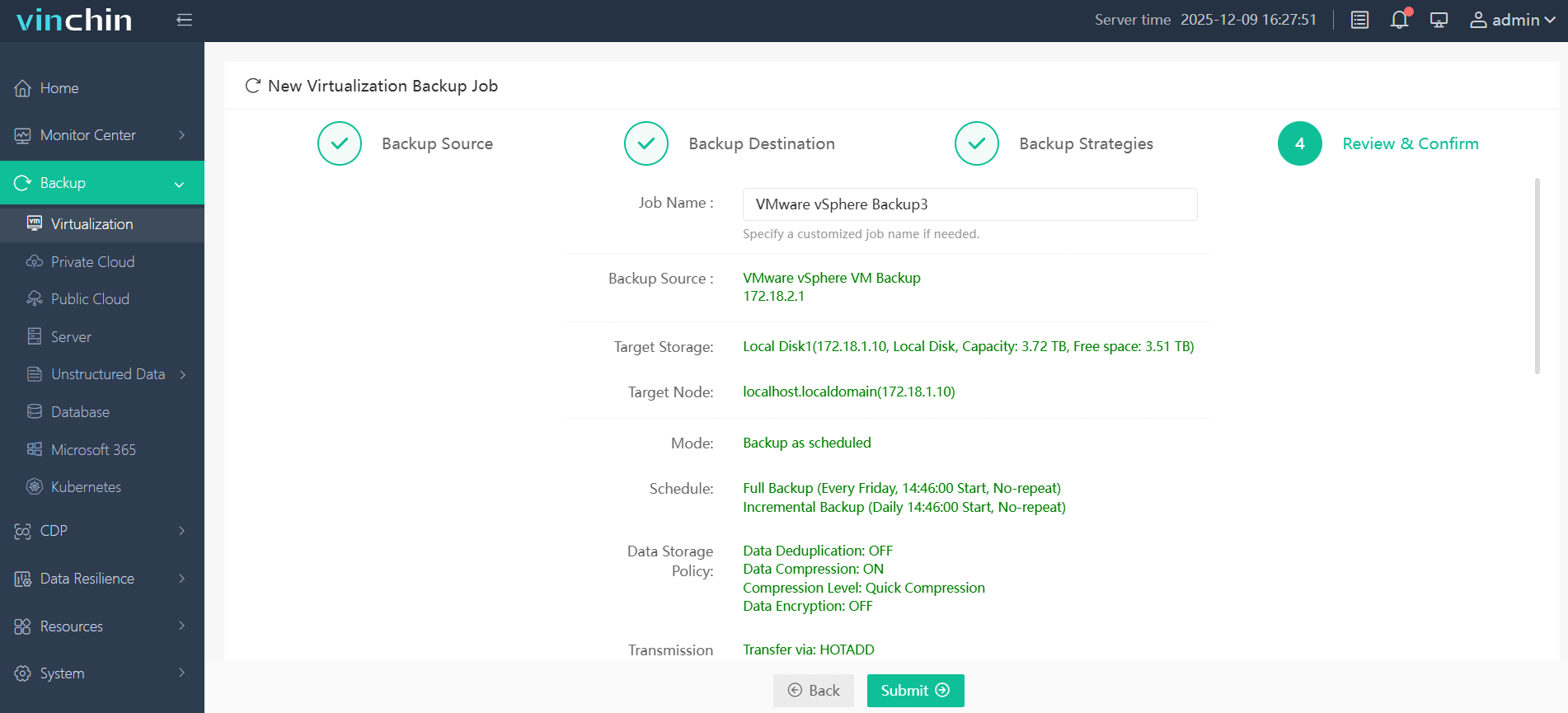
Steps to protect your environment with Vinchin, take VMware as an example:
Step 1. Choose the VMware VMs you want to protect as the backup source, under Backup > Virtualization
Step 2. Choose the desired backup destination
Step 3. Set your backup strategies, like mode, schedule, and retention policy
Step 4. Make sure the backup settings are all right, and click Submit
By combining rapid snapshot creation with independent backup storage, Vinchin helps organizations achieve both fast operational recovery and reliable long-term data protection, supporting modern business continuity and disaster recovery requirements. Download Vinchin now to get the 60-day free trial!
FAQs
Q1. Can storage snapshots replace backups?
No, storage snapshots provide fast point-in-time recovery but generally reside on the same storage system as production data. They do not offer the same level of protection as independent backups.
Q2. Can storage snapshots protect against ransomware?
Not reliably on their own. Attackers with storage admin access will delete or encrypt all local snapshots. Full ransomware protection requires immutable, physically/logically separated backup storage (WORM/object lock) that threat actors cannot alter or erase. Snapshots serve as a fast short-term recovery, and immutable backups are the last line of defense against full environment compromise.
Q3: Why do enterprises use snapshots before backups?
Snapshots allow backup software to read stable point-in-time data while reducing the impact on production applications and storage systems.
Conclusion
Storage snapshots enable fast recovery and efficient backups, but they cannot replace independent backups. By combining snapshot-assisted backup with secure backup repositories, Vinchin Backup & Recovery helps organizations achieve reliable data protection, ransomware resilience, and disaster recovery.