Why Linux Server Backup Matters More Than Ever
For years, many IT teams assumed Linux’s security meant backup was not a priority. This is no longer valid.
Market scale: As of May 2026, 61% of all web servers run Linux, and Unix-like systems account for over 90% of web infrastructure, making Linux a prime attack target.
Rising threats: Ransomware attacks on Linux rose 62% from Q1 2022 to Q1 2023. Brute-force attacks on exposed SSH services are rampant. Over 5,500 Linux kernel vulnerabilities were recorded in 2025, averaging 8-9 new flaws per day.
High financial loss: The average cost of a ransomware incident reaches $4.4 million. Rebuilding a server is manageable, but permanent data loss cause far greater damage.
Backup Linux Server Using Native Tools
Linux provides several built-in tools for backup without requiring third-party software. The best method depends on whether you need to back up files, database, or an entire server.
Method 1. Backup Linux Files with rsync
Rsync is the most commonly used Linux backup tool because it only copies changed files.
Full Backup
Create a backup directory:
mkdir -p /backup/server1
Run rsync:
rsync -avh --delete /home/ /backup/server1/home/
-a: archive mode (preserves permissions, ownership, timestamps)
-v: verbose output
-h: human-readable format
--delete: remove files from backup that were deleted from source
Backup Entire Linux System
Exclude pseudo-filesystems:
rsync -aAXv \
--exclude={"/dev/*","/proc/*","/sys/*","/tmp/*","/run/*","/mnt/*","/media/*","/lost+found"} \
/ /backup/full-system/
Additional Options:
-A preserve ACLs
-X preserve extended attributes
Method 2. Create a Compressed Backup with tar
Useful for archiving and transferring backups.
Backup a Directory
tar -czvf home-backup.tar.gz /home
-c: create archive
-z: compress with gzip
-v: verbose
-f: specify filename
Backup Entire Server
tar --exclude=/proc \
--exclude=/sys \
--exclude=/dev \
--exclude=/tmp \
--exclude=/run \
--exclude=/mnt \
--exclude=/media \
-czpvf full-backup.tar.gz /
Restore:
tar -xzpvf full-backup.tar.gz -C /
Method 3. Backup to a Remote Linux Server via SSH
Using rsync over SSH:
rsync -avz /home/ user@192.168.1.100:/backup/server1/
-z: compression during transfer
SSH: encrypts backup traffic
Method 4. Create Disk Image with dd
Useful for bare-metal recovery:
Identify the disk:
lsblk
Create image:
dd if=/dev/sda of=/backup/sda.img bs=64K status=progress
Compress on-the-fly:
dd if=/dev/sda bs=64K | gzip > /backup/sda.img.gz
Restore
gunzip -c sda.img.gz | dd of=/dev/sda bs=64K
Note: Be extremely careful with dd. Choosing the wrong target disk can overwrite data.
Method 5. Backup LVM Snapshots
If the server uses LVM:
Check volumes:
Lvdisplay
Create snapshot:
lvcreate -L 5G -s -n root_snap /dev/vg0/root
Mount snapshot:
mkdir /mnt/snapshot
mount /dev/vg0/root_snap /mnt/snapshot
Backup snapshot:
rsync -av /mnt/snapshot/ /backup/root/
Remove snapshot:
umount /mnt/snapshot
lvremove /dev/vg0/root_snap
Method 6. Backup Database
MySQL/MariaDB
Single database:
mysqldump -u root -p mydb > mydb.sql
All database:
mysqldump -u root -p --all-databases > all-dbs.sql
Restore:
mysql -u root -p < all-dbs.sql
PostgreSQL
Backup:
pg_dump mydb > mydb.sql
All database:
pg_dumpall > pg-all.sql
Restore:
psql mydb < mydb.sql
Method 7. Automate Backups with Cron
Edit cron:
crontab -e
Daily backup at 2 AM:
0 2 * * * rsync -a /home/ /backup/home/
Weekly full backup:
0 1 * * 0 tar -czf /backup/full-$(date +\%F).tar.gz /
Check scheduled jobs:
crontab -l
Challenges of Traditional Linux Backup Tools
Many Linux administrators rely on native tools, while effective for small environments, these approached may create challenges:
Manual scripting will increased management overhead
Multiple backup tools cause operational complexity
Recovery complexity lead to longer downtime
Scaling issues will difficult enterprise management
As environments grow, organizations often seek centralized backup platforms.
Easy Enterprise Linux Server Backup and Restore with Vinchin
For business managing multiple Linux servers, virtualization platforms, databases, and hybrid infrastructures, centralized backup management becomes increasingly important.
Vinchin Backup & Recovery provides enterprise-grade protecting for physical and virtual Linux environments. Instead of manually maintaining backup script and schedules on individual machines, administrators can create and manage backup policies from a single console.
Key capabilities:
Full and incremental Linux server backup
Flexible backup scheduling and retention policies
Fast file-level and system-level recovery
Backup data encryption and compression
Offsite backup and disaster recovery support
Compatibility with major Linux distributions including Ubuntu, Debian, CentOS, Rocky Linux, Oracle Linux, Red Hat Enterprise Linux, and SUSE Linux
Follow the simple steps to backup Linux server:
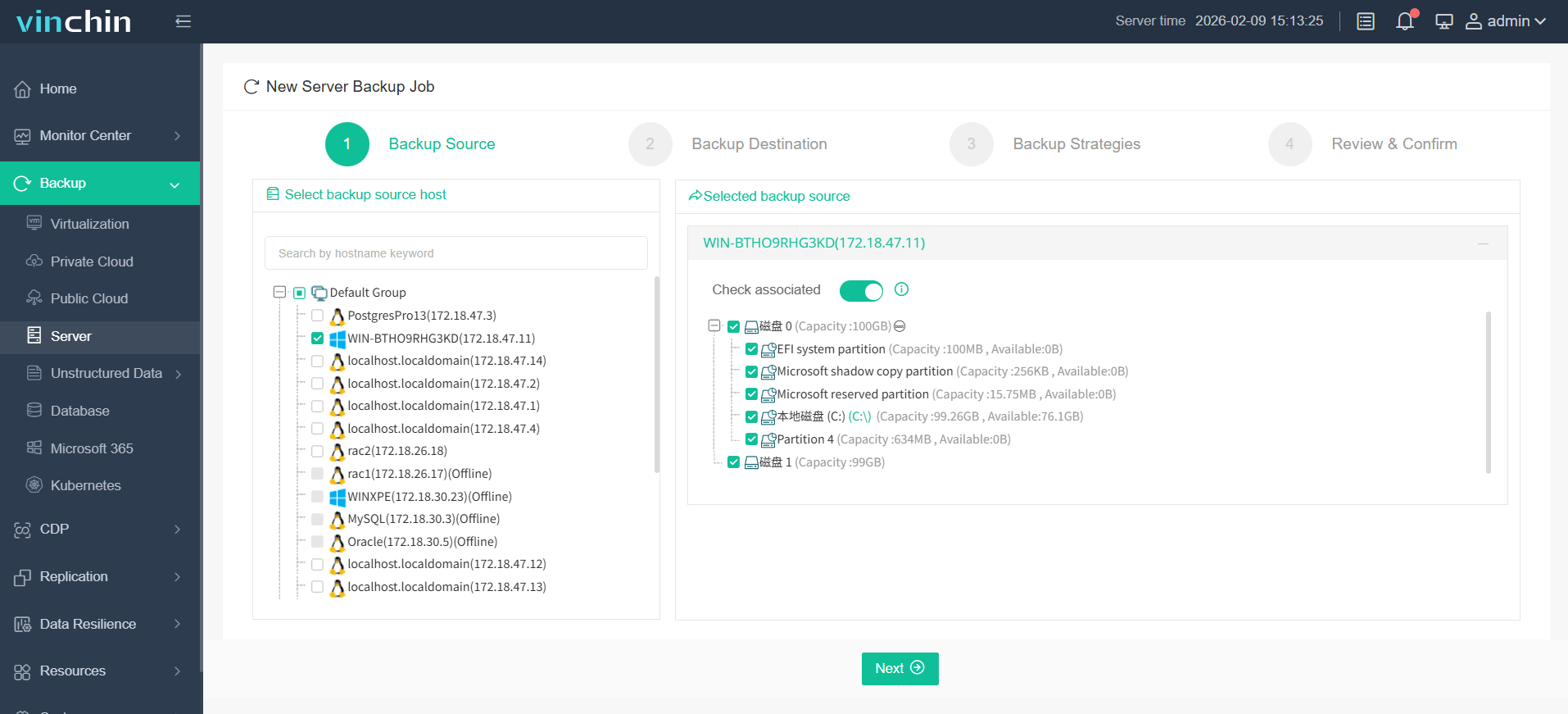
Step 1. Go to Backup > Server and choose the Linux server you want to backup
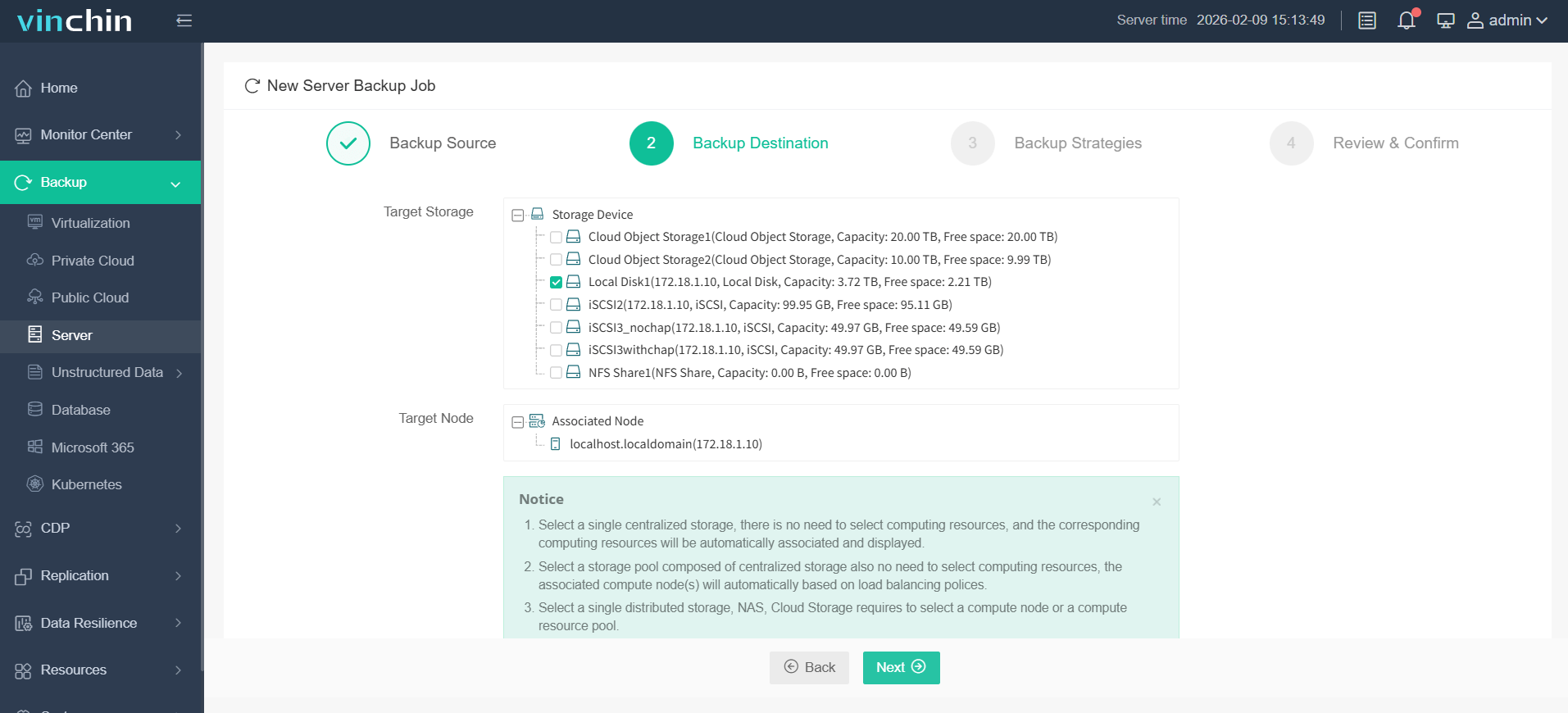
Step 2. Select your target storage and target node
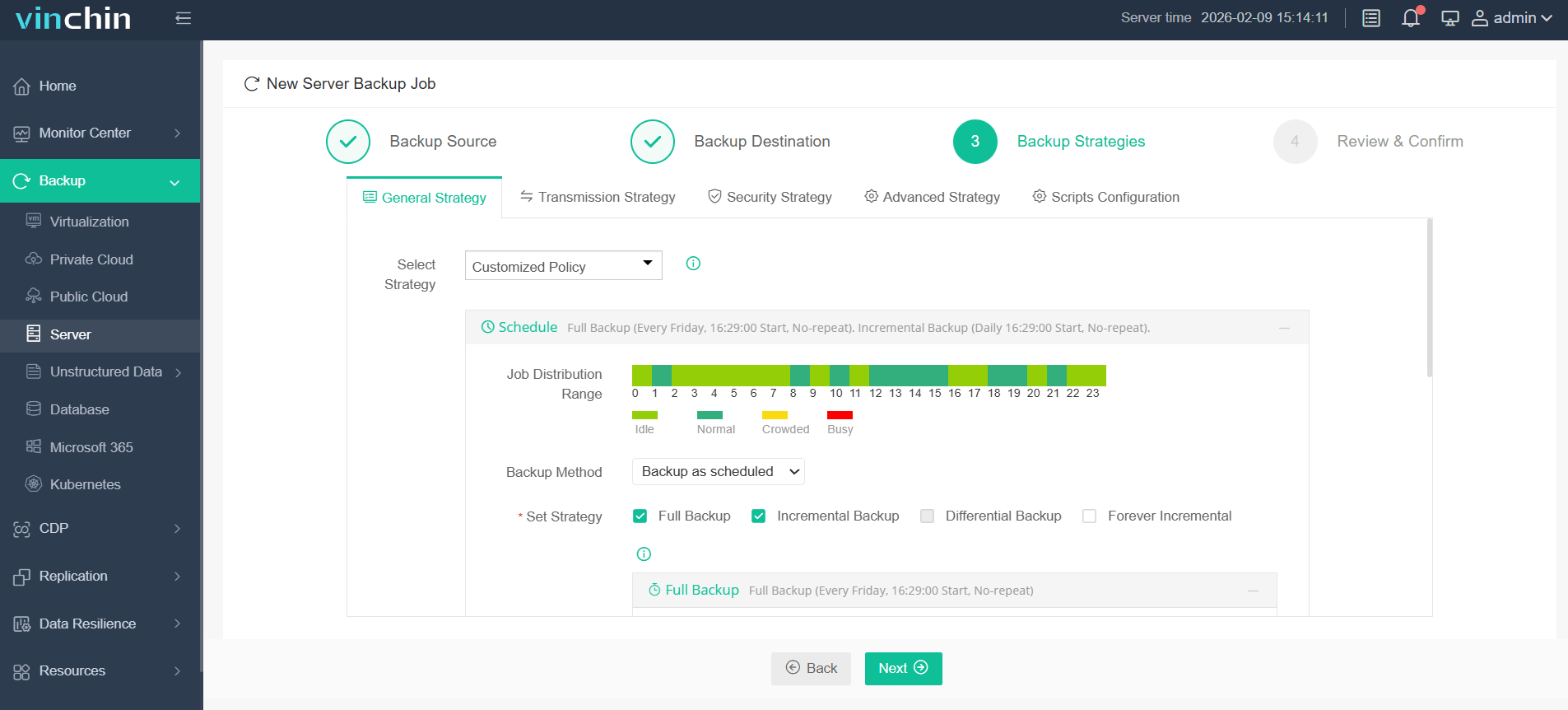
Step 3. Configure your backup strategies, like backup method
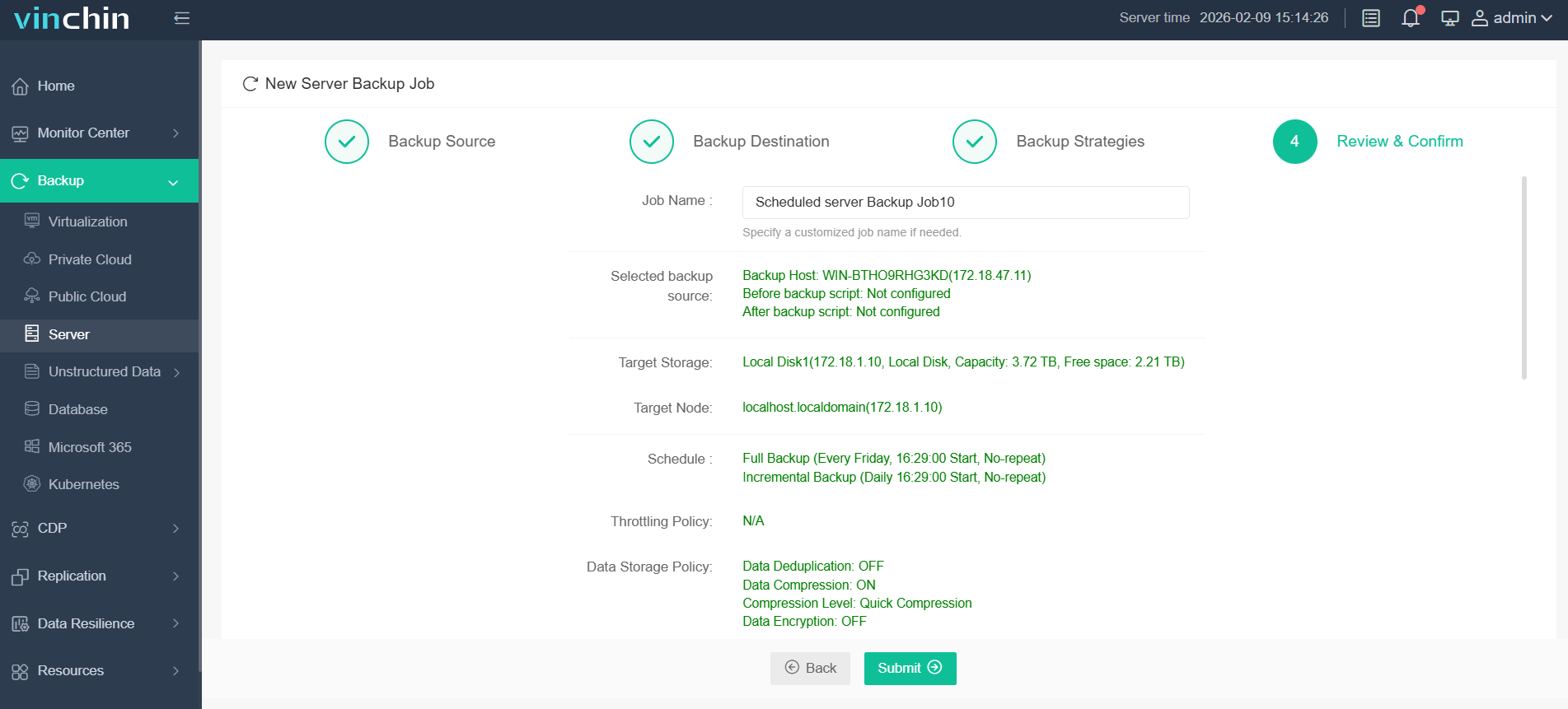
Step 4. Review all your backup settings, and click Submit to begin process
If you are looking for an efficient way to protect Linux server, Vinchin Backup & Recovery probably the best choice, download it to enjoy the 60-day full-featured free trial!
FAQs about Linux Backup and Restore
Q1: What should be included in a Linux server backup?
A complete backup should include operating system, boot partition, configuration files, user data, database, and application data. This enables full system recovery after a disaster.
Q2: Can I restore a Linux backup to different hardware?
Yes, this process is often called bare-metal recovery or hardware-independent recovery. However, compatibility issues may arise if the new server uses different storage controllers, network adapters, or boot configurations.
Q3: Can I restore individual files without restoring the entire Linux server?
Yes, many backup tools support granular recovery, like Vinchin, allowing administrators to restore specific files, folders, or application data without performing a full system recovery.
Conclusion
Native Linux tools provide effective backup and recovery capabilities for small environments, but managing backups at scale can become complex. For businesses requiring centralized management, automated protection, and faster recovery, Vinchin Backup & Recovery offers a simpler and more efficient way to safeguard Linux servers and ensure business continuity.