Introduction
Downtime costs businesses dearly. Every minute lost can mean thousands of dollars gone. For companies running business-critical applications on VMware, choosing backup software is not just an IT task, it's vital for survival. The right solution must deliver fast recovery and keep data safe so operations never stop. This means minimizing Recovery Time Objective (RTO) and ensuring data consistency when disaster strikes or upgrades happen. Technologies like Changed Block Tracking (CBT), storage snapshots, or integration with VMware APIs help achieve near-zero downtime by speeding up restores and reducing disruption.
Maximizing uptime matters because every second counts in enterprise environments. Reliable backup software helps you avoid interruptions that hurt productivity, revenue, compliance status, and customer trust. It also supports strict service level agreements (SLAs) demanded by regulators or clients. According to Gartner research, IT downtime can cost large enterprises over $5,600 per minute, covering lost sales, remediation costs, reputational damage, and regulatory penalties.
Why Maximizing Uptime Matters in Enterprise Environments
Keeping systems online is essential for any modern business. Even a brief outage can disrupt workflows across departments or regions.
● Lost Revenue
Unplanned downtime stops transactions cold, customers cannot buy products or access services until systems are restored. For e-commerce sites or financial institutions processing thousands of transactions per hour, even minutes offline translate into significant losses.
● Reputation Damage
Clients expect 24/7 availability from their vendors. When critical applications go down unexpectedly even briefly, customers lose confidence fast. News of outages spreads quickly through social media or industry channels.
● Compliance Violations
Many industries face strict regulations around data availability and uptime, think healthcare (HIPAA), finance (SOX), retail (PCI DSS). Failing to meet these standards can result in hefty fines or legal action if auditors find gaps in your continuity plan.
● Operational Risk
Inadequate backup tools risk prolonged downtime, unreliable recovery processes, and increased exposure to threats like ransomware attacks or hardware failures.
For mission-critical workloads such as ERP systems or real-time analytics platforms running on VMware infrastructure, robust backup strategies are non-negotiable. Without them, organizations face higher operational risk every day.
How To Choose The Best VMware Backup Solution for Maximizing Uptime
Choosing effective VMware backup software requires careful evaluation of features that directly support uptime goals, not just box-ticking exercises but real-world performance under pressure.
● Instant VM Recovery & Granular Restore Options
The ability to recover entire virtual machines instantly, or restore individual files within minutes, is crucial when time is money. Instant VM recovery often leverages CBT technology built into VMware vSphere, allowing only changed blocks since the last backup to be restored rapidly instead of full images each time. Granular restore lets you retrieve specific emails from Exchange servers or single database tables without rolling back whole VMs, a lifesaver during targeted incidents.
● Automated Backups & Verification Processes
Automation ensures backups run reliably on schedule without manual oversight from IT staff who may be busy elsewhere during crises. Automated verification checks confirm that backups are usable before disaster strikes, no surprises at restore time due to corrupted files or incomplete snapshots.
● Seamless Integration with Existing Infrastructure
Backup solutions must fit smoothly into current environments, including compatibility with vCenter Server APIs like VADP to reduce complexity for administrators managing hundreds of VMs across hybrid clouds or multiple clusters.
● Robust Ransomware Protection
Modern threats target both production data and backup repositories themselves, attackers know restoring from compromised backups prolongs outages further. Features like immutable storage prevent tampering by locking backups against deletion/modification until retention periods expire; strong encryption protects sensitive information at rest/in transit, proactive anomaly detection flags suspicious activity early so admins can respond before malware spreads widely.
● Scalability & Performance Under Load
As organizations grow, from dozens to thousands of VMs, their backup system must scale seamlessly while maintaining high throughput rates during peak windows (e.g., nightly batch jobs). Look for architecture supporting distributed processing nodes/load balancing so performance does not degrade as workloads increase over time.
Selecting a solution aligned with these principles ensures rapid recovery after failures while keeping management overhead low, a win-win for both IT teams and business leaders focused on resilience.
Vinchin Backup & Recovery: Enterprise-Grade Protection for VMware
For enterprises seeking robust protection across diverse virtualization platforms, including leading support for VMware, Vinchin Backup & Recovery stands out as a professional-grade virtual machine backup solution compatible with more than 15 mainstream environments such as Hyper-V, Proxmox, oVirt, OLVM, RHV, XCP-ng, XenServer, OpenStack, ZStack and others alongside VMware itself. Key features include instant VM recovery for minimal downtime, Changed Block Tracking (CBT) technology enabling efficient incremental backups, LAN-free backup options that optimize network usage, granular restore capabilities, plus advanced deduplication and encryption, all designed to maximize uptime while safeguarding critical workloads efficiently and securely.
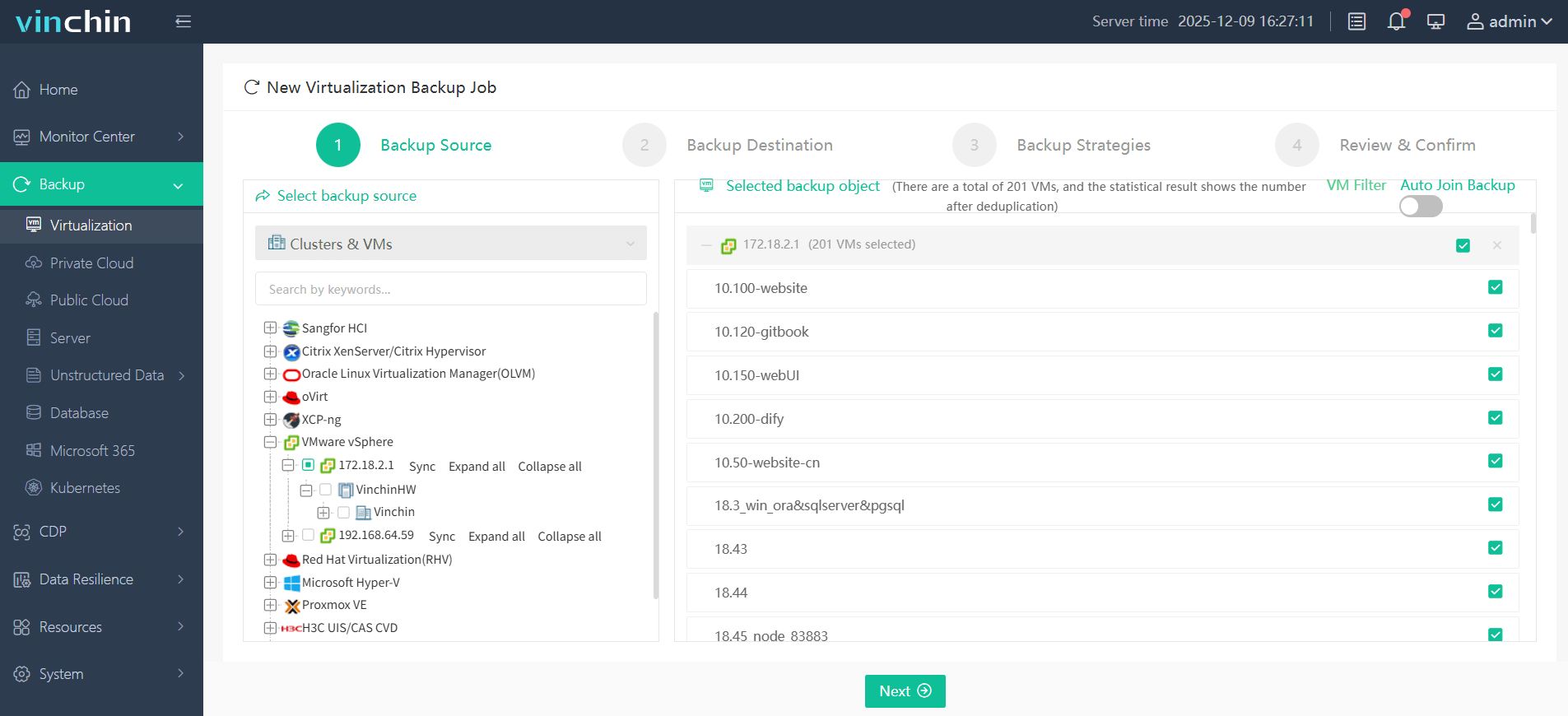
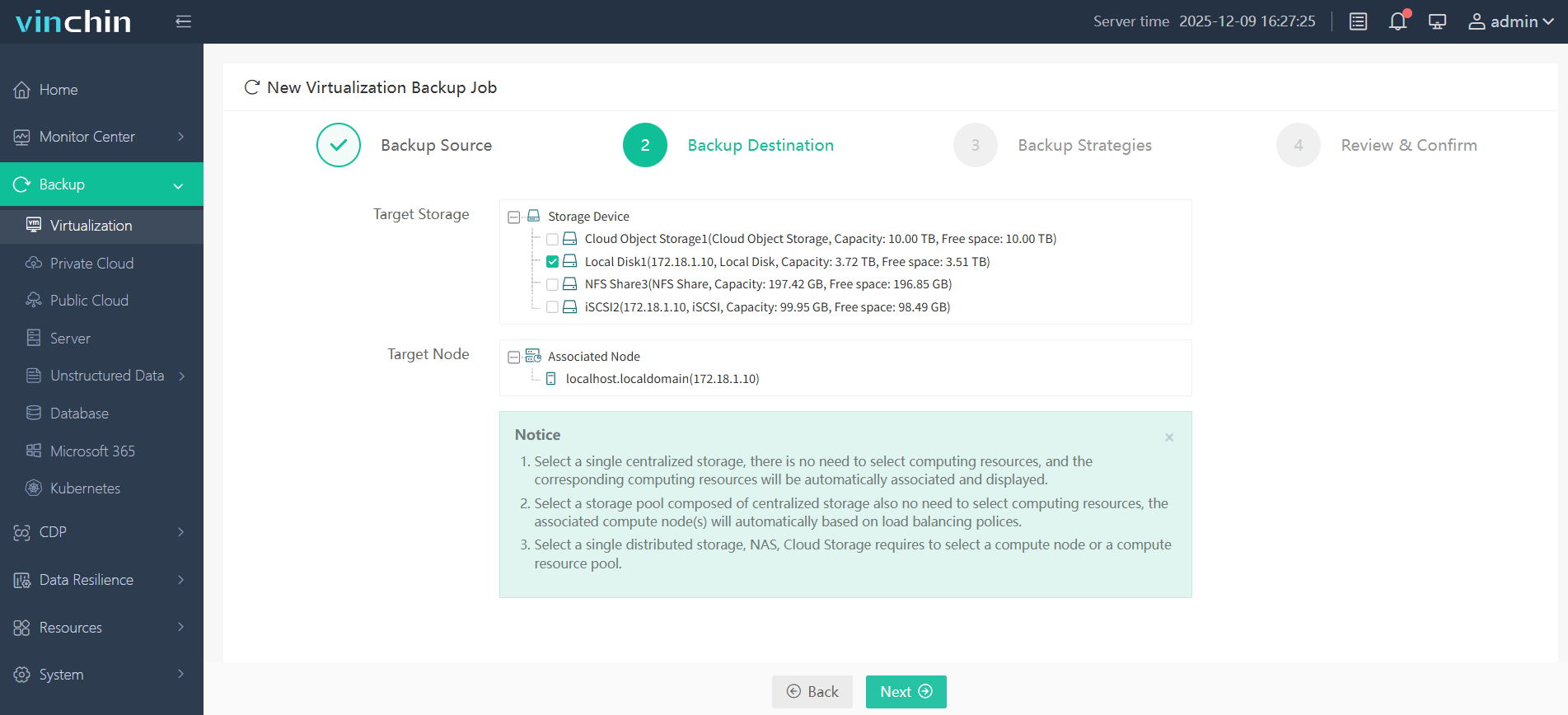
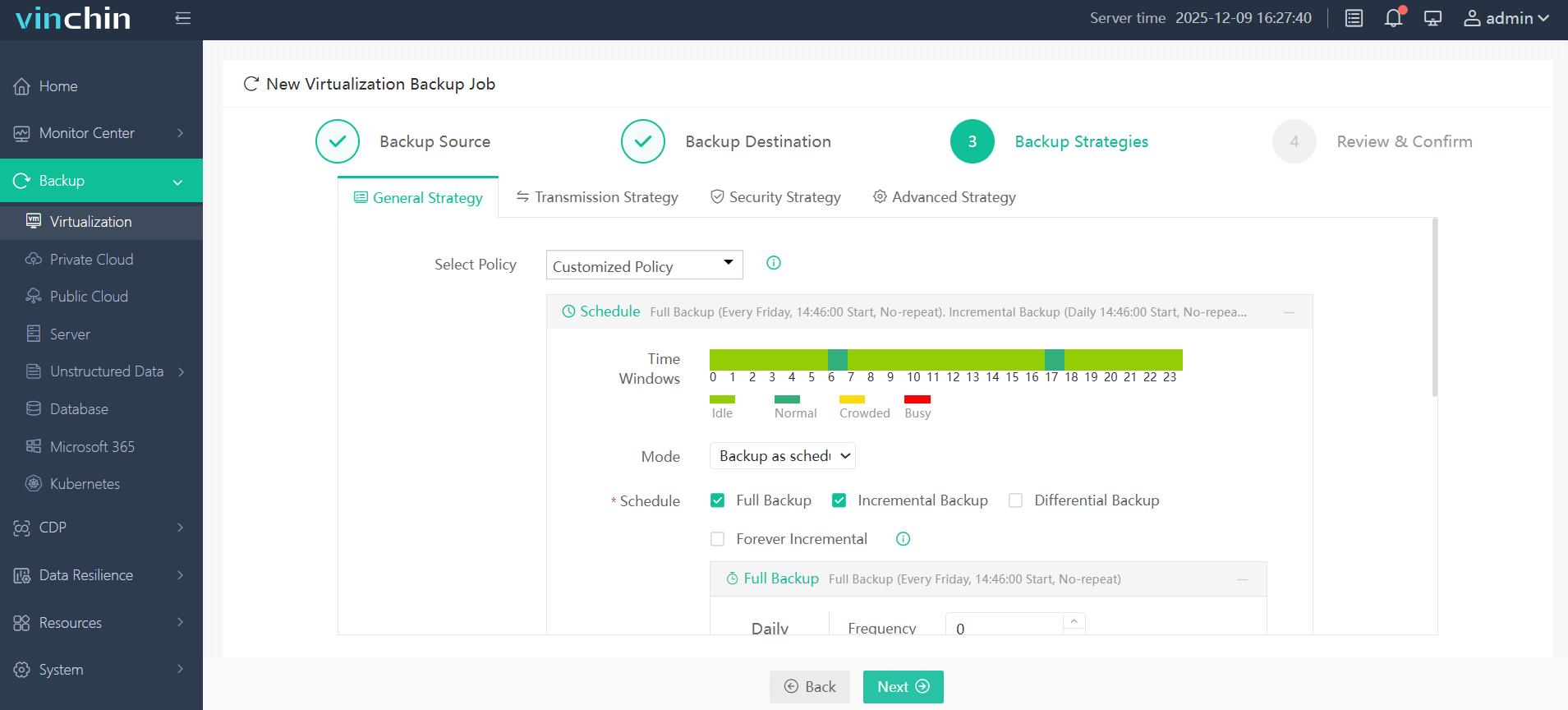
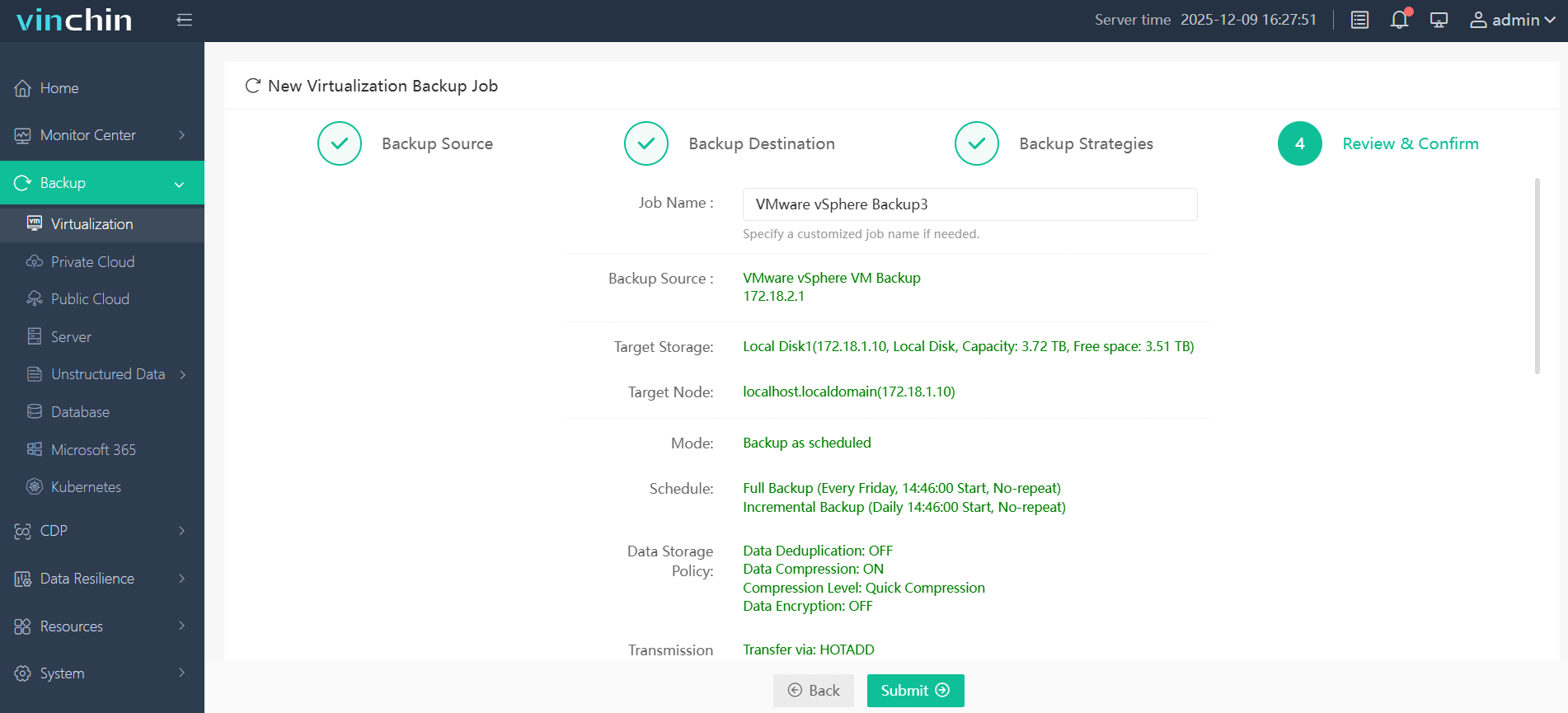
With Vinchin Backup & Recovery's intuitive web console interface backing up a VMware VM takes just four steps:
Step 1: Select the VMware VM to back up
Step 2: Choose the backup storage location
Step 3: Configure your preferred backup strategy including scheduling options
Step 4: Submit the job for automated execution
Recognized globally with top ratings among enterprise users worldwide, and trusted by thousands of organizations, Vinchin Backup & Recovery offers a 60-day full-featured free trial so you can experience its powerful data protection firsthand.
Best VMware Backup Software FAQs
Q1: How does the right VMware backup solution impact application uptime?
A1: It enables rapid restoration of virtual machines or individual files after failures occur so critical services resume quickly, with minimal disruption, to maintain continuous operations even during planned maintenance windows or unexpected disasters.
Q2: What risks arise from inadequate VMware backup tools?
A2: Risks include extended outages due to slow restores, incomplete recoveries leading to data loss; potential compliance breaches if required records are unavailable, increased operational expenses tied to manual intervention, greater vulnerability during cyberattacks targeting unprotected repositories.
Q3: Is scalability important when selecting a VMware backup solution?
A3: Yes, scalable solutions ensure consistent performance as workloads grow over time without sacrificing speed/protection levels regardless of whether backing up ten VMs today, or ten thousand tomorrow, in dynamic cloud/hybrid environments common among enterprises today.
Q4: How does ransomware protection relate to uptime?
A4: Integrated defenses such as immutable storage/encryption prevent malicious actors from corrupting/deleting critical backups needed for swift restoration following attacks, which otherwise could cause prolonged outages/permanent loss if fallback copies were compromised alongside live systems/data stores themselves.
Q5: How does backup software ensure application consistency during backups?
A5: Leading solutions use transaction-consistent snapshots via pre-freeze/post-thaw scripts integrated with guest operating systems/applications, for example quiescing databases before capturing images, to guarantee all active transactions complete safely prior so recovered instances start cleanly without corruption/issues post-restoration.
Conclusion
Prioritizing instant recovery capabilities alongside automation and integrated ransomware protection maximizes resilience against disruptions while meeting enterprise demands for speed/security at scale, qualities embodied by Vinchin Backup & Recovery's robust platform design tailored specifically toward mission-critical workloads running atop modern VMware infrastructures worldwide.