Ransomware attacks have surged across virtualized environments in recent years. According to Cybersecurity Ventures, global ransomware damages are expected to exceed $20 billion annually by 2024. For organizations running VMware infrastructure, this threat is especially acute because attackers often target both production systems and backup repositories. A robust VMware backup tool is not just an IT asset—it’s your last line of defense against costly downtime and data loss.
The best VMware backup tools for ransomware protection combine immutable backups, rapid recovery capabilities, proactive monitoring, and compliance support. These features help ensure that critical business data remains safe from unauthorized changes or deletion. When disaster strikes, you need confidence that your backups are clean and can restore operations quickly.
Ransomware resilience has become essential for enterprises of all sizes. It reduces operational risk, limits financial losses during incidents, supports regulatory compliance efforts such as GDPR or HIPAA, and helps maintain customer trust even after an attack.
Why Ransomware Protection Matters in Enterprise Environments
Ransomware can cripple business operations within minutes. Attackers now use advanced tactics to breach not only live systems but also backup storage—sometimes lying dormant until they can encrypt both at once.
● Loss of Both Production Data and Backups
When ransomware infects your environment, it often seeks out backup files stored on accessible disks or network shares. If your solution lacks strong isolation or immutability controls, you may lose access to both primary data sets and recovery points at the same time.
● Prolonged Downtime Costs
Extended outages hurt more than productivity—they hit revenue hard. According to IBM’s Cost of a Data Breach Report 2023, average downtime costs reach $5,600 per minute for large enterprises. Even brief disruptions can result in lost sales opportunities or missed service-level agreements.
● Exposure of Sensitive Information
Many ransomware groups threaten public exposure of stolen data if ransoms go unpaid. This risk extends beyond financial loss; it includes reputational harm that can erode customer loyalty overnight.
● Regulatory Non-compliance Risks
Industry regulations require secure retention of sensitive information along with detailed audit trails showing how data is protected. Failure to meet these standards may lead to fines or legal action following a breach event.
A resilient backup strategy directly impacts your ability to recover quickly while meeting legal obligations—and keeps your organization’s reputation intact when facing modern threats.
How To Choose The Best VMware Backup Solution for Ransomware Protection?
Selecting a VMware backup tool requires careful evaluation of security features tailored for today’s threat landscape. A well-chosen solution should provide layered defenses against evolving ransomware techniques while supporting fast recovery when needed most.
● Immutable Storage Prevents Tampering
Immutability means backups cannot be changed or deleted within a defined retention period—even by administrators or malware with elevated privileges. On-premises solutions may use WORM (Write Once Read Many) hardware; cloud-based options rely on object lock technology built into platforms like Amazon S3 Glacier Deep Archive or Azure Blob Storage Immutable Policies. By enforcing immutability at the storage layer, you guarantee that clean copies always exist outside attackers’ reach.
● Rapid Recovery Minimizes Business Impact
Speed matters during crisis response—every second counts toward restoring services before customers notice disruption. Look for instant VM recovery features that allow entire virtual machines to boot directly from backup images without waiting hours for full restores. Granular restore options let you retrieve specific files or application objects instead of rolling back whole servers unnecessarily.
● Integrated Threat Detection Offers Early Warning
Some advanced solutions monitor file system activity within protected workloads as well as their own repositories—flagging unusual patterns like mass file renames or deletions indicative of active encryption attempts. Built-in alerting gives IT teams precious time to intervene before damage spreads further across the network.
● Scalability Ensures Long-term Viability
As businesses grow through mergers or digital transformation projects, their virtual environments expand rapidly—sometimes spanning multiple sites worldwide. Your chosen tool must scale seamlessly alongside increasing workloads without sacrificing performance or security posture; otherwise gaps emerge that adversaries can exploit later on.
● Compliance Support Simplifies Audits
Meeting regulatory requirements involves more than just storing copies—it demands proof those copies are valid over time via regular verification checks (such as automated test restores), policy-driven retention schedules aligned with industry mandates (like SOX), plus comprehensive reporting dashboards ready-made for auditors’ review.
Choosing a solution that delivers these capabilities builds true resilience against ransomware—not just basic insurance coverage but real operational assurance when stakes are highest.
Vinchin Backup & Recovery: Enterprise-Grade Protection for VMware
For organizations seeking robust protection in VMware environments, Vinchin Backup & Recovery stands out as an enterprise-level virtual machine backup solution supporting over 15 mainstream virtualization platforms—including VMware (with advanced integration), Hyper-V, Proxmox, oVirt, OLVM, RHV, XCP-ng, XenServer, OpenStack, ZStack and more. Its broad compatibility ensures seamless deployment across diverse infrastructures found in modern businesses and service providers alike.
Vinchin Backup & Recovery offers key features highly relevant to ransomware defense: immutable backups safeguard restore points from tampering; instant VM recovery enables rapid restoration after attacks; CBT accelerates incremental backups; granular restore allows precise file-level retrieval; and LAN-free backup optimizes performance while reducing network load—all contributing to minimized downtime and enhanced operational continuity during incidents.
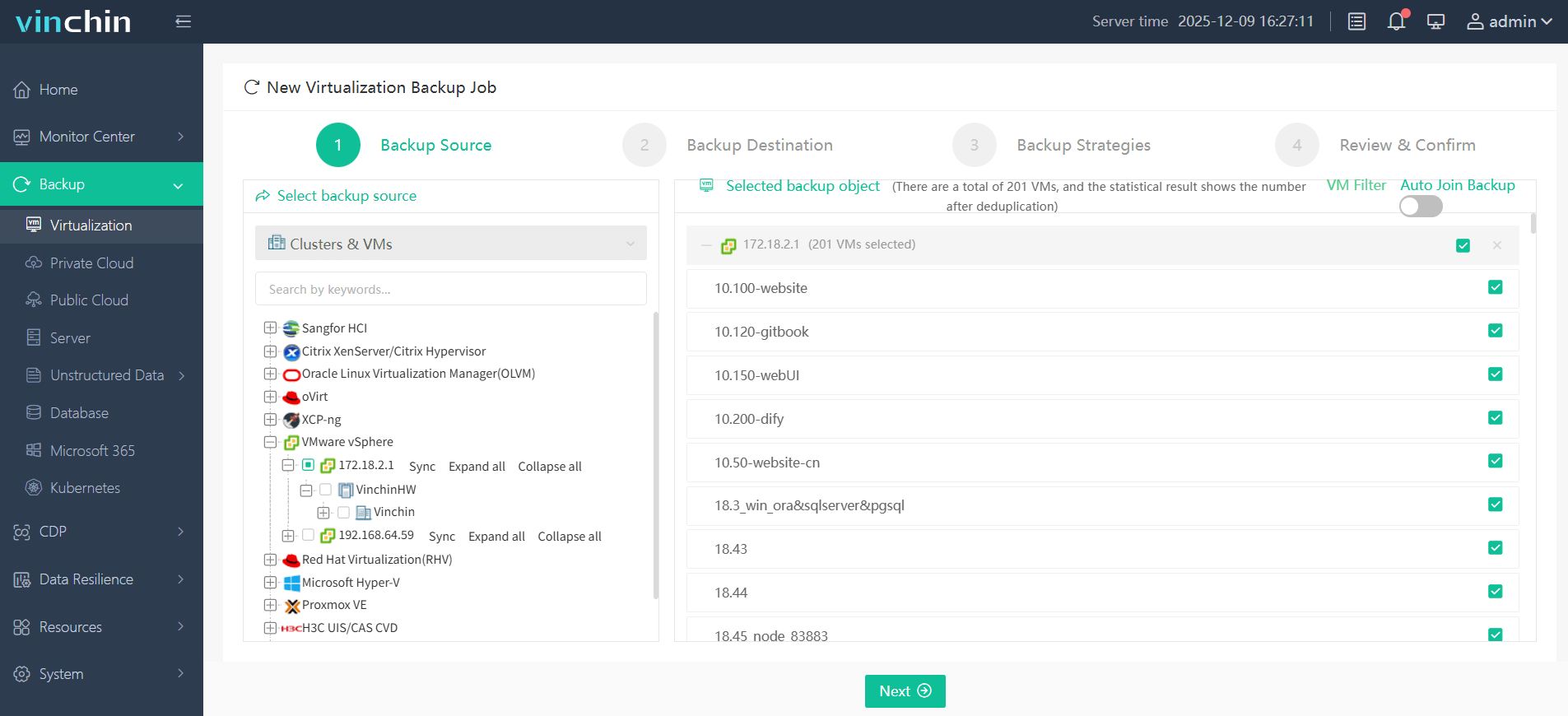
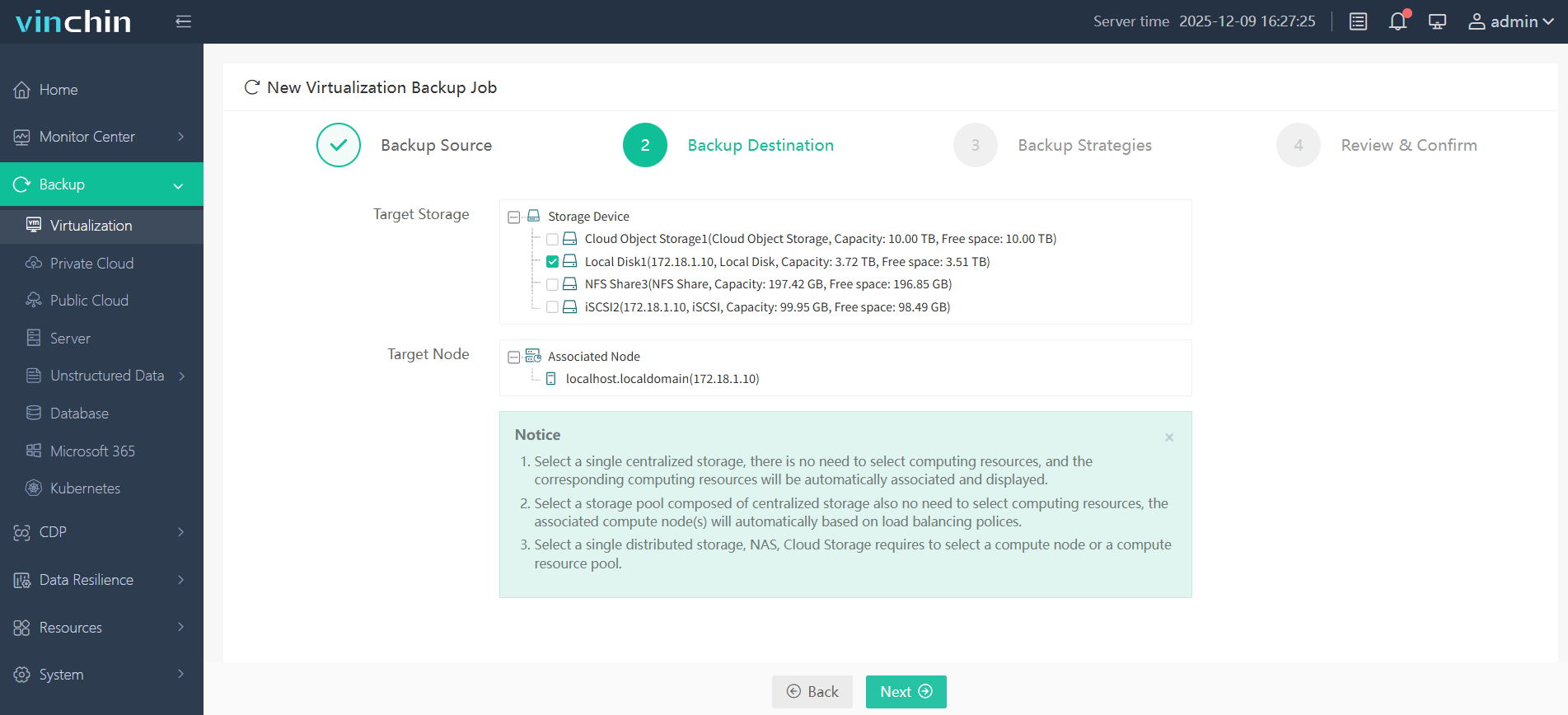
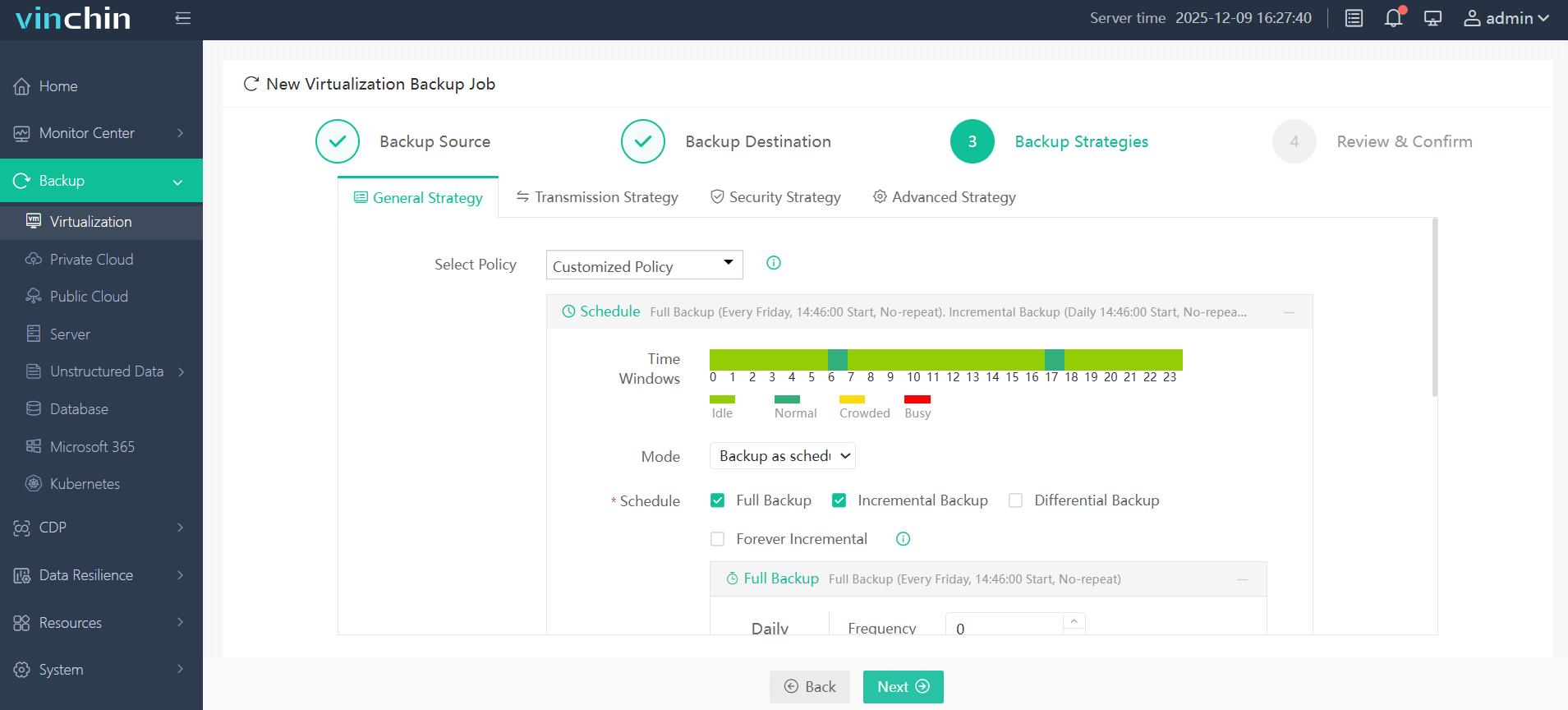
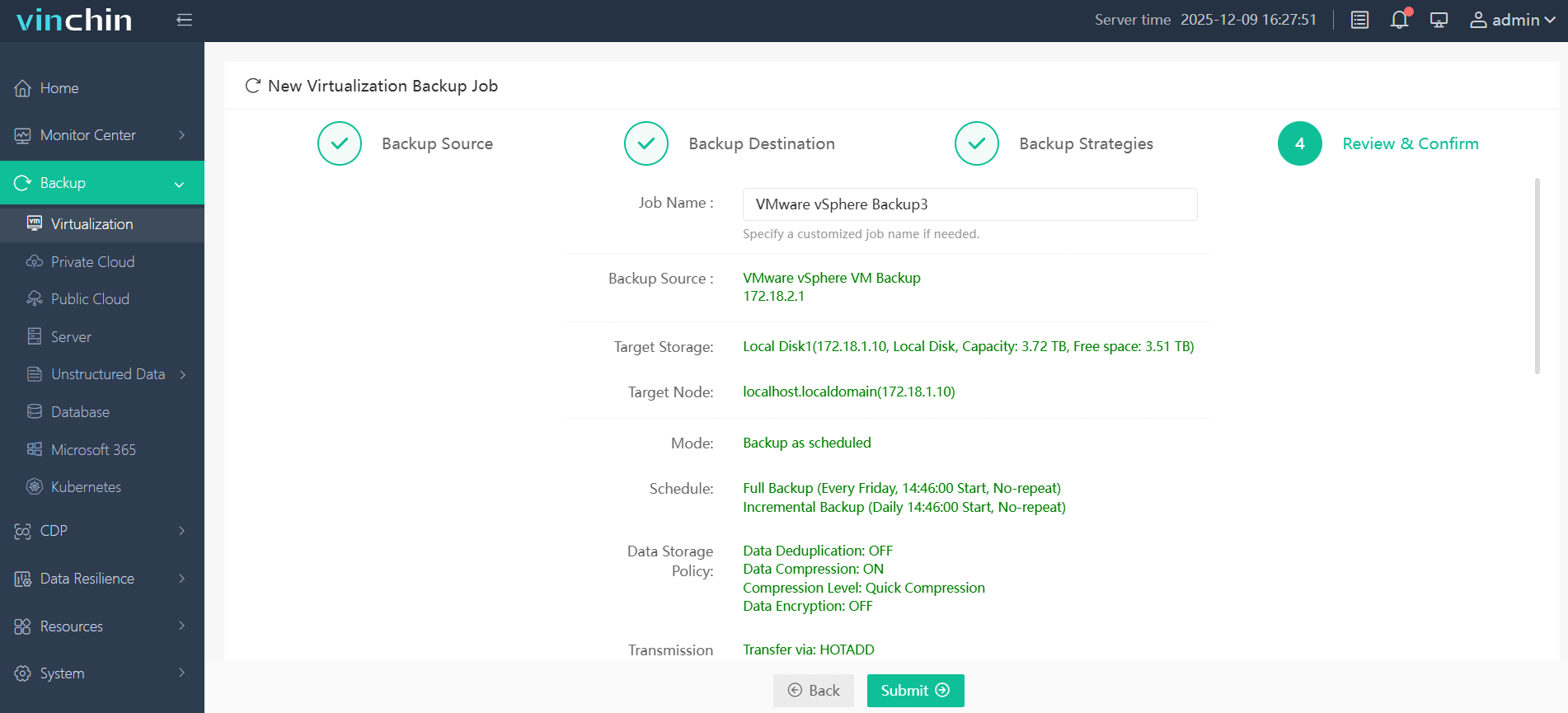
With its intuitive web console interface, backing up a VMware VM using Vinchin Backup & Recovery is straightforward:
Step 1: Select the VMware VM to back up.
Step 2: Choose the backup storage.
Step 3: Configure the backup strategy.
Step 4: Submit the job.
Recognized globally with top ratings from thousands of enterprise users,Vinchin Backup & Recovery offers a fully featured 60-day free trial—click below to experience leading-edge data protection firsthand!
Best VMware Backup Software FAQs
Q1: What makes a VMware backup tool effective against ransomware?
A1: Immutable storage is key because it prevents alteration or deletion of backups by malware or attackers—ensuring there is always an uncompromised copy available for restoration after an incident occurs.
Q2: How does rapid recovery help mitigate ransomware impact?
A2: Fast restores minimize downtime after an attack so business operations resume quickly—with less opportunity for lost revenue due to prolonged outages.
Q3: Is built-in threat detection necessary in backup software?
A3: Yes—integrated monitoring detects suspicious activity early so IT teams receive alerts before widespread damage occurs.
Q4: Can scalable solutions maintain security as environments grow?
A4: Yes—enterprise-grade tools like Vinchin scale easily while maintaining strong protection policies across expanding workloads.
Q5: How does air-gapping differ from immutability in protecting backups from ransomware?
A5: Air-gapping physically isolates backups from networks so malware cannot reach them; immutability locks data logically so it cannot be changed even if accessed—both methods enhance protection but address different attack vectors.
Conclusion
Selecting a resilient VMware backup solution with immutable storage safeguards business continuity against modern ransomware threats—and limits risk exposure during critical incidents.










