Performance is critical when backing up virtual machines in ZStack environments. Enterprises depend on fast systems to meet customer demands and keep operations smooth. Even a small slowdown during backup can disrupt workflows or cause missed deadlines. Data protection must not come at the cost of productivity or uptime. Selecting a backup solution that keeps your business running while safeguarding data is essential.
ZStack is an open-source cloud platform designed for scalability and flexibility. Its API-driven architecture allows integration with advanced backup solutions that can protect workloads without heavy resource use. This makes it possible to achieve both strong data protection and high performance.
Why Minimizing Backup Impact Matters for Enterprises?
Backup jobs that strain system resources can lead to serious business risks. Enterprises need their applications responsive at all times—even during backups. When backup software competes with production workloads for CPU, memory, or network bandwidth, users may experience slowdowns or outages.
● Resource Contention Causes Downtime
When backups run alongside mission-critical apps, they may consume shared resources like CPU cycles or disk I/O bandwidth. This competition can cause application lag or even temporary service interruptions if not managed well.
● Missed SLAs Lead to Financial Loss
Service Level Agreements (SLAs) often require strict uptime guarantees. If backups slow down key services during business hours, organizations risk SLA violations that could result in financial penalties or lost contracts.
● User Productivity Drops During Slowdowns
Employees rely on fast access to systems for daily tasks. If a backup job causes noticeable delays—such as slower database queries or file access—overall productivity drops across departments.
● Customer Experience Suffers from Service Interruptions
Customers expect seamless digital experiences at all times. Any disruption caused by resource-heavy backups can damage your reputation and erode trust among clients who depend on your services.
● Compliance Risks Increase Without Reliable Backups
Regulatory standards demand consistent data protection without impacting operational continuity. Poorly managed backups may put compliance certifications at risk if they interfere with normal business processes.
In large-scale ZStack deployments—where dozens or hundreds of VMs share infrastructure—the effects of inefficient backups multiply quickly. A single misconfigured job might spike CPU usage across hosts, leading to cascading performance issues throughout your environment.
How to Choose a Low-Impact ZStack Backup Solution?
Selecting a backup solution that minimizes impact requires careful evaluation of several technical factors relevant to ZStack's architecture and enterprise needs.
A good choice balances efficiency with robust protection features so you never have to trade performance for safety.
● Agentless Architecture Reduces Overhead
Solutions built on agentless design interact directly with ZStack APIs instead of installing extra software inside each VM. This approach reduces CPU/memory overhead within guest operating systems and simplifies management since there are no agents to update or troubleshoot inside VMs.
For example: With agentless backup enabled via ZStack’s native APIs, administrators avoid manual deployment steps while ensuring consistent coverage across dynamic cloud environments—a major benefit as workloads scale up or migrate between hosts.
● Data Reduction Technologies Optimize Resource Use
Features like Changed Block Tracking (CBT), deduplication, and compression allow backup tools to capture only new or modified data blocks since the last snapshot—conceptually similar in other platforms). Incremental backups finish faster than full ones because less data moves over networks and storage devices remain less stressed during operations.
It’s important to verify whether CBT is supported by your specific version of ZStack; some configurations may require additional setup for optimal results.
● Scalability Ensures Consistent Performance as You Grow
Backup solutions must handle increasing numbers of VMs without creating bottlenecks. Look for products tested in large-scale environments where horizontal scaling keeps per-job resource consumption low even as total workload rises—a key requirement for enterprises planning rapid expansion into private clouds powered by ZStack clusters.
● Flexible Scheduling & Bandwidth Controls Prevent Interference
Advanced scheduling lets you run intensive jobs outside core business hours—or stagger them across time zones—to avoid overlap with peak usage periods. Bandwidth throttling ensures network links remain available for production traffic even when large volumes of data are being transferred offsite for disaster recovery purposes
Administrators should look for intuitive UI controls labeled clearly (e.g., “Schedule,” “Bandwidth Limit”) so policies are easy to set up and adjust based on changing operational needs throughout the year (like seasonal spikes).
● Security & Compliance Features Protect Data Without Disruption
Strong encryption (in transit/at rest), granular access controls (“Role-Based Access Control”), audit logs (“Audit Trail”), and retention policies help organizations meet regulatory requirements while keeping sensitive information safe from unauthorized access—all without slowing down live applications due to excessive security checks during routine backups.
By focusing on these criteria—and verifying support through vendor documentation—you ensure minimal impact on production VM performance while maintaining reliable disaster recovery capabilities.
Vinchin Backup & Recovery: Advanced Enterprise Protection for ZStack
For organizations seeking reliable VM protection in ZStack environments, Vinchin Backup & Recovery offers an enterprise-level solution supporting over 15 mainstream virtualization platforms—including prioritized support for ZStack itself alongside VMware, Hyper-V, Proxmox, oVirt, OLVM, RHV, XCP-ng, XenServer, OpenStack, and more. Its agentless architecture integrates seamlessly with hypervisor APIs such as those provided by ZStack—minimizing overhead while maximizing compatibility across diverse infrastructures.
Key features include incremental backup using Changed Block Tracking (CBT), LAN-free backup options tailored for efficient large-scale deployments, built-in deduplication/compression technologies to optimize storage use, flexible scheduled backups with GFS retention policy support, and granular restore capabilities—all designed to reduce resource consumption while ensuring rapid recovery.
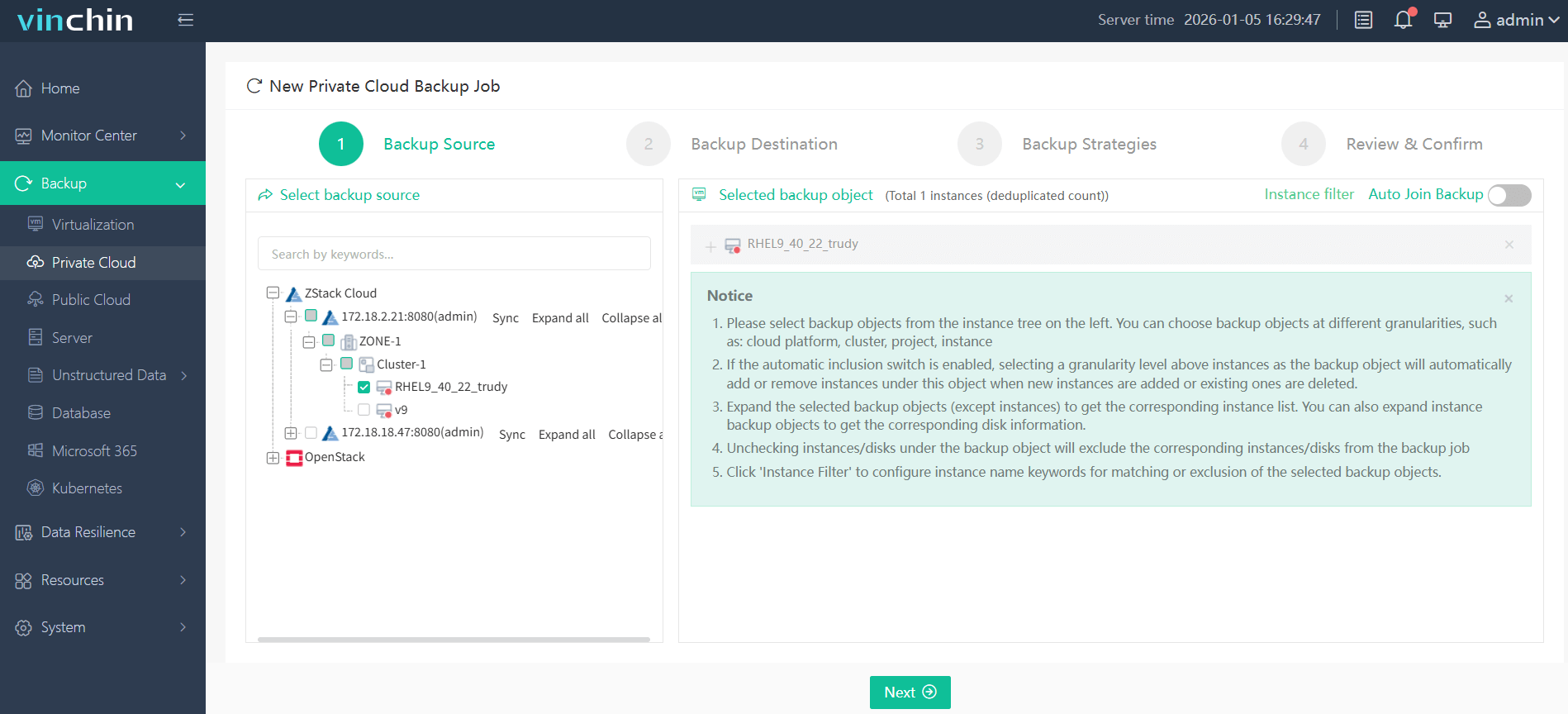
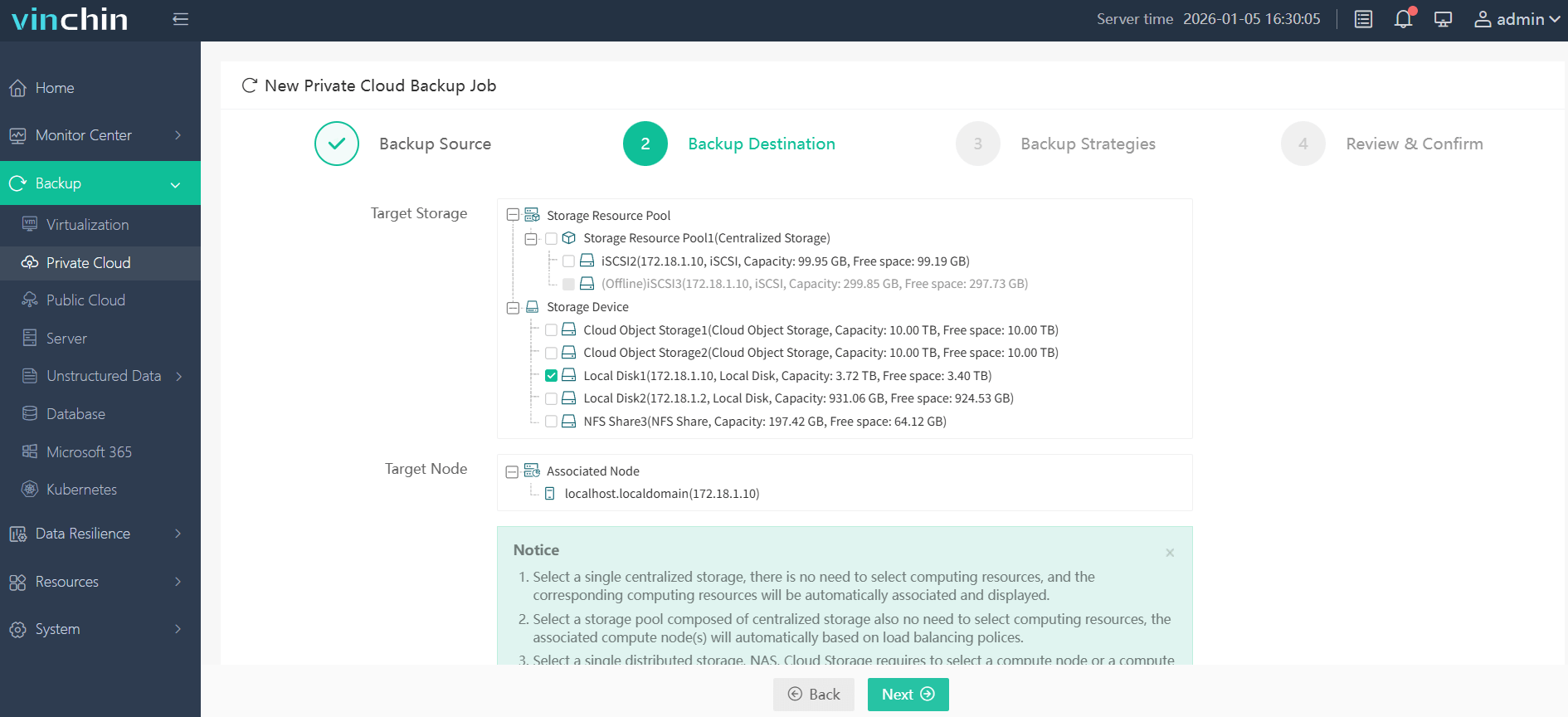
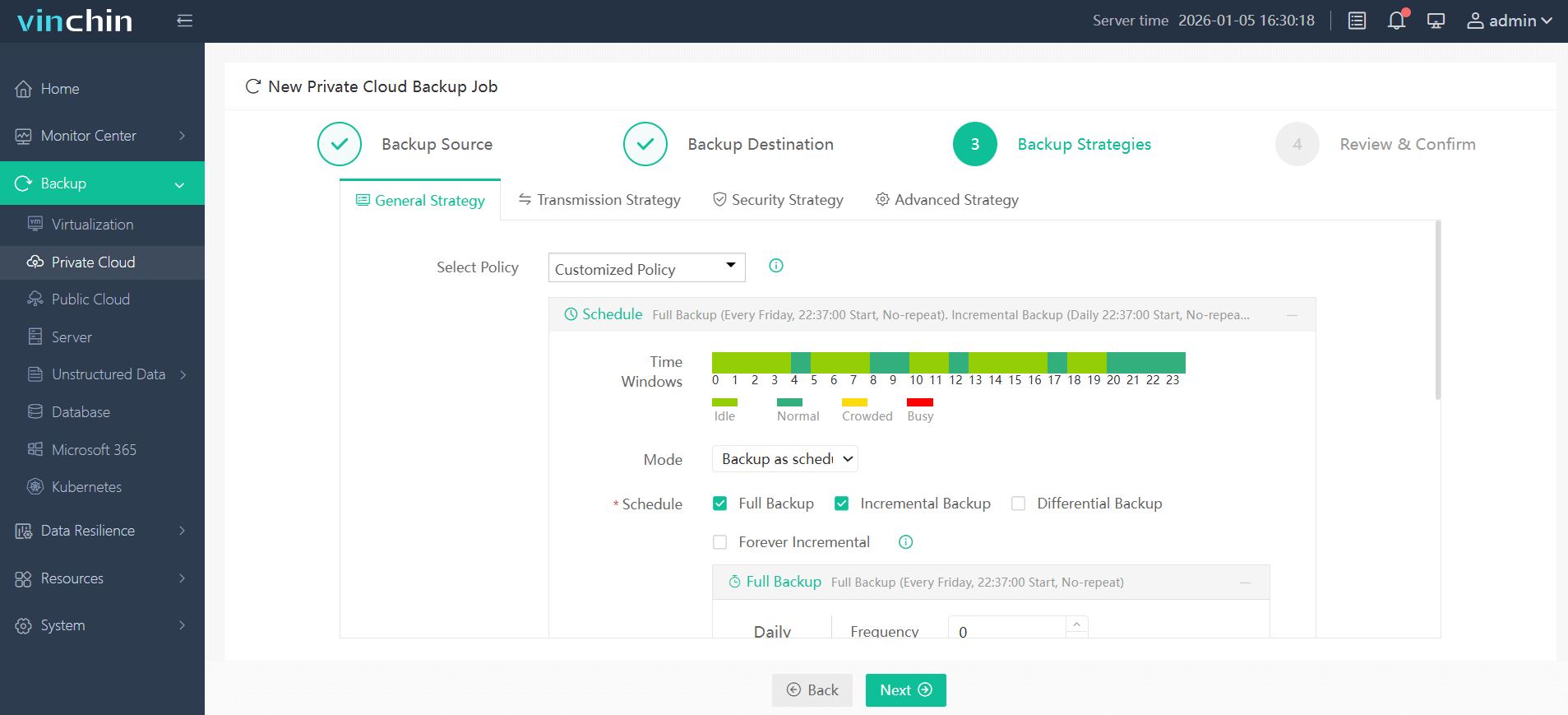
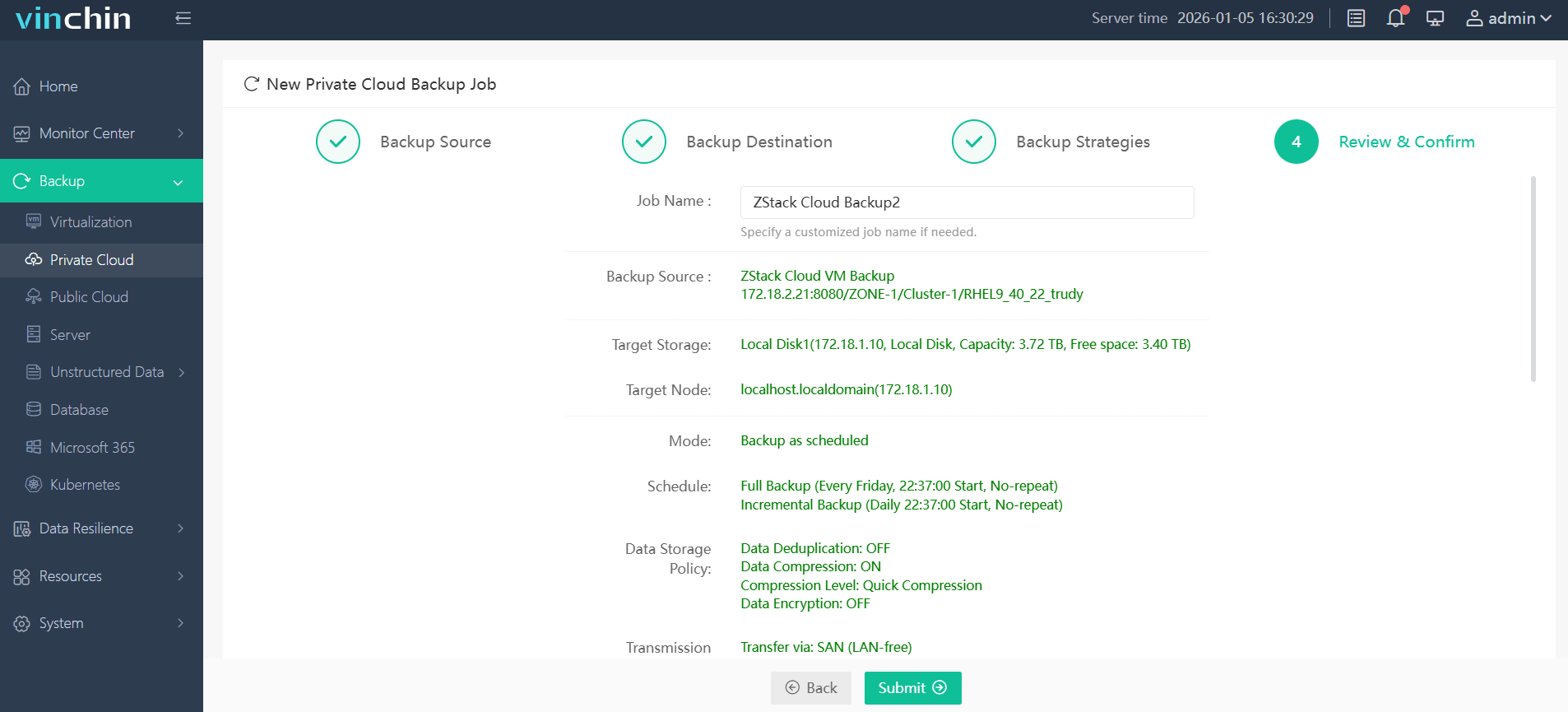
Vinchin Backup & Recovery provides an intuitive web console making operation straightforward:
Step 1: Select the ZStack VM to back up.
Step 2: Choose the appropriate backup storage.
Step 3: Configure your preferred backup strategy.
Step 4: Submit the job with a single click.
Recognized globally by thousands of enterprises—with top ratings—Vinchin Backup & Recovery offers a 60-day full-featured free trial; click below to start protecting your environment today.
Best ZStack Backup Software FAQs
Q1: How does agentless backup minimize performance impact in ZStack environments?
By leveraging direct integration with the hypervisor layer through APIs rather than installing agents inside each VM guest OS instance—which would consume extra CPU/memory—agentless solutions reduce overhead significantly while maintaining efficient communication between management servers.
Q2: Is scalability affected by low-impact backup solutions?
No; modern enterprise-grade solutions are designed specifically for horizontal scaling across multiple nodes/clusters within large cloud infrastructures like those built on top of ZStack. As more workloads are added over time—including new tenants/projects—the software adapts dynamically without increasing load per individual VM.
Q3: Can minimal-impact backups still meet compliance requirements?
Yes; best-in-class products provide end-to-end encryption options plus detailed audit trails/logging functions required under most industry regulations such as GDPR/HIPAA/NIST guidelines—all implemented transparently so regular operations continue uninterrupted while audits remain fully supported.
Conclusion
Choosing a minimal-impact solution protects uptime while meeting compliance goals—without disrupting daily operations. Vinchin Backup & Recovery delivers reliable enterprise-grade protection tailored for demanding ZStack environments.








