Automated retention policies act like a digital janitor for your backup storage. They keep your OpenStack VM backups organized by removing outdated data on schedule. This process saves space, cuts costs, and reduces risk. Enterprises need these policies to manage growing data volumes while staying compliant with regulations. Manual cleanup is slow and error-prone. Automated retention brings order to chaos.
OpenStack environments often span many projects and tenants. Each group may have different compliance needs or business rules for how long backups must be kept. Without automation, tracking hundreds of VM backups across multiple clouds becomes impossible. Automated retention ensures every backup follows policy—no exceptions.
Many organizations rely on enterprise-grade backup solutions because native OpenStack tools like Cinder snapshots offer only basic protection. These built-in options lack advanced scheduling or lifecycle management features needed in regulated industries or large-scale deployments.
Why Automated Retention Policies Matter in Enterprise Environments?
Automated retention policies are essential safeguards in modern IT operations. They ensure that backup data stays available just as long as needed—no longer—and gets deleted when it’s no longer useful or legal to keep.
● Cost Control Automated retention prevents unnecessary storage growth by deleting expired backups on time. Storage costs can spiral out of control if old restore points pile up unnoticed. With automated cleanup, you avoid paying for unused space.
● Regulatory Compliance Many industries face strict rules about how long certain data must be kept (or deleted). Automated policies enforce these timelines precisely so you meet requirements like GDPR’s “right to be forgotten” or HIPAA’s health record mandates.
● Consistent Recovery Points Reliable recovery depends on having recent backups available at all times—not just when someone remembers to run them manually. Automation guarantees regular snapshots so you always have valid restore points if disaster strikes.
● Reduced Human Error Manual processes invite mistakes—missed deletions, accidental overwrites, or skipped schedules can leave gaps in protection or waste resources. Automated enforcement removes this risk by following set rules every time.
● Audit Readiness Auditors often ask for proof that data is managed according to policy. With automated retention logs and reports, you can show exactly when each backup was created and deleted—making audits faster and less stressful.
Automated retention transforms backup from a tedious chore into a reliable system that works quietly behind the scenes.
How To Choose The Best OpenStack Backup Solution for Automated Retention Policies?
Selecting an OpenStack backup solution with strong automated retention support requires careful evaluation of several key factors. The right choice will fit seamlessly into your environment while providing flexibility and control over your data lifecycle.
● Policy Flexibility A good solution lets you set different retention rules based on project ID, tenant name, VM tags, or compliance tier (such as PCI-DSS vs general workloads). This granularity allows each department to align its backups with unique business needs without affecting others.
● Scalability As your cloud grows from dozens to thousands of VMs across regions or availability zones, your backup platform should scale smoothly without slowing down jobs or missing schedules.
● Centralized Policy Management Central dashboards make it easy to create new policies—or update existing ones—for all projects at once instead of logging into separate interfaces per tenant. This centralization simplifies audit preparation too since all settings are visible in one place.
● Robust Reporting & Alerting Look for detailed logs showing which backups were retained or deleted under each policy rule along with real-time alerts if something goes wrong (like failed cleanups due to quota limits).
● Integration With Existing Infrastructure Your chosen solution should work well alongside current authentication systems such as Keystone (OpenStack Identity Service), object storage backends like Swift/Ceph/S3-compatible platforms, network topologies including VLANs/VXLANs used in multi-cloud setups—and support recent OpenStack releases so you’re not left behind after upgrades.
A strong candidate will also provide APIs for automating policy changes via scripts or external orchestration tools such as Ansible/Terraform if desired.
Vinchin Backup & Recovery: Enterprise-Grade Protection for OpenStack
For enterprises seeking robust data protection across diverse virtual environments—including OpenStack—Vinchin Backup & Recovery stands out as a professional enterprise-level virtual machine backup solution supporting more than 15 mainstream virtualization platforms such as VMware, Hyper-V, Proxmox, oVirt, OLVM, RHV, XCP-ng, XenServer, ZStack and others alongside OpenStack itself. Designed specifically for complex infrastructures found in large organizations and service providers alike, Vinchin Backup & Recovery delivers comprehensive compatibility whether you're running private clouds or hybrid deployments involving multiple hypervisors.
Among its extensive feature set are full/incremental/differential/forever-incremental backup modes; granular restore; instant recovery; LAN-free backup; CBT; scheduled tasks; GFS retention policy; V2V migration; throttling policy; deduplication/compression; encryption; multi-thread transmission; cloud/tape archive integration—and more—all engineered for efficiency and reliability at scale.
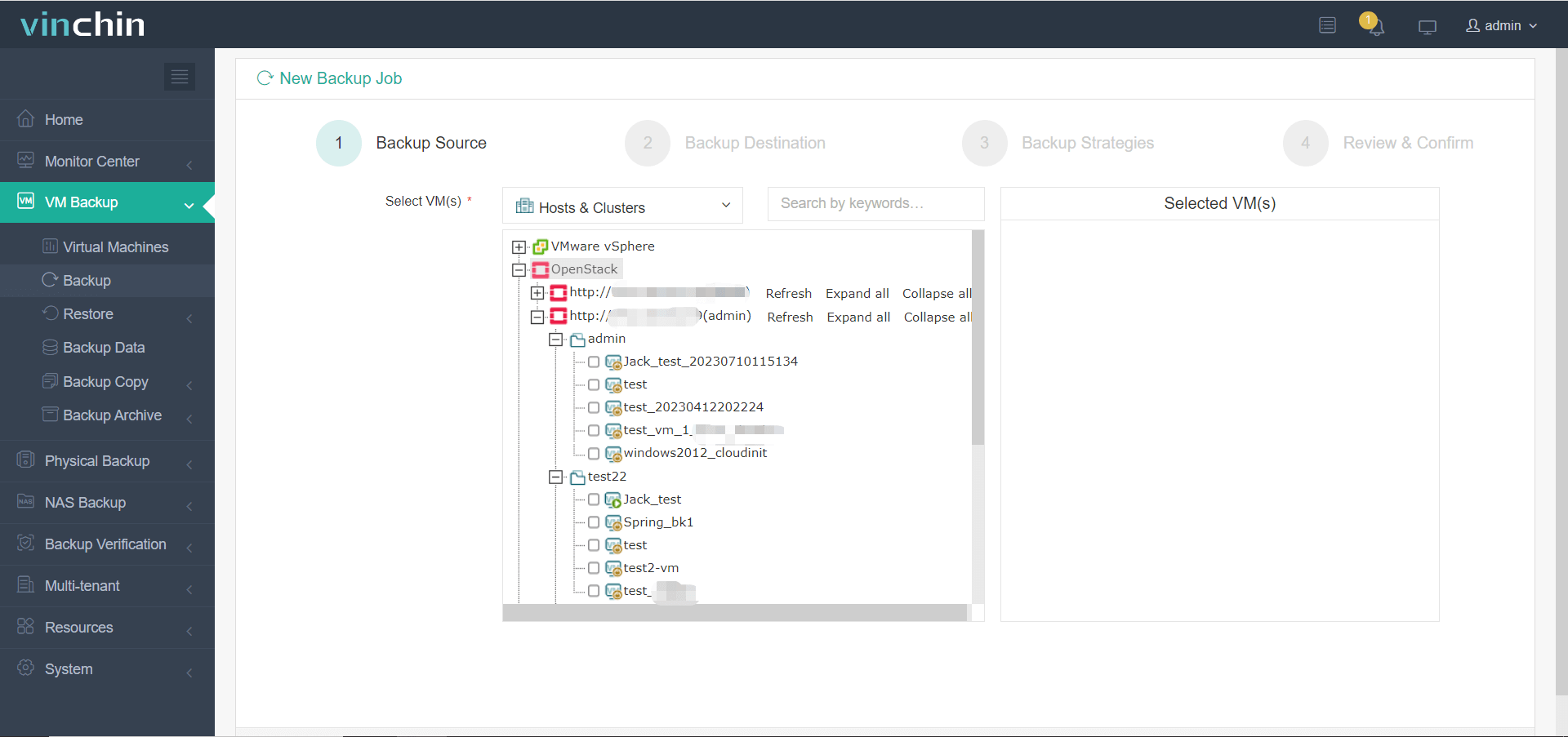
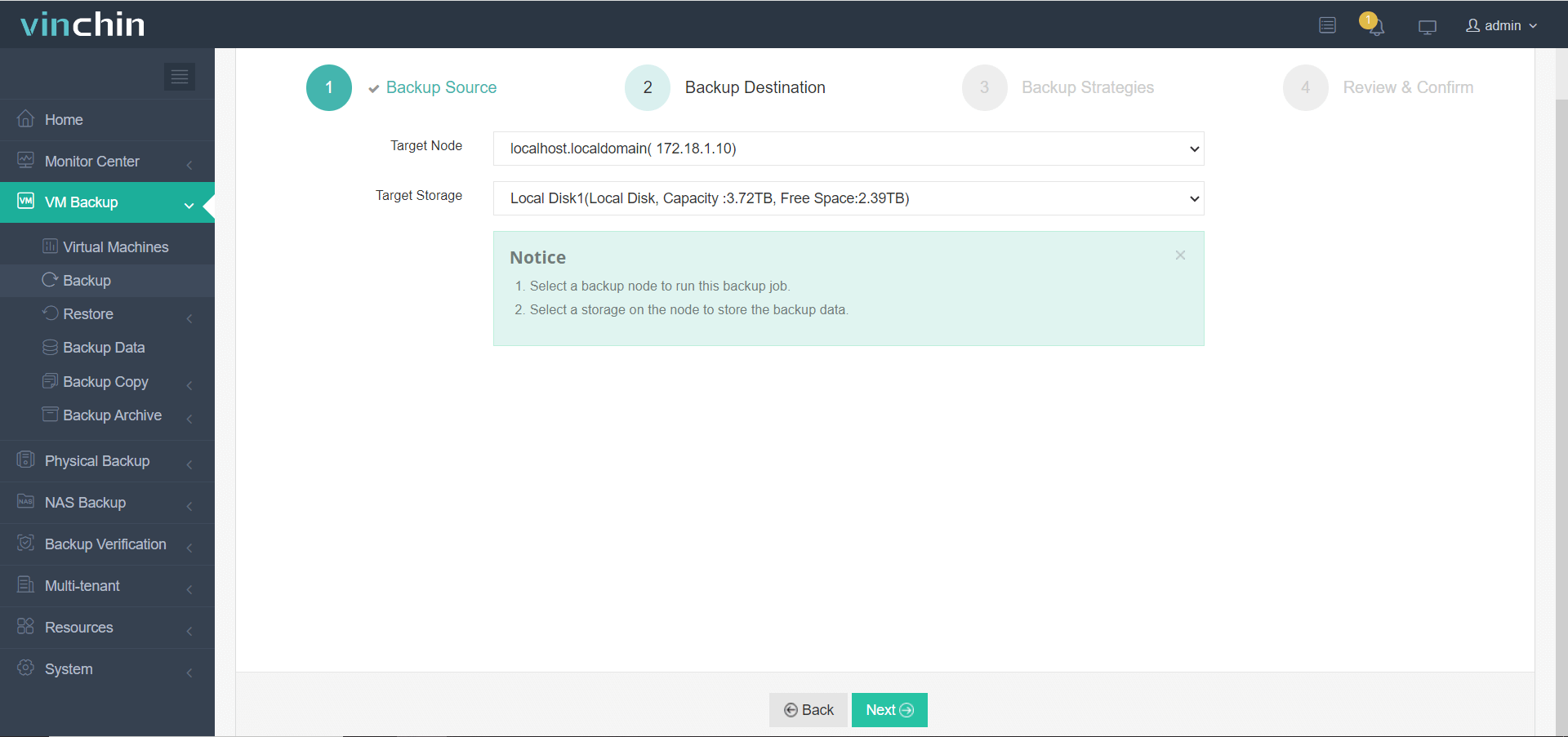
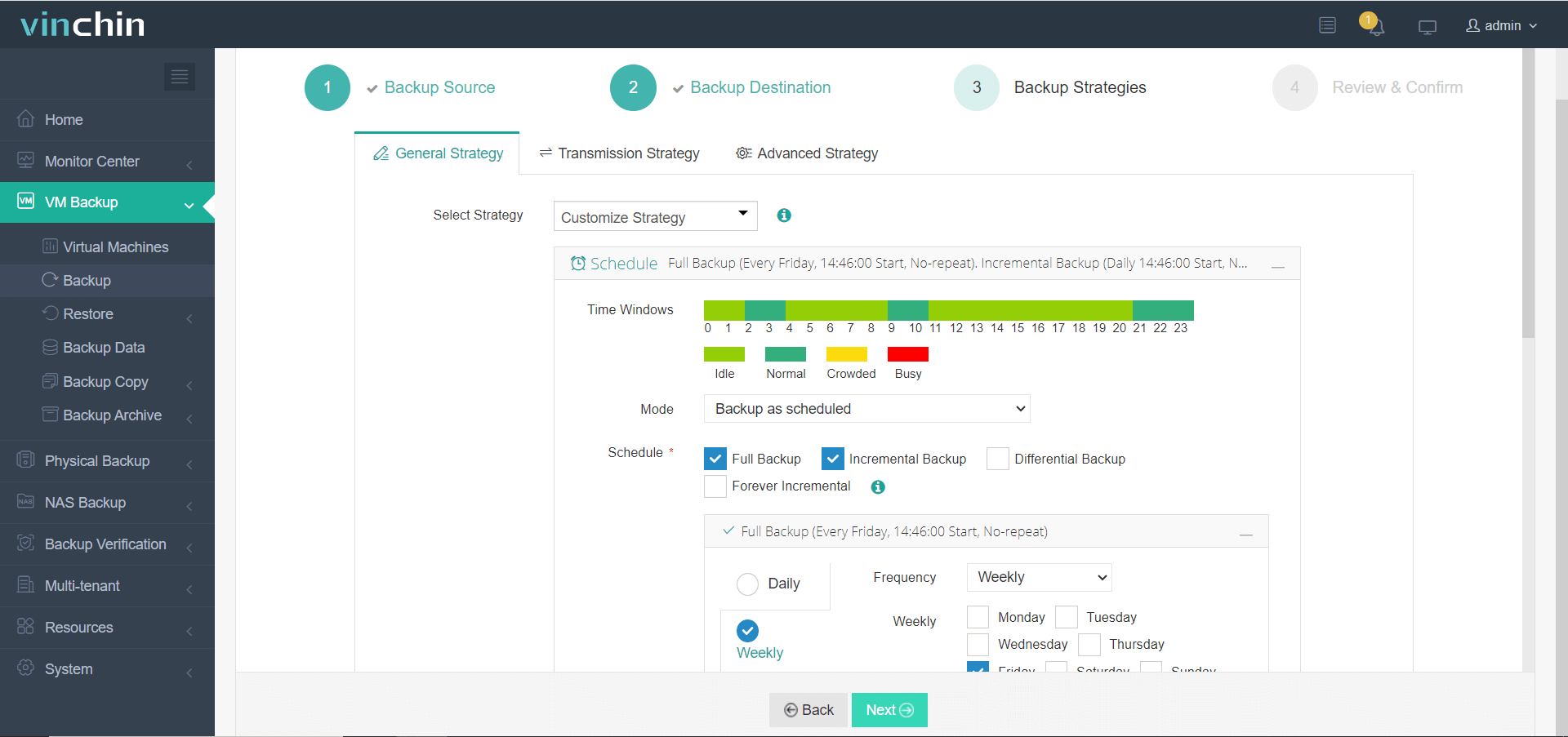
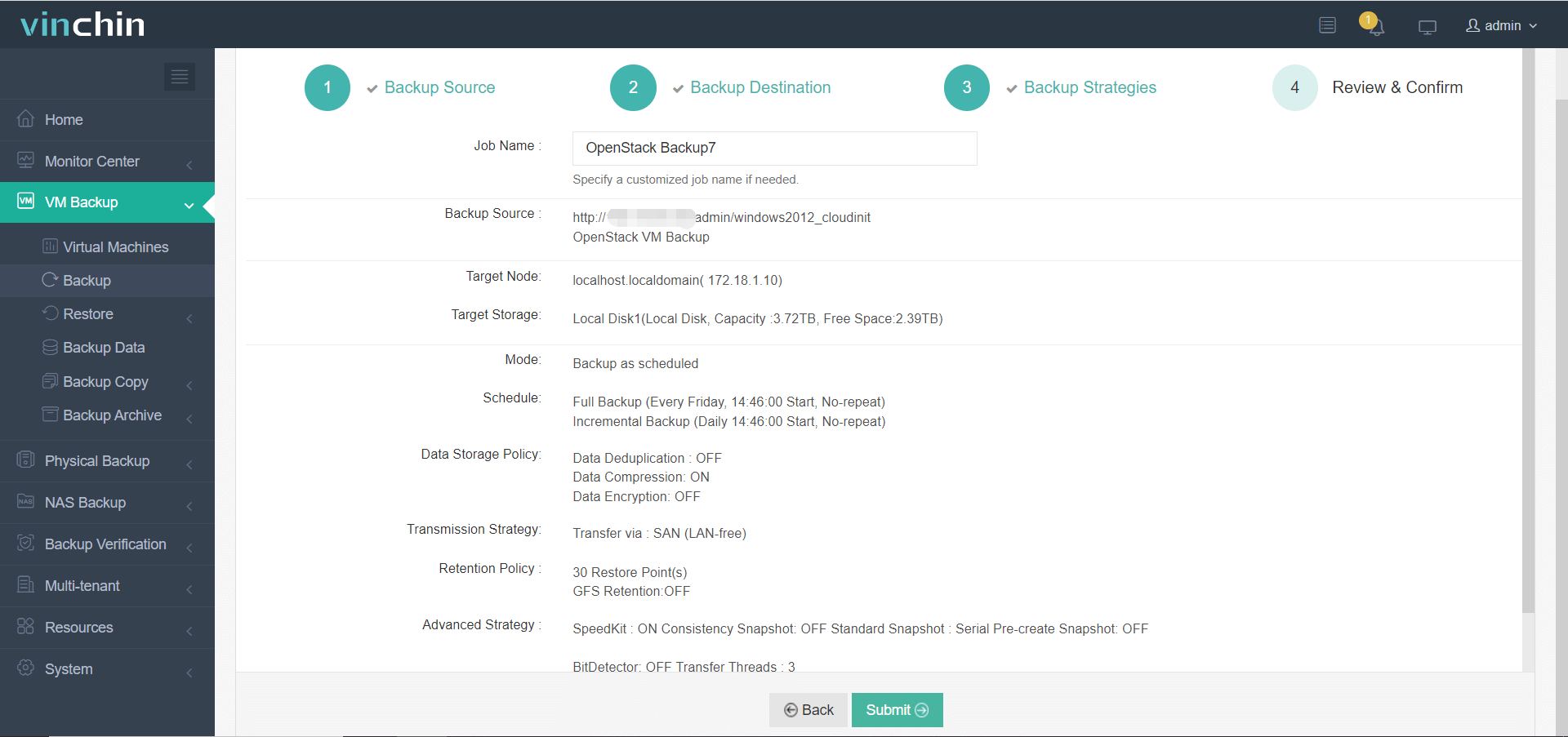
Using the intuitive web console of Vinchin Backup & Recovery makes safeguarding your OpenStack VMs straightforward:
Step 1: Select the OpenStack VM to back up
Step 2: Choose the backup storage
Step 3: Configure the backup strategy
Step 4: Submit the job
Globally trusted by thousands of customers with top industry ratings,Vinchin Backup & Recovery offers a 60-day full-featured free trial—click below to experience leading enterprise data protection firsthand.
FAQs
Q1: What makes automated retention policies critical for large-scale OpenStack deployments?
Automated retention policies eliminate manual intervention by systematically enforcing how long each VM backup is stored before deletion based on business logic or regulatory requirements. In sprawling environments where hundreds of VMs generate frequent restore points daily across multiple tenants/projects/clouds, automation ensures consistent compliance while reducing operational overhead and human error risk—a necessity at scale.
Q2: Can I integrate Vinchin Backup & Recovery with my existing object storage backend?
Yes. Vinchin Backup & Recovery natively integrates with popular object storage platforms including Ceph,S3-compatible services,and Swift.This means you can direct VM backups straight into scalable cloud/object repositories rather than relying solely on local disk arrays,enabling cost-effective archiving,long-term compliance,and seamless expansion without hardware lock-in.
Q3: What reporting/auditing capabilities does Vinchin provide around automated deletion events?
Every action performed under an automated retention policy—including creation,deletion,and merging of recovery points—is logged within Vinchin’s centralized dashboard.Administrators can export detailed reports showing which VMs were affected when/how/by whom,supporting both internal governance reviews and external regulatory audits.Audit trails help prove continuous adherence during compliance checks.
Conclusion
Strategic use of automated retention transforms chaotic VM sprawl into manageable assets—delivering resilience,cost savings,and audit confidence essential for modern enterprises running mission-critical workloads on OpenStack.