User Case
"Help! My company runs some Linux servers, and what worries me most is that scheduled backups still only run at fixed intervals. On production Linux servers, databases, logs, and application files keep changing all the time, so there's always a risk of missing the latest data before the next backup runs. Any suggestions?"
This is a common concern for fast-changing Linux workloads. To address this challenge, many organizations are turning to Linux continuous backup solutions that automatically capture data changes as they occur.
In this article, we will explore what continuous backup is, the benefits of continuous backup, and three common methods to implement continuous backup.
What Is Linux Continuous Backup?
Linux continuous backup is a data protection method that captures changes on Linux servers as they happen, instead of waiting for a scheduled backup window. Unlike traditional full backups, which copy all data at set intervals, or incremental backups, which save changes since the last backup, continuous backup keeps recording new writes in near real time.
This helps protect frequently updated files, databases, and application data, so businesses can recover to a more recent point after accidental deletion, corruption, or system failure.
Why Production Linux Servers Need Continuous Backup?
Production Linux servers often run critical databases, business applications, and customer-facing services. Since data changes constantly, periodic backups may leave important updates unprotected. This is where continuous data protection (CDP) helps:
1. Minimize Data Loss
CDP captures changes as they happen, helping recover the most recent files, databases, logs, and application data after deletion, corruption, or failure.
2. Recover Faster from Disruptions
With more recovery points, IT teams can restore Linux workloads closer to the latest server state and reduce downtime.
3. Protect Fast-Changing Workloads
CDP is better suited for servers with frequent writes from applications, transactions, and system processes.
4. Reduce Business Risks
It helps protect service availability, customer trust, and compliance-related recovery objectives.
3 Common Ways to Implement Linux CDP
There are three mainstream implementations for Linux Continuous Data Protection (CDP). The first two leverage built-in Linux utilities, whereas the third adopts professional dedicated CDP software. While all three mitigate data loss risks, only purpose-built CDP tools deliver real-time data capture, granular recovery points, and streamlined management for enterprise Linux production workloads.
1. Snapshot-Based Protection
Create and mount LVM snapshots with the native commands below:
lvcreate -s -n data_snap -L 5G /dev/vg0/data
mount /dev/vg0/data_snap /mnt/snap
Automate hourly snapshot tasks via cron with this rule: 0 * * * * /usr/local/bin/create_snapshot.sh. Though snapshots support point-in-time restoration, they operate on fixed cycles. Any new data generated between two snapshots remains unprotected, and frequent snapshots quickly exhaust storage under heavy business loads. This approach merely serves as a temporary recovery buffer and cannot qualify as genuine Linux CDP.
2. Replication-Based Protection
Set up DRBD replication with these basic commands:
drbdadm create-md r0
drbdadm up r0
drbdadm primary r0
Data replication duplicates your workload to a secondary server or offsite storage to boost system availability and disaster resilience. Its major flaw is blind full mirroring: accidental deletion, file corruption, or ransomware damage will be synced to the replica before you respond. Replication also brings complicated failover configuration and fails to offer the precise rollback controls demanded by production Linux services.
3. Dedicated Continuous Data Protection Software
Specialized CDP software records every data modification in real time instead of relying on scheduled backup cycles. For Linux CDP scenarios, this translates to second-level recovery granularity, unified policy management, clear data change logs, and one-click restoration for databases, logs and core business data. It delivers the most comprehensive continuous backup solution for high-churn production Linux environments.
For enterprises pursuing scalable, reliable Linux CDP, dedicated backup software stands as the optimal choice — and Vinchin Backup & Recovery is a mature, all-in-one solution built for this exact demand.
Built for real-time server CDP, it helps reduce data loss, shorten recovery time, and keep business workloads recoverable when disruption happens.
Real-Time Server Backup
Vinchin records server disk I/O changes in real time, helping Linux continuous backup achieve near-zero RPO. This protects frequently changing databases, files, and application data.
Centralized CDP Management
A web-based console lets administrators configure CDP tasks, monitor processes, and receive alerts, notifications, and reports across multiple environments.
Linux Support and Ransomware Protection
Vinchin supports major Linux distributions, including RHEL, CentOS, Oracle Linux, Rocky Linux, and Ubuntu. It can also enable storage protection to help defend CDP backup data against ransomware attacks.
The following steps demonstrate how Vinchin continuously protects your business with a simple and efficient workflow.
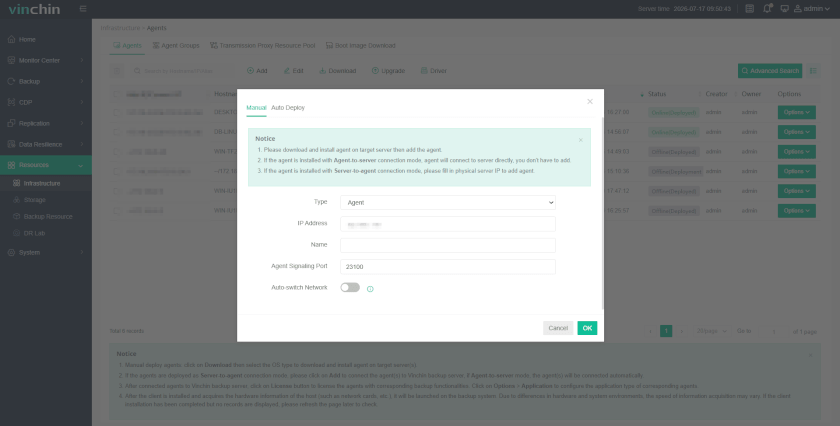
Step 1: Navigate to Resources > Infrastructure > Agent > Add to add your server to Vinchin.
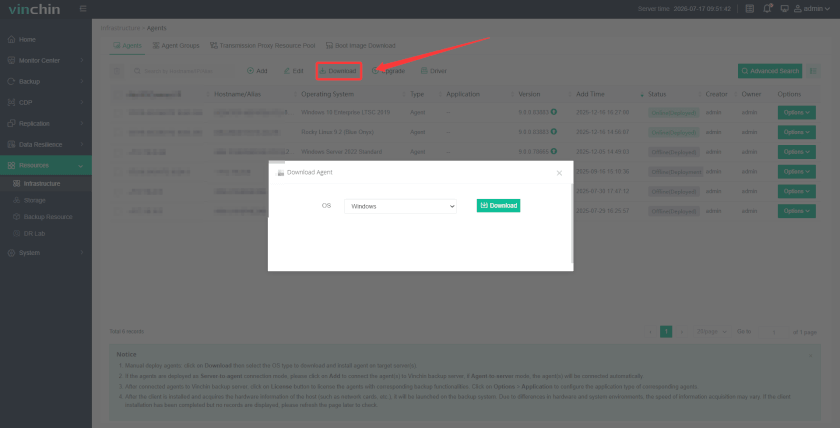
Step 2: Click the Download button and install the agent on the server.
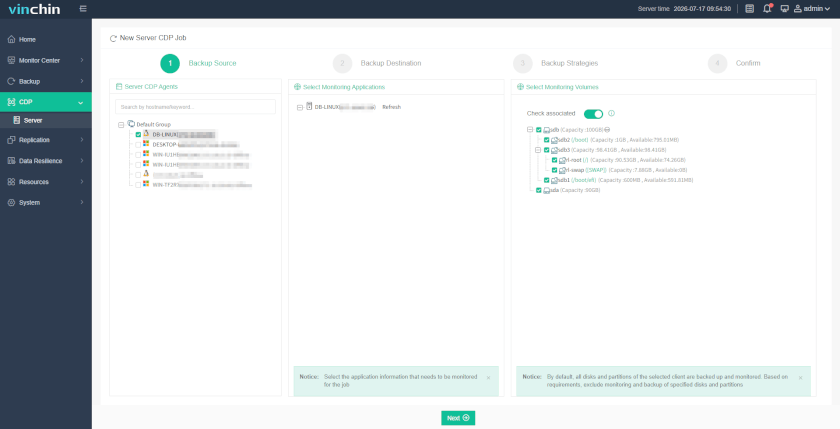
Step 3: Click CDP > Server and select the server, application, and volumes you want to protect.
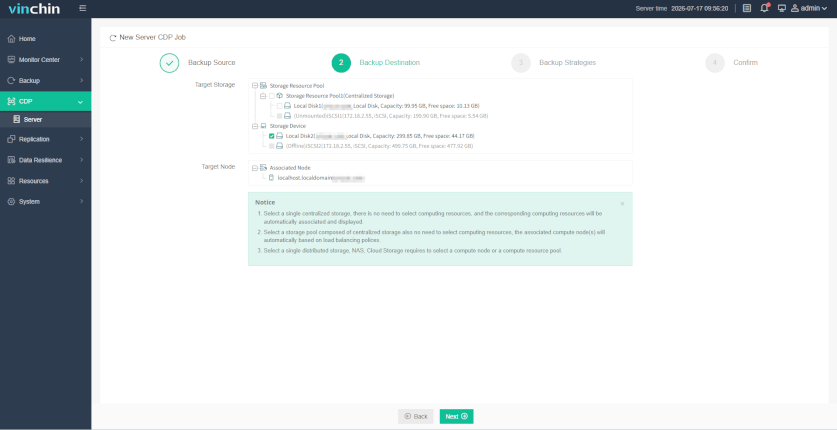
Step 4: Choose the backup destination by selecting the target storage and node.
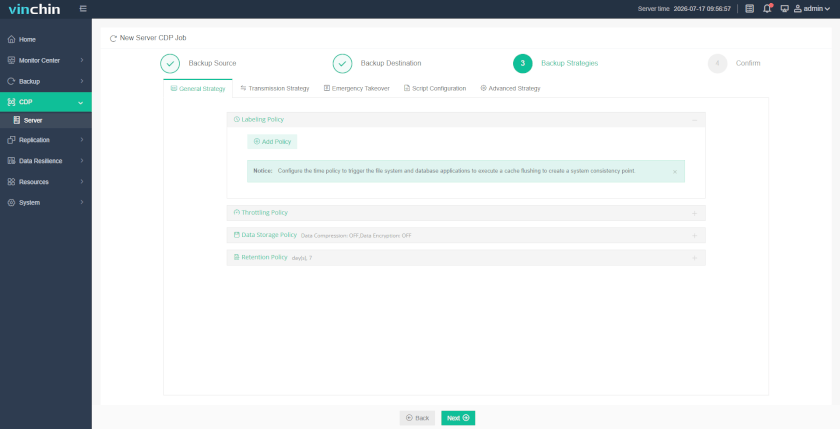
Step 5: Configure backup strategies, including labeling policy, retention policy, and so on.
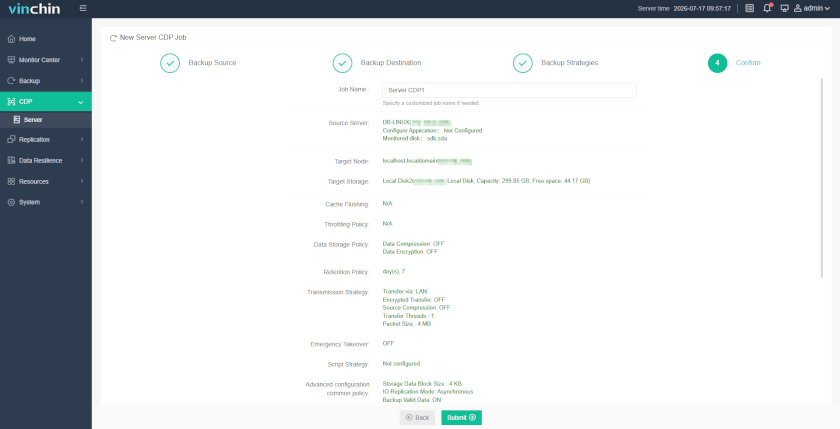
Step 6: Confirm and submit the task.
FAQs About Linux Continuous Backup
Q1: Can Linux continuous backup protect a database while it is still running?
A1: Yes, but the backup method must keep data consistent. For databases, simple file copy is often not enough because files may change during backup. It is better to use application-aware backup, database snapshots, or transaction log protection.
Q2: Will continuous backup also copy corrupted or deleted data?
A2: It can, depending on the method. Real-time replication may copy bad changes quickly. A good CDP solution should keep multiple recovery points, so you can roll back to a clean version before deletion, corruption, or ransomware activity.
Q3: Does Linux continuous backup affect server performance?
A3: It may add some CPU, disk I/O, and network load, especially on busy production servers. To reduce impact, use efficient change tracking, compression, bandwidth control, and monitor backup performance regularly.
Q4: How long should Linux continuous backup recovery points be retained?
A4: Retention depends on storage capacity, compliance needs, and recovery goals. Many businesses keep frequent short-term recovery points for quick rollback and longer-term backups for audit, ransomware recovery, or historical restore.
Final Thoughts
Linux continuous backup helps protect fast-changing production data, but native methods have limits: snapshots are periodic, and replication may sync bad changes before they are detected.
For enterprises that need finer recovery points and easier management, dedicated continuous data protection software is the better choice. Vinchin Backup & Recovery helps build a reliable Linux continuous data protection strategy with real-time backup, point-in-time recovery, failover, and ransomware protection.