What Is Incremental Backup in Linux?
An incremental backup in Linux saves only the data that has changed since the last backup, instead of copying the entire system every time. Compared with a full backup, which creates a complete copy of all selected files, an incremental backup is faster and more storage-friendly because each backup job transfers only new or modified data.
Why Businesses Need Incremental Backup?
For businesses, backup is not just a routine IT task. It directly affects uptime, storage cost, and recovery readiness. Full backups are important, but running them too frequently can create several problems:
Rapid data growth makes daily full backups harder to complete.
Long backup windows may affect applications and business operations.
Repeated copies of unchanged data consume unnecessary storage.
Remote or cloud backup jobs can create heavy network traffic.
Strict RPO or RTO requirements.
Incremental backup helps address these challenges by reducing the amount of data transferred in each backup job. As a result, businesses can run backups more frequently, use storage more efficiently, and improve recovery planning.
4 Linux Incremental Backup Tools Compared
When choosing Linux incremental backup software, many users start with free or native methods, such as rsync scripts, file system snapshots, or open-source tools. These options can work well in simple environments, but they often require manual scheduling, retention management, monitoring, restore testing, and troubleshooting.
Vinchin Backup & Recovery offers a more centralized approach with incremental and forever incremental backup, scheduling, retention policies, alerts, deduplication, compression, encryption, and recovery verification for Linux workloads in physical and virtual environments.
Below, we compare Vinchin with three common free Linux incremental backup methods: backup scripts, file system or volume snapshots, and open-source backup tools, so you can choose the right option for your environment.
1. Vinchin Backup & Recovery
Vinchin Backup & Recovery is designed for businesses that need centralized Linux data protection. Users can create and manage backup tasks from one console, apply backup strategies, monitor job status, and restore data when needed.
It is a strong choice for organizations that manage multiple Linux servers, virtual machines, or hybrid environments. Features such as incremental backup, forever incremental backup, deduplication, compression, encryption, retention policies, alerts, and recovery verification help businesses reduce backup complexity and improve restore reliability.
Best for:
Businesses that need centralized backup management, automated scheduling, stronger security, and predictable recovery for Linux workloads.
2. Linux Incremental Backup Script
A Linux incremental backup script is a free and lightweight way to back up changed files with native tools such as rsync. After the first backup, the script can copy only new or modified files to the backup destination.
This method is flexible and easy to start, but it depends heavily on manual setup. Users need to write or adjust scripts, configure schedules, manage backup destinations, check job results, and test restores by themselves.
Best for:
Personal servers, small environments, or technical users who need a free and customizable backup method.
3. File System or Volume Snapshots
File system and volume snapshots provide a fast way to capture the state of Linux data at a specific point in time. Common options include LVM snapshots, Btrfs snapshots, and ZFS snapshots.
Snapshots are useful for quick rollback and short-term recovery. They can help users recover files or return a system to an earlier state quickly. However, snapshots are usually stored close to the production environment, so they should not be treated as a complete backup strategy by themselves.
Best for:
Systems that need frequent recovery points and fast rollback, especially when snapshots are also copied or replicated to independent storage.
4. Open-Source Linux Incremental Backup Tools
Open-source Linux incremental backup tools, such as BorgBackup, Restic, and Duplicity, usually support features such as deduplication, compression, encryption, and remote backup.
These tools provide more backup capabilities than simple scripts and are often a good fit for technical users who want free software with strong control over backup repositories and retention policies. However, they still require command-line knowledge and ongoing maintenance.
Best for:
Small to medium Linux environments with technical administrators who want a free, flexible, and secure backup tool.
In short, each Linux incremental backup method serves a different need. Scripts, snapshots, and open-source tools work well for technical users and smaller environments, while Vinchin is better for businesses that need centralized management, automation, stronger protection, and more reliable recovery.
How Vinchin Performs Incremental Backup in Linux
This section shows how to add Linux machines in virtual environments to Vinchin Backup & Recovery and create an incremental backup job step by step.
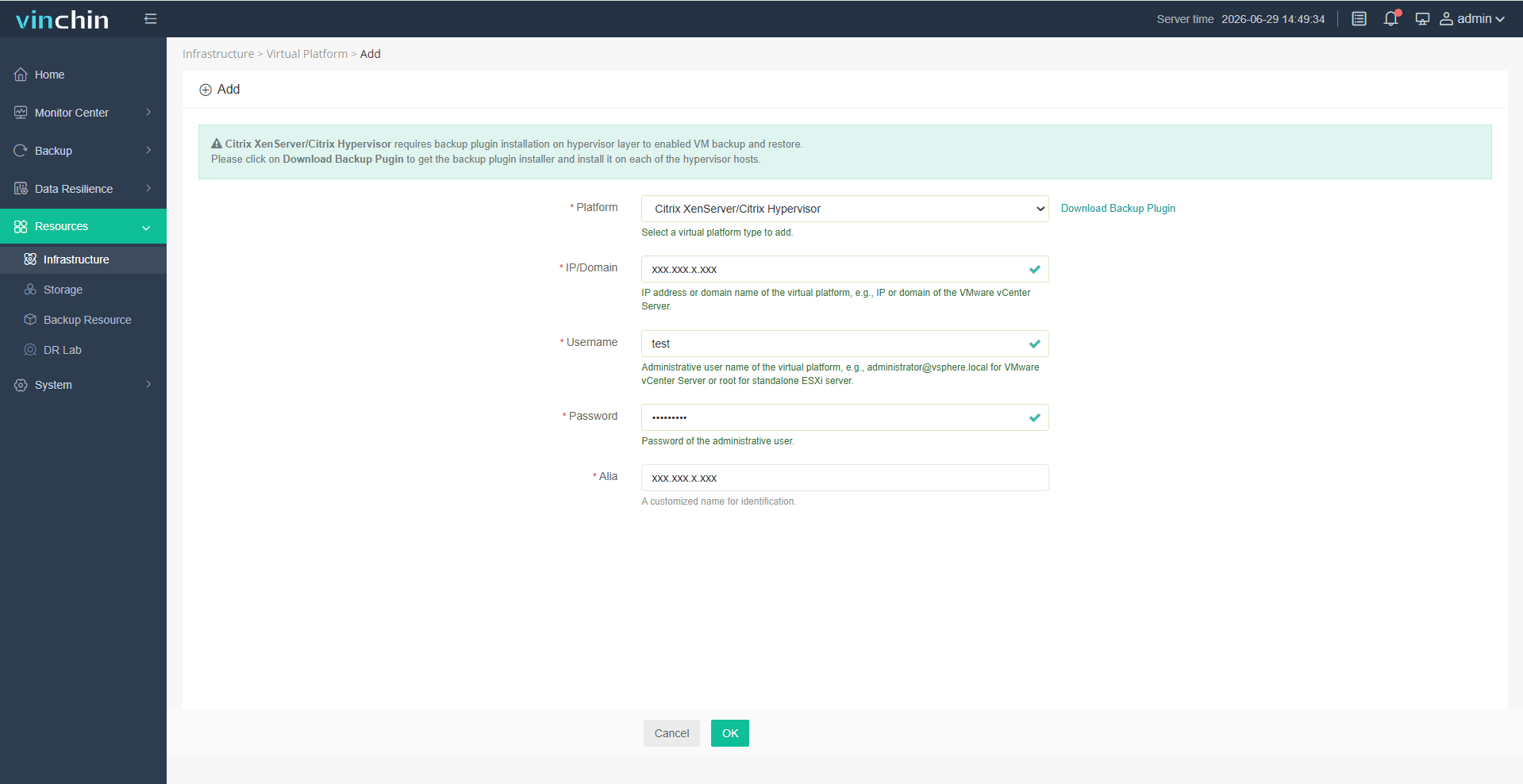
Step 1: Click Resources > Infrastructure > Virtual Platform to add your Linux machine.
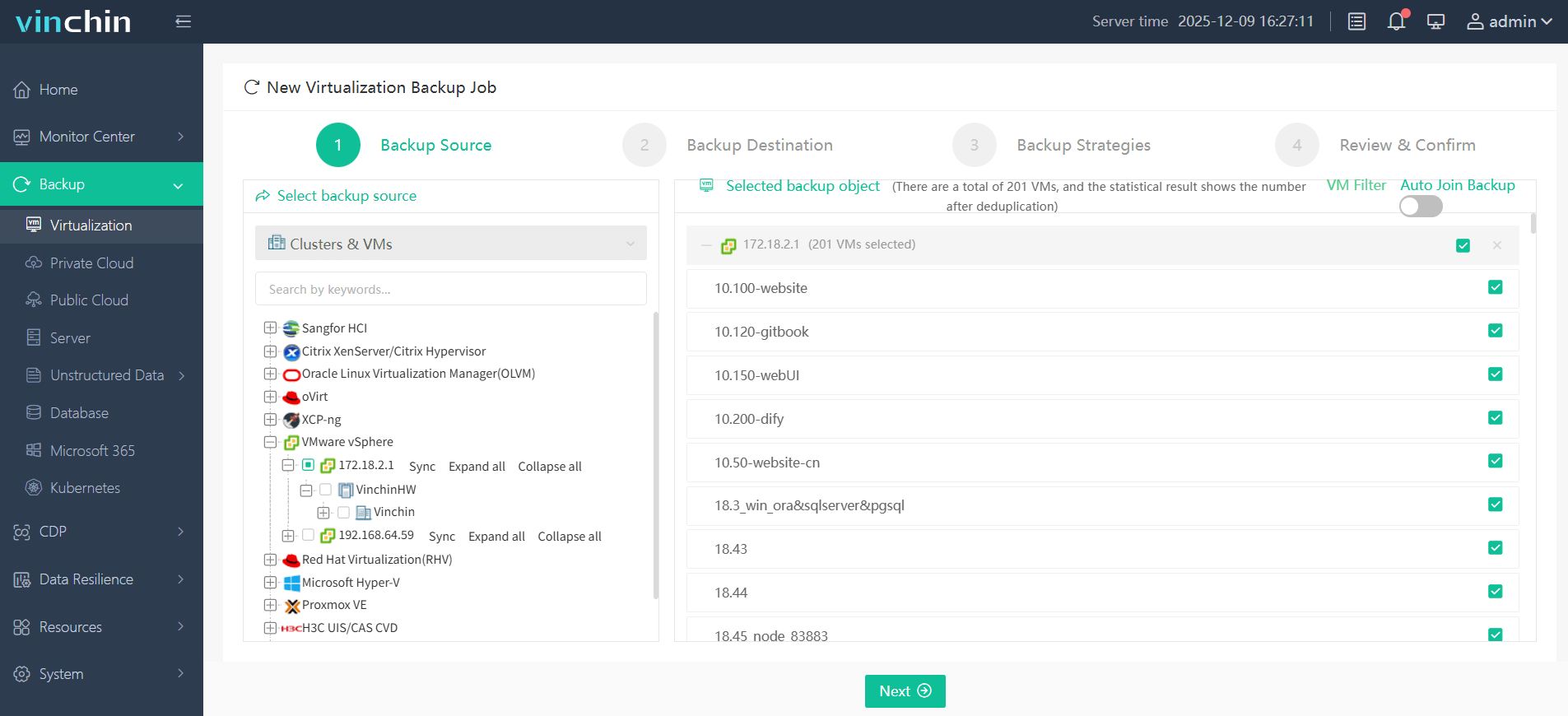
Step 2: Click Backup > Virtualization and select the Linux machine you added.
Step 3: Select the backup destination by choosing the target storage and node.

Step 4: Configure the backup strategy. You can set an incremental backup schedule, data storage policy, retention policy, and more.

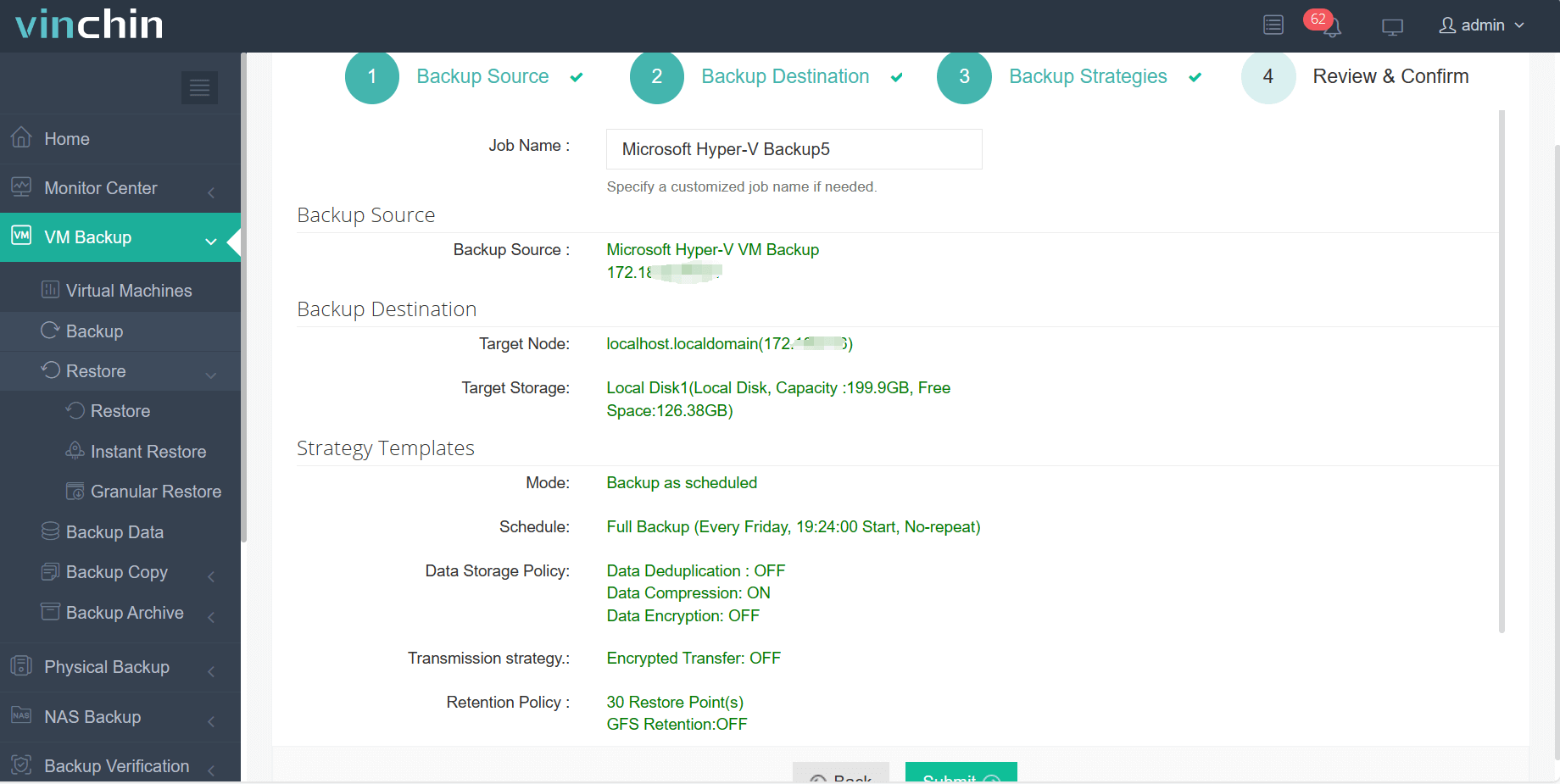
Step 5: Review and confirm your backup configurations and submit the backup task.
With a 60-day free trial, Vinchin Backup & Recovery allows you to test centralized Linux incremental backup, automated scheduling, and reliable recovery before deployment. Download the software to see how it can simplify Linux workload protection in your environment.
Best Practices for Linux Incremental Backup
No matter which method you choose, a reliable Linux incremental backup strategy should follow several best practices:
Keep at least one backup copy on independent storage.
Do not rely only on local snapshots for disaster recovery.
Encrypt backups that contain sensitive business data.
Set clear retention policies to avoid uncontrolled storage growth.
Monitor backup jobs and investigate failures promptly.
Test restores regularly instead of assuming backups are usable.
Combine full, incremental, and offsite backup strategies based on recovery needs.
These practices help reduce data loss, prevent backup storage from growing silently, and make recovery more predictable. For business workloads, document backup schedules, ownership, and restore steps so teams can respond quickly during outages or security incidents.
FAQs About Linux Incremental Backup Software
Q1: How can I reduce Linux backup storage usage?
A1: Use incremental backup, deduplication, compression, and clear retention policies. You should also exclude temporary files, caches, logs that do not need long-term retention, and unnecessary system directories.
Q2: Is open-source Linux backup software enough for business use?
A2: Open-source tools like BorgBackup, Restic, and Duplicity can work well for small or technical teams. However, businesses that manage multiple servers usually need centralized monitoring, alerts, reporting, and easier recovery workflows, which are often better handled by enterprise backup software.
Q3: Can Linux incremental backup software back up to remote or cloud storage?
A3: Yes. Many tools, such as Vinchin Backup & Recovery, support remote backup targets such as SSH servers, NAS devices, object storage, or cloud platforms.
Conclusion
Linux incremental backup is an efficient way to protect business data while reducing backup time, storage usage, and network load. Scripts, snapshots, open-source tools, and enterprise backup software can all be used to perform incremental backup in Linux, but they serve different needs.
For small environments, scripts or open-source tools may provide enough flexibility. For systems that require fast rollback, snapshots are helpful. For organizations that need centralized management, reliable recovery, and scalable protection, enterprise Linux incremental backup software provides a more complete and business-ready solution.