Introduction
Enterprises depend on virtualized platforms like Proxmox to run essential workloads, from databases to customer-facing applications. These environments often support hundreds of virtual machines across clusters that span multiple sites or data centers. When disaster strikes, whether due to hardware failure, cyberattack, or human error, the ability to recover quickly determines whether business operations continue or grind to a halt.
Industry standards emphasize robust backup strategies as a core part of IT resilience planning. Without reliable backups in place, even minor incidents can escalate into major crises that threaten revenue streams and regulatory compliance.
The Importance of Enterprise Business Continuity
Business continuity ensures that critical services remain available during unexpected events. In today's digital landscape, downtime means more than lost productivity, it can lead to missed revenue targets, eroded customer trust, and legal consequences if sensitive data is compromised or unavailable.
● Direct Impact on Revenue
A single hour of downtime can cost enterprises thousands or even millions of dollars depending on scale (IBM Cost of a Data Breach Report). Lost transactions during outages directly affect bottom lines.
● Customer Trust at Stake
Clients expect uninterrupted access to services. Extended outages damage reputation and drive customers toward competitors who offer greater reliability.
● Regulatory Compliance Requirements
Many industries must meet strict uptime requirements set by regulators (e.g., HIPAA for healthcare or GDPR for European businesses). Failing to maintain service availability may result in fines or sanctions.
● Vulnerability of Virtualized Environments
Proxmox clusters consolidate many workloads onto shared infrastructure. A single point of failure, like storage corruption or network outage can disrupt dozens of business-critical systems at once.
According to Gartner research, average IT downtime costs range from $5,600 per minute for large enterprises, a figure that underscores why continuity planning is non-negotiable.
Why This Matters for Enterprise Operations
Even small disruptions in Proxmox environments can have outsized effects on enterprise operations. With so many systems running virtually side-by-side, an incident affecting one component may cascade across departments or geographies.
● Extended Downtime Risks
Without recent backups, recovering from accidental deletions or hardware failures becomes slow and complex. This leads to longer outages while teams scramble for manual fixes instead of restoring clean copies instantly.
● Exposure to Ransomware Attacks
Ransomware continues targeting virtual infrastructures because encrypting VM disks cripples entire application stacks at once (CISA Ransomware Guidance). Enterprises without isolated backups face tough choices: pay ransoms or risk permanent data loss.
● Compliance Violations & Legal Exposure
In regulated sectors like finance or healthcare, failing to restore records promptly after an incident may trigger audits or lawsuits, even if the root cause was outside your control.
● Reputational Harm & Customer Churn
News about service interruptions spreads fast via social media and industry forums. Enterprises unable to recover quickly risk losing long-term contracts as clients seek more dependable partners elsewhere.
Reliable backup solutions help mitigate these risks by enabling rapid restoration from verified recovery points, minimizing disruption regardless of what caused the outage (Proxmox Backup & Restore Documentation).
What Makes a Good Proxmox Backup Strategy?
A strong backup strategy protects both data integrity and operational uptime in dynamic Proxmox environments. It should adapt as your infrastructure grows while ensuring you always have recent recovery points ready when needed most.
● Consistent Backups
Automated daily or even hourly, backups ensure new changes are captured regularly so you never lose more than a few minutes' work after an incident.
● Secure Storage Practices
Storing backups both onsite (for quick restores) and offsite (for disaster scenarios) reduces risk from localized threats like fire or theft while supporting geographic redundancy best practices such as the 3-2-1 backup rule: three copies of your data on two different media with one stored offsite.
● Scalability Across Workloads
As VM counts grow, from dozens today to hundreds tomorrow, a good solution scales seamlessly without adding complexity or slowing down performance during backup windows.
● Compliance Alignment with Industry Mandates
Backup retention policies must match legal requirements for your sector (e.g., keeping financial records seven years). Automated policy enforcement helps pass audits without manual intervention.
● Centralized Control Over Policies & Monitoring
Managing all jobs through a unified dashboard reduces human error while making it easy for administrators to check status reports at-a-glance, and respond proactively if issues arise.
A well-designed plan also includes regular testing: restoring sample VMs periodically confirms that backups are usable, not just present, and ensures teams know exactly how recovery works before disaster strikes.
Vinchin Backup & Recovery: Enterprise-Grade Protection for Proxmox
For organizations seeking robust protection across diverse virtualization platforms, including Proxmox, Vinchin Backup & Recovery delivers comprehensive enterprise-level VM backup capabilities. Supporting over 15 mainstream hypervisors such as VMware, Hyper-V, oVirt, OLVM, RHV, XCP-ng, XenServer, OpenStack, ZStack and others, with special focus here on seamless integration with Proxmox, it enables agentless protection tailored for modern IT environments found in large businesses and institutions alike.
Key features include LAN-free backup for high-speed transfers within datacenters, full/incremental/differential scheduling options, advanced deduplication/compression, granular restore, V2V migration, GFS retention policy, multi-thread transmission, cloud/tape archiving, plus instant recovery capabilities designed specifically around minimizing downtime in critical scenarios. Together these functions ensure efficient storage use while maximizing operational resilience.
The intuitive Vinchin web console makes protecting your environment straightforward:
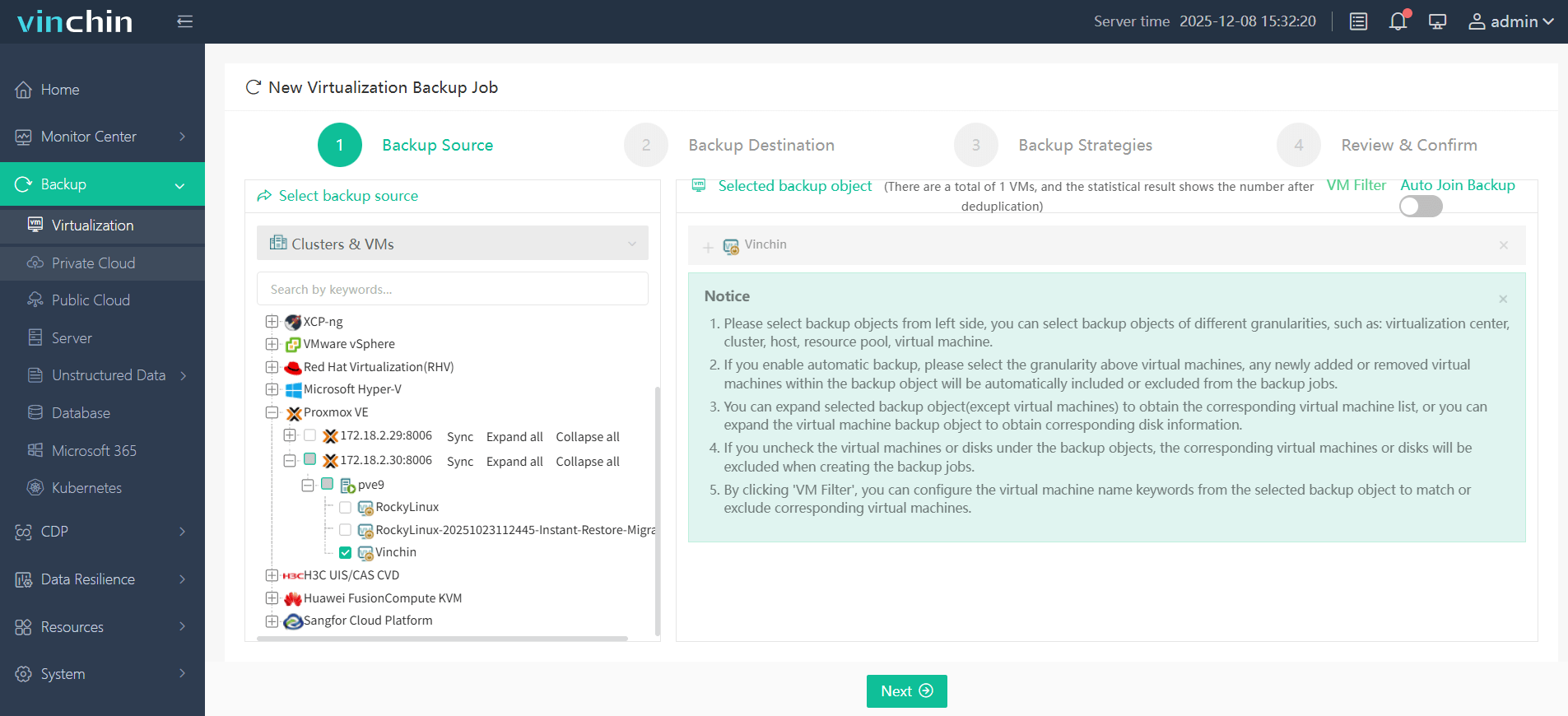
Step 1: Select the Proxmox VM to back up
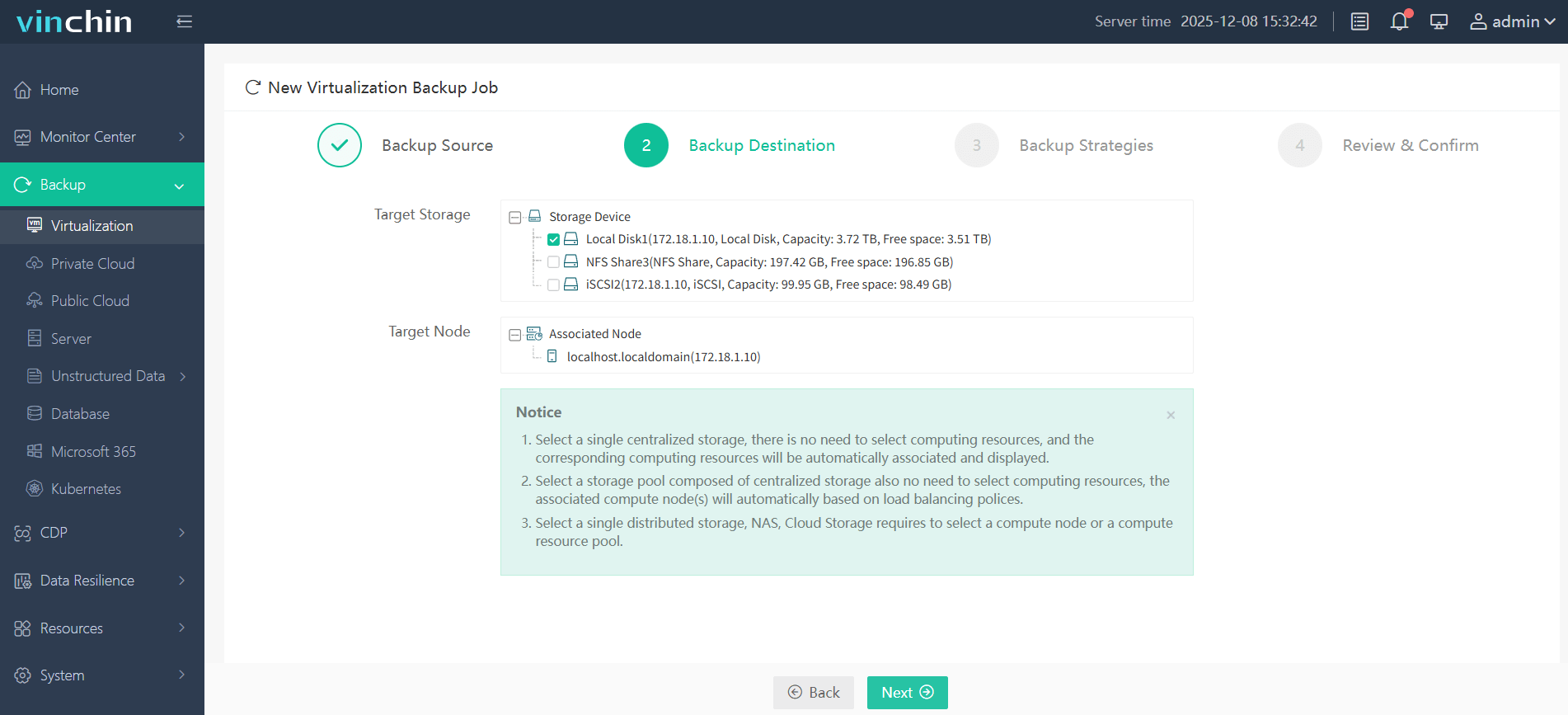
Step 2: Choose the backup storage
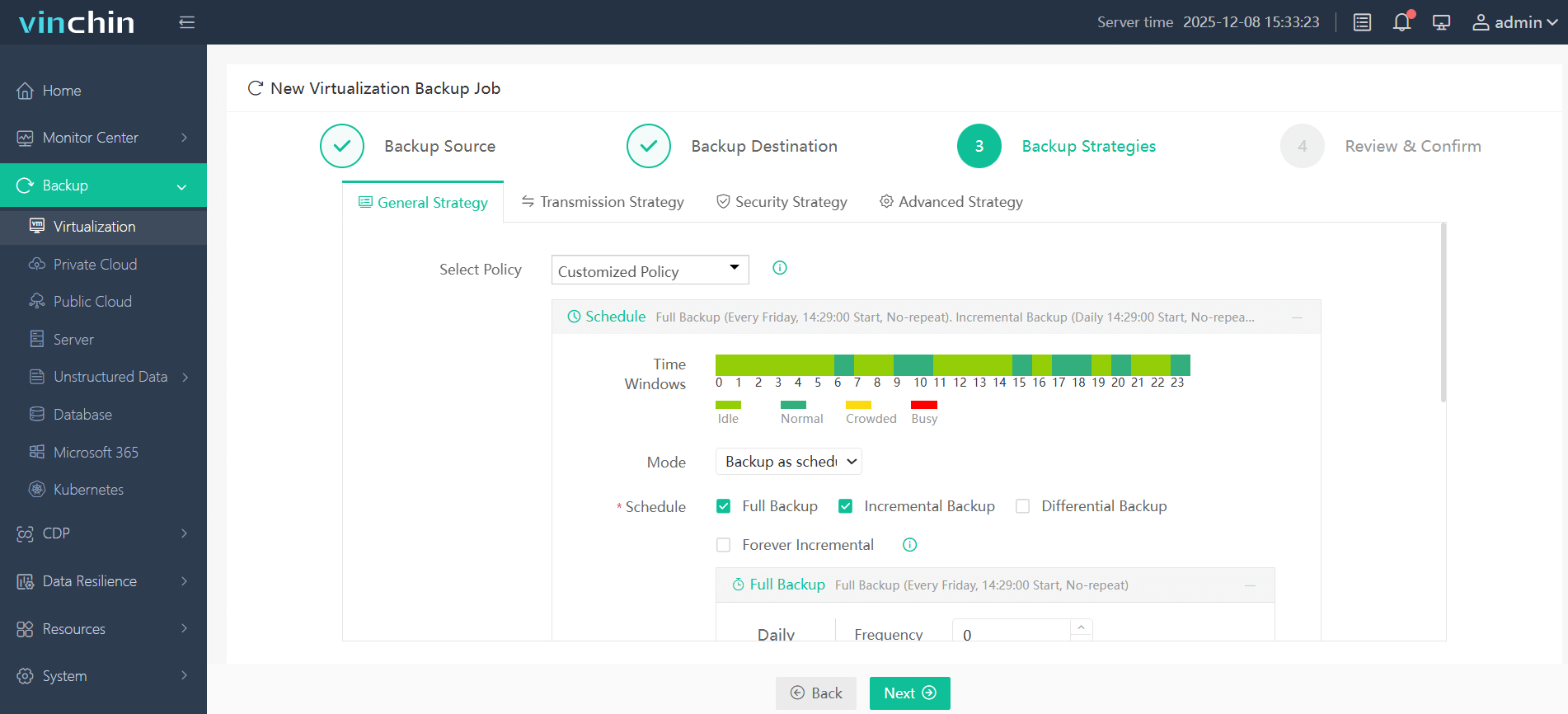
Step 3: Configure the backup strategy
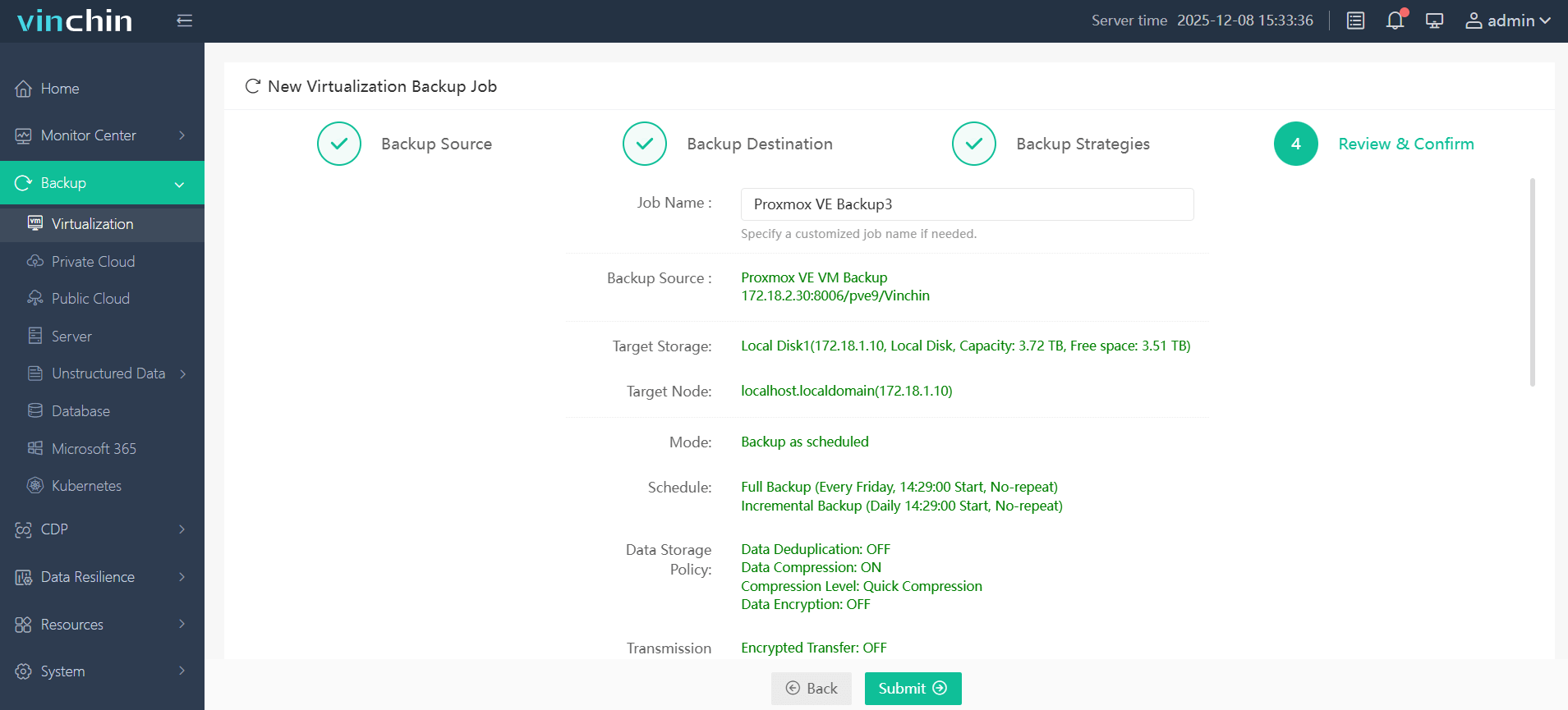
Step 4: Submit the job
Thousands worldwide rely on Vinchin Backup & Recovery's proven track record and top ratings, try its full-featured 60-day free trial now and experience trusted enterprise-grade data protection firsthand.
Best Proxmox Backup Software FAQs
Q1: What risks do enterprises face without regular Proxmox backups?
Enterprises risk losing vital data permanently during system failures or attacks if they lack recent backups in place, this results in prolonged downtime where key services stay offline until rebuilt manually, a process prone to errors and exposes them further legal penalties due non-compliance with regulations demanding timely restoration capabilities (NIST SP 800-34).
Q2: How often should enterprise-level backups be performed?
Backups should occur frequently based on workload importance, typically daily at minimum but leveraging incremental methods such as change block tracking (CBT) allows multiple safe points per day without straining resources since only changed blocks transfer each cycle (Proxmox Incremental Backups Guide), reducing both window length required plus storage consumed compared traditional full-image approaches.
Q3: Can backups help with ransomware recovery in Proxmox?
Yes, maintaining clean immutable copies enables swift restoration following infection so ransom payments become unnecessary, with additional safeguards provided storing some copies offsite/cloud-based locations inaccessible attackers even compromise production network segments locally (CISA Ransomware Guidance).
Conclusion
Backing up Proxmox protects enterprise operations against disruption from failures or attacks, without proven recoveries ready at hand business continuity remains vulnerable.