Introduction
Enterprises depend on digital systems for daily operations. Data loss from ransomware, hardware failure, or human error can halt business activities. Hyper-V virtual environments host critical workloads for many organizations. Backing up these environments is not just a best practice, it is essential for survival. Industry standards such as ISO/IEC 27001 highlight robust data protection as a core requirement for information security management. Reliable backup ensures that companies can recover quickly from disruptions and meet regulatory demands.
The Importance of Enterprise Business Continuity
Business continuity means keeping your organization running during unexpected events. A solid plan protects access to applications and data even when disaster strikes. Enterprises rely on Hyper-V to run vital services, any interruption can cause lost revenue, damaged reputation, or legal trouble. Effective continuity planning reduces risk by enabling fast recovery from outages or cyberattacks. This approach supports customer trust and helps meet contracts and laws while building long-term resilience.
● Continuous Access to Critical Systems keeps operations moving even if part of your infrastructure fails. Downtime leads to missed deadlines and unhappy customers.
● Regulatory Compliance requires proof that you protect sensitive data against loss or theft. Many regulations, such as GDPR or HIPAA, demand regular backups as part of their requirements.
● Customer Trust depends on your ability to deliver consistent service without interruption. Quick recovery after an incident shows reliability.
● Financial Stability comes from minimizing losses due to downtime or penalties for non-compliance.
Why This Matters for Enterprise Operations
Hyper-V hosts many virtual machines (VMs) that support key business functions like databases, email servers, and ERP systems. If these VMs are not backed up properly, one hardware failure or ransomware attack could take down dozens of services at once. The impact spreads fast, productivity drops, customers cannot access services, and compliance violations may occur (N-able: Hyper-V Backup Software). Proactive backup strategies reduce these risks by making sure you can restore systems quickly.
● Minimizing Downtime allows teams to resume work faster after incidents by restoring VMs instead of rebuilding them from scratch.
● Protecting Against Data Loss ensures that accidental deletions or corruption do not become permanent setbacks.
● Meeting Audit Requirements provides evidence that your company follows industry standards for disaster recovery planning.
● Reducing Recovery Costs saves money by avoiding expensive manual fixes or third-party intervention during crises.
What Makes a Good Hyper-V Backup Strategy?
A strong Hyper-V backup strategy combines automation with reliable recovery options across all virtual machines in your environment. The goal is simple: keep downtime low while ensuring every VM's data stays safe under any condition (Vinchin Hyper-V Backup Best Practices). Secure storage methods and scalable design help defend against cyber threats or equipment failures without slowing daily operations.
A good strategy includes several features designed for enterprise needs:
Regular automated backups ensure no recent changes are lost if disaster strikes overnight or during weekends when staff may be unavailable. Application-aware backups use Microsoft's Volume Shadow Copy Service (VSS) technology so databases like SQL Server remain consistent, even if users are working during backup windows, eliminating post-recovery corruption risks.
Host-level agentless backups capture both VM data and configuration settings at once through the main server interface rather than installing software inside each guest OS, this simplifies management across large deployments while reducing resource overhead on production servers.
Encryption secures backup files both in transit over networks and at rest within storage devices so unauthorized users cannot access sensitive information even if physical drives are stolen or compromised by malware attacks such as ransomware (NIST Guide to Storage Encryption).
Backup validation involves regularly testing restores from saved copies, not just assuming they work, to catch problems before real emergencies occur, this step builds confidence among IT teams responsible for uptime guarantees.
Offsite storage adds another layer of safety by sending copies off-premises via secure cloud connections or remote datacenters, this guards against site-wide disasters like fires or floods which might destroy local infrastructure entirely.
Scalability matters because enterprise environments grow over time, your solution should handle more VMs easily without requiring major upgrades every year as new projects launch across departments.
Vinchin Backup & Recovery: Enterprise-Grade Protection for Hyper-V
For enterprises seeking robust protection in complex virtualized environments, Vinchin Backup & Recovery stands out as a professional solution supporting most mainstream virtualization platforms, including full compatibility with Hyper‑V alongside VMware, Proxmox, oVirt, OLVM, RHV, XCP-ng, XenServer, OpenStack, ZStack and more (15+ total). As an enterprise-level VM backup toolset tailored for diverse infrastructures, it delivers advanced features such as instant recovery (not available on Hyper‑V), LAN-free backup (unsupported on Hyper‑V), SpeedKit acceleration (supported), plus universal essentials like incremental backup, granular restore capabilities, scheduled jobs, deduplication/compression technologies and encrypted transmission/storage options, all designed to maximize efficiency while minimizing risk exposure across large-scale deployments.
Among its most relevant features are incremental backup strategies that optimize storage use, granular restore allowing file-level recoveries within VMs, SpeedKit acceleration boosting transfer speeds on supported platforms, comprehensive scheduling automating routine protection tasks, and built-in encryption safeguarding sensitive business data throughout the process, together ensuring rapid recovery times with minimal operational disruption.
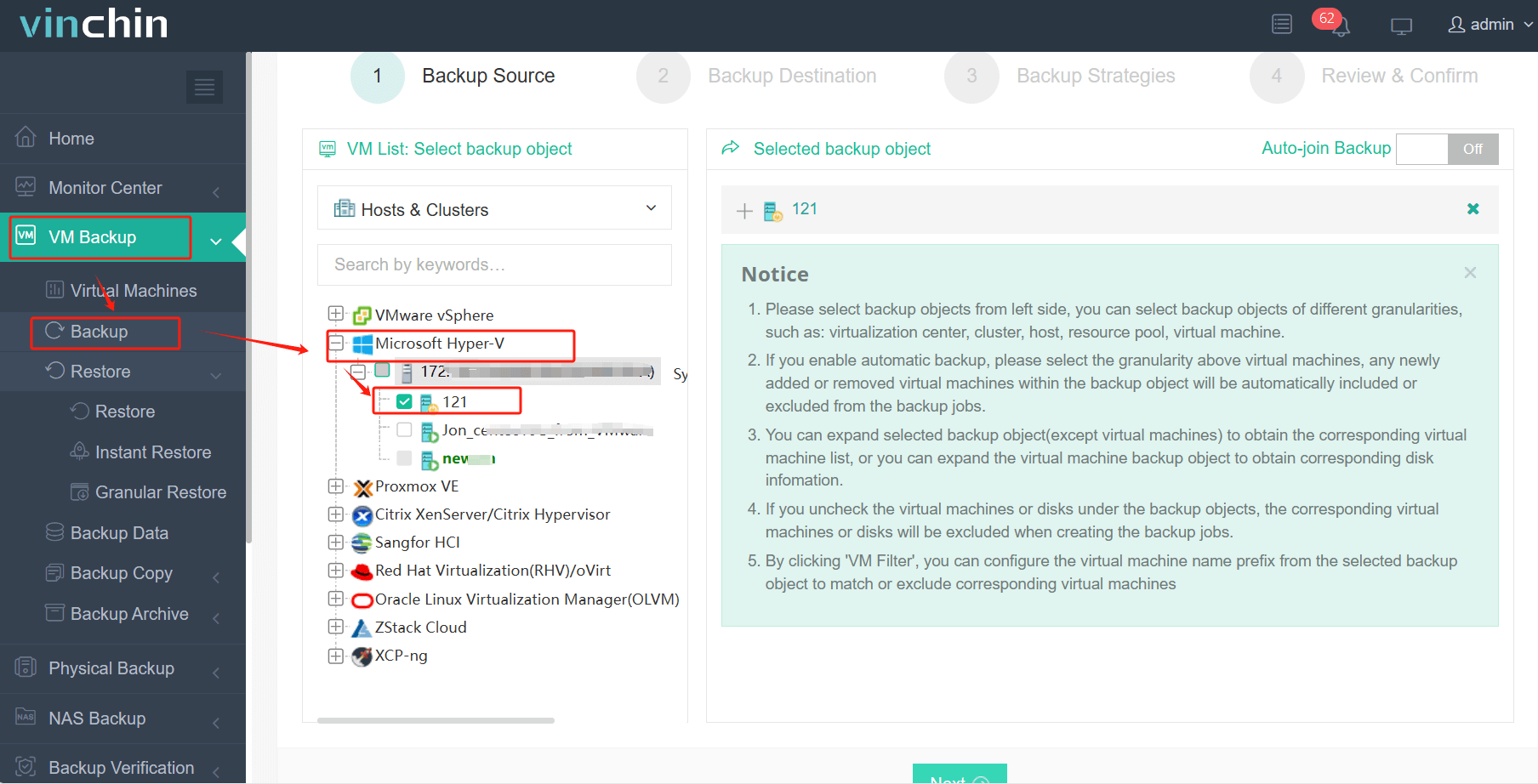
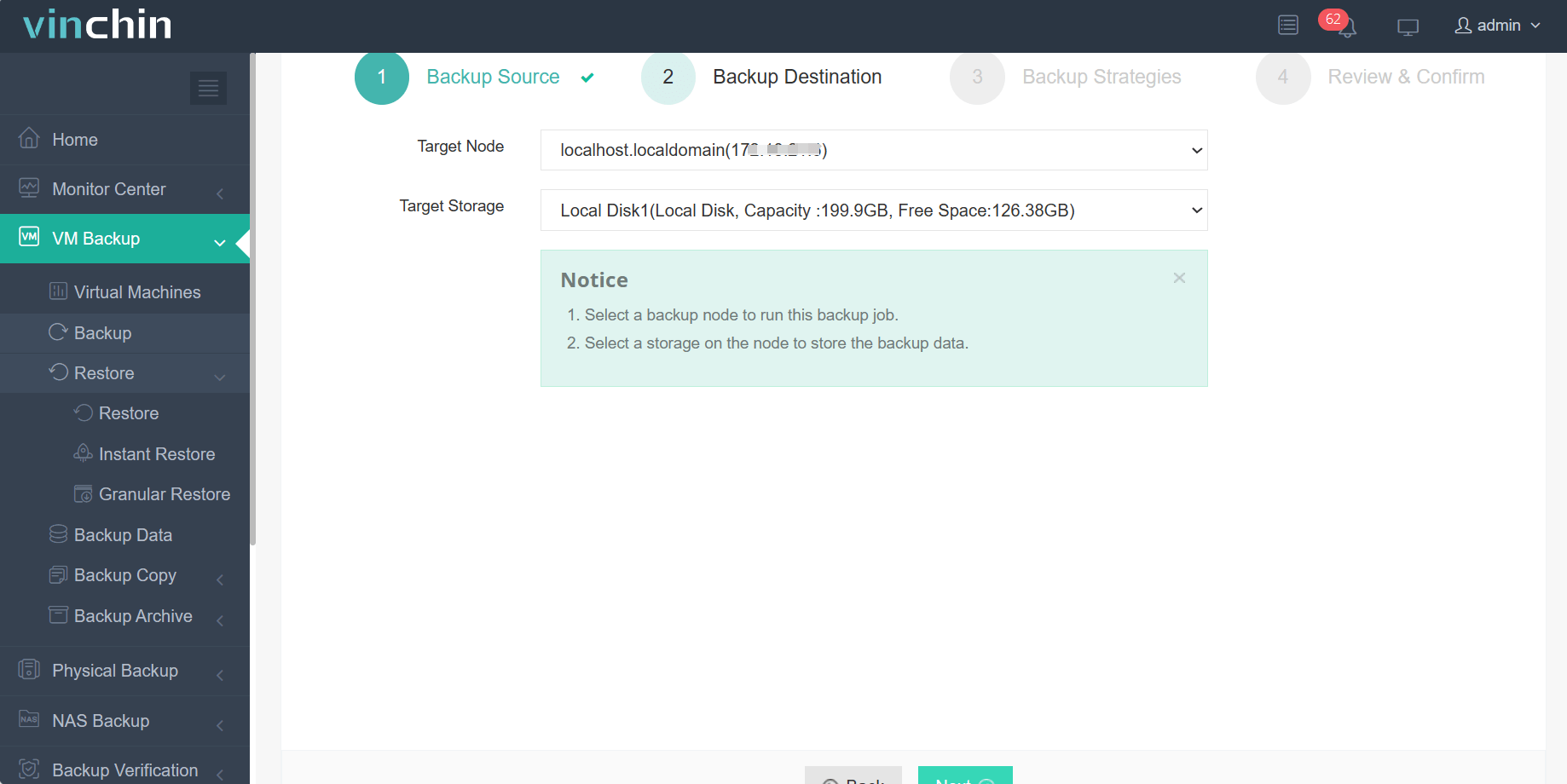
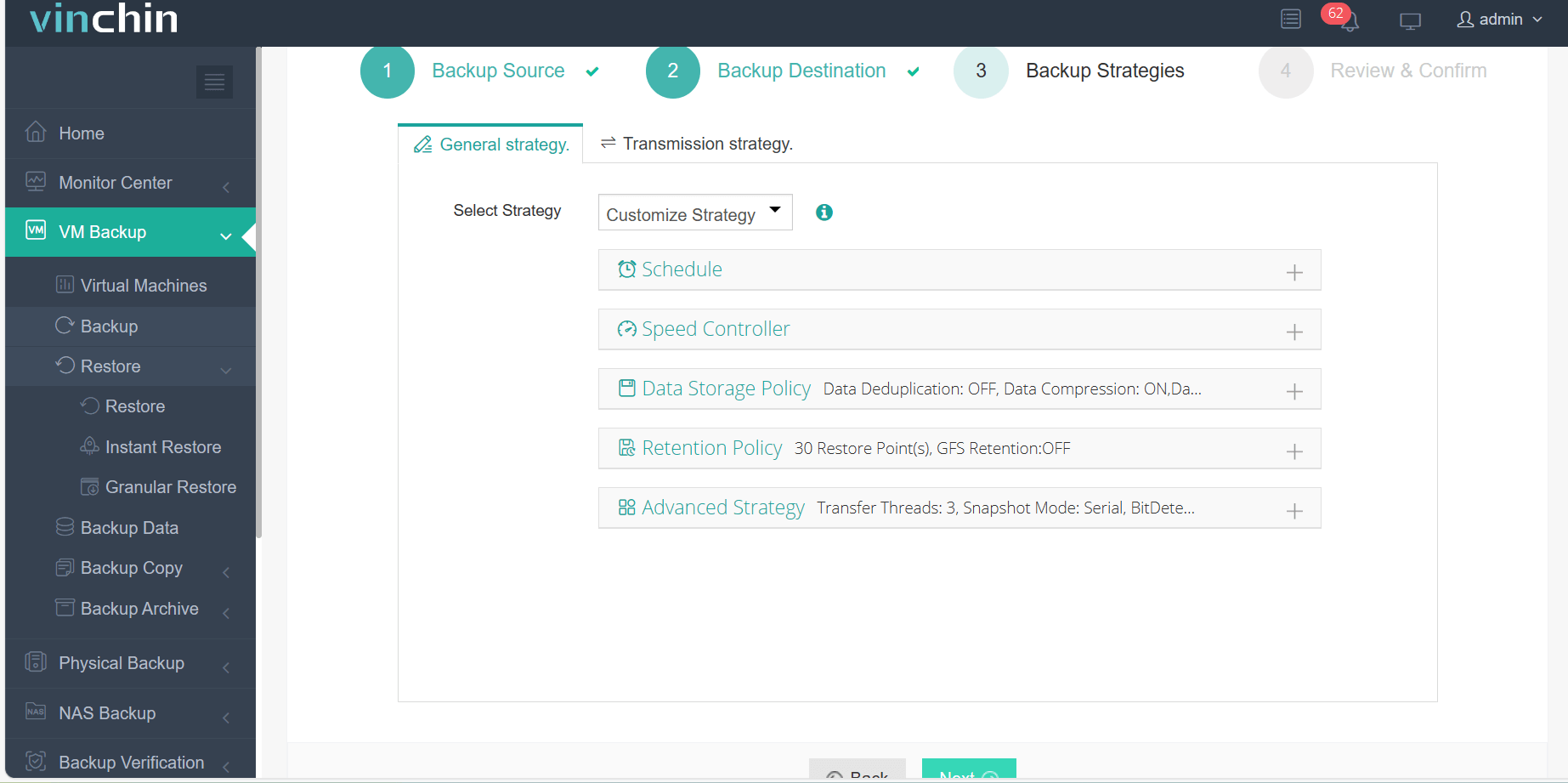
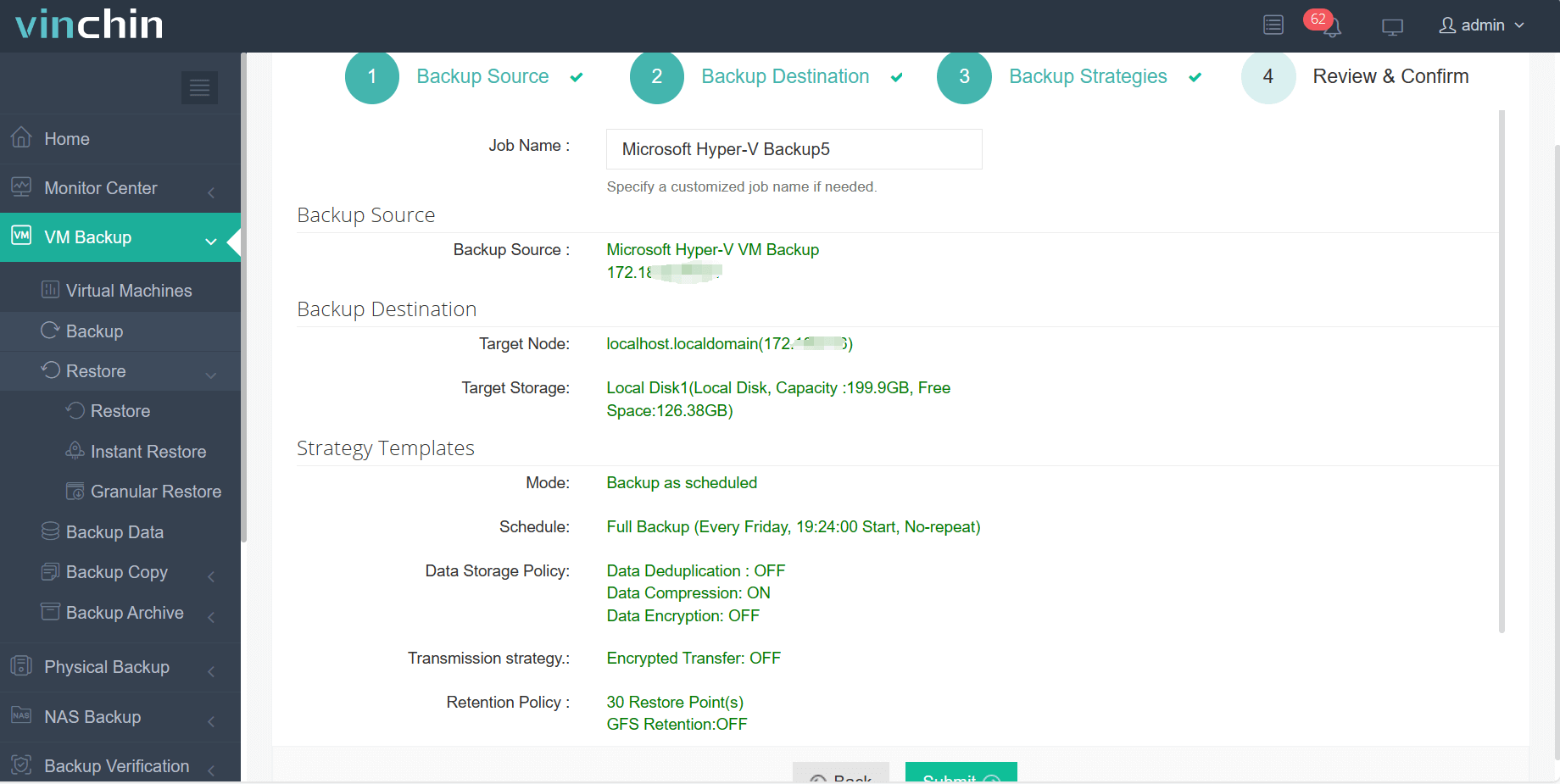
The intuitive Vinchin Backup & Recovery web console streamlines workflow into four easy steps:
Step 1: Select the Hyper‑V VM you want to back up
Step 2: Choose the backup storage
Step 3: Configure the backup strategy, such as the schedule, data storage policy, and retention policy
Step 4: Submit the job, wnating for the backup process
Recognized globally with top ratings among enterprise users worldwide, and trusted by thousands of organizations, Vinchin Backup & Recovery offers a 60-day full-featured free trial so you can experience its powerful capabilities firsthand.
Best Hyper-V Backup Software FAQs
Q1: What should enterprises prioritize when choosing Hyper-V backup software?
Reliability of restores ranks highest since failed recoveries mean longer downtime, strong security controls guard against ransomware threats, scalability supports growing numbers of VMs, ease of management reduces training costs, all are key priorities when evaluating solutions built for enterprise use cases.
Q2: How does regular Hyper-V backup support compliance?
Frequent backups create audit trails showing adherence to regulations such as GDPR (Europe), HIPAA (healthcare), PCI-DSS (payment processing), SOX (finance), among others, which often mandate strict controls around data retention periods and disaster recovery readiness documentation during audits or investigations by authorities.
Q3: Can backups protect against both accidental deletion and cyberattacks?
Yes, robust backup solutions allow quick restoration following accidental file deletions by employees as well as malicious attacks like ransomware infections where original files become encrypted beyond repair.
Conclusion
Backing up Hyper-V protects enterprise operations from costly disruptions caused by system failures or cyber threats, and ensures rapid recovery so business never stops moving forward.