Introduction
Modern enterprises run their most important workloads on virtual infrastructure like VMware vSphere. Data loss or downtime can disrupt business operations and cause lasting harm. Backing up VMware environments is essential for meeting strict operational goals and compliance standards such as ISO/IEC 27001 (ISO.org). Reliable backup ensures that businesses can recover quickly from unexpected events, whether it's hardware failure, cyberattack, or human error.
VMware platforms power everything from customer-facing services to internal databases and analytics tools. If these systems go offline without a recovery plan in place, organizations risk losing revenue and damaging their reputation. Industry leaders recognize that robust data protection is not just an IT concern, it's a core part of business continuity planning.
The Importance of Enterprise Business Continuity
Business continuity means keeping vital operations running despite disruptions, from natural disasters to cyber incidents or accidental deletions. Even brief outages can have major consequences for enterprises.
● Financial Impact: Downtime leads directly to lost sales, missed opportunities, and increased costs for remediation or overtime work. According to IBM's Cost of a Data Breach Report (IBM Security), the average cost per hour of downtime can reach hundreds of thousands of dollars in large organizations.
● Reputation Damage: Customers expect constant availability from enterprise services. When systems fail, even briefly, trust erodes fast. News about outages spreads quickly through social media and industry channels, making recovery even harder.
● Regulatory Penalties: Many industries face strict rules around data protection and uptime (e.g., healthcare HIPAA requirements or financial sector SLAs). Failing to meet these standards can result in fines or legal action against the organization.
● Operational Disruption: Internal teams depend on IT systems for daily tasks, sales processing, inventory management, HR functions, all rely on continuous access to applications hosted on VMware infrastructure.
A strong business continuity plan reduces vulnerability by ensuring rapid recovery from any disruption. This resilience helps organizations adapt quickly when challenges arise so they can keep serving customers without missing a beat.
Why This Matters for Enterprise Operations
A reliable backup strategy protects more than just files, it safeguards entire workflows across departments and locations.
● Extended Outages Risk: Without proper backups for VMware environments, a single server crash or ransomware attack could take down dozens or hundreds of virtual machines at once. This means critical applications like ERP systems or customer portals may be unavailable until data is restored from scratch.
● Revenue Losses: Every minute that key services are offline translates into lost transactions and dissatisfied clients who may turn elsewhere if problems persist.
● Missed SLAs: Enterprises often promise high service levels (99%+ uptime) in contracts with partners or customers, failing to meet these agreements due to unplanned downtime exposes companies to penalties or lost business opportunities.
● Legal Liabilities: In regulated sectors like finance or healthcare, inability to restore data promptly after an incident could trigger audits or worse regulatory sanctions that threaten long-term viability.
Comprehensive VMware backup minimizes these risks by enabling quick restoration of mission-critical workloads so operations continue smoothly even during crises (VMware Backup Best Practices).
What Makes a Good VMware Backup Strategy?
A well-designed backup strategy ensures consistent protection for every virtual machine while supporting fast recovery at scale even as your environment grows more complex over time.
Effective solutions should deliver:
Scalability: The ability to protect hundreds or thousands of VMs as your organization expands its digital footprint across multiple sites or clouds is crucial for future-proofing your investment.
Automation: Automated scheduling reduces manual effort while policy-driven backups ensure new VMs are always included without extra configuration steps.
Granular Recovery: Restore full VMs after disaster strikes, or recover individual files when users accidentally delete important documents.
Centralized Management: A unified dashboard lets administrators monitor jobs across all clusters and sites while generating reports needed for audits.
Deduplication & Compression: These technologies reduce storage needs by eliminating duplicate data blocks before writing backups saving money while speeding up transfers.
Encryption (at rest & in transit): Protects sensitive information against unauthorized access whether stored onsite or sent offsite, this is especially important for compliance with regulations like GDPR.
Cloud Integration & Offsite Replication: Support hybrid architectures by sending copies offsite automatically, for example into AWS S3 buckets to guard against site-wide disasters such as fire or flood (Firewall.cx).
Role-Based Access Control (RBAC): Restricts who can manage backups based on job function, this limits insider threats while simplifying compliance reporting.
Application-Aware Backups: Capture consistent snapshots even when databases like SQL Server are running live transactions so restores don't require lengthy repairs afterward.
Regular Testing & Reporting: Built-in verification routines confirm that backups are usable before disaster strikes, detailed logs make it easy to prove compliance during audits.
These features combine into an effective safety net that keeps enterprise operations resilient no matter what happens next in your IT landscape.
Vinchin Backup & Recovery: Enterprise-Grade Protection for VMware
For enterprises seeking robust protection of their VMware environments, Vinchin Backup & Recovery stands out as a professional solution designed specifically for large-scale virtual machine backup across 15+ mainstream virtualization platforms, including comprehensive support for VMware vSphere alongside Hyper-V, Proxmox, oVirt, OLVM, RHV, XCP-ng, XenServer, OpenStack, ZStack and others. Vinchin Backup & Recovery offers advanced features tailored to enterprise needs such as quiesced snapshot capability (for application-consistent backups), HotAdd transport mode (for efficient VM data transfer), CBT-based incremental backup (to minimize backup windows), LAN-free backup options (for faster local transfers), and instant recovery functionality (enabling near-zero downtime). Additional highlights include deduplication/compression technology, granular restore options, cloud/tape archiving support, V2V migration capabilities, scheduled policies with GFS retention strategie, and strong encryption throughout the process to maximize efficiency while reducing risk across diverse infrastructures.
The intuitive web console makes protecting your environment straightforward:
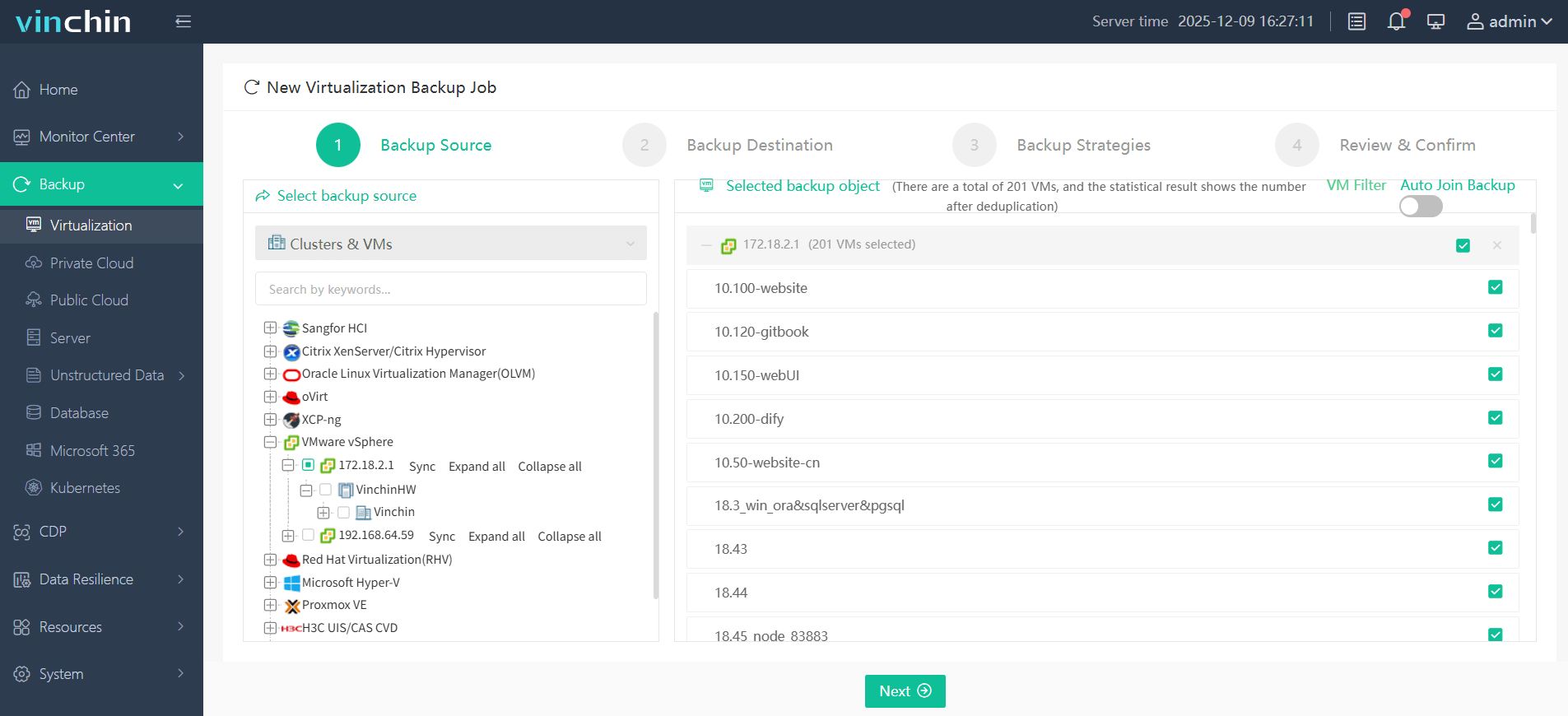
Step 1. Select the VMware VM you wish to back up
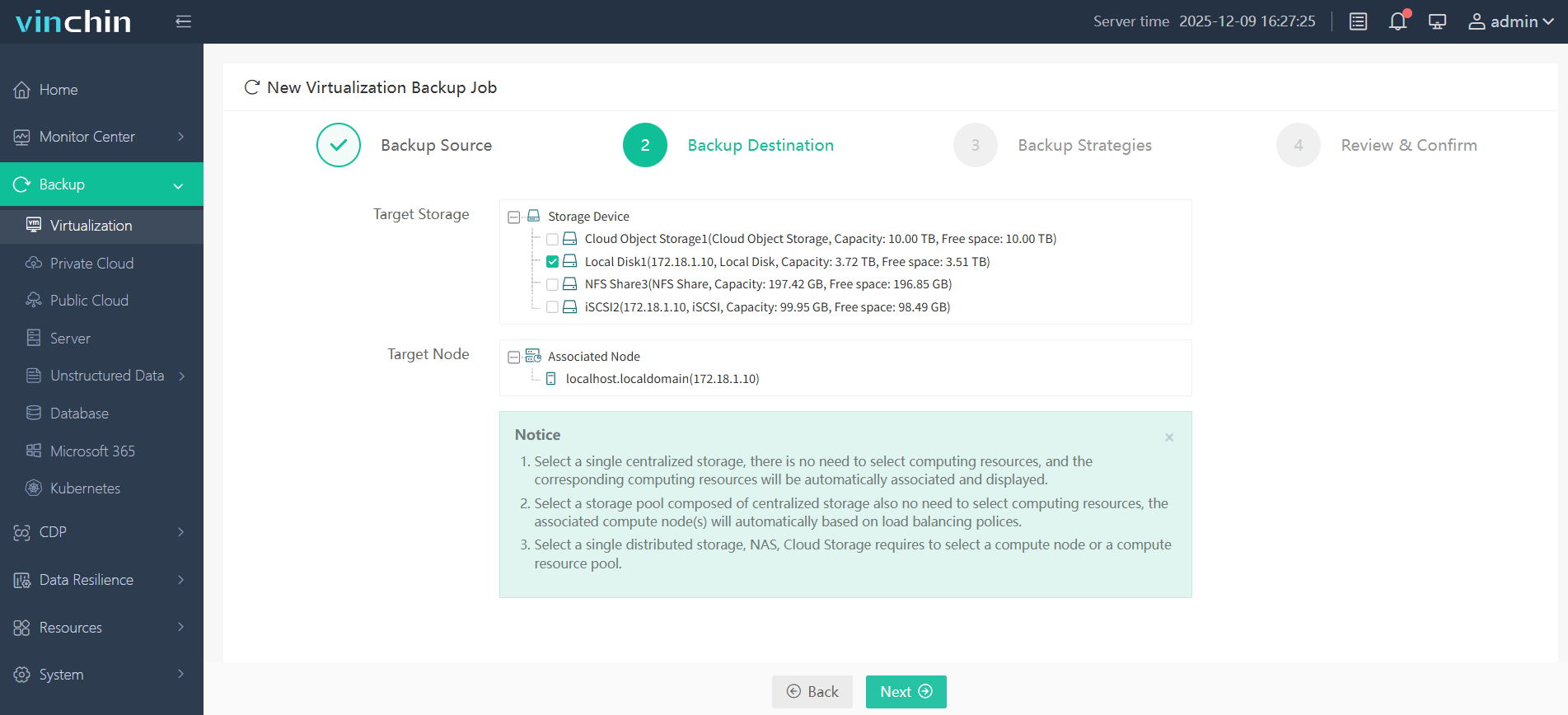
Step 2. Choose the appropriate backup storage
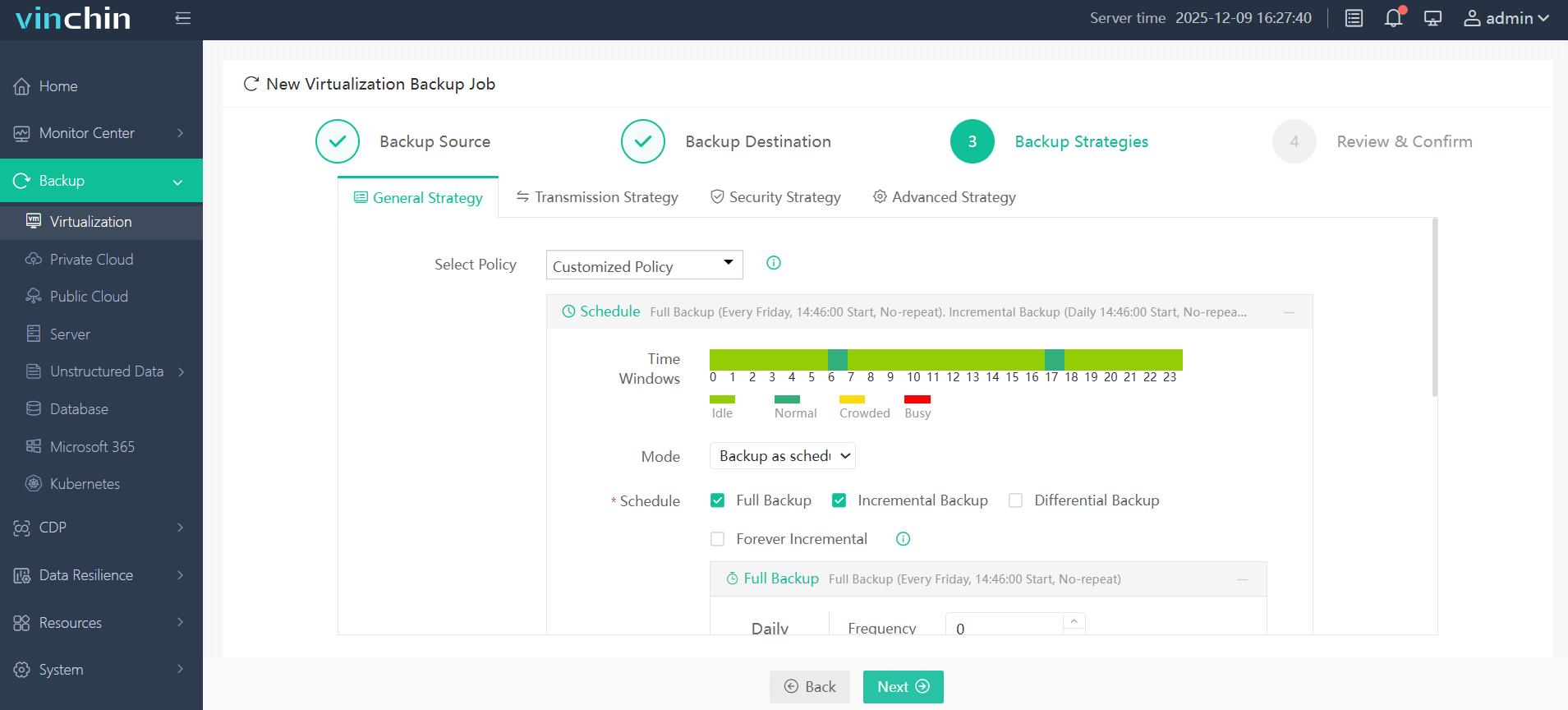
Step 3. Configure your desired backup strategy
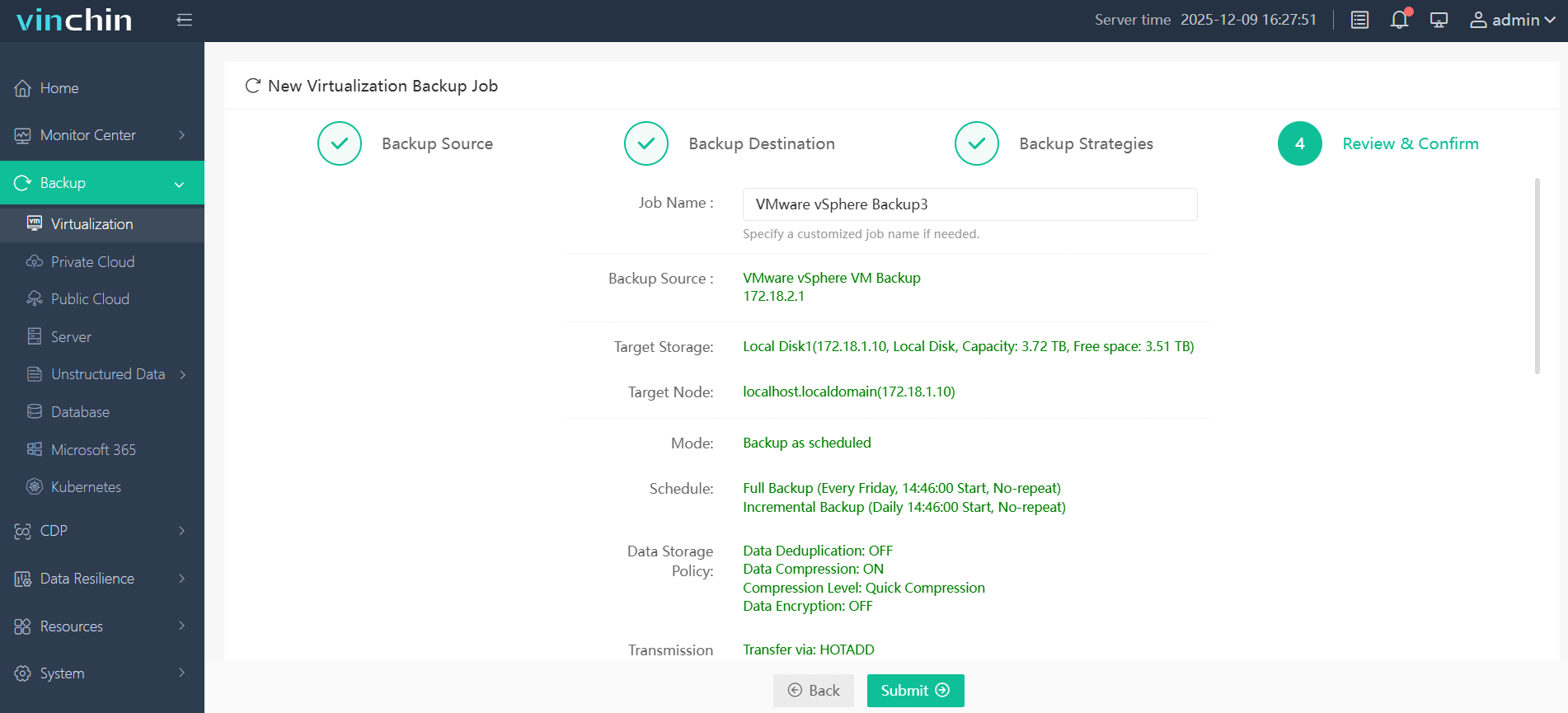
Step 4. Submit the job with one click
Recognized globally by thousands of enterprises, with top ratings in independent reviews, Vinchin Backup & Recovery offers a fully featured 60-day free trial so you can experience its reliability firsthand.
Best VMware Backup Software FAQs
Q1: What risks do enterprises face without dedicated VMware backups?
Unprotected environments risk prolonged downtime from failures or attacks, leading directly to financial loss and reputational damage due to missed RTO/RPO targets common in enterprise settings (Datafloq).
Q2: How does backup frequency affect recovery objectives?
Higher frequency enables tighter Recovery Point Objectives (RPOs), reducing potential data loss during incidents, true continuous data protection captures changes nearly instantly rather than every few minutes, a critical distinction when minimizing lost work matters most.
Q3: Is encrypted backup necessary for compliance?
Yes, encryption helps meet regulatory requirements by protecting sensitive data both in transit and at rest, and also mitigates insider threats beyond simple compliance checkboxes required by frameworks like HIPAA/GDPR (StoneFly).
Conclusion
Backing up VMware keeps enterprise operations safe from costly downtime and regulatory risks, Vinchin delivers proven reliability trusted worldwide.









