Introduction
Enterprises rely on virtualized platforms like XCP-ng to run vital workloads. Outages, cyberattacks, or data loss can stop operations and cause major financial damage. Industry standards highlight robust backup as key for business continuity. Reliable backups help organizations recover quickly from disruptions and meet regulatory demands. This post explains why backing up XCP-ng is essential for enterprise business continuity by examining risks of data loss, core requirements for protection strategies, and effective solutions.
The Importance of Enterprise Business Continuity
Business continuity means keeping critical services running despite unexpected events. Enterprises must ensure access to applications and data at all times to protect productivity, customer trust, and legal compliance. Even brief interruptions can have far-reaching effects.
● Financial Impact of Downtime:
The cost of IT downtime varies but can be devastating. One hour of downtime can cost from $300,000 up to over $5 million depending on company size and industry. Gartner also reports an average cost around $5,600 per minute. These losses include lost revenue, missed deadlines, SLA penalties, overtime pay for recovery efforts, and sometimes even lost customers.
● Regulatory Compliance Requirements:
Many industries face strict rules about data availability and retention. Regulations such as GDPR in Europe require organizations to ensure ongoing confidentiality and availability of systems processing personal data. Healthcare providers must comply with HIPAA in the US, payment processors follow PCI-DSS standards worldwide. Failure to meet these obligations due to unplanned outages or lost records can result in heavy fines or legal action.
● Reputation Management:
A single incident causing prolonged downtime or lost customer information can erode years of built-up trust. News about breaches or service failures spreads fast through social media and news outlets, potentially damaging brand reputation beyond repair.
Data forms the backbone of modern enterprises. Losing access disrupts workflows across departments, from sales teams unable to process orders to support staff locked out of ticketing systems, leading to delays that ripple throughout the organization.
Why This Matters for Enterprise Operations
Protecting XCP-ng environments with reliable backups shields enterprises from extended outages after incidents like ransomware attacks or hardware failures. Without proper backups in place, restoring operations may take hours or even days, leaving businesses exposed to mounting losses.
● Minimizing Recovery Time Objectives (RTO):
A strong backup strategy reduces RTO, the time needed to restore normal operations after disruption, to minutes instead of hours or days. For example: if ransomware encrypts your VMs but you have recent backups stored offsite using immutable storage technology, you can restore clean copies quickly without paying ransoms or rebuilding systems from scratch.
● Reducing Data Loss (RPO):
Frequent backups lower your Recovery Point Objective (RPO), the maximum acceptable amount of data loss measured in time before an incident occurs (NIST SP 800-34 Rev1). If you back up every hour instead of once daily, you risk losing less work during a failure event.
● Meeting Service-Level Agreements:
Many enterprises operate under SLAs promising high uptime rates (often "five nines" or 99.999%). Failing these commitments due to slow recovery exposes companies not just financially but contractually, sometimes triggering penalty clauses worth millions.
Effective backup is more than insurance, it's a lifeline that keeps businesses moving forward when disaster strikes.
What Makes a Good XCP-ng Backup Strategy?
A solid backup strategy protects all workloads consistently while enabling rapid recovery at scale as environments grow larger over time. Enterprises need solutions designed around reliability, security controls, compliance support, and operational simplicity.
A good approach combines frequent automated backups with secure storage practices based on proven frameworks like the 3-2-1 rule: keep three copies of your data on two different media types with one copy stored offsite or offline for resilience against local disasters.
● Reliable & Frequent Backups:
Backups should run automatically at regular intervals, daily at minimum, hourly for mission-critical workloads, to capture changes promptly without manual intervention. Incremental backup methods such as Changed Block Tracking (CBT) only save new changes since last backup session, reducing both storage needs and network load while speeding up processes.
● Strong Security Controls:
Backup files are prime targets during cyberattacks because attackers know they're often used for recovery after ransomware hits. Encrypting backups both in transit and at rest prevents unauthorized access, even if someone steals physical disks or intercepts network traffic during replication jobs. Immutability features lock down completed backups so malware cannot modify or delete them until their retention period expires, a crucial defense against modern ransomware strains that target backup repositories directly.
● Compliance Support:
Backup solutions should offer detailed reporting tools showing who accessed what data when, helpful during audits required by GDPR Article 32(2), HIPAA Security Rule §164.308(a)(7), PCI DSS Requirement 10, and flexible retention policies matching legal mandates across jurisdictions (GDPR guidance).
● Centralized Management & Automation:
Managing dozens or hundreds, of VMs manually increases risk of human error leading to missed jobs or incomplete restores. A centralized console lets administrators schedule tasks across clusters from one dashboard, automation ensures consistency while freeing IT staff for higher-value projects rather than routine maintenance chores.
By following these principles, and regularly testing restores you build confidence that your XCP-ng environment remains resilient no matter what happens next.
Vinchin Backup & Recovery: Enterprise-Grade Protection for XCP-ng
For organizations running critical workloads on XCP-ng virtualization platforms, comprehensive VM protection is essential. Vinchin Backup & Recovery delivers professional enterprise-level virtual machine backup supporting over fifteen mainstream virtualization environments, including full compatibility with XCP-ng alongside VMware, Hyper-V, Proxmox VE, oVirt, OLVM, RHV, XenServer, OpenStack and more, for broad infrastructure coverage.
Key features offered by Vinchin Backup & Recovery include agentless VM protection tailored for XCP-ng environments, LAN-free backup options, instant recovery capabilities, granular restore functions, and advanced scheduling with flexible retention policies, all designed to maximize uptime while minimizing administrative effort.
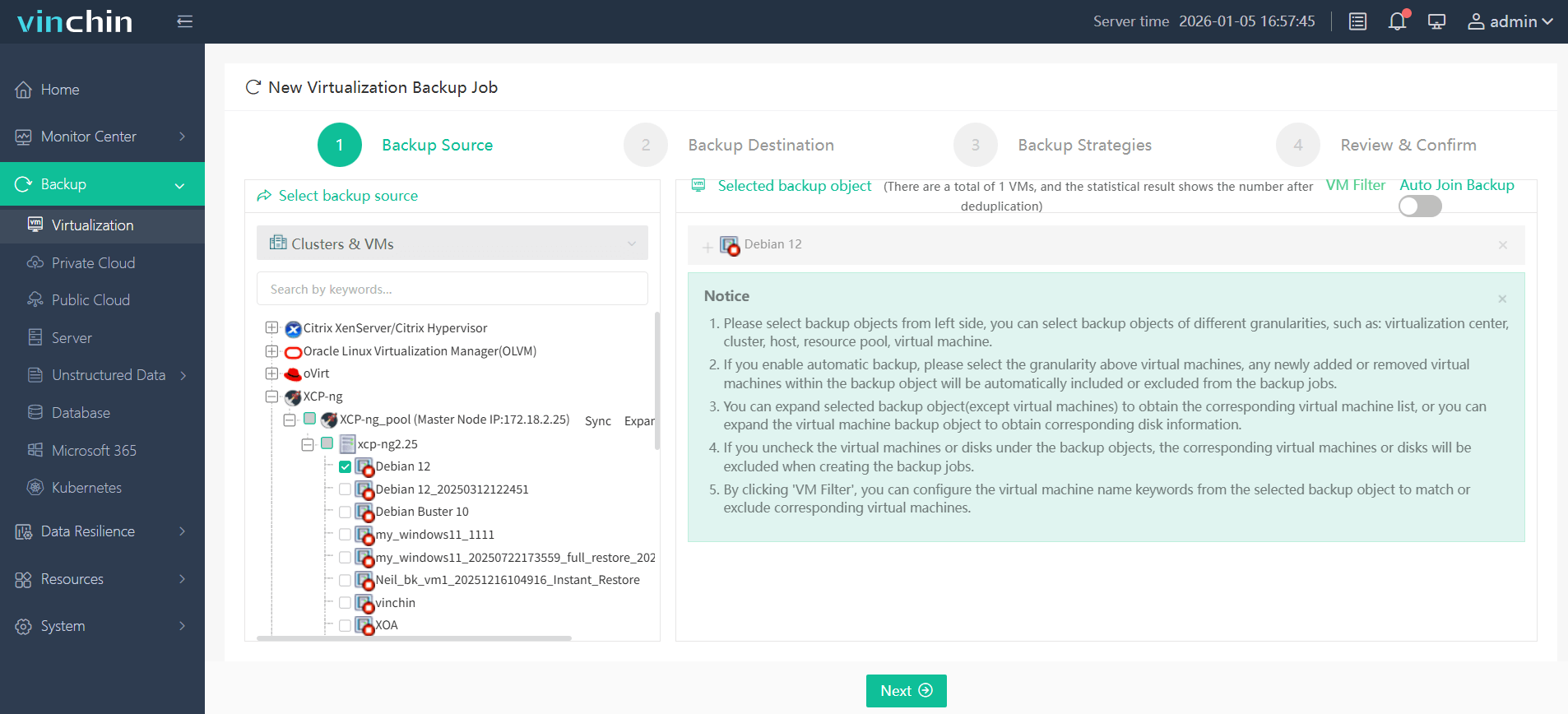
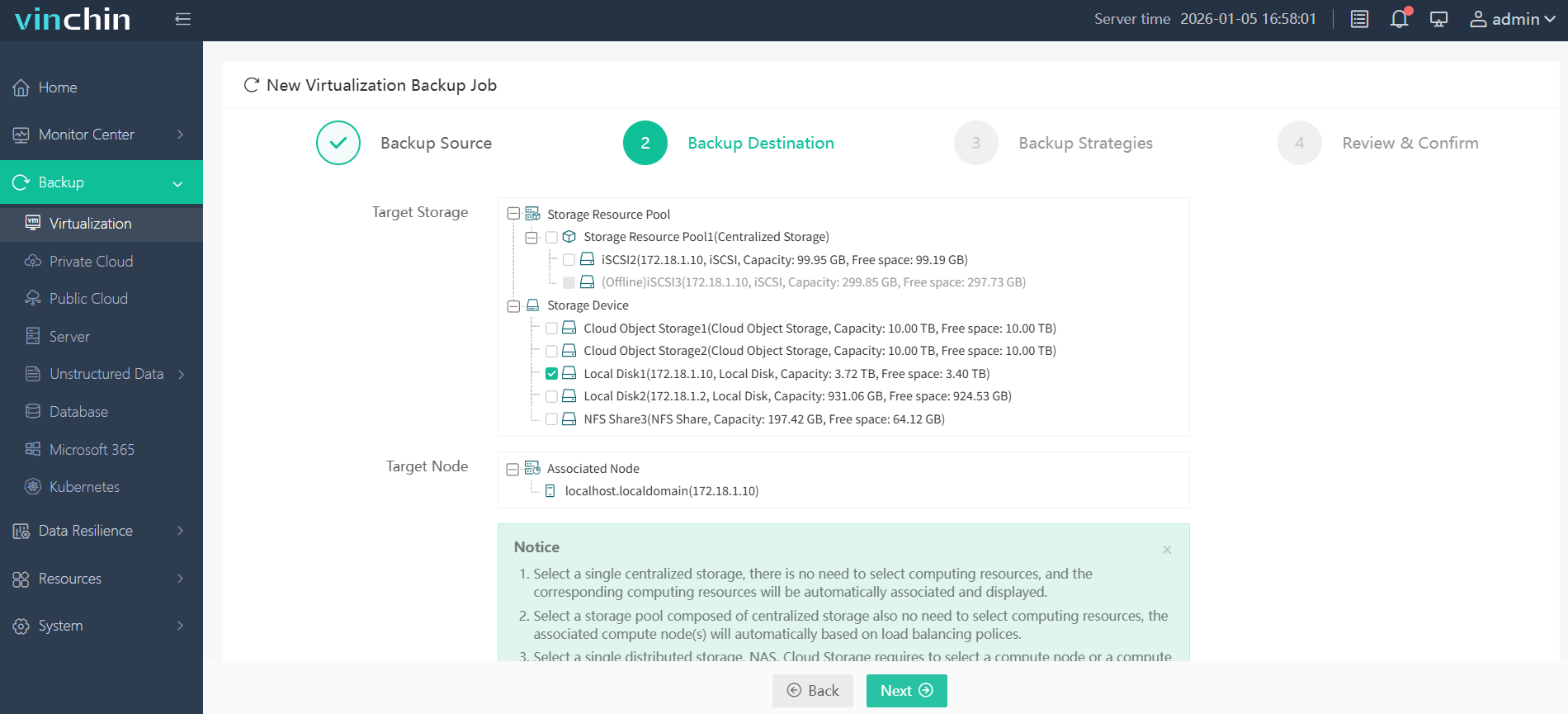
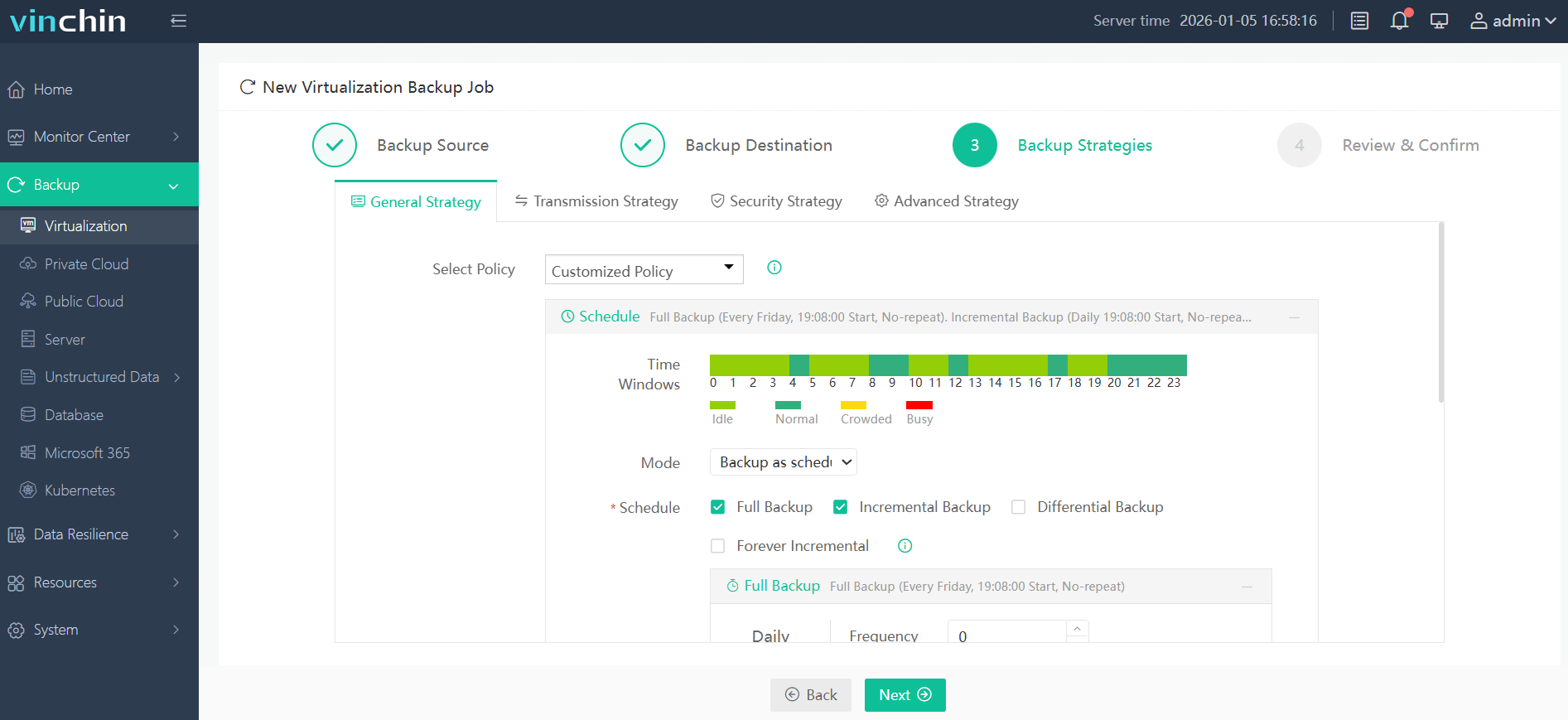
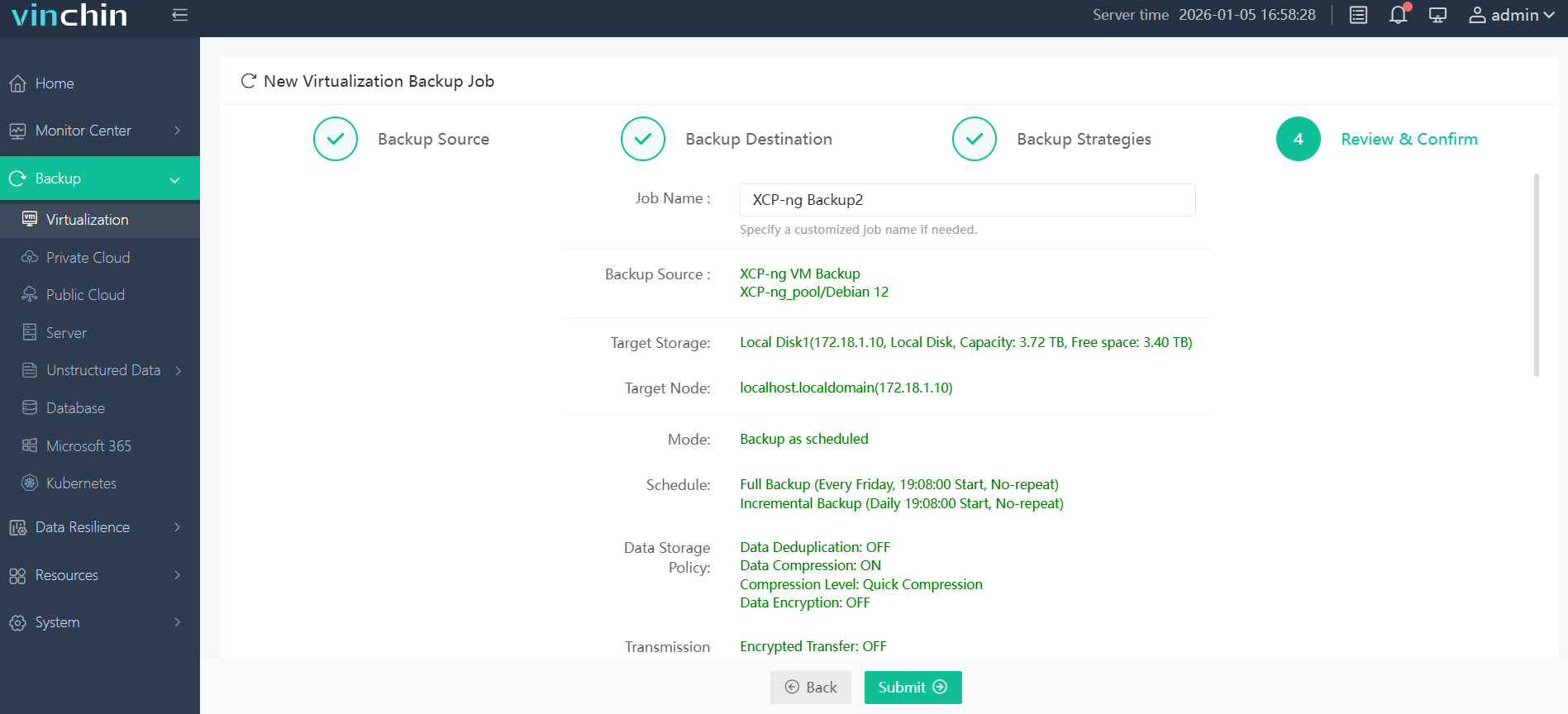
With its intuitive web console interface, backing up an XCP-ng VM using Vinchin Backup & Recovery involves four straightforward steps:
Step 1: Select the XCP-ng VM to back up
Step 2: Choose the backup storage
Step 3: Configure the backup strategy
Step 4: Submit the job
Thousands of global enterprises trust Vinchin Backup & Recovery's top-rated solution, start your own fully featured free trial today!
Best XCP-ng Backup Software FAQs
Q1: What are key risks if we don't back up our XCP-ng VMs?
Data loss from hardware failure or cyberattacks can result in extended downtime and costly recovery efforts, without backups you may need rebuild systems from scratch risking business disruption plus regulatory penalties if records are missing!
Q2: How often should enterprise backups run?
Frequency depends on business needs, daily,or more frequent, backups recommended especially mission-critical systems! More frequent schedules mean less potential data loss during incidents!
Q3: Does backup software help with regulatory compliance?
Yes! It supports audit trails/logging functions plus customizable retention policies ensuring secure storage required many regulations including GDPR/HIPAA/PCI-DSS making audits easier avoiding fines!
Q4: Can I restore individual files from a backup, or do I have recover whole VM?
With granular restore features available, you recover specific files/folders without restoring full virtual machine saving time/minimizing disruption!
Q5: How can I protect backups from ransomware attacks?
Use solutions offering strong encryption/ransomware-proof immutable storage so malware cannot alter/delete completed backups before expiration date!
Q6: What should I look for in a backup solution for growing enterprise?
Look scalability/ease-of-use/support efficient incremental methods like Changed Block Tracking plus centralized management automation, all important large dynamic environments!
Conclusion
Backing up XCP-ng protects enterprise operations against costly outages and threats while supporting fast recovery and compliance needs.