Backing up Oracle databases is essential for every operations administrator. As data grows and cloud storage becomes standard, many teams want to send RMAN backups straight to Amazon S3. But bridging block-level database backups with object storage like S3 brings unique challenges—compatibility, performance tuning, security controls, and cost management.
This guide explains what “RMAN backup to S3” means in practice. We’ll walk through three proven methods: using AWS Storage Gateway as an NFS bridge; syncing files with open-source CLI tools; and leveraging Oracle’s native Cloud Backup Module for direct integration. Each approach has different trade-offs in complexity, speed, automation potential, and cost control.
By the end of this article you’ll know how these solutions work step by step—and which one fits your environment best.
What Is RMAN Backup for Oracle?
RMAN (Recovery Manager) is Oracle’s built-in tool for automating database backup and recovery tasks. It creates block-consistent backups—meaning every file is captured at a single point in time—which ensures reliable restores even during heavy database activity.
With RMAN you can back up entire databases or just selected tablespaces or archive logs. It manages Backup Sets, Image Copies, retention policies, compression algorithms, encryption settings—even integrates with a central Recovery Catalog if you need enterprise-wide reporting.
RMAN supports writing backups directly to disk or tape devices out of the box. With plugins or modules it can also connect to cloud storage targets like Amazon S3. This flexibility makes it a cornerstone of any robust Oracle disaster recovery plan.
What Is Amazon S3 Storage?
Amazon Simple Storage Service (S3) is an object-based cloud storage platform designed for durability (99.999999999%), scalability across regions worldwide, and flexible access controls via IAM roles or bucket policies.
S3 stores data as objects inside buckets rather than traditional file systems—each object can be up to 5TB in size. You interact with S3 over HTTPS APIs or compatible tools that translate local files into objects behind the scenes.
For backup purposes S3 offers several advantages: offsite protection against disasters; pay-as-you-go pricing based on actual usage; lifecycle rules that move old data into cheaper archival classes; plus easy integration with monitoring tools like AWS CloudTrail for audit trails.
You can use S3 as your main backup repository—or as secondary insurance alongside local disk copies—for long-term retention or cross-region disaster recovery strategies.
Why Use RMAN Backup to S3?
Combining RMAN’s powerful backup features with Amazon S3 gives you both reliability and flexibility:
First, it provides true offsite protection against site failures or ransomware attacks since your data lives outside your primary datacenter.
Second, S3’s pay-as-you-go model helps control costs by charging only for what you store (and transfer). No need to over-provision hardware upfront.
Third, S3 delivers industry-leading durability (“11 nines”) so your critical backups are safe from hardware failure or bit rot over years of retention.
Finally, you gain agility: restoring databases from S3 lets you spin up test/dev environments quickly in any region—or recover production workloads after major incidents without waiting on tapes or slow WAN links.
But how do you actually get those RMAN backups into S3? Let’s look at three practical methods used by administrators today—from simple NFS bridges all the way up to native cloud plugins.
Method 1: Using AWS Storage Gateway with RMAN Backup
AWS Storage Gateway acts as a bridge between your on-premises servers and Amazon S3 by presenting network shares that sync transparently into cloud buckets behind the scenes. For most admins this means setting up an NFS share mapped directly onto an existing bucket—so your Oracle server sees it like any other mount point while Storage Gateway handles uploads in the background.
Before starting:
Make sure your operating system supports NFS client utilities (nfs-utils package on Linux).
Deploy the AWS Storage Gateway appliance following AWS documentation.
Create an appropriate IAM role granting PutObject, GetObject, ListBucket permissions on your target bucket.
Size local cache disks generously—at least 150% of your largest expected backup set—to avoid upload bottlenecks during large jobs.
Here are the steps:
1. Provision AWS Storage Gateway as a File Gateway VM using recommended specs from AWS documentation.
2. Create an NFS file share mapped directly onto your chosen Amazon S3 bucket via the gateway console.
3. Mount the NFS share on your Oracle server using:
sudo mount -t nfs -o hard,nointr,timeo=600,retrans=3 <gateway_ip>:/<share_name> /mnt/s3backup
The options hard and timeo=600 help ensure stability during large transfers by retrying interrupted writes until successful.
4. Configure RMAN output location:
BACKUP DATABASE FORMAT '/mnt/s3backup/db_%U.bkp';
5. After completion run:
ls -lh /mnt/s3backup/
Then check your AWS Console under “Objects” in that bucket—the files should appear automatically once uploaded from cache.
6. Monitor progress via both Storage Gateway Console (for cache status) and standard OS tools (df -h) so you don’t run out of space mid-backup!
If uploads stall due to network issues or insufficient cache space you may see errors in syslog (/var/log/messages). Always verify successful transfer before deleting local copies.
Method 2: Using s3cmd or rclone CLI Utilities with RMAN Backup
Some administrators prefer open-source command-line tools such as s3cmd or rclone because they offer fine-grained control over when files are uploaded—and work well across most Linux distributions without extra licensing costs.
Before proceeding:
Install either s3cmd (yum install s3cmd) or rclone (curl https://rclone.org/install.sh | bash) depending on preference.
Configure credentials securely using s3cmd --configure (which saves keys in ~/.s3cfg) or rclone config. Never hardcode secrets inside scripts!
Create an empty target bucket ahead of time via AWS Console if needed.
The workflow looks like this:
1. Run RMAN locally:
BACKUP DATABASE FORMAT '/u01/rman_backups/db_%U.bkp';
2. Sync files after each job completes:
s3cmd sync /u01/rman_backups/ s3://your-bucket-name/
For rclone:
rclone sync /u01/rman_backups/ remote:your-bucket-name
To automate everything—including error handling—you might use a shell script such as:
#!/bin/bash
LOGFILE="/var/log/rman_s3_sync.log"
BACKUP_DIR="/u01/rman_backups"
BUCKET="your-bucket-name"

echo "$(date): Starting RMAN backup" >> $LOGFILE
rman target / <<EOF >> $LOGFILE
RUN {
    BACKUP DATABASE FORMAT '${BACKUP_DIR}/db_%U.bkp';
    DELETE NOPROMPT OBSOLETE;
}
EOF

if [ $? -eq 0 ]; then
    echo "$(date): Backup succeeded; syncing..." >> $LOGFILE
    rclone sync ${BACKUP_DIR}/ remote:${BUCKET} --verbose --log-file=$LOGFILE
else
    echo "$(date): Backup failed." >> $LOGFILE
fi
After confirming upload success (by checking both log output above AND viewing objects in AWS Console), clean up old files locally so disks don’t fill up:
find /u01/rman_backups/ -type f -mtime +7 -delete
This approach gives maximum flexibility—but requires careful monitoring so uploads finish before deleting originals.
Method 3: Using Oracle Database Cloud Backup Module (ODCBM)
Oracle offers its own plugin—the Database Cloud Backup Module—that allows direct streaming of encrypted backups from RMAN straight into supported cloud object stores including Amazon S3 (with proper licensing).
Why choose this? It provides official support from Oracle plus tight integration within existing maintenance windows—no manual copying required after each job finishes!
To get started:
1. Download ODCBM installer JAR from Oracle Technology Network.
2. Run installer specifying destination directory plus license key if prompted.
Example command line setup might look like this:
java -jar oracle-cloud-backup-module-install.jar \
     -bucketName my-safebackup-bucket \
     -awsAccessKeyId <YOUR_KEY_ID> \
     -awsSecretAccessKey <YOUR_SECRET_KEY> \
     -libDir $ORACLE_HOME/lib \
     –configFile opc_SBT.cfg
This installs necessary libraries (libopc.so) under $ORACLE_HOME/lib.
Next configure channels inside RMAN itself:
CONFIGURE CHANNEL DEVICE TYPE 'SBT_TAPE'
PARMS='SBT_LIBRARY=/path/to/libopc.so,SBT_PARMS=(OPC_PFILE=/path/to/opc_SBT.cfg)';
Then simply run standard jobs such as:
BACKUP DATABASE PLUS ARCHIVELOG;
Backups stream directly into specified bucket—with no intermediate staging required! Note however that ODCBM often requires additional licensing beyond base Enterprise Edition contracts; always check compliance before deploying at scale.
Vinchin Backup & Recovery for Oracle Database Protection
For organizations seeking streamlined enterprise-level protection beyond native tools, Vinchin Backup & Recovery delivers robust support for Oracle databases—including comprehensive management of archivelogs alongside other mainstream platforms like MySQL, SQL Server, MariaDB, PostgreSQL, PostgresPro, and MongoDB. This solution offers features such as advanced source-side compression, incremental backup capabilities tailored specifically for Oracle environments, batch database backup operations, flexible retention policies including GFS strategies, and ransomware protection—all designed with efficiency and reliability in mind while minimizing resource consumption and administrative effort.
The intuitive web console makes safeguarding your Oracle environment simple:
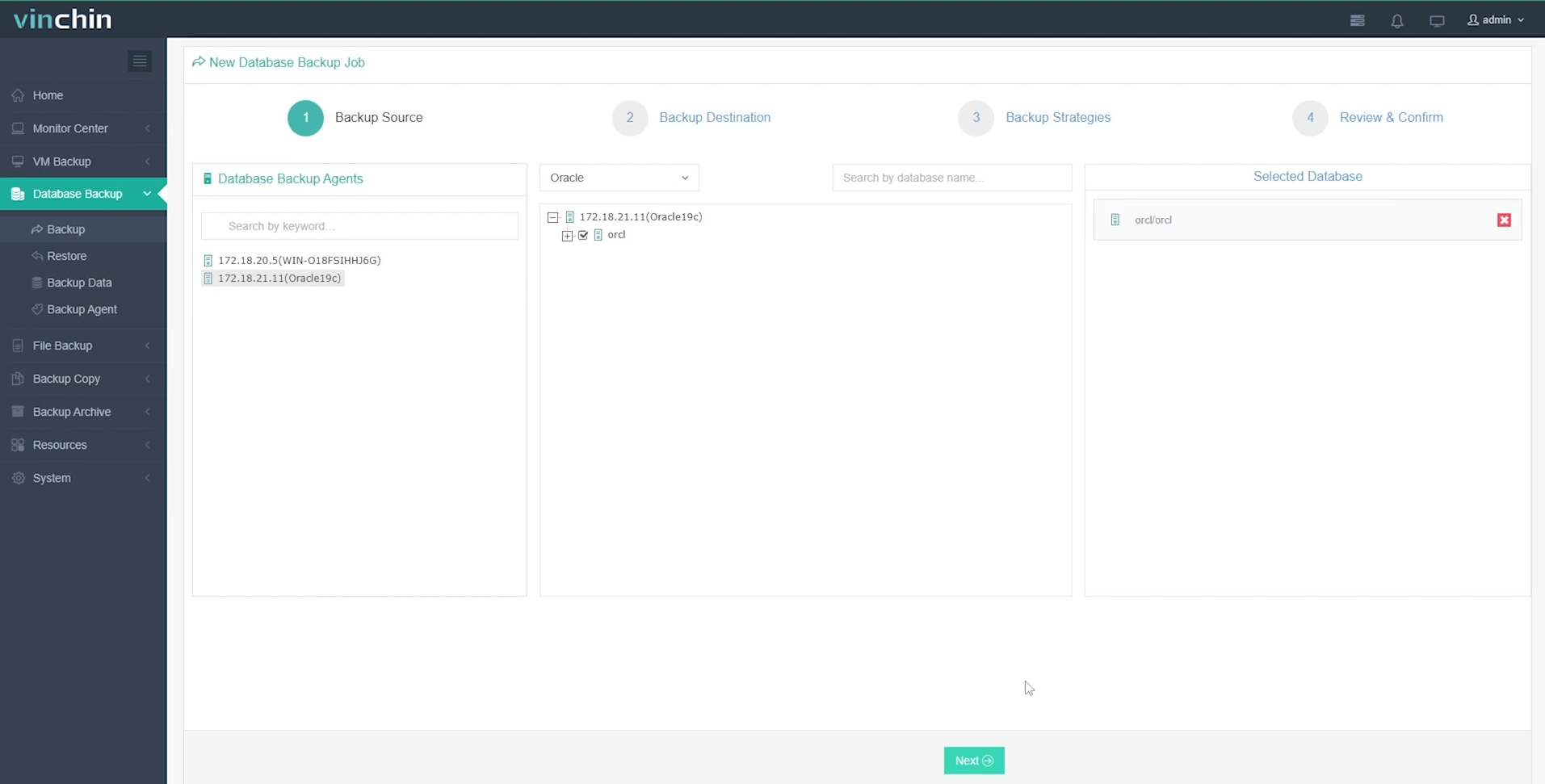
Step 1. Select the Oracle database to back up;
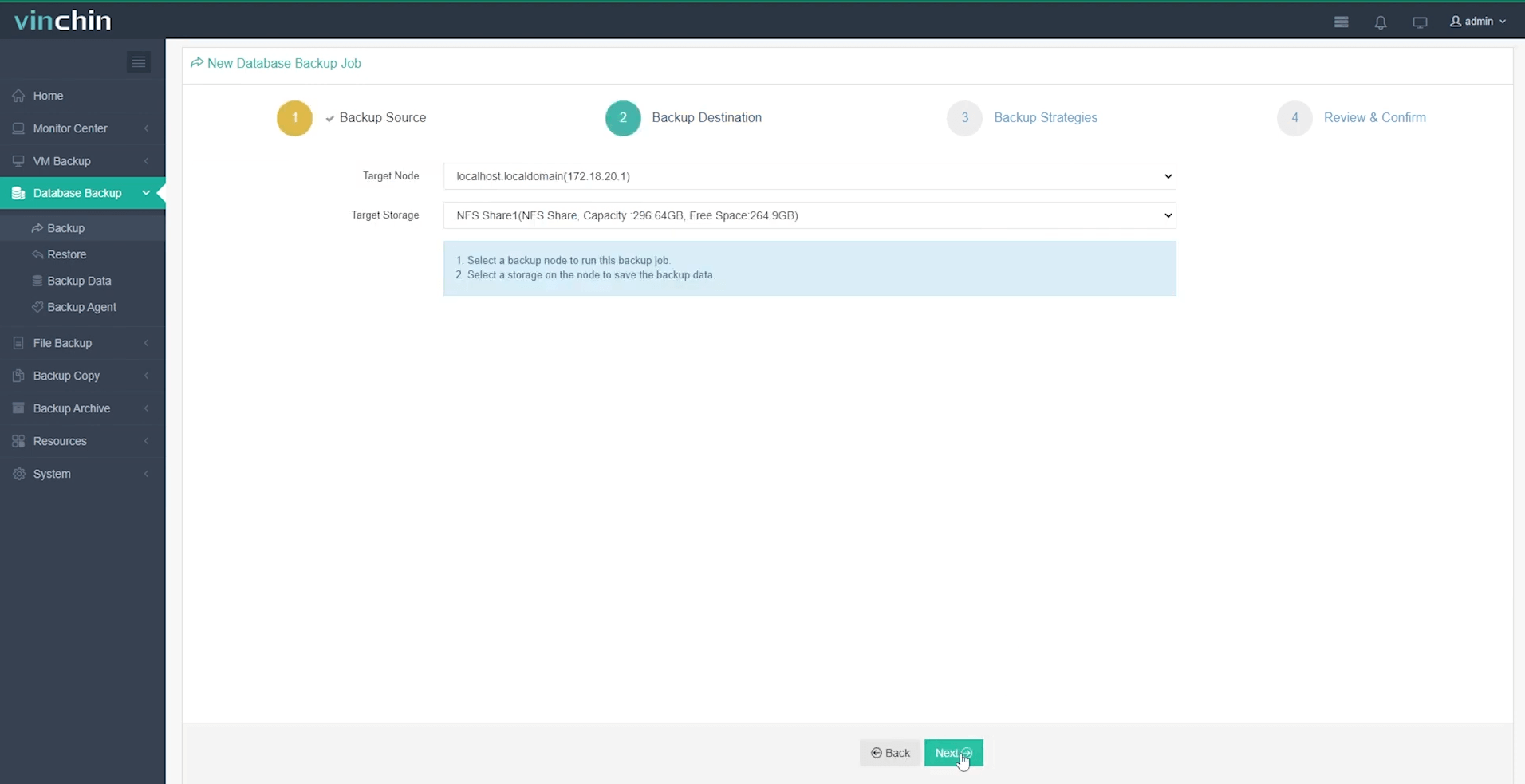
Step 2. Choose the desired backup storage;
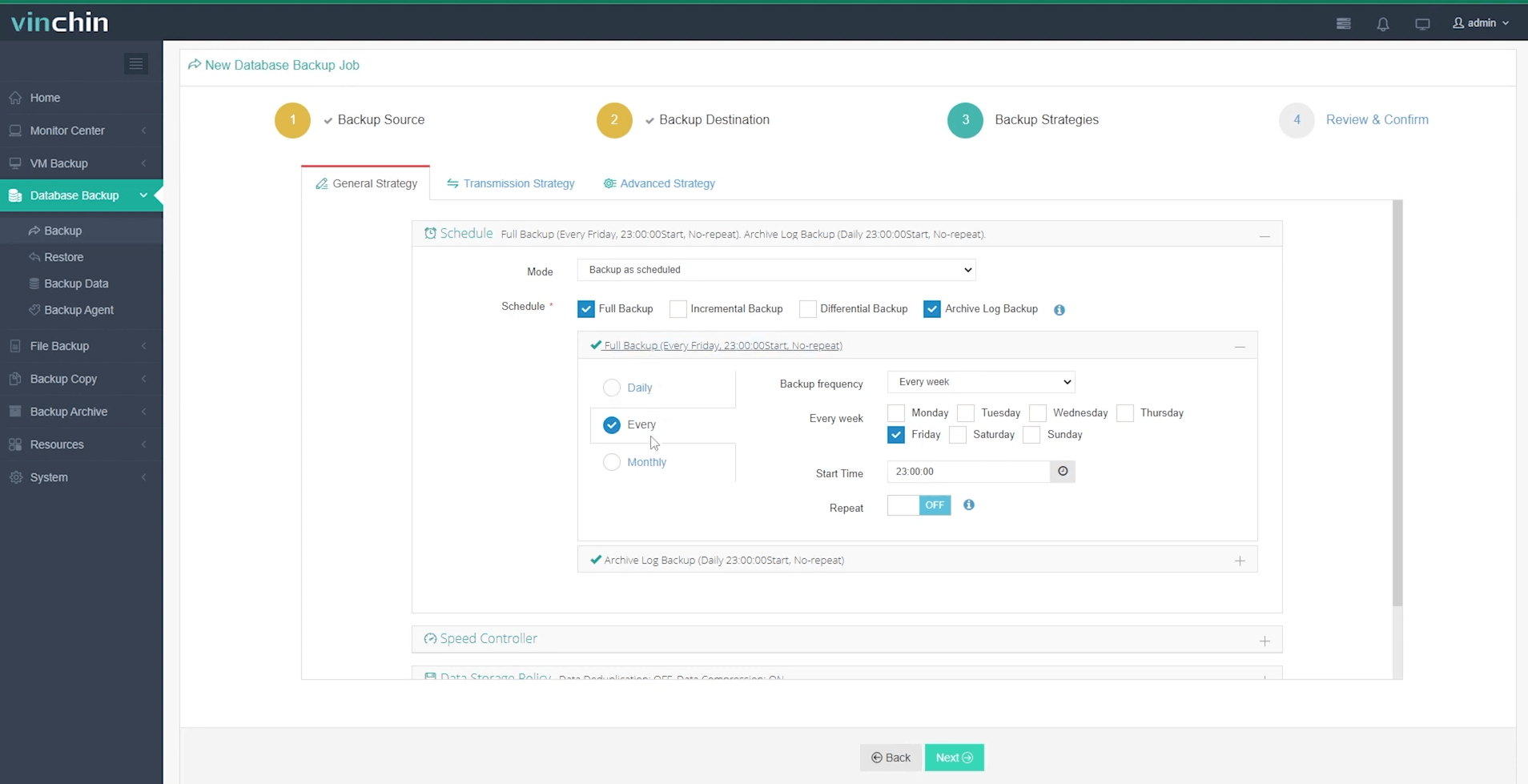
Step 3. Define scheduling and strategy options;
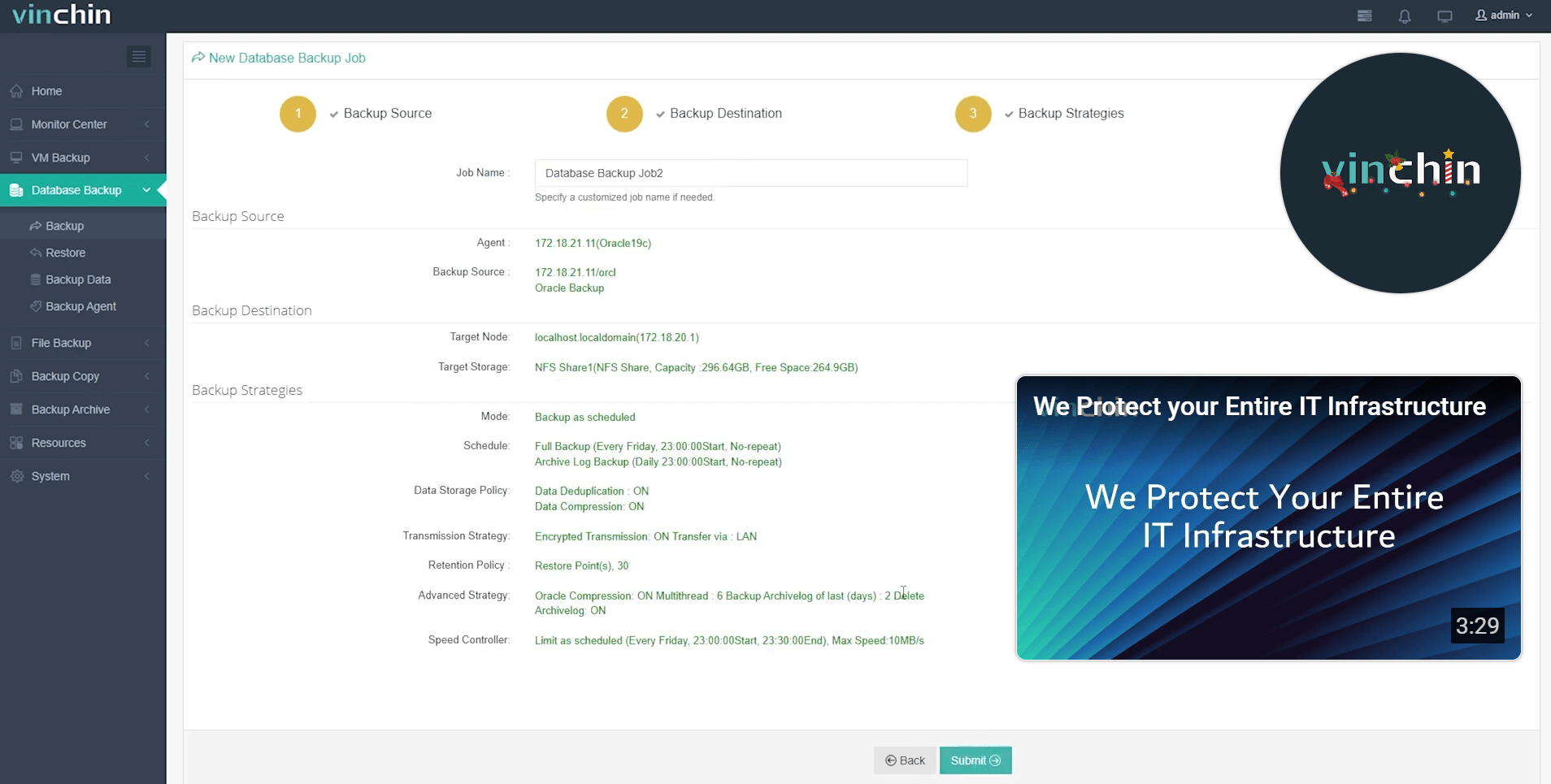
Step 4. Submit the job with just a few clicks—no steep learning curve required.
Recognized globally with top ratings from thousands of enterprise customers worldwide, Vinchin Backup & Recovery offers a fully featured free trial valid for 60 days—click below to experience effortless enterprise-grade data protection firsthand.
RMAN Backup to S3 FAQs
Q1: Can I restore an Oracle database directly from S3 using RMAN?
A1: Yes—with Storage Gateway shares mounted locally OR via Cloud Backup Module channels; otherwise download objects first before restore if using CLI sync tools like rclone/s3cmd.
Q2: How do I automate regular secure uploads?
A2: Script both local disk-to-S3 copy AND cleanup logic together; schedule via CRON using robust error-checking scripts that alert admins upon failure events detected in logs/output emails/SNS notifications etcetera!
Q3: How can I minimize ongoing costs storing large volumes?
A3: Enable lifecycle rules moving older objects automatically into Glacier Deep Archive class after X days/months—and always enable compression/encryption at source before uploading!
Conclusion
Backing up Oracle databases safely into Amazon S3 combines reliability with agility whether through native plugins (ODCBM), infrastructure gateways (Storage Gateway), open-source utilities—or dedicated platforms like Vinchin that streamline everything end-to-end! Try Vinchin's free trial today if you're seeking hassle-free enterprise-grade protection built specifically around modern hybrid clouds.












