Automated retention policies have become vital for organizations using hyper-converged infrastructure like Sangfor HCI. Managing virtual machine backups can be complex as data grows. Manual oversight often leads to wasted storage or accidental loss. With automated retention controls, you gain efficiency and peace of mind. These policies help enforce compliance rules and keep your backup environment organized.
A solution that supports automated retention for Sangfor HCI VMs reduces manual work while protecting your business from costly mistakes. Automated lifecycle management ensures only necessary restore points remain. This approach saves time, lowers costs, and helps meet regulatory demands.
Why Automated Retention Policies Matter in Enterprise Environments?
Automated retention policies play a critical role in enterprise IT environments where data volume is high and regulations are strict. They ensure backups are managed efficiently without constant human intervention.
● Storage Optimization
Automated retention policies prevent unnecessary accumulation of old backups. Without these controls, backup repositories fill up quickly with outdated restore points. This wastes valuable storage resources and can slow down operations. By automatically deleting expired backups on schedule, organizations maintain optimal storage use and avoid unexpected capacity issues.
● Regulatory Compliance
Many industries must follow strict data retention laws such as GDPR or HIPAA. Automated retention ensures that only required data is kept for mandated periods while obsolete records are purged promptly. This reduces legal exposure during audits because you can prove adherence to policy-driven schedules.
● Reduced Human Error
Manual backup management introduces risk—people forget to delete old files or accidentally erase important ones. Automation removes this uncertainty by enforcing consistent rules across all VMs or jobs. Fewer mistakes mean higher reliability for disaster recovery plans.
● Operational Efficiency
IT teams save significant time when they do not need to monitor backup lifecycles manually. Automated systems handle routine tasks so staff can focus on strategic projects instead of repetitive cleanup work.
Automated retention transforms backup management from a tedious chore into a streamlined process aligned with business needs.
How To Choose The Best Sangfor HCI Backup Solution for Automated Retention Policies
Selecting an effective backup solution requires careful evaluation of its automation capabilities, ease of use, scalability, and integration with existing workflows. A strong platform should offer granular control over how long backups are retained while fitting seamlessly into your IT environment.
● Granular Policy Controls
Look for solutions that allow you to set detailed retention rules per VM or job rather than applying one-size-fits-all settings. For example, mission-critical databases may require longer-term archiving compared to test environments. Granular controls let you align backup lifecycles with both business priorities and compliance mandates.
● Ease of Configuration & Auditing
A user-friendly interface makes it simple to create new policies or adjust existing ones as requirements change. Solutions should provide clear audit trails showing when backups were created or deleted—essential during compliance reviews or incident investigations.
● Scalability & Performance
As your organization grows, so does your virtual infrastructure—and your backup needs expand too. Choose software that scales easily across hundreds of VMs without performance bottlenecks or complicated reconfiguration steps.
● Workflow Integration
Backup tools should fit naturally into daily IT operations rather than forcing disruptive changes in process. For instance, integration with authentication systems (like LDAP) streamlines access control; compatibility with cloud storage enables hybrid strategies; support for scheduled reporting keeps stakeholders informed automatically.
When evaluating products, request demos focused on real-world scenarios: setting different retention periods per VM group; auditing policy changes; scaling up protection as more workloads migrate onto Sangfor HCI clusters; restoring expired versus active restore points; integrating reports into broader security dashboards.
By prioritizing these factors—granularity, usability, scalability—you ensure your chosen solution delivers reliable automated retention tailored to enterprise needs while minimizing administrative overhead.
Vinchin Backup & Recovery: Enterprise-Grade Protection for Sangfor HCI
For organizations seeking advanced protection on Sangfor HCI and other mainstream virtualization platforms—including VMware, Hyper-V, Proxmox VE, oVirt/RHV/OLVM, XenServer/XCP-ng, OpenStack, ZStack and more (15+ environments)—Vinchin Backup & Recovery stands out as a professional enterprise-level virtual machine backup solution designed for diverse infrastructures in businesses of all sizes.
Vinchin Backup & Recovery offers features highly relevant to modern enterprises: agentless full/incremental/differential backups ensure efficient data capture; GFS retention policy automates long-term restore point management; deduplication/compression optimize storage usage; granular restore accelerates recovery times; cross-platform V2V migration simplifies workload mobility between supported hypervisors—all contributing to secure operations and reduced administrative burden.
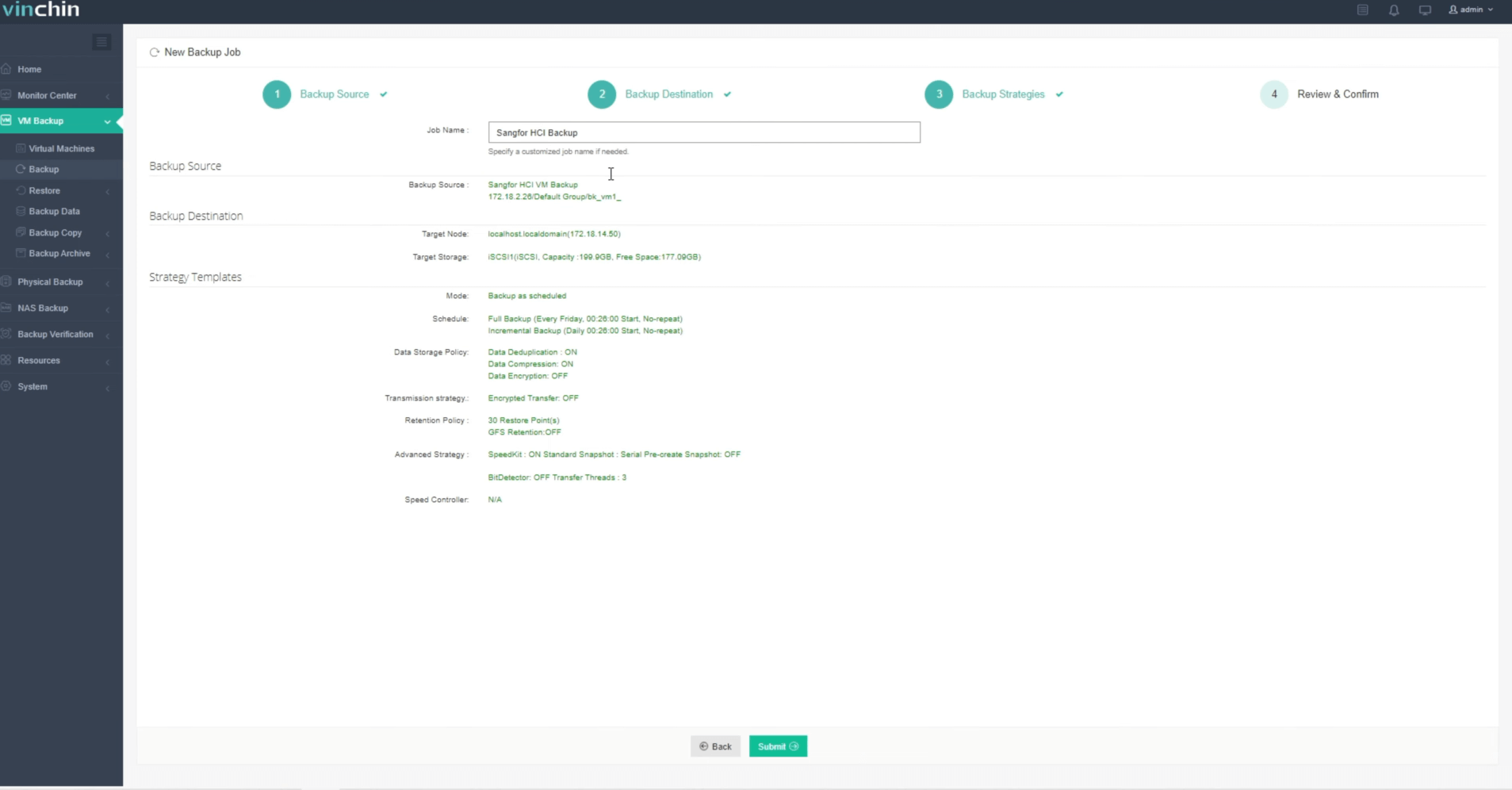
The intuitive web console makes managing VM protection straightforward:
Step 1: Select the Sangfor HCI VM you wish to back up

Step 2: Choose your desired backup storage
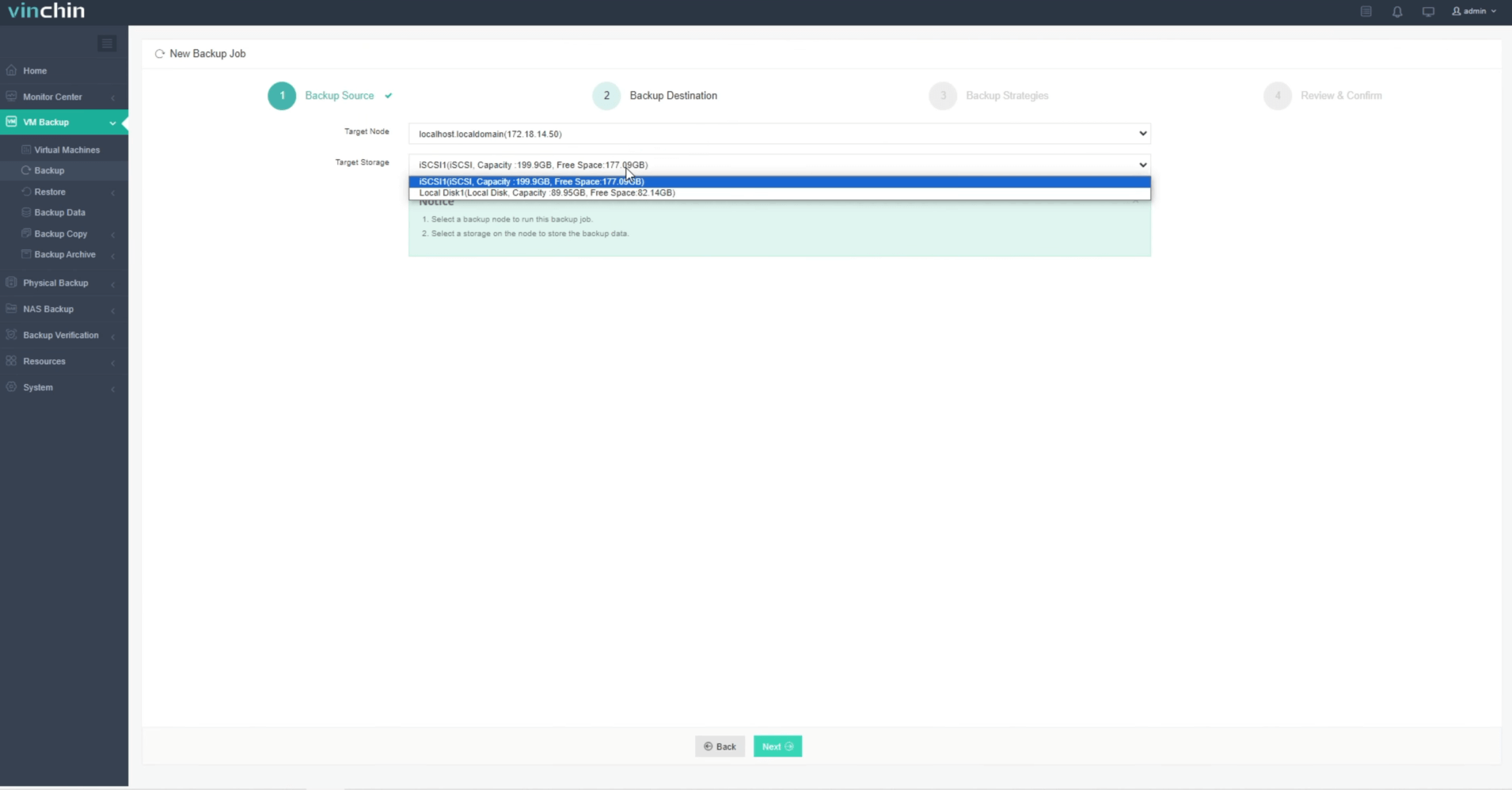
Step 3: Configure your preferred backup strategy

Step 4: Submit the job
Recognized globally by thousands of customers with top ratings in enterprise data protection software markets—try Vinchin Backup & Recovery’s 60-day full-featured free trial today by clicking the download button below.
Best Sangfor HCI Backup Software FAQs
Q1: Can I set different retention periods per VM or job?
Yes. Vinchin’s policy-based controls allow flexible settings per VM or job so you match each workload’s business value or compliance requirement—for example keeping production database snapshots longer than test servers following ISO 27001 guidelines if needed.
Q2: Does automated retention help with compliance audits?
Absolutely! Automated enforcement aligns data lifecycle management with standards like SOX or GDPR by providing clear records showing when each restore point was created/purged—making audit trails transparent during regulatory reviews without extra manual effort.
Q3: Will automated purging impact recovery options?
No! Only expired restore points defined by policy get deleted—all valid backups remain accessible until their scheduled expiration so you always retain required recovery options.
Conclusion
Vinchin Backup & Recovery automates VM backup lifecycle on Sangfor HCI—saving time reducing errors supporting compliance Try it today for efficient secure data protection









