Managing backup data for H3C CAS and UIS virtual machines is a core responsibility for IT teams in many enterprises. These platforms power critical workloads across finance, healthcare, government, and education. As organizations grow more reliant on virtualization for agility and cost savings, they must also ensure that their backup strategies keep pace. Automated retention policies have become essential for enforcing data lifecycle management—helping businesses avoid unnecessary storage costs while meeting compliance standards.
Manual retention management often leads to errors or inefficiencies. Enterprises need solutions that automate this process so backups are kept only as long as needed. Vinchin Backup & Recovery supports automated retention policies for H3C CAS/UIS VMs. This capability lets organizations enforce data lifecycle rules without constant manual oversight. Backups are retained or deleted according to business needs or regulatory requirements—keeping operations efficient and audit-ready.
Automated retention does more than save time. It reduces risk of human error, controls storage growth, and helps meet strict industry regulations like GDPR or HIPAA. Enterprises depend on these capabilities to maintain smooth operations while minimizing exposure during audits or legal reviews.
Why Automated Retention Policies Matter in Enterprise Environments?
Automated retention policies play a vital role in modern enterprise IT environments where virtual machine sprawl can quickly overwhelm manual processes. Without automation, managing backup data becomes complex—and mistakes can be costly.
● Storage Cost Control
Uncontrolled backup growth leads to ballooning storage expenses. When every VM snapshot is kept indefinitely “just in case,” disk arrays fill up fast. Automated retention ensures only necessary restore points remain available—freeing up space for new backups without requiring constant hardware upgrades or emergency cleanups.
● Regulatory Compliance
Many industries face strict rules about how long certain types of data must be kept—and when it must be deleted. Automated retention policies help organizations comply by enforcing consistent schedules across all relevant workloads. This reduces risk of accidental non-compliance during audits or investigations.
● Reduced Human Error
Manual deletion of old backups is tedious work prone to mistakes—such as deleting active restore points or missing expired ones altogether. Automation eliminates these risks by applying clear rules every time a backup job runs.
● Operational Efficiency
IT teams already juggle many responsibilities—from patching systems to responding to incidents. Automating routine tasks like backup cleanup frees staff for higher-value projects while ensuring no critical step gets overlooked due to workload spikes or turnover.
● Faster Restore Point Discovery
When too many outdated backups clutter your repository, finding the right recovery point slows down disaster response efforts. By keeping only recent and relevant copies per policy, automated retention makes restores faster when minutes matter most.
These benefits make automated retention an indispensable part of any robust H3C CAS/UIS VM protection strategy—especially as environments scale beyond what manual methods can handle reliably.
How To Choose The Best H3C CAS/UIS Backup Solution for Automated Retention Policies
Selecting a backup solution that truly supports automated retention requires careful evaluation of several key factors—not just checking off basic feature lists but understanding how each capability impacts daily operations and long-term compliance goals.
A flexible solution adapts easily as your environment changes over time—from small test clusters today to hundreds of production VMs tomorrow. Look for tools that let you define granular policies tailored to different business units or application types without extra complexity.
● Policy Flexibility
A strong solution allows you to set unique retention rules per VM group or workload type—for example, keeping financial system backups longer than those from development servers. This tiered approach aligns storage use with actual business value rather than treating all data equally.
● Ease of Policy Configuration
Backup administrators should be able to create and adjust policies through an intuitive interface—without needing advanced scripting skills or extensive training sessions. Solutions with simple wizards reduce onboarding time for new staff while lowering risk of misconfiguration during policy updates.
● Scalability Across Large Environments
As your organization adds more VMs—or migrates between clouds—the chosen tool must apply defined policies consistently everywhere without gaps that could expose sensitive data or waste resources on obsolete copies.
● Auditability Features
Detailed logs showing when each backup was created, retained, deleted—or restored—are crucial during compliance checks or internal reviews. Transparent reporting builds trust with auditors while helping IT teams troubleshoot unexpected behavior quickly if something goes wrong.
● Seamless Workflow Integration
The best solutions fit naturally into existing operational routines—including alerting systems and ticketing workflows—to minimize disruption during rollout phases while maintaining service level agreements (SLAs) even as underlying infrastructure evolves rapidly due to mergers/acquisitions or cloud migrations.
By focusing on these criteria—not just headline features—you ensure your investment delivers real-world results: lower costs, less risk, smoother audits, and happier end users who trust their critical workloads are always protected according to company policy.
Vinchin Backup & Recovery: Enterprise-Grade Protection for H3C CAS/UIS
For enterprises running H3C CAS/UIS virtualized environments, choosing the right protection platform is crucial for reliable automated backup management at scale. Vinchin Backup & Recovery stands out as an enterprise-level solution supporting over 15 mainstream virtualization platforms—including H3C CAS/UIS alongside VMware, Hyper-V, Proxmox VE, oVirt, OLVM, RHV, XCP-ng, XenServer, OpenStack, ZStack and others—making it ideal for diverse infrastructures found in large organizations and public institutions alike.
Vinchin Backup & Recovery offers agentless VM protection with features such as LAN-free backup support on H3C CAS/UIS; full/Incremental/differential backups; GFS retention policies; granular restore; multi-thread transmission; deduplication/compression; V2V migration; throttling policy; encryption; scheduled jobs; cloud/tape archive integration; comprehensive verification mechanisms; among others—all designed around efficiency and security at scale.
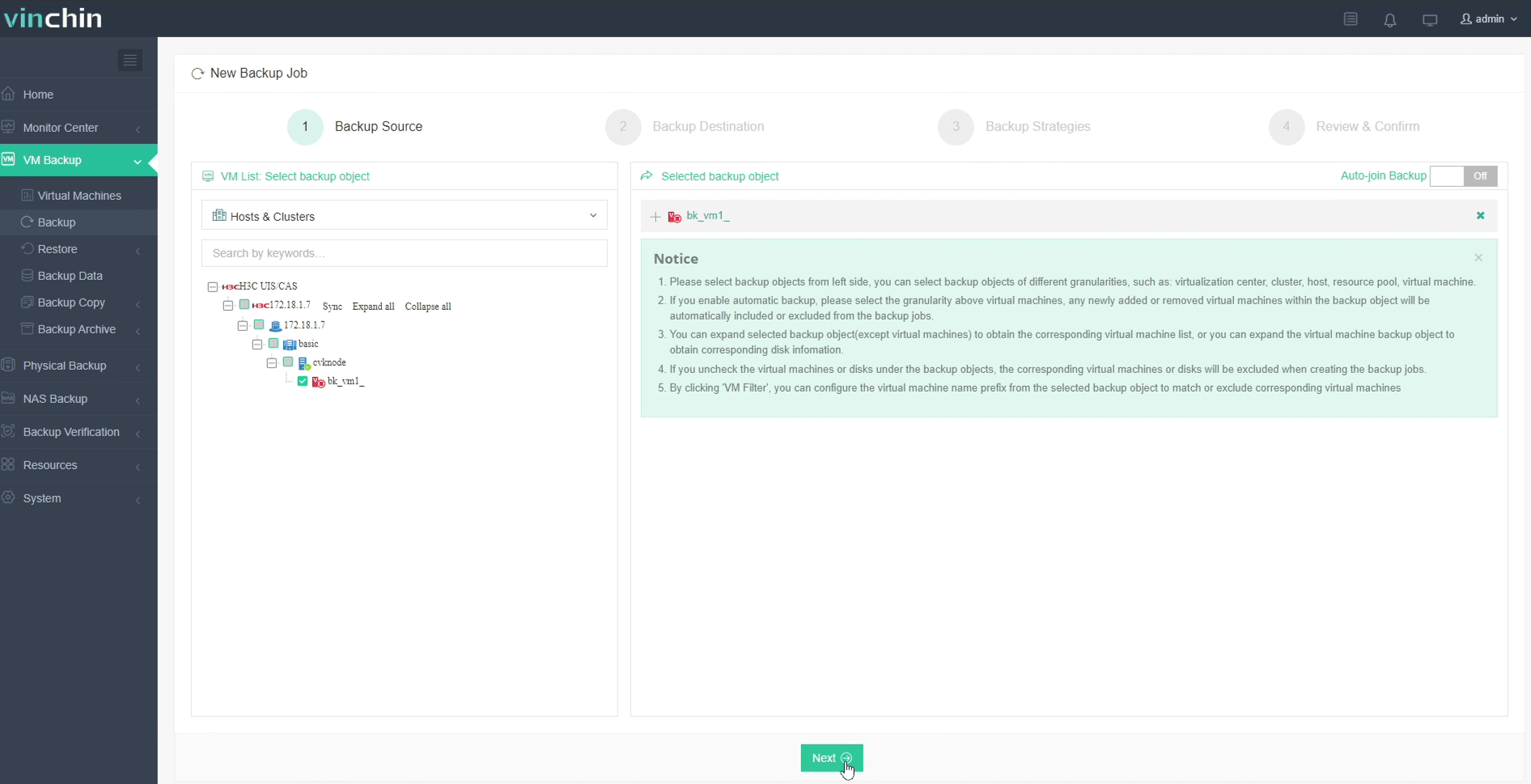
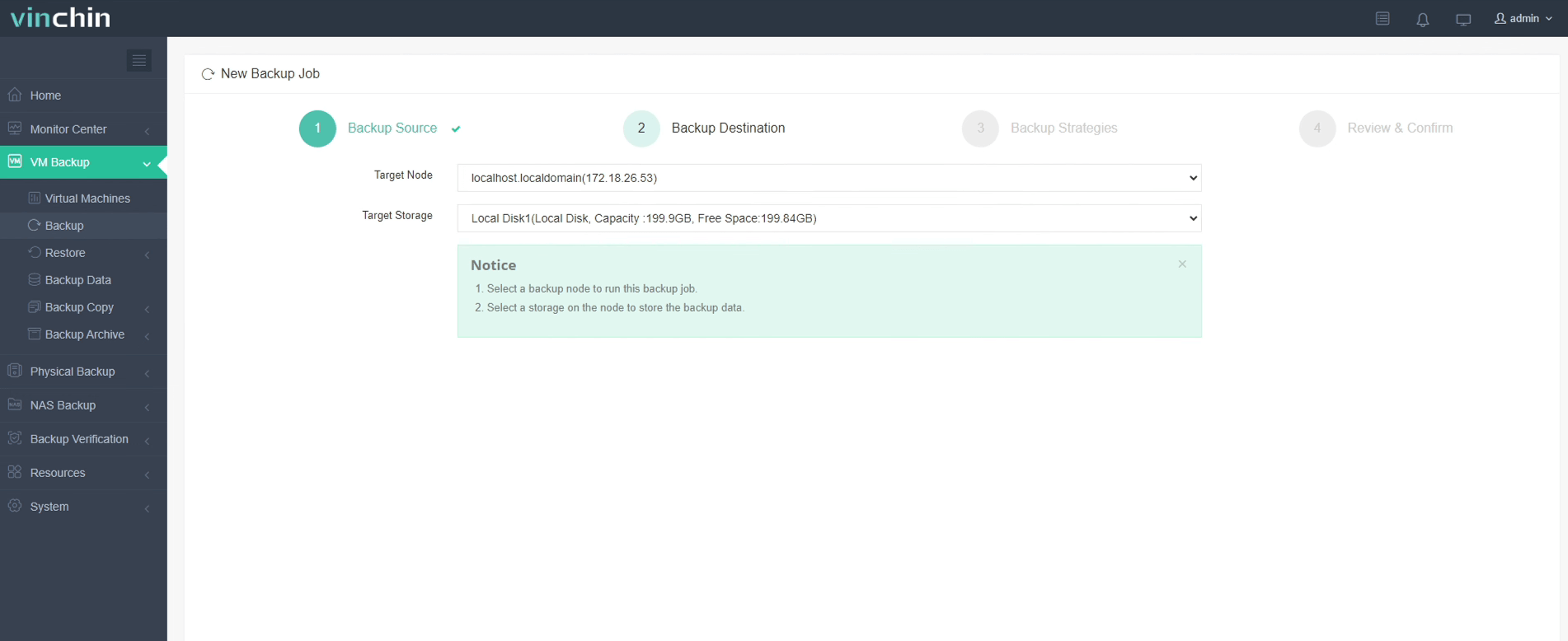
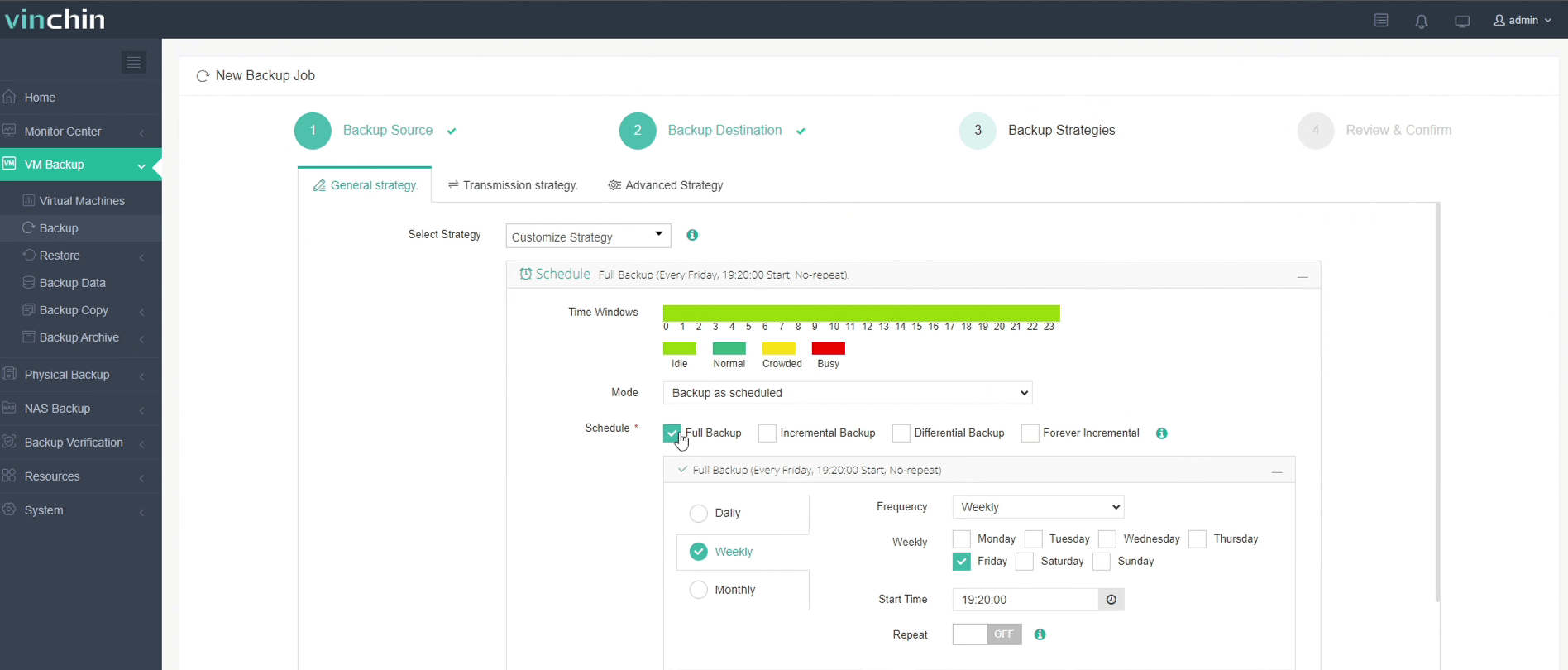
Backing up an H3C CAS/UIS VM with Vinchin Backup & Recovery is straightforward via its intuitive web console:
The intuitive web console makes protecting your environment straightforward:
Step 1: Select the H3C CAS/UIS VM to back up
Step 2: Choose the backup storage
Step 3: Configure the backup strategy
Step 4: Submit the job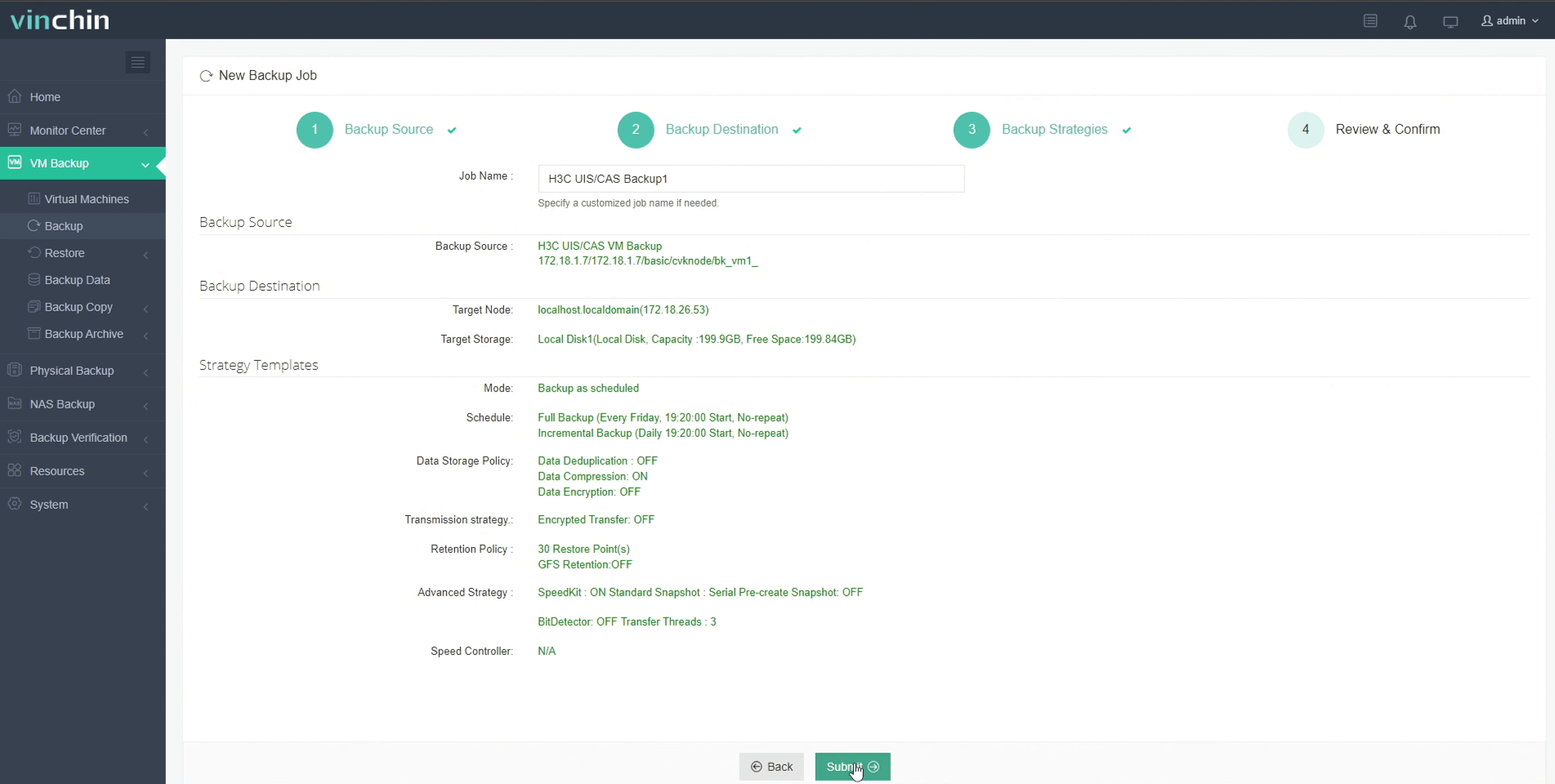
Trusted by thousands worldwide—with top ratings from global customers—Vinchin Backup & Recovery offers a fully functional 60-day free trial so you can experience its enterprise-grade capabilities firsthand before committing.
Best H3C CAS/UIS Backup Software FAQs
Q1: Can automated retention policies be customized by VM group or workload?
Yes; leading solutions like Vinchin allow granular customization so you can assign different settings based on business unit needs—for example retaining HR records longer than test lab snapshots—all managed centrally from one interface.
Q2: How does automation reduce compliance risk?
Automation applies lifecycle rules consistently every time a job runs; this minimizes chances that someone forgets required deletions—or accidentally erases protected records before their mandated hold period ends.
Q3: Is reporting available on expired or deleted backups?
Yes; comprehensive solutions provide detailed logs showing which files were removed under each policy rule—with timestamps—to support both internal troubleshooting efforts and external audit requests.
Q4: Will scaling up my environment affect policy enforcement?
No; scalable tools like Vinchin apply defined settings across all current—and newly added—VMs automatically so nothing slips through unnoticed even during rapid expansion phases.
Q5: How do automated retention policies interact with multiple storage repositories—including secondary archives?
Modern solutions enforce primary policy settings across both local repositories used for quick restores—and remote/archive tiers designed for long-term holds—to ensure consistency regardless where individual copies reside.
Conclusion
Automated retention transforms VM protection from tedious manual work into reliable compliance assurance—with less cost overhead at scale.









