XCP-ng is an open-source virtualization platform built on Xen. It powers many enterprise data centers due to its flexibility and cost-effectiveness. Managing backups for XCP-ng virtual machines can be complex as environments grow. Automated retention policies help IT teams control storage use and meet compliance needs. These policies let you set rules so old backups are deleted on schedule while critical restore points remain available. This approach reduces manual work, cuts costs, and lowers risk of human error. As data volumes rise and regulations tighten, automated retention becomes essential for reliable VM protection.
Why Automated Retention Policies Matter in Enterprise Environments?
Automated retention policies are vital for managing backup data efficiently in large-scale environments. They help organizations avoid unnecessary storage costs while ensuring compliance with legal requirements.
● Storage Optimization
Backup files accumulate quickly in enterprise settings. Without automated cleanup, storage can fill up fast—leading to higher costs or even failed backups due to lack of space. Automated retention ensures only necessary restore points remain by deleting outdated copies based on your defined schedule or count.
● Regulatory Compliance
Many industries face strict rules about how long certain data must be kept—and when it must be deleted. Automated retention helps enforce these requirements consistently across all VMs without relying on manual processes that are prone to mistakes.
● Reduced Human Error
Manual deletion of old backups increases risk of accidental loss or missed deletions. Automation removes this burden from administrators, reducing operational risks and supporting reliable recovery when needed.
● Operational Efficiency
Automated policies free up IT staff from routine maintenance tasks so they can focus on more strategic projects. With clear schedules in place, backup management becomes predictable and less stressful during audits or disaster recovery drills.
● Auditability & Reporting
Enterprises need proof that their backup practices follow internal policies and external regulations. Automated systems generate logs showing exactly when backups were created or purged—making it easier to pass audits.
How To Choose The Best XCP-ng Backup Solution for Automated Retention Policies?
Selecting an effective backup solution requires careful evaluation of features beyond basic scheduling or restore capabilities. Look for solutions that offer granular policy controls, centralized oversight, scalability, audit trails, and deep automation—all tailored for XCP-ng environments.
A robust solution should support multiple backup types such as full, incremental, or differential jobs; allow flexible policy assignment; scale easily as your infrastructure grows; provide detailed reporting; and automate most tasks to minimize manual intervention.
● Policy Flexibility
The best solutions let you create different retention rules per VM or group—matching business priorities or regulatory demands. For example: mission-critical servers may require longer retention than test systems. Support for both time-based (days/weeks/months) and count-based (number of restore points) criteria is key.
● Centralized Management
Managing dozens—or hundreds—of VMs is easier if you can apply global policies from one dashboard rather than configuring each job separately. Centralized tools also simplify onboarding new workloads by letting you auto-enroll them into existing protection plans.
● Scalability
As your environment expands with more hosts or VMs, your backup system should handle increased load without performance drops. Solutions designed for scale often include features like deduplication or parallel processing to keep operations smooth even during peak periods.
● Auditability & Compliance Tracking
Clear records are crucial during audits or investigations following incidents. Look for solutions that log every action related to backup creation/deletion—including who made changes—to demonstrate adherence to company policy and external standards like GDPR/HIPAA/SOX.
● Depth of Automation
Deep automation means fewer touchpoints required from admins day-to-day: scheduled jobs run automatically; expired backups purge themselves; reports generate without prompting; alerts trigger if something goes wrong—all reducing operational risk while maintaining high availability of protected data.
Vinchin Backup & Recovery: Enterprise-Grade Protection for XCP-ng
For organizations seeking advanced protection with automated retention in XCP-ng environments, Vinchin Backup & Recovery delivers a comprehensive solution supporting over 15 mainstream virtualization platforms—including seamless integration with XCP-ng itself alongside VMware, Hyper-V, Proxmox, oVirt, OLVM, RHV, XenServer, OpenStack, ZStack and more. Key features such as LAN-free backup support on XCP-ng ensure efficient data transfer without impacting production networks; users also benefit from full/Incremental/differential backups, granular restore options including file-level recovery within VMs, GFS retention policy management for long-term archiving needs, and powerful deduplication plus compression technologies that optimize storage usage while keeping sensitive information secure through encryption—all managed centrally via a modern web console.
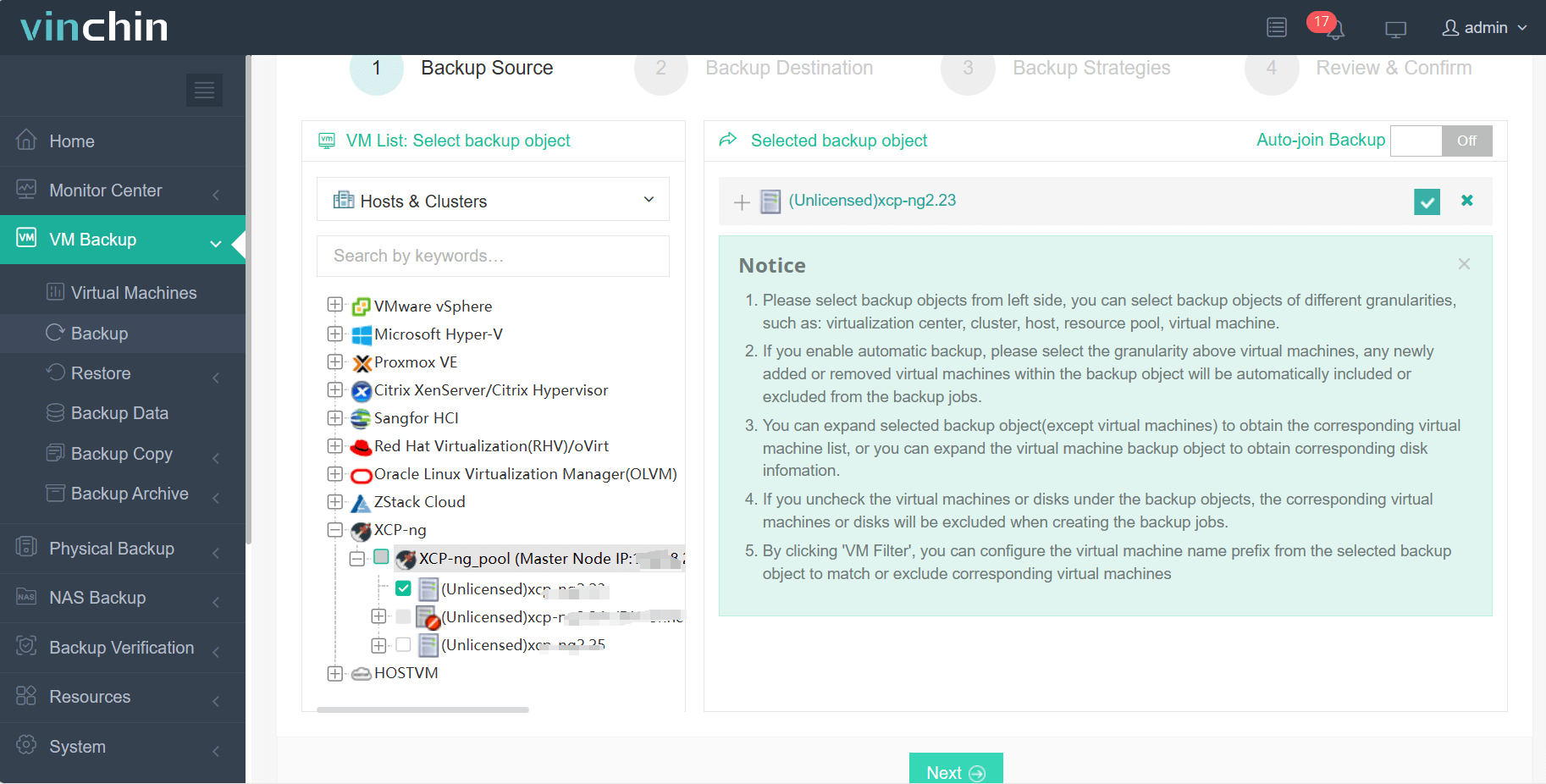
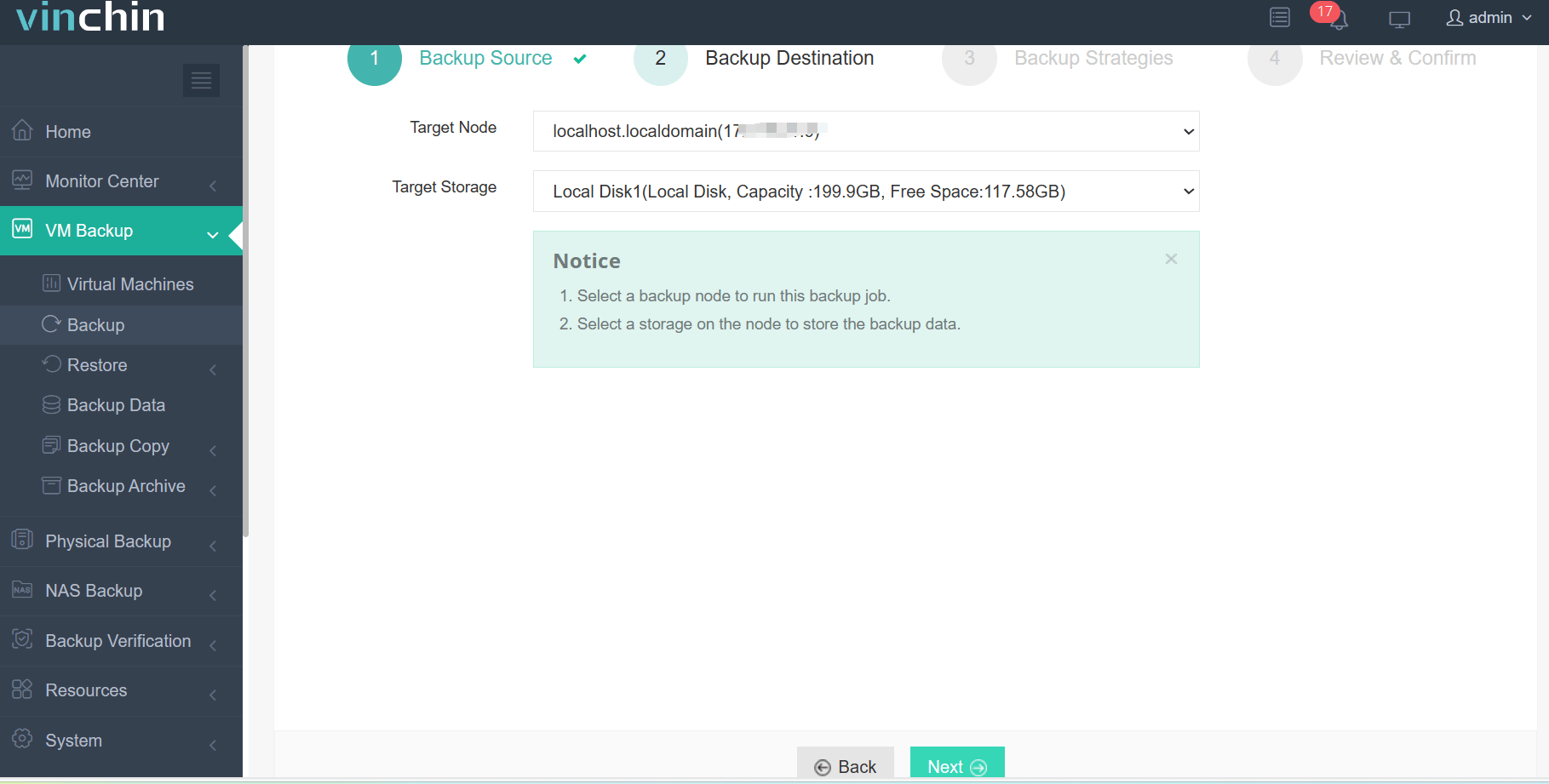
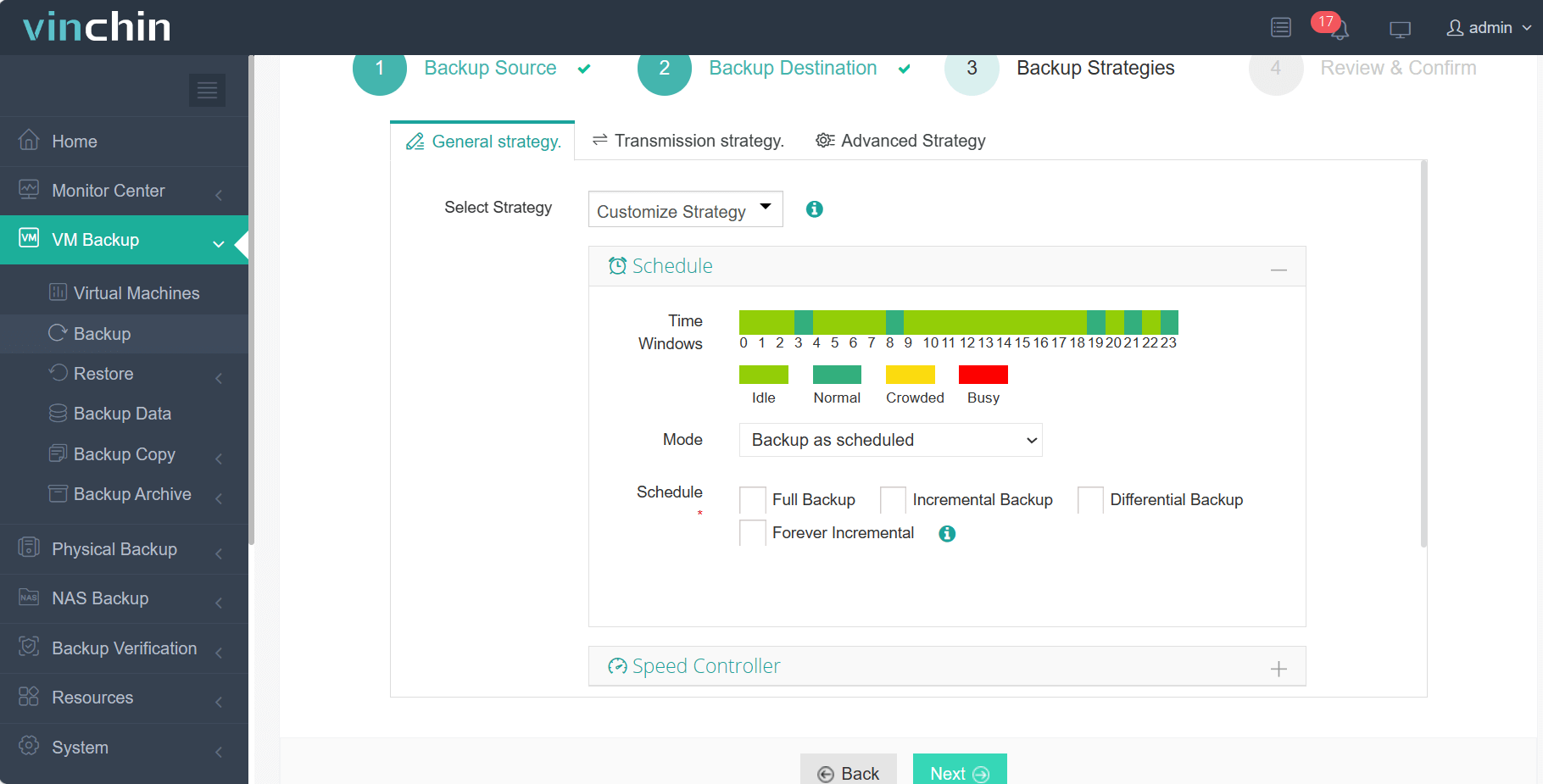
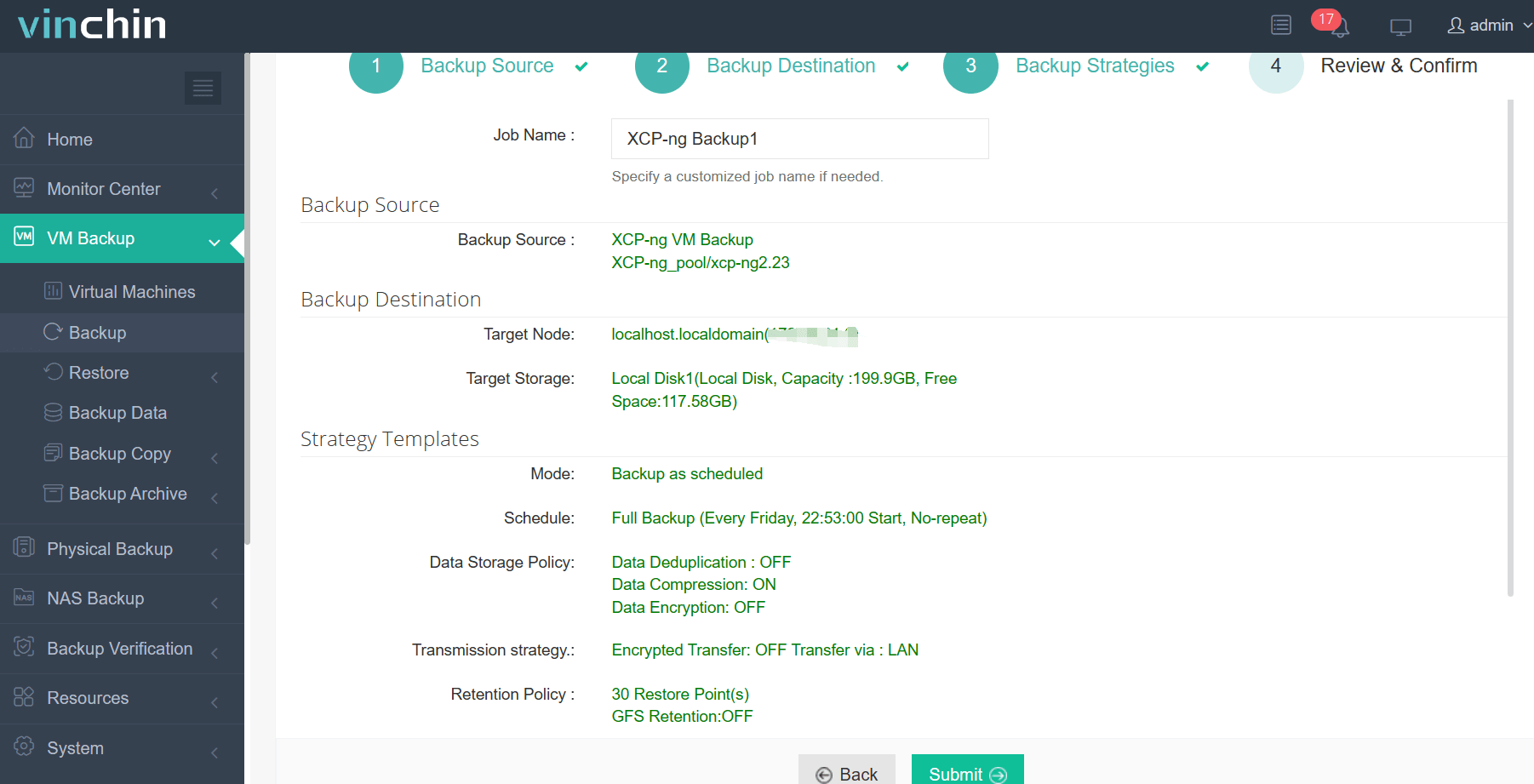
Backing up an XCP-ng VM with Vinchin Backup & Recovery is straightforward thanks to its intuitive interface:
Step 1: Select the XCP‑ng VM to back up;
Step 2: Choose the backup storage;
Step 3: Configure the backup strategy;
Step 4: Submit the job.
Recognized globally by thousands of enterprises with top industry ratings—Vinchin Backup & Recovery offers a fully featured 60-day free trial so you can experience its power firsthand—click below to get started!
Best XCP-ng Backup Software FAQs
Q1: Can automated retention policies be customized per VM or group?
Yes—they can be tailored at both levels within leading solutions like Vinchin Backup & Recovery using either time-based (e.g., keep daily backups for 30 days) or count-based (e.g., retain last 10 versions) settings per workload type—even leveraging GFS (Grandfather-Father-Son) schemes common in enterprises.
Q2: How does automation reduce compliance risks?
Automation enforces consistent lifecycle management by applying pre-set rules across all protected workloads without relying on manual steps—which minimizes chances of accidental deletion/non-compliance events tied to frameworks such as HIPAA, SOX, ISO 27001, etc.—and generates logs needed during audits.
Q3: Will automated purging impact ongoing restores?
No—enterprise-grade tools ensure active restore points stay available until any running recoveries finish before removing expired copies behind-the-scenes so there’s no disruption during urgent restores—a standard feature among modern platforms designed around business continuity best practices.
Conclusion
Automated retention keeps XCP-ng VM backups compliant while controlling costs and reducing risk—delivering reliable recovery when needed most through streamlined management from solutions like Vinchin Backup & Recovery.









