Manual backup management drains IT resources and increases risk. Enterprises running ZStack virtual machines face growing data volumes and complex compliance demands. Tracking every backup copy manually is not practical at scale. Automated retention policies solve this problem by enforcing rules that keep only what you need—no more, no less.
Automated retention ensures backups expire according to your business or regulatory requirements. This approach reduces storage costs, supports compliance audits, and frees up staff time for higher-value tasks. For organizations managing dynamic virtual environments like ZStack, automated retention is essential for efficient data lifecycle management.
Why Automated Retention Policies Matter in Enterprise Environments
Automated retention policies play a key role in enterprise data protection strategies. They help organizations meet legal obligations while controlling costs and reducing operational risks.
● Regulatory Compliance
Many industries must follow strict rules about how long data should be kept or deleted. Regulations such as GDPR require timely removal of personal information (“right to erasure”), while financial standards may mandate multi-year record retention. Automated policies ensure these requirements are met without manual oversight.
● Storage Cost Control
Retaining unnecessary backups leads to wasted storage space and higher expenses. With automated retention, old restore points are purged on schedule so only relevant copies remain. This approach optimizes both primary storage arrays and secondary targets like cloud object storage or tape libraries.
● Operational Efficiency
Manual tracking of backup lifecycles becomes unmanageable as VM counts grow into the hundreds or thousands. Automation eliminates human error from routine deletion tasks and allows IT teams to focus on strategic projects instead of repetitive chores.
● Consistent Policy Enforcement
Automated systems apply rules uniformly across all workloads—whether production databases or test environments—reducing gaps that could lead to audit findings or security incidents.
● Support for Storage Tiering
Modern infrastructures often use tiered storage: fast disks for recent backups, slower media for archives. Automated retention can move older backups between tiers before final deletion, maximizing performance while minimizing cost.
Enterprises benefit from automated retention by ensuring their backup environment stays lean, compliant, and easy to manage—even as demands evolve over time.
How To Choose The Best ZStack Backup Solution for Automated Retention Policies
Selecting a backup solution with strong automated retention support requires careful evaluation of several factors beyond basic scheduling capabilities. Each organization has unique needs based on its size, industry regulations, growth rate, and recovery objectives.
A flexible policy engine is vital so you can set different rules per VM group or workload type—critical if your business spans multiple regions or faces overlapping compliance mandates (such as HIPAA plus local privacy laws). Look for solutions that let you define granular criteria: keep daily backups for seven days but monthly ones for a year; exclude test VMs from long-term archiving; enforce immutability where needed.
Ease of configuration matters too. Solutions should offer clear UI elements—like drop-down menus or templates—for setting schedules and expiration periods without scripting knowledge. Audit trails help track changes over time so you can prove compliance during reviews or investigations.
Scalability ensures your chosen tool keeps pace as your infrastructure grows—from dozens to thousands of VMs—without performance bottlenecks or administrative headaches. Integration with reporting tools provides transparency into policy enforcement: how many restore points exist today? Which jobs failed last week? These insights support proactive management rather than reactive firefighting.
Finally, consider how well automation reduces day-to-day effort while supporting rapid recovery when disaster strikes. The best solutions balance hands-off operation with instant access to valid restore points whenever needed—a critical factor during ransomware attacks or hardware failures when every minute counts.
Vinchin Backup & Recovery: Enterprise-Grade Protection for ZStack
For enterprises seeking advanced protection of ZStack virtual machines alongside other mainstream platforms such as VMware, Hyper-V, Proxmox VE, oVirt/RHV/OLVM, XCP-ng/XenServer, OpenStack, Nutanix AHV and more (15+ environments), Vinchin Backup & Recovery stands out as an enterprise-level solution designed specifically for diverse virtualization scenarios including large-scale cloud deployments and service providers using ZStack infrastructure.
Vinchin Backup & Recovery offers comprehensive features tailored to modern enterprise needs: agentless VM backup across supported platforms; flexible scheduling; granular restore options; robust GFS retention policy; LAN-free backup capability; deduplication/compression; V2V migration; throttling policy; encryption; multi-thread transmission; verification tools; cloud/tape archive integration—and more.
The intuitive web console makes setup simple:
Step 1: Select the ZStack VM to back up.
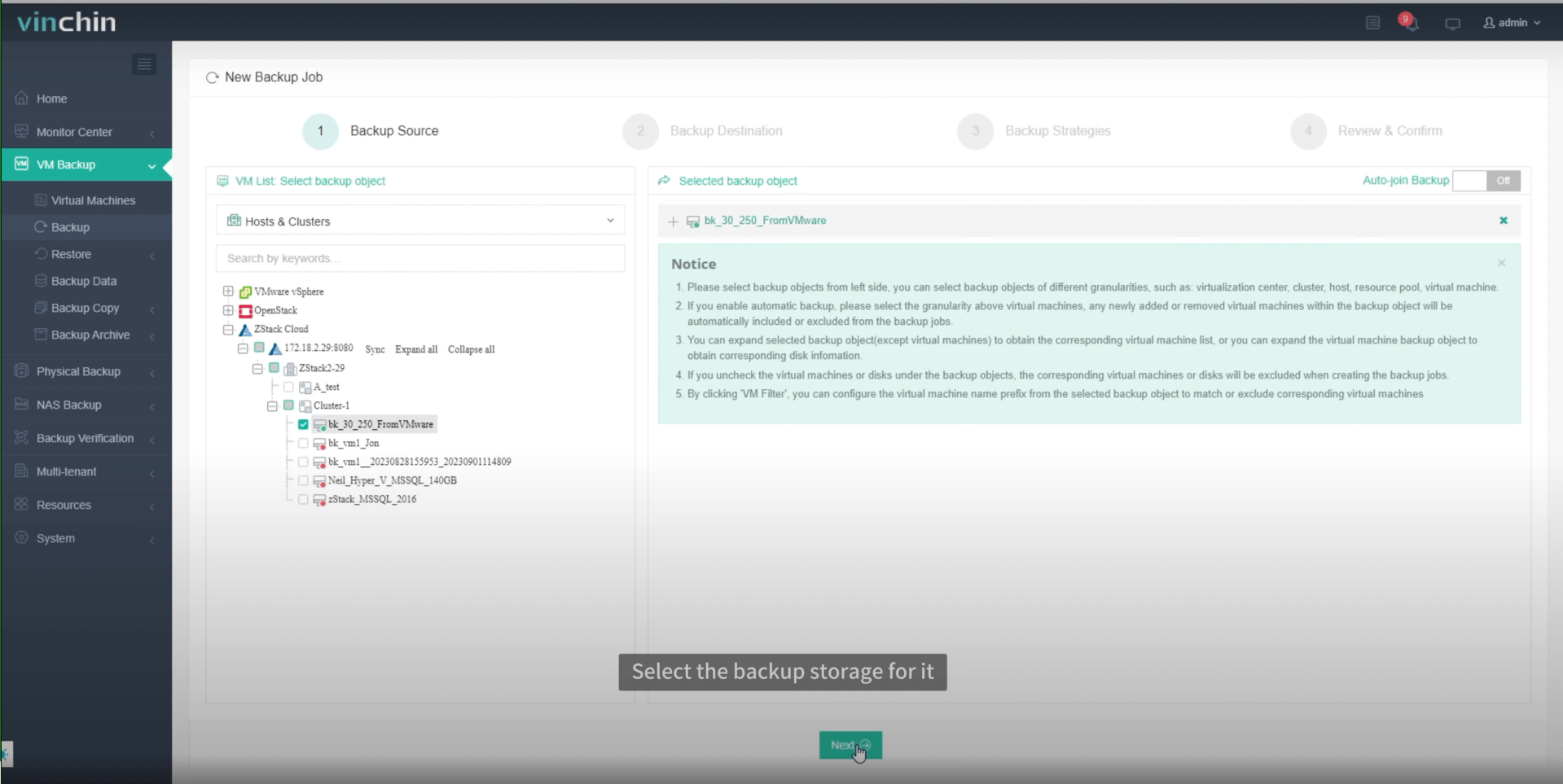
Step 2: Choose the backup storage.

Step 3: Configure the backup strategy.
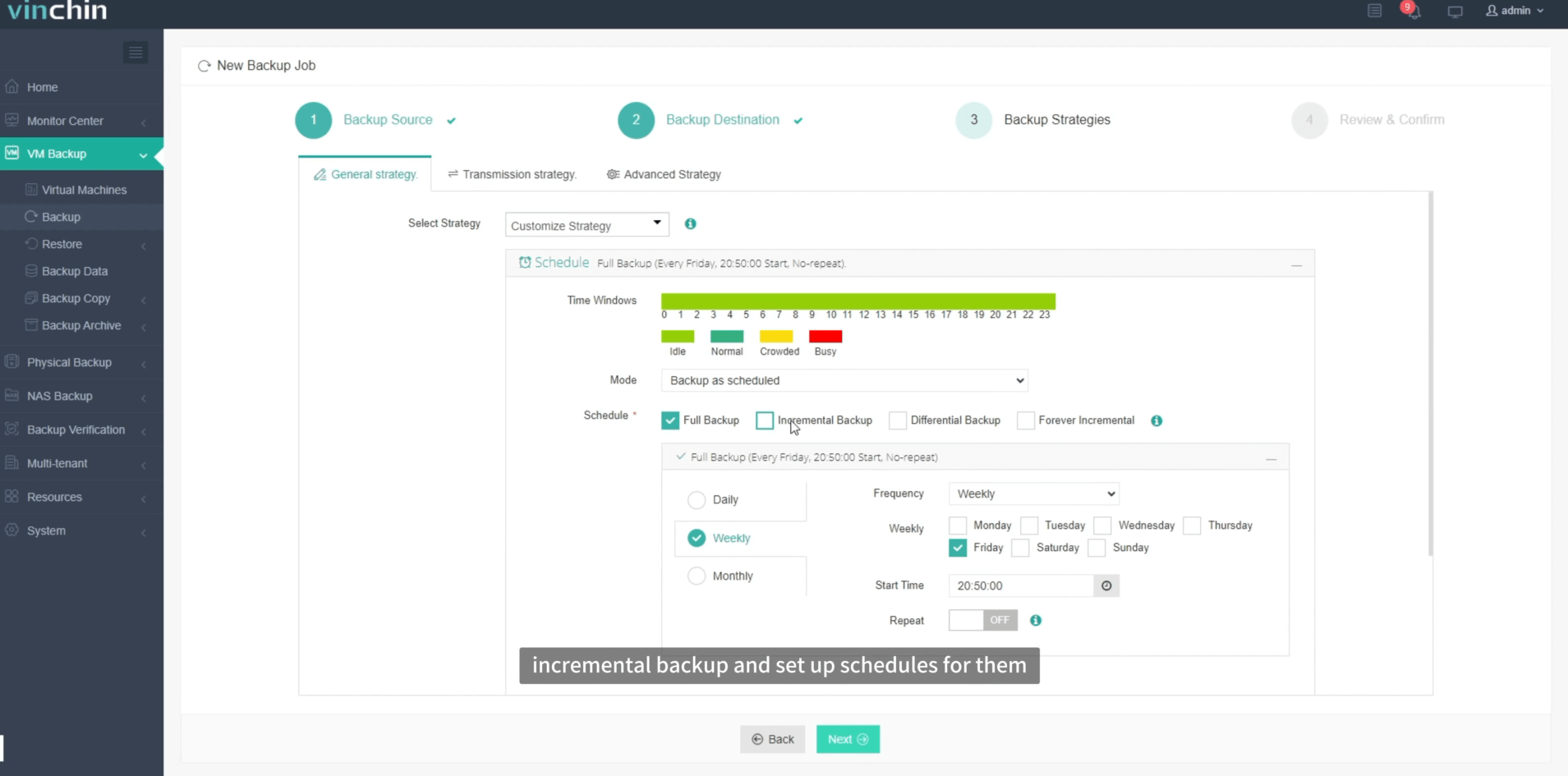
Step 4: Submit the job.
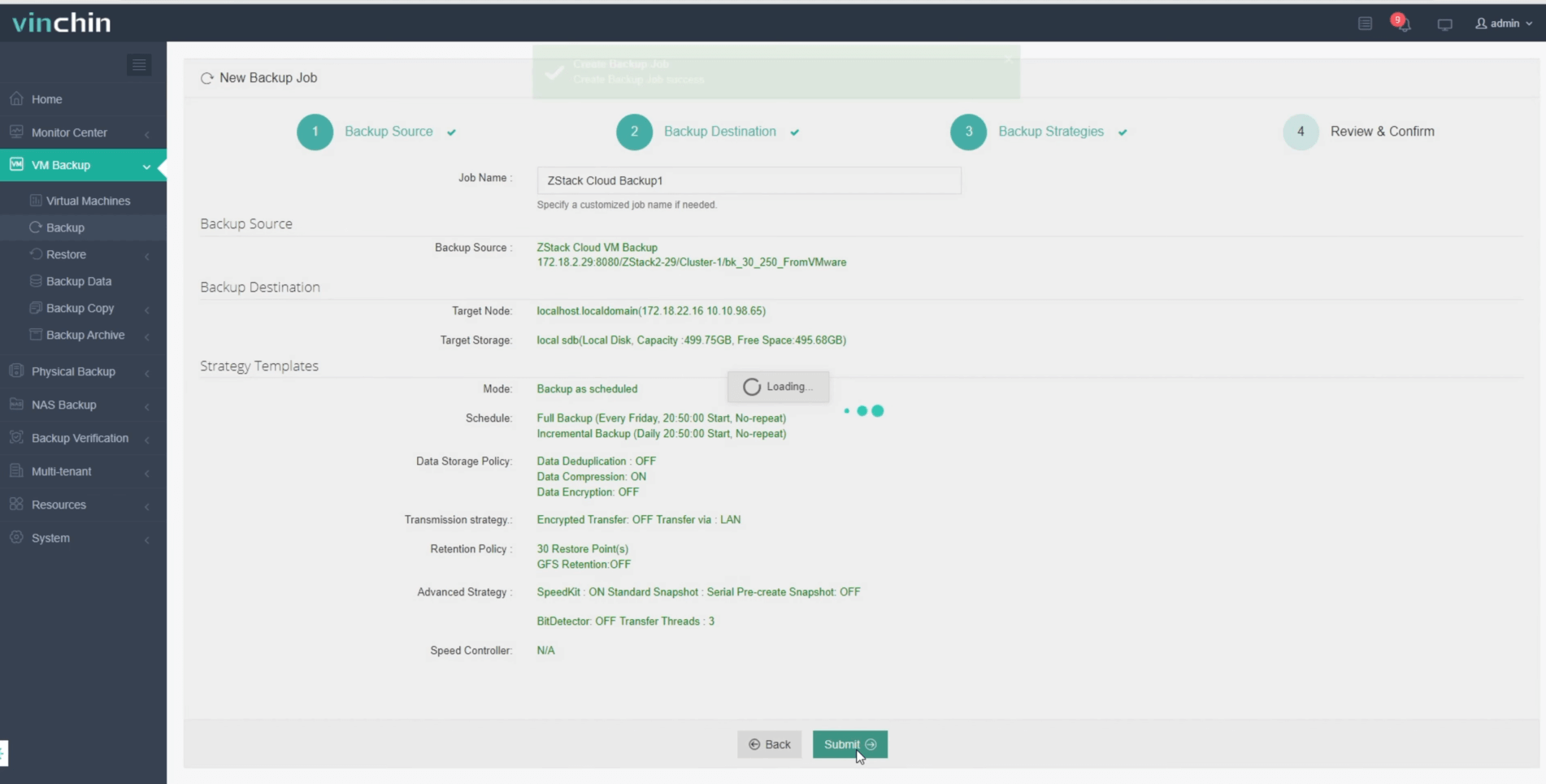
With just these steps in Vinchin Backup & Recovery’s user-friendly interface you achieve fully automated protection aligned with enterprise standards.
Trusted worldwide by thousands of organizations—with top ratings in independent reviews—Vinchin Backup & Recovery offers a 60-day full-featured free trial so you can experience its benefits firsthand.
Best ZStack Backup Software FAQs
Can I customize automated retention policies by VM group or workload type?
Yes; leading solutions allow assignment of specific policies based on groups such as production servers versus development environments so diverse compliance needs are met efficiently within one platform’s interface.
How does automated retention interact with ZStack’s native snapshots?
Automated backup solutions typically operate independently from native hypervisor snapshots but may coordinate snapshot creation during scheduled jobs; expired backup sets—including associated snapshots—are removed according to defined policy settings without affecting active system state in ZStack itself.
Are audit trails available showing changes made to my organization’s backup policies?
Enterprise-grade platforms provide comprehensive logging so any adjustment—including who changed what setting—is recorded; this supports internal governance reviews as well as external audits required under frameworks like SOX.
Does enabling automated retention slow down recovery times if I need urgent restores?
No; valid restore points remain immediately accessible even after expired copies are deleted according to schedule.Automation simply removes obsolete data while keeping current recovery options ready at all times—a crucial advantage during outages,ransomware events ,or accidental deletions .
Conclusion
Choosing a solution with robust automated retention is critical for cost control and compliance.Vinchin Backup & Recovery enables effective data lifecycle management at scale for ZStack environments .









