Automated retention policies are a cornerstone of modern data protection strategies. For organizations running virtual machines on oVirt, managing backup lifecycles efficiently is not just about saving storage—it’s about meeting compliance requirements and reducing operational risk. Vinchin Backup & Recovery supports automated retention policies for oVirt VMs. This capability helps enterprises keep only necessary backups while minimizing manual work and controlling costs.
Retention policies define how long backup data should be kept before deletion. Automating this process ensures that your organization stays in line with internal guidelines and external regulations such as GDPR or HIPAA. By automating retention enforcement, you reduce human error and streamline audits. As environments grow more complex, automation becomes essential for maintaining consistency across hundreds or thousands of VMs.
Why Automated Retention Policies Matter in Enterprise Environments?
Automated retention policies play a vital role in enterprise IT operations by ensuring that backup data is managed according to strict rules set by business needs or regulatory frameworks. These policies help organizations avoid unnecessary storage consumption while supporting legal obligations around data handling.
● Consistent Data Lifecycle Enforcement
Automated retention guarantees that every VM backup follows the same lifecycle rules without exception. This consistency is crucial when dealing with large-scale environments where manual oversight can lead to missed deletions or accidental over-retention of sensitive information.
● Reduced Storage Costs
By automatically deleting outdated backups based on defined criteria—such as age or number of restore points—organizations prevent storage bloat. Over time, this translates into significant cost savings on physical disks or cloud storage subscriptions.
● Minimized Human Error
Manual processes are prone to mistakes like forgetting to delete old backups or accidentally removing critical restore points. Automation removes these risks by executing retention actions reliably according to schedule.
● Regulatory Compliance Support
Many industries must comply with laws requiring specific data retention periods (e.g., SOX mandates seven-year record keeping; GDPR enforces “right to be forgotten”). Automated policies ensure your organization meets these demands without constant oversight.
● Audit Readiness
During audits, being able to show clear logs of automated backup management demonstrates due diligence. Auditors often require proof that expired data has been purged according to policy—a task made simple through automation.
Manual deletion of old backups is resource-intensive and error-prone. Relying on staff increases the chance of non-compliance during busy periods or staff turnover. With automated retention in place, IT teams can focus on higher-value tasks while knowing their backup environment remains compliant and efficient at all times.
How To Choose The Best oVirt Backup Solution for Automated Retention Policies
Selecting an effective oVirt backup solution requires careful evaluation of several key factors related to policy automation, scalability, flexibility, auditability, and performance impact. Each factor contributes directly to operational efficiency and risk mitigation in enterprise settings.
Centralized policy management simplifies administration across large infrastructures by allowing IT teams to create global rules from a single interface rather than configuring each VM individually. This approach reduces setup time and ensures uniform application of company-wide standards even as your environment grows rapidly.
Policy configuration flexibility enables alignment with both business objectives and regulatory requirements. Look for solutions that allow you to set different retention periods per VM group—for example: mission-critical databases may need longer histories than test servers—or base rules on criteria like age (“delete after 30 days”) versus count (“keep last 7 backups”).
Automation depth determines how much manual intervention is needed day-to-day. Leading solutions let you schedule full/Incremental/differential backups alongside automatic enforcement of custom retention rules—all from one dashboard—so routine maintenance does not distract from strategic projects.
Auditability supports compliance reporting by generating detailed logs showing when each backup was created, retained, deleted—and why those actions occurred based on policy logic. During regulatory reviews (e.g., HIPAA audits), having this evidence readily available saves time and builds trust with auditors.
Scalability ensures that performance remains high even as your VM fleet expands into hundreds or thousands of instances across multiple clusters or sites. A robust solution continues enforcing all configured policies without lagging behind due to increased workload—a common pain point in fast-growing enterprises.
When evaluating options:
Confirm centralized control exists via a web-based console.
Test whether you can assign unique policies per VM/group easily.
Check if scheduled jobs run reliably without frequent errors.
Review sample audit reports/logs for clarity.
Simulate scaling up VM numbers during trial runs; monitor system responsiveness under load conditions typical for your business size.
These steps help ensure your chosen solution delivers reliable automation today—and keeps pace tomorrow—as organizational needs evolve.
Vinchin Backup & Recovery: Enterprise-Level oVirt VM Protection
For organizations seeking advanced protection for oVirt virtual machines, Vinchin Backup & Recovery stands out as an enterprise-level solution supporting over 15 mainstream virtualization platforms—including VMware, Hyper-V, Proxmox, XCP-ng, XenServer, OpenStack, ZStack—and prominently featuring robust support for oVirt environments used by many mid-sized businesses and large enterprises alike. Vinchin Backup & Recovery offers agentless operation along with features such as Changed Block Tracking (CBT), LAN-free backup modes for optimal speed within supported platforms like oVirt itself, instant recovery capabilities (excluding Hyper-V), granular restore options, deduplication/compression technologies, flexible scheduling tools including GFS retention policy support, multi-thread transmission for faster jobs—even cloud/tape archiving integration—all managed through a unified web console interface.
Vinchin Backup & Recovery makes protecting your oVirt VMs straightforward: The intuitive web console guides users through four quick steps
The intuitive Vinchin web console streamlines the process:
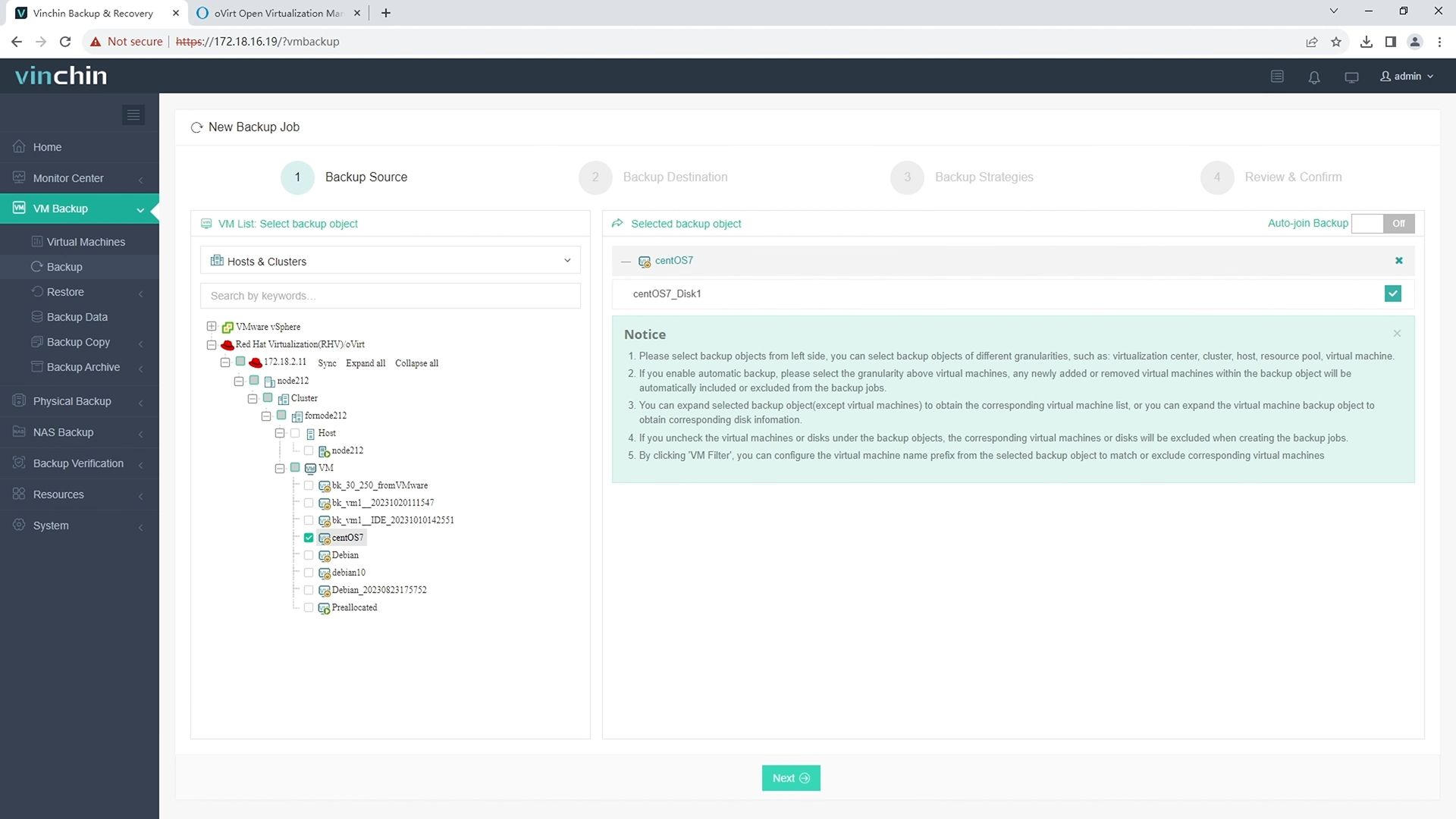
Step 1: Select the oVirt VM(s) you wish to back up.
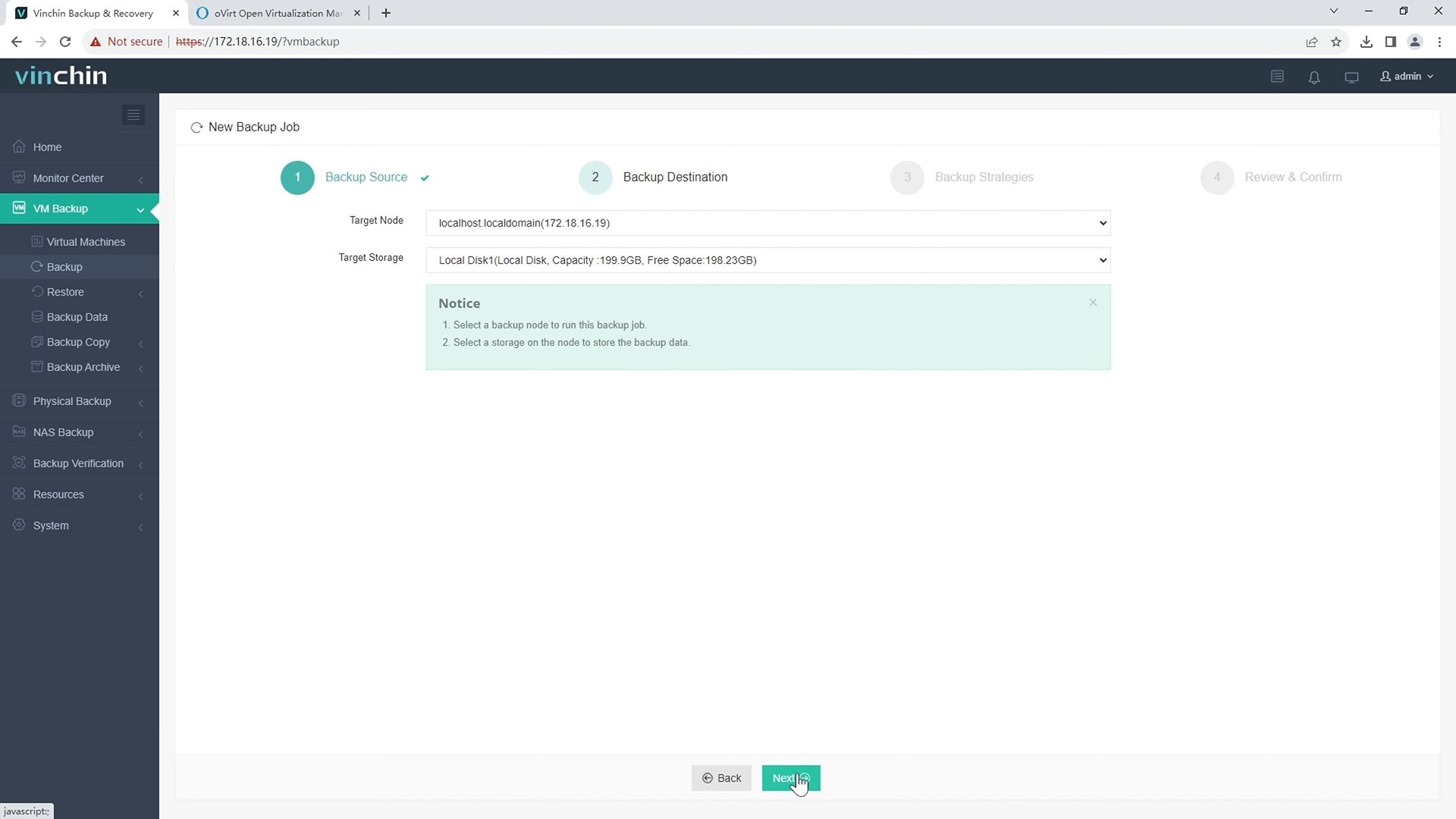
Step 2: Choose the appropriate backup storage destination.
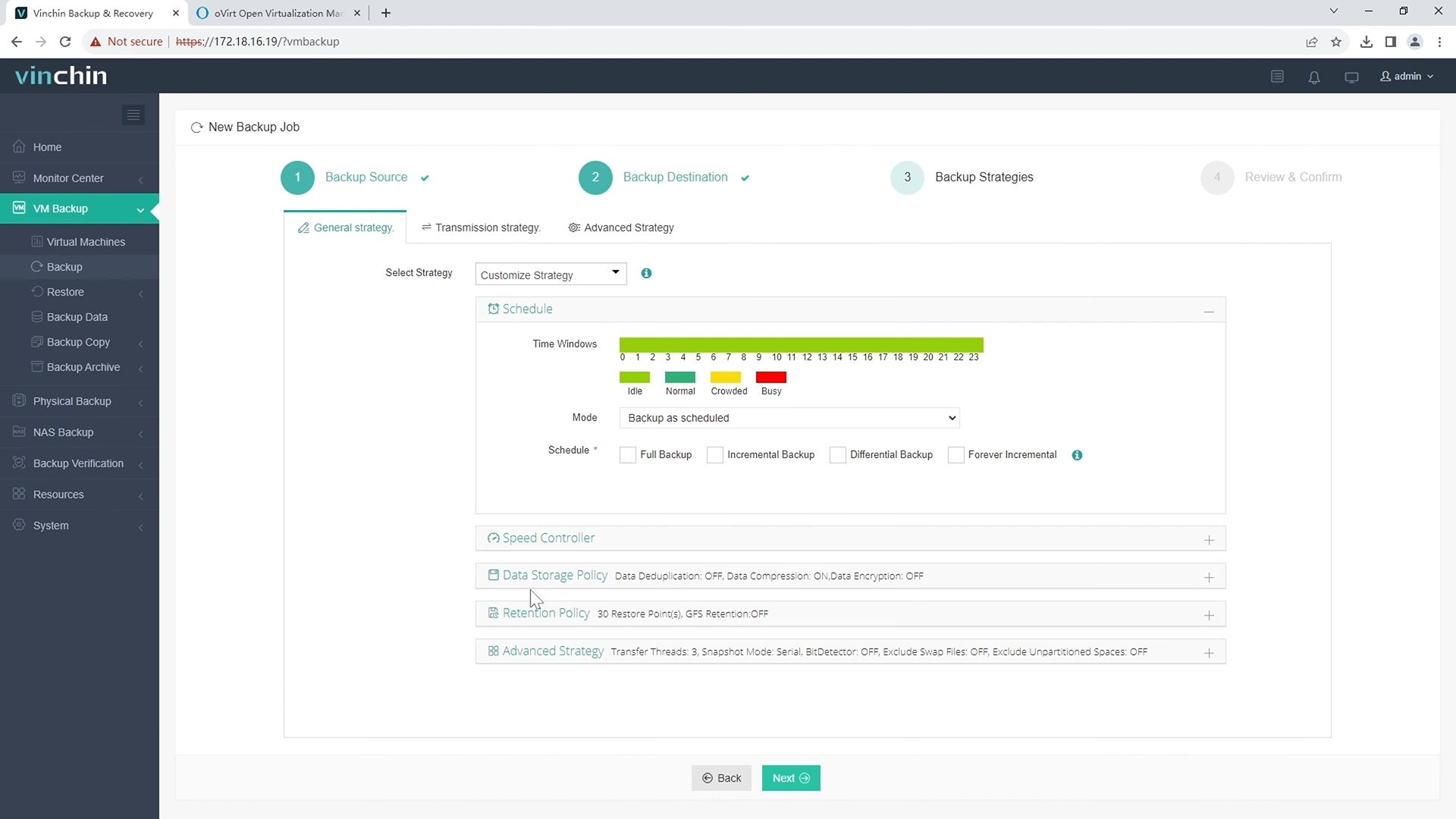
Step 3: Configure your desired backup strategy—including frequency, scheduling, encryption, and retention settings.
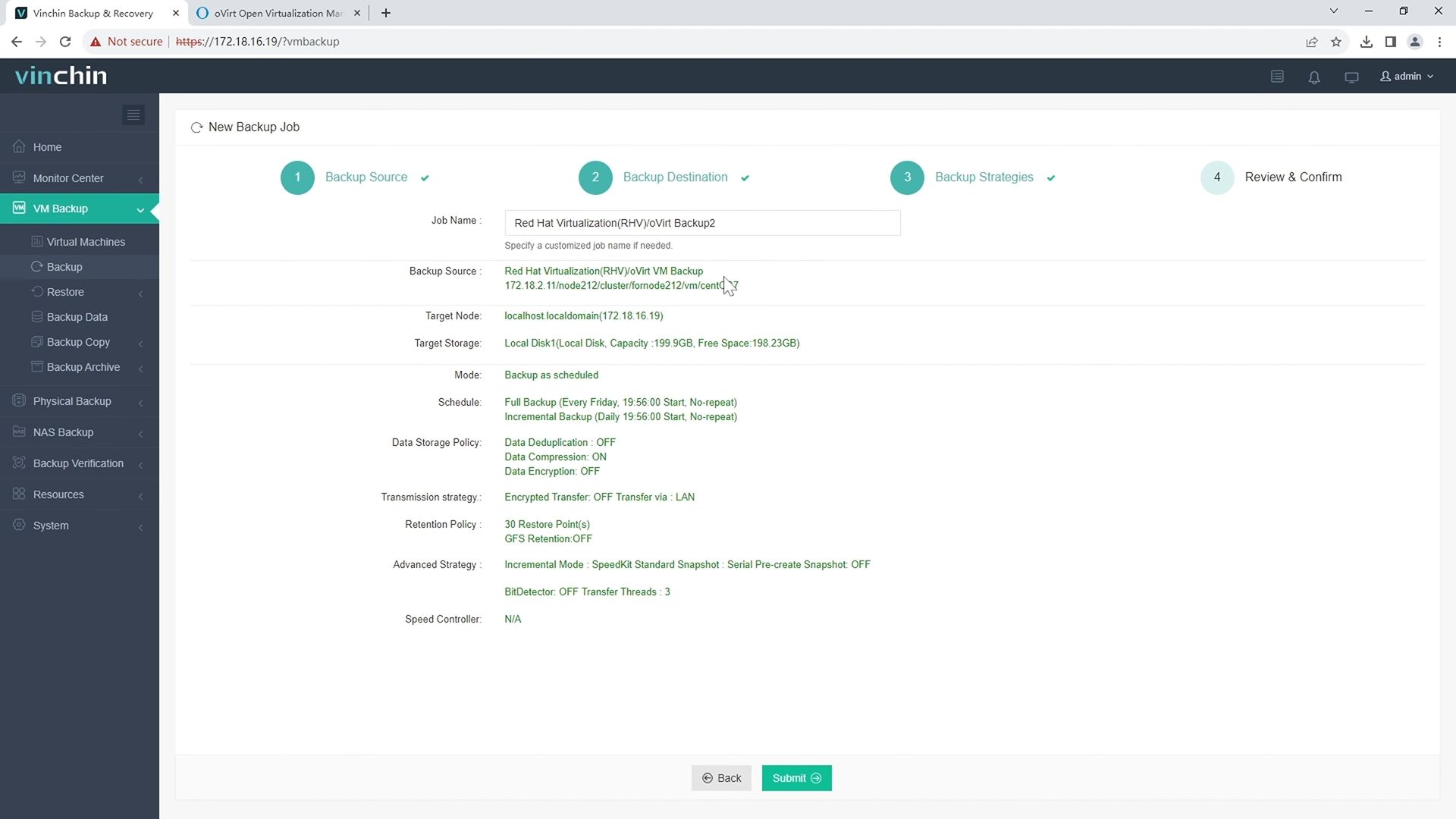
Step 4: Submit the job—the system automates execution, reports progress transparently, and notifies staff if intervention is required.
Recognized globally with top ratings from thousands of customers across diverse industries,Vinchin Backup & Recovery offers a fully featured 60-day free trial—click below to experience leading enterprise-grade data protection firsthand.
Best oVirt Backup Software FAQs
Q1: Why are automated retention policies important in VM backup?
They ensure consistent data lifecycle management across all virtual machines while reducing manual errors associated with routine cleanup tasks; they also control storage growth automatically—which helps meet legal requirements such as GDPR Article 5without extra effort from IT staff.
Q2: Can automated retention be customized per VM or group?
Yes; leading solutions allow granular assignment so administrators can specify unique criteria such as keeping daily snapshots for production VMs but weekly ones for development groups—or setting different expiration dates depending on workload priority.
Q3: How do automated policies impact compliance audits?
They provide auditable records showing adherence—including timestamped logs detailing when each action occurred—which greatly simplifies demonstrating regulatory compliance during formal reviews.
Conclusion
Automated retention streamlines compliance while cutting costs in growing environments—empowering IT teams with reliable protection at scale.









