Have you ever needed to recover your Oracle database to a specific point in time—right before a critical error or accidental data loss? The oracle rman set until time feature is your lifeline in these situations. Point-in-time recovery lets you restore your database to just before disaster struck. This guide explains what it is, why it matters, how to use it step by step, and what you must check before starting. We’ll also show you how Vinchin can make Oracle database protection even easier.
What Is Oracle RMAN Set Until Time?
The SET UNTIL TIME command in Oracle Recovery Manager (RMAN) allows you to restore and recover your database to an exact moment in the past. This process is called point-in-time recovery (PITR). Instead of rolling forward to the latest backup or redo log, you can stop at the precise time just before unwanted changes occurred.
According to Oracle’s official documentation, when you use SET UNTIL TIME, RMAN sets an upper noninclusive limit for recovery operations. That means if you specify UNTIL TIME '2024-06-23 10:30:00', transactions committed exactly at 10:30:00 are not included in the recovered state. This level of control helps DBAs target their restores with precision.
Why Use Set Until Time in RMAN?
Point-in-time recovery is essential when recent mistakes threaten your data integrity. Did someone drop a table by accident? Was there a bad data load or logical corruption? Rather than restoring everything from scratch or losing hours of work since your last backup, PITR lets you rewind only as far as needed. This approach minimizes both data loss and downtime.
However, using PITR requires that your database runs in ARCHIVELOG mode so that all changes are captured between backups. You must have all necessary backups and archived redo logs up to your target time; otherwise, recovery will fail. Always verify that these files exist before starting any restore operation.
Critical Pre-Recovery Checks and Validation?
Before running any point-in-time recovery with oracle rman set until time, careful preparation is vital. Skipping checks can lead to failed restores or incomplete recoveries.
First, confirm that all required backups are available for the period leading up to your chosen target time. Use LIST BACKUP OF DATABASE COMPLETED AFTER within RMAN to see which backups cover this window. Next, validate that archived redo logs form a continuous sequence from your backup date through the desired recovery point by running LIST ARCHIVELOG FROM TIME. Missing logs mean incomplete recovery—so double-check now rather than during an emergency.
It’s wise to perform trial validations using RESTORE DATABASE VALIDATE and RECOVER DATABASE VALIDATE. These commands let RMAN simulate restore operations without actually moving data on disk—a quick way to catch missing files early.
Finally, always check which incarnation of your database is active by running LIST INCARNATION;. If previous RESETLOGS events exist (for example after earlier incomplete recoveries), ensure you're working with the correct incarnation pointer before proceeding further.
Using Set Until Time Command in Oracle RMAN
Once you've confirmed all prerequisites are met, you're ready for actual point-in-time recovery using SET UNTIL TIME within RMAN's command line interface. Each step below builds on best practices recommended by both Oracle documentation and experienced DBAs worldwide.
Begin by shutting down your database cleanly so no changes occur during restoration work. Start it again but only mount it—do not open yet—to prepare for controlled file operations:
RMAN> SHUTDOWN IMMEDIATE;
RMAN> STARTUP MOUNT;
From your operating system shell prompt (not inside SQL*Plus), connect directly into RMAN as a privileged user:
$ rman TARGET /
Within this session—and always inside an atomic RUN block—specify exactly where you want recovery operations capped using SET UNTIL TIME:
RUN {
  SET UNTIL TIME "TO_DATE('2024-06-23 10:30:00','YYYY-MM-DD HH24:MI:SS')";
  RESTORE DATABASE;
  RECOVER DATABASE;
}
Here’s what happens:
SET UNTIL TIME tells RMAN where to stop applying changes
RESTORE DATABASE brings back datafiles valid at that moment
RECOVER DATABASE applies archived redo logs up until—but not including—the specified timestamp
If any part of this RUN block fails—for example due to missing files—the entire operation rolls back automatically so nothing partial remains on disk.
After successful completion of these steps comes one final action: opening your restored database with RESETLOGS mode:
RMAN> ALTER DATABASE OPEN RESETLOGS;
This command starts a new incarnation of your database history—a fresh timeline from which future backups must be taken immediately (Warning: Backups made prior are generally unusable after RESETLOGS).
Note:
If restoring across incarnations (such as after previous RESETLOGS events), reset pointers first using RESET DATABASE TO INCARNATION n after identifying correct values via LIST INCARNATION;. If exact timestamps do not match redo log entries perfectly, RMAN recovers up through available logs nearest but not beyond what you've specified (Oracle Docs). Always take a full backup right after opening with RESETLOGS since older ones become invalid for future restores under this new timeline.
For clarity here’s how everything fits together:
SHUTDOWN IMMEDIATE;
STARTUP MOUNT;
RUN {
  SET UNTIL TIME "TO_DATE('2024-06-23 10:30:00','YYYY-MM-DD HH24:MI:SS')";
  RESTORE DATABASE;
  RECOVER DATABASE;
}
ALTER DATABASE OPEN RESETLOGS;
-- Immediately perform a full backup here!
Understanding Recovery Internals and Common Pitfalls
Knowing how things work behind-the-scenes helps avoid costly mistakes during PITR operations with oracle rman set until time.
When restoring databases this way, RMAN relies heavily on control files—which act like roadmaps pointing out where each piece of required backup or archive log resides on disk or tape storage systems. If control file autobackups aren’t current enough—or if they don’t know about recent backups—you may hit dead ends mid-recovery.
The actual mechanics involve applying redo records sequentially from archived logs until reaching an internal System Change Number (SCN) whose timestamp matches or slightly exceeds what was specified via SET UNTIL TIME. Any transaction committed exactly at that second won’t appear post-recovery due its noninclusive logic—so choose times carefully!
Be aware too that physical PITR differs from Flashback Database features found elsewhere within Oracle environments:
Flashback uses retained undo segments plus special Flashback Logs allowing rapid rewinds over short intervals—but only if those features were enabled beforehand.
By contrast PITR needs complete physical copies plus every intervening archive log file between base backup date/time and chosen target instant—a much heavier lift operationally but often necessary after major disasters or logical errors outside Flashback coverage windows.
Finally remember space planning! Restoring large databases means having enough free disk room for both old/current copies and newly restored versions until everything completes successfully—including extra overhead while applying REDO during RECOVER phase prior opening via RESETLOGS command above!
How Can Vinchin Backup & Recovery Simplify Oracle Database Protection?
Beyond native tools like RMAN, organizations seeking streamlined enterprise-level protection should consider dedicated solutions tailored for modern workloads.
Vinchin Backup & Recovery stands out as a professional platform supporting today’s mainstream databases—including Oracle 10g, 11g/11g R2, 12c, 18c, 19c, 21c, Oracle RAC, MySQL, SQL Server, MariaDB, PostgreSQL, PostgresPro, and TiDB.
Core capabilities include incremental backup support, batch database backup management, advanced source-side compression options for efficient storage usage, robust GFS retention policies for compliance needs, and reliable cloud/tape archiving integration—all designed to maximize automation while minimizing risk and manual effort across complex environments.
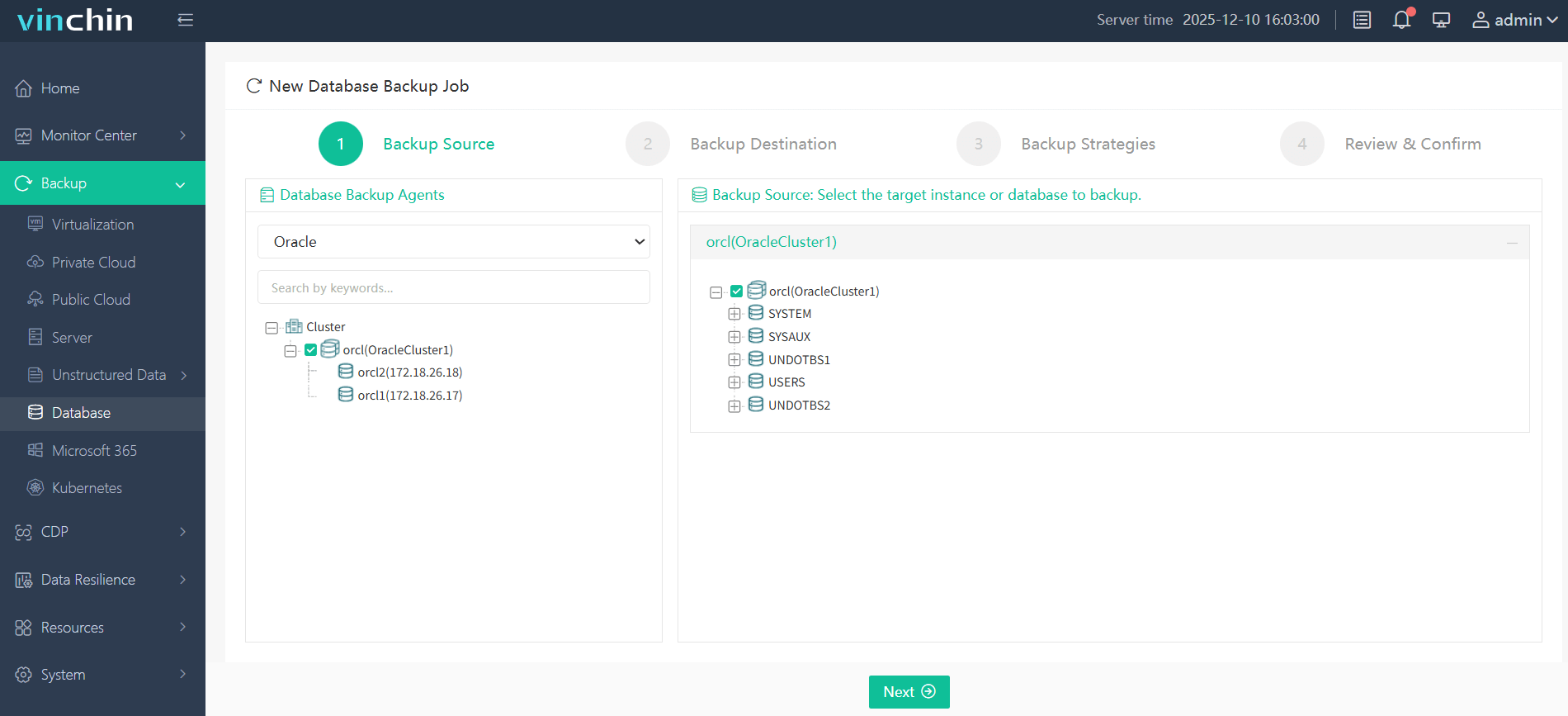
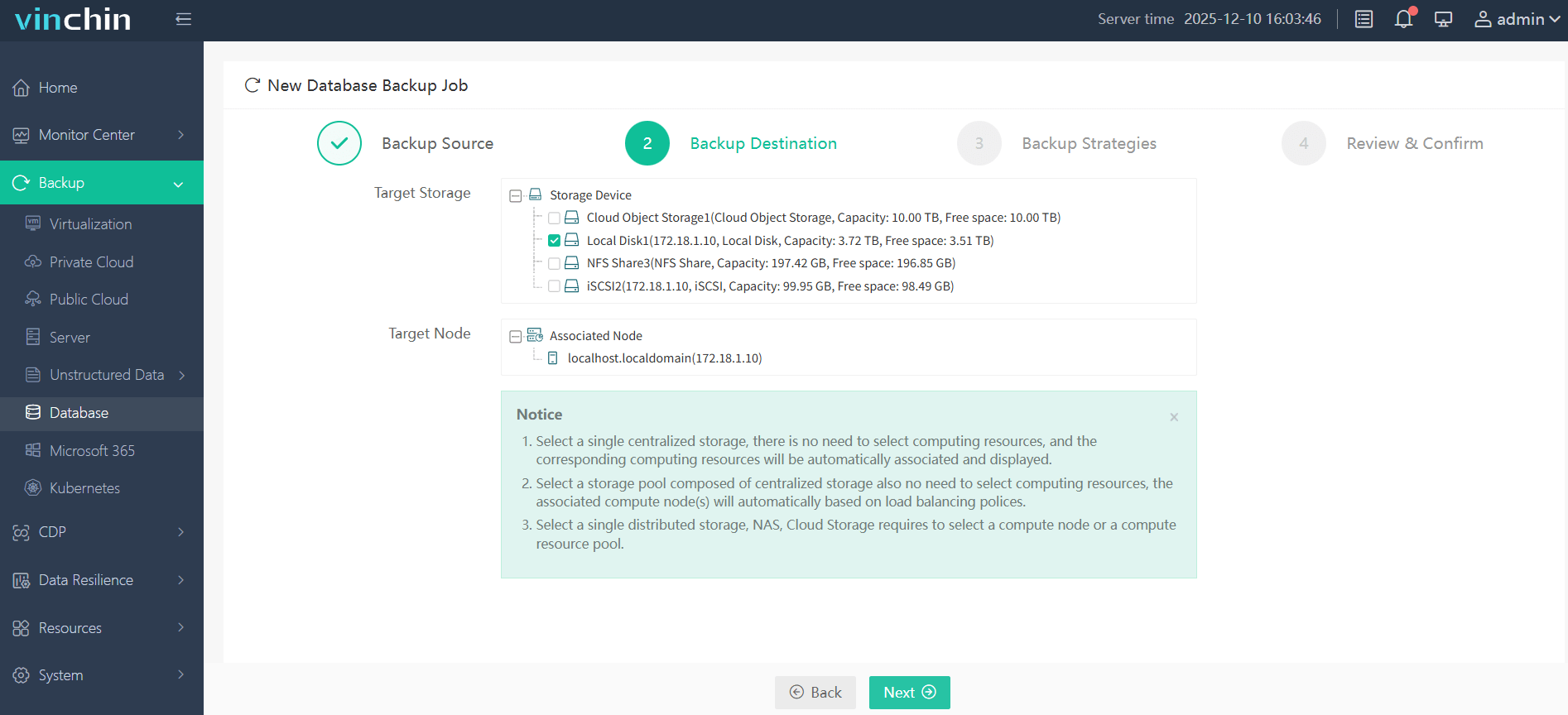
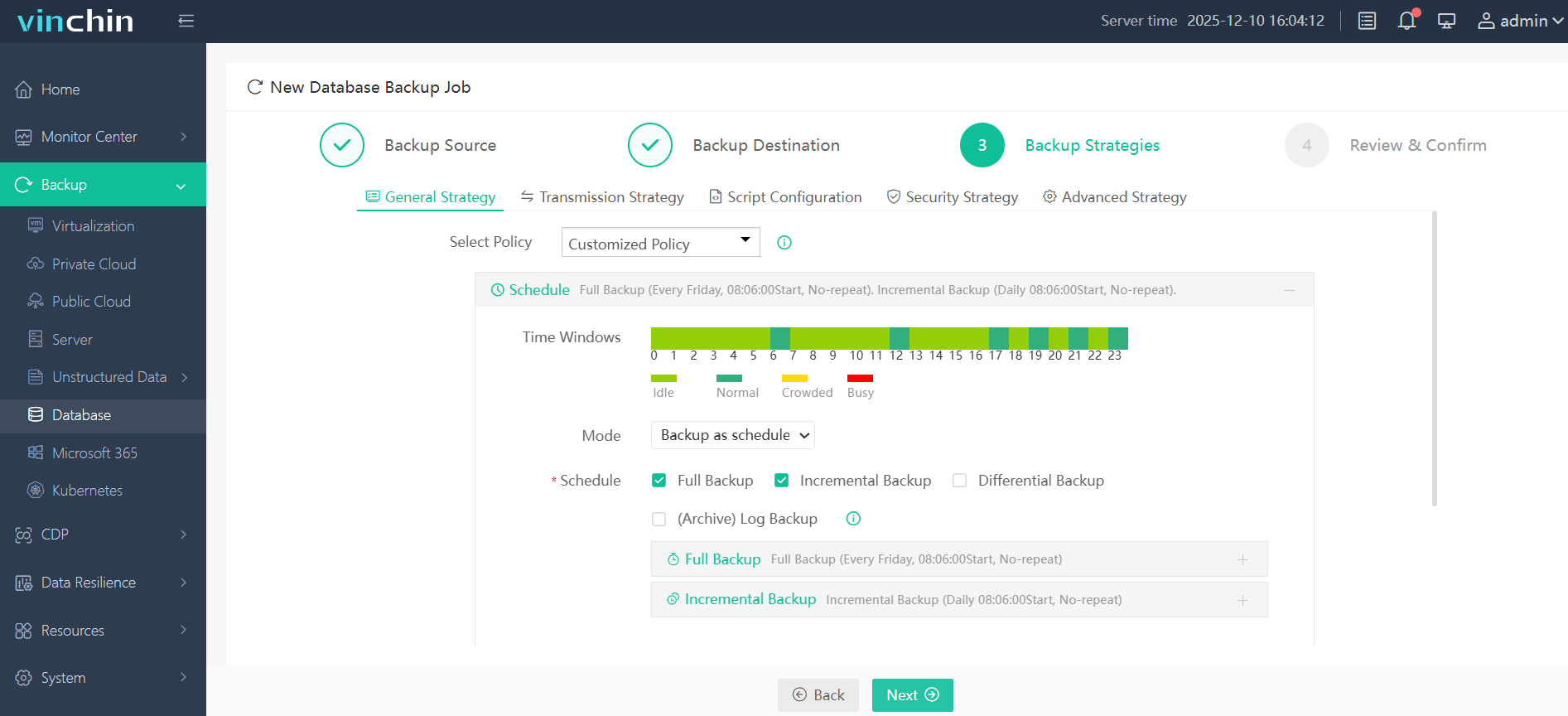
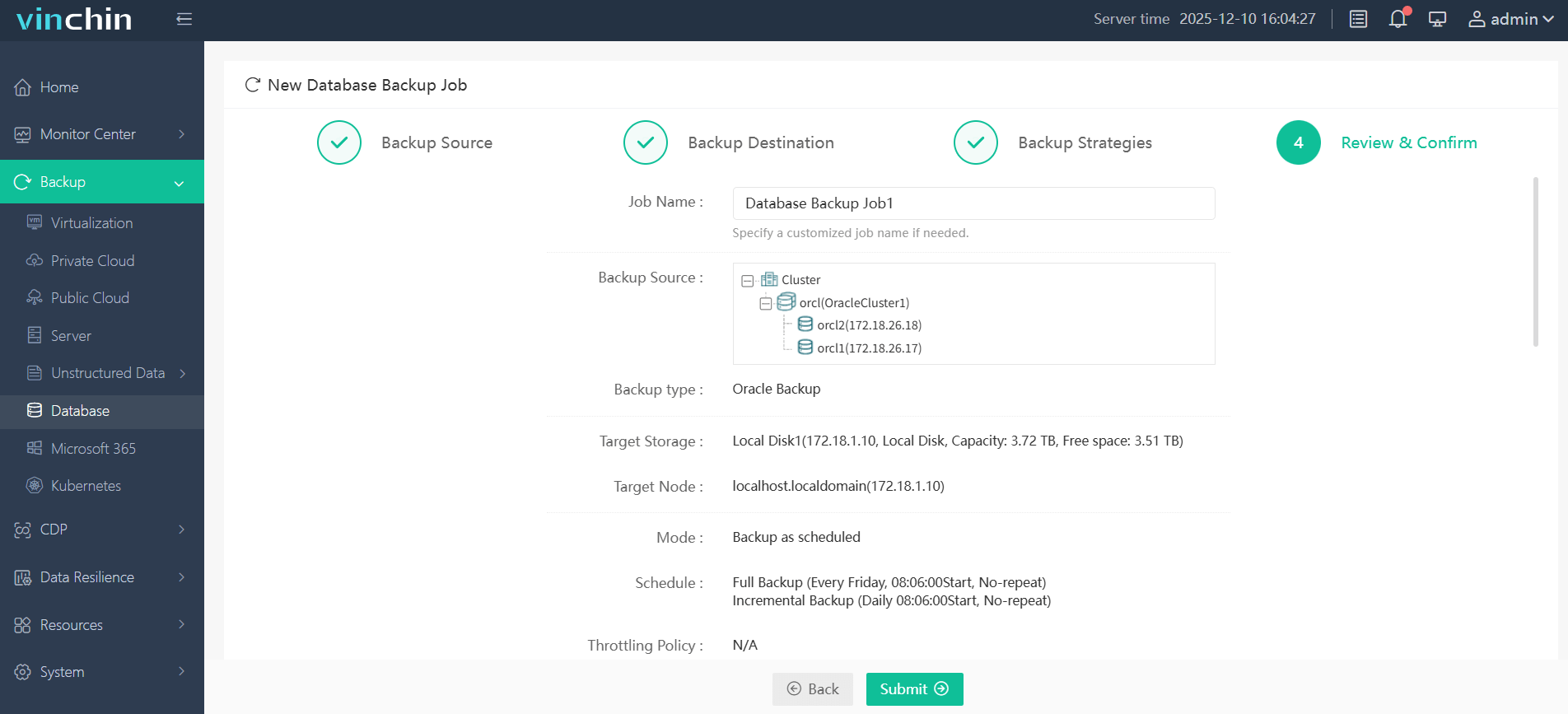
With its intuitive web console interface backing up an Oracle instance takes just four steps:
Step 1. Select the Oracle database to backup
Step 2. Choose the backup storage
Step 3. Define the backup strategy
Step 4. Submit the job
Vinchin Backup & Recovery enjoys global recognition among enterprises for reliability and ease-of-use—plus top ratings from industry analysts—and offers a fully featured free trial valid for 60 days; click download now to experience comprehensive protection firsthand!
Oracle RMAN Set Until Time FAQs
Q1: What should I do if some archived redo logs are missing when attempting PITR?
You must locate or restore every required archived redo log covering from last full/incremental backup through target time; otherwise point-in-time recovery will fail with errors such as "RMAN-06053".
Q2: Does specifying an exact timestamp guarantee transactions at that second will be included?
No; because SET UNTIL TIME acts as an upper noninclusive limit—transactions committed precisely at given second won't appear post-recovery unless recovered SCN falls just beyond specified value per available redo sequence timing.
Q3: How do I switch my active incarnation pointer if recovering across multiple RESETLOGS events?
Run LIST INCARNATION then issue RESET DATABASE TO INCARNATION n within RMAN session before beginning main RESTORE/RECOVER workflow targeting earlier timeline branch as needed.
Conclusion
The oracle rman set until time feature gives precise control over recovering databases right up until disaster strikes—but never past it! Whether using native tools or leveraging Vinchin’s intuitive platform makes business continuity simple worldwide—try their free trial today!