Agentless and incremental backup features are vital for protecting large-scale virtualized environments like Sangfor HCI. These technologies help IT teams reduce manual work, save storage space, and speed up recovery. In modern data centers where downtime can be costly, efficient backup strategies keep businesses running smoothly while meeting compliance needs.
Sangfor HCI is built on KVM virtualization technology, making it compatible with advanced backup methods that interact directly with the hypervisor layer. By leveraging agentless backups through API integration and incremental backups using techniques such as Changed Block Tracking (CBT), organizations can achieve reliable protection without overloading their systems.
Why Agentless & Incremental Backup Matters in Enterprise Environments
Agentless and incremental backups address key challenges faced by IT teams managing virtual infrastructure at scale. They streamline operations while reducing risk.
● Simplified Management: Agentless backups remove the need to install software agents inside every VM. This means less time spent on deployment, updates, or troubleshooting compatibility issues between agents and guest operating systems. The backup system communicates directly with Sangfor HCI’s management APIs or hypervisor interfaces to discover VMs automatically.
● Reduced Resource Consumption: Incremental backups only capture data blocks that have changed since the last backup job. This approach uses less network bandwidth during transfers and requires less storage capacity over time compared to full backups of every VM on every run. For example, if you back up 100 VMs daily but only 10% of their data changes each day, incremental methods cut both transfer times and storage costs dramatically.
● Faster Recovery Times: With smaller backup sets created by incremental jobs, restoring a VM or file becomes much quicker than sifting through massive full images. This helps meet strict Recovery Time Objectives (RTO) set by business continuity plans.
● Lower Operational Overhead: Without agents running inside VMs consuming CPU or memory resources—and without frequent agent maintenance—IT staff can focus on higher-value tasks rather than routine upkeep of backup software components across hundreds of machines.
● Improved Compliance & Audit Readiness: Many regulations require proof that critical workloads are protected regularly without gaps in coverage. Automated agentless discovery ensures no VM is missed due to manual error or outdated agent installations; incremental logs provide clear evidence of ongoing protection cycles.
Without these features in place, enterprises face longer backup windows that may disrupt production workloads or miss tight RTO/RPO targets—potentially leading to compliance failures or costly downtime during disaster recovery events.
How To Choose The Best Sangfor HCI Backup Solution for Agentless & Incremental Backups?
Selecting a robust Sangfor HCI backup solution requires careful evaluation across several dimensions important for enterprise IT operations.
A strong candidate should offer proven agentless integration with Sangfor HCI’s native APIs or supported hypervisors like KVM. This minimizes setup complexity because there is no need for per-VM installation steps; new VMs are discovered automatically as they’re provisioned within your cluster environment.
Look for solutions featuring advanced incremental mechanisms such as Changed Block Tracking (CBT). CBT identifies which disk sectors have changed since the last snapshot so only those blocks get backed up—saving time on both local disk writes and remote transfers if you use cloud storage targets. While this reference explains CBT generally, most modern platforms—including those supporting Sangfor HCI—use similar principles even if implementation details differ.
Scalability matters too: As your organization grows from dozens to hundreds of VMs—or adds more clusters—the chosen solution must maintain performance without bottlenecks during peak activity periods like nightly batch processing or quarterly audits when many jobs run simultaneously.
Security controls cannot be overlooked: End-to-end encryption (such as AES-256) protects sensitive data both in transit between hosts/storage devices and at rest within your repository; role-based access control (RBAC) restricts who can view/manage backups based on job function—a requirement under frameworks like GDPR or HIPAA.
Finally, audit-ready reporting tools help demonstrate compliance by generating logs showing successful completion of scheduled jobs along with any exceptions requiring follow-up action—a must-have during regulatory reviews or internal audits.
Vinchin Backup & Recovery: Enterprise-Level Solution for Sangfor HCI
For organizations seeking reliable protection for Sangfor HCI environments, Vinchin Backup & Recovery stands out as an enterprise-level virtual machine backup solution supporting more than 15 mainstream virtualization platforms—including VMware, Hyper-V, Proxmox, oVirt, OLVM, RHV, XCP-ng, XenServer, OpenStack, ZStack, and notably Sangfor HCI itself. Its comprehensive feature set includes agentless architecture tailored for KVM-based infrastructures like Sangfor HCI and advanced incremental backup technology designed to optimize efficiency while minimizing impact on production workloads.
Key capabilities such as forever-incremental backup strategy, granular restore options, data deduplication/compression technology, centralized scheduling/reporting tools, and robust encryption ensure secure yet flexible protection across diverse environments. These features collectively enable fast recovery times while reducing operational overhead and storage consumption—ideal for demanding enterprise scenarios where uptime matters most.
With Vinchin Backup & Recovery’s intuitive web console interface:
Step 1: Select the Sangfor VM to back up.
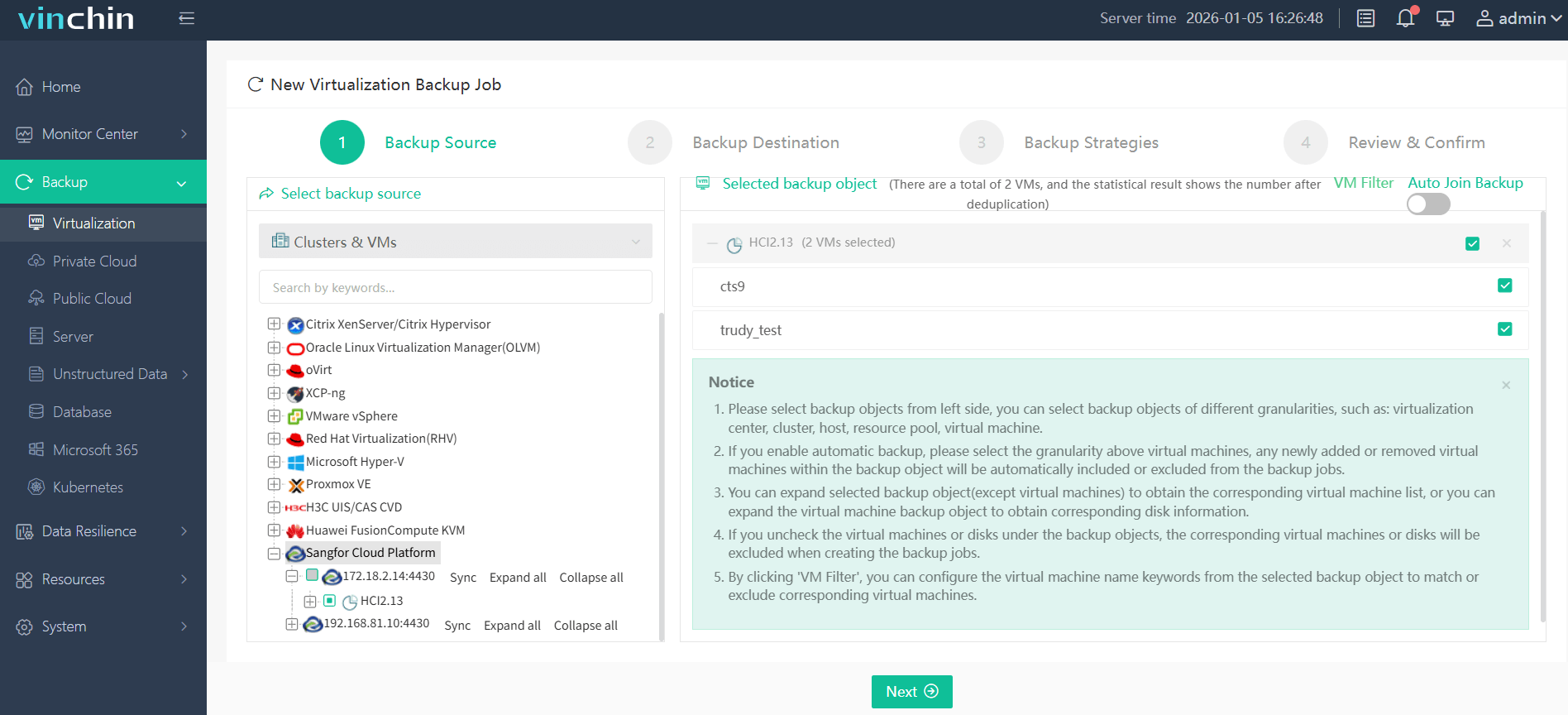
Step 2: Choose the desired backup storage.

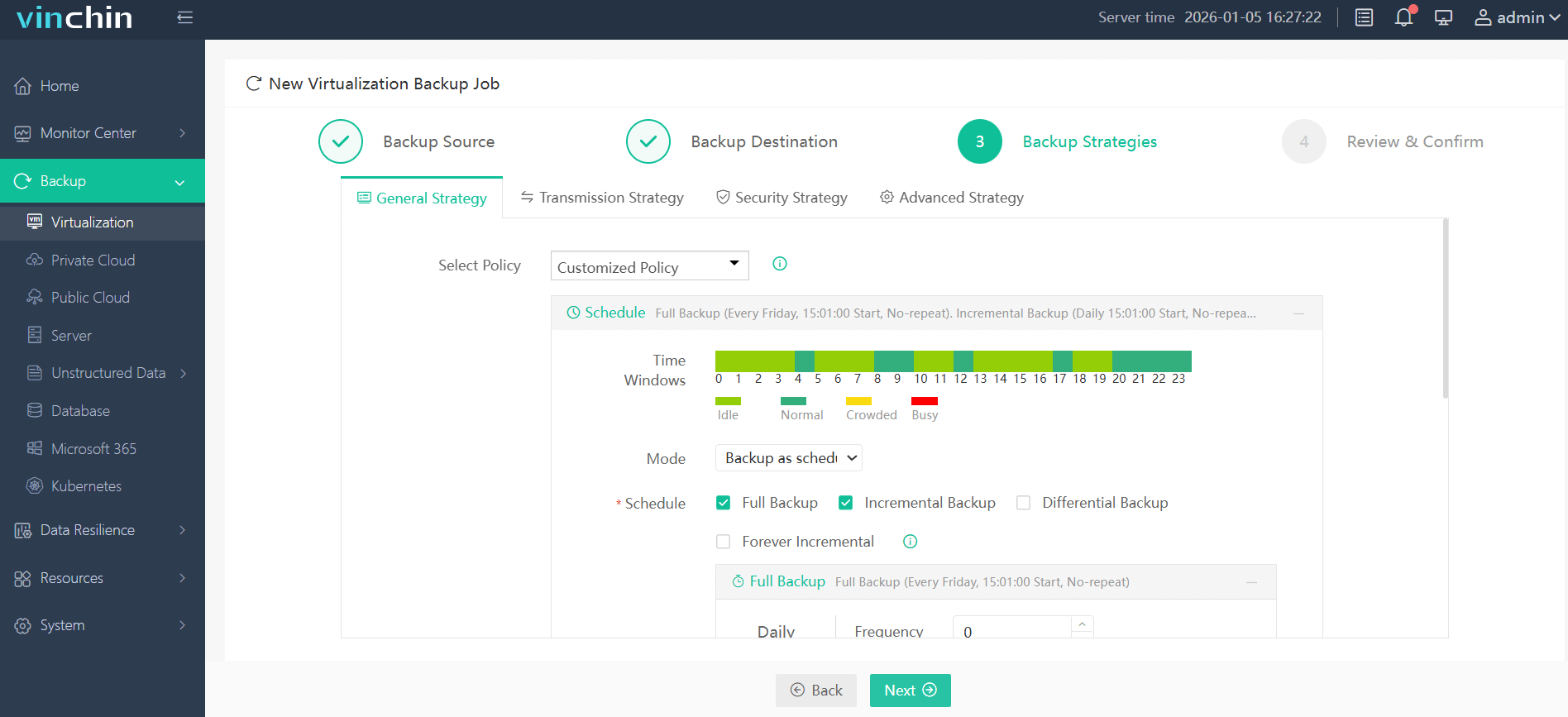
Step 3: Configure a suitable backup strategy.
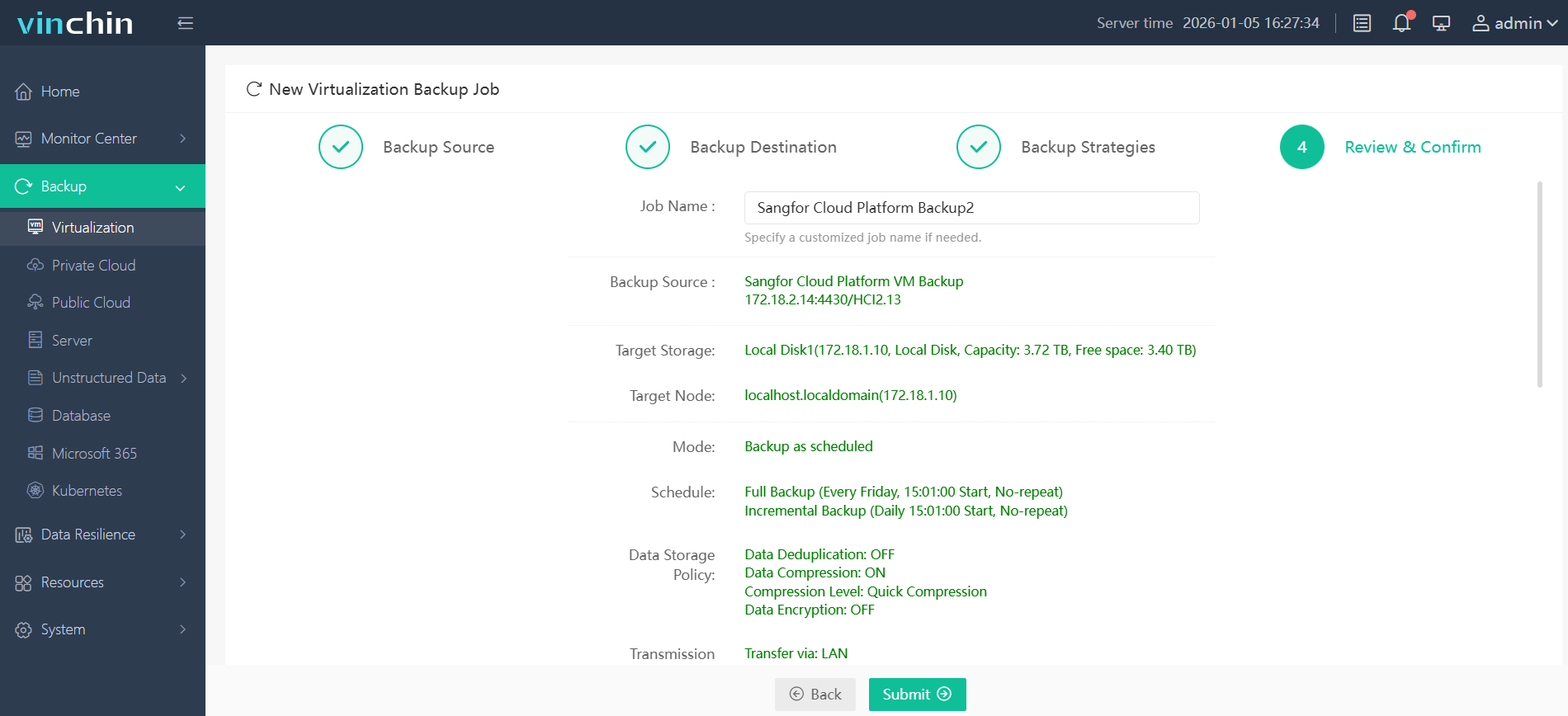
Step 4: Submit the job—all managed from a single dashboard in just minutes.
Trusted globally by thousands of enterprises with top ratings in independent reviews,Vinchin Backup & Recovery offers a fully functional 60-day free trial—click below to experience its powerful capabilities firsthand.
Best Sangfor HCI Backup Software FAQs
Q1: Why is agentless backup important for Sangfor HCI?
Agentless backup reduces deployment complexity by eliminating per-VM agents—lowering maintenance effort while minimizing system impact through direct integration with hypervisor APIs such as those used by KVM-based platforms like Sangfor HCI.
Q2: How does incremental backup benefit large-scale environments?
Incremental backups save time and storage by capturing only changed data after an initial full copy—enabling faster operations at scale while keeping network traffic low even when protecting hundreds of active virtual machines daily.
Q3: What security measures should be expected?
Expect end-to-end encryption using standards like AES-256 during transfer/storage plus RBAC restricting unauthorized access—ensuring regulatory compliance under frameworks such as GDPR Article 32 and HIPAA Security Rule requirements.
Q4: Can I restore individual files from an incremental backup?
Yes; leading solutions allow file-level restore from point-in-time snapshots created by incremental jobs so you can recover specific documents quickly without restoring an entire VM image.
Conclusion
Prioritizing agentless and incremental capabilities improves efficiency,cuts costs,and reduces risk.Vinchin Backup & Recovery delivers reliable protection tailored for demanding enterprise environments running on Sangfor HCI.








