OpenStack powers many enterprise clouds. Keeping workloads running without interruption is crucial for business continuity. The backup method that best achieves this is image-based, agentless backup with application-consistent snapshots. This approach enables rapid recovery while preserving data integrity and does not disrupt active services.
In modern enterprises, even brief outages can cause lost revenue, missed service-level agreements (SLAs), and dissatisfied customers. Efficient backup methods also help reduce compliance risks and operational burdens as cloud environments scale up or change over time. According to Gartner, IT downtime costs large organizations an average of $5,600 per minute, making fast recovery essential.
Why Minimizing Downtime Matters in Enterprise Environments
Downtime impacts more than just IT teams—it affects every part of a business. When critical systems go offline, productivity drops across departments. Revenue streams pause or shrink. Customer trust can erode quickly if services are unavailable or data is lost.
● Downtime causes direct financial loss
Lost transactions during outages mean immediate revenue hits. For example, e-commerce platforms may lose thousands of dollars per minute when payment processing halts due to server failure.
● Downtime leads to regulatory risk
Many industries face strict rules about data availability and recoverability (such as HIPAA for healthcare or GDPR in Europe). Failing to restore data quickly can result in fines or legal action.
● Downtime damages reputation
Customers expect always-on digital experiences. Prolonged outages make headlines and drive users toward competitors who offer better reliability.
● Downtime disrupts operations
Internal workflows depend on access to applications like email servers or databases hosted on OpenStack compute nodes (Nova). If these are down—even briefly—teams cannot collaborate effectively.
These risks highlight why minimizing downtime through robust backup strategies is vital for any enterprise using OpenStack infrastructure.
How To Choose The Best OpenStack Backup Solution for Minimal Downtime?
Selecting an effective backup solution requires understanding how different technologies interact with core OpenStack components such as Nova (compute), Cinder (block storage), Glance (image service), and Swift (object storage). A well-chosen method ensures quick restores while protecting both system state and application data.
A strong backup strategy rests on several pillars:
● Agentless backups reduce complexity
Agentless solutions leverage native OpenStack APIs instead of requiring software inside each virtual machine (VM). This means less resource overhead on hosts managed by Nova or Cinder volumes—no need to maintain agents during upgrades or migrations. It also lowers security risks since fewer components run inside production VMs.
● Application-consistent snapshots ensure usable restores
Image-based backups that capture application consistency guarantee that restored VMs boot into a stable state—databases are intact; file systems are clean; no manual fixes needed after recovery. For transactional workloads like MySQL databases running atop Cinder volumes, this prevents corruption that could otherwise occur if only crash-consistent snapshots were used.
● Automation accelerates protection and recovery
Automated scheduling allows regular backups without human intervention—critical when managing hundreds of VMs across multiple projects in Horizon dashboard or via CLI tools. Instant recovery features let you bring VMs back online within minutes rather than hours by mounting image backups directly from storage repositories.
● Scalability supports growing cloud environments
As your organization adds more tenants or expands its private cloud footprint using additional compute nodes or storage pools, your backup solution must keep pace without bottlenecks. Centralized management consoles help orchestrate protection across diverse resources managed by Keystone identity service.
● Security safeguards sensitive information during backup operations
Strong encryption protects VM images stored offsite or in object stores like Swift from unauthorized access—even if physical media is compromised during disaster scenarios. Role-based access controls ensure only authorized admins can initiate restores through Horizon UI or API endpoints.
By focusing on these pillars—agentless operation, application consistency, automation, scalability, and security—you build a resilient foundation that minimizes downtime risk across all layers of your OpenStack deployment.
Vinchin Backup & Recovery: Enterprise‑Level Protection for OpenStack
For enterprises seeking robust protection for their OpenStack environments, Vinchin Backup & Recovery stands out as a professional-grade virtual machine backup solution supporting 15+ mainstream virtualization platforms—including VMware, Hyper-V, Proxmox VE, oVirt/RHV/OLVM, XCP-ng/XenServer, ZStack—and notably full support for OpenStack infrastructures at scale.
Among its most relevant features are incremental backup strategies for efficiency; granular restore options enabling flexible file-level recoveries; automated scheduling to streamline routine tasks; strong encryption safeguarding sensitive VM data; and instant VM/file recovery functions that dramatically reduce RTOs after failures—together providing comprehensive resilience against disruption.
The intuitive web console makes the process straightforward:
Step 1: Select the OpenStack VM to back up;

Step 2: Choose the target backup storage location;
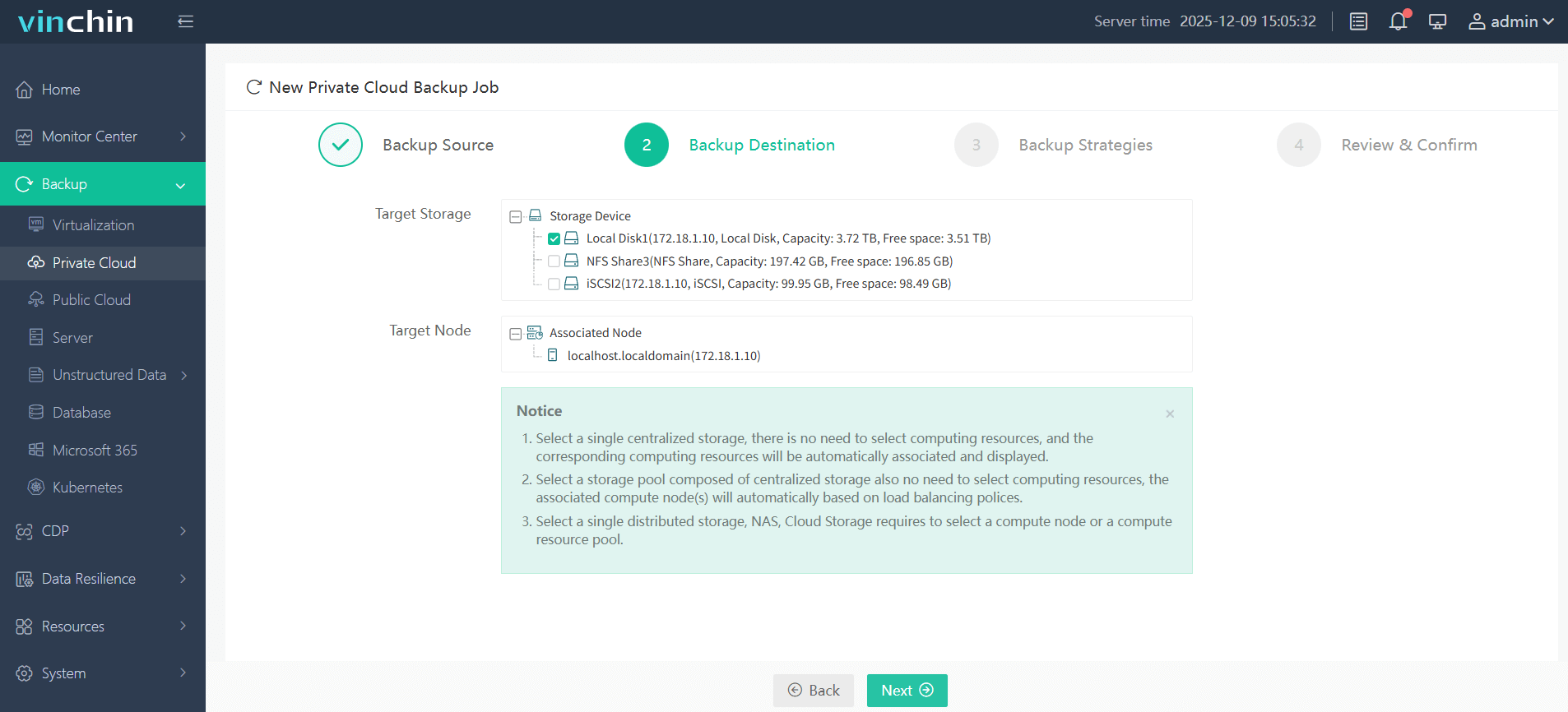
Step 3: Configure the desired backup strategy including schedule and retention policies;

Step 4: Submit the job with one click.
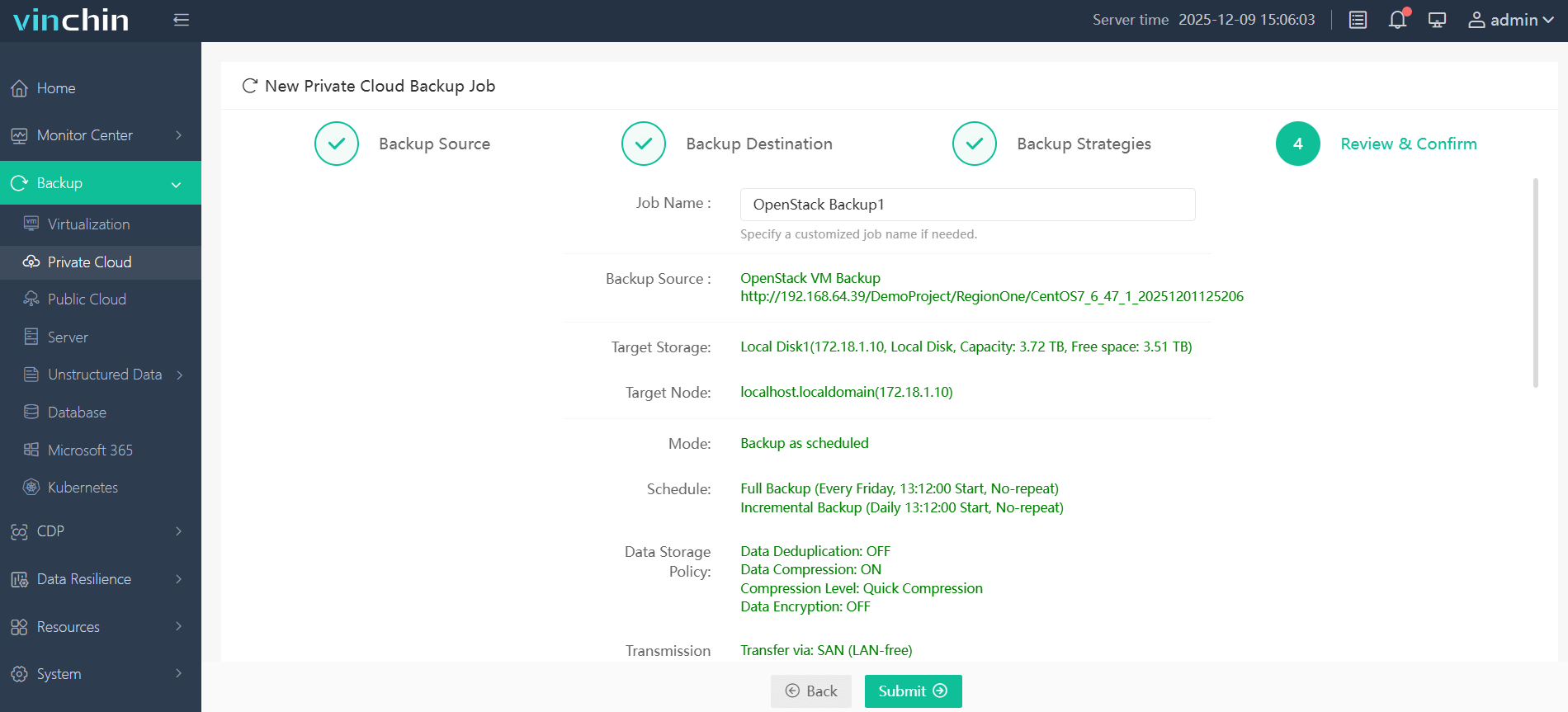
Vinchin Backup & Recovery enjoys global recognition among enterprise users with top ratings for reliability—try the fully featured 60-day free trial now by clicking below.
Best OpenStack Backup Software FAQs
Q1: What is the most effective backup method for minimizing downtime in OpenStack?
A1: Agentless image-level backups with instant recovery capabilities allow rapid restoration without stopping workloads by leveraging native APIs from components like Nova and Cinder so systems return online within minutes instead of hours.
Q2: Is application consistency necessary for minimal downtime?
A2: Yes; application-consistent backups ensure restored data is immediately usable without corruption so mission-critical apps like databases do not require manual repair after failover events.
Q3: How does scalability affect downtime risk?
A3: Scalable solutions prevent bottlenecks during large-scale restores when multiple workloads fail at once ensuring predictable recovery times even as environments grow across new compute nodes.
Q4: Does encryption impact speed of recovery—or compliance?
A4: Modern encryption methods protect backed-up images without slowing down restore processes significantly; they also help meet industry regulations regarding secure handling of sensitive information throughout disaster recovery cycles.
Conclusion
Choosing an advanced image-based backup solution is the best defense against costly downtime—ensuring rapid reliable recovery for enterprise OpenStack environments.









