Protecting Microsoft Hyper-V environments requires backup solutions that are both efficient and reliable. Enterprises today demand agentless and incremental backup capabilities to ensure their virtual machines (VMs) remain safe without unnecessary complexity. These features help organizations maintain business continuity while reducing operational costs and minimizing disruptions during backup operations.
Agentless incremental backups have become essential for modern IT infrastructures. They allow businesses to recover from incidents quickly, reduce downtime, streamline management tasks, and support regulatory compliance efforts. With these advanced capabilities, organizations can achieve faster restores with less impact on production systems—helping teams focus on strategic goals rather than routine maintenance.
Why Agentless & Incremental Backup Matters in Enterprise Environments
Modern enterprises require backup solutions that minimize overhead while maximizing data protection. Agentless technology leverages hypervisor-level APIs to capture VM data without installing software inside each guest OS. Incremental backups further optimize storage usage by transferring only changed blocks since the last backup job.
● Reduced System Overhead: By using agentless architecture, there is no need to deploy or maintain agents within every VM. This approach lowers CPU and memory consumption on hosts and guests alike. It also eliminates compatibility issues that may arise when updating guest operating systems or applications.
● Simplified Deployment & Maintenance: Agentless backups streamline setup processes because administrators manage everything from a central console. There is no need for manual installation or updates of agents across dozens or hundreds of VMs—a significant time saver for large-scale environments.
● Shorter Backup Windows: Incremental backups capture only new or modified data since the previous run. This reduces the amount of information transferred over the network during each cycle, allowing jobs to complete more quickly—even as VM counts grow.
● Lower Storage Consumption: Storing just changed blocks instead of full VM images saves substantial disk space over time. Organizations can retain more restore points without expanding their storage infrastructure unnecessarily.
● Reduced Network Load: Because incremental jobs move less data than full backups, they place less strain on network bandwidth—especially important in distributed environments or when backing up across WAN links.
Without agentless and incremental backup capabilities, organizations often face longer backup times due to full-image transfers for every job. Resource usage increases as agents consume host resources and generate additional traffic across networks. Manual work multiplies as IT staff must install, update, and troubleshoot agents individually—raising operational costs and risk of human error. Data loss risks rise if slow or failed backups leave gaps in protection; compliance violations become more likely if retention policies cannot be enforced efficiently.
How To Choose The Best Hyper-V Backup Solution for Agentless & Incremental Backup?
Selecting an effective Hyper-V backup solution involves evaluating several critical factors beyond basic feature checklists. Enterprises should focus on architecture design choices that directly affect scalability, automation potential, security posture, and ease of management throughout the lifecycle of their virtualized workloads.
A robust solution should offer true agentless operation by integrating directly with Hyper-V’s native APIs such as Volume Shadow Copy Service (VSS) writers or Resilient Change Tracking (RCT). This ensures application-consistent snapshots without requiring intrusive software inside VMs. Look for platforms that provide granular control over scheduling policies so you can automate recurring tasks based on business needs rather than manual intervention alone.
Scalability remains vital as your environment grows; your chosen tool must handle increasing numbers of VMs without performance bottlenecks or administrative headaches. Policy-driven automation enables consistent enforcement of retention rules across all protected assets—making audits easier while supporting regulatory requirements like GDPR or HIPAA. Security features such as encrypted transmission/storage help safeguard sensitive information against unauthorized access during transit or at rest within your infrastructure.
When comparing options:
● True Agentless Architecture: Solutions built around direct integration with Hyper-V APIs avoid resource drain caused by guest-level agents while simplifying ongoing maintenance tasks for IT teams managing large deployments.
● Robust Incremental Methods: Advanced change-tracking mechanisms ensure only modified blocks are captured after initial full jobs—saving time during daily operations while reducing total storage footprint needed for historical recovery points.
● Scalable Performance: The ability to protect thousands of VMs concurrently is essential for enterprise growth; look for evidence of proven scalability through benchmarks or customer case studies where possible.
● Policy-Based Automation: Centralized policy engines enable automated scheduling based on workload type, SLA requirements, or compliance mandates—reducing manual oversight while improving consistency across diverse environments.
● Comprehensive Security Controls: Encryption at rest/in transit plus role-based access controls help mitigate risks associated with unauthorized data exposure during routine operations or disaster recovery scenarios.
Vinchin Backup & Recovery: Enterprise-Grade Protection for Hyper-V
For enterprises seeking robust protection in Microsoft Hyper-V environments, Vinchin Backup & Recovery stands out as a professional enterprise-grade virtual machine backup solution supporting 15+ mainstream virtualization platforms—including VMware, Proxmox VE, oVirt/OLVM/RHV, XCP-ng/XenServer, OpenStack, ZStack—and especially Microsoft Hyper‑V itself. With broad platform compatibility and deep integration into each hypervisor’s unique APIs and features set, it delivers seamless agentless VM protection tailored to complex hybrid infrastructures.
Key features relevant to Hyper‑V users include agentless incremental backup technology (with SpeedKit acceleration), granular restore capability down to file level within VMs, scheduled/policy-based automation tools for hands-off operation at scale—and comprehensive encryption/compression safeguards ensuring secure yet efficient long-term retention.
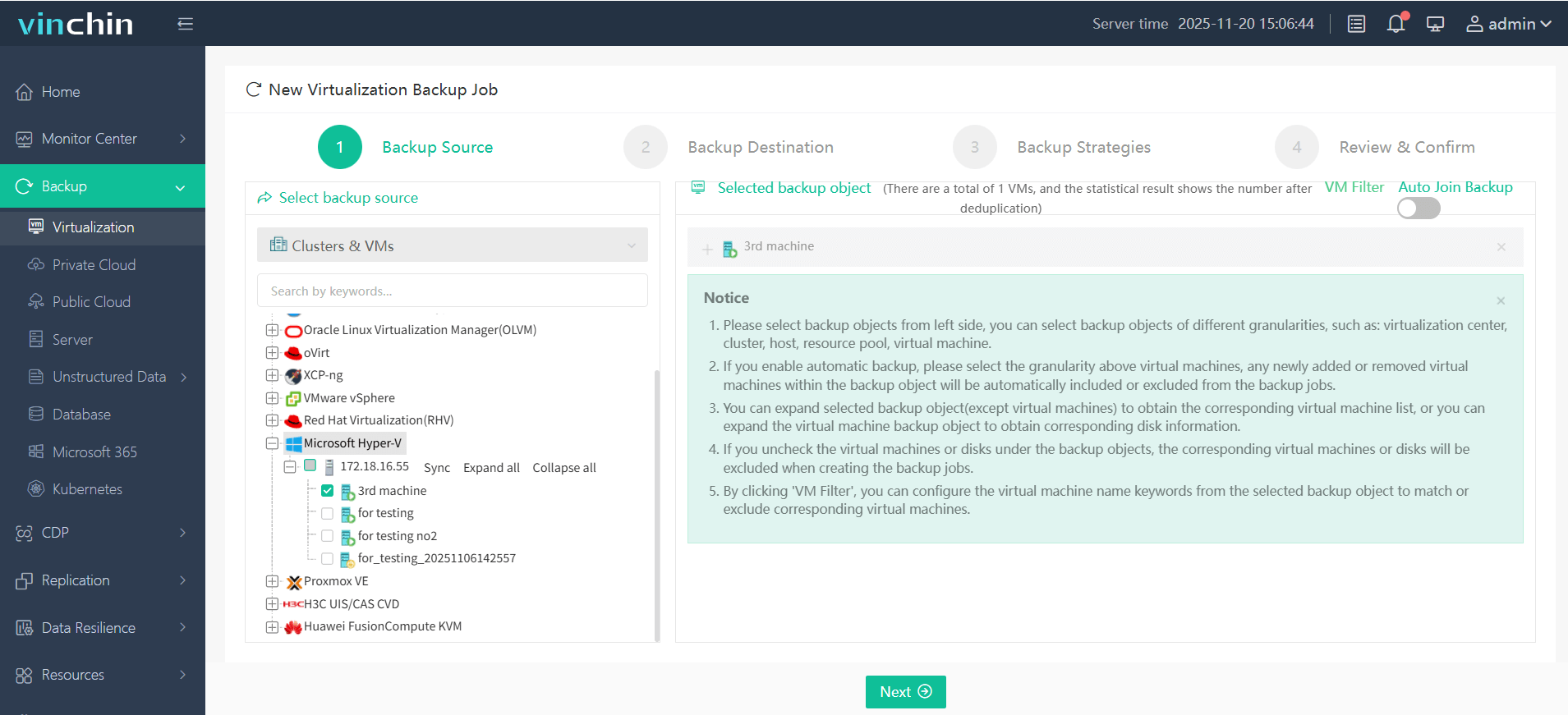
Using Vinchin Backup & Recovery’s intuitive web console makes protecting your environment straightforward: Step 1: Select the Hyper‑V VM you wish to back up;
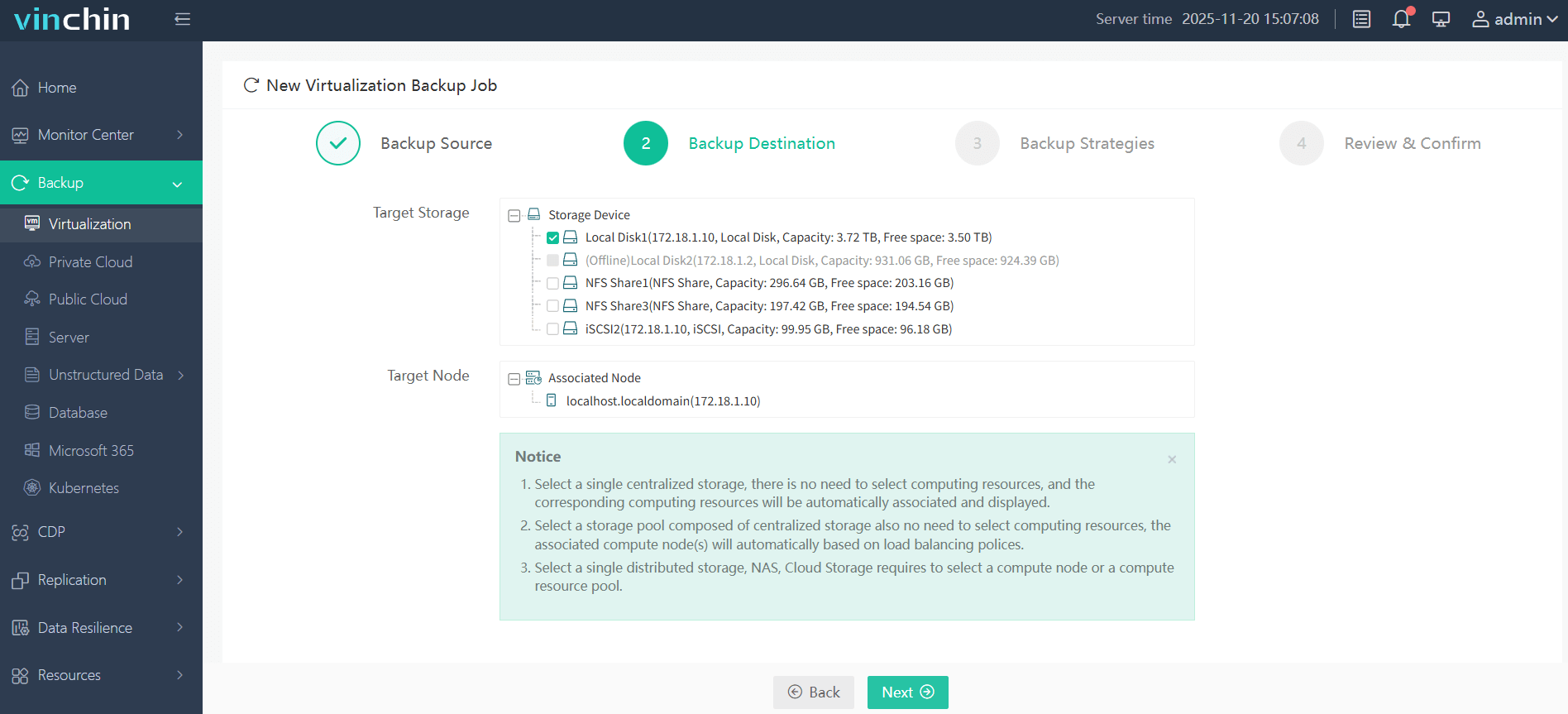
Step 2: Choose target storage;
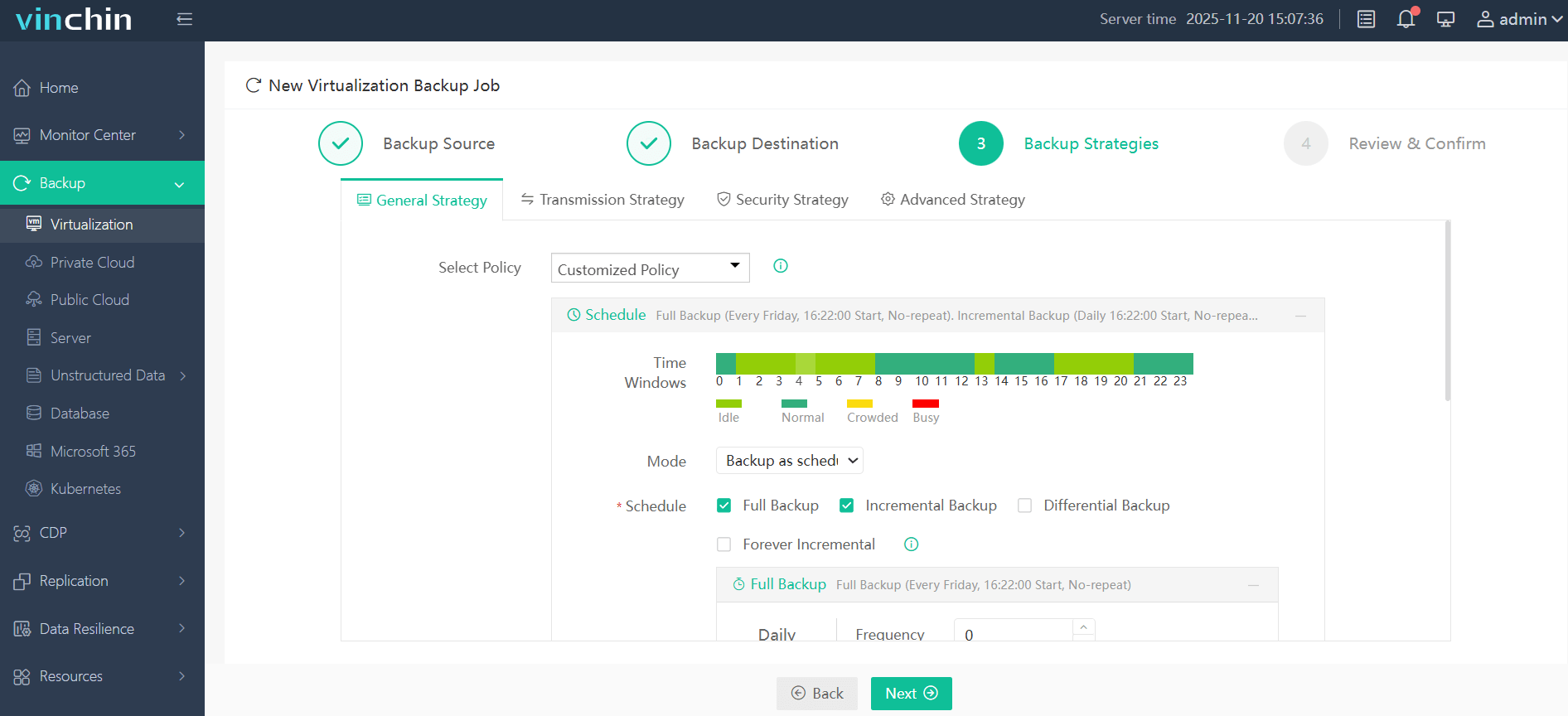
Step 3: Configure strategy settings such as schedule/frequency/retention;
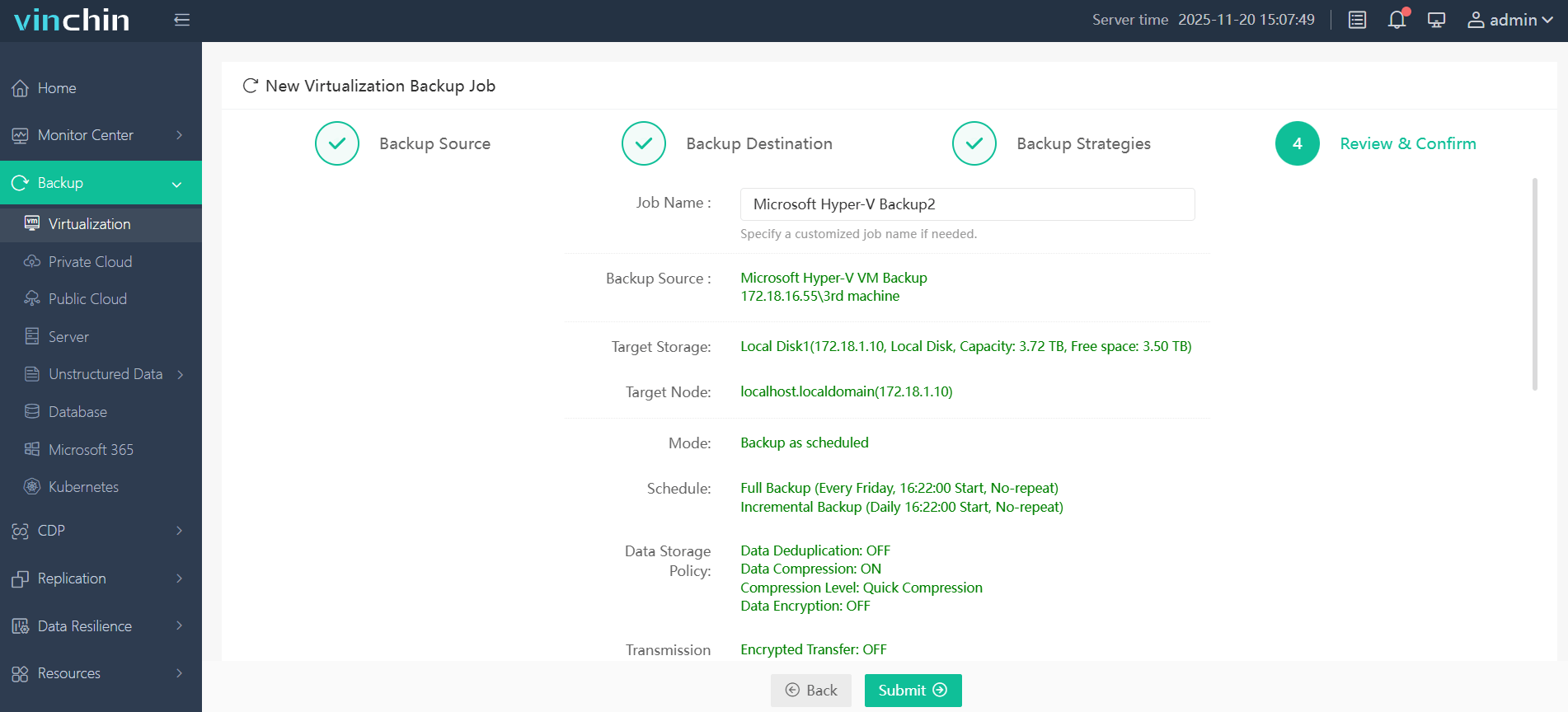
Step 4: Submit the job—all managed centrally via a clean interface.
Trusted globally by thousands of organizations with top industry ratings—try Vinchin Backup & Recovery free for 60 days with all features enabled; click below to get started.
Best Hyper-V Backup Software FAQs
Q1: Why is agentless backup preferred in large-scale Hyper-V deployments?
Agentless backup reduces management complexity because there’s no need to install or update agents on every VM individually; this lowers maintenance effort while eliminating potential points of failure related to outdated components inside guest operating systems.
Q2: How does incremental backup improve efficiency?
Incremental backups capture only new data since the last successful job instead of duplicating entire VM images each cycle; this approach reduces overall storage requirements significantly while shortening daily/weekly backup windows compared with traditional full-backup strategies.
Q3: Can enterprise-grade solutions automate both agentless discovery and scheduling?
Yes; leading platforms provide automatic detection/discovery features combined with policy-driven scheduling engines so administrators can ensure consistent coverage across all protected assets without relying solely on manual configuration steps.
Q4: What risks arise from lacking either capability?
Organizations missing agentless/incremental support face higher operational costs due to increased storage/bandwidth demands; slower recovery times extend downtime following outages; greater risk exists around incomplete coverage/compliance reporting due to complex manual processes.
Conclusion
Choose a solution offering true agentless incremental protection—it improves uptime while controlling cost/risk exposure in any enterprise setting.








