Data breaches are a constant threat in today’s digital world—especially for cloud environments like OpenStack that handle sensitive workloads at scale. How do you keep your data safe if someone steals a disk or intercepts network traffic? OpenStack encryption offers strong protection both at rest and in transit across your cloud infrastructure. In this guide, we break down what openstack encryption means for operations administrators—from basic concepts to advanced setup—and show you how to back up encrypted VMs securely with Vinchin.
What Is OpenStack Encryption?
OpenStack encryption is the process of encoding data so that only authorized users can access it within an OpenStack environment. This protection applies to block storage volumes (Cinder), object storage (Swift), and network communications between services or users and APIs.
Encryption transforms readable information into ciphertext using cryptographic algorithms such as AES (Advanced Encryption Standard). Only those with valid decryption keys can recover the original data content. Even if attackers gain physical access to disks or tap into network streams, they cannot read encrypted information without these keys.
OpenStack supports both software-based encryption—where compute nodes perform cryptographic operations—and integration with dedicated key management systems for secure key handling. Understanding these mechanisms helps you design robust defenses against unauthorized access or compliance violations.
Why Use Encryption in OpenStack?
Encryption is not just an optional feature; it’s often required by law or industry standards such as GDPR (General Data Protection Regulation), HIPAA (Health Insurance Portability and Accountability Act), PCI DSS (Payment Card Industry Data Security Standard), among others. These regulations demand strong safeguards for personal data stored electronically—including virtual machines running on private clouds like OpenStack.
By enabling openstack encryption:
You protect sensitive business information from insider threats.
Lost or stolen drives become useless to attackers.
Network eavesdroppers cannot read confidential API calls.
You meet audit requirements during compliance checks.
If your organization handles regulated workloads—or simply wants peace of mind—encryption should be part of your default security posture.
Types of Encryption in OpenStack
OpenStack provides several ways to encrypt data depending on where it resides or travels:
Block Storage Volume Encryption: Protects persistent disks attached to VMs using Cinder volume types.
Object Storage Encryption: Secures files stored in Swift containers through middleware filters.
Network Traffic Encryption: Shields API endpoints and service-to-service communication using TLS/SSL protocols.
Each type addresses different risks—so understanding their strengths helps you choose what fits your workload best.
For example:
Encrypting block storage prevents attackers from reading VM disks even if they remove them physically from servers.
Object storage encryption ensures backups or logs saved in Swift remain confidential—even if backend hardware is compromised.
Network-level encryption stops man-in-the-middle attacks when users connect over public networks or between internal services spread across multiple sites.
How to Enable Volume Encryption in OpenStack Using Cinder and Barbican?
Encrypting block storage volumes protects VM disks against theft—even if someone removes drives from your datacenter physically! This method uses Cinder for provisioning volumes plus Barbican for managing secret keys securely behind the scenes.
Prerequisites
Before starting:
Ensure Barbican services are installed/running across controller nodes
Assign creator role via Keystone identity service for accounts creating encrypted volumes
Verify all compute/storage hosts support LUKS1/LUKS2 formats depending on chosen provider
Check that Castellan library points Cinder/Nova configs toward Barbican backend
Implementation Steps
First confirm configuration settings:
crudini --get /var/lib/config-data/puppet-generated/cinder/etc/cinder/cinder.conf key_manager backend
castellan.key_manager.barbican_key_manager.BarbicanKeyManager

crudini --get /var/lib/config-data/puppet-generated/nova_libvirt/etc/nova/nova.conf key_manager backend
castellan.key_manager.barbican_key_manager.BarbicanKeyManager
Next create an encrypted volume type specifying provider/cipher/key size/control location:
openstack volume type create --encryption-provider nova.volume.encryptors.luks.LuksEncryptor --encryption-cipher aes-xts-plain64 --encryption-key-size 256 --encryption-control-location front-end LuksEncryptor-Template-256
Now provision an actual encrypted volume:
openstack volume create --size 10 --type LuksEncryptor-Template-256 Encrypted-Test-Volume
Attach this volume safely to any running instance:
openstack server add volume testInstance Encrypted-Test-Volume
To verify status run:
openstack volume show Encrypted-Test-Volume | grep 'encryption'
How to Enable Object Storage Encryption in OpenStack Using Swift Middleware?
Object storage holds everything from logs/backups to user uploads—which makes encrypting Swift containers vital against accidental leaks!
Prerequisites
Confirm all proxy servers run compatible Swift versions supporting kms_keymaster middleware filter;
Generate/store base64 root secret securely outside code repositories;
Plan maintenance window since pipeline changes require restarting proxy processes;
Configuration Steps
Edit proxy-server.conf pipeline order so filters appear just before final logging handler:
pipeline = catch_errors healthcheck proxy-logging cache ratelimit bulk tempurl formpost authtoken keystone staticweb copy container_quotas account_quotas slo dlo versioned_writes kms_keymaster encryption proxy-server
Set root secret under [keymaster] stanza:
[keymaster]
encryption_root_secret = <your_base64_secret>
The root secret must be at least 44 base64 characters long per documentation recommendations!
Restart all affected proxy servers after saving changes so new filters take effect immediately;
Once enabled—all objects uploaded/read through this pipeline get encrypted/decrypted automatically;
Clients interact normally—they never see raw ciphertext nor need special tools;
Check logs after uploading sample file—a successful entry confirms middleware processed request;
You may also inspect container metadata via CLI/API calls;
How to Enable Network Encryption in OpenStack Using TLS/SSL?
Securing API endpoints plus internal service links keeps sensitive credentials/tokens safe while traversing shared networks;
Prerequisites
Obtain valid SSL certificates signed by trusted CA—or generate self-signed ones for testing purposes;
Identify which services/endpoints require HTTPS exposure based on risk profile;
Implementation Example: Horizon Dashboard
1. Place certificate/private key files inside /etc/pki/tls/certs directory on Horizon host;
2. Edit Apache config file (ssl.conf) referencing correct paths under <VirtualHost *:443> directive;
3. Set SSLCertificateFile, SSLCertificateKeyFile, optionally enable strict cipher suites (SSLCipherSuite HIGH:!aNULL);
4. Restart Apache web server using systemctl restart httpd;
5. Visit dashboard URL via browser ensuring green padlock appears indicating active HTTPS session;
Repeat similar steps for other components such as Keystone/Cinder/Glance adjusting web server configs accordingly;
For inter-service communication—for example Nova talking securely with Neutron—you may configure mutual TLS authentication following official guides;
Always validate endpoint accessibility post-change using curl/wget commands specifying --cacert option pointing at trusted CA bundle;
Back Up Encrypted OpenStack VMs with Vinchin Backup & Recovery
When safeguarding critical workloads, reliable backup is essential alongside robust openstack encryption strategies. Vinchin Backup & Recovery stands out as a professional, enterprise-level solution supporting more than 15 mainstream virtualization platforms—including full compatibility with OpenStack, VMware, Hyper-V, Proxmox, oVirt, OLVM, RHV, XCP-ng, XenServer, ZStack, and others. For organizations leveraging openstack environments specifically, Vinchin Backup & Recovery delivers comprehensive protection tailored for complex hybrid infrastructures.
Among its extensive feature set are incremental backup, granular restore capabilities, forever-incremental backup mode, multi-thread transmission for high-speed jobs, and built-in malware detection powered by Kaspersky—all designed to maximize efficiency while minimizing risk and resource consumption across large-scale deployments.
Backing up an OpenStack VM with Vinchin Backup & Recovery is straightforward thanks to its intuitive web console interface:
Step 1: Select the OpenStack VM you wish to back up

Step 2: Choose the target backup storage
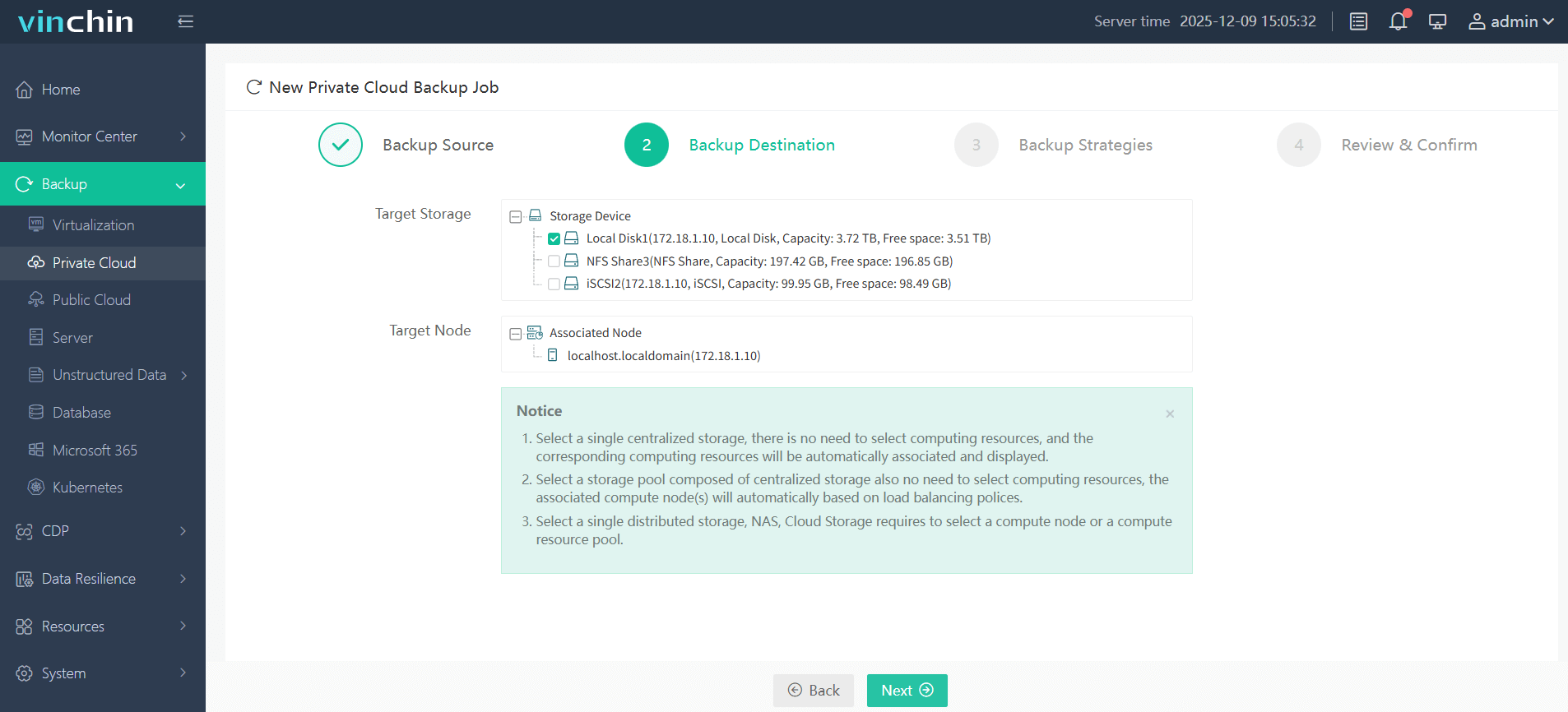
Step 3: Configure backup strategy parameters

Step 4: Submit the job
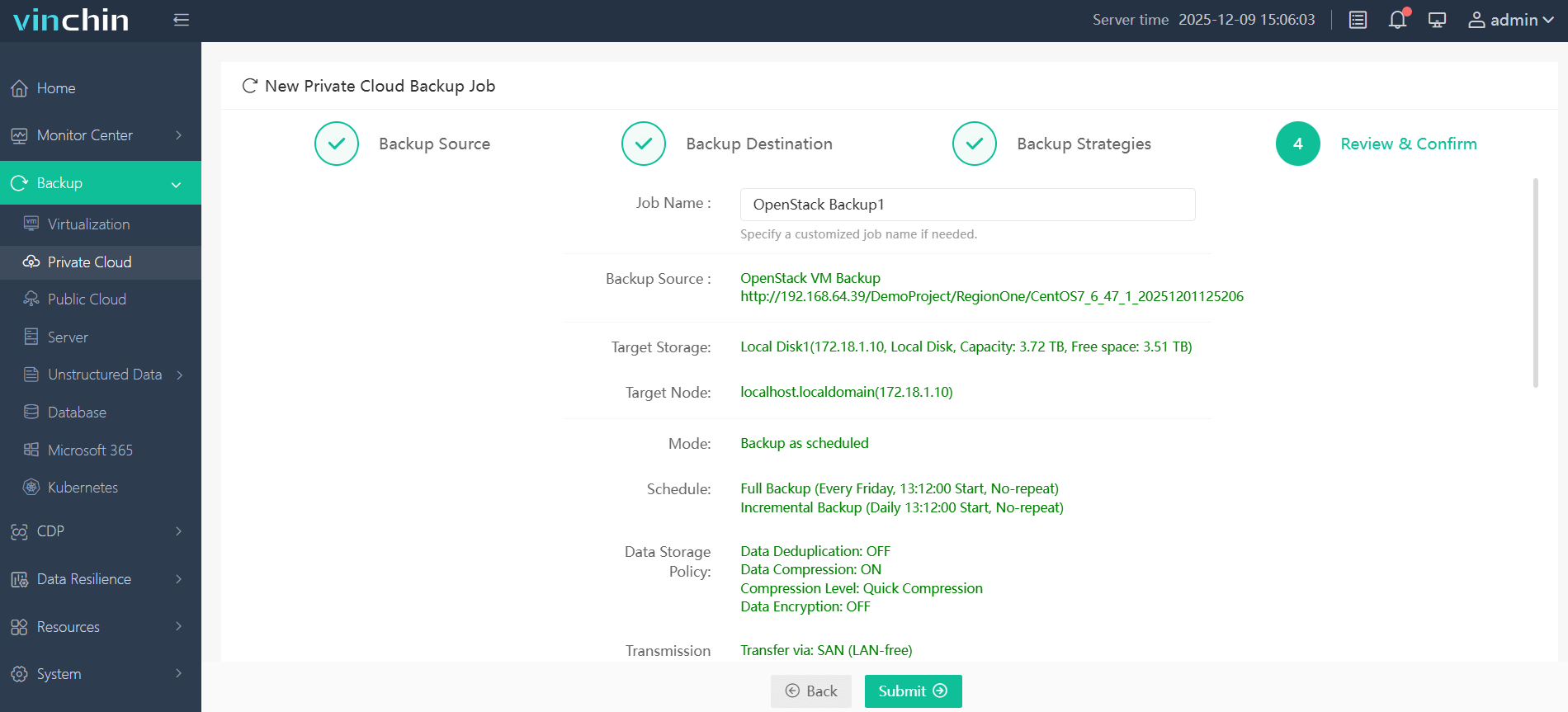
Trusted globally by thousands of enterprises and rated highly by industry analysts, Vinchin Backup & Recovery offers a fully functional 60-day free trial—click below now and experience leading-edge enterprise data protection firsthand.
OpenStack Encryption FAQs
Q1: Does live migration preserve volume encryption?
Yes—as long as both source/destination hosts support encrypted volumes configured identically via Cinder/Nova settings.
Q2: Will enabling openstack encryption slow down my daily backup jobs?
Some performance impact occurs due to extra CPU work—but modern hardware minimizes delays especially when paired with efficient backup solutions supporting incremental/deduplicated workflows like Vinchin does natively.
Q3: Can I replicate encrypted Swift objects across regions without exposing plaintext?
Yes—replication transmits ciphertext end-to-end provided both clusters share compatible middleware configurations/secrets.
Conclusion
Openstack encryption shields critical data wherever it lives—in block devices/object stores/or traveling networks—but don’t forget reliable backups too! With Vinchin you can safeguard even fully-encrypted VMs quickly/easily while meeting compliance goals every day.













