Modern enterprises rely on virtualization to boost efficiency and reduce costs. Huawei FusionCompute is a popular choice for managing virtual environments at scale. Protecting these environments requires backup solutions that do more than just copy data—they must integrate tightly with virtualization management consoles. This integration ensures backups are always up-to-date, policies are enforced automatically, and recovery is fast when needed.
Organizations face growing pressure to comply with regulations and maintain business continuity. A backup tool that integrates with Huawei FusionCompute’s management console can help meet these demands by automating protection across dynamic workloads. According to Gartner’s research on data protection for virtualized environments, seamless integration between backup tools and hypervisor management platforms is now considered a best practice for reducing risk.
Choosing the right solution means understanding why integration matters so much—and what features set enterprise-grade tools apart.
Why Integration with Virtualization Management Consoles Matters in Enterprise Environments?
Integration between backup software and virtualization management consoles brings significant benefits to enterprise IT operations. These advantages go beyond convenience; they address core challenges of scale, complexity, compliance, and risk mitigation.
● Automated VM Discovery Reduces Human Error:
Manual tracking of virtual machines is prone to mistakes—especially in large organizations where VMs are created or deleted daily. Integrated backup solutions use APIs like Huawei FusionCompute’s OpenAPI to detect new or migrated VMs instantly. This automation ensures every workload receives protection without relying on manual updates.
● Centralized Policy Enforcement Improves Compliance:
With direct integration into the management console, administrators can apply consistent backup policies across all VMs from one place. This unified approach reduces gaps in coverage that could lead to non-compliance with industry standards such as GDPR or HIPAA. Centralized control also streamlines audits by providing clear records of policy application.
● Streamlined Recovery Minimizes Downtime:
When disaster strikes—a ransomware attack or hardware failure—integrated solutions know exactly which VMs exist and their current state. This knowledge speeds up recovery because there’s no need to manually map backups back to live systems. Fast restoration helps maintain service levels demanded by modern businesses.
● Reduced Administrative Overhead Lowers Costs:
Managing backups through separate interfaces adds complexity and increases training needs for IT staff. Integration allows teams to use familiar tools within their existing workflows—saving time on both routine tasks and urgent restores.
● Improved Security Through Unified Access Controls:
Integrated solutions inherit access controls from the virtualization platform itself. Administrators can manage permissions centrally rather than juggling multiple user databases or authentication methods—reducing attack surfaces while simplifying security audits.
These factors make it clear why leading organizations prioritize integrated backup tools when protecting their Huawei FusionCompute environments.
How To Choose The Best Huawei FusionCompute Backup Solution for Console Integration?
Selecting an effective backup solution requires careful evaluation of its ability to work natively with your virtualization platform while delivering robust performance at scale. Here are key considerations:
● Native Console Integration Enables Automation:
Look for solutions that connect directly with Huawei FusionCompute’s management console using supported APIs like OpenAPI. Native integration means automatic VM discovery, policy enforcement without manual steps, and real-time status updates—all managed from a single interface.
● Scalability Handles Large Virtual Estates:
Enterprise environments often span hundreds or thousands of VMs across multiple clusters or sites. The ideal solution supports both full and incremental backups at scale without degrading performance as your infrastructure grows.
● Granular Restore Capabilities Save Time:
Restoring an entire VM may not always be necessary—or practical—in urgent situations. Solutions offering file-level or disk-level restore let you recover only what you need quickly instead of waiting hours for a full VM restore process.
● Comprehensive Reporting Supports Compliance Audits:
Regulatory requirements demand detailed logs showing when backups occurred, who initiated them, whether they succeeded or failed—and how restores were performed. Look for built-in reporting features that simplify audit preparation while supporting internal governance needs.
● Minimal Manual Processes Reduce Risk:
The fewer manual steps required—from job setup through monitoring—the less chance there is for human error leading to missed backups or incomplete restores. Automated scheduling based on policies defined within your virtualization console keeps protection aligned as workloads change dynamically.
By focusing on these criteria during evaluation—and insisting on native integration—you ensure your organization gets reliable protection tailored specifically for Huawei FusionCompute deployments.
Vinchin Backup & Recovery: Enterprise-Grade Protection for Huawei FusionCompute
For enterprises seeking robust data protection in Huawei FusionCompute environments, Vinchin Backup & Recovery stands out as a professional enterprise-level virtual machine backup solution supporting over 15 mainstream virtualization platforms—including VMware, Hyper-V, Proxmox, oVirt, OLVM, RHV, XCP-ng, XenServer, OpenStack, ZStack, and more—with comprehensive support tailored specifically for Huawei FusionCompute users.
Vinchin Backup & Recovery offers agentless VM protection along with advanced features such as LAN-free backup (for optimal speed), CBT-based incremental jobs (for efficient storage usage), instant recovery (to minimize downtime), granular restore (for precise data retrieval), and secure deduplication plus compression (to reduce storage costs). Together these capabilities ensure rapid recovery times while maintaining high efficiency and strong security standards throughout the lifecycle of your virtual machines.
Using the intuitive web console makes protecting your environment straightforward:
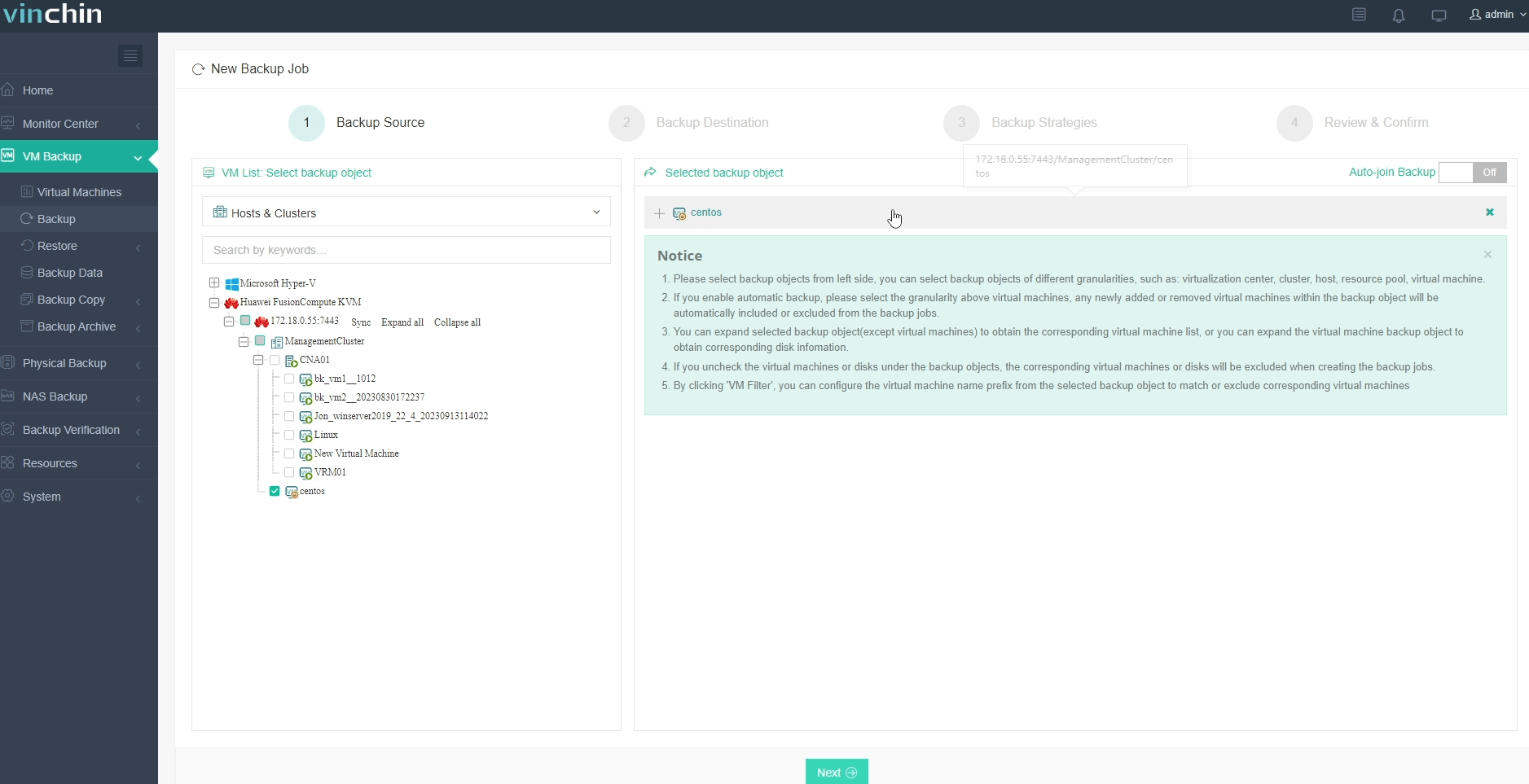
Step 1: Select the Huawei FusionCompute VM to back up.
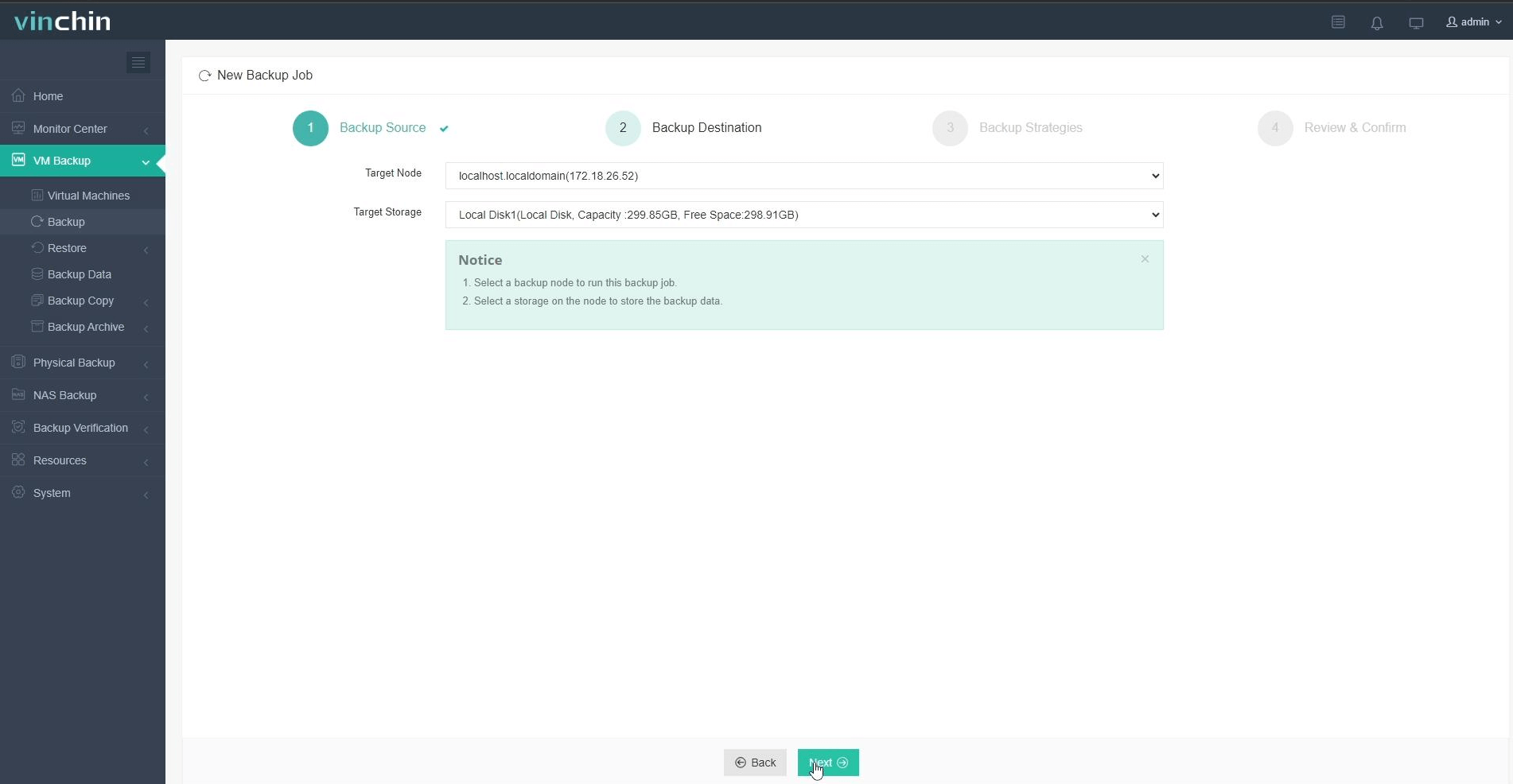
Step 2: Choose backup storage.
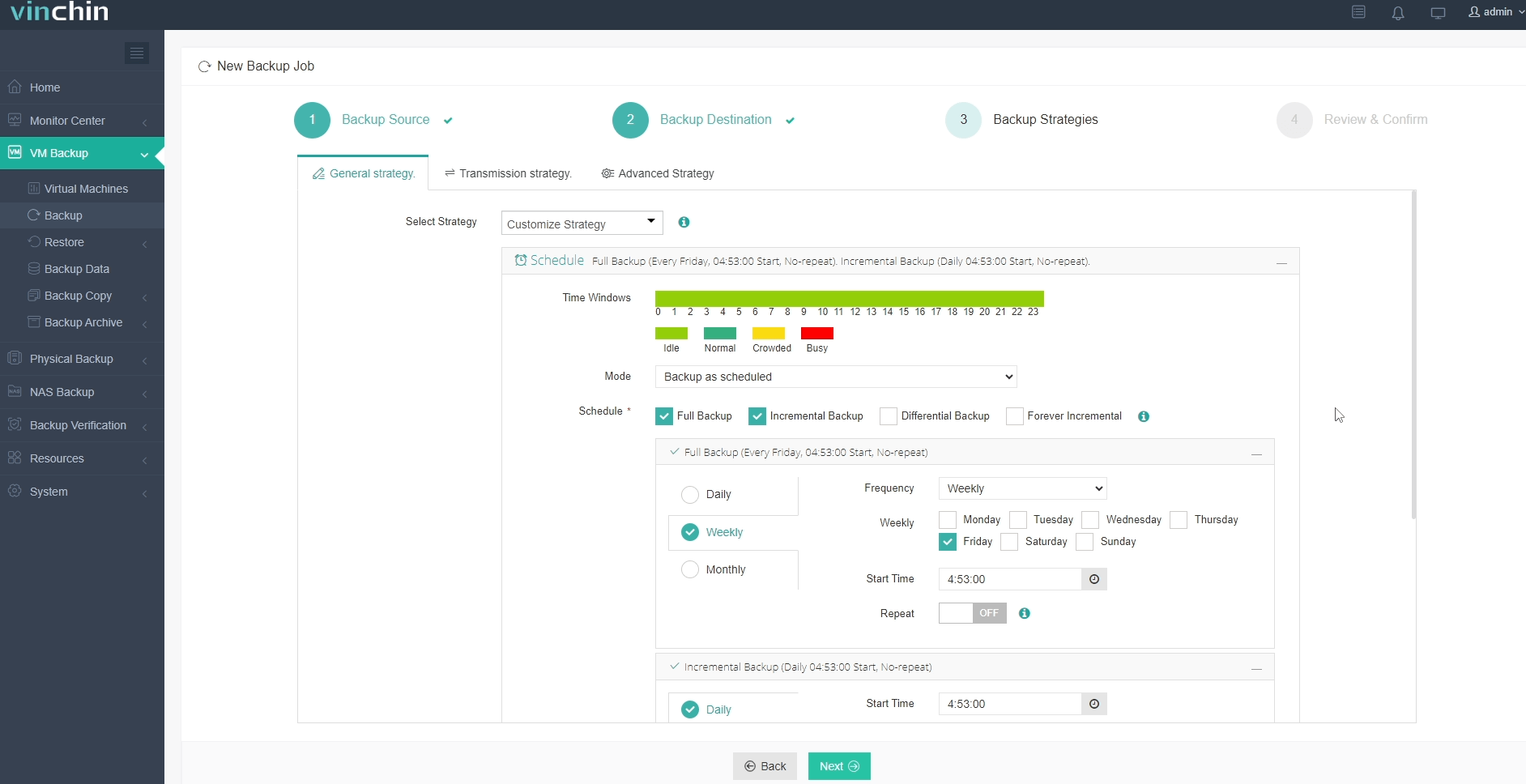
Step 3: Configure the backup strategy.
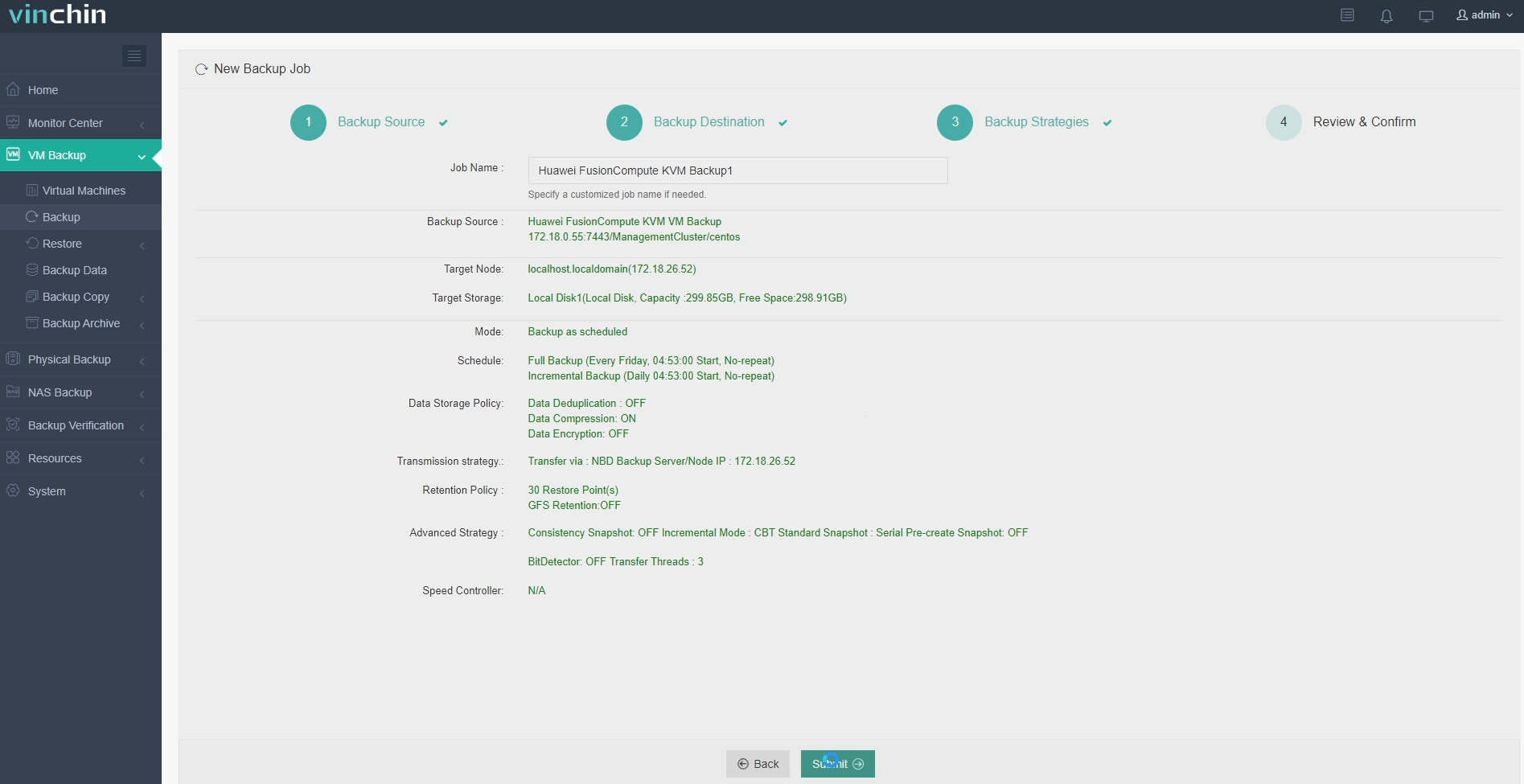
Step 4: Submit the job.
Recognized globally by thousands of customers with top ratings in enterprise data protection software reviews—plus a 60-day full-featured free trial—Vinchin Backup & Recovery lets you experience powerful VM safeguarding firsthand; click below to get started.
Best Huawei FusionCompute Backup Software FAQs
Q1: Does the solution support direct integration with the FusionCompute console?
Yes. Vinchin provides native integration for centralized management and automation.
Q2: Can it handle large-scale VM environments efficiently?
Yes. It is designed for scalable performance across extensive virtual infrastructures.
Q3: Is granular file-level restore supported?
Yes; it supports file-level restore so you recover only what you need quickly without restoring entire VMs unnecessarily.
Q4: How does it address compliance requirements?
Comprehensive logging and reporting features help meet audit and regulatory needs.
Conclusion
Integrated backup protects data reliably while reducing risk in complex virtual environments like Huawei FusionCompute.









