Direct integration between oVirt backup tools and virtualization management consoles brings real control to IT teams. It lets you manage backups from one place. This approach improves efficiency by reducing manual steps. It also helps meet compliance needs by keeping data protection consistent across your virtual environment.
Why Integration with Virtualization Management Consoles Matters in Enterprise Environments?
Integration is more than convenience—it is about making complex environments manageable. When backup tools connect natively to virtualization consoles, they remove silos between operations and protection tasks. This leads to smoother workflows and fewer mistakes.
● Unified Operations
A single interface for both VM management and backup means administrators do not need to switch between different tools or dashboards. This reduces confusion during critical moments like disaster recovery or urgent restores.
● Reduced Human Error
Automated coordination through APIs or plugins ensures that backup jobs run as planned without relying on manual job creation or scheduling. By automating these processes within the console itself, organizations lower the risk of skipped backups or misconfigured policies.
● Consistent Policy Enforcement
Centralized policy management allows IT teams to enforce retention rules and schedules across all VMs from one location. This consistency is key for meeting regulatory standards such as GDPR or HIPAA.
● Simplified Compliance Auditing
Integrated reporting consolidates logs within the virtualization platform’s ecosystem. Auditors can quickly review who performed which actions without piecing together records from multiple systems.
● Streamlined Network Security
Native integration often means fewer open ports or firewall exceptions since communication happens inside existing trusted channels between the backup tool and management console. This reduces architectural complexity in segmented enterprise networks.
How To Choose The Best oVirt Backup Solution for Console Integration?
Choosing an oVirt backup solution goes beyond speed or storage savings. True value comes from how well it fits into your daily workflow—especially through deep integration with your virtualization management console.
Look for these features when evaluating solutions:
Native console integration: Seek out solutions that connect directly using official APIs or certified plugins for oVirt’s web-based admin portal. This lets you discover VMs automatically, assign policies right from the main dashboard, and monitor job status without extra logins.
Automation capabilities: Automated scheduling ensures every VM gets protected—even as new ones are added—by enforcing policies at scale through built-in task schedulers tied to your business calendar.
Scalability: As your infrastructure grows across clusters or sites, make sure your backup tool supports distributed architectures (such as multiple proxy servers) so performance does not drop off during peak loads.
Robust reporting: Detailed logs should cover every step—from job creation to restore events—and support export in formats suitable for compliance audits (CSV/PDF). Look for customizable reports that highlight failed jobs so issues get fixed fast.
Granular recovery: Solutions should allow file-level restores by mounting backup images directly within the console UI or using guest OS indexing features so you can recover only what you need without restoring whole VMs.
By focusing on these criteria—and checking vendor documentation against your own operational needs—you ensure that your investment pays off in both reliability and ease of use.
Vinchin Backup & Recovery: Enterprise-Level oVirt VM Protection
For enterprises seeking robust data protection, Vinchin Backup & Recovery stands out as a professional solution supporting oVirt alongside 15+ mainstream virtualization platforms including VMware, Hyper-V, Proxmox, OLVM, RHV, XCP-ng, XenServer, OpenStack, ZStack, and more. With direct integration into the oVirt management console, it enables seamless centralized control over all backup operations within diverse virtual environments.
Key features include agentless VM backup, instant recovery (excluding Hyper-V), CBT-based incremental backups on supported platforms like oVirt/RHV/OLVM/XenServer/VMware, LAN-free backup on compatible hypervisors including oVirt and Proxmox, plus granular restore options across all supported platforms. These capabilities deliver rapid recovery times while optimizing storage usage and minimizing network load—ensuring business continuity even at scale.
The intuitive Vinchin Backup & Recovery web console makes protecting your environment straightforward:
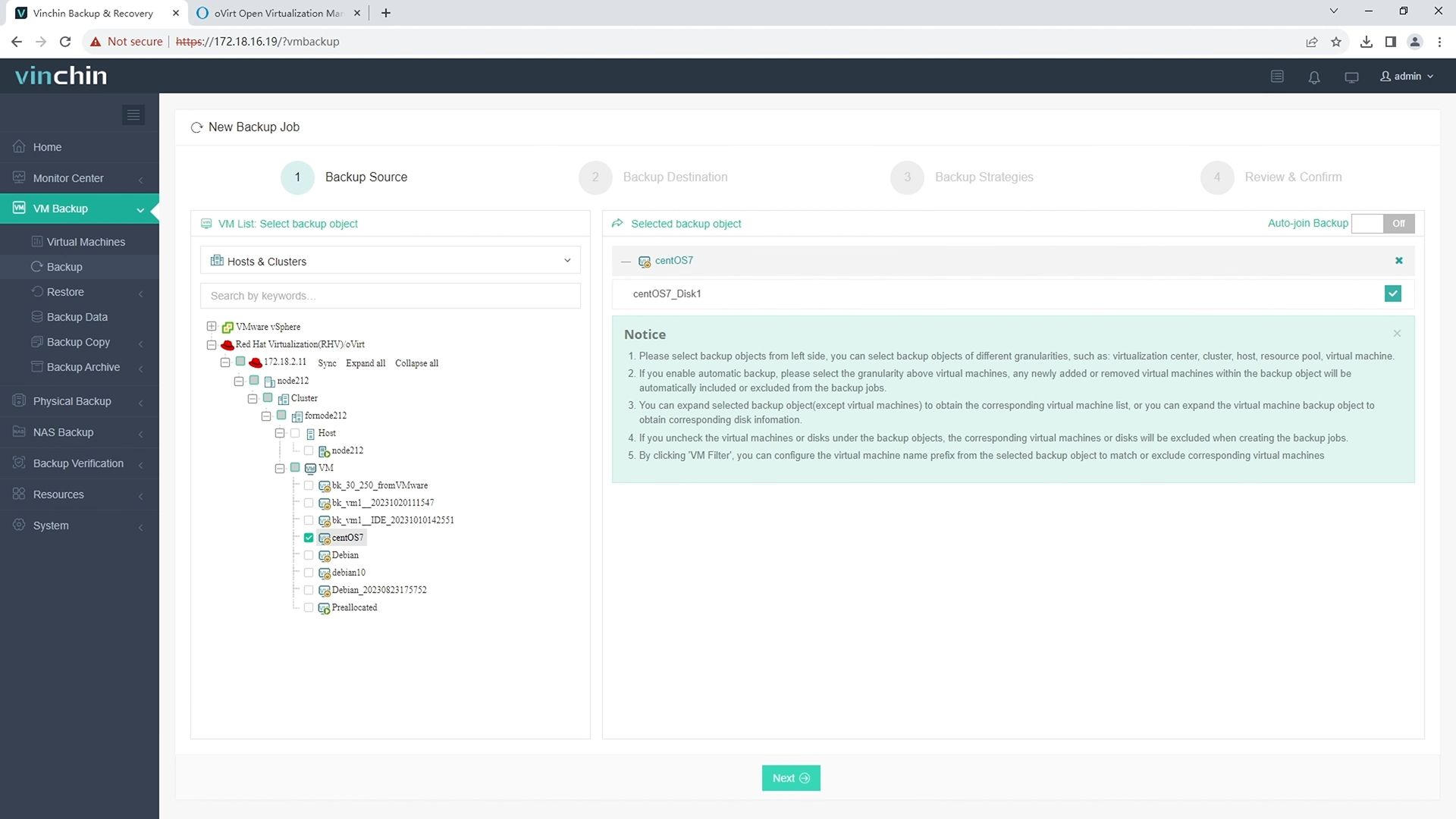
Step 1: Select the oVirt VM(s) you wish to back up.
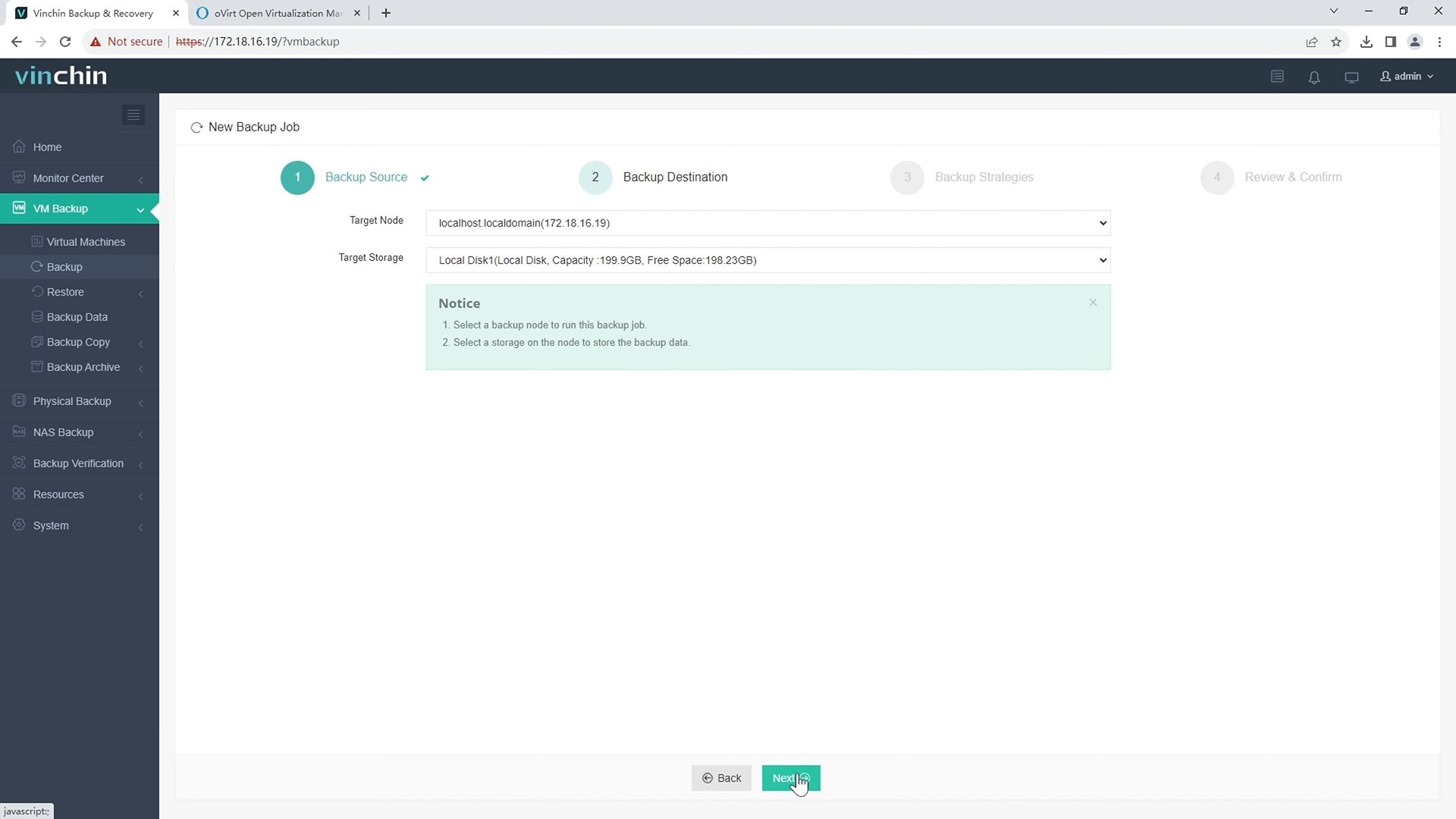
Step 2: Choose the appropriate backup storage destination.
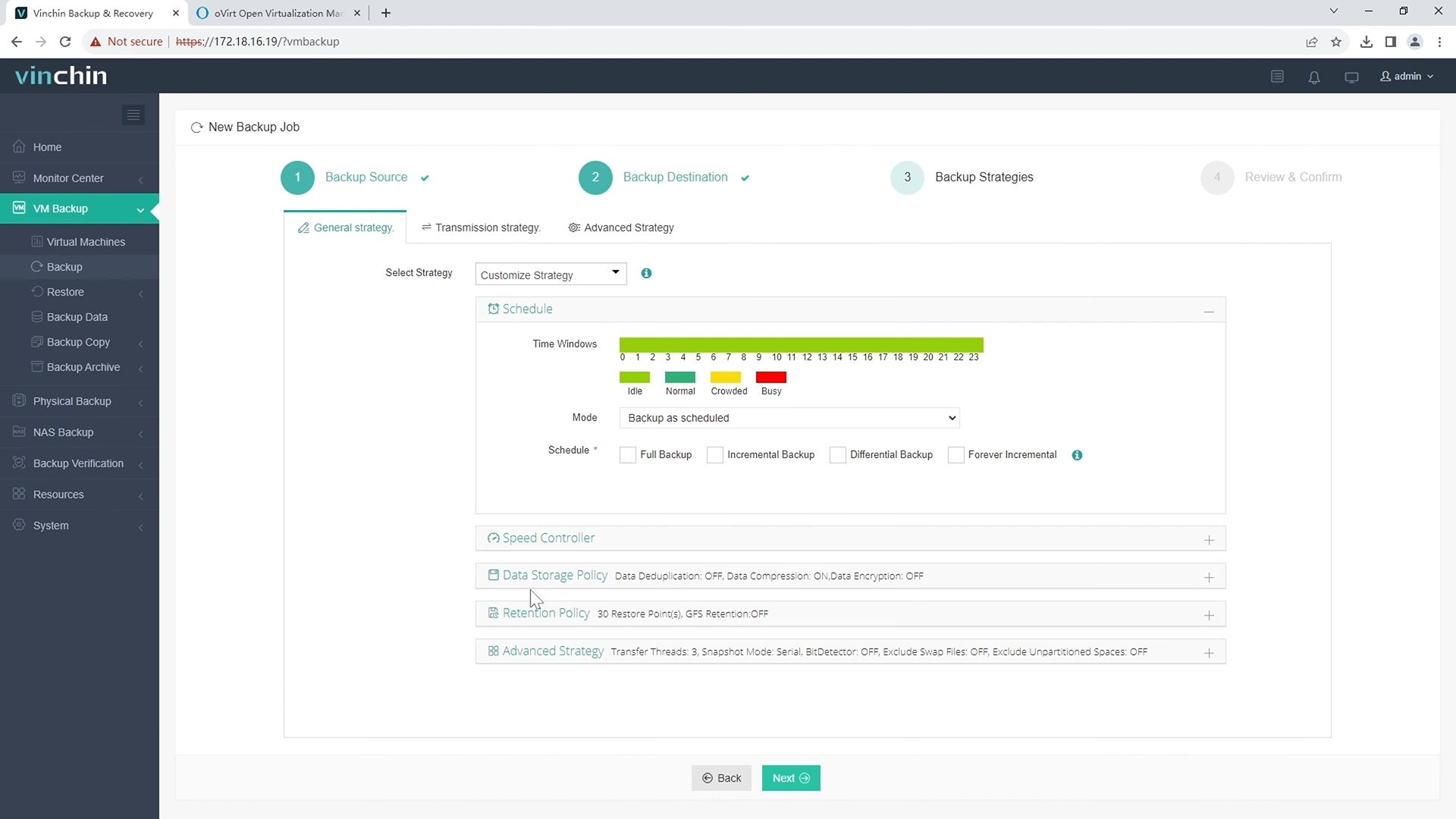
Step 3: Configure your desired backup strategy—including frequency, scheduling, encryption, and retention settings.
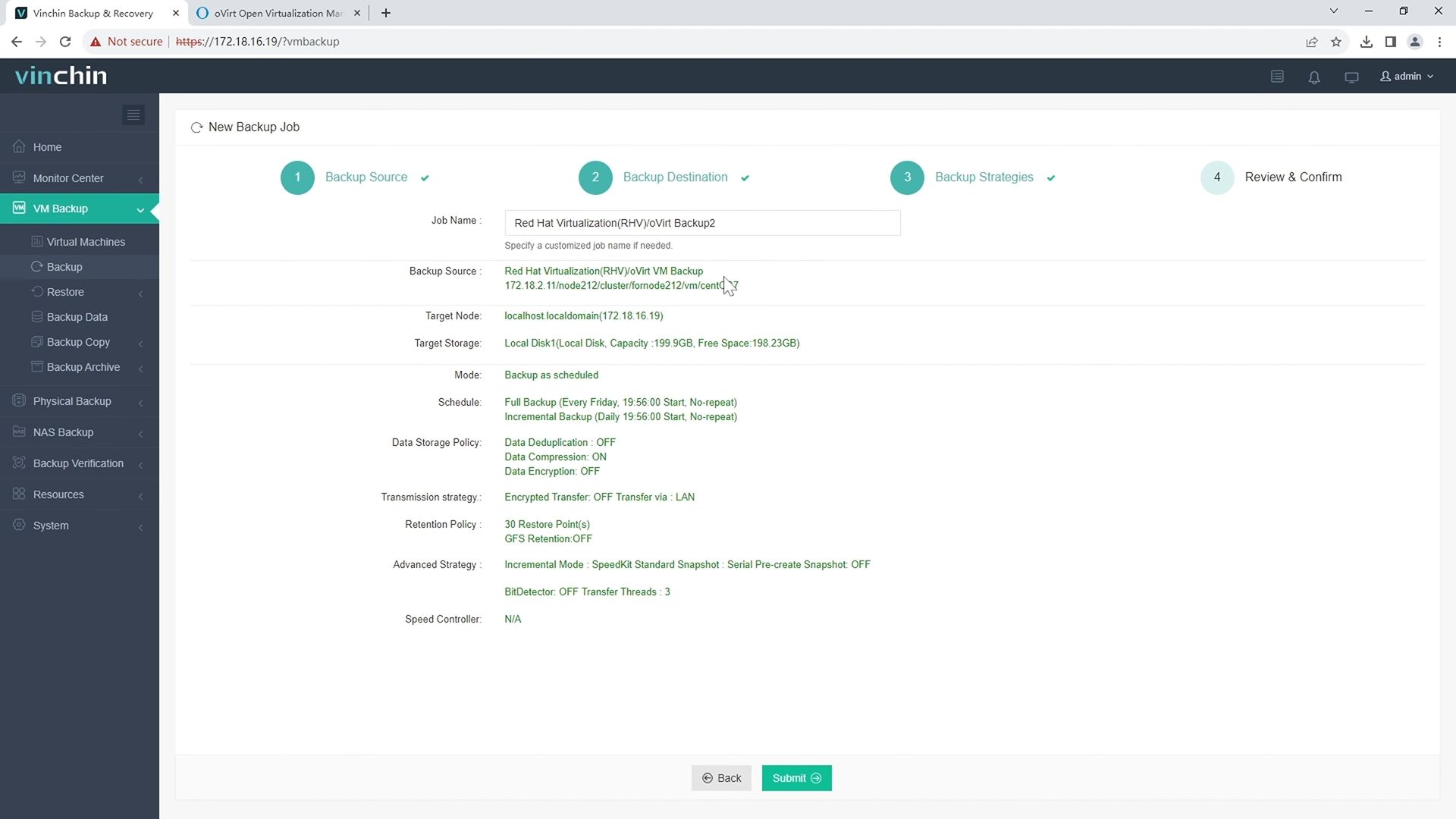
Step 4: Submit the job—the system automates execution, reports progress transparently, and notifies staff if intervention is required.
Recognized worldwide with top ratings among enterprise users, Vinchin Backup & Recovery offers a 60-day full-featured free trial—click below to experience its powerful unified data protection firsthand!
Best oVirt Backup Software FAQs
Does native console integration improve backup reliability?
Yes—native integration uses automation built into the virtualization platform itself rather than relying on external scripts or manual steps. By leveraging official APIs within oVirt’s admin portal, it eliminates missed jobs due to human error while ensuring every scheduled task runs exactly as intended—even during busy periods when staff may overlook manual processes.
Is granular recovery possible through integrated solutions?
Leading integrated solutions provide file-level restoration by allowing administrators to mount VM disk images directly within their familiar management interface. Some tools index guest OS files during backups so individual documents can be restored without bringing back entire virtual machines—a major advantage when only small pieces of data are lost due to accidental deletion.
Conclusion
Seamless integration between oVirt backup tools and virtualization consoles centralizes control, reduces errors, strengthens compliance, and streamlines security. By prioritizing native integration, automation, scalability, and granular recovery, enterprises can ensure reliable, efficient VM protection while simplifying management and maintaining business continuity at scale.









