ZStack is an open-source Infrastructure-as-a-Service (IaaS) cloud platform designed for building scalable private or hybrid clouds. It offers unified management of compute, storage, and networking resources through a web-based console. As organizations virtualize more workloads using platforms like ZStack, protecting data becomes critical to business continuity.
Seamless integration between backup tools and virtualization management consoles is now essential in modern data centers. For IT teams running ZStack environments, choosing a backup tool that connects directly to the virtualization console can simplify operations while reducing risk. Vinchin Backup & Recovery stands out as an enterprise-grade solution that integrates natively with ZStack’s management interface.
Integration matters because it streamlines workflows across large-scale environments. When backup policies are managed centrally from within your existing virtualization console, you reduce manual errors and ensure consistent protection across all virtual machines (VMs). This approach also helps meet compliance requirements by enforcing standardized procedures.
Why Integration with Virtualization Management Consoles Matters in Enterprise Environments?
Managing backups in complex virtual environments requires more than just basic scheduling—it demands tight coordination between systems to ensure reliability at scale. Native integration between your backup tool and virtualization management console brings operational efficiency while minimizing risks associated with fragmented solutions.
● Unified Control Reduces Complexity
When your backup tool integrates directly into the virtualization management console—such as ZStack’s web interface—you gain centralized control over all backup tasks. This eliminates the need to switch between multiple applications or duplicate configurations across different platforms. Unified control reduces administrative overhead while making it easier to enforce company-wide policies.
● Consistent Policy Enforcement
Integrated solutions apply backup schedules, retention rules, and access controls uniformly across every VM managed by ZStack. This consistency lowers the risk of human error or missed backups—a common issue when juggling separate tools—and ensures compliance during audits.
● Reduced Backup Windows Through API-Level Integration
Direct API-level integration allows faster communication between systems compared to agent-based approaches. By leveraging native APIs within ZStack’s architecture, integrated tools can trigger snapshot-based backups quickly without impacting VM performance or causing conflicts inside guest operating systems.
● Improved Recovery Times
With everything managed from one place, recovery processes become faster and less prone to mistakes. Administrators can restore entire VMs or individual files directly from the same console used for daily operations—reducing downtime after incidents such as accidental deletions or ransomware attacks.
● Enhanced Security Posture
Centralized management makes it easier to implement strong access controls based on organizational roles. Integrated audit trails track every action taken within both the virtualization platform and backup system—helping organizations meet regulatory requirements like GDPR or HIPAA.
● Operational Transparency Supports Compliance
Detailed reporting features built into integrated solutions provide clear visibility into job status, history of changes, success rates, failures, and user actions—all from one dashboard. These reports make passing compliance audits much simpler since evidence is readily available for review.
How To Choose The Best ZStack Backup Solution for Integration with Virtualization Management Consoles?
Selecting an effective ZStack backup solution means looking beyond basic compatibility—it requires careful evaluation of how well each option supports seamless administration at scale while meeting security needs.
A robust solution should integrate natively with your existing infrastructure so IT staff can manage protection tasks without leaving their familiar environment. Consider these key factors:
● Native Integration With Management Console
Choose software that plugs directly into the ZStack web interface using official APIs rather than relying on external scripts or manual exports/imports. Native integration enables automated discovery of new VMs as they are created—ensuring no workload goes unprotected even as your environment grows.
● Scalability For Enterprise Workloads
The best tools support high concurrency—meaning they handle many simultaneous backups/restores without slowing down production systems or exceeding resource limits. Look for features like load balancing across multiple nodes so performance remains stable as you add more VMs over time.
● Strong Security And Compliance Features
Enterprise-grade solutions offer end-to-end encryption both in transit (TLS) and at rest (AES 256-bit), along with granular role-based access controls (RBAC) that map to organizational structures. Comprehensive audit logs record every action taken—helping satisfy internal governance policies as well as external regulations such as ISO 27001 or SOC 2 Type II standards.
● Comprehensive Reporting And Monitoring
Look for real-time dashboards showing job progress/status plus historical reports detailing successes/failures over time. Automated alerts notify administrators about failed jobs or low storage space before problems escalate—enabling proactive intervention instead of reactive troubleshooting after data loss occurs.
Vinchin Backup & Recovery: Enterprise-Grade Protection for ZStack
For enterprises seeking reliable protection for their ZStack environments, Vinchin Backup & Recovery provides a professional solution supporting over 15 mainstream virtualization platforms—including full compatibility with ZStack itself alongside VMware, Hyper-V, Proxmox, oVirt, OLVM, RHV, XCP-ng, XenServer, OpenStack and others. Designed specifically for mixed-infrastructure scenarios common in today’s data centers, Vinchin Backup & Recovery delivers agentless operation and direct integration with the ZStack management console.
Key features include LAN-free backup for efficient data transfer in large deployments; instant recovery enabling rapid restoration of VMs; granular restore options for precise file-level recovery; advanced data deduplication/compression to optimize storage use; and robust scheduled/synthetic forever-incremental backups ensuring continuous protection without excess overhead. Together these capabilities streamline administration while maximizing reliability.
The intuitive Vinchin Backup & Recovery web console makes setup straightforward:
Step 1: Select the ZStack VM to back up.
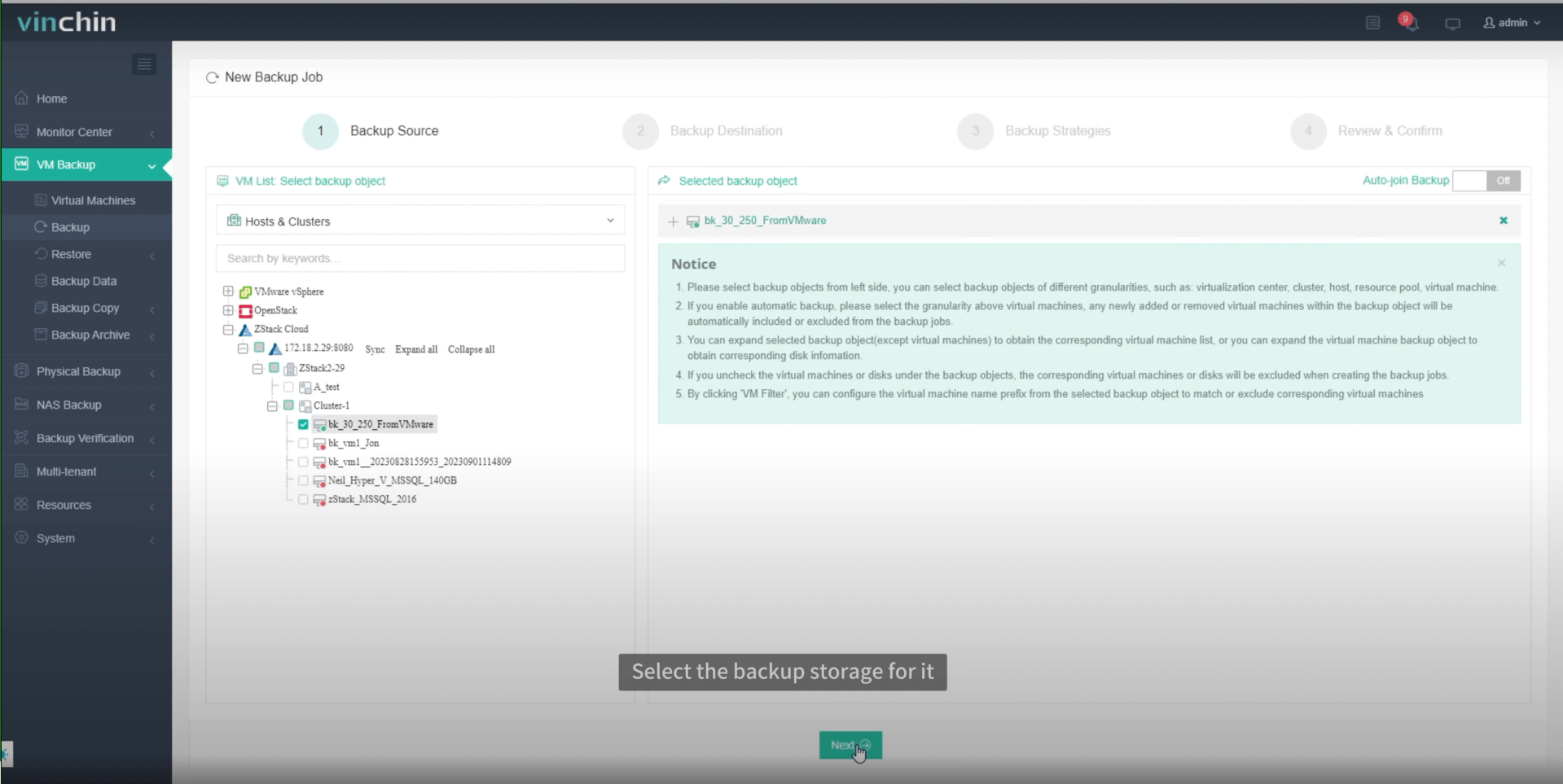
Step 2: Choose the backup storage.

Step 3: Configure the backup strategy.
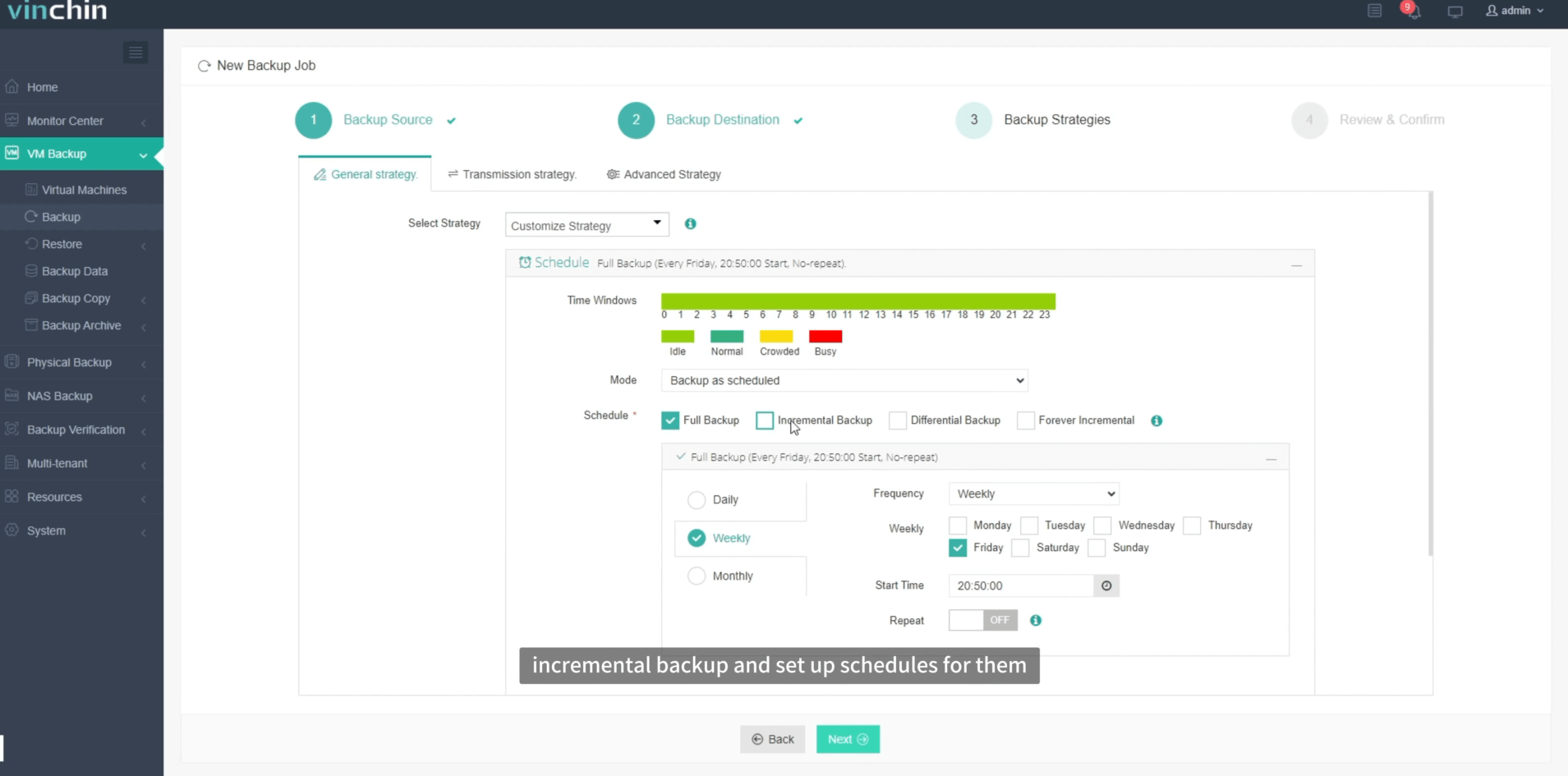
Step 4: Submit the job.
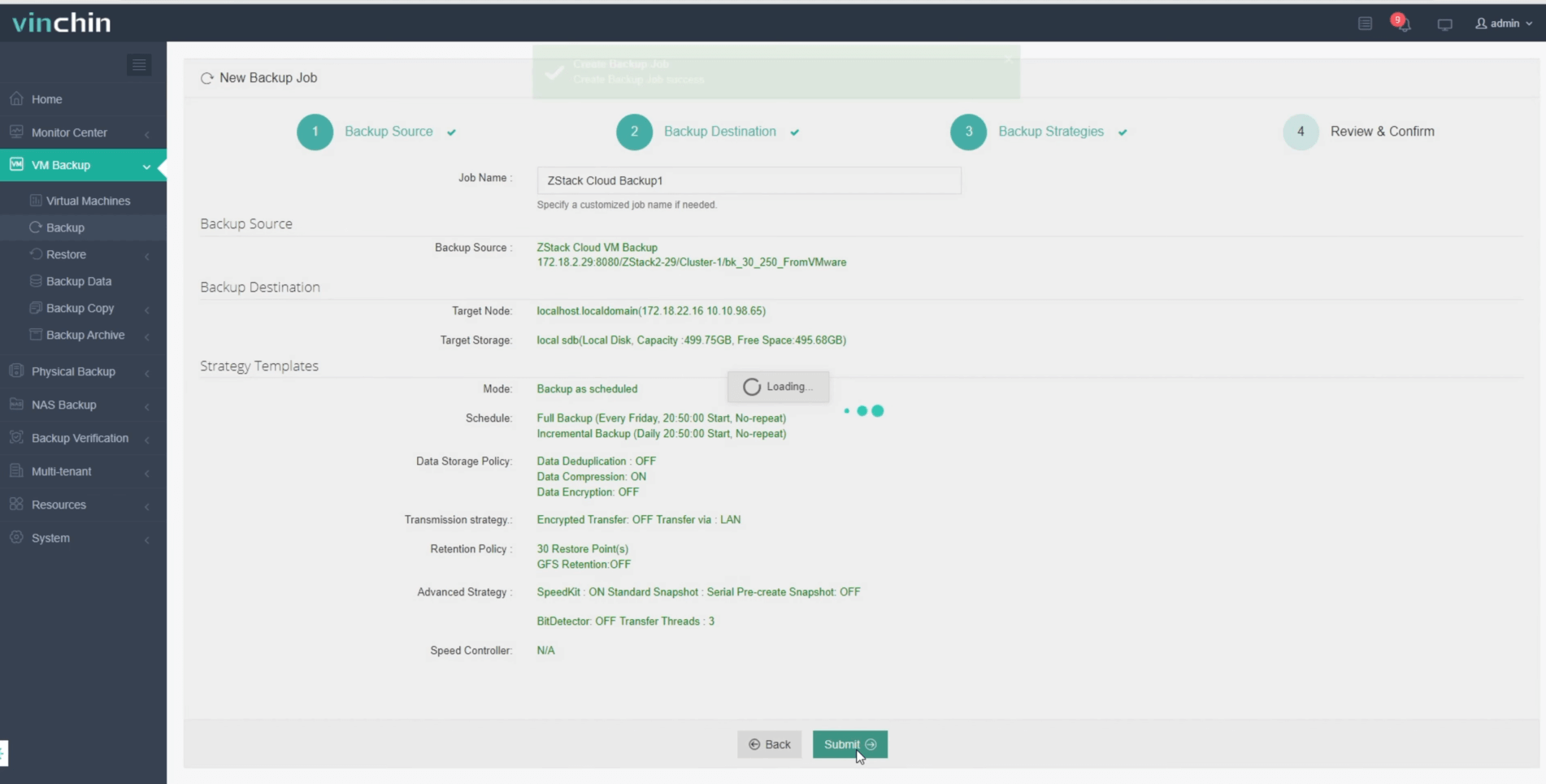
Trusted worldwide by thousands of businesses—with top ratings from global users—Vinchin Backup & Recovery offers a fully featured 60-day free trial so you can experience its power firsthand.
Best ZStack Backup Software FAQs
Q1: Does seamless integration affect backup reliability?
No—native integration actually improves reliability by reducing manual steps and ensuring that backup policies are executed consistently according to best practices documented by leading industry analysts such as Gartner.
Q2: Is role-based access supported within the integrated console?
Yes—enterprise solutions like Vinchin provide granular Role-Based Access Control (RBAC), allowing permissions based on user roles aligned with organizational responsibilities.
Q3: Can integrated tools scale as our virtual infrastructure grows?
Absolutely! Vinchin’s scalable architecture supports expanding workloads through concurrent processing without compromising performance—even during peak usage periods typical in large enterprises.
Conclusion
Integrated solutions like Vinchin Backup & Recovery deliver reliable protection while simplifying daily operations across virtualized environments—helping safeguard business continuity efficiently at scale.









