Oracle Linux Virtualization Manager (OLVM) is a powerful platform for managing virtual machines in enterprise environments. As organizations scale their infrastructure, protecting data becomes more complex. The best backup tools for OLVM integrate directly with virtualization management consoles. This integration allows administrators to manage backups, restores, and monitoring tasks from one interface. It streamlines operations and reduces risk by centralizing control.
Integration is not just about convenience—it is essential for maintaining consistent data protection across all virtual machines. Enterprises need solutions that fit into existing workflows without adding complexity or manual steps.
Why Integration with Virtualization Management Consoles Matters in Enterprise Environments?
Direct integration between backup tools and virtualization management consoles brings significant benefits to enterprise IT teams. When backup operations are managed within the same console as virtual machine administration, processes become unified and less prone to error.
● Unified Control Reduces Complexity: Managing backups from within the virtualization console means administrators can set policies, monitor jobs, and recover data without switching applications. This unified approach lowers training needs for staff and minimizes confusion during critical recovery scenarios.
● Centralized Oversight Improves Consistency: With all backup activities visible in one place, organizations can enforce policies more effectively. Centralized oversight ensures that every VM follows company standards for retention schedules and security protocols.
● Reduced Human Error Minimizes Risk: Manual intervention often leads to mistakes—missed backups or incorrect restores can have serious consequences. Integrated solutions automate routine tasks so human error is less likely to cause data loss or downtime.
● Streamlined Compliance Reporting: Regulatory frameworks like GDPR or HIPAA require detailed audit trails of backup activity. Integration enables automatic logging of actions within the main console, making it easier to generate reports during audits.
● Faster Recovery During Incidents: In a disaster scenario, time matters. Integrated tools allow quick access to restore options right from the familiar management interface—helping IT teams respond faster when every minute counts.
Fragmented workflows increase operational risk as small errors can lead to failed audits or lost data. By consolidating control through integration, enterprises gain reliability while reducing administrative overhead.
How To Choose The Best Oracle OLVM Backup Solution for Console Integration?
Selecting an OLVM backup solution that integrates smoothly with your virtualization management console requires careful evaluation of several key factors. Each factor contributes to operational efficiency and long-term scalability in large environments.
A strong solution should offer native integration so you can manage everything from one place without extra plugins or manual configuration steps.
● Native Console Integration: Direct connection between the backup tool and OLVM’s management interface allows seamless discovery of VMs, policy creation, scheduling of jobs, and monitoring—all inside your primary admin portal. For example, native integration reduces latency by using built-in APIs rather than external scripts or connectors.
● Scalability: As your environment grows—from dozens to hundreds of VMs—the solution must maintain performance without bottlenecks or slowdowns. Scalable architecture supports distributed workloads across multiple hosts while ensuring fast incremental backups even at scale.
● Automation: Policy-driven automation lets you schedule regular backups based on business needs instead of relying on manual triggers. Automated job orchestration ensures no VM is left unprotected if new instances are added dynamically—a common scenario in cloud-like private datacenters.
● Reporting and Compliance: Built-in dashboards provide real-time visibility into job status while detailed logs support regulatory audits (such as SOC 2 or ISO 27001). Integrated reporting makes it easy to demonstrate compliance during internal reviews or external inspections.
● Security Controls: Role-based access control (RBAC) restricts sensitive operations like restores or deletions only to authorized users; encryption protects both stored backups and data in transit against unauthorized access.
By focusing on these criteria—native integration, scalability, automation capabilities, robust reporting/compliance features, and strong security controls—you ensure your chosen solution fits seamlessly into daily operations while supporting future growth needs.
Vinchin Backup & Recovery: Enterprise-Level Protection for Oracle OLVM
For organizations seeking robust protection for Oracle OLVM environments alongside other mainstream platforms such as VMware, Hyper-V, Proxmox VE, oVirt/RHV/OLVM, XCP-ng/XenServer/OpenStack/ZStack—and more than 15 total—Vinchin Backup & Recovery stands out as a professional enterprise-level virtual machine backup solution designed for diverse infrastructures.
Vinchin Backup & Recovery offers agentless protection at the hypervisor layer with features including CBT-based incremental backup (supported on OLVM), LAN-free backup (supported on OLVM), instant recovery (supported on OLVM), granular restore capabilities across file systems within VMs, plus deduplication/compression for storage savings.
Key advantages include forever-incremental backup strategies that minimize storage usage; scheduled automated jobs that reduce manual effort; granular restore enabling rapid file-level recovery; LAN-free transfer modes boosting speed; plus comprehensive VM data verification routines—all contributing to efficient operations and minimized downtime.
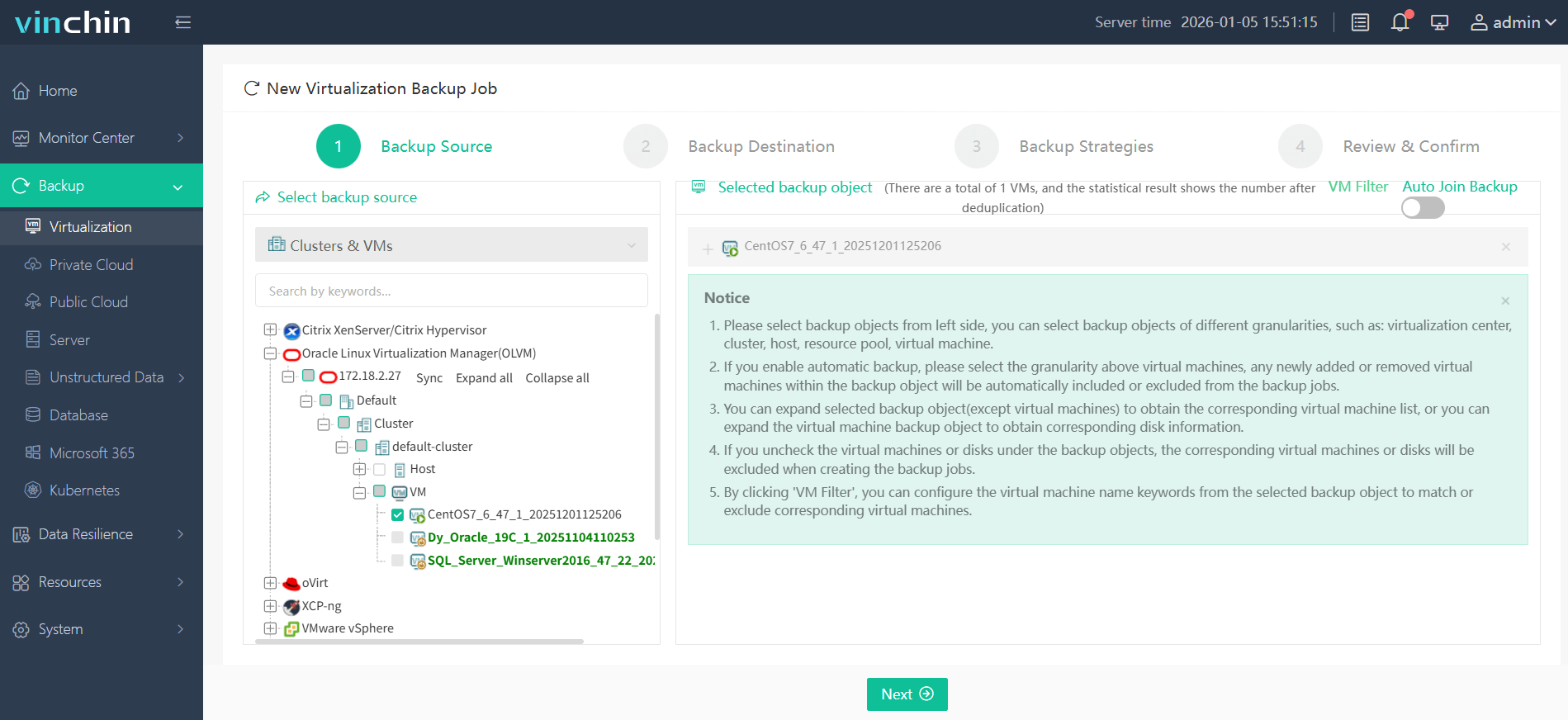
The intuitive Vinchin web console simplifies workflow:
Step 1: Select the OLVM VM you wish to back up;
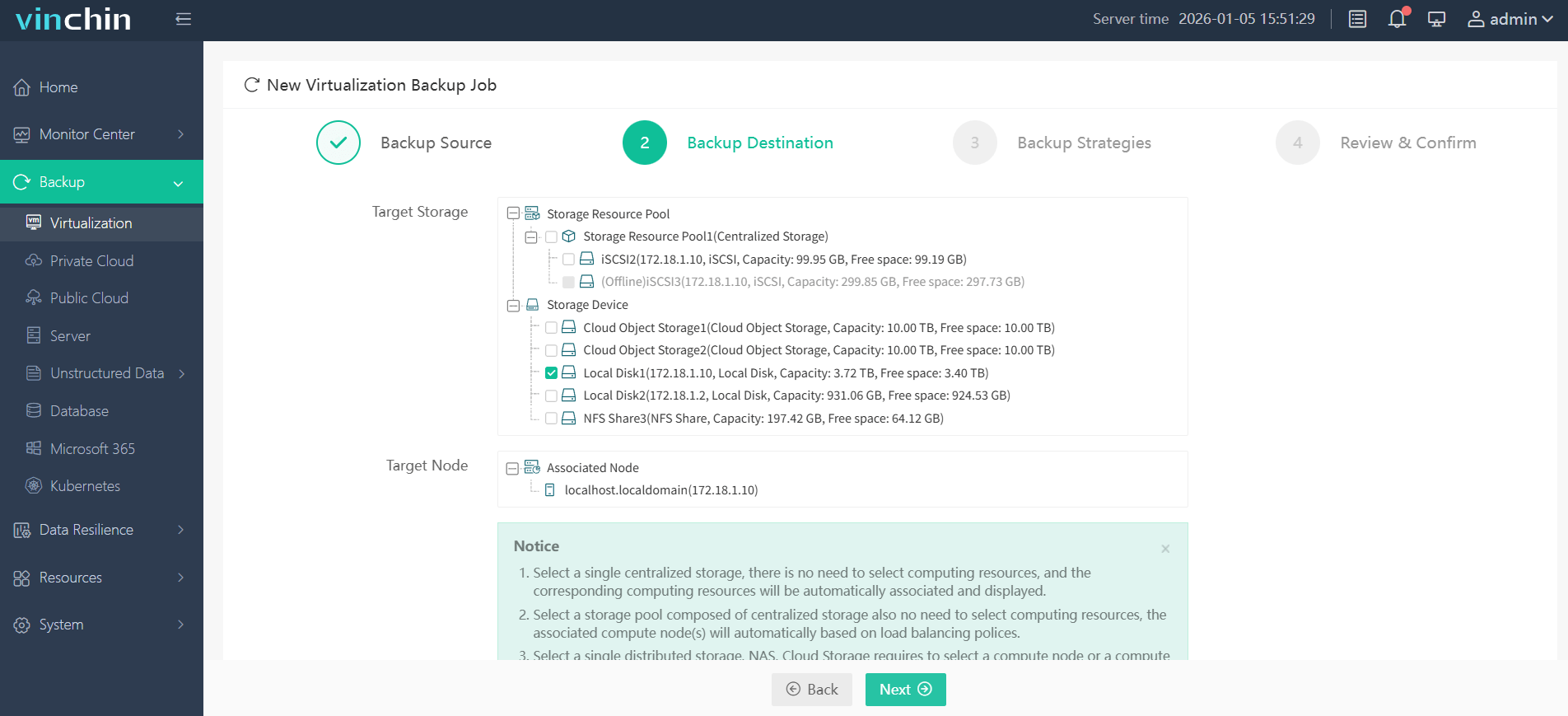
Step 2: Choose your preferred backup storage;
Step 3: Configure your desired backup strategy;

Step 4: Submit the job—ensuring secure protection with minimal effort required from administrators each time.

Trusted globally by thousands of enterprises—with top ratings—Vinchin Backup & Recovery offers a full-featured 60-day free trial; click below to download now.
Best Oracle OLVM Backup Software FAQs
Q1: Why is console integration important in an enterprise backup tool?
Console integration centralizes control over all virtual machine backups within a single dashboard used daily by IT teams This reduces errors speeds up response times during incidents simplifies training requirements—and provides clear audit trails needed by most regulatory frameworks such as GDPR HIPAA NIST SP 800–53
Q2: Does native integration affect scalability?
Yes Native integration leverages built-in APIs which allow scalable deployment across growing environments without extra configuration layers As new VMs are added they appear automatically within both your virtualization manager dashboard—and your integrated backup tool—ensuring continuous coverage even at scale
Q3: How does integrated reporting help compliance?
Integrated reporting provides real-time visibility into every completed scheduled failed—or restored—backup Detailed logs align easily with industry standards like ISO 27001 SOC 2 NIST These records simplify internal governance reviews external audits—and help prove adherence during regulatory checks
Conclusion
Deep console integration streamlines operations boosts recovery speed strengthens compliance—and minimizes risk Solutions like Vinchin deliver efficient unified management essential for modern enterprise-scale Oracle OLVM deployments









