Modern IT environments rely on virtualization to deliver flexibility and efficiency. A virtualization management console acts as a central hub for managing virtual machines (VMs), storage resources, networking settings, and system health. For Sangfor HCI users, this means using a unified interface—often web-based—to control all aspects of their virtual infrastructure.
Backup tools that integrate directly with these consoles offer significant advantages. They connect through APIs or plugins to automate VM discovery, policy enforcement, backup scheduling, monitoring, and recovery actions. This tight integration reduces manual work while improving reliability.
Integration is not just about convenience; it’s about ensuring every VM gets protected without gaps or delays. When your backup solution communicates natively with your virtualization platform’s management layer—such as Sangfor HCI’s own console—it can react instantly to changes in your environment. New VMs are detected automatically; old ones are retired from protection policies when decommissioned.
This level of automation supports large-scale environments where hundreds or thousands of VMs may come online or offline daily. It also helps organizations meet strict data protection standards set by frameworks like NIST SP 800-53 or CIS Controls. These standards require consistent backup coverage across all critical systems—a task made much easier through seamless integration.
For enterprises running mission-critical workloads on Sangfor HCI clusters, integrated backup solutions provide centralized control over data protection operations. This ensures rapid response during outages while supporting compliance audits and business continuity plans.
Why Integration with Virtualization Management Consoles Matters in Enterprise Environments?
Direct connection between backup tools and virtualization management consoles is essential for modern enterprise IT operations. Integrated solutions help organizations maintain high availability while reducing operational risk.
● Automated VM Discovery
When backup software integrates at the API level with your virtualization console, it automatically detects new VMs as soon as they are created. This eliminates manual tracking of assets—a process prone to oversight—and ensures no workload is left unprotected even in fast-changing environments.
● Consistent Policy Enforcement
Integrated backups allow administrators to apply uniform policies across all virtual machines from one place. Whether setting retention rules or encryption requirements, you gain confidence that every VM follows organizational standards without exception. This consistency supports regulatory mandates such as GDPR or HIPAA that demand reliable data handling practices.
● Reduced Human Error
Manual processes often lead to mistakes—missed schedules or forgotten VMs can result in incomplete backups. By automating discovery and policy application through integration with the management console, you minimize these risks significantly.
● Faster Recovery Times
Centralized control enables quick identification of affected workloads during an incident. Integrated tools let you launch restores directly from the same interface used for day-to-day VM administration—saving precious minutes when time matters most during disaster recovery scenarios.
● Simplified Compliance Auditing
Auditors often require proof that all critical systems receive regular backups according to company policy. With integrated reporting features tied into your virtualization platform’s inventory data, generating audit-ready documentation becomes straightforward rather than a manual chore.
● Scalability Across Large Environments
As businesses grow their virtual infrastructure—adding new hosts or clusters—the complexity of managing backups increases exponentially if handled manually. Integrated solutions scale effortlessly by leveraging real-time inventory updates from the management console itself.
These benefits combine to create a resilient foundation for enterprise data protection strategies built around Sangfor HCI deployments.
How To Choose The Best Sangfor HCI Backup Solution for Integration with Virtualization Management Consoles?
Selecting an effective backup tool requires careful evaluation beyond basic compatibility checklists. Focus on how well each solution leverages deep integration features that matter most in dynamic enterprise settings.
A robust choice should offer:
Native API-Level Integration
Look for solutions designed specifically to communicate via official APIs provided by Sangfor HCI’s management platform. This allows automatic synchronization of VM inventories so every change—new deployments or removals—is reflected instantly within your backup environment without extra configuration steps.
Granular Restore Capabilities
The ability to recover not only entire VMs but also individual files or folders is crucial when responding quickly to accidental deletions or targeted ransomware attacks. Granular restore options reduce downtime by letting you retrieve only what you need instead of restoring full images unnecessarily.
Future-Proof Compatibility
Virtualization platforms evolve rapidly; new features such as live migration support or advanced snapshotting become available over time. Your chosen backup tool must adapt seamlessly alongside these updates so you avoid costly reconfigurations later on.
Centralized Web-Based Management Console
An intuitive dashboard accessible via browser streamlines daily operations—from scheduling jobs to monitoring status alerts—all without switching between multiple interfaces. Centralized reporting also aids compliance efforts by consolidating logs across hybrid cloud setups if needed.
By focusing on these core capabilities during selection—and confirming vendor support for ongoing updates—you ensure long-term value from your investment in Sangfor HCI data protection technology.
Vinchin Backup & Recovery: Enterprise Data Protection for Sangfor HCI
For organizations seeking robust protection for their hyperconverged infrastructure, Vinchin Backup & Recovery stands out as an enterprise-level virtual machine backup solution supporting more than 15 mainstream platforms—including seamless compatibility with Sangfor HCI environments alongside VMware, Hyper-V, Proxmox, oVirt, OLVM, RHV, XCP-ng, XenServer, OpenStack, ZStack and others. Deep integration enables automated VM discovery via the management console and centralized scheduling within a single web interface.
Key features include agentless full/incremental/differential backups (including forever-incremental backup ), granular restore capabilities for file-level recovery inside VMs, LAN-free backup options for efficient data transfer on supported platforms (Sangfor HCI excluded), advanced deduplication/compression technologies to optimize storage use, and secure multi-thread transmission plus strong encryption throughout the workflow—all designed to maximize reliability while minimizing resource impact.
Using Vinchin Backup & Recovery is straightforward thanks to its intuitive web console:
Step 1: Select the Sangfor HCI VM you wish to back up

Step 2: Choose your desired backup storage
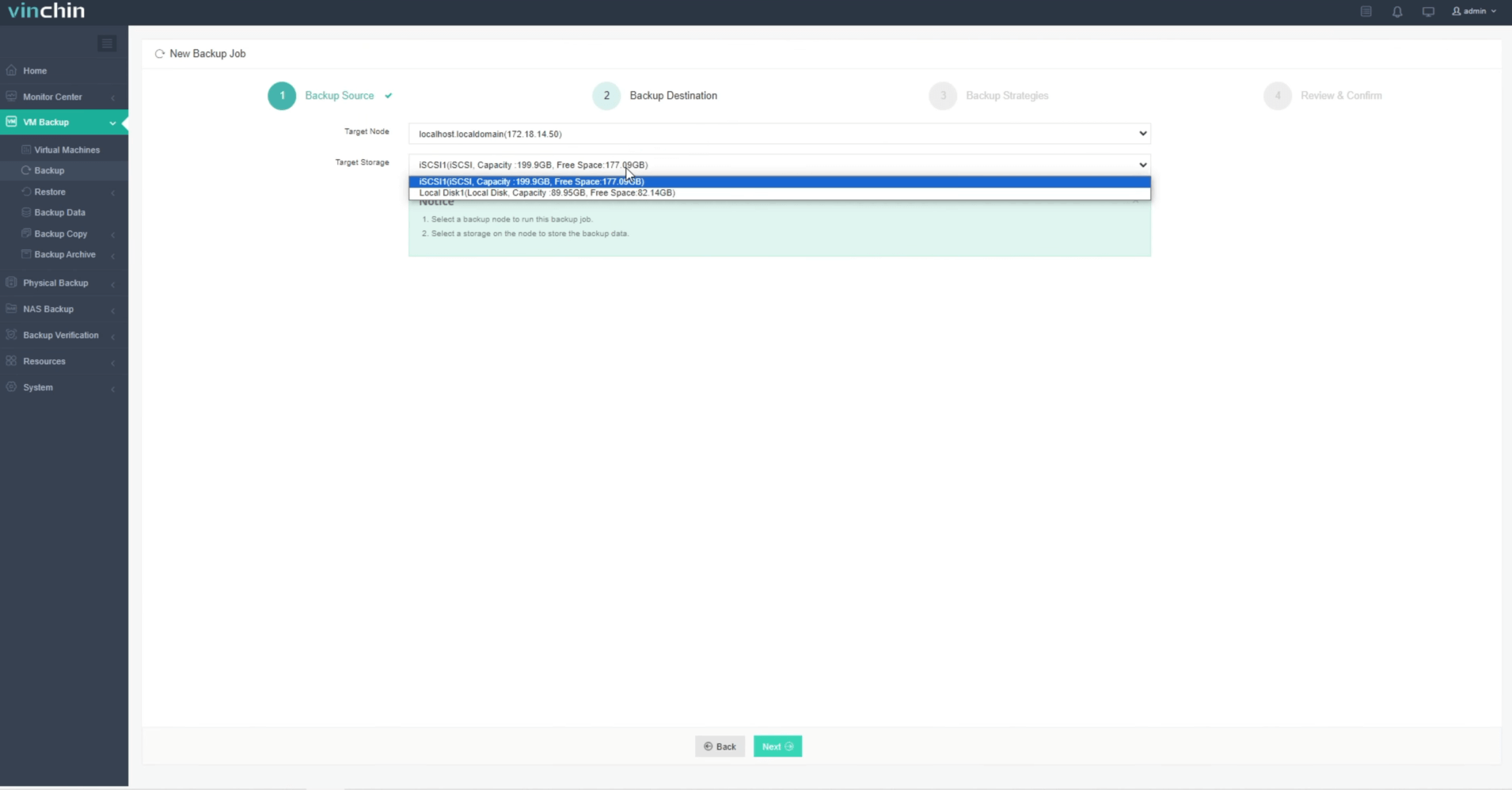
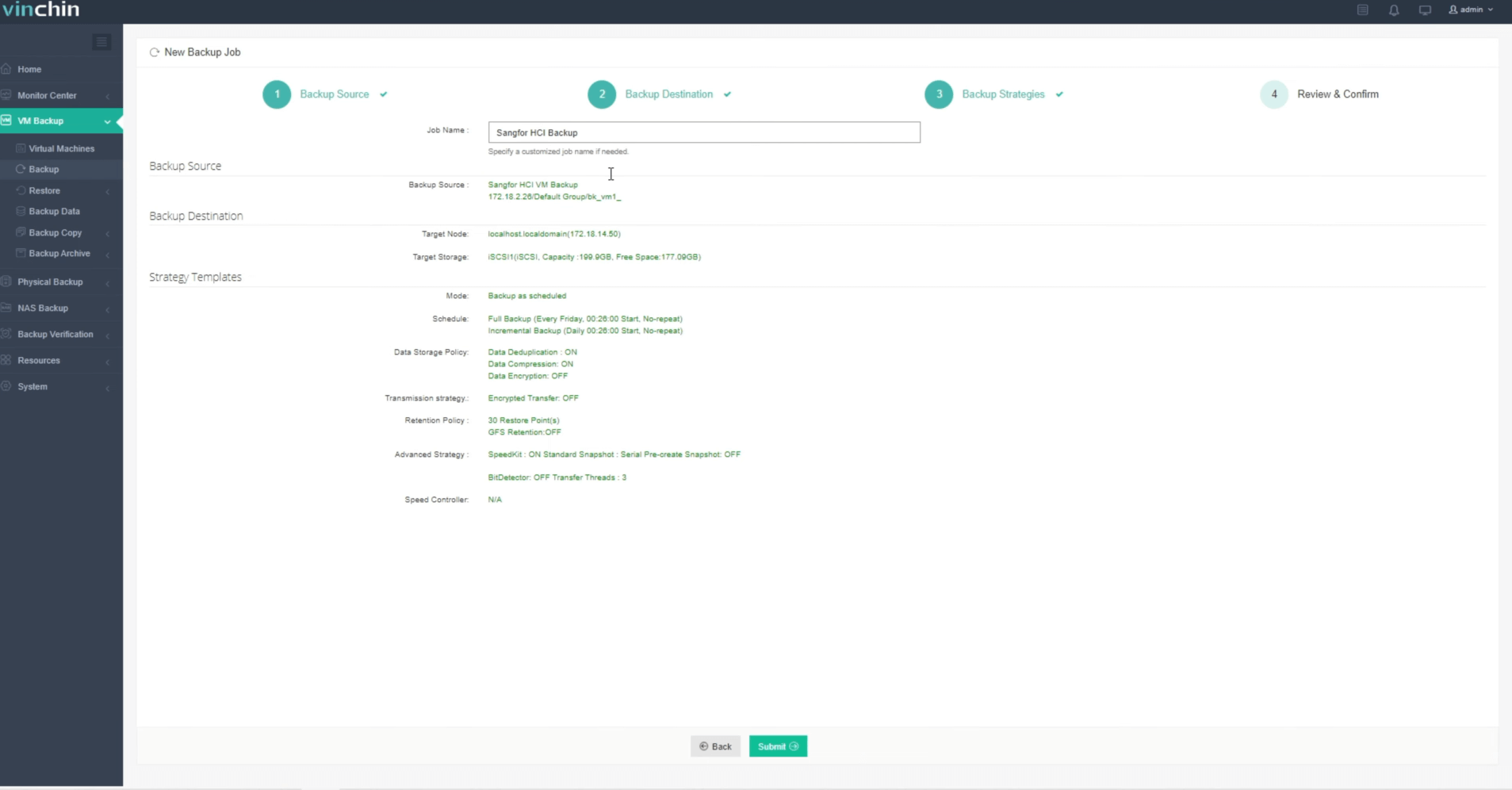
Step 3: Configure your preferred backup strategy

Step 4: Submit the job
Trusted globally by thousands of enterprises—with top ratings for performance and ease-of-use—Vinchin Backup & Recovery offers a 60-day full-featured free trial; click below to get started today!
Best Sangfor HCI Backup Software FAQs
Q1: Why is integration with virtualization management consoles important for backing up virtual machines?
Integration enables automatic detection of new virtual machines (VMs), enforces consistent policies across all workloads from one place within the management interface itself while reducing manual errors common in non-integrated setups.
Q2: Does using an integrated solution impact production performance during backups?
Enterprise-grade integrated tools use agentless technology which minimizes load on production systems during both scheduled backups and restores so normal business operations continue smoothly.
Q3: How does this type of integration help meet compliance requirements?
It ensures complete coverage because every active workload managed by the virtualization platform receives regular automated backups aligned precisely with organizational retention rules required under frameworks like NIST SP 800–53.
Q4: Can integrated solutions handle growth if my organization adds more hosts or clusters?
Yes; scalable architecture lets them adapt automatically whenever new resources join your environment since they synchronize continuously against real-time inventory updates maintained by your main virtualization console.
Conclusion
Integrated backup tools simplify enterprise data protection on Sangfor HCI by automating discovery and policy enforcement through native console connections—delivering reliable coverage at scale while minimizing risk.









