Why Migrate VMware to OpenShift Virtualization
In recent years, the rising licensing costs, operational flexibility concerns, and the push toward cloud-native infrastructure have accelerated migrations away from VMware.
OpenShift Virtualization offers several advantages:
Unified management for VMs and containers
Kubernetes-native orchestration
Reduced infrastructure silos
Scalability across hybrid and multi-cloud environments
Integration with DevOps and GitOps workflows
Modern automation capabilities
Reduce dependency on proprietary hypervisor ecosystems
Organizations can do a VMware to OpenShift migration with minimal downtime using warm migration technologies.
Main Methods on How to Migrate from VMware to Red Hat OpenShift
1. Migration Toolkit for Virtualization (MTV)
Migration Toolkit for Virtualization (MTV) is an open-source tool designed to simplify virtual machine migration from platforms. It provides automated VM discovery, conversion, and migration workflows to help organizations move workloads with minimal downtime and operational complexity. This is the most common and officially supported migration approach.
MTV supports migration from:
Step-by-Step Migration:
Step 1. Prepare OpenShift Virtualization
Install:
And verify:
Cluster health
Storage classes
Network connectivity
Step 2. Add Source and Destination Providers
Configure:
MTV automatically discovers available VMs from vSphere.
Step 3. Create a Migration Plan
Under Migration > Plans for virtualization, click Create plan
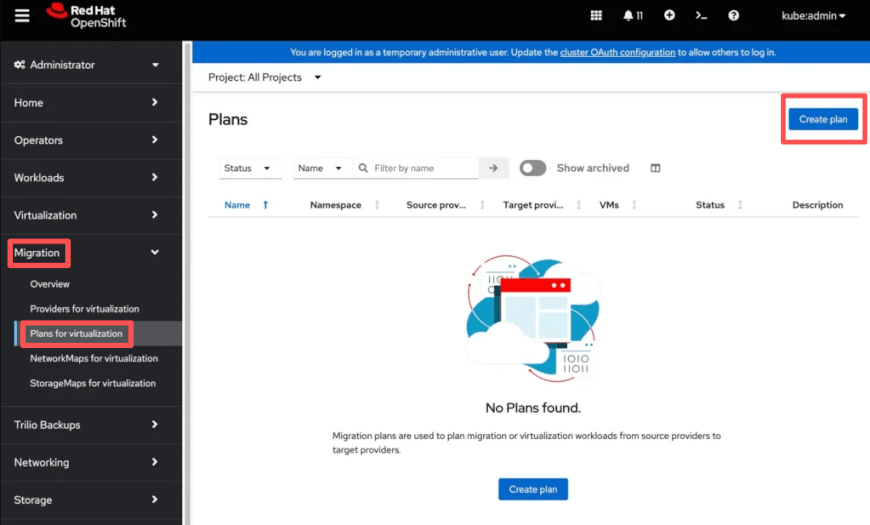
Create a new project and choose your VMs that need to be migrated
Then set the Network Mapping and Storage Mapping
Choose the migration type - Cold migration or Warm migration
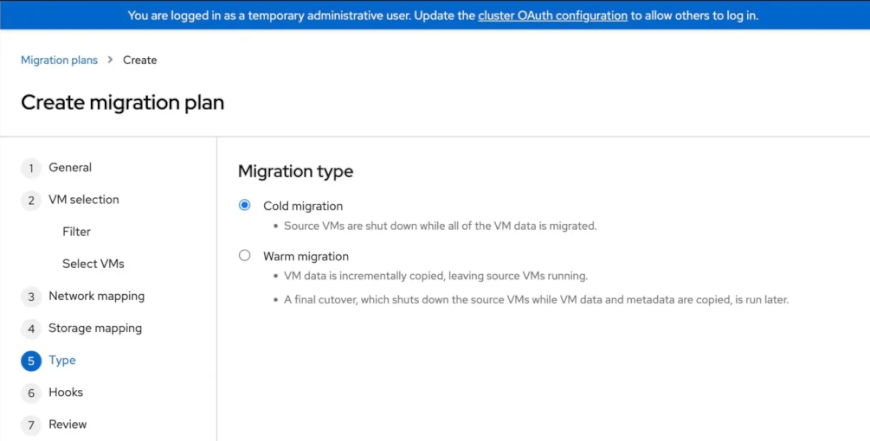
In Hooks, you can enter any hooks for Ansible scripts to run post-migration automation
Review the migration settings
Things You Need to Know: In the migration type choosing step, to use Warm migration, Changed Block Tracking has to enabled on the VM.
Step 4. Start the Migration
Click Start to begin the migration. You can click the down arrow to see the migration details and process.
2. Manual VM Export and Import
This method is generally slower and more error-prone for enterprise-scale migrations. For small environments, organizations may manually:
3. Third-Party Migration Platforms
Although Red Hat Migration Toolkit for Virtualization (MTV) handles the actual VM migration workflow, many enterprises also tend to deploy third-party tools, like Vinchin Backup & Recovery, alongside the migration project to ensure workload protection rollback capability, and business continuity throughout the migration process.
Available Features: easy to use, centralized backup management, offsite backup replication, immutable backup protection, instant VM recovery, etc.
Step 1. Backup VMware VMs with Vinchin
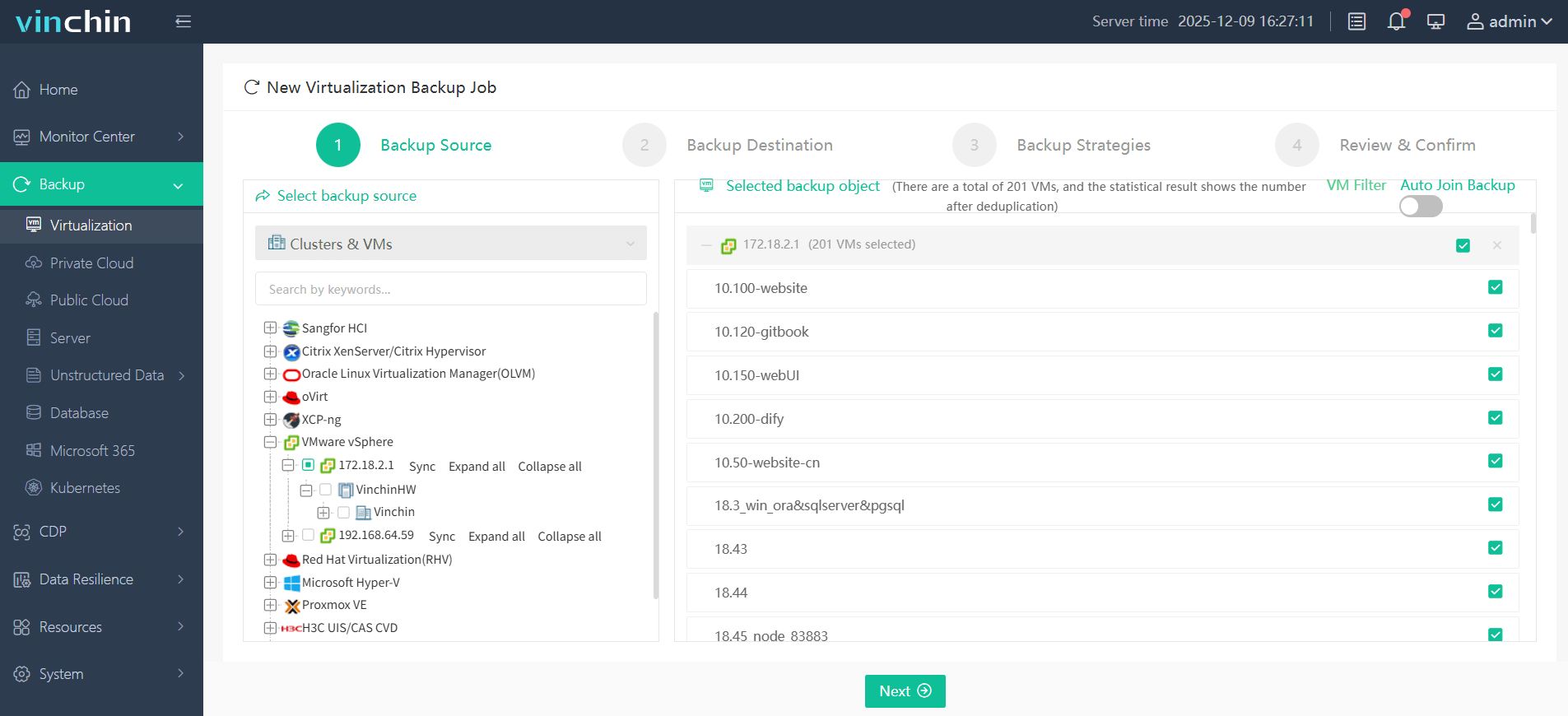
In Backup > Virtualization, choose the migration VMware VMs to run a full backup
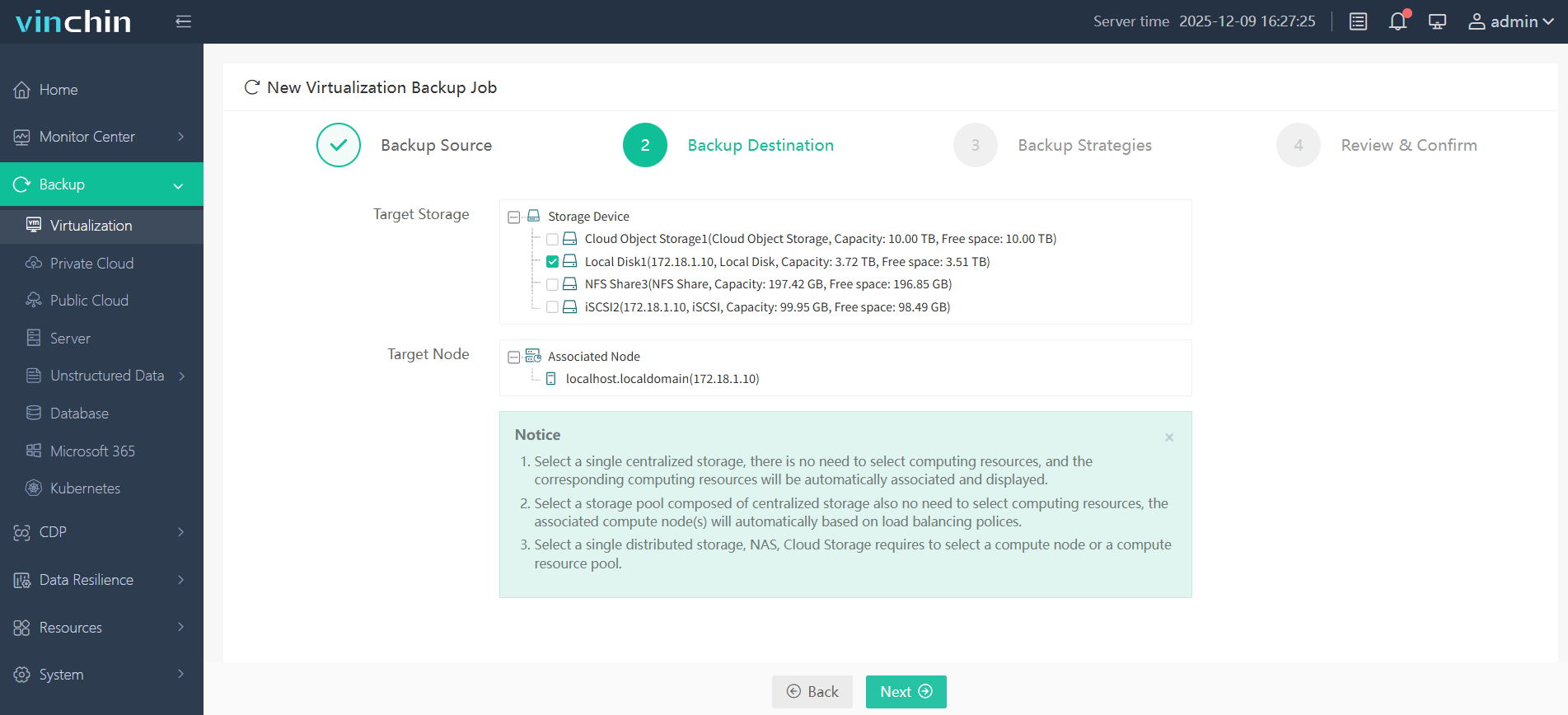
Select the backup destination - target node and target storage
Select the backup strategies - mode, schedule, and some advanced strategy
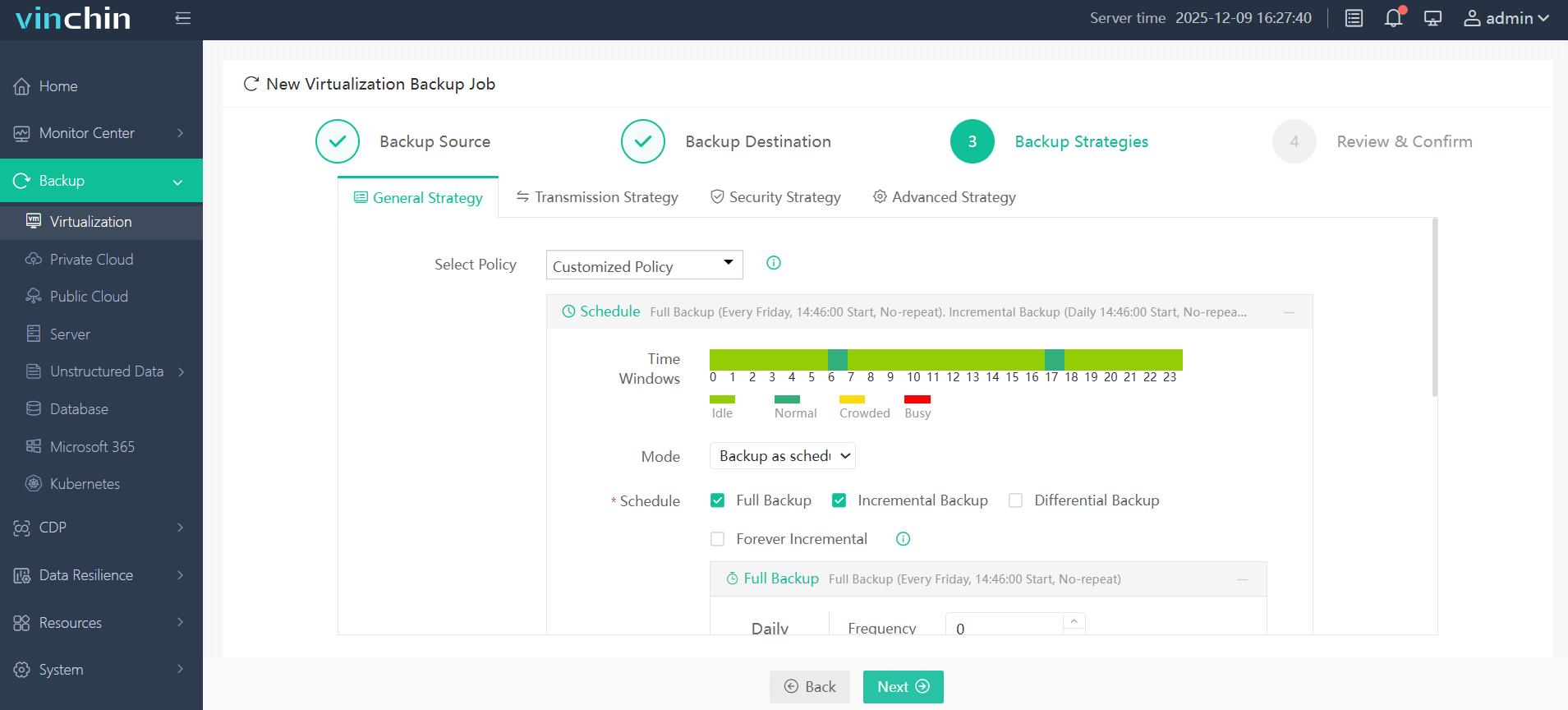
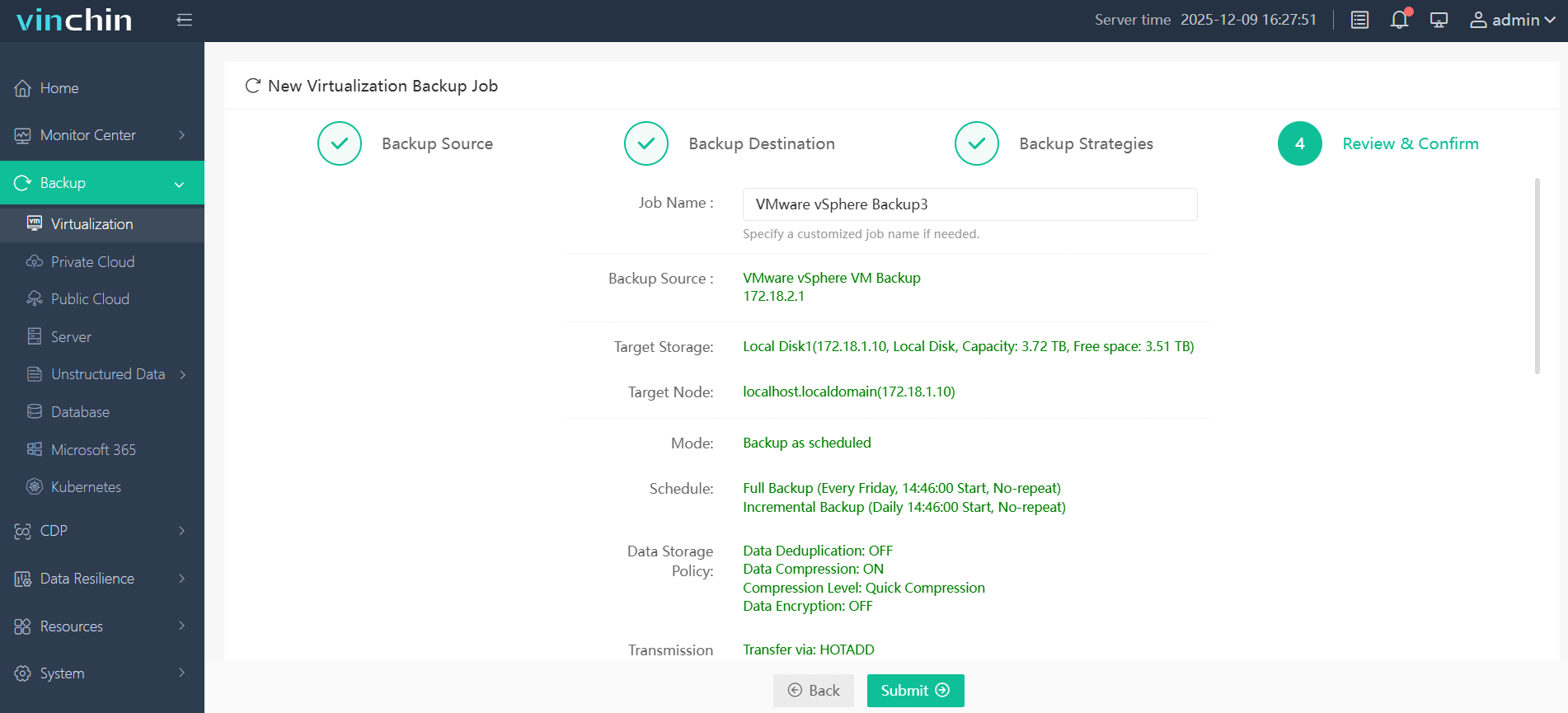
Review and confirm the backup task, then Submit
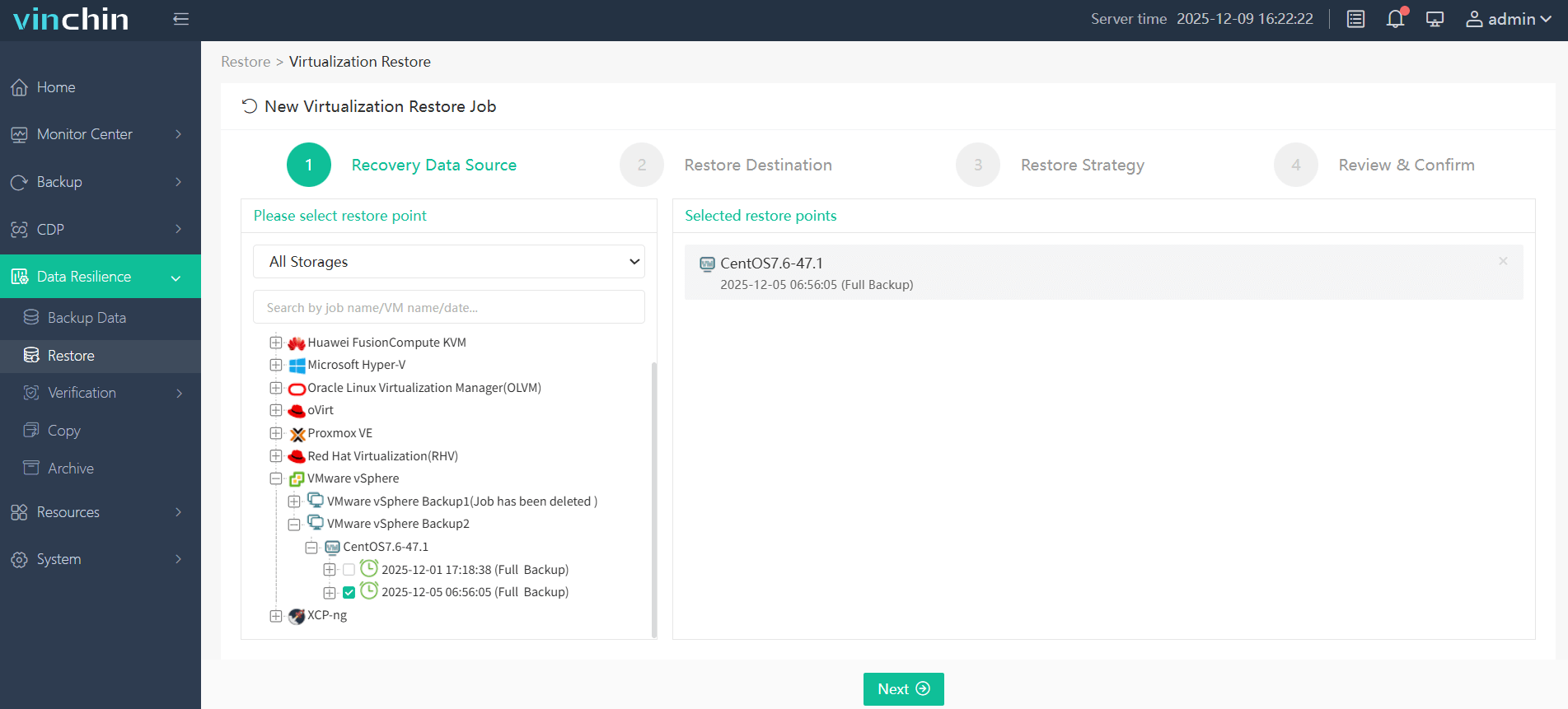
Step 2. Restore VMware VMs to OpenShift Virtualization
In Backup > Restore, select the restore point to choose the VMware VMs, click Next
Choose the Red Hat Virtualization as your restore destination
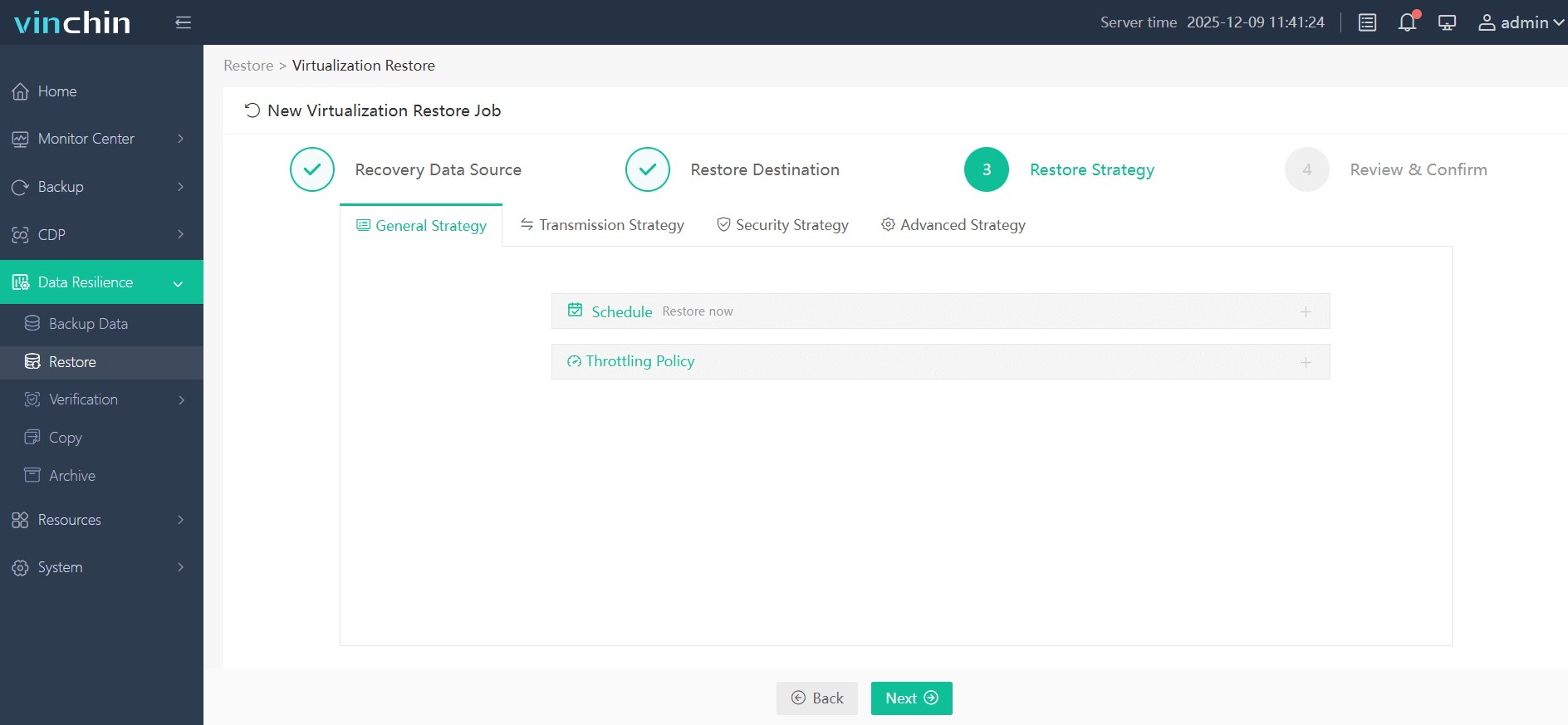
Select restore strategy - schedule, speed controller, and advanced strategy
Submit the job
Only a few steps to migrate VMeare to OpenShift! Just try Vinchin Backup & Recovery, download now you can enjoy the 60-days free trial!
Post-Migration Step: Verify and Enable SSH Access
After the VMware VM is migrated to OpenShift Virtualization, administrators should verify that SSH access works correctly before moving workloads into production.
Step 1. Find the VM/VMI Name
oc get vm -n <namespace>

Example output:
my-vm Running
Step 2. Verify VM IP Address
Get the VMI details:
oc get vmi my-vm -n <namespace> -o yaml
Look for:
status.interfaces.ipAddress
Step 3. Ensure SSH Service is Enabled Inside VM
Inside the migrated VM (Linux):
systemctl enable sshd
systemctl start sshd
Check firewall:
firewall-cmd --add-service=ssh --permanent
firewall-cmd --reload
Step 4. Choose Access Method
a. Use OpenShift Network (Pod Network/Bridge)
If VM is attached to a bridge or pod network:
Direct SSH:
ssh user@<VM-IP>
b. Expose VM via Service (Cluster Access)
If you want stable access inside cluster:
oc expose vm my-vm --port=22 -n <namespace>
Or manually:
apiVersion: v1
kind: Service
metadata:
  name: my-vm-ssh
spec:
  selector:
    kubevirt.io/domain: my-vm
  ports:
    - port: 22
      targetPort: 22
  type: ClusterIP
Apply:
oc apply -f service.yaml
Migrate from VMware to Red Hat OpenShift FAQs
Q1: Is VMware NSX networking compatible with OpenShift networking?
Partially. Some VMware NSX networking designs require redesign when migrating to Kubernetes-native networking models. Administrators may need to reconfigure: VLANs, overlay networks, load balancers, firewall policies, ingress routing.
Q2: How much downtime should I expect during migration?
Downtime depends on migration method, VM size, storage speed, application complexity, and network bandwidth.
Warm migrations may only require minutes of downtime, while cold migrations can require longer maintenance windows.
Q3: Should I containerize applications instead of migrating VMs?
Not always. Many organizations initially migrate VMs into OpenShift Virtualization first, then modernize applications gradually over time.
VM migration and container modernization are often separate phases of a larger transformation strategy.
Q4: What are the most common migration mistakes?
Common VMware-to-OpenShift migration mistakes include:
Understanding networking complexity
Skipping backup verification
Migrating oversized VMs without optimization
Ignoring storage performance testing
Lacking rollback procedures
Insufficient administrator training
Conclusion
Migrating from VMware to Red Hat OpenShift Virtualization is becoming a practical choice for organizations seeking greater flexibility, Kubernetes-native management, and reduced reliance on traditional hypervisors.
Whether using MTV, manual migration, or backup-based approaches with Vinchin Backup & Recovery, successful migration depends on careful planning around storage, networking, workload compatibility, and data protection. With proper migration and rollback strategies, enterprises can modernize their infrastructure while maintaining business continuity and operational stability.