Backing up XCP-ng virtual machines is vital for business continuity. The right backup software protects data without slowing down production workloads. Efficient solutions use agentless technology, incremental backups, and application-aware methods. These approaches help keep services running smoothly during backups. Enterprises need this efficiency to meet SLAs and avoid costly downtime. Reliable backup also helps with compliance by ensuring data is always protected.
Choosing backup software that minimizes impact on VM performance means fewer slowdowns for users and less risk of outages. This matters most when systems must stay available around the clock. By using modern backup strategies designed for virtualization platforms like XCP-ng, organizations can safeguard their operations without sacrificing speed or reliability.
Why Minimal Impact Backup Matters in Enterprise Environments?
Backups should protect data without disrupting daily business operations. In large environments with many VMs running critical workloads, even small delays can cause problems for users or customers.
● Avoiding Service Disruption: Backups that strain production VMs may lead to slow applications or failed transactions. This can frustrate customers and harm your reputation.
● Meeting Compliance Requirements: Many industries require regular backups as part of regulatory compliance. If backups fail due to resource contention or poor scheduling, you could face penalties or audit failures.
● Reducing Operational Risk: Poorly optimized backups increase operational risk by threatening uptime commitments. If a backup job causes an outage during peak hours, it could mean lost revenue or missed deadlines.
● Ensuring Complete Data Protection: When backups overload systems, they might not finish on time or skip important data. This leaves gaps in protection that could be exploited by ransomware or hardware failure.
● Supporting Business Growth: As your infrastructure grows, so does the demand on resources during backup windows. Scalable solutions prevent bottlenecks as you add more VMs and storage devices.
Efficient backup processes help IT teams deliver reliable service while meeting strict business requirements.
How To Choose The Best XCP-ng Backup Solution for Minimal Impact on Production VM Performance?
Selecting effective XCP-ng backup software requires understanding both technical capabilities and real-world demands. The following features make a difference when minimizing impact on live systems:
Agentless Architecture simplifies deployment because you do not install extra software inside each VM. Instead, the solution connects through hypervisor APIs such as XenServer’s management interface. This reduces CPU and memory usage within guest operating systems while avoiding conflicts with application processes.
Incremental Forever Backups rely on tracking only changed blocks since the last successful job—sometimes called change block tracking (CBT). While CBT is widely known from VMware environments, XCP-ng achieves similar results using its own snapshot mechanisms via XenAPI calls. Incremental transfers reduce network traffic and storage input/output compared to full-image jobs.
Intelligent Scheduling lets administrators run jobs during off-hours or periods of low activity. Flexible policies allow you to align protection tasks with business cycles so production workloads remain unaffected throughout busy times.
Resource Throttling gives control over how much bandwidth or CPU power a backup process consumes at any moment. By setting limits within the UI—such as maximum concurrent streams—you prevent jobs from overwhelming shared infrastructure resources like storage arrays or network links.
Integration With Hypervisor APIs ensures consistent snapshots across all protected VMs—even those running databases or transactional applications requiring application-consistent states (for example using Microsoft VSS integration for Windows guests).
Scalability means your chosen solution keeps pace as you grow from dozens to hundreds—or thousands—of virtual machines without introducing new risks of performance degradation during protection windows.
By focusing on these features when evaluating solutions for XCP-ng environments, IT leaders can confidently select tools that balance safety with speed.
Vinchin Backup & Recovery: Enterprise-Grade Protection for XCP-ng
For enterprises seeking robust protection of their XCP-ng environment alongside other mainstream virtualization platforms such as VMware, Hyper-V, Proxmox, oVirt, OLVM, RHV, XenServer, OpenStack, ZStack and more (15+ total), Vinchin Backup & Recovery stands out as a professional enterprise-level virtual machine backup solution. It supports agentless architecture and offers deep integration with hypervisor APIs including those specific to XCP-ng environments to ensure efficient operation with minimal impact on production workloads.
Key features include LAN-free backup support for fast local transfers in XCP-ng environments; CBT-based incremental backups; flexible scheduled backups; granular restore options; and advanced data deduplication/compression—all designed to maximize efficiency while reducing resource consumption during protection tasks.
Using Vinchin Backup & Recovery’s intuitive web console makes safeguarding your environment straightforward:
Step 1: Select the XCP-ng VM to back up; 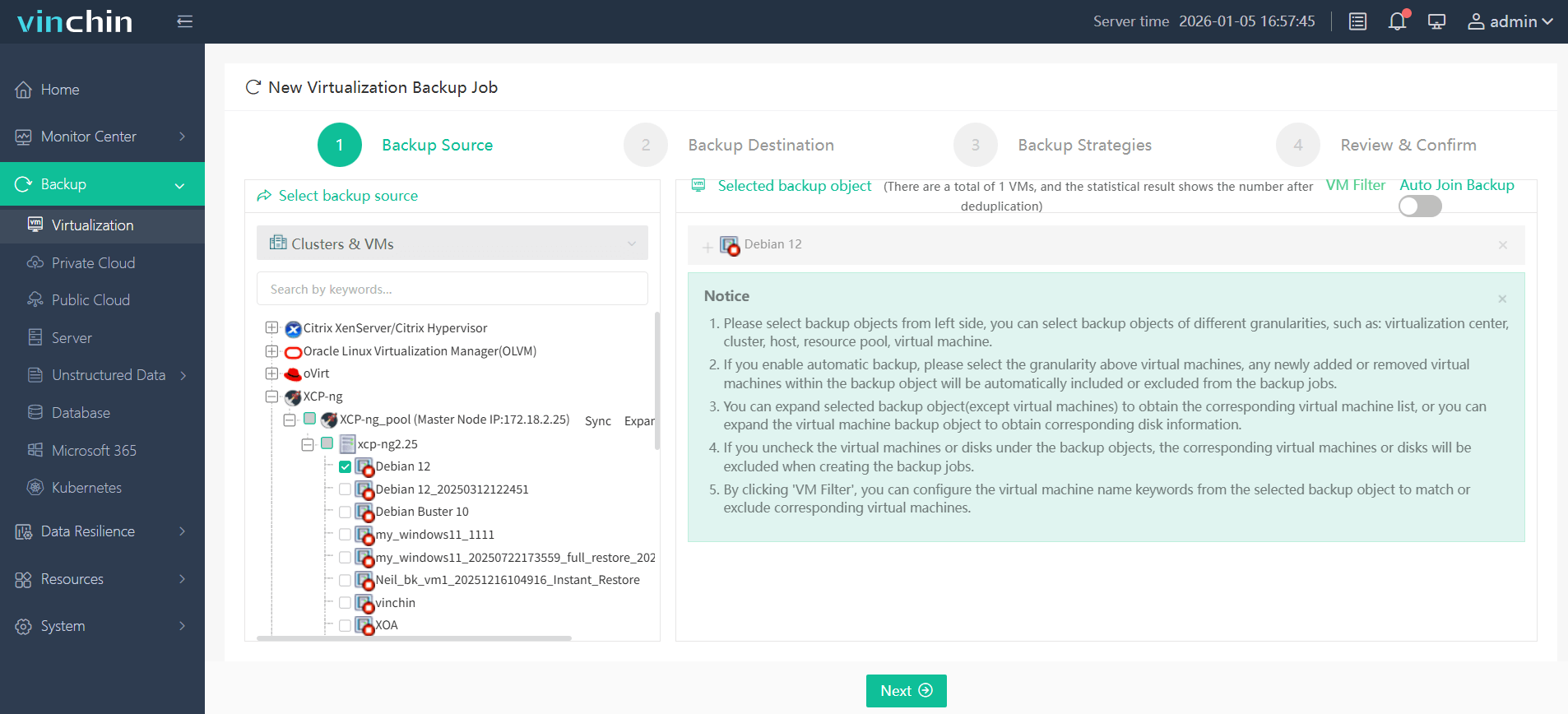
Step 2: Choose the desired backup storage; 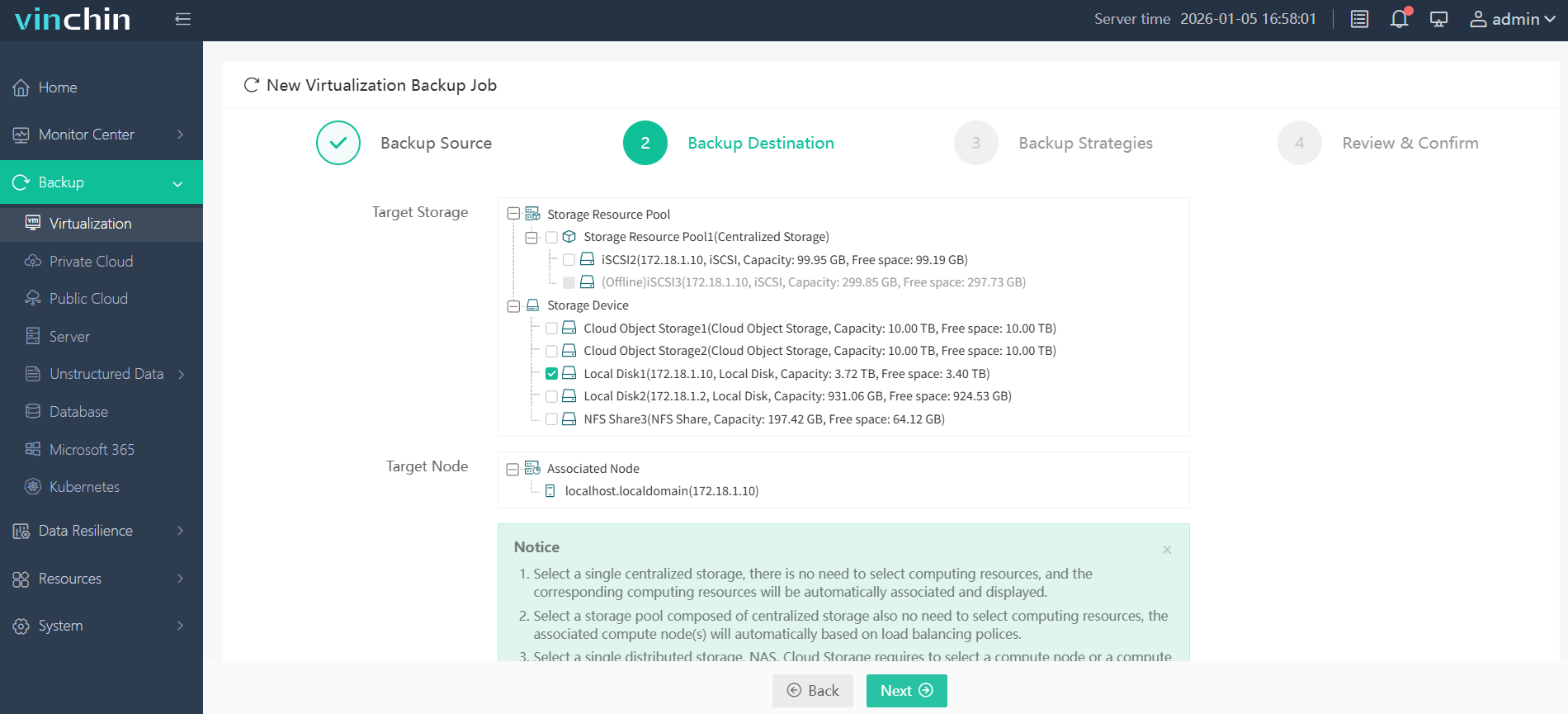
Step 3: Configure a suitable backup strategy; 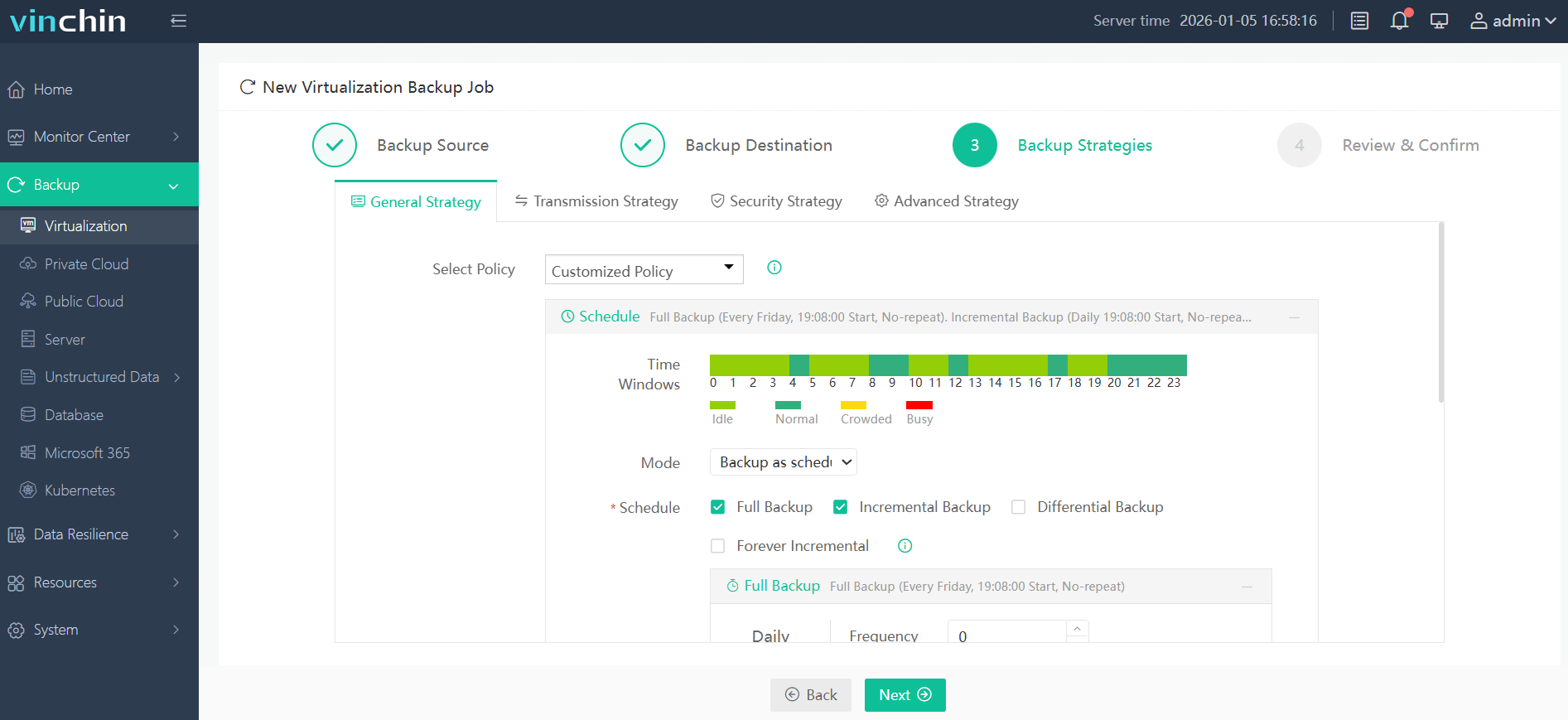
Step 4: Submit the job—ensuring reliable protection in just a few clicks.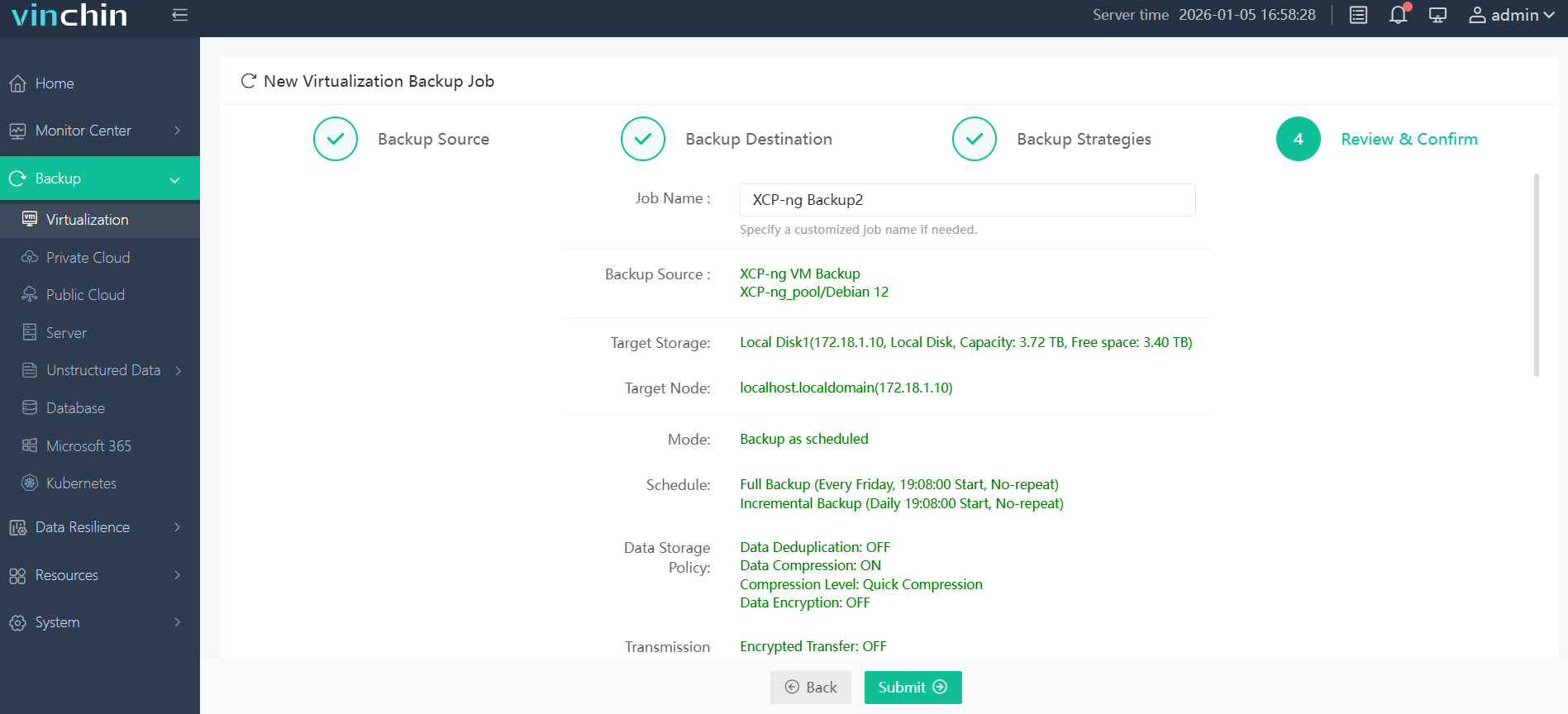
With global recognition among enterprise users and top industry ratings, Vinchin Backup & Recovery offers a fully featured 60-day free trial—click below to get started today!
Best XCP-ng Backup Software FAQs
Q1: How does agentless backup reduce VM performance impact?
Agentless backup leverages XCP-ng’s management API (XenAPI) instead of installing extra software inside each VM guest OS. This approach avoids consuming guest CPU/memory resources during protection tasks so virtual machines continue operating at normal speed throughout scheduled jobs.
Q2: Why are incremental backups important for performance?
Incremental backups copy only changed blocks since your last successful job by using hypervisor-level change tracking built into platforms like XCP-ng through its snapshot system. This method reduces both network traffic volume and disk I/O load compared to full-image transfers—making jobs faster with less disruption overall.
Q3: Can backup schedules be aligned with low-usage periods?
Yes; advanced solutions provide flexible scheduling tools so administrators set jobs outside peak hours—for example overnight—to minimize interference with user-facing services while still maintaining regular protection intervals required by company policy or regulation standards.
Q4: Is instant recovery possible without affecting live systems?
Yes; instant recovery allows rapid access to protected virtual machines directly from compressed copies stored by your solution—without tying up primary compute/storage resources needed by ongoing operations—so businesses restore critical services quickly if disaster strikes but keep day-to-day workloads unaffected until full restoration completes if necessary.
Conclusion
Choosing efficient XCP-ng backup software safeguards business continuity while minimizing performance impact on production workloads—helping enterprises stay compliant and resilient every day.










