Running critical workloads on Proxmox Virtual Environment (VE) demands careful selection of backup software. The right solution uses agentless methods, incremental backups like Changed Block Tracking (CBT), application-aware processing, and efficient resource management. This approach keeps your business running smoothly during backup operations while protecting your data.
Minimizing performance impact from backups is vital for enterprises. It helps maintain service levels, avoids user disruption, supports compliance needs, reduces operational risk, and makes scaling easier as your environment grows.
Why Minimal Impact Backup Matters in Enterprise Environments?
Minimal-impact backups are essential in enterprise IT because even brief slowdowns or outages can cause significant problems. These solutions prevent slowdowns or outages during protection operations by reducing resource contention and missed service-level agreements (SLAs).
● Downtime Costs Are High: According to Gartner’s 2014 report, large organizations face average IT downtime costs exceeding $5,600 per minute. This highlights why minimizing disruption from backups is crucial.
● Regulatory Penalties: Failing to meet compliance due to missed recovery points or inconsistent data can result in regulatory fines or legal issues.
● Operational Risk: Inefficient backups increase operational risk by exposing your business to potential data loss or extended downtime.
● Scalability Challenges: As environments grow larger with more VMs and nodes, inefficient backup processes can become bottlenecks that limit scalability.
How To Choose The Best Proxmox Backup Solution for Minimal Impact on Production VM Performance
Selecting a Proxmox backup solution requires attention to several technical factors that directly affect production VM performance. Each factor plays a role in reducing overhead during protection operations while ensuring reliable recoveries.
● Agentless Architecture
Choose solutions that use an agentless approach—no extra software inside each VM means less guest OS overhead and simpler deployment. This minimizes compatibility risks and simplifies maintenance since updates happen at the hypervisor level rather than inside every virtual machine.
● Incremental Forever Backups Using CBT/qemu-dirty-bitmap
Prioritize solutions using incremental forever strategies powered by technologies like Changed Block Tracking (CBT) or Proxmox VE’s qemu-dirty-bitmap. Only changed blocks since the last backup are transferred—if just 10GB out of a 1TB VM changes overnight, only those 10GB move across your network. This reduces storage IO load and network congestion. Periodic synthetic fulls or health checks remain important for long-term data integrity.
● Intelligent Scheduling & Bandwidth Throttling
Look for features allowing you to schedule backups during off-hours or set bandwidth limits within UI elements like Bandwidth Control settings. Intelligent scheduling ensures jobs do not compete with production workloads for resources; bandwidth throttling prevents saturation of network links during peak times.
● Native Integration With Proxmox APIs
Deep integration enables efficient snapshot handling through host-level APIs such as QEMU/KVM interfaces instead of guest agents. Native API access allows precise control over quiescence mechanisms—like freezing file systems before taking snapshots—which reduces VM stun time and ensures consistent images.
● Scalability With Centralized Management
A scalable solution maintains low-impact operation even as you add VMs or expand clusters. Centralized management consoles help monitor resource utilization across multiple nodes so you can spot bottlenecks early before they affect performance.
● Comprehensive Reporting Capabilities
Detailed reporting gives visibility into job status and resource usage via dashboards or scheduled reports within tools’ web interfaces. These insights help optimize your strategy while supporting audit trails needed for compliance reviews.
Two solutions that exemplify these principles are Proxmox Backup Server (PBS) and Vinchin Backup & Recovery.
Proxmox Backup Server: Native, Efficient, and Low-Impact
Proxmox Backup Server (PBS) is designed specifically for Proxmox VE environments to deliver efficient protection with minimal impact on production workloads. Its architecture leverages host-level API integrations rather than guest agents inside VMs—a key advantage when seeking low-overhead operation across large clusters.
Agentless Backups: PBS integrates directly with Proxmox VE hosts using QEMU/KVM APIs instead of requiring agents within guest operating systems. This design eliminates additional CPU/memory consumption inside VMs while streamlining deployment across many machines at once.
Incremental And Deduplicated Backups: PBS employs block-level deduplication combined with incremental forever techniques based on qemu-dirty-bitmap. Only unique changed blocks transfer between source storage and repository—reducing both storage requirements and network traffic dramatically over time. While this method lowers daily load significantly, periodic synthetic fulls or repository health checks are recommended to ensure long-term reliability of restore points.
Application-Aware Consistency: PBS supports application-consistent snapshots using hooks that work alongside database engines or other transactional applications running inside VMs—ensuring reliable restores without corruption risks even under heavy IO loads.
Bandwidth Throttling: Administrators can set bandwidth limits per job using controls within PBS’s web interface so that backup tasks never saturate available network capacity—even when running multiple concurrent jobs across clusters.
Live Backups And Restores: By leveraging built-in snapshot technology at the hypervisor layer rather than pausing guest OSes directly (“live mode”), PBS allows VMs to remain online throughout most backup operations; live restore lets you boot a VM from partially restored images if urgent recovery is needed before full completion.
Centralized Management: The unified web interface provides easy scheduling through calendar views (Datacenter > Backup) plus real-time monitoring dashboards covering all cluster nodes—a must-have feature when managing hundreds of workloads spread across sites.
Vinchin Backup & Recovery: Enterprise-Level Protection for Proxmox VE
For enterprises seeking robust protection across diverse virtualization platforms—including Proxmox VE—Vinchin Backup & Recovery delivers professional-grade virtual machine backup capabilities supporting over 15 mainstream environments such as VMware, Hyper-V, oVirt, OLVM, RHV, XCP-ng, XenServer, OpenStack, ZStack, H3C CAS/UIS, among others. With native support for Proxmox VE highlighted here first due to its relevance in this context,Vinchin Backup & Recovery offers advanced features tailored for modern datacenters: LAN-free backup optimizes data transfer efficiency; CBT-based incremental backups minimize workload impact; instant recovery accelerates business continuity; granular restore enhances flexibility; comprehensive deduplication/compression maximizes storage savings—all contributing to reduced downtime and streamlined management without sacrificing reliability.
The intuitive Vinchin web console makes it simple:
Step 1: Select the Proxmox VM to back up
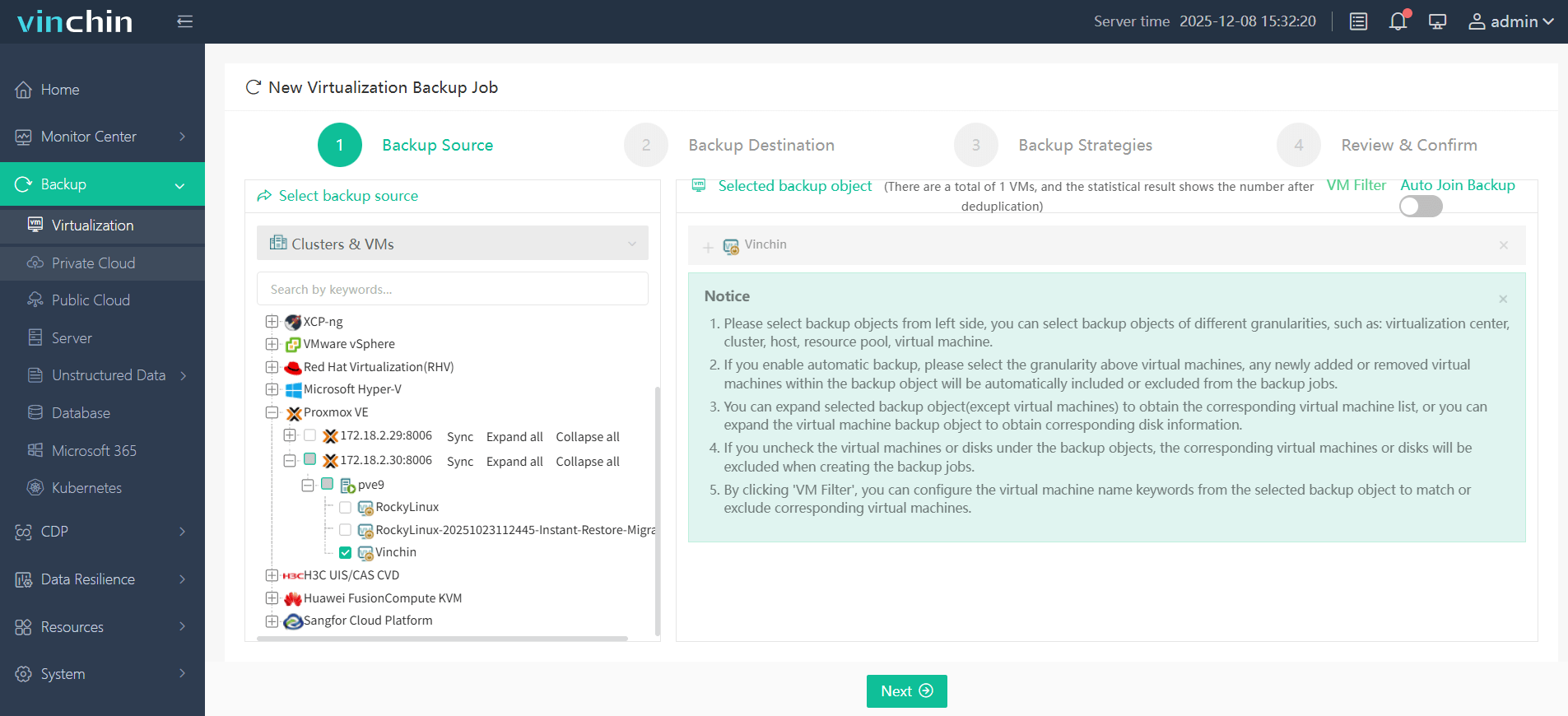
Step 2: Choose the target backup storage
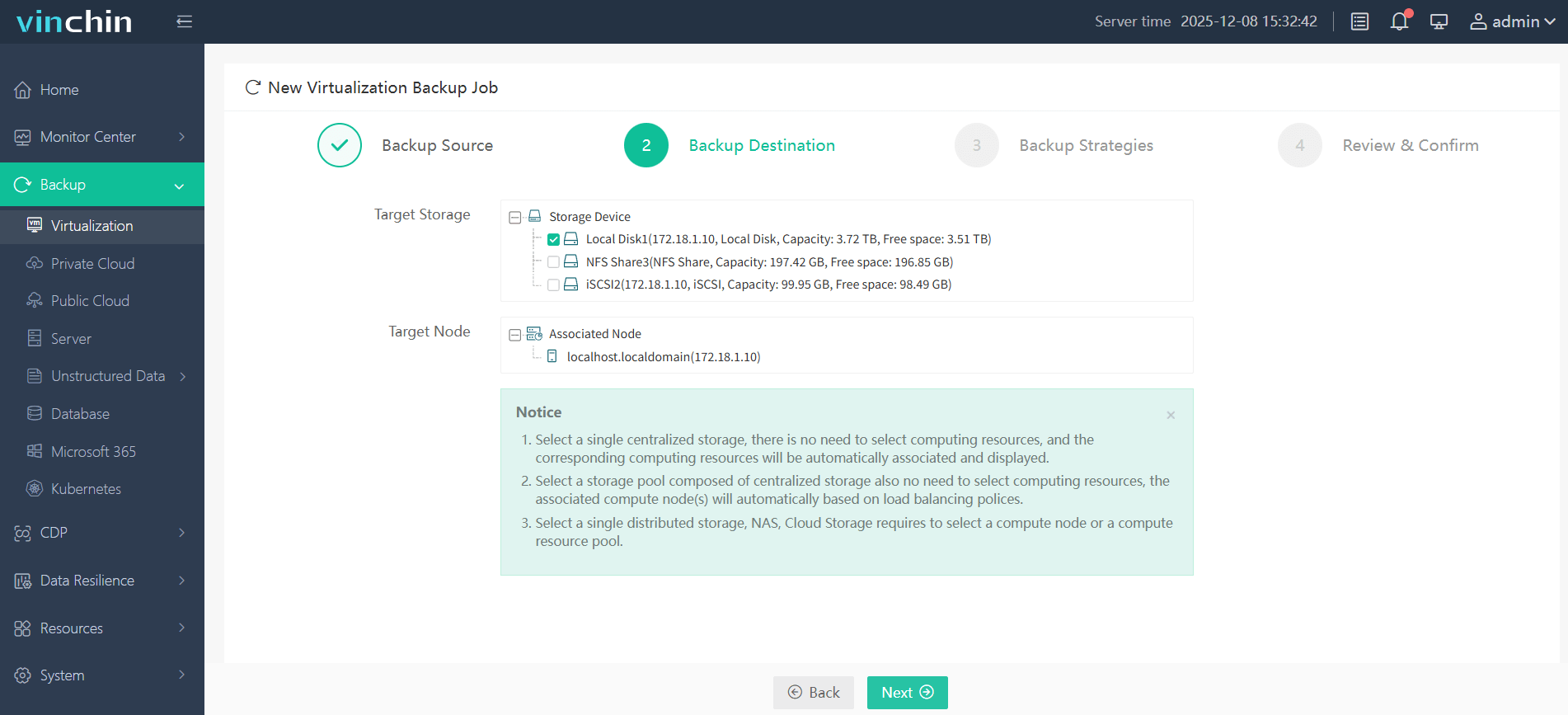
Step 3: Configure an appropriate strategy based on business needs
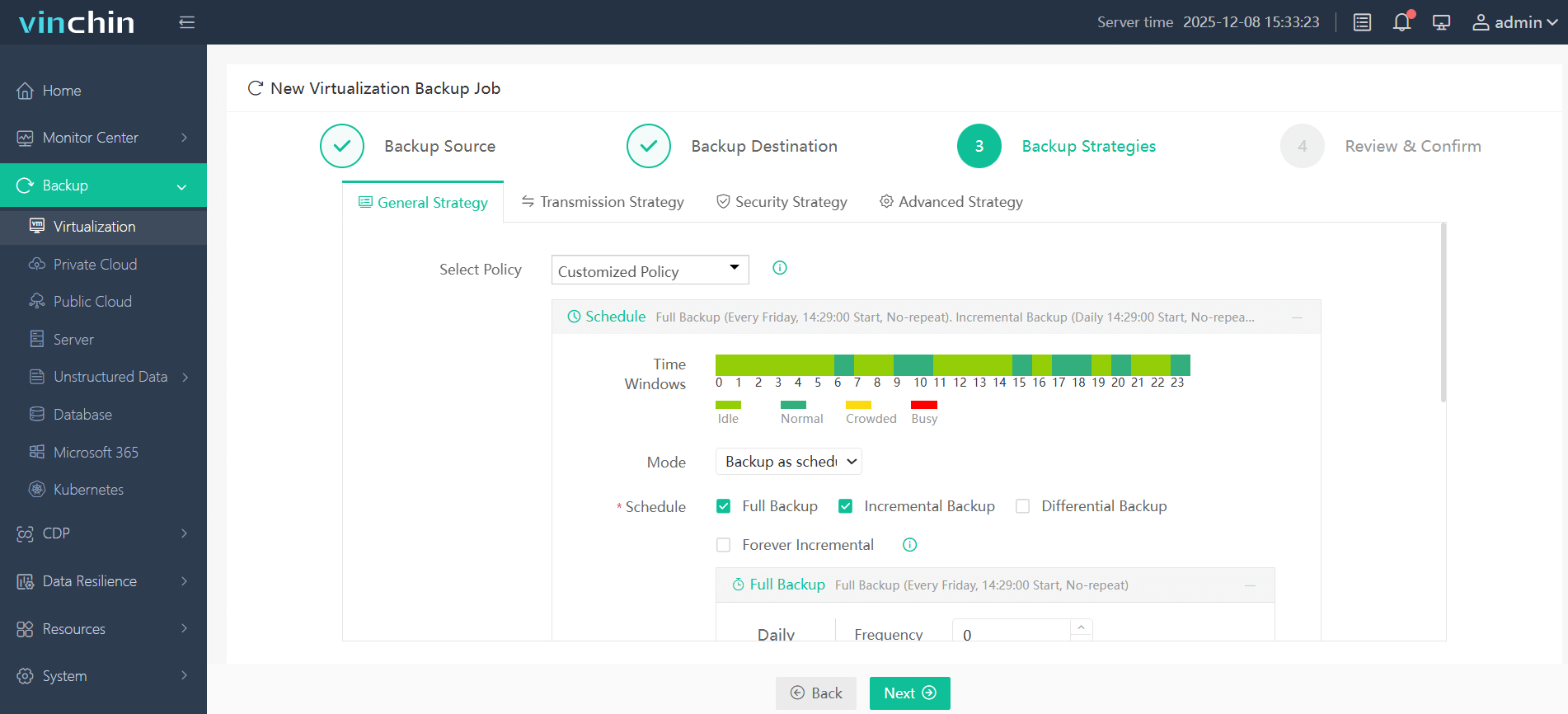
Step 4: Submit the job
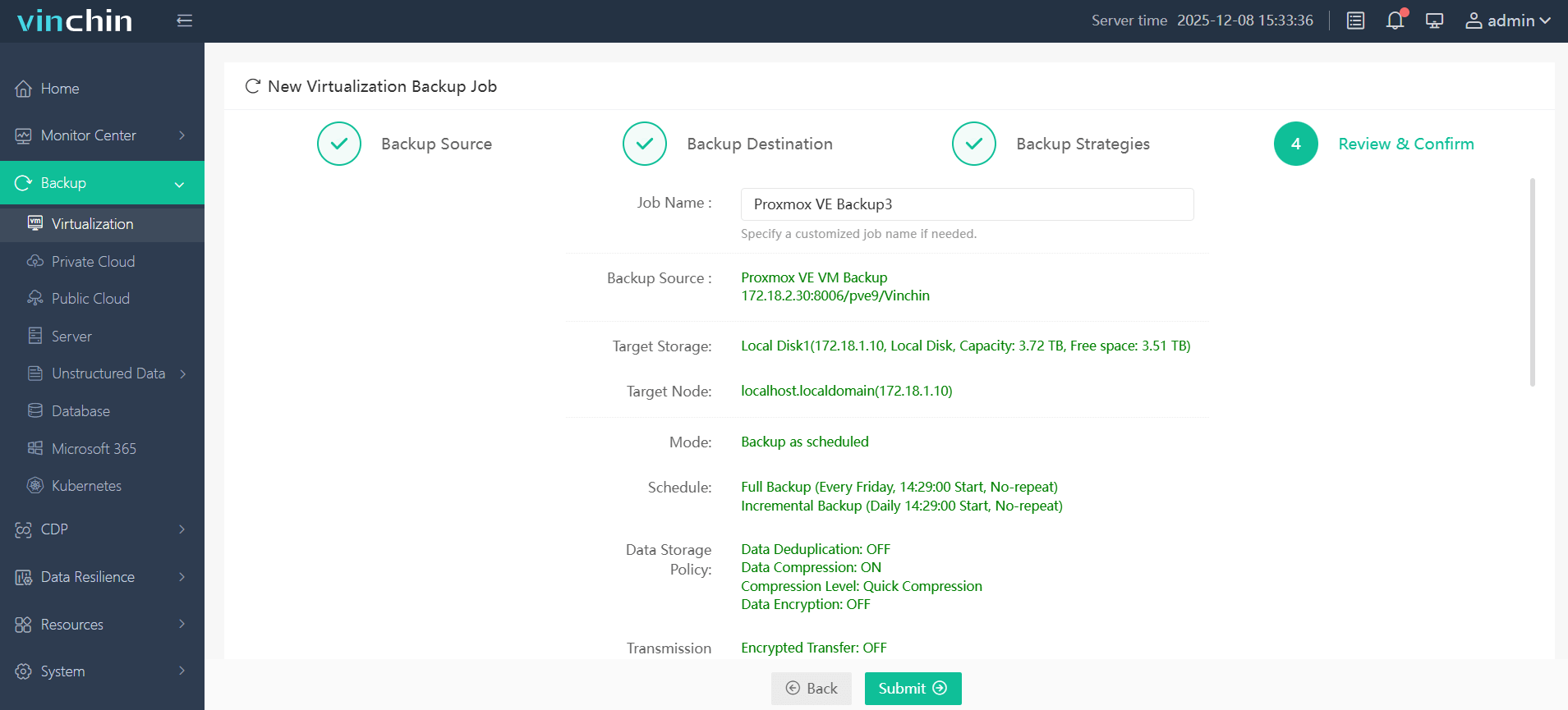
Trusted globally by thousands of organizations,Vinchin Backup & Recovery earns top ratings for enterprise data protection—start your free 60-day trial today by clicking below!
Best Proxmox Backup Software FAQs
Q1: How do I know if a backup solution will affect my VM performance?
Check if it uses agentless architecture with incremental forever capabilities like CBT/qemu-dirty-bitmap support; review benchmarks/documentation about resource usage during jobs; look for features such as bandwidth throttling/scheduling; test thoroughly in a non-production environment before deploying widely.
Q2: Can minimal-impact backups still guarantee data consistency?
Yes—solutions offering application-aware processing leverage technologies such as Microsoft Volume Shadow Copy Service (VSS) on Windows or fsfreeze/QEMU Guest Agent hooks on Linux guests so both low impact operation AND consistent recoveries are possible—even under heavy transactional loads.
Q3: Will this approach scale as my environment grows?
Enterprise-grade tools distribute workload efficiently across proxies/storage nodes so adding more VMs/nodes does not increase overhead linearly; centralized management consoles provide holistic oversight regardless of cluster size.
Q4: Are there compliance risks with low-impact backup methods?
No—as long as solutions implement encryption-at-rest/in-transit options plus audit logging/policy-based retention schedules they preserve both data integrity AND chain-of-custody required by modern regulations.
Conclusion
Choosing a Proxmox backup solution with agentless architecture plus incremental application-aware capabilities protects workloads efficiently while minimizing production impact.