Protecting Huawei FusionCompute virtual machines requires more than just local backups. Secure offsite replication is now a core requirement for compliance in sectors like healthcare (HIPAA), finance (PCI-DSS), and organizations handling personal data (GDPR). Regulations demand that businesses prove their data is safe from disasters—both natural and man-made—and can be restored quickly. Vinchin Backup & Recovery stands out as a trusted solution for this challenge. It delivers robust protection against loss while helping organizations meet strict legal mandates. With Vinchin, you reduce risk, ensure business continuity, and keep sensitive information secure—even if your primary site fails.
Secure offsite replication forms the backbone of modern IT resilience strategies. By replicating VM backups to remote locations—such as another data center or cloud—you lower risks from fires, floods, ransomware attacks, or hardware failures. You also make compliance audits easier because you can show that your data remains protected and recoverable at all times.
Why Secure Offsite Replication Matters in Enterprise Environments
Offsite replication is essential for enterprises facing constant threats to their digital assets. A single incident at your main site could disrupt operations for days—or worse.
● Disaster Recovery Assurance
When disaster strikes—be it fire, flood, or earthquake—onsite backups may be destroyed along with production systems. Offsite replication ensures that critical VM data survives such events by storing copies far away from danger zones.
● Protection Against Cyber Threats
Ransomware attacks are on the rise worldwide. Attackers often target both production servers and local backup storage to maximize damage. By keeping replicated backups offsite—ideally in an isolated network segment—you prevent attackers from wiping out all recovery options.
● Compliance With Industry Regulations
Many industries face strict rules about how long they must retain records and where those records should reside. Regulators may require proof that backup copies exist outside the primary facility to guard against regional disasters or insider threats.
● Reduced Downtime And Data Loss
Without offsite replication, restoring service after a major outage can take days—or even weeks—if local backups are lost too. Remote replicas allow fast failover so you can resume operations quickly with minimal disruption.
● Audit Readiness And Transparency
Auditors want evidence that your organization follows best practices for data protection. Offsite replication provides clear documentation of where backup copies are stored and how they are secured—a key factor during compliance reviews.
How To Choose The Best Huawei FusionCompute Backup Solution for Secure Offsite Replication
Choosing backup software for Huawei FusionCompute involves several technical considerations beyond basic functionality. The right solution must protect sensitive workloads efficiently while supporting growth over time.
A strong candidate should offer these core capabilities:
Encryption standards matter when transmitting sensitive VM data across networks or storing it remotely. Look for solutions using AES-256 encryption both in transit (TLS) and at rest to block unauthorized access during every stage of replication.
Scalability ensures your backup system grows alongside your business needs without performance bottlenecks. Solutions should support hundreds—or thousands—of VMs across multiple clusters without slowing down jobs or requiring complex manual tuning.
Automation reduces human error by letting you schedule regular replications based on policies rather than relying on staff intervention. Features like policy-based scheduling let you define when replications occur (hourly/daily/weekly), which VMs are included, retention periods for old copies, and automatic pruning of expired backups—all managed through simple UI controls instead of scripts.
Compliance reporting tools help document every step of your backup process—from job creation to replica verification—to satisfy auditors’ requests quickly. Detailed logs should include timestamps of each operation plus status reports showing successful completion or errors needing attention.
Integration flexibility means being able to replicate backups not only between physical sites but also into public clouds if needed—for example using S3-compatible storage endpoints—to meet hybrid IT requirements.
Support for granular restores allows quick recovery of individual files within large VMs without rolling back entire systems—a crucial feature when users accidentally delete important documents but need rapid access restored with minimal downtime.
Role-based access control lets administrators assign permissions based on job function so only authorized personnel can manage critical tasks like starting restores or deleting replicas—a key safeguard against insider threats.
Finally: look for vendor support resources such as knowledge bases or responsive help desks so issues get resolved before they impact uptime.
By focusing on these criteria—with special attention paid to encryption strength, automation options, scalability metrics (such as concurrent job limits), audit-ready reporting features, integration breadth (cloud/on-premises), restore granularity options, RBAC security controls—and reliable vendor support—you set up your enterprise IT environment for success under any circumstance.
Vinchin Backup & Recovery: Enterprise Protection Tailored For Huawei FusionCompute
For organizations running Huawei FusionCompute environments alongside other virtualization platforms such as VMware, Hyper-V, Proxmox, oVirt, OLVM, RHV, XCP-ng, XenServer, OpenStack and ZStack among others (15+ total), Vinchin Backup & Recovery offers comprehensive enterprise-grade virtual machine protection designed specifically for mixed-infrastructure needs. This solution delivers agentless full/incremental/differential backups; supports LAN-free backup; enables CBT-based efficiency; provides instant recovery; enforces role-based access control; automates scheduled jobs; deduplication and compression data; verifies backup integrity; supports granular restore; archives to cloud/tape; migrates VMs cross-platform via V2V migration; applies GFS retention policies; encrypts all traffic/data at rest—and more.
Among its most relevant features: LAN-free backup maximizes speed by bypassing production LAN bottlenecks; CBT accelerates incremental jobs by copying only changed blocks since last run; instant recovery minimizes downtime after failure events; granular restore retrieves specific files/folders instantly without full VM rollback; built-in encryption secures sensitive workloads end-to-end whether onsite or replicated offsite—all combining to deliver efficient protection with minimal resource impact.
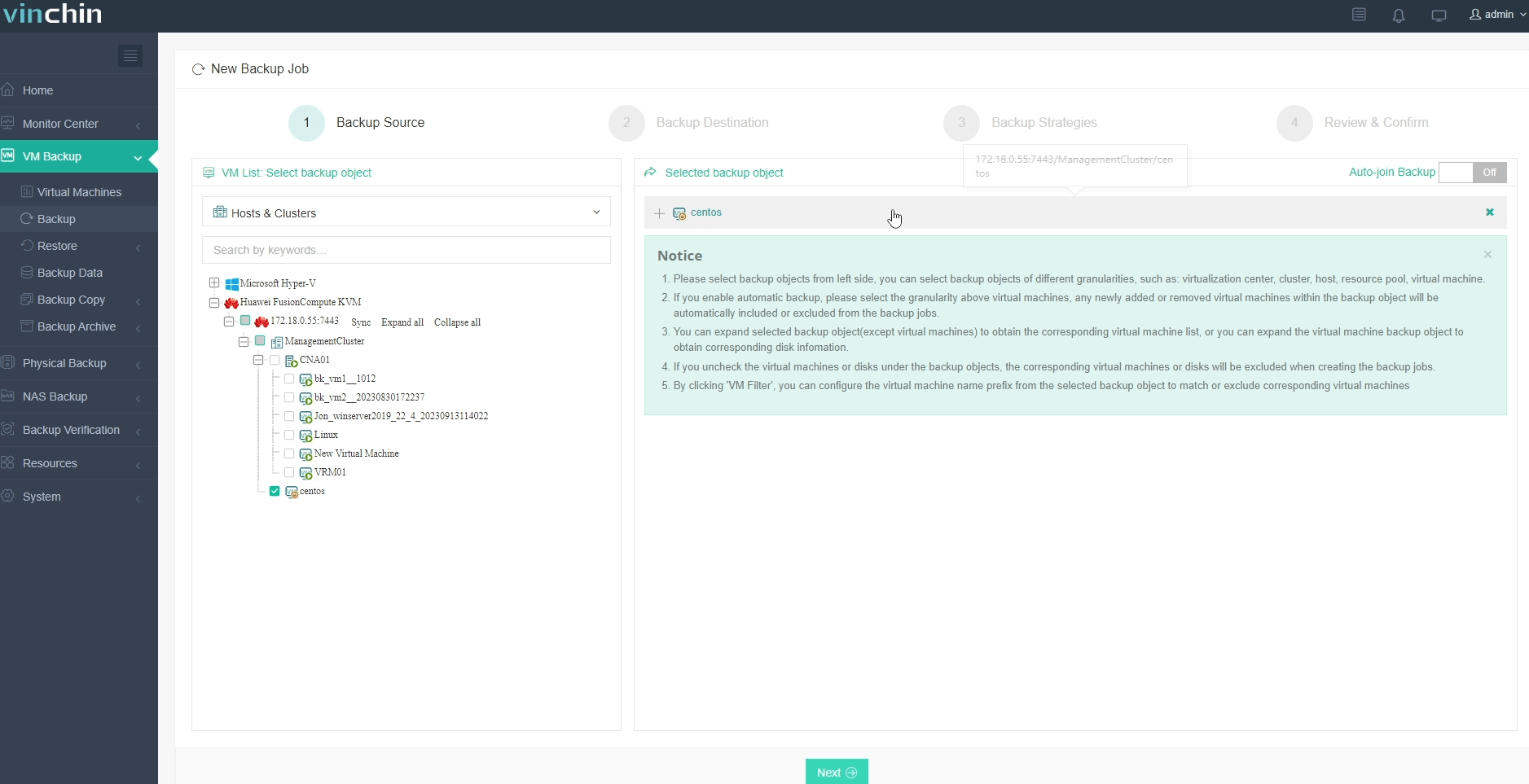
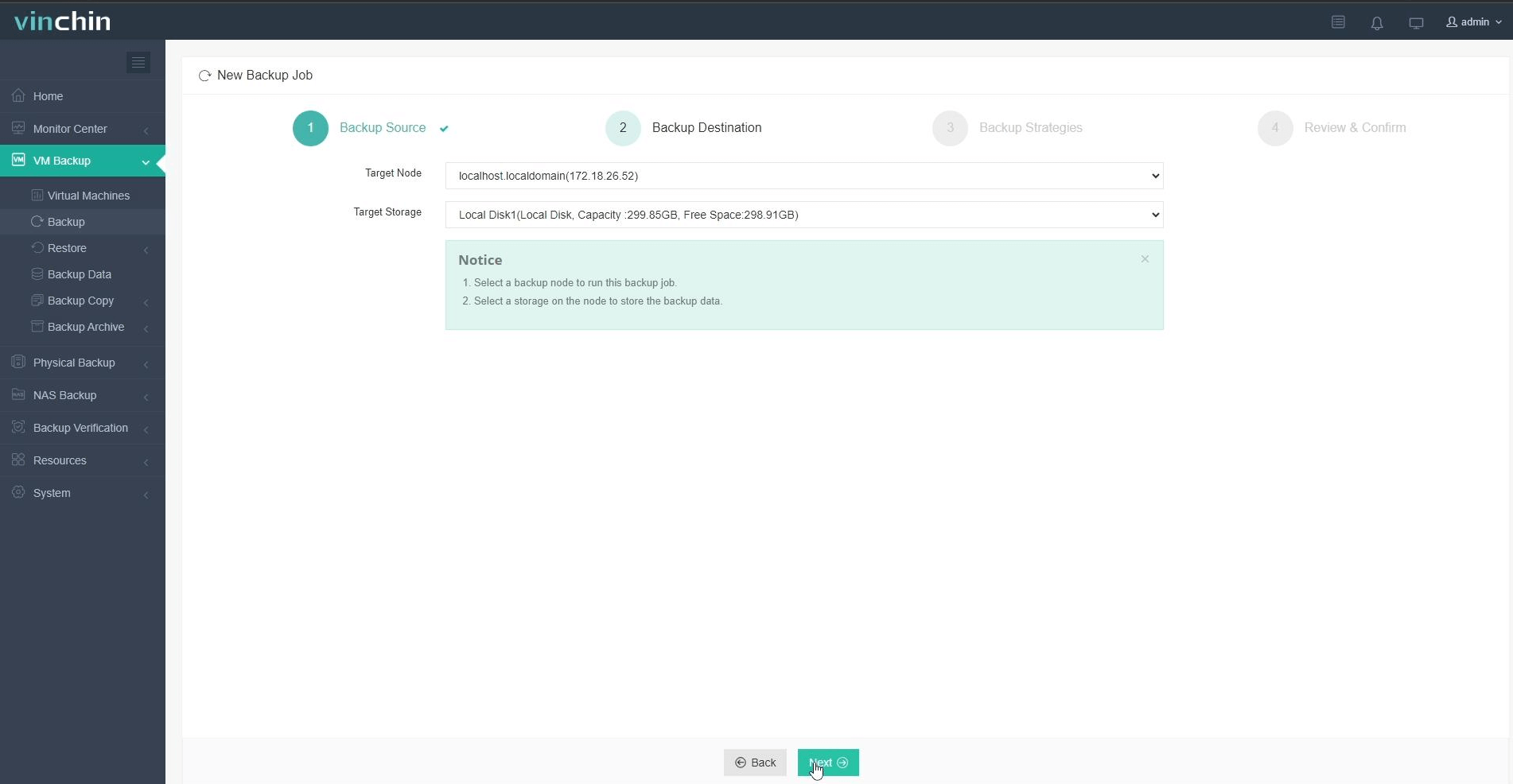
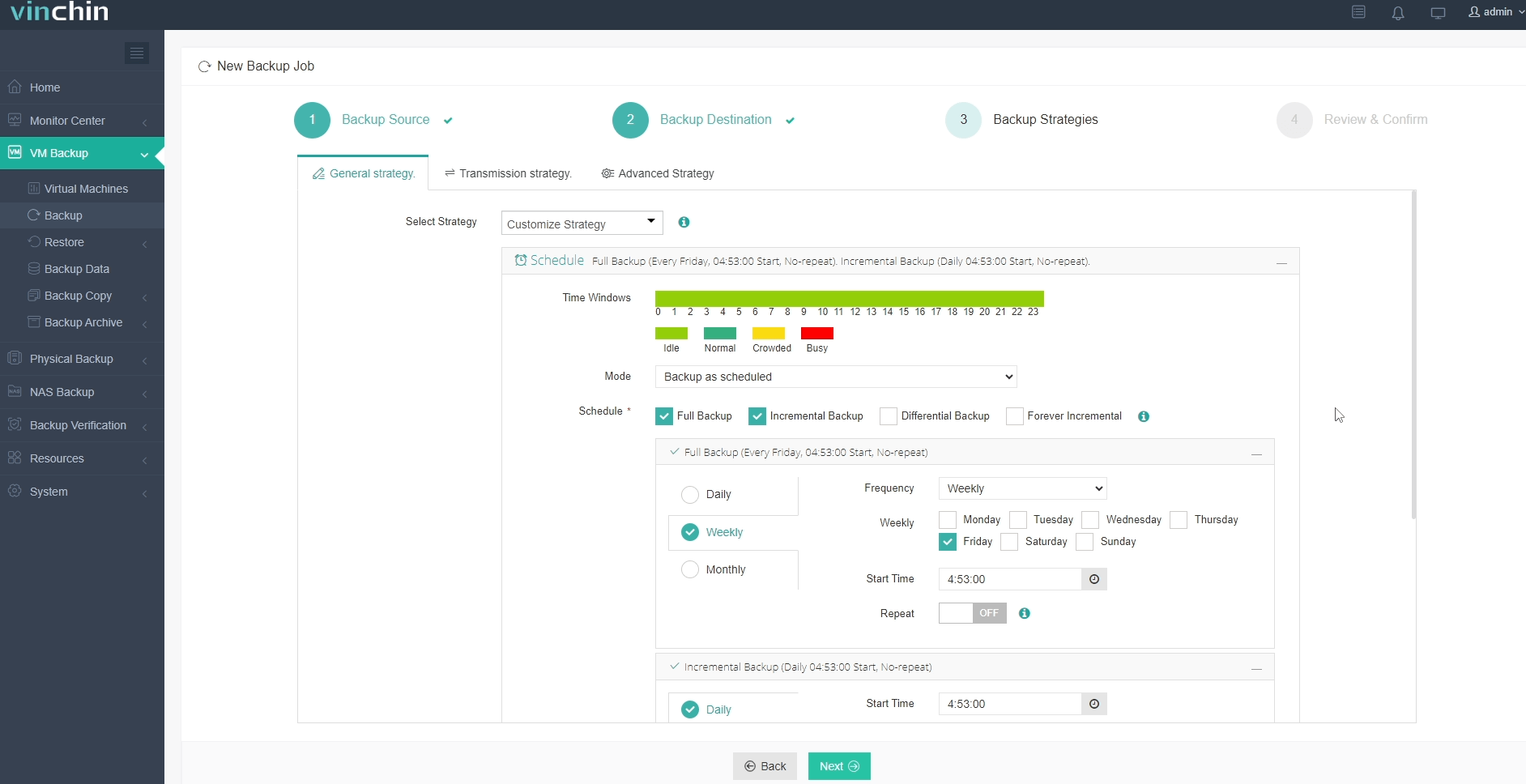
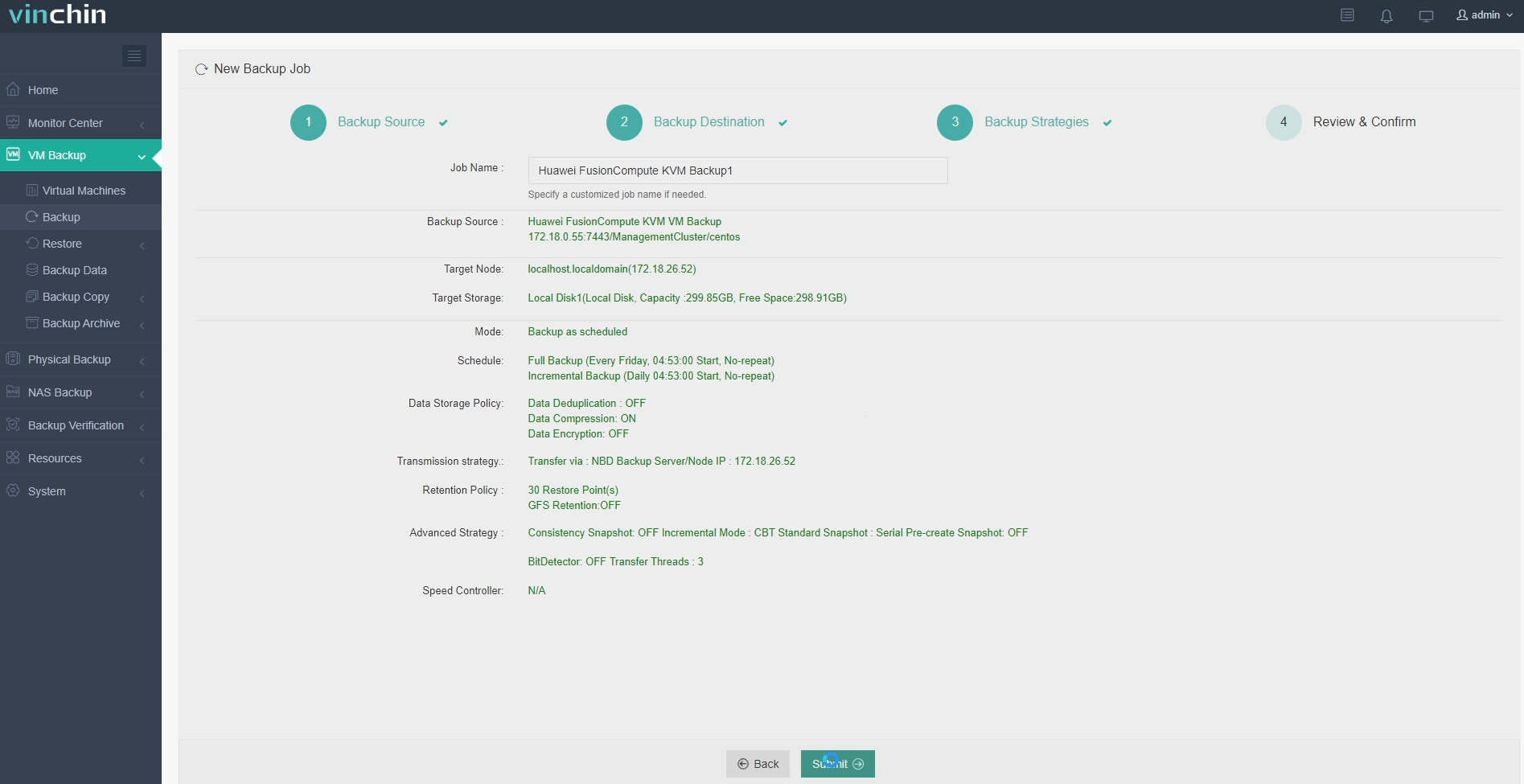
Backing up a Huawei FusionCompute VM with Vinchin Backup & Recovery is straightforward thanks to its intuitive web console:
Step 1: Select the Huawei FusionCompute VM to back up.
Step 2: Choose backup storage.
Step 3: Configure the backup strategy.
Step 4: Submit the job.
With global recognition among enterprise customers and consistently top-rated user feedback worldwide,Vinchin Backup & Recovery stands out as a leading choice in professional data-protection software.Try it free with a 60-day full-featured trial—click below to download.
Best Huawei FusionCompute Backup Software FAQs
Q1: Does the solution provide end-to-end encryption during offsite replication?
Yes. Vinchin Backup & Recovery supports AES-256 encryption both in transit via TLS protocols and at rest within remote repositories ensuring full protection throughout transfer cycles against interception attempts by unauthorized parties.
Q2: Can it automate regular offsite replications?
Yes; scheduled automation lets administrators configure recurring jobs using flexible policies within the web console—including hourly/daily intervals—with no manual oversight required once set up; this consistency helps maintain continuous protection even during staff absences.
Q3: Is scalability supported as our VM environment grows?
Absolutely; Vinchin scales horizontally across multiple clusters/sites supporting hundreds-to-thousands of VMs simultaneously while maintaining high throughput thanks to optimized CBT algorithms/LAN-free architecture; this enables seamless expansion as business needs evolve without sacrificing performance.
Conclusion
Secure offsite replication protects business continuity while meeting compliance demands.Vinchin Backup & Recovery delivers robust safeguards for Huawei FusionCompute VMs so organizations stay resilient—even under pressure.









