In today’s digital world, business operations depend on uninterrupted access to data and applications. A single outage or cyberattack can halt productivity and disrupt services across an entire enterprise. The consequences are severe—lost revenue, damaged reputation, regulatory penalties, and loss of customer trust. For organizations running virtualized environments like ZStack, a reliable backup is not just a precaution; it is essential for survival.
Industry standards such as ISO/IEC 27001 emphasize robust data protection as a core part of operational resilience and business continuity planning (ISO/IEC 27001). Regulatory frameworks worldwide now require enterprises to ensure data availability even during disasters or attacks. Without effective backups in place for platforms like ZStack, organizations risk falling short of these requirements.
The Importance of Enterprise Business Continuity
Business continuity means your organization keeps running despite disruptions. Enterprises rely on constant access to critical systems and information. If these systems go down—even briefly—the impact can ripple through every department.
● Uninterrupted Operations Protect Revenue: Downtime leads directly to lost sales opportunities and delayed projects. Even a few minutes offline can cost thousands in missed transactions or halted production lines.
● Compliance with Regulations: Many industries must meet strict legal requirements for uptime and data retention (such as HIPAA for healthcare or GDPR for European businesses). Failure to comply can result in heavy fines or legal action.
● Safeguarding Reputation: Customers expect services to be available at all times. Extended outages erode trust quickly—sometimes permanently—and may drive clients toward competitors who offer more reliable service.
● Minimizing Human Error Impact: Mistakes happen—accidental deletions or misconfigurations can cripple systems without warning. A strong continuity plan ensures you recover fast when errors occur.
Effective business continuity planning acts as your safety net against these risks. It minimizes downtime by providing clear steps for recovery while protecting your brand image and helping you meet legal obligations.
Why This Matters for Enterprise Operations
A robust backup strategy is vital because threats are unpredictable but inevitable in complex IT environments like ZStack. When backups are missing or inconsistent, each risk becomes more dangerous—and recovery becomes harder.
● Ransomware Threats Are Rising: Attackers often target virtual infrastructures with ransomware that encrypts both live data and attached storage volumes (ENISA Threat Landscape Report). Without recent backups stored securely offsite or immutably locked down, restoring clean copies may be impossible—forcing costly ransom payments or permanent data loss.
● Infrastructure Failures Cause Prolonged Outages: Hardware malfunctions—from failed disks to network switches—can bring down entire clusters if not planned for properly with redundant backups ready to restore operations quickly.
● Downtime Costs Add Up Fast: Average IT downtime costs large enterprises $5,600 per minute—a figure that includes lost productivity, missed sales opportunities, SLA penalties, and remediation expenses.
● Regulatory Penalties Loom Large: Inability to restore critical records within mandated timeframes exposes companies to audits and fines from regulators such as the SEC (for financial firms) or national privacy authorities (for personal data breaches).
Customers expect seamless service delivery at all times; any disruption threatens contracts and long-term relationships built on reliability.
What Makes a Good ZStack Backup Strategy?
A solid backup strategy protects every workload without slowing daily operations or introducing new risks. The best plans combine automation with flexibility so you always have recent copies ready when disaster strikes—but never waste resources on unnecessary duplication.
A good ZStack backup approach should address several key factors:
Backup Frequency determines how much recent work could be lost if disaster hits (your Recovery Point Objective). Frequent incremental backups reduce this window but require efficient storage management so they don’t overload infrastructure resources.
Recovery Speed measures how fast you can bring systems back online after failure (your Recovery Time Objective). Solutions that enable instant VM recovery help minimize costly downtime by restoring services within minutes instead of hours—a crucial advantage during major incidents when every second counts.
Scalability ensures your backup solution grows alongside your expanding ZStack environment without becoming harder to manage or slower over time. As workloads multiply across clusters or sites, centralized tools let you protect hundreds—or thousands—of VMs efficiently from one interface.
Security keeps backup copies safe from unauthorized access—including insider threats—or tampering by malware such as ransomware that targets both primary storage and connected archives. Encryption at rest/in transit plus immutable storage options are now standard best practices among leading enterprises.
Granularity allows selective restores: sometimes only one file needs recovering rather than an entire VM image. Granular recovery saves time during routine incidents like accidental deletions while reducing operational disruption compared with full-system rollbacks.
Decision-makers should weigh these factors carefully when designing their ZStack backup policies so they align with business goals—and satisfy auditors’ expectations during compliance reviews.
Vinchin Backup & Recovery: Enterprise-Grade Protection for ZStack
For organizations seeking robust protection of their virtualized workloads on ZStack, Vinchin Backup & Recovery delivers comprehensive enterprise-level VM backup capabilities across more than 15 mainstream virtualization platforms—including full support for ZStack environments alongside VMware, Hyper-V, Proxmox, oVirt, OLVM, RHV, XCP-ng, XenServer, OpenStack and others.
Vinchin is packed with multiple premium features like LAN-free backup, instant recovery, granular restore, scheduled incremental/differential backups, V2V migration, and GFS retention policy, etc. They are all designed to maximize efficiency while minimizing risk.
With these features above, Vinchin ensures rapid local transfer speeds in Zstack environments without burdening production networks, near-zero downtime restoration after failures, and precise file-level recoveries inside VMs.
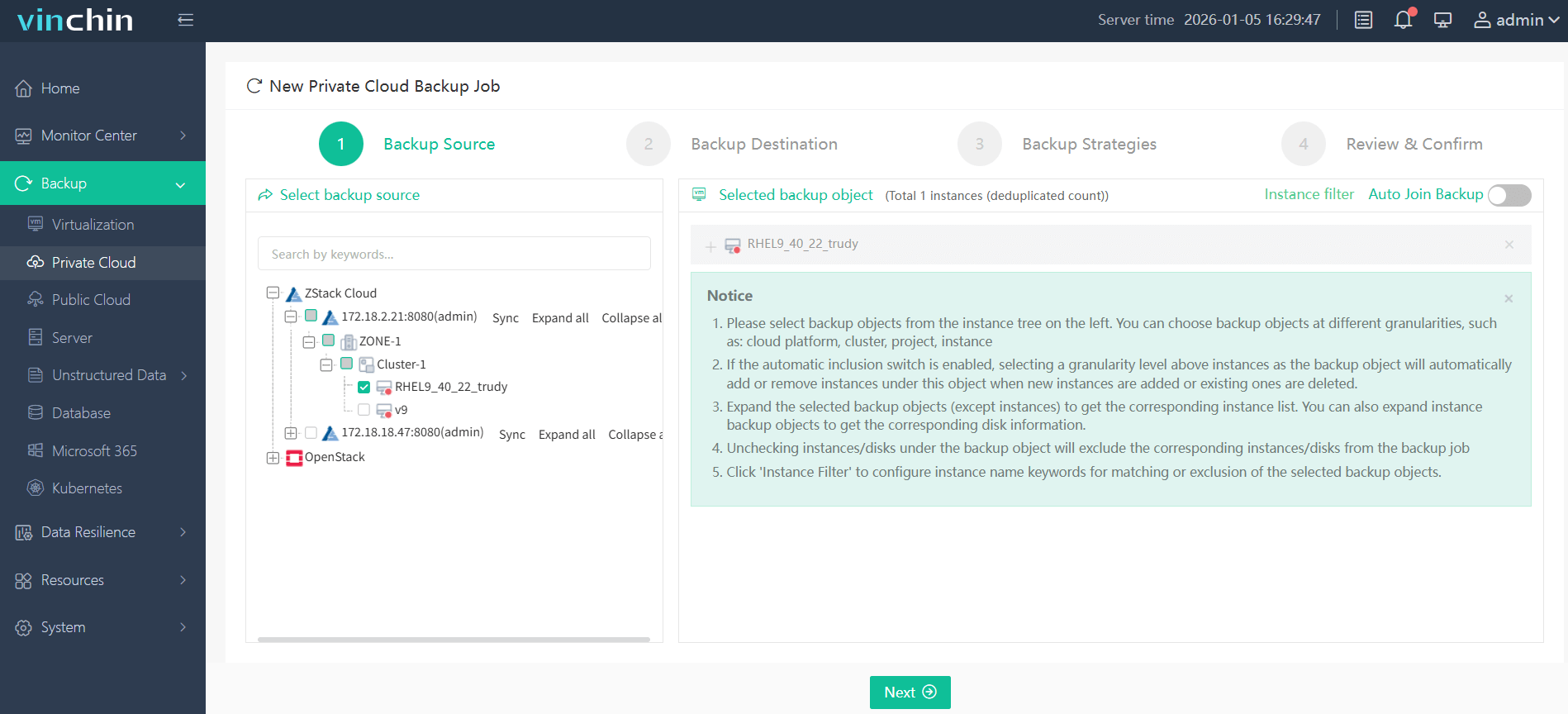
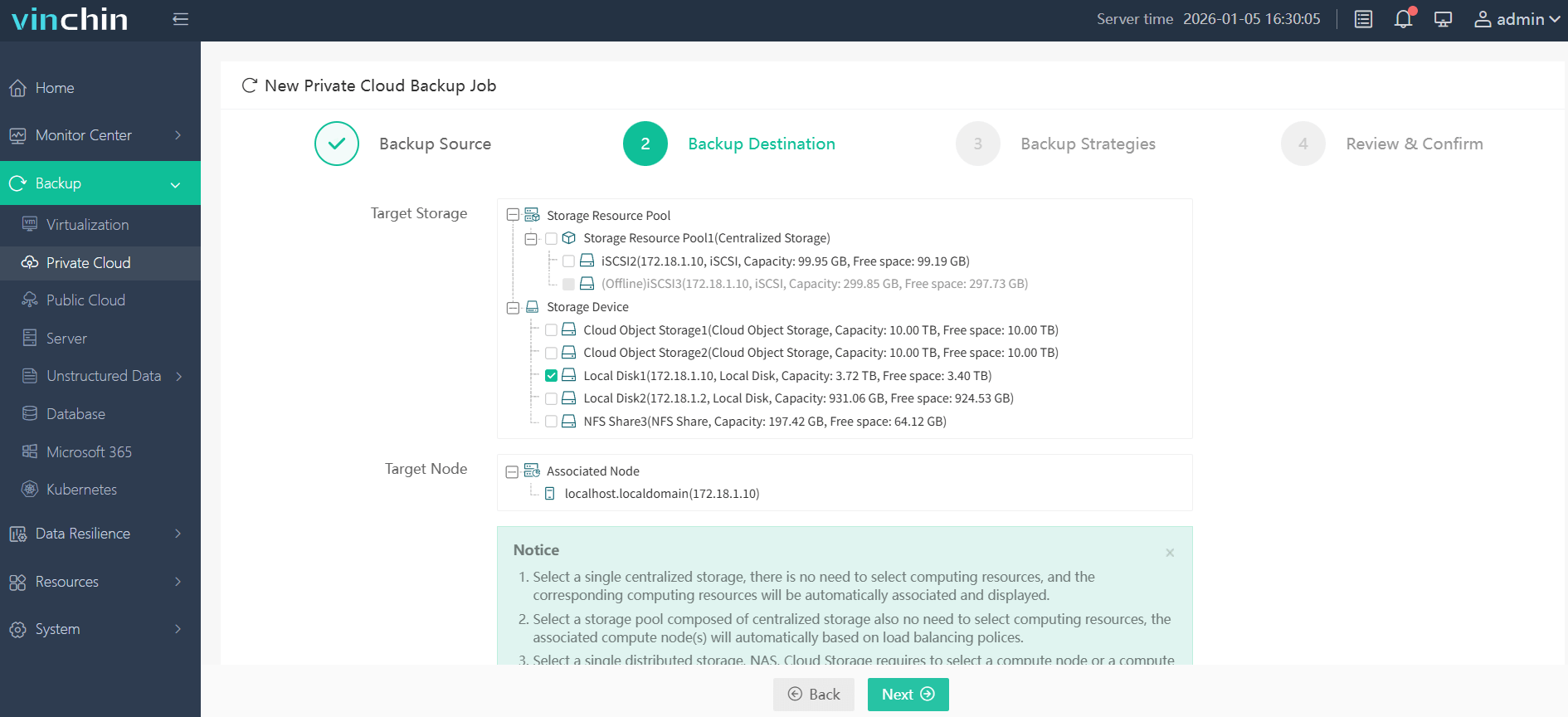
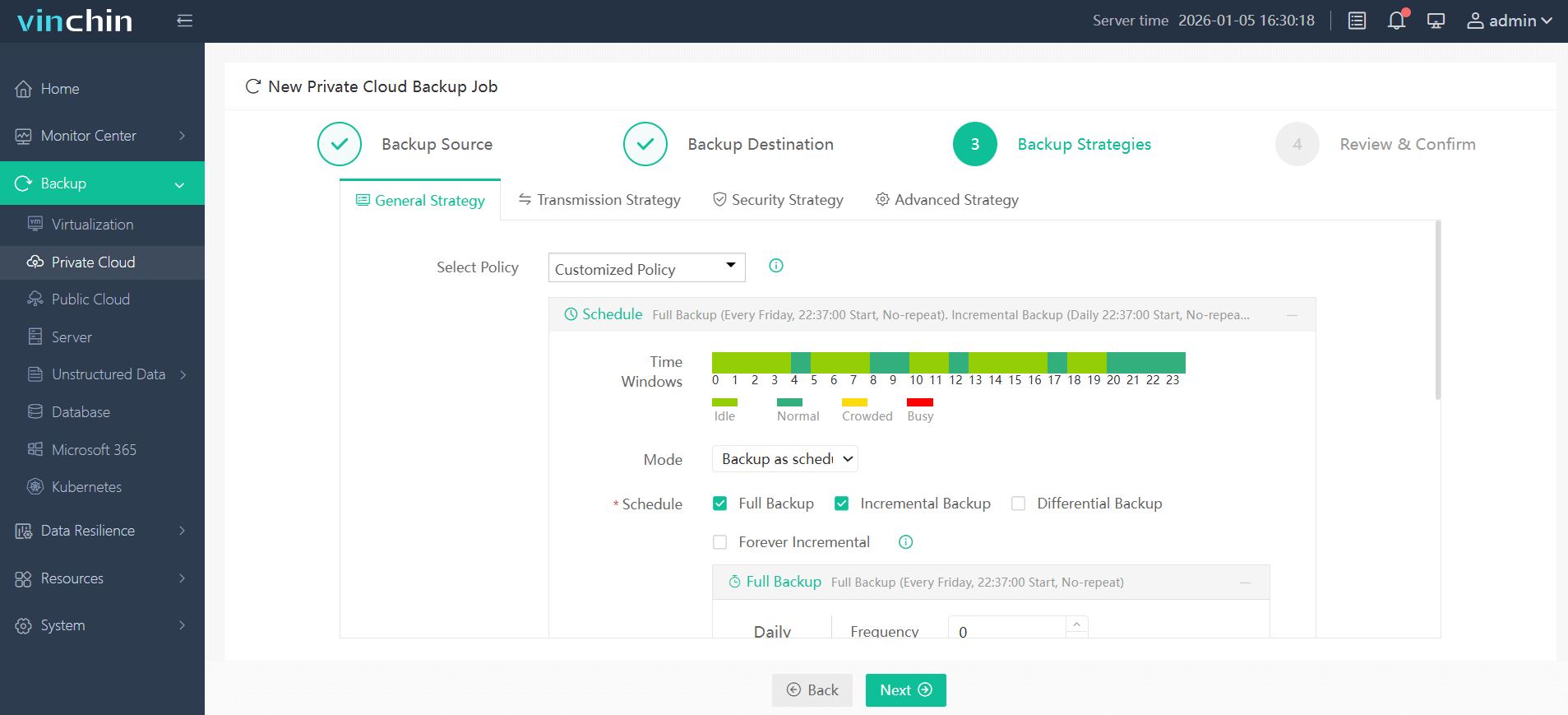
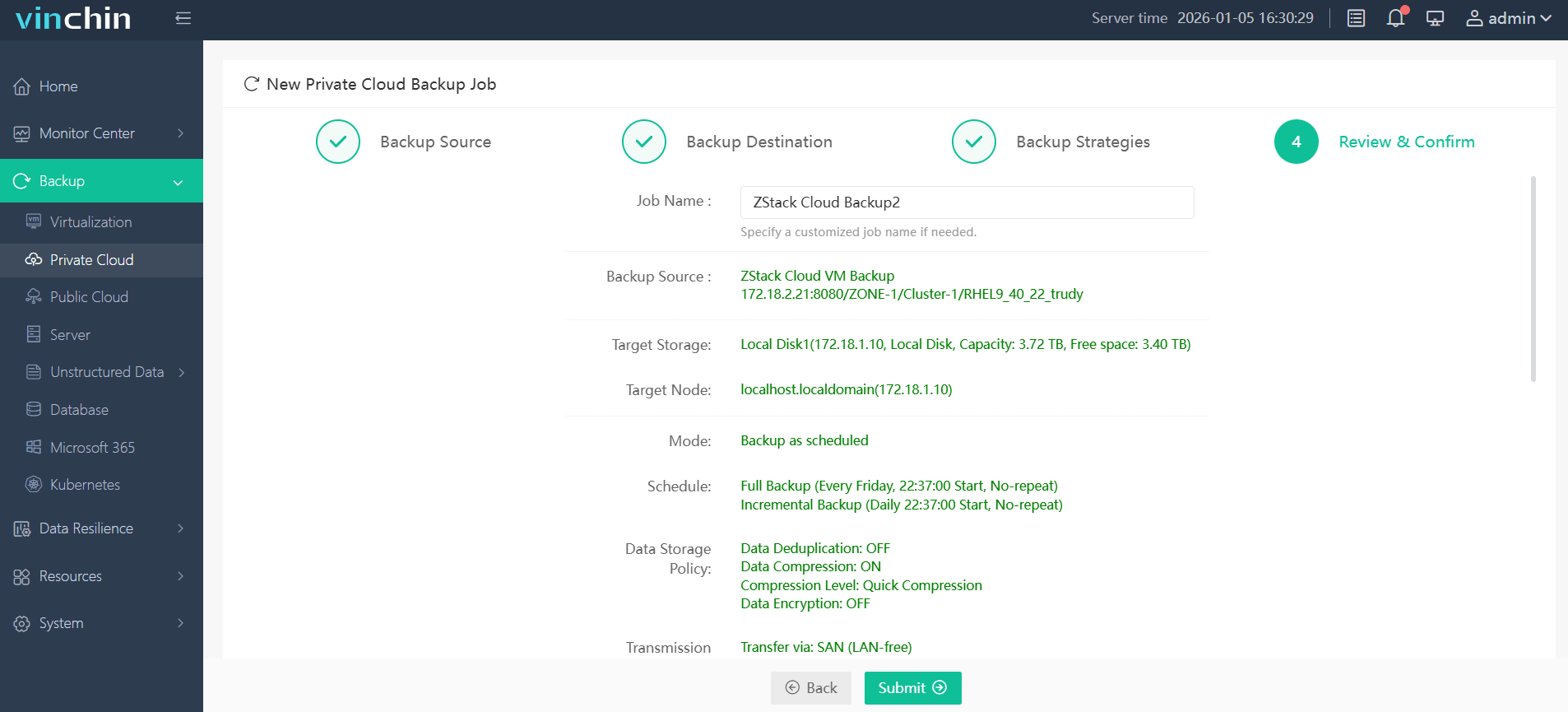
The intuitive web console makes using Vinchin Backup & Recovery straightforward:
Step 1: Select the ZStack VM to back up
Step 2: Choose the backup storage
Step 3: Configure the backup strategy
Step 4: Submit the job
Trusted globally by thousands of enterprises—with top ratings in user satisfaction—Vinchin Backup & Recovery offers a fully featured 60-day free trial so you can experience its power firsthand.
Best ZStack Backup Software FAQs
Q1: How does backup frequency affect business continuity?
More frequent backups mean less data is lost if disaster strikes; however, frequent jobs use more system resources so balance protection needs against performance impacts based on workload sensitivity levels set by IT policy makers.
Q2: What if our environment scales rapidly?
Choose a solution supporting seamless scalability across clusters/sites; centralized management consoles like those offered by Vinchin make it easy to add new VMs into existing schedules without manual reconfiguration.
Q3: Can we recover individual files from VM backups?
Yes; advanced solutions provide granular file-level restore capabilities allowing targeted retrievals instead of full-image rollbacks which saves time during minor incidents such as accidental deletions.
Conclusion
Backing up ZStack ensures enterprise resilience against outages, attacks, human error, or hardware failures while meeting compliance demands—all with minimal disruption using trusted solutions like Vinchin Backup & Recovery.