Modern enterprises rely on virtualization to run critical workloads efficiently. As these environments grow, so does the need for robust data protection. The most effective VMware backup tools do more than just copy virtual machines—they connect directly with virtualization management consoles like vCenter or ESXi. This connection gives IT teams centralized oversight of their entire virtual infrastructure from one place.
Integration between backup software and management consoles is not just a feature—it is essential for reliable operations at scale. It enables automated policy enforcement, reduces manual work, speeds up recovery times, and ensures consistent protection across all VMs—even in fast-changing environments where new VMs are created or moved daily. Direct integration also helps organizations meet compliance requirements by maintaining accurate records of protected assets.
Why Integration With Virtualization Management Consoles Matters in Enterprise Environments?
Direct integration between backup tools and virtualization management consoles brings operational efficiency and reliability that manual processes cannot match. Enterprises benefit from real-time synchronization between live VM inventories and their protection policies—a critical safeguard against gaps in coverage.
● Accurate VM Discovery
Backup tools integrated with management consoles always know which VMs exist in your environment—even after rapid changes like vMotion migrations or new deployments. This prevents missed backups due to outdated inventory lists or manual tracking errors.
● Automated Policy Enforcement
Centralized integration lets you apply backup schedules, retention rules, and access controls directly through your main console interface. This automation ensures every VM follows company policy without relying on individual administrators to configure jobs manually.
● Reduced Human Error
Manual mapping of VMs often leads to mistakes—especially in large environments where workloads shift frequently. Integrated solutions keep everything synchronized automatically so no critical VM goes unprotected due to oversight.
● Faster Recovery Times
When disaster strikes, integrated systems can restore data faster because they maintain up-to-date knowledge of your environment’s structure—including dependencies between VMs or applications running across clusters.
● Improved Compliance & Auditability
Regulatory standards require clear records showing what data was backed up—and when. Integration provides detailed audit trails aligned directly with managed VM inventories so you can prove compliance during audits without extra effort.
Imagine an enterprise where dozens of new VMs are spun up weekly: without direct integration, some may never be added to legacy backup jobs—leaving them exposed until someone notices the gap during a crisis.
How To Choose The Best VMware Backup Solution Integrated With Virtualization Management Consoles
Selecting a VMware backup solution that integrates seamlessly with your virtualization management console is crucial for both scalability and security in modern IT operations. Look beyond basic compatibility; focus on how deeply the tool connects via native APIs like those provided by vCenter Server or ESXi hosts. Deep integration supports real-time inventory updates, granular policy controls, automated job creation based on dynamic changes in your environment—and much more.
● Native API-Level Integration
Choose solutions that leverage official APIs such as vSphere API for Data Protection (VADP). These enable features like Changed Block Tracking (CBT) for efficient incremental backups while minimizing performance impact on production systems.
● Scalability Across Large Clusters
Evaluate whether the tool can handle growing numbers of VMs without slowing down operations—or requiring frequent reconfiguration as clusters expand through mergers or hardware refresh cycles.
● Role-Based Access Controls (RBAC)
Ensure you can delegate specific tasks securely within your team using RBAC features built into both the backup software and your virtualization platform’s console interface.
● Compatibility With New Releases
Check that vendors provide timely updates supporting each new version of VMware software—so you avoid operational gaps when upgrading hypervisors or deploying new features introduced by VMware.
● Support For Application-Aware Backups And Storage Snapshots
Look for options offering application-consistent snapshots (for databases like SQL Server or Exchange) plus storage-level integrations that speed up large-scale backups while reducing network load.
Other important factors include measuring recovery point objectives (RPOs) and recovery time objectives (RTOs), verifying support for encrypted backups at rest/in transit, testing instant restore capabilities before deployment—and confirming vendor reputation through third-party analyst reports such as those from Gartner Magic Quadrant reviews.
Vinchin Backup & Recovery: Enterprise-Grade Protection for VMware
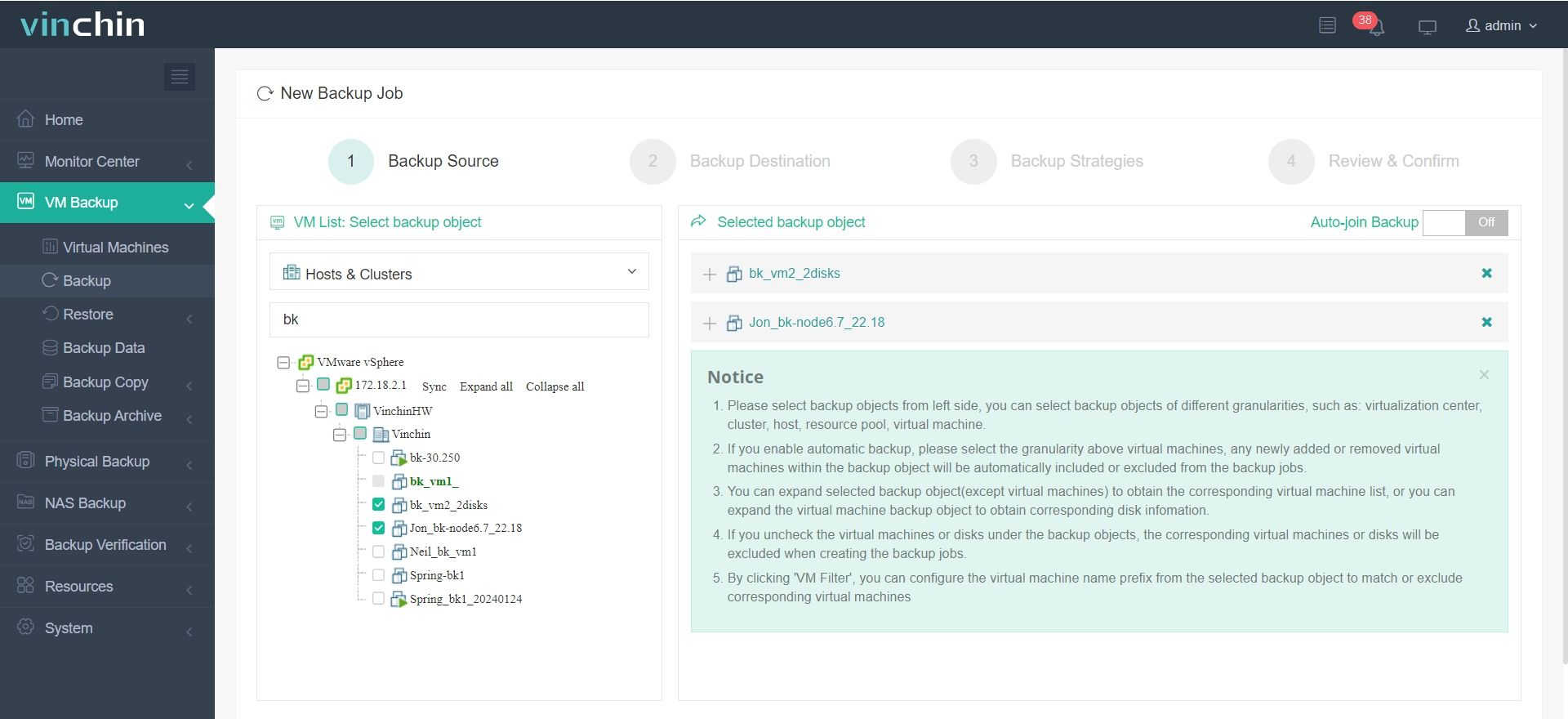
For organizations seeking seamless integration with VMware environments, Vinchin Backup & Recovery stands out as a professional enterprise-level virtual machine backup solution supporting over 15 mainstream platforms—including VMware, Hyper-V, Proxmox VE, oVirt, OLVM, RHV, XCP-ng, XenServer, OpenStack, ZStack and more. Deeply integrated with vCenter and ESXi management consoles, Vinchin Backup & Recovery enables agentless operation while providing advanced features such as quiesced snapshot support on VMware platforms only; HotAdd transport mode; Changed Block Tracking; LAN-free backup; instant recovery; full/incremental /differential backups; deduplication; compression; granular restore; cloud/tape archive; among others.
Step 1. Select Backup Source
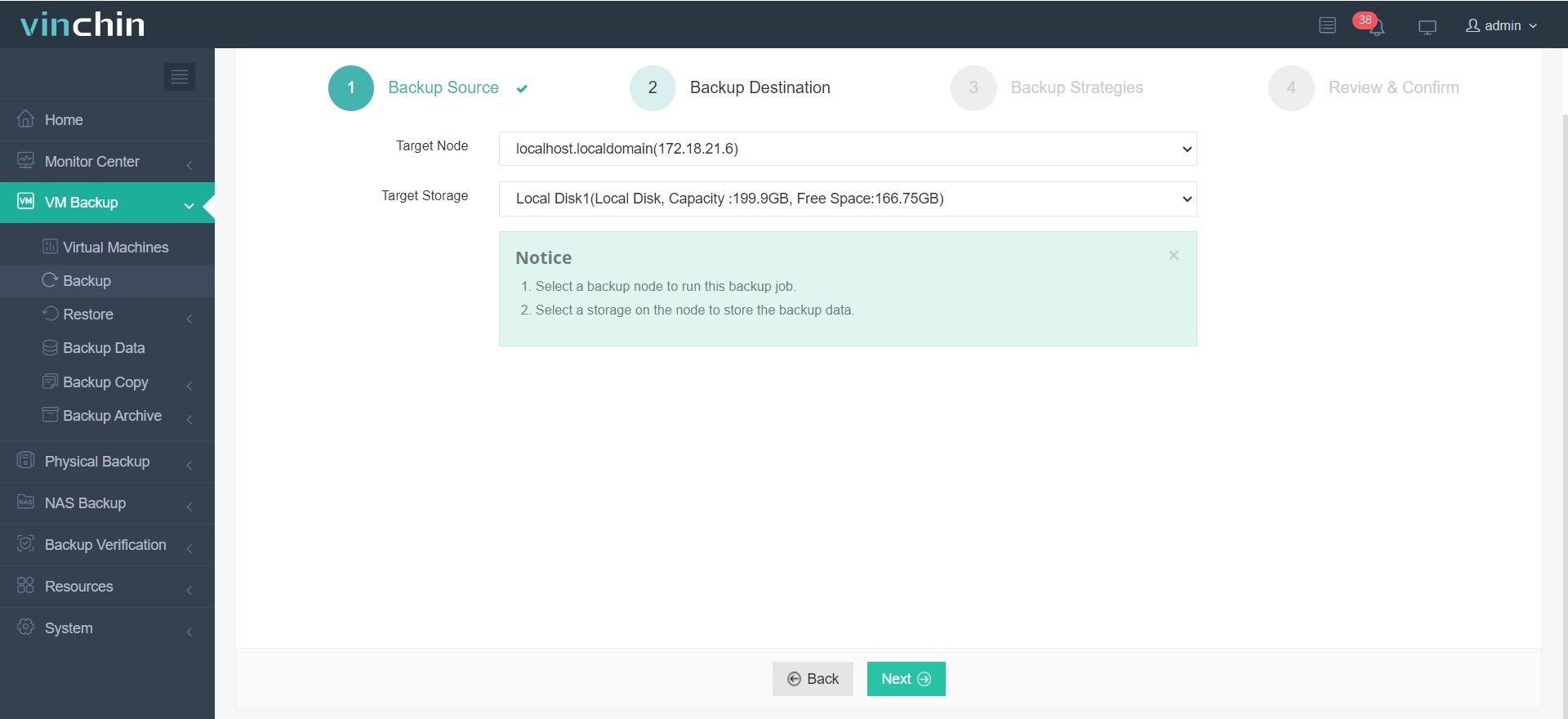
Step 2. Select Backup Destination
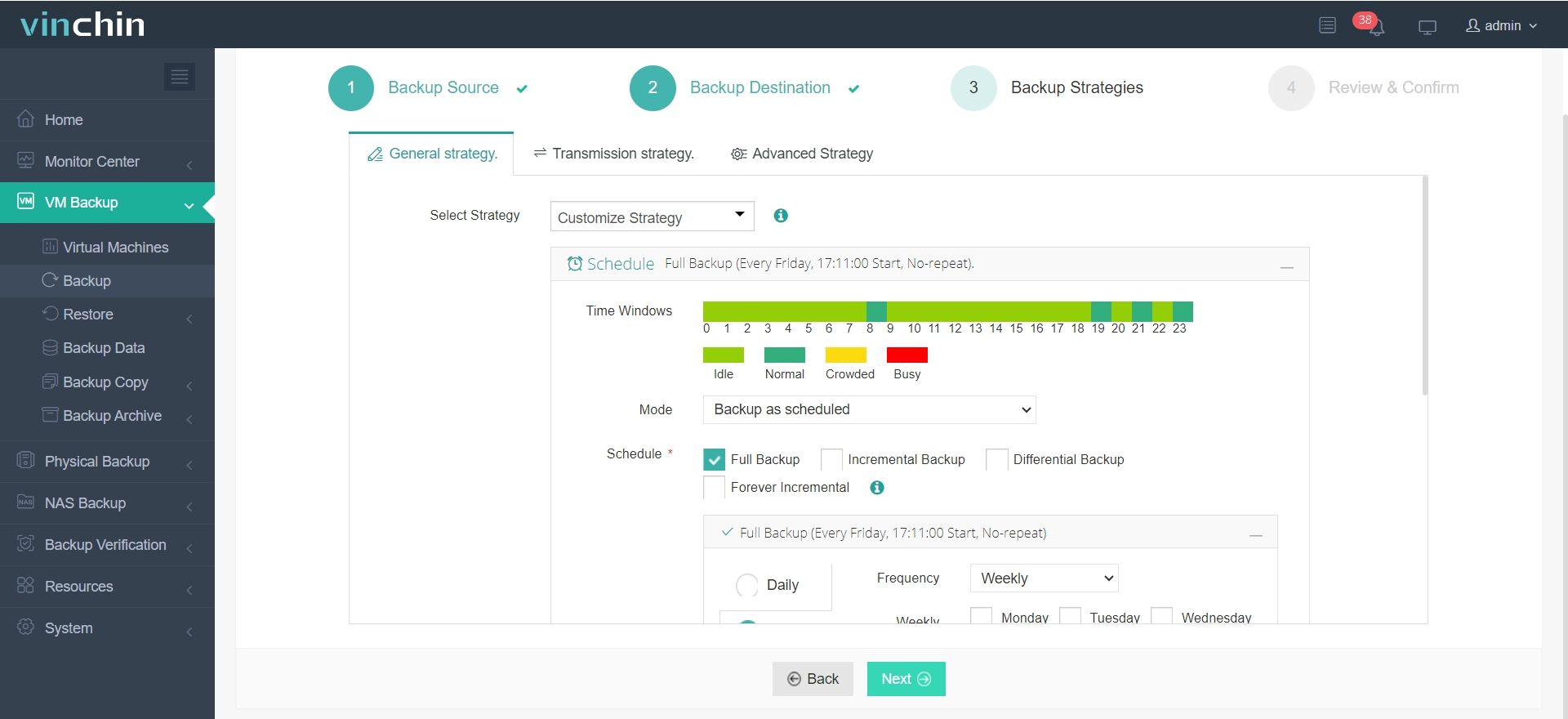
Step 3. Select Backup Strategies
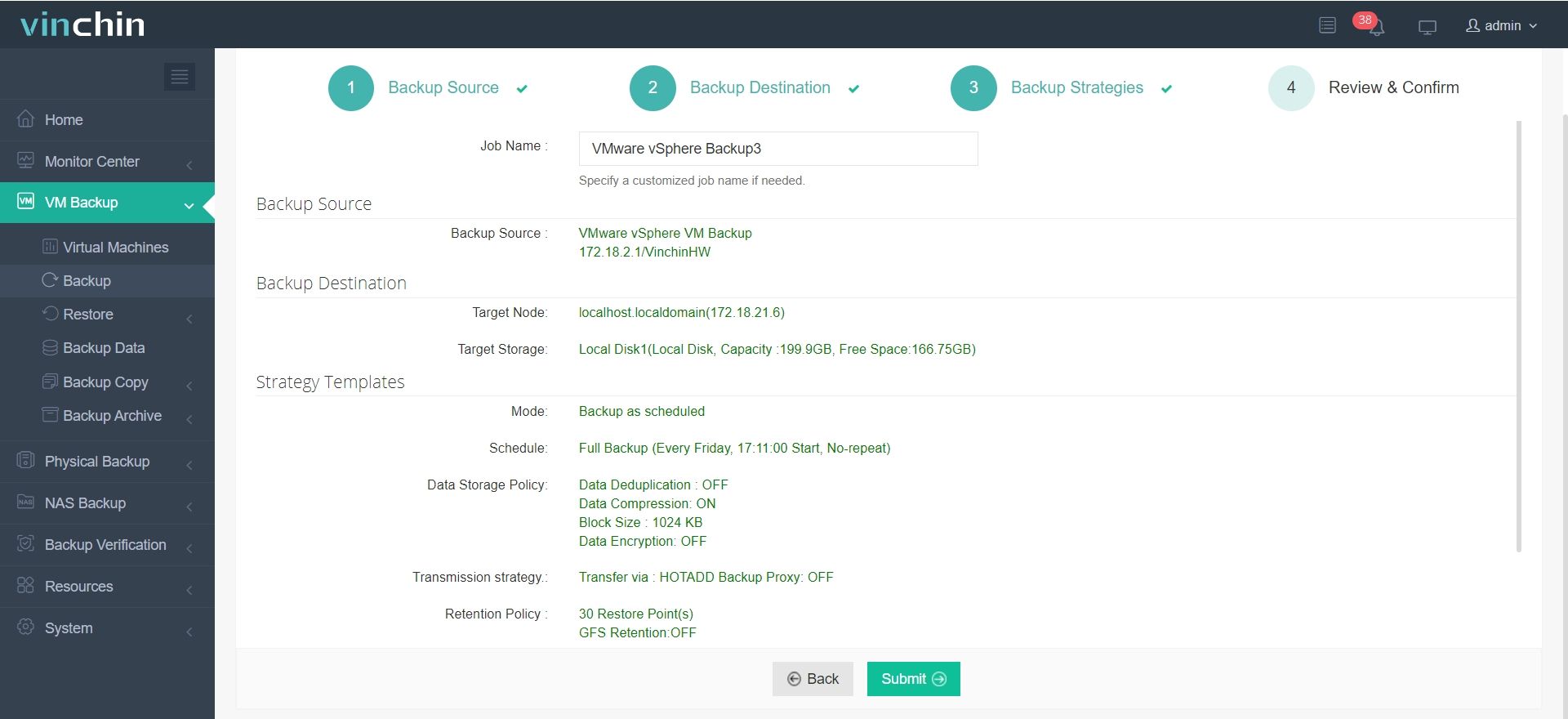
Step 4. Review and submit the job
With global recognition among enterprise users and top industry ratings worldwide,Vinchin Backup & Recovery offers a 60-day full-featured free trial—click below to experience its powerful capabilities firsthand.
Best VMware Backup Software FAQs
Q1: Why is console integration important in VMware backup tools?
It ensures accurate discovery of all virtual machines by staying synced with live inventories through native APIs like vSphere API for Data Protection (VADP). This reduces manual errors during configuration or recovery while enforcing consistent policies across dynamic environments.
Q2: Does console integration affect scalability?
Yes; native integration enables seamless scaling because new virtual machines are auto-discovered whenever they’re added—or removed—from managed clusters without needing manual reconfiguration of jobs each time growth occurs.
Q3: How does this impact compliance?
Integrated solutions align all backup activity directly with managed VM inventories providing detailed audit trails required by regulations such as GDPR HIPAA SOX etc making compliance reporting straightforward during audits.
Q4: Can integrated tools support mixed-platform environments?
Leading solutions offer unified interfaces capable of managing multiple hypervisors alongside VMware allowing cross-platform visibility job scheduling monitoring etc within one dashboard—for example many organizations use hybrid clouds combining private/public resources under central control.
Conclusion
Integrated backup delivers resilient business continuity reduces operational risk improves compliance—and keeps enterprises ready for anything their virtual world demands.