Enterprises need backup tools that work smoothly with virtualization management consoles. This integration brings all backup tasks into one place. It makes daily operations easier and helps IT teams avoid mistakes. When backup tools connect well with your main console, you gain better control and faster response during incidents.
Integrated solutions also help enforce company policies. They make it easier to prove compliance during audits because every action is logged in one system. As virtual environments grow more complex, having centralized oversight becomes essential for both security and efficiency. Integration is now a core requirement for any modern IT department.
Why Integration with Virtualization Management Consoles Matters in Enterprise Environments?
A strong backup strategy depends on how well your tools fit together. Integrated solutions let teams manage backups from familiar dashboards instead of switching between different apps or web pages. This reduces confusion and speeds up routine tasks.
● Centralized Oversight Reduces Complexity: Managing data protection from a single interface cuts down on errors caused by manual steps across multiple systems. For example, when an admin can schedule backups directly from their main console, they are less likely to miss critical settings or overlook important machines.
● Consistent Policy Enforcement: Integrated tools apply backup policies uniformly across all virtual machines (VMs) and containers. This consistency lowers the risk of gaps in coverage—a key concern for regulated industries like healthcare or finance where missing even one VM could mean non-compliance.
● Faster Recovery During Outages: With everything managed through one dashboard, recovery actions are quicker and more reliable. Teams can launch restores without hunting for credentials or switching contexts between applications.
● Improved Auditability: Centralized logs make it easy to track who did what and when—a major advantage during compliance checks based on standards like NIST Cybersecurity Framework.
Fragmented management leads to wasted time and higher risks during emergencies. Centralized integration keeps your environment secure while supporting business continuity goals.
How To Choose The Best Proxmox Backup Solution for Integration with Virtualization Management Consoles
Selecting a backup solution involves more than just checking feature lists—it’s about finding a tool that fits seamlessly into your existing workflow while supporting future growth. A good choice should offer robust integration options that allow automation and unified oversight.
Look for these qualities:
Native or API-based integration ensures smooth communication between your backup tool and virtualization platform. RESTful APIs allow automated scheduling, monitoring, and reporting without manual intervention—critical for large-scale deployments where human error can have big consequences.
Scalability matters as your infrastructure grows; choose solutions that expand easily without forcing you to redesign workflows or retrain staff.
Security controls should include granular access delegation so only authorized users can manage backups or perform restores. Audit trails must be detailed enough to satisfy internal reviews or external auditors.
Compatibility checks are vital before deployment—ensure the solution supports your current hypervisor version and storage backends to avoid surprises later on.
By focusing on these areas—API support, scalability, security controls, auditability, compatibility—you set up your organization for efficient operations today while preparing for tomorrow’s challenges.
Proxmox Backup Server: Native Integration with Proxmox VE Console
Proxmox Backup Server (PBS) stands out because it was built specifically by the Proxmox team to work hand-in-hand with Proxmox Virtual Environment (VE). This native connection means you don’t need extra plugins or middleware—the two systems talk directly through tightly integrated interfaces designed from day one to work together.
With PBS connected as a storage target inside the Proxmox VE console:
1. You add PBS using the exact same UI used for managing VMs—no separate logins needed.
2. You configure scheduled jobs using built-in wizards under Datacenter > Backup, setting retention rules right alongside other cluster settings.
3. You monitor job status via real-time logs showing success/failure rates, throughput statistics, warnings about missed schedules—all within the main dashboard view.
4. You restore entire VMs or individual files instantly using context menus available right next to each VM entry in Server View—making disaster recovery fast even under pressure.
PBS supports incremental backups (only changed data gets copied), deduplication (saving space), compression (reducing network load), client-side encryption (protecting sensitive data before it leaves production servers), role-based access control tied into existing user accounts in Proxmox VE itself—and remote sync jobs so you always have offsite copies ready.
This level of deep integration means admins never leave their primary management interface—from setup through daily monitoring all the way to emergency restores—which saves time while reducing training costs across large teams.
Proxmox Datacenter Manager: Centralized Multi-Cluster Management
Managing several clusters at once introduces new challenges around visibility and policy enforcement across distributed sites or business units. A centralized manager simplifies this complexity by bringing health metrics and operational controls into one place—even when dealing with dozens of nodes spread over multiple locations.
Global Cluster Visibility lets administrators see CPU usage trends, RAM consumption spikes, storage utilization patterns—and most importantly—the status of every configured backup datastore at a glance from within Proxmox Datacenter Manager’s dashboard view.
You can register multiple clusters along with their associated PBS instances so that alerts about failed jobs show up immediately regardless of which site they originated from—a crucial feature when uptime targets are strict due to SLAs (Service Level Agreements).
Basic VM lifecycle operations such as starting/stopping workloads or migrating them between hosts happen right inside PDM’s web interface alongside monitoring functions—removing friction points common in multi-cluster setups where admins otherwise juggle many browser tabs just to keep things running smoothly.
Third-Party Tools with Console Integration
Many organizations use third-party solutions when they require advanced features beyond what native tools provide—or when managing hybrid environments spanning several hypervisors at once. These products often rely on open APIs provided by platforms like Proxmox VE but vary widely in how deeply they integrate into core management consoles versus offering their own standalone dashboards.
Some third-party tools let you register entire clusters as managed resources inside their web UIs; others may expose plug-ins that appear directly within sections such as Datacenter > Storage inside Proxmox VE itself—but always check documentation closely since not all integrations offer full lifecycle control over scheduling/restoring jobs natively within your primary console view.
● API-Based Automation Enables Flexibility: Many vendors use RESTful APIs exposed by Proxmox VE so admins can automate recurring tasks like nightly snapshots without manual clicks each time—a benefit especially valuable at scale where hundreds of VMs might need coordinated protection windows.
● Role-Based Access Control Supports Compliance: Advanced integrations map user permissions from virtualization platforms onto their own RBAC models so only approved personnel can run sensitive operations like deleting old backups—a requirement under frameworks such as GDPR.
● Unified Monitoring Simplifies Troubleshooting: Some products aggregate logs/events from both hypervisor layer and underlying storage/backups into consolidated views making root-cause analysis faster after failures occur.
When evaluating third-party options always verify API stability/support longevity since changes upstream could break automation scripts if not maintained actively by both vendor communities involved. Also ensure audit logging meets standards relevant for regulated sectors before deploying widely.
Vinchin Backup & Recovery: Enterprise‑Level Protection Integrated With Your Console
For organizations seeking advanced enterprise-grade protection tailored specifically for Proxmox environments, Vinchin Backup & Recovery offers seamless integration with virtualization management consoles—including direct support for Proxmox VE alongside 15+ mainstream platforms such as VMware, Hyper-V, oVirt, OLVM, RHV, XCP-ng, XenServer, OpenStack, ZStack, among others. Its broad compatibility ensures unified oversight even in mixed-hypervisor infrastructures common in modern datacenters.
Key features include agentless backups for minimal disruption; instant recovery capabilities; LAN-free backup; granular restore; plus powerful deduplication/compression technologies—all designed to maximize efficiency while minimizing resource impact across large-scale deployments requiring high reliability and rapid RTO/RPO achievement.
Step 1: Select the Proxmox VM(s) you wish to back up.
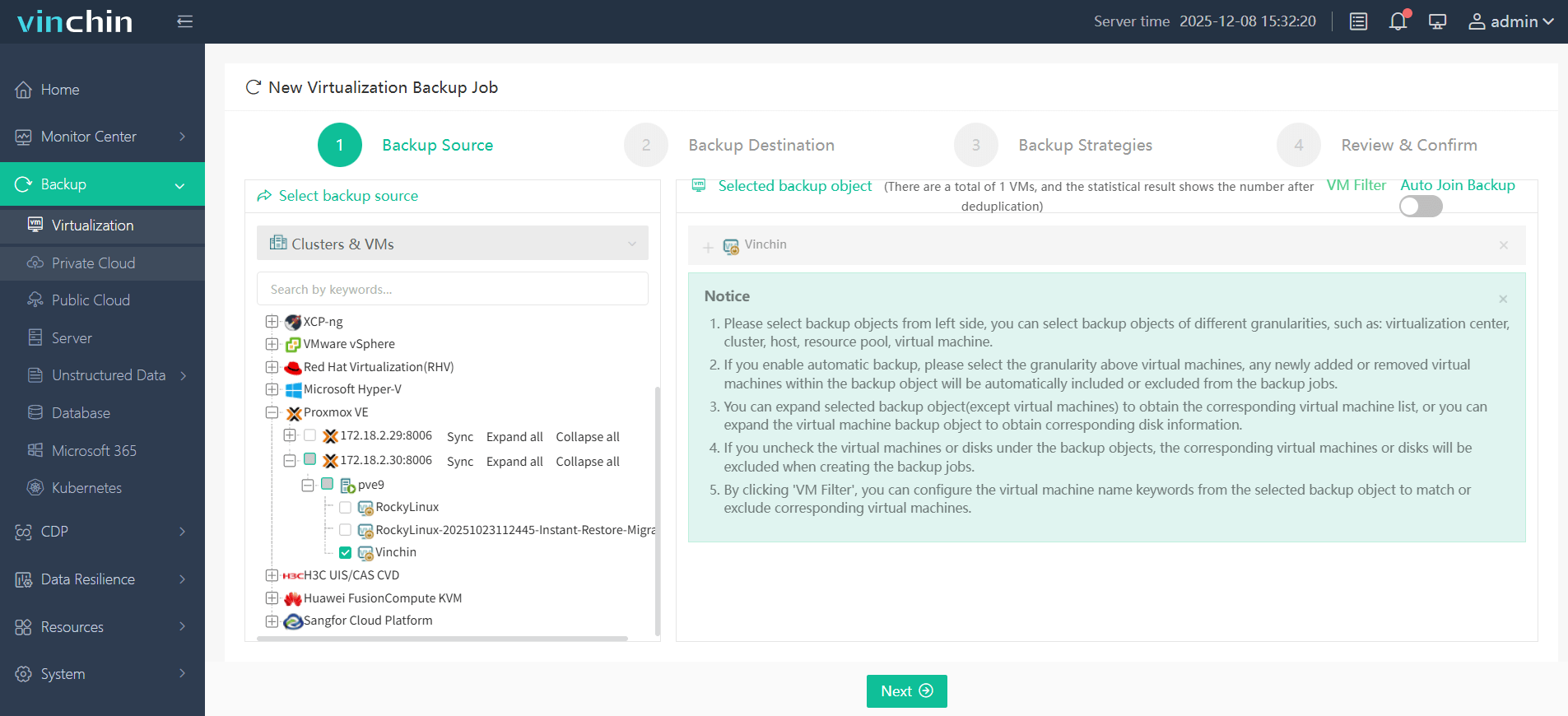
Step 2: Choose target storage location.
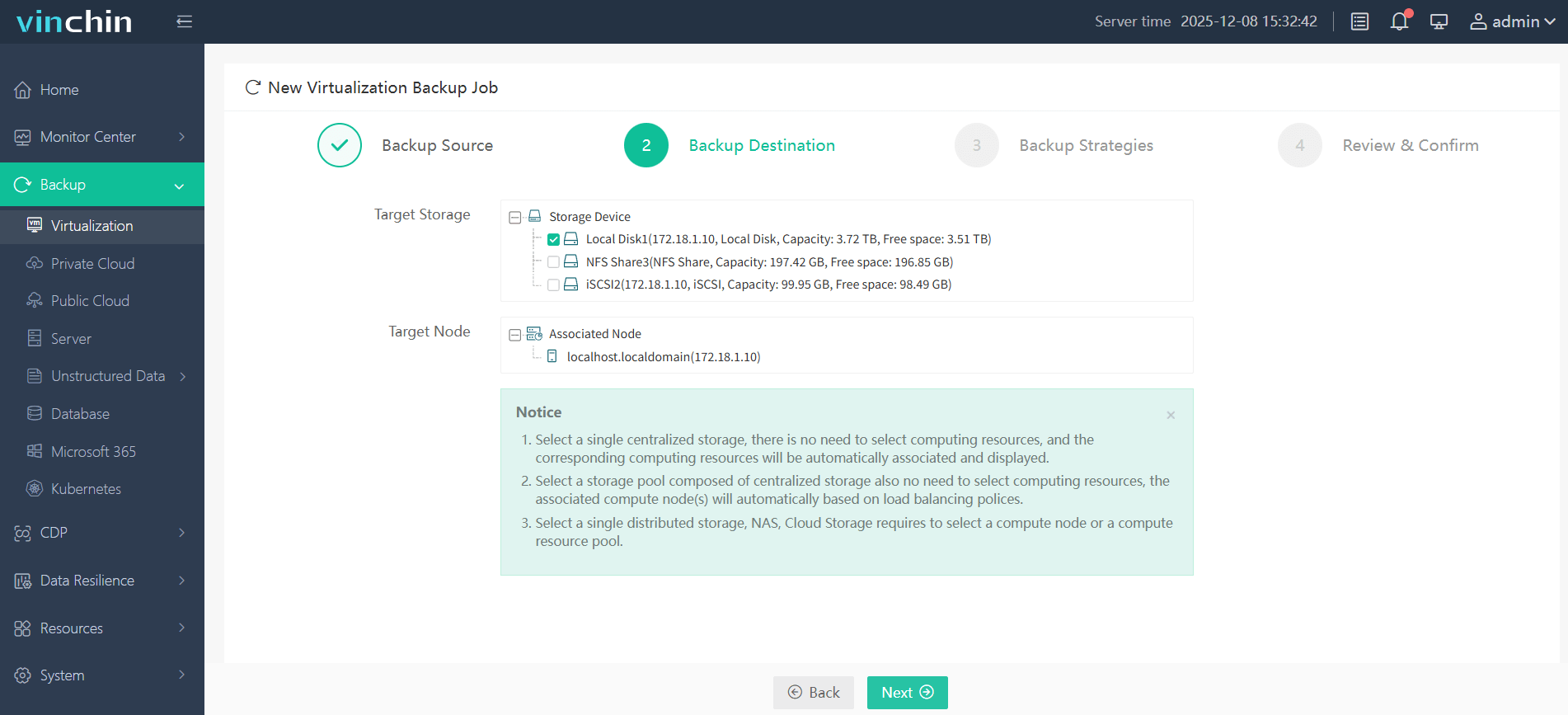
Step 3: Configure desired backup strategy/schedule.
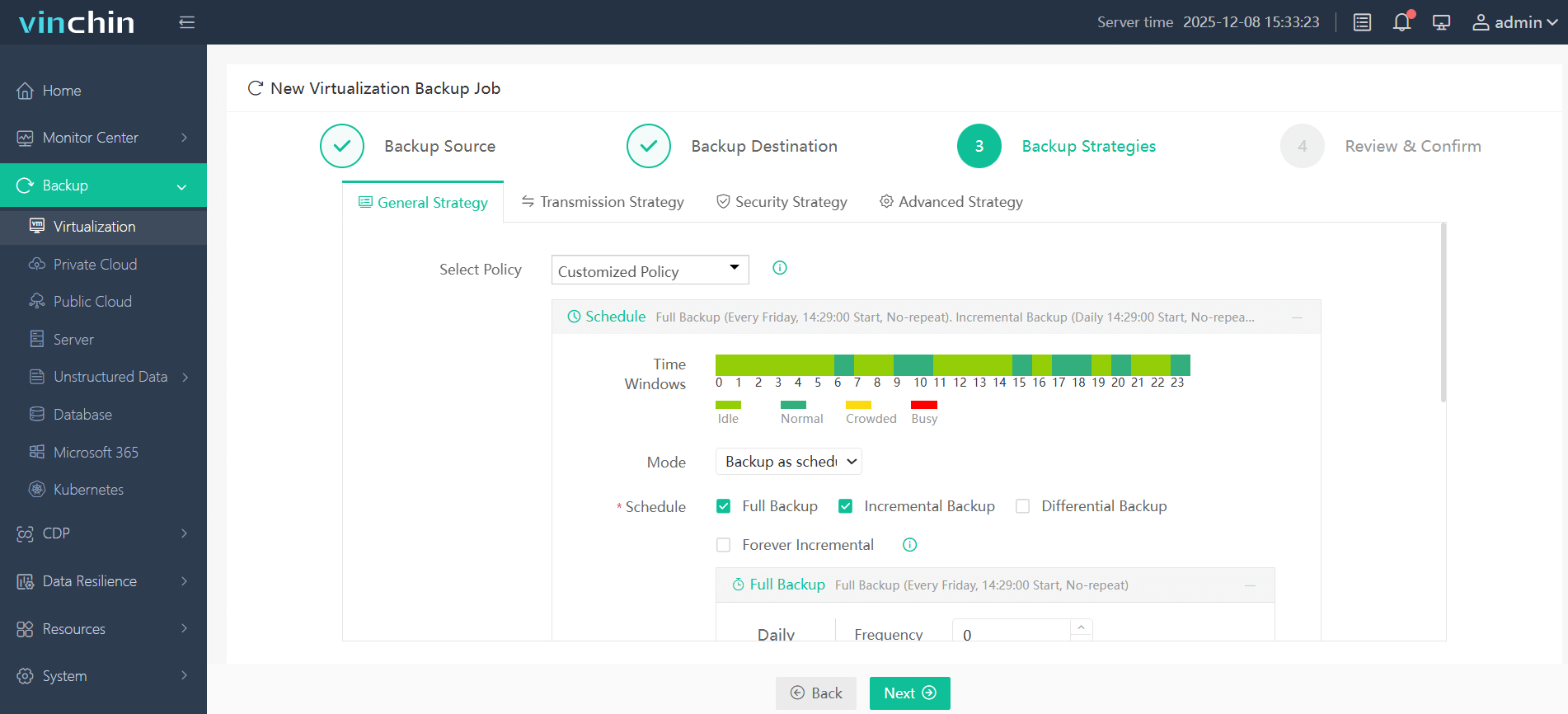
Step 4: Submit the job—backup proceeds automatically.
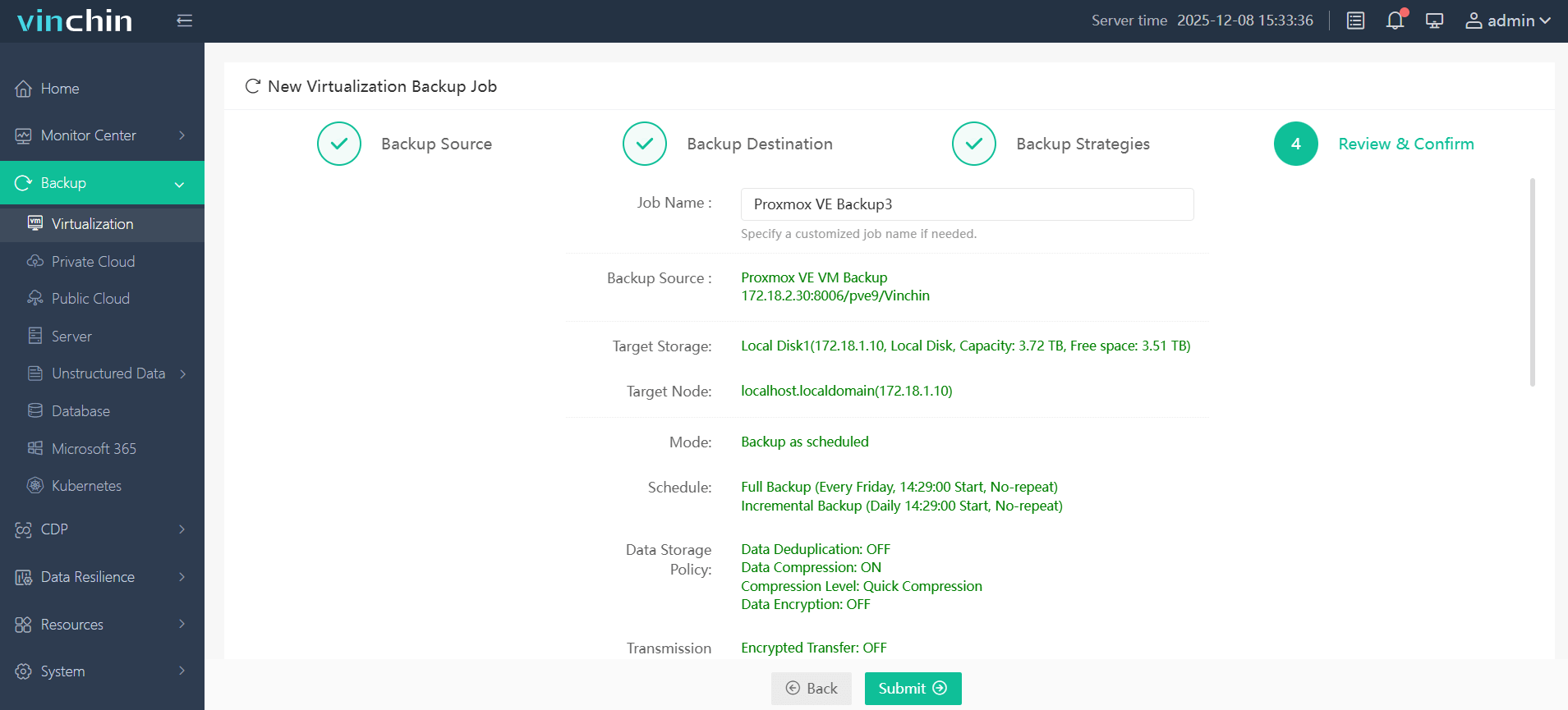
This streamlined process enables quick setup without steep learning curves—even across complex virtual environments.
Trusted globally by thousands of enterprises—with top ratings worldwide—Vinchin Backup & Recovery offers a 60-day full-featured free trial; click below to experience industry-leading data protection firsthand!
Best Proxmox VE Backup Software FAQs
Q1: Why is console integration important in Proxmox backup tools?
A1: Console integration centralizes management reduces errors from manual processes ensures consistent policy enforcement across all virtual machines making administration simpler safer more reliable especially at scale.
Q2: Does integrated backup impact system performance?
A2: Modern solutions optimize resource usage during backups minimizing performance impact on production workloads through techniques like incremental copying deduplication throttling ensuring critical services remain responsive.
Q3: How does integration affect compliance audits?
A3: Integrated solutions provide unified logs detailed reporting simplifying demonstration of regulatory compliance during audits streamlining evidence collection reducing administrative overhead compared to fragmented approaches.
Conclusion
Choosing an integrated Proxmox backup tool improves efficiency reduces risk supports compliance efforts across growing virtual environments delivering peace-of-mind through seamless centralized protection every day.










