OpenStack powers many enterprise clouds. Protecting its virtual machines (VMs) demands backup software that works fast and efficiently. Incremental backup performance is critical because it determines how quickly you can secure new data without slowing down your systems. The best solutions use agentless image-based backups with advanced change block tracking (CBT). This method copies only changed data since the last backup. It saves time, reduces storage needs, and keeps production workloads running smoothly.
Fast incremental backup help organizations shrink backup windows and meet tight recovery point objectives (RPOs). In today's digital landscape, downtime or data loss can mean lost revenue or compliance penalties. Efficient backup operations are essential for business continuity.
Incremental Backup Performance Matters in Enterprise Environments
Incremental backup speed plays a vital role in large-scale OpenStack deployments. Enterprises often manage hundreds or thousands of VMs across multiple projects or tenants. Backup jobs must finish quickly to avoid interfering with daily operations.
● Minimizing Business Disruption: Slow backups extend backup windows into production hours, impacting application performance and user experience. When backups run long, they compete for resources with critical workloads.
● Meeting Compliance Requirements: Many industries require frequent restore points to comply with regulations like GDPR or HIPAA. Fast incremental backups make it possible to create these restore points without overloading infrastructure.
● Reducing Storage Costs: Efficient incremental backups store only changed blocks instead of full VM images every time. This approach lowers storage consumption and helps control costs as environments grow.
● Lowering Risk of Data Loss: Shorter backup windows mean less risk of missing important changes between jobs. If disaster strikes, recent data is more likely to be protected.
Incremental performance is not just about speed, it also impacts reliability and cost-effectiveness at scale.
Choose The Best OpenStack Backup Solution for Fast Incremental Backups
Selecting an OpenStack VM backup solution requires careful evaluation of architecture and features that drive incremental speed. Here are key factors to consider:
● Native OpenStack API Integration: Solutions that connect directly to Nova (compute), Cinder (block storage), Glance (image service), and Keystone (identity) APIs enable precise VM discovery and orchestration. Native integration ensures compatibility across releases and allows granular control over what gets backed up—unlike generic storage-level methods which may miss metadata or configuration details crucial for restores.
● Agentless Architecture: Agentless solutions interact with hypervisors through platform APIs rather than installing software inside each VM guest OS. This design reduces resource overhead on VMs themselves, simplifies deployment at scale, avoids compatibility issues during upgrades, and eliminates maintenance headaches associated with agent management.
● Efficient Change Block Tracking (CBT): Advanced CBT operates at the block level outside the guest OS by monitoring which disk sectors have changed since the last snapshot or backup job. Image-level CBT captures all changes regardless of file system type or guest OS activity—making it faster than file-level tracking inside a VM which relies on agents parsing file system events. With image-based CBT in OpenStack environments, only modified blocks are transferred during incrementals—drastically reducing network load and repository growth compared to traditional approaches.
● Centralized Management & Automation: Enterprise-grade solutions offer unified web consoles where administrators schedule jobs, set retention policies, monitor status dashboards, receive alerts on failures or bottlenecks—all from one place. Centralization streamlines operations across multi-cloud setups while automation ensures consistent protection even as environments scale rapidly.
● Proven Reliability & Support: Vendor track record matters when protecting mission-critical workloads. Look for providers offering enterprise SLAs backed by customer case studies in similar verticals—demonstrating both technical expertise and responsive support teams ready to assist during incidents or audits.
Vinchin Backup & Recovery: Enterprise-Grade Protection for OpenStack
For organizations seeking robust OpenStack VM protection, Vinchin Backup & Recovery delivers professional enterprise-level virtual machine backup across 15+ mainstream virtualization platforms—including first-class support for OpenStack alongside VMware, Hyper-V, Proxmox VE, oVirt/RHV/OLVM, XCP-ng/XenServer, ZStack, FusionCompute, among others. Vinchin Backup & Recovery leverages agentless architecture with native API integration for seamless deployment in complex cloud infrastructures like OpenStack private clouds used by enterprises worldwide.
Key features such as change block tracking (CBT), forever-incremental backup strategies, granular restore capabilities, deduplication/compression technology, and centralized scheduling ensure high-speed incremental backups while minimizing resource usage.
With an intuitive web console interface:
Step 1: Select the OpenStack VM to back up.

Step 2: Choose the backup storage.
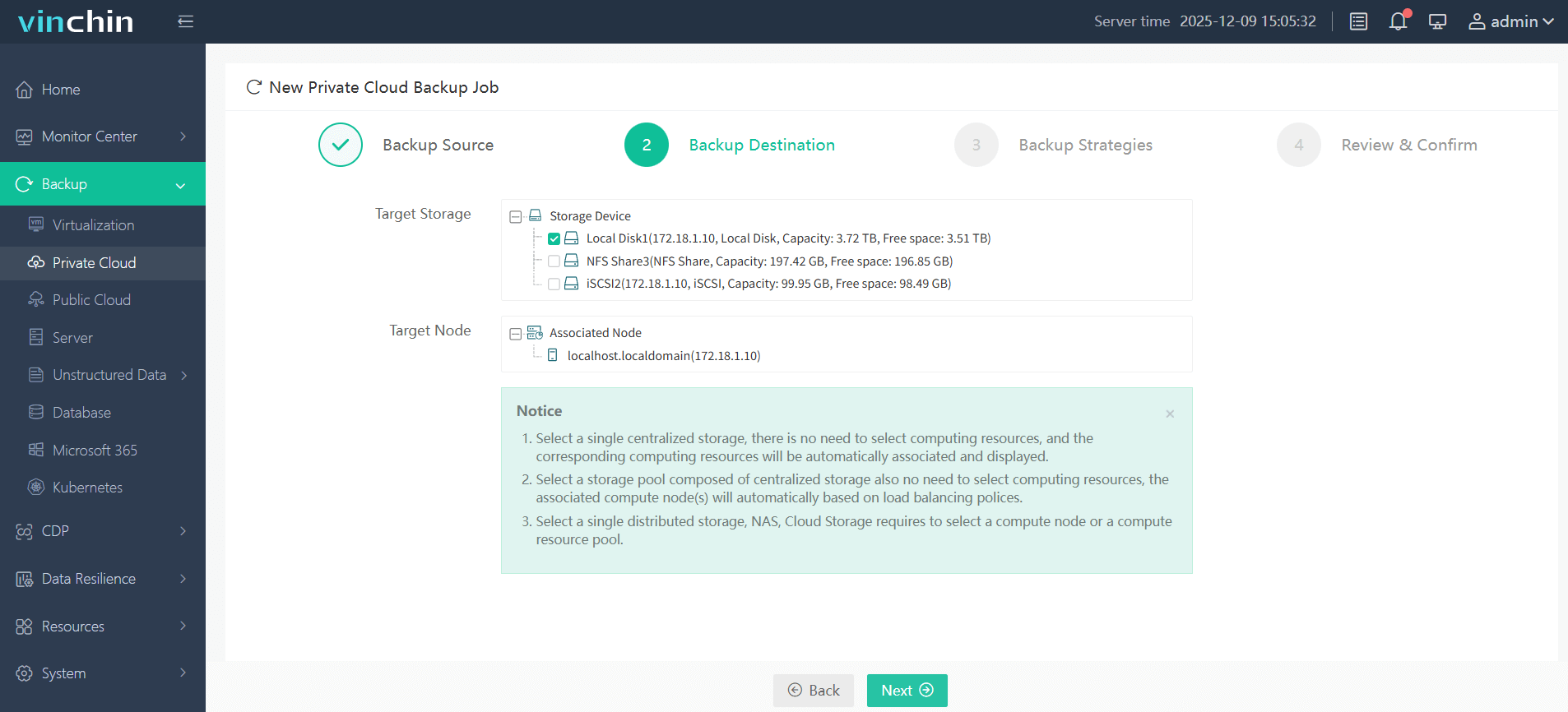
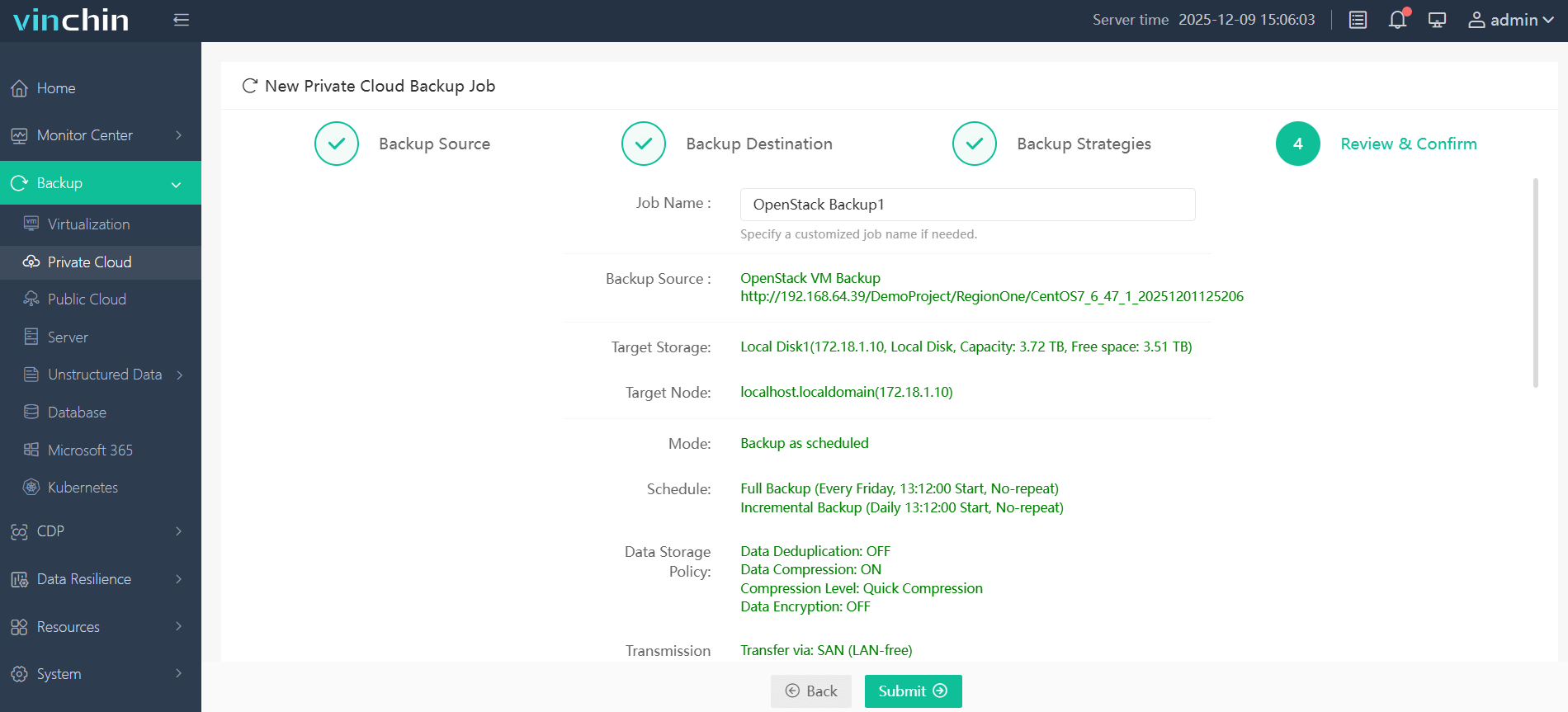
Step 3: Configure the backup strategy.

Step 4: Submit the job.
Recognized globally by thousands of customers—with top industry ratings—Vinchin Backup & Recovery offers a 60-day full-featured free trial so you can experience leading enterprise data protection firsthand.
Best OpenStack Backup Software FAQs
Q1: What determines fast incremental backup speeds in OpenStack environments?
Efficient change block tracking at the image level using native platform APIs enables rapid identification of altered disk sectors between snapshots while minimizing system load during transfers; agentless designs further reduce overhead by avoiding per-VM installations; optimized scheduling ensures resources remain available throughout production hours; centralized management prevents bottlenecks caused by manual intervention errors.
Q2: How does fast incremental backup improve compliance?
Frequent incrementals allow organizations to meet strict RPOs required by industry regulations such as GDPR or HIPAA by ensuring recent changes are always protected; this supports audit trails showing regular successful backups were performed according to policy.
Conclusion
For the fastest incremental backups on OpenStack virtual machines, an agentless solution that leverages native API integration and advanced change block tracking should be preferred. This approach ensures highly efficient data protection while meeting strict business continuity and recovery requirements.