Automated retention policies have become essential for managing VMware VM backups in today's enterprise IT environments. As virtual machines multiply across data centers and cloud platforms, backup data grows rapidly. Manual management cannot keep pace with this scale or complexity. Automated retention ensures that backup data is stored only as long as needed—no more, no less—helping organizations control costs, reduce risk, and meet strict compliance requirements.
Many industries face regulations that dictate how long certain types of data must be retained. For example, healthcare providers must comply with HIPAA rules on patient record retention; financial institutions often follow SOX or PCI-DSS standards; companies operating in Europe must consider GDPR’s right-to-erasure provisions. Failing to manage backup lifecycles properly can result in legal penalties or loss of critical business information.
Automated retention policies are not just about compliance—they are about operational efficiency too. By automating routine tasks like deleting expired backups or archiving older versions according to policy, IT teams can focus on higher-value work such as disaster recovery planning or infrastructure optimization. This makes automated retention a cornerstone of modern data protection strategies for any organization running VMware VMs.
Why Automated Retention Policies Matter in Enterprise Environments
Automated retention policies play a crucial role in large-scale VMware deployments where manual oversight is impractical. These policies help organizations maintain control over their growing volumes of backup data while meeting both internal governance needs and external regulatory demands.
● Efficient Storage Management
Backup storage fills up quickly when old copies linger beyond their useful life. Automated retention policies delete outdated backups on schedule without human intervention. This keeps storage usage predictable and avoids sudden capacity shortages that could disrupt ongoing operations or force emergency hardware purchases.
● Regulatory Compliance
Many laws require organizations to retain certain records for fixed periods—and to delete them promptly when those periods end. Automated retention helps enforce these rules consistently across all VMs by applying standardized schedules based on business needs or legal mandates like HIPAA (healthcare), SOX (finance), or GDPR (privacy). This reduces the risk of accidental non-compliance during audits.
● Reduced Human Error
Manual deletion is slow and prone to mistakes—especially at scale. A missed step could leave sensitive data exposed longer than necessary or result in accidental deletion of critical files before they should expire. Automation eliminates these risks by following pre-defined rules every time without fail.
● Consistent Data Lifecycle Management
With automated retention policies applied centrally across your environment, you ensure that every VM follows the same lifecycle process—from creation through expiration—regardless of who manages it day-to-day. This consistency simplifies reporting and audit preparation while supporting disaster recovery efforts by ensuring recent restore points are always available when needed.
● Lower Operational Costs
By keeping only necessary backups online—and archiving or deleting others automatically—you avoid unnecessary spending on extra storage hardware or cloud capacity. Over time, this cost control adds up significantly for enterprises managing hundreds or thousands of VMs.
Automated retention transforms backup from a reactive chore into a proactive safeguard against both technical failures and regulatory pitfalls—a vital shift for any business relying on VMware virtualization at scale.
How To Choose The Best VMware Backup Solution for Automated Retention Policies
Selecting an effective VMware backup solution means looking beyond basic functionality toward features that support robust automation and fine-grained control over your backup lifecycle processes.
A strong solution should offer centralized management so you can define global rules once—and apply them everywhere—with minimal effort from your team each day. Look for flexible scheduling options that let you align both backups and their associated retentions with your organization’s service level agreements (SLAs) or compliance deadlines.
Granular controls are especially important if your environment includes different types of workloads—for example, production databases versus test servers—or if you need separate handling for full versus incremental backups. With granular settings, you might specify that mission-critical application servers retain daily snapshots for 30 days while development VMs keep weekly copies for just one week before deletion.
Scalability matters too; as your virtual infrastructure grows from dozens to hundreds (or thousands) of VMs across multiple clusters or sites, your chosen platform should handle increased load seamlessly without requiring constant manual adjustments or performance tuning from administrators.
Audit capabilities provide transparency into who changed which settings—and when—which is invaluable during security reviews or regulatory inspections where proof-of-process is required. Integration with existing workflows ensures new tools do not add friction but instead streamline daily operations through automation wherever possible.
Vinchin Backup & Recovery: Enterprise-Level Protection Across Virtualization Platforms
For enterprises seeking comprehensive protection of their VMware environments alongside other mainstream virtualization platforms—including Hyper-V, Proxmox, oVirt, OLVM, RHV, XCP-ng, XenServer, OpenStack, ZStack and more— Vinchin Backup & Recovery stands out as a professional enterprise-level VM backup solution supporting over 15 environments seamlessly. It offers advanced features such as quiesced snapshot support specifically optimized for VMware workloads; HotAdd transport mode; CBT-based fast incremental backups; LAN-free backup capability; instant recovery; plus universal essentials like full/incremental/differential backups, deduplication/compression, granular restore options and secure encryption across all supported hypervisors.
Among its most relevant features are agentless operation for simplified deployment; instant recovery minimizing downtime after failure; CBT-powered efficient incrementals reducing storage use; granular restore enabling item-level recoveries; and robust GFS retention policy automating complex lifecycle management—all designed to maximize reliability while streamlining administration at scale.
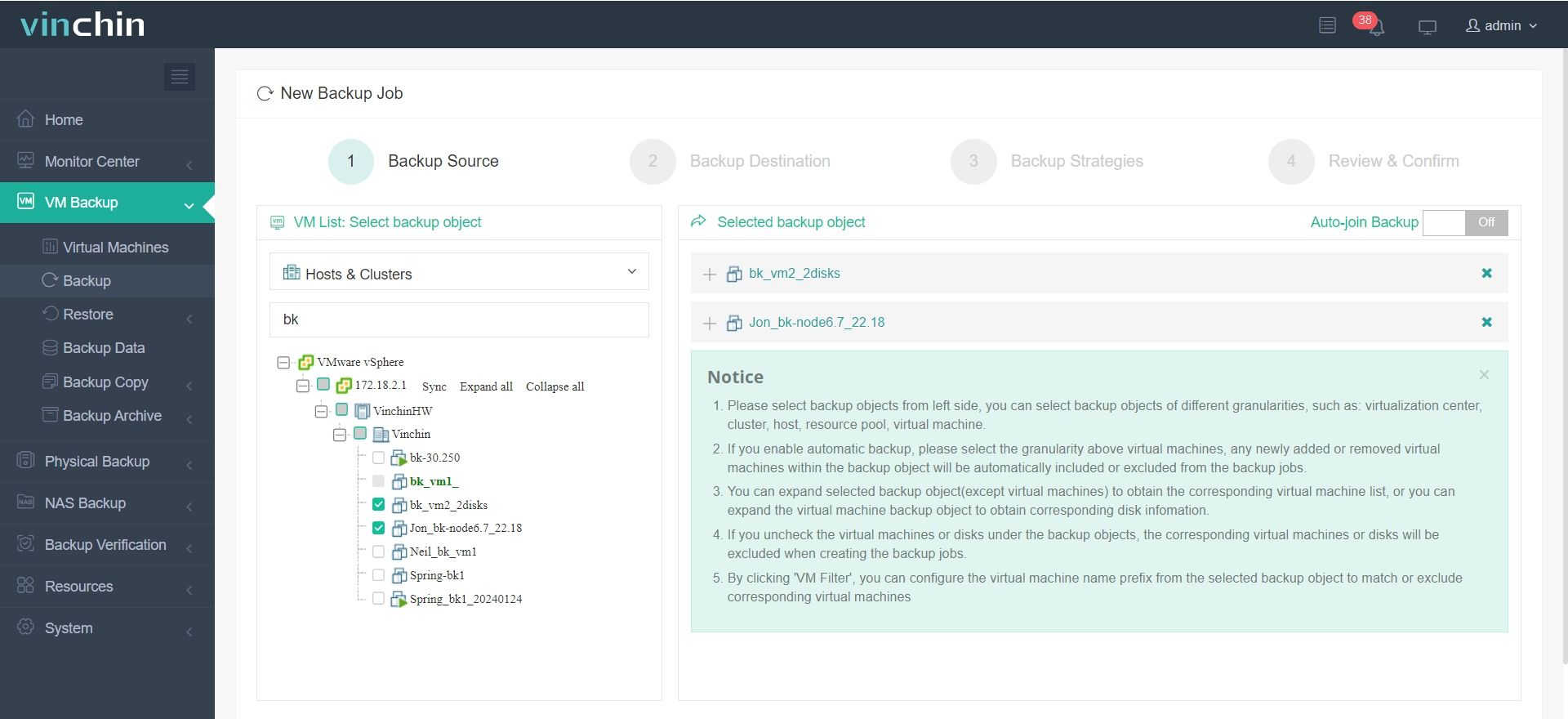
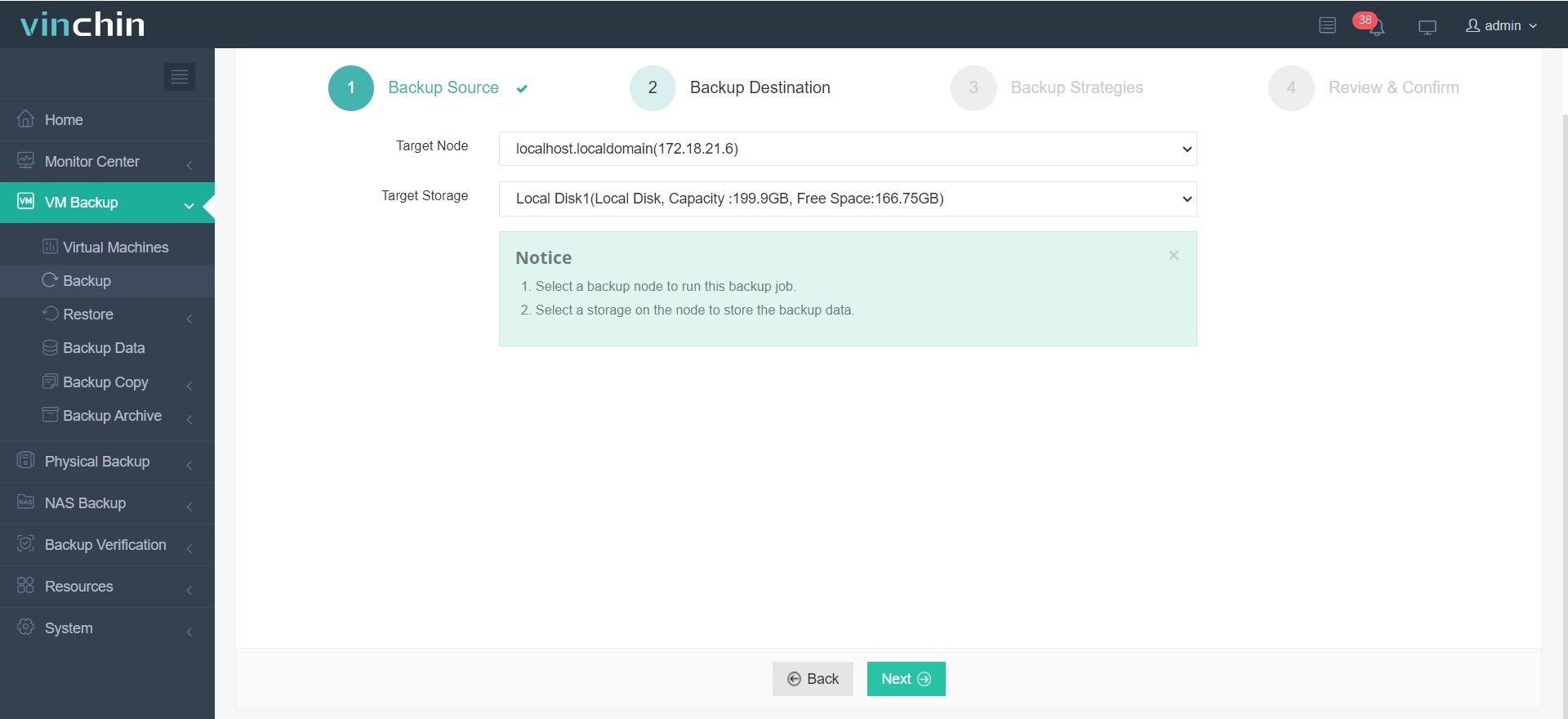
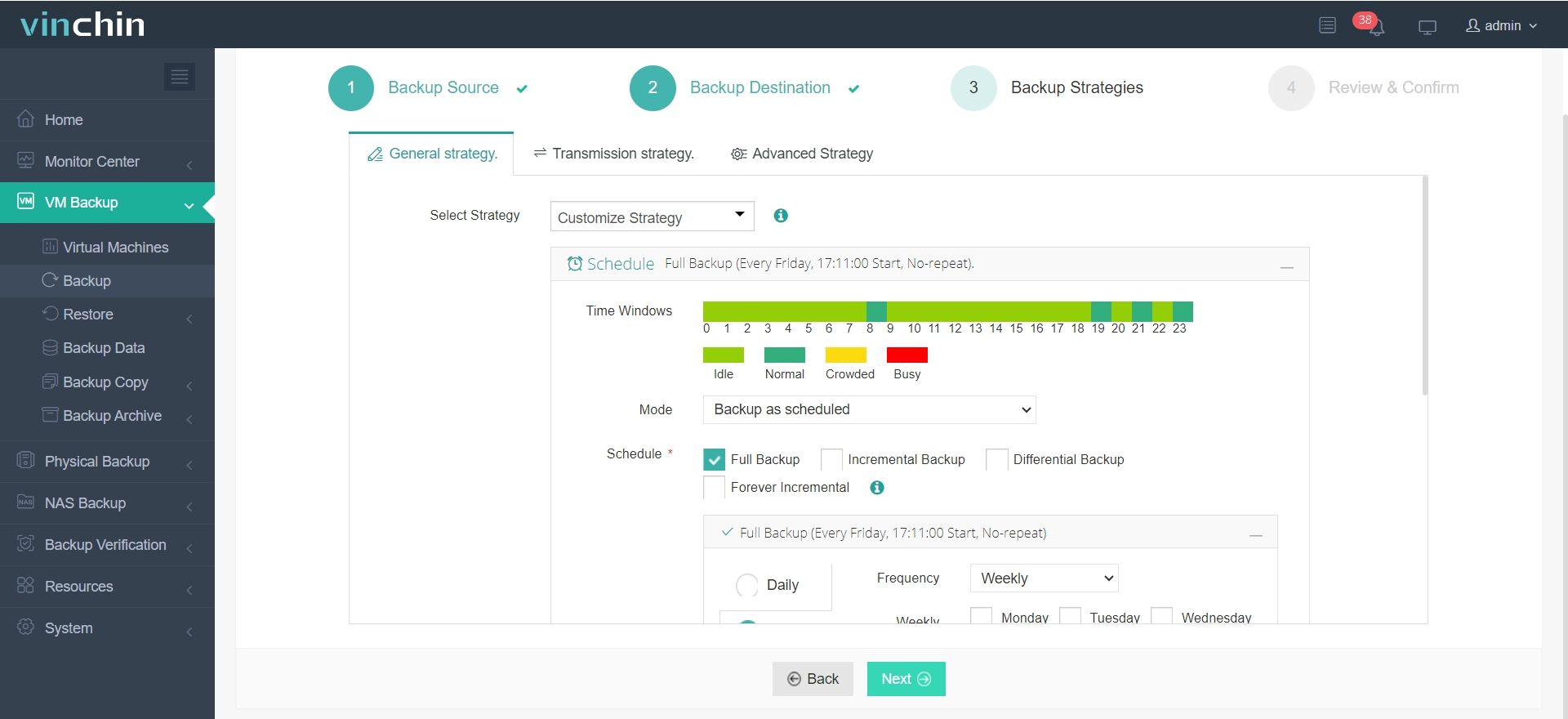
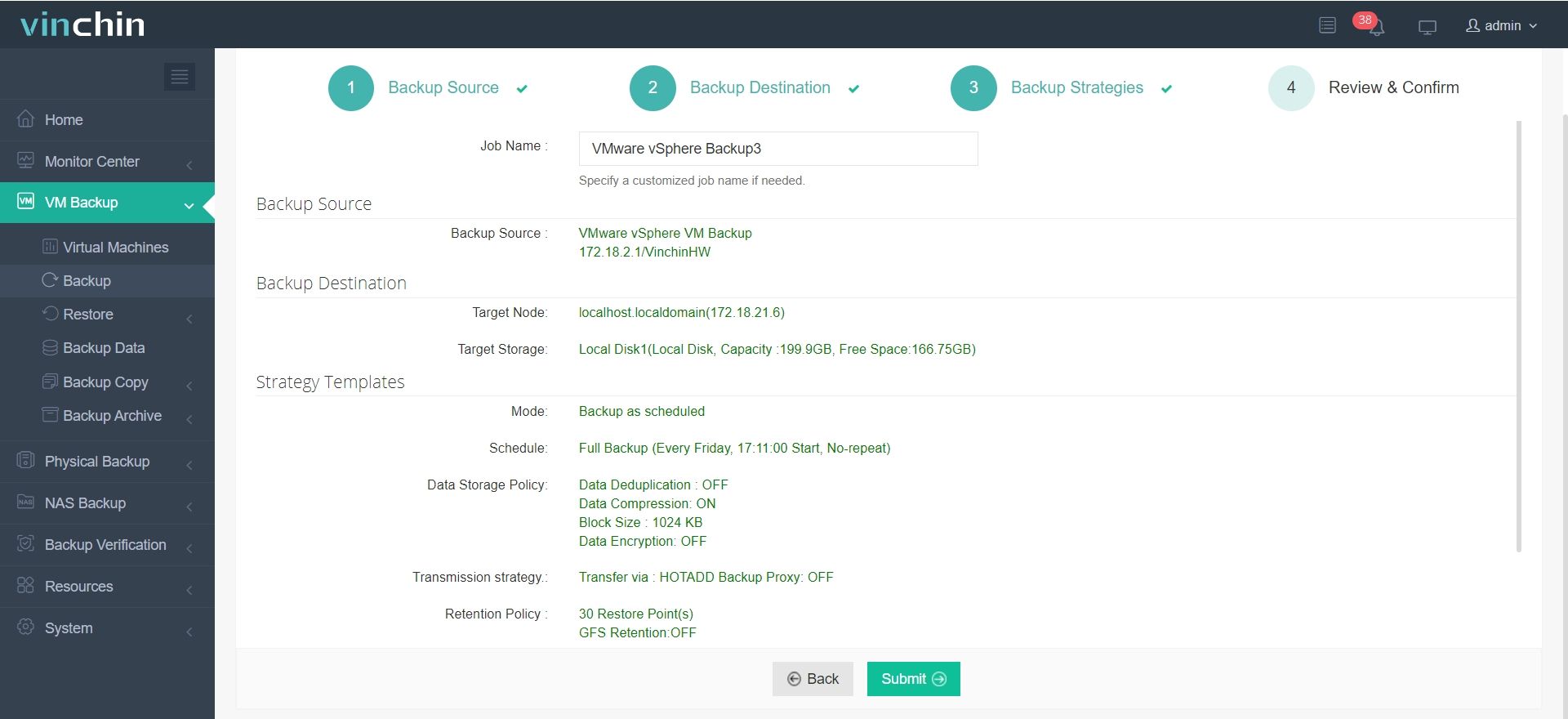
Using the intuitive Vinchin web console makes protecting critical workloads straightforward:
Step 1. Select Backup Source
Step 2. Select Backup Destination
Step 3. Select Backup Strategies
Step 4. Review and submit the job
Recognized globally by thousands of customers with top ratings in enterprise data protection software reviews—Vinchin Backup & Recovery offers a fully featured 60-day free trial so you can experience its power firsthand.
Best VMware Backup Software FAQs
Q1: Why are automated retention policies important in VMware backup?
They prevent accidental loss by ensuring expired backups are deleted automatically according to defined schedules—for example removing sensitive customer records after seven years per GDPR requirements—while keeping recent restore points available if disaster strikes unexpectedly.
Q2: Can automated policies adapt quickly when compliance requirements change?
Yes; leading solutions allow administrators to update global settings instantly across all protected VMs so new legal mandates—such as shorter privacy windows under evolving regulations—are enforced without delay throughout the environment.
Q3: Does automation reduce administrative workload compared with manual cleanup?
Absolutely; automation eliminates repetitive tasks like tracking expiration dates manually then deleting old files one-by-one—instead freeing staff hours each week so teams can focus on strategic projects rather than routine maintenance chores alone.
Q4: Are audit trails available showing who changed which policy settings?
Enterprise-grade software provides detailed logs recording every adjustment made—including user identity plus timestamp—for easy review during security investigations or formal audits demanding proof-of-process documentation.
Conclusion
Automated retention turns complex VM backup management into a streamlined process—ensuring data stays only as long as needed while supporting compliance goals efficiently at scale.









