Automated retention policies have become a cornerstone of modern backup strategies for Oracle OLVM VMs. These policies help organizations manage data lifecycles efficiently while meeting compliance requirements. With automated retention in place, IT teams can ensure that backup data is kept only as long as necessary—no more, no less—reducing manual work and risk of error.
The ability to automate retention means backups are deleted or archived according to set rules. This approach saves storage space and keeps systems running smoothly. Enterprises benefit from lower costs and improved regulatory posture when they use solutions that support automated retention policies for Oracle OLVM VMs.
Why Automated Retention Policies Matter in Enterprise Environments
Automated retention policies play a vital role in enterprise IT environments by ensuring consistent enforcement of data lifecycle rules across large VM estates. These policies reduce human error and free up valuable time for IT staff who would otherwise need to track backup expiration dates manually.
● Cost Control
Automated retention helps control storage costs by deleting outdated backups on schedule. For example, if your policy states “keep daily backups for 30 days and weekly backups for one year,” automation ensures these rules are followed without oversight. This prevents unnecessary accumulation of old backups that consume expensive disk space.
● Regulatory Compliance
Many industries must follow strict regulations about how long data should be retained. Automated retention makes it easier to comply with laws like GDPR or HIPAA because expired data is purged consistently based on policy—not left lingering due to oversight. Audit trails generated by automated actions also provide proof during compliance reviews.
● Operational Efficiency
Managing hundreds or thousands of virtual machines becomes much simpler when backup expiration happens automatically. Manual tracking introduces risk; mistakes can lead to accidental deletion or missed purges. Automation reduces this risk while keeping your environment organized.
● Risk Mitigation
Old backups may contain sensitive information that could pose risks if kept too long. Automated purging lowers exposure by ensuring obsolete copies do not remain accessible beyond their intended lifespan—a key part of any robust security strategy.
These benefits make automated retention essential for enterprises seeking reliable Oracle OLVM VM protection at scale.
How To Choose The Best Oracle OLVM Backup Solution for Automated Retention Policies?
Selecting a backup solution involves careful evaluation of its automation capabilities, scalability, reporting features, and ease of integration into existing workflows. The best solutions offer granular control over how long different types of backups are kept—daily versus weekly or monthly—and allow you to apply unique rules per VM or group as needed.
● Granular Policy Configuration
Look for solutions that let you define detailed retention schedules such as “retain full backups every Sunday for six months” alongside “keep incremental backups daily for two weeks.” This flexibility supports both operational needs and compliance mandates.
● Scalability Across Large Environments
A strong solution handles thousands of VMs without performance drops even when complex policies are applied across many groups or projects. As your infrastructure grows, automation should continue working seamlessly so you don’t need extra manual intervention just because your environment expanded.
● Clear Audit Trails & Reporting
Transparent logs showing what was deleted (and when) help prove compliance during audits. Solutions should provide easy-to-read reports detailing which jobs ran successfully, which failed, what was purged due to policy enforcement—and why those actions occurred.
● Seamless Workflow Integration
Backup software must fit into your existing processes with minimal disruption. Look for web-based consoles where you can create jobs quickly using templates or wizards; this reduces training time while improving consistency across teams responsible for managing Oracle OLVM VMs.
Evaluate whether the solution offers safeguards such as alerts before deletion occurs—these features give administrators confidence that important data won’t be lost accidentally due to misconfiguration but still allow expired files to be removed promptly according to policy.
Vinchin Backup & Recovery: Reliable Protection for Oracle OLVM Virtual Machines
For organizations seeking robust protection specifically tailored to Oracle OLVM environments, Vinchin Backup & Recovery stands out as an enterprise-level virtual machine backup solution supporting over 15 mainstream virtualization platforms—including VMware, Hyper-V, Proxmox, oVirt, RHV, XCP-ng, XenServer, OpenStack, ZStack, and more—with dedicated support for Oracle OLVM infrastructures at the forefront here.
Vinchin Backup & Recovery delivers agentless backup and restore operations along with advanced features such as CBT-based incremental backup (supported on OLVM), LAN-free backup options (available on OLVM), instant recovery capabilities (fully supported), flexible scheduling with GFS retention policy management, and efficient deduplication plus compression—all designed to streamline enterprise-scale protection.
With these core functions—incremental backup via CBT technology; LAN-free transfer; instant recovery; granular restore; and comprehensive GFS-based scheduling—enterprises gain fast restores, optimized storage usage, simplified management workflows, reduced network load during transfers, and strong compliance alignment.
Backing up an Oracle OLVM VM using Vinchin Backup & Recovery is straightforward thanks to its intuitive web console:
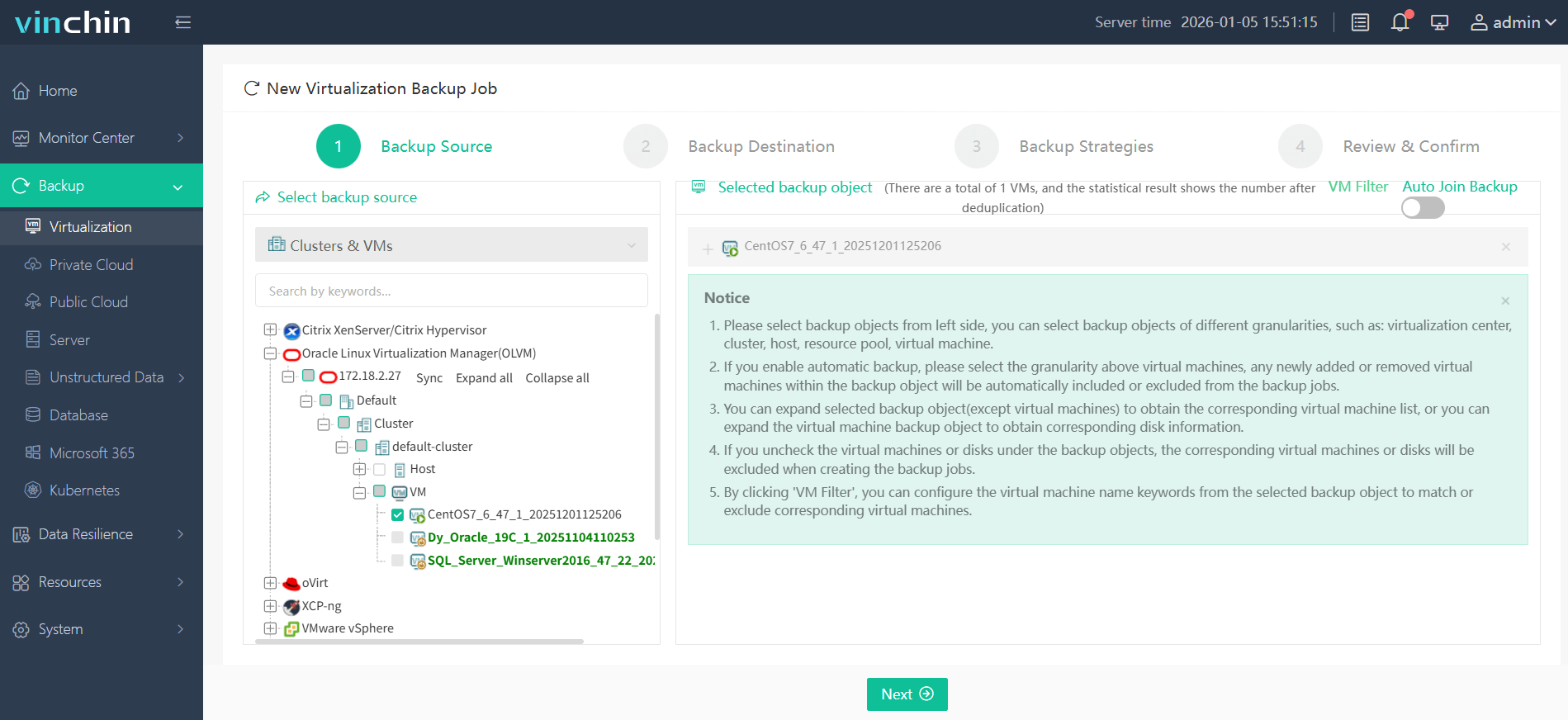
Step 1: Select the OLVM VM you wish to back up;
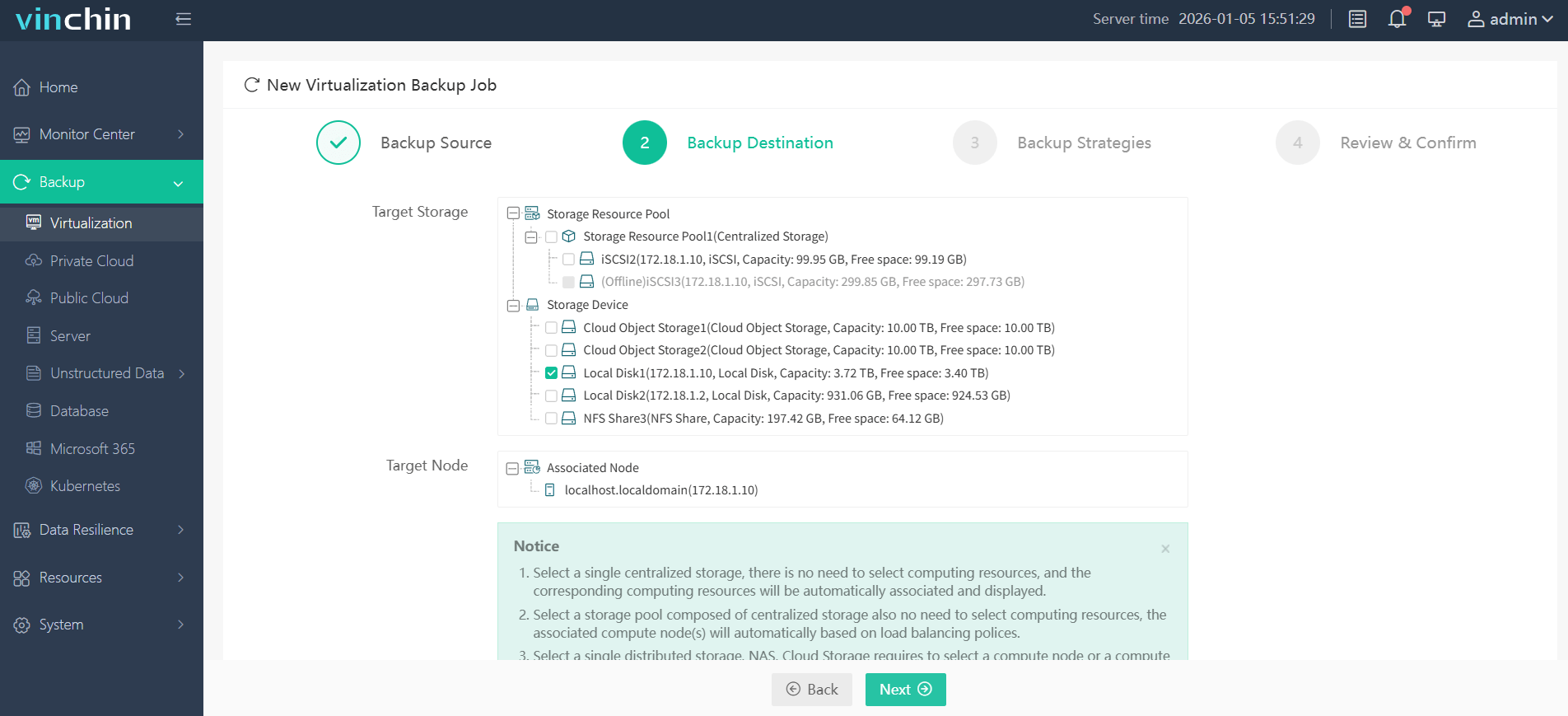
Step 2: Choose your preferred backup storage;
Step 3: Configure your desired backup strategy;

Step 4: Submit the job—ensuring secure protection with minimal effort required from administrators each time.

Recognized globally among enterprise customers with top industry ratings,Vinchin Backup & Recovery offers a fully featured 60-day free trial—click below to experience leading-edge VM protection firsthand!
FAQ
Q: Can automated retention policies be customized by VM or group?
Yes; leading solutions allow granular customization by VM or group so organizations can meet diverse compliance needs within one platform configuration window rather than relying on global defaults alone.
Q: How does automation impact compliance audits?
Automation generates auditable logs showing every action taken under each policy—including deletions—which simplifies audit preparation since proof-of-compliance documentation is always available through built-in reporting tools.
Q: Will automated purging risk accidental data loss?
Properly configured solutions include safeguards such as pre-deletion alerts so administrators receive notifications before critical files are removed; ultimate responsibility rests with admins who must validate settings align with business requirements before enabling automatic purge functions.
Conclusion
Robust automated retention controls cut costs while supporting regulatory goals at scale—empowering enterprises with efficient operations plus peace of mind around compliance risks.









