What Is WORM Protection?
WORM protection is a storage technology that allows you to write data only once; after that point, no one can change or delete it until a set retention period expires. You can read the data as many times as needed—but cannot alter it in any way during its protected state.
The principle behind WORM is immutability: once written, information remains fixed and tamper-proof until its retention ends. This concept has roots in both hardware-based solutions (like optical discs or magnetic tapes) and modern software-driven approaches found in enterprise storage arrays or cloud object stores.
Today’s organizations rely on software-based WORM features—such as SnapLock volumes in NAS systems or Object Lock in cloud storage—to meet strict legal requirements around non-erasability and non-rewritability of records. These controls are essential across industries like finance and healthcare where regulations demand permanent audit trails.
Why Choose WORM Protection?
WORM protection offers more than just regulatory compliance—it acts as a powerful shield against threats that could compromise your business continuity.
First comes security: immutable storage blocks ransomware attacks from encrypting backups or logs since files cannot be overwritten or deleted during their lock period. Insider threats are also reduced because even privileged users cannot tamper with protected records.
Second is compliance: many laws require organizations to retain certain documents unchanged for years—think financial statements under SOX or patient records under HIPAA. With WORM-enabled storage, you pass audits more easily by proving your files have not been altered since creation.
Finally comes operational integrity: immutable logs provide reliable forensic evidence during investigations; contracts stored with WORM guarantee authenticity; backup archives remain trustworthy over time—even if mistakes happen elsewhere in your environment.
Have you ever faced an audit request only to find key records missing—or discovered backups corrupted by malware? If so, implementing robust WORM (write-once-read-many) protection could save you from costly downtime or penalties down the line.
Key Considerations Before Implementing WORM
Before enabling any form of WORM protection across your infrastructure, take time to plan carefully—this ensures smooth integration with existing workflows while avoiding surprises later on.
Start by defining clear retention policies: how long must each type of record stay immutable? Align these periods with legal mandates specific to your industry—and remember that setting overly long retentions may increase storage costs unnecessarily.
Next consider performance impacts: some legacy hardware-based solutions limit throughput compared to standard volumes; modern software-driven methods usually match regular performance but always test under real workloads before rolling out at scale.
Integration matters too: check whether your backup tools support writing directly into locked volumes—or if application changes are required so critical files land in compliant locations from day one.
Finally assess reversibility: most true compliance-grade modes make protected volumes undeletable until expiry—even by administrators! Make sure this aligns with business needs before activating such settings system-wide.
By thinking through these factors up front—and involving stakeholders from IT security/legal/compliance—you lay the groundwork for successful adoption of enterprise-grade immutability controls without disrupting daily operations.
Method 1: Enabling WORM Protection on NetApp ONTAP NAS
NetApp ONTAP NAS systems deliver robust file-level immutability using SnapLock—a feature designed specifically for regulatory compliance and operational assurance. Let’s look at how you can enable this capability step by step:
First confirm prerequisites are met:
Ensure SnapLock license is installed
Verify cluster time synchronization via NTP
Confirm hardware/software compatibility
To create a SnapLock-protected volume:
1. Log in to ONTAP System Manager
2. Navigate to Storage, then select Volumes
3. Click Add to start creating a new volume
4. In the field labeled Volume Type, choose either SnapLock Compliance (for strict legal holds) or SnapLock Enterprise (for flexible governance)
5. Set the desired Retention Period according to policy
6. Complete other required fields—then click Save
From now on any file written into this volume becomes immutable until its retention expires—you can read but not modify/delete those files during lockout.
Important Operational Notes for SnapLock
Choosing between Compliance mode versus Enterprise mode depends on risk tolerance:
Be aware that once enabled SnapLock cannot be disabled nor changed back—the commitment lasts for the life of each volume! Plan capacity accordingly since deleting old data before expiry isn’t possible here.
For large-scale deployments consider automating creation via CLI:
volume create -vserver <svm_name> -volume <vol_name> -aggregate <aggr_name> -snaplock-type compliance|enterprise -retention-period <days>
If you encounter issues selecting SnapLock types double-check NTP status; unsynchronized clocks prevent activation due to regulatory accuracy requirements.
Method 2: Using AWS S3 Object Lock for WORM Protection
AWS S3 Object Lock brings cloud-native immutability within reach—ideal when storing backups offsite or archiving sensitive documents at scale without managing physical media yourself.
To get started:
1. Open the AWS Management Console then go straight into S3
2. Click on Create bucket
3. In the section titled Object Lock, check box labeled Enable
4. Fill out remaining bucket details then click Create bucket
Remember—you must enable Object Lock at bucket creation; retrofitting existing buckets isn’t supported!
After setup upload objects as usual then set their lock status:
1. Select an object inside your S3 bucket
2. Choose option labeled Actions, followed by selecting Edit retention
3. Pick either Governance mode (allows exceptions via special permissions) or Compliance mode (no deletions possible)
4. Specify exact retention date/time window then hit Save changes
Objects now become immune from deletion/modification—even root users cannot override Compliance locks before expiry!
Configuring Object Lock via API/CLI for Automation
Many ops teams prefer scripting resource deployment rather than manual clicks—for them AWS CLI offers full control:
aws s3api create-bucket --bucket my-worm-bucket --region us-east-1 --object-lock-enabled-for-bucket
You can also apply Legal Holds—which freeze objects indefinitely until manually released—in addition/instead of timed retentions depending upon workflow needs.
How to Protect Data from Ransomware With Vinchin Backup & Recovery?
Beyond native public-cloud features, organizations benefit from unified solutions that streamline protection across diverse platforms such as S3 object storage, NAS appliances, and Windows/Linux file servers—all common targets in today’s hybrid IT environments impacted by ransomware threats discussed above. Vinchin Backup & Recovery stands out as an enterprise-grade file backup solution supporting nearly all mainstream file storage types on the market—including but not limited to S3-compatible object stores, NAS devices, and both Windows and Linux file servers—with industry-leading speed thanks to its advanced architecture.
Vinchin Backup & Recovery leverages proprietary technologies such as simultaneous scanning/data transfer and merged file transmission mechanisms that deliver exceptionally fast backup performance—outpacing most competitors significantly when handling large-scale workloads and complex datasets typical in enterprise settings.
Among its many capabilities, five standout features include incremental backup support for efficiency; wildcard filtering for precise selection; robust throttling policy management; multi-level compression options; and cross-platform restore flexibility allowing seamless recovery between file server/NAS/object storage targets—all designed to maximize reliability while minimizing resource consumption and operational complexity.
The web console of Vinchin Backup & Recovery is extremely intuitive: backing up critical assets typically involves just four steps tailored for each environment—for example:
Step 1. Select the S3 object storage files to back up
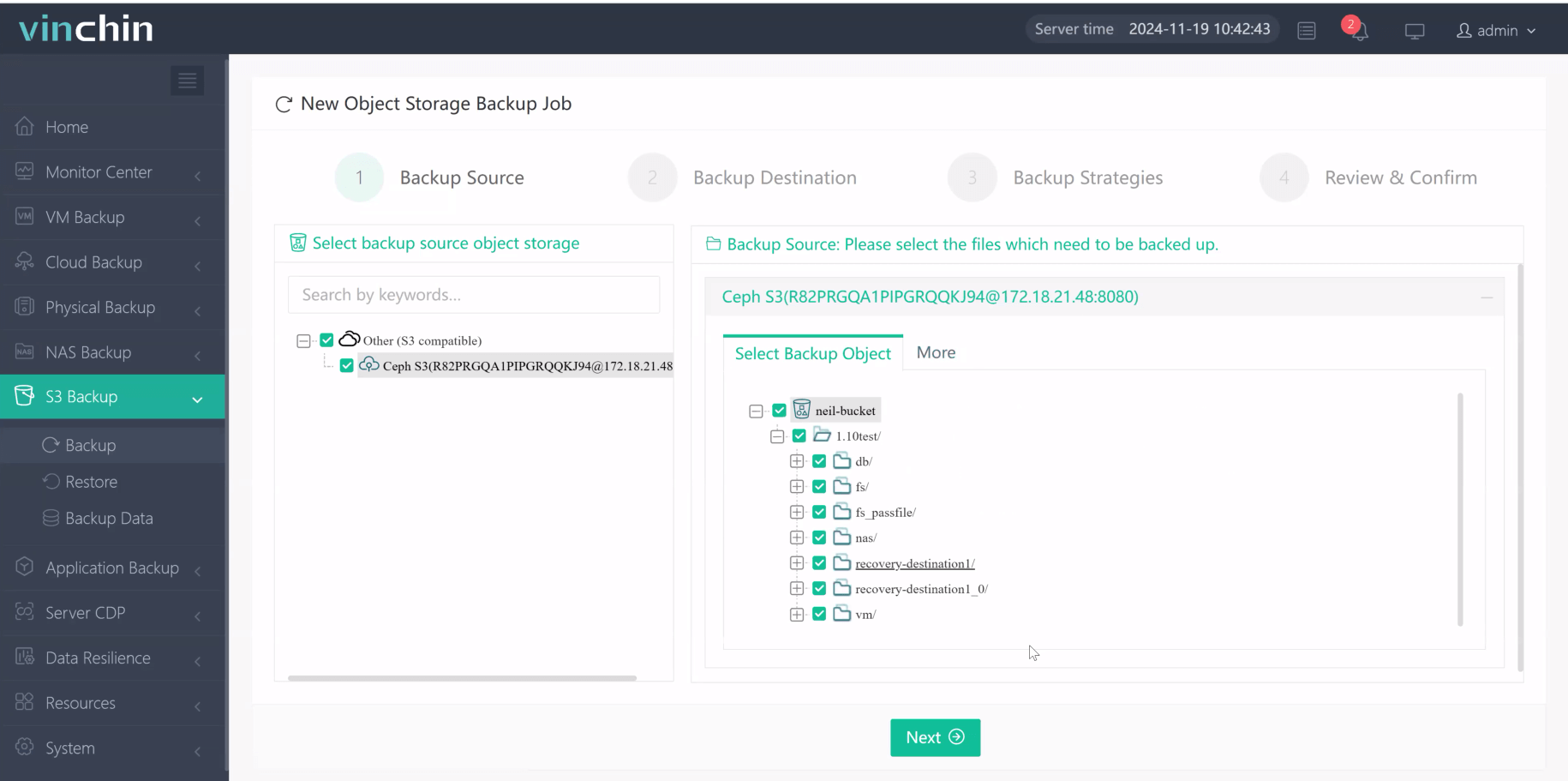
Step 2. Choose the desired backup destination
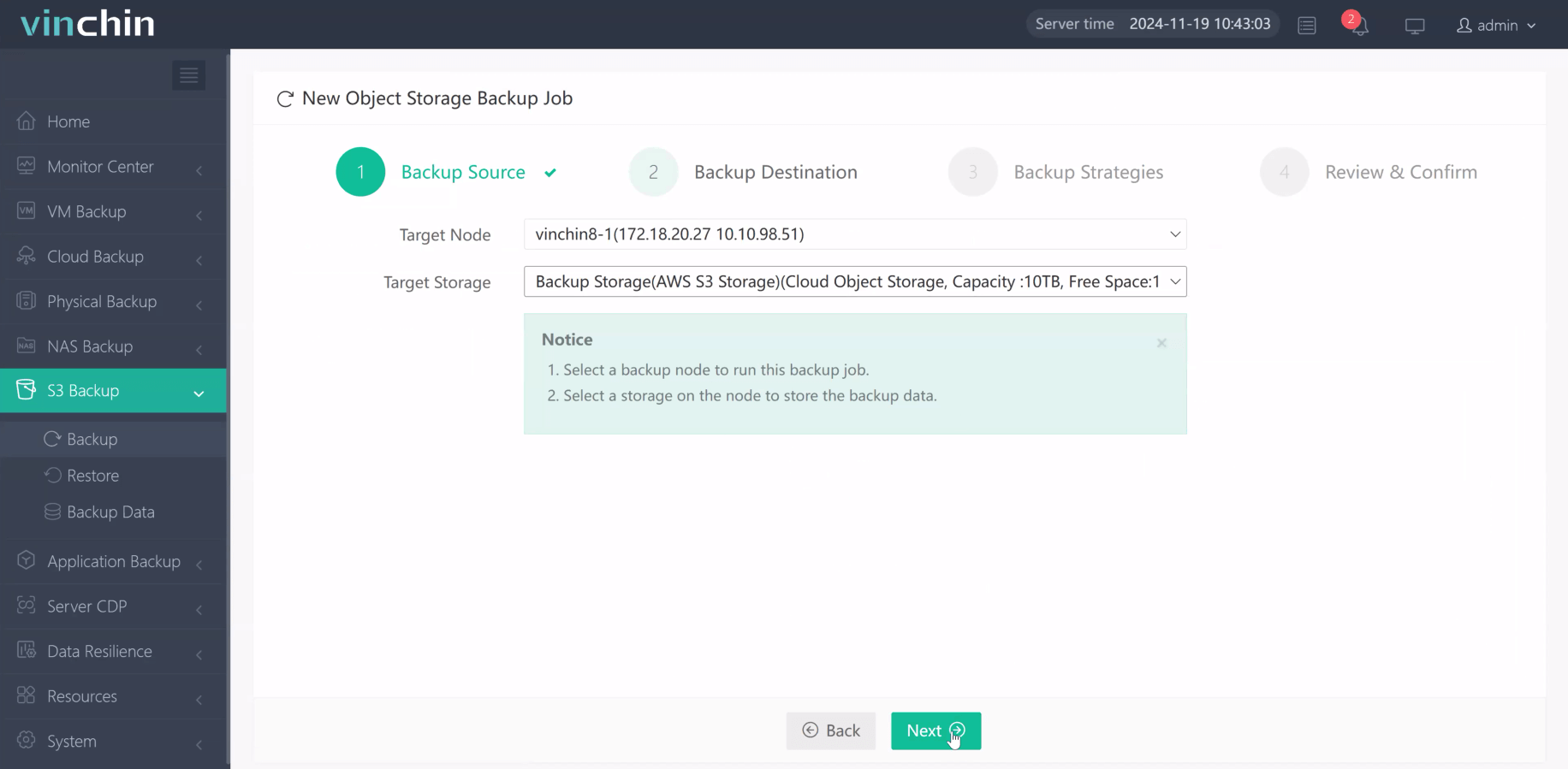
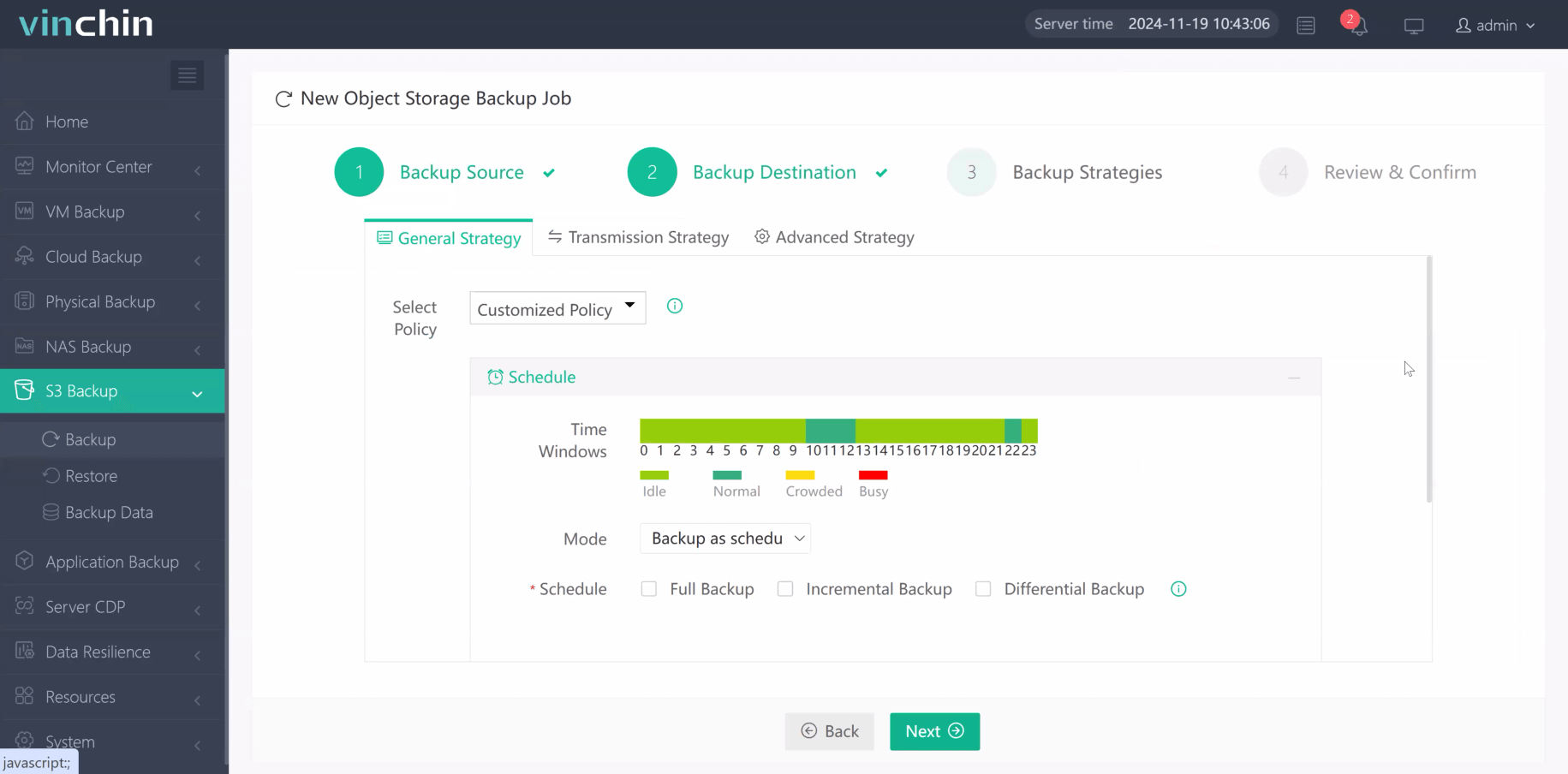
Step 3. Define scheduling/compression/throttling strategies
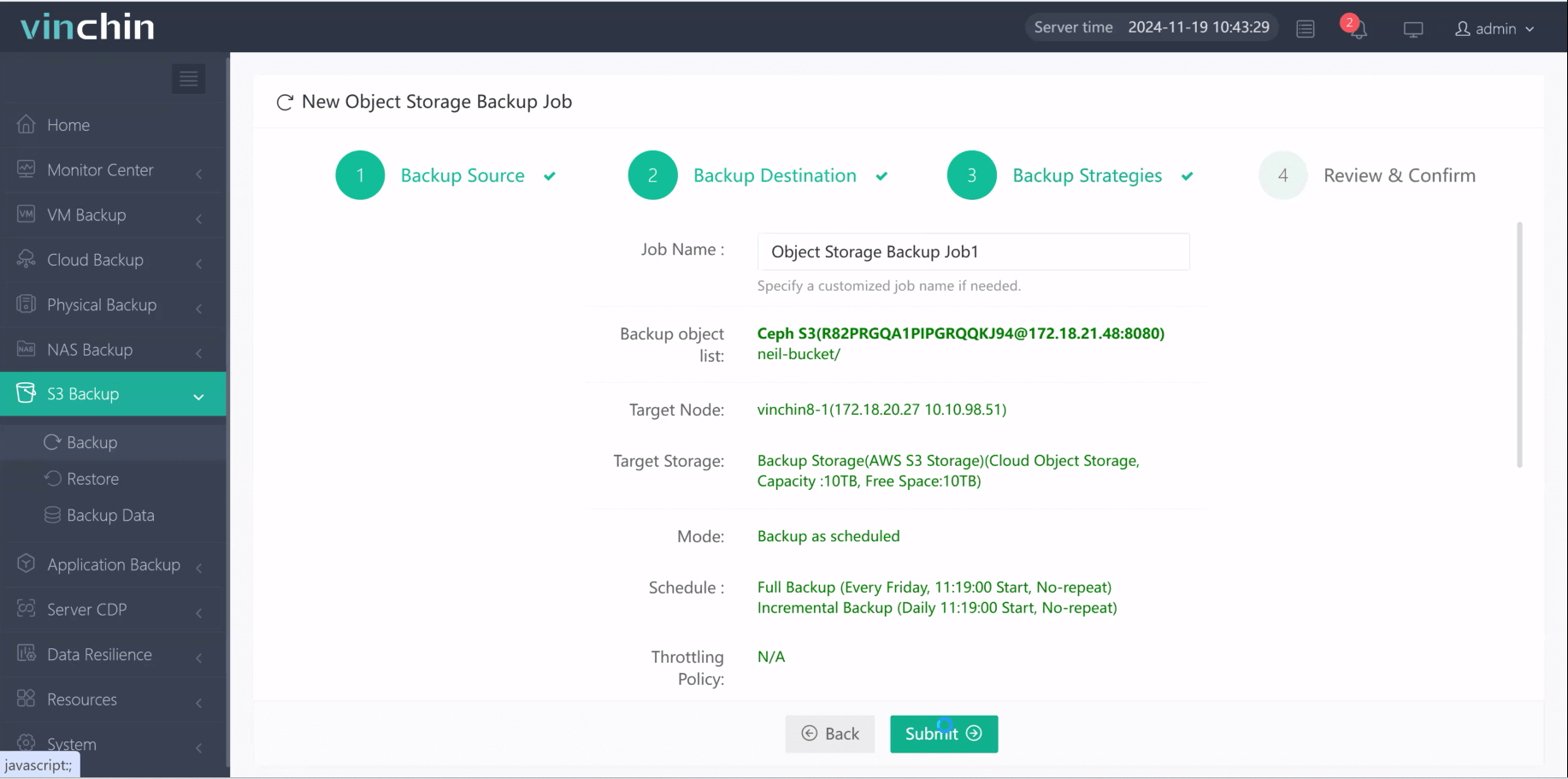
Step 4. Submit the job
Trusted globally by thousands of enterprises with top ratings in independent reviews, Vinchin Backup & Recovery offers a fully featured free trial valid for 60 days—click below to experience comprehensive protection risk-free!
WORM Protection FAQs
Q1: Can I shorten a retention period after applying it in Compliance mode?
A1: No—you must wait until expiration; shortening isn’t allowed once set under strict compliance rules.
Q2: What happens if my system clock drifts while using SnapLock?
A2: Operations may fail; always sync clocks via NTP before enabling SnapLock features.
Q3: Can I move locked objects between buckets without losing their lock status?
A3: No—you must copy them into another pre-configured Object Lock bucket while preserving metadata manually.
Conclusion
WORM protection keeps vital business records safe from tampering while helping meet tough audit standards year after year—with minimal overhead once properly configured upfront! Whether leveraging NetApp ONTAP/NAS appliances/cloud-native AWS S3—or advanced solutions like Vinchin—you gain peace of mind knowing critical assets remain truly immutable throughout their lifecycle.






