Automation keeps modern IT operations running smoothly. In Kubernetes, CronJobs let you schedule jobs to run at fixed times or intervals—just like classic Unix cron but built for containers. Whether you want to back up data, clean logs, or send reports on a schedule, Kubernetes CronJobs can help. This guide walks you through kubernetes cronjob examples from basic to advanced so you can automate tasks confidently.
What Is a Kubernetes CronJob?
A Kubernetes CronJob is a resource that schedules jobs in your cluster using time-based rules. It works much like the familiar cron utility in Linux but runs inside your cluster instead of on one server. When it triggers, it creates Job objects that launch Pods to do the work you define.
The CronJob controller manages this process behind the scenes. It checks schedules every minute and starts Jobs when needed. If something fails—like a Pod crash—the controller retries based on your settings. This makes CronJobs reliable for automating routine tasks across distributed environments.
How Does Scheduling Work?
Kubernetes uses standard cron syntax in the schedule field:
means every minute; 0 0 means midnight daily; other patterns follow cron rules. All times use UTC unless you specify otherwise.
Basic Kubernetes CronJob Example
Let’s start simple with a kubernetes cronjob example that prints the date and a hello message every minute—a great way to test scheduling basics before moving on.
First, create a file called cronjob.yaml:
apiVersion: batch/v1
kind: CronJob
metadata:
  name: hello
spec:
  schedule: "* * * * *"
  jobTemplate:
    spec:
      template:
        spec:
          containers:
          - name: hello
            image: busybox:1.36
            imagePullPolicy: IfNotPresent
            command:
            - /bin/sh
            - -c
            - date; echo Hello from the Kubernetes cluster
          restartPolicy: OnFailure
Here’s what matters most:
schedule: " *" runs once per minute (all fields are minutes/hours/day/month/week).
image: Uses BusyBox version 1.36—a lightweight shell environment.
command: Prints date then echoes a message.
restartPolicy: Restarts only if there’s an error.
Deploying Your First CronJob
To deploy this kubernetes cronjob example:
1. Run kubectl apply -f cronjob.yaml
2. Confirm creation with kubectl get cronjob hello
3. Watch jobs appear using kubectl get jobs --watch
After about one minute, you’ll see new Job resources created automatically by your CronJob.
Verifying Output
Want proof it worked? Find out which Pod ran your job:
1. List pods with kubectl get pods --selector=job-name=hello-*
2. Pick the latest pod name shown.
3. View logs using kubectl logs <pod-name>
You should see output like this:
Fri Feb 22 11:02:09 UTC 2019
Hello from the Kubernetes cluster
If nothing appears yet, wait another minute—the schedule may not have triggered yet!
Cleaning Up
When finished testing:
Run kubectl delete cronjob hello.
This removes both the CronJob definition and any Jobs or Pods it created.
Advanced Kubernetes CronJob Example
Once you’re comfortable with basics, let’s try an advanced kubernetes cronjob example that adds real-world features—like preventing overlap between runs and keeping job history tidy.
Suppose you want to run backups every night at midnight—but never allow two backups at once—and keep only recent results for easy review.
Here’s how:
apiVersion: batch/v1
kind: CronJob
metadata:
  name: daily-backup
spec:
  schedule: "0 0 * * *"
  concurrencyPolicy: Forbid
  successfulJobsHistoryLimit: 3
  failedJobsHistoryLimit: 1
# Uncomment below line if using K8s v1.24+ and need local timezone support!
# timeZone: "America/New_York"
  jobTemplate:
    spec:
      template:
        spec:
          containers:
          - name: backup
            image: alpine:3.18 # Use stable tag for reproducibility!
            command:
            - /bin/sh
            - -c
            - echo "Starting daily backup at $(date)"; sleep 10; echo "Backup finished at $(date)"
            resources:
              requests:
                memory: "64Mi"
              limits:
                memory: "128Mi"
          restartPolicy: OnFailure
Key points explained:
schedule: "0 0 *" means midnight UTC daily.
concurrencyPolicy: Set to Forbid, so if yesterday’s backup is still running tonight’s won’t start until it finishes (prevents overlap).
successfulJobsHistoryLimit/failedJobsHistoryLimit: Only keep last three successes and last failure—for easier troubleshooting without cluttering up resources.
resources: Requests/limits prevent runaway memory usage during backups—a smart production habit!
(Optional) Add timeZone if your business logic depends on local time rather than UTC (supported since K8s v1.24).
Deploying Your Advanced Job
Deploy just like before:
1. Save as backup-cron.yaml.
2. Run kubectl apply -f backup-cron.yaml.
3. Check status anytime with kubectl get cronjob daily-backup.
To see all past runs (jobs), use
kubectl get jobs --sort-by=.metadata.creationTimestamp.
To view logs from any backup run,
find its pod (kubectl get pods --selector=job-name=daily-backup-*) then
run kubectl logs <pod-name>.
Why Use Kubernetes CronJobs?
Why bother learning all this? Because automation saves time—and reduces mistakes—in almost every IT operation task!
With kubernetes cronjobs you can reliably automate things like database backups (so data isn’t lost), log cleanup (to save disk space), regular report generation (for compliance), syncing data between systems nightly—or even running security scans automatically while everyone sleeps!
CronJobs scale as clusters grow—they’re managed just like any other resource via YAML files or GitOps tools. No more logging into servers late at night just to kick off scripts manually!
Real World Scenarios Where Automation Shines
Imagine these situations:
A nightly database dump saves hours of recovery after accidental deletes;
Old log rotation keeps disks healthy;
Automated health checks alert admins before users notice downtime;
Regular syncs ensure remote offices always have fresh data;
Scheduled email reports keep stakeholders informed without manual effort;
All these become routine—with less risk of human error—when powered by well-designed kubernetes cronjobs!
Enterprise-Level Protection for Kubernetes with Vinchin Backup & Recovery
Beyond automation, safeguarding critical workloads requires robust backup capabilities tailored for containerized environments. Vinchin Backup & Recovery stands out as an enterprise-level solution purpose-built for comprehensive Kubernetes protection across clusters of any size and complexity.
Vinchin Backup & Recovery delivers full and incremental backups, fine-grained restore options by namespace/application/PVC/resource, policy-driven scheduling alongside one-off jobs, cross-cluster/cross-version recovery—including migration between different storage backends—and strong encryption plus retention controls for compliance-ready protection—all designed to maximize efficiency while minimizing operational risk.
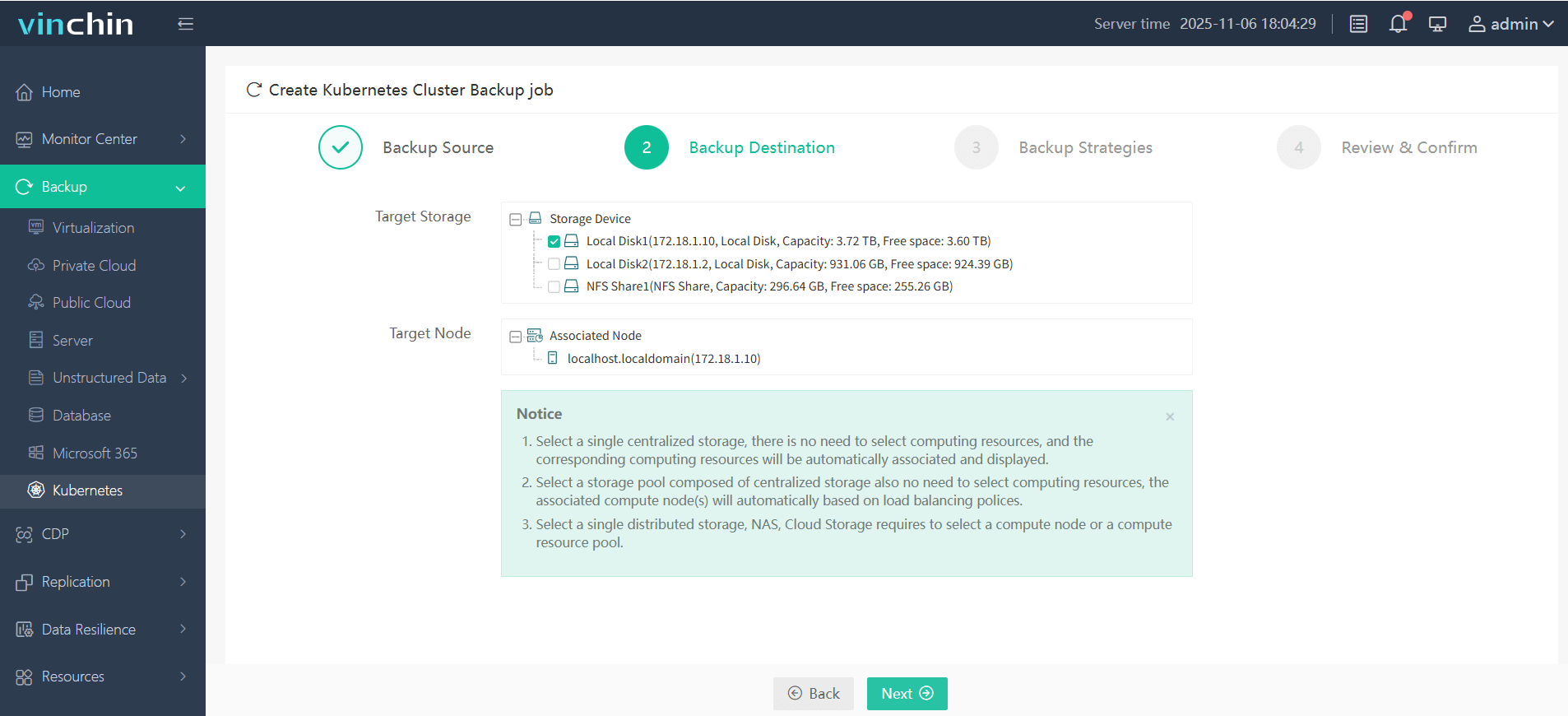
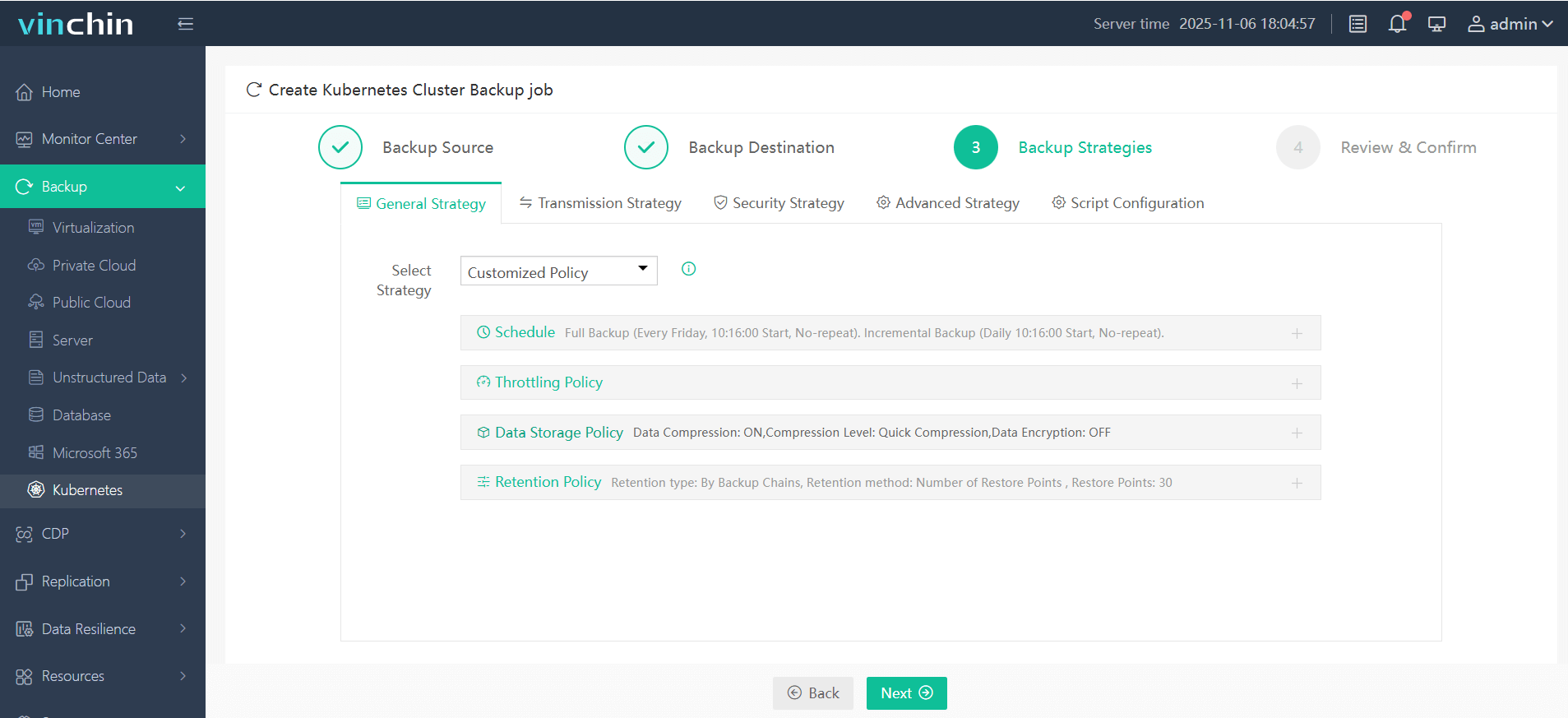
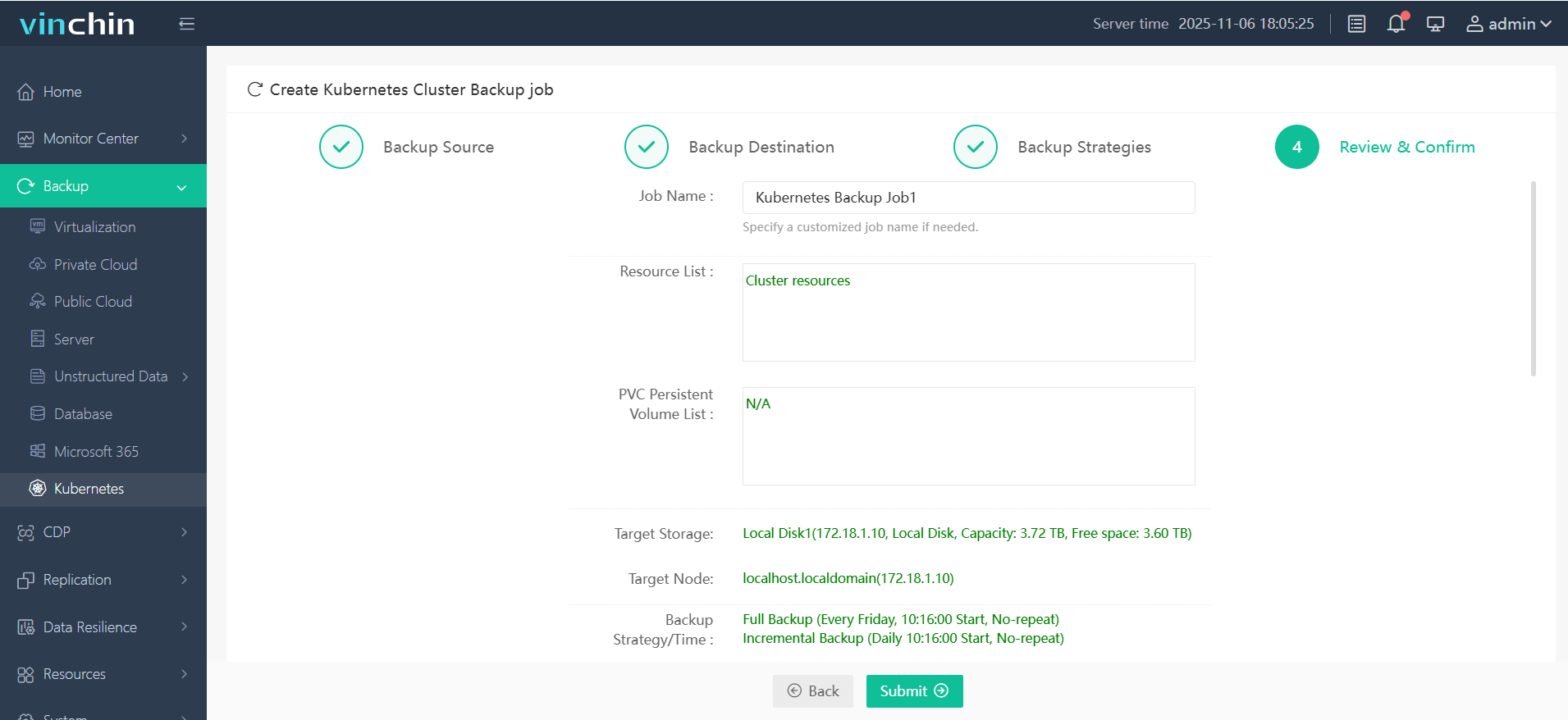
The intuitive web console streamlines backup management into four straightforward steps specifically optimized for Kubernetes environments:
Step 1 – Select the backup source;

Step 2 – Choose backup storage;
Step 3 – Define strategy;
Step 4 – Submit the job.
Recognized globally by thousands of enterprises and rated among top data-protection solutions, Vinchin Backup & Recovery offers a free full-featured trial valid for sixty days—click below to experience seamless enterprise-grade protection firsthand.
Kubernetes CronJob Example FAQs
Q1. How do I trigger a scheduled job immediately instead of waiting?
A1. Use KUBECTL CREATE JOB --FROM=CRONJOB/<CRONJOB-NAME> <NEW-JOB-NAME>
Q2. Can I limit how long my scheduled jobs wait if they miss their window?
A2. Yes—set STARTINGDEADLINESECONDS in your YAML; e.g., startingDeadlineSeconds: 600 lets missed jobs start within ten minutes of their intended time slot.
Q3. What should I check first when my scheduled task doesn’t run?
A3. Describe both the CronJob (KUBECTL DESCRIBE CRONJOB <NAME>) and recent Jobs (KUBECTL DESCRIBE JOB <NAME>) to review events/errors quickly.
Conclusion
Kubernetes CronJobs make automation easy—from simple scripts up through complex workflows—with reliability built-in across distributed clusters worldwide! For complete peace of mind about data safety alongside automation power, Vinchin delivers robust protection plus an intuitive web console. Try Vinchin free today—and keep operations running smoothly!










