Choosing the right data platform is a big decision for any IT team. Hadoop and MySQL are both popular choices in today’s data-driven world, but they serve very different needs. Understanding their strengths and weaknesses helps you pick the best tool for your workload—whether you manage small transactional databases or massive analytics clusters. Let’s break down what makes each unique, how they compare step by step, and when to use one over the other.
What Is Hadoop?
Hadoop is an open-source framework designed to store and process huge amounts of data across many servers at once. Its core component is HDFS (Hadoop Distributed File System), which spreads files across multiple machines so no single server becomes a bottleneck. This design allows organizations to handle petabytes of information without expensive hardware.
The main processing engine in classic Hadoop is MapReduce, which lets you analyze large datasets in parallel on different nodes. However, modern Hadoop deployments often use other engines like Apache Spark through YARN (Yet Another Resource Negotiator) for faster analytics and more flexible workloads. This flexibility means you can choose batch processing with MapReduce or near real-time analysis with Spark—all within the same ecosystem.
Hadoop excels at handling unstructured or semi-structured data such as logs, images, videos, or sensor readings from IoT devices. It was built from day one with fault tolerance in mind: if one server fails during processing or storage tasks, others take over automatically so your jobs keep running without interruption.
Example: Simple MapReduce Workflow
Let’s say you want to count word frequency in millions of log files stored on HDFS:
1. Write a mapper function that reads each line of text and outputs each word.
2. Write a reducer function that sums up occurrences of each word.
3. Submit your job using hadoop jar command.
4. Results are saved back into HDFS as output files.
This approach works well even if your dataset grows tenfold overnight—just add more servers!
What Is MySQL?
MySQL is a widely used open-source relational database management system (RDBMS) trusted by businesses worldwide. It stores information in structured tables defined by schemas—think rows and columns like spreadsheets—which makes it perfect for applications where relationships between data matter.
You interact with MySQL using Structured Query Language (SQL) commands such as SELECT, INSERT, UPDATE, or DELETE to manage records quickly:
SELECT * FROM customers WHERE country = 'USA';
This query fetches all customer records from the USA instantly—a common task in e-commerce sites or banking systems where speed matters most.
MySQL follows strict ACID principles (Atomicity, Consistency, Isolation, Durability), ensuring every transaction either completes fully or not at all—even during power failures or crashes. That reliability makes it ideal for transactional workloads needing strong consistency guarantees.
While MySQL runs well on modest hardware out-of-the-box—and scales vertically by adding CPU/RAM—it can also scale horizontally through sharding (splitting tables across servers) or clustering solutions when needed for larger environments.
Hadoop vs MySQL Key Differences
Both platforms have their place—but how do they stack up side by side? Here are their main differences explained step by step:
Data Structure Flexibility
Hadoop handles almost any type of data—unstructured logs from web servers; semi-structured JSON documents; even structured CSV files—with no fixed schema required upfront. You simply drop new files into HDFS as needed.
In contrast, MySQL requires predefined schemas before storing anything: every table has set columns with specific types (text strings; numbers; dates). This structure enforces order but limits flexibility if your incoming data changes often.
Scalability Approaches
Hadoop was built to scale horizontally—you just add more commodity servers (“nodes”) whenever storage needs grow or analytics jobs get bigger. There’s no need to buy high-end machines; inexpensive hardware works fine because failures are expected and handled automatically through replication across nodes.
MySQL typically scales vertically first: upgrade CPUs/RAM/disks on one server until it maxes out resources. For higher loads—or high availability—you can implement read replicas (for scaling reads) or sharding/clustering setups (for writes), but these require careful planning compared to Hadoop’s plug-and-play expansion model.
Processing Model
Hadoop uses batch processing via MapReduce/Spark/YARN frameworks—jobs run over entire datasets at once rather than row-by-row transactions—which means results may take minutes/hours depending on size but allow deep analysis impossible in traditional databases.
MySQL shines at real-time queries: users get instant answers thanks to indexed tables optimized for fast lookups/updates/deletes/inserts—a must-have feature when serving live websites/apps where delays aren’t acceptable!
Consistency Models & Transactions
MySQL enforces immediate consistency using ACID transactions—every change is visible right away after commit; rollbacks undo partial updates if something goes wrong mid-way through an operation (like transferring money between accounts).
Hadoop focuses on high availability/fault tolerance instead: its distributed nature means some updates might not appear everywhere instantly (“eventual consistency”). That trade-off works fine when analyzing historical trends but isn’t suitable where up-to-the-second accuracy matters most—for example billing systems!
Cost & Hardware Requirements
Both platforms are open source so there’s no licensing fee—but costs differ based on scale/type:
Hadoop: Runs best on clusters of cheap commodity hardware due to built-in redundancy/failure recovery features.
MySQL: Can run efficiently on single modest server initially; scaling beyond that may require investment in specialized clustering/sharding tools plus extra operational overhead managing those setups long-term.
Operational Overhead and Management
Managing these platforms day-to-day brings unique challenges:
Setting up a basic MySQL instance takes minutes—you install software then create databases/tables via SQL scripts.
Deploying Hadoop involves configuring multiple services across several nodes: NameNode/DataNode roles in HDFS; ResourceManager/NodeManager roles via YARN; plus monitoring tools like Ambari/Grafana.
Ongoing maintenance differs too: MySQL admins focus on backups/index tuning/query optimization while Hadoop admins monitor cluster health/job queues/disk usage/network traffic regularly.
Use Cases for Hadoop and MySQL
Each platform shines brightest under certain conditions—let’s see where they fit best.
Real-World Scenarios
Hadoop Use Cases:
Imagine an online retailer wants insights into shopping patterns from billions of clickstream events logged daily—they load raw logs into HDFS nightly then run Spark jobs summarizing user journeys per product category before exporting results into dashboards used by marketing teams next morning.
Another example? A utility company collects smart meter readings every minute from millions of homes—their engineers use MapReduce workflows inside Hadoop clusters to spot outages/trends/predictive maintenance needs months ahead.
Typical workflow steps:
1) Ingest raw files into HDFS
2) Process/analyze using Spark/MapReduce
3) Store aggregated results back into warehouse/reporting layer
MySQL Use Cases:
Picture an e-commerce site tracking orders/payments/inventory live as shoppers browse products—the backend relies on dozens of normalized tables linked together via foreign keys ensuring accurate stock counts/order histories per customer.
Or consider a bank recording thousands of transactions per second—all requiring strict ACID compliance so balances never go negative even during network hiccups!
Typical workflow steps:
1) User submits order/payment form
2) Application inserts record(s) atomically via SQL transaction
3) If error occurs mid-way rollback undoes partial changes
Why Choose Hadoop or MySQL?
When deciding between these two platforms—or considering both together—it helps to weigh performance factors alongside business goals.
Performance Considerations
For massive datasets growing rapidly year-over-year—or when dealing mostly with unstructured/semi-structured sources—Hadoop offers unmatched scalability/cost savings thanks to its distributed architecture.
But if low-latency response times matter most—or you’re working exclusively with structured tabular info needing complex joins/transactions/MyISAM/InnoDB optimizations—then mature RDBMS solutions like MySQL remain hard-to-beat!
Hybrid architectures are common too: companies often move transactional records from OLTP systems like MySQL into big-data lakes powered by Hadoop/Spark using connectors such as Apache Sqoop:
1) Extract recent sales/orders/customers nightly from production DB
2) Load them into HDFS/parquet format
3) Run deep-dive analytics without impacting front-end app performance
Ask yourself:
Do you need instant access + strict consistency? Or will batch reporting suffice given volume/diversity?
Enterprise Database Backup Made Simple With Vinchin Backup & Recovery
Regardless of whether you're managing vast analytical workloads with Hadoop ecosystems or handling mission-critical operations with relational databases like MySQL, robust backup strategies remain essential for business continuity. Vinchin Backup & Recovery stands out as a professional enterprise-level solution supporting today's mainstream databases—including prioritized support for MySQL along with Oracle, SQL Server, MariaDB, PostgreSQL, PostgresPro, and TiDB.
Vinchin Backup & Recovery delivers key features such as incremental backup capabilities tailored for efficient protection of growing datasets; batch database backup operations that streamline administration across multiple instances; advanced multi-level compression options that optimize storage usage; comprehensive retention policies including GFS retention strategies for regulatory compliance; and reliable any-point-in-time recovery ensuring minimal downtime after incidents—all designed to maximize efficiency while minimizing risk throughout your environment.
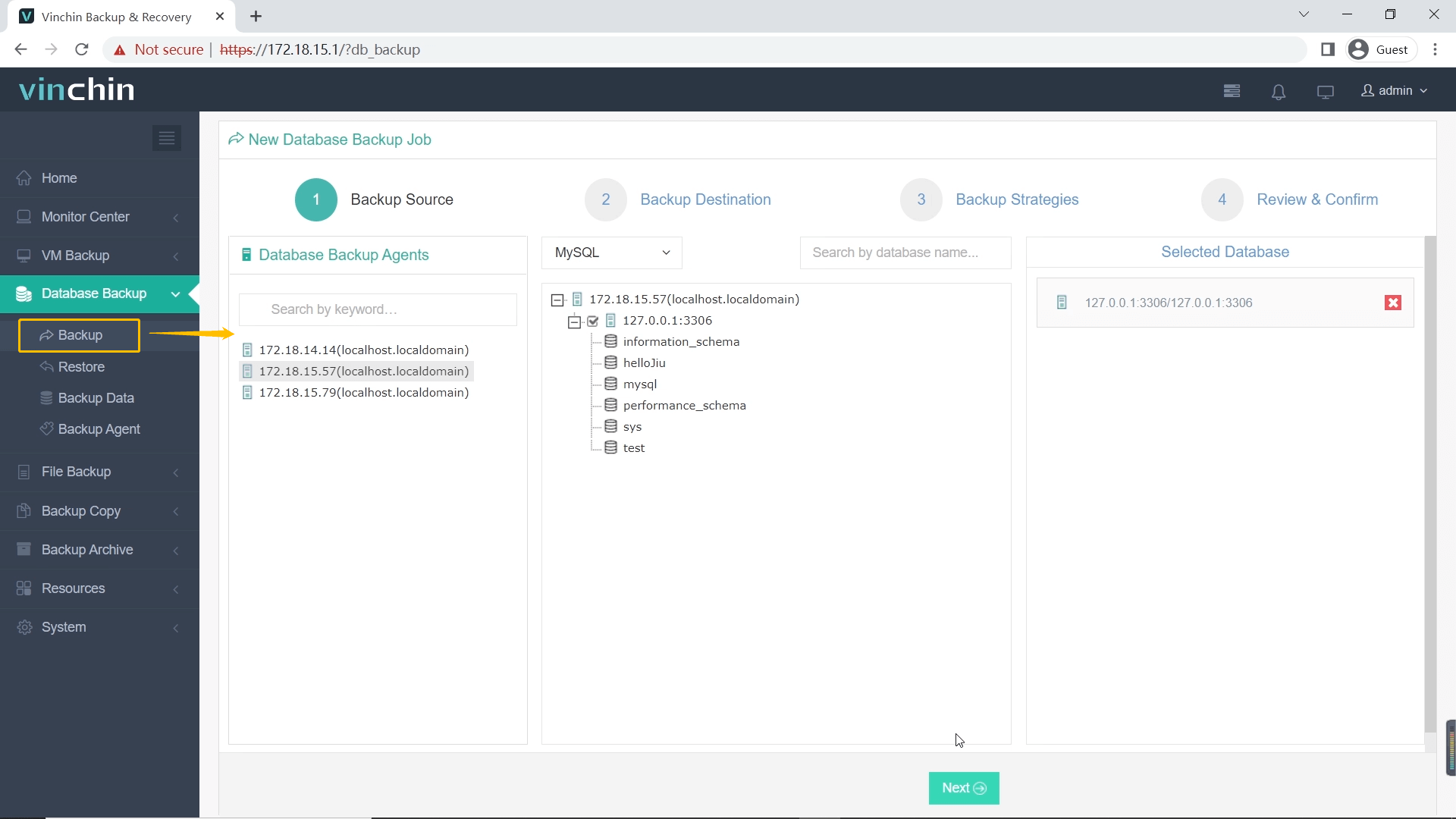
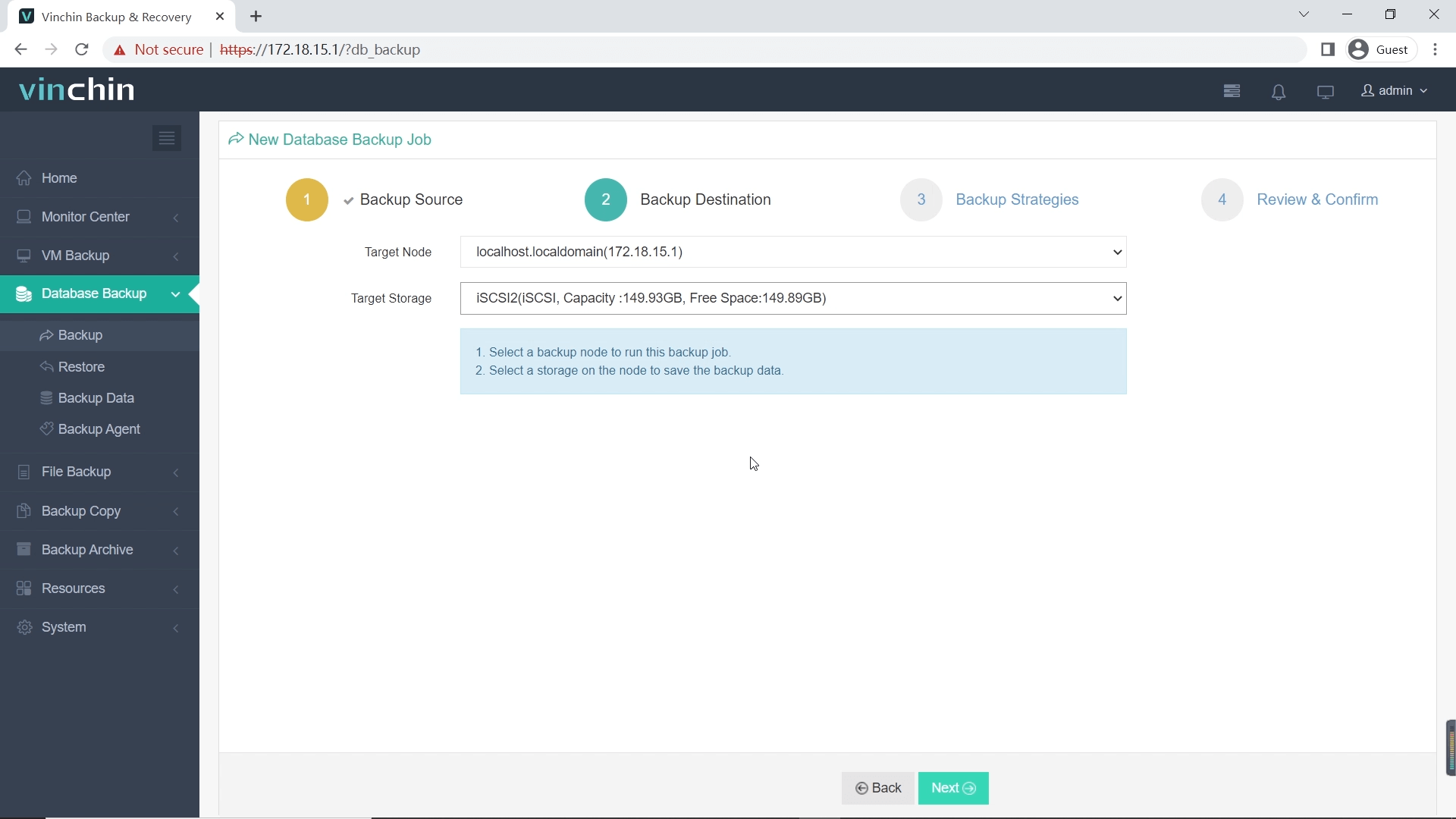
The intuitive web console simplifies backup management dramatically:
Step 1 – Select the MySQL database to back up
Step 2 – Choose backup storage destination
Step 3 – Define your backup strategy/schedule

Step 4 – Submit the job

Recognized globally among enterprise users for its reliability and ease-of-use—with top ratings worldwide—Vinchin Backup & Recovery offers a full-featured 60-day free trial so you can experience its benefits firsthand. Click below to download now!
Hadoop vs MySQL FAQs
Q1: Can I migrate legacy application data from MySQL into my new big-data pipeline?
Yes—you can export tables as CSV then import directly into HDFS using command-line tools before launching analytics jobs inside your cluster setup.
Q2: What should I monitor daily when running production-grade clusters?
Track node health/disk usage/job queue lengths/HDFS replication status regularly using built-in dashboards/tools provided by each platform.
Q3: How do I restore only selected rows accidentally deleted from my main table?
Use Vinchin web console > SELECT target table > CHOOSE restore point > FILTER specific rows > CLICK Restore Now
Conclusion
Both platforms serve distinct roles—choose based on workload size/data type/performance needs! For reliable backup/recovery especially around mission-critical RDBMS deployments trust Vinchin's advanced yet easy-to-use solution today!










