Keeping Oracle database backups healthy is a daily task for any operations administrator. But how do you know if the backups listed in your RMAN catalog actually exist on disk or tape? This is where the rman crosscheck command comes in. In this article, we’ll break down what RMAN crosscheck does, why it matters, and how to use it—starting with the basics and moving to advanced options.
What Is RMAN Crosscheck?
The rman crosscheck command is a built-in feature of Oracle Recovery Manager (RMAN). It verifies whether backup files recorded in the RMAN repository still exist on storage media such as disk or tape. When you run a crosscheck operation, RMAN scans for physical files like backup sets, image copies, or archived logs.
If a file exists where expected, its status remains AVAILABLE. If not found—perhaps deleted outside of RMAN—it gets marked as EXPIRED. This process keeps your backup catalog honest by matching records to reality. Without regular crosschecks, you might think you have recoverable data when you don’t.
Why Use RMAN Crosscheck?
Running rman crosscheck isn’t just good housekeeping—it’s essential for reliable recovery planning. Over time, backup files can disappear due to hardware failures, accidental deletions, or manual cleanups done outside of RMAN control.
Imagine trying to restore production data only to discover that key backups are missing! That’s every admin’s nightmare. Regularly running crosscheck ensures that what’s listed in your catalog matches what’s actually available on storage.
Crosschecking also helps identify expired records so you can remove them safely. This keeps your environment tidy and reduces confusion during audits or disaster recovery drills. By keeping only valid entries in your catalog, you avoid restore surprises—and keep compliance teams happy.
Method 1 Running Basic RMAN Crosscheck
Most administrators start with basic rman crosschecks because they’re simple yet effective at catching missing files across all types of Oracle backups.
Begin by connecting to RMAN with access to your target database instance. Then issue one of these commands depending on what you want checked:
To verify all backups:
RMAN> CROSSCHECK BACKUP;
For image copies:
RMAN> CROSSCHECK COPY;
For archived redo logs:
RMAN> CROSSCHECK ARCHIVELOG ALL;
After running these commands, RMAN scans configured storage locations for each file referenced in its repository. Any missing file gets flagged as EXPIRED, while present ones remain AVAILABLE.
Want an overview of expired items? Use:
RMAN> LIST EXPIRED BACKUP;
Ready to clean house? Remove expired records using:
RMAN> DELETE EXPIRED BACKUP;
This routine helps keep both your catalog accurate and storage uncluttered. Remember: always double-check before deleting anything—you don’t want accidental data loss!
Method 2. Advanced Options for RMAN Crosscheck
Sometimes basic checks aren’t enough—especially if you manage large databases with complex retention policies or multiple tablespaces spread across different devices.
Advanced rman crosschecks let you target specific objects by type, location, date range—or even custom tags used during backup creation.
To check only one tablespace:
RMAN> CROSSCHECK BACKUP OF TABLESPACE users;
To focus on a single datafile:
RMAN> CROSSCHECK BACKUP OF DATAFILE 4;
Limit checks by completion date:
RMAN> CROSSCHECK BACKUP OF DATAFILE 4 COMPLETED AFTER 'SYSDATE-14';
Filter by tag name (helpful if using naming conventions):
RMAN> CROSSCHECK BACKUPPIECE TAG = 'nightly_backup';
Or restrict checks based on device type—for example just disk-based backups:
RMAN> CROSSCHECK BACKUP DEVICE TYPE DISK;
These options help pinpoint problem areas quickly without scanning everything—a big time-saver when dealing with hundreds (or thousands) of files!
After targeted checks complete use familiar commands like LIST EXPIRED BACKUP or DELETE EXPIRED BACKUP as needed.
How Vinchin Backup & Recovery Protects Oracle Database Backups
Beyond maintaining accurate catalogs with rman crosscheck, safeguarding Oracle database backups requires robust enterprise solutions designed for modern IT environments. Vinchin Backup & Recovery stands out as a professional-grade platform supporting today’s leading databases—including Oracle first and foremost—as well as MySQL, SQL Server, MariaDB, PostgreSQL, PostgresPro, and TiDB. For Oracle workloads specifically, Vinchin Backup & Recovery delivers features such as batch database backup management, flexible data retention policies including GFS retention strategy, cloud backup and tape archiving integration, integrity check mechanisms for reliable restorability assurance, and seamless restore-to-new-server capabilities—all working together to maximize protection while minimizing administrative effort.
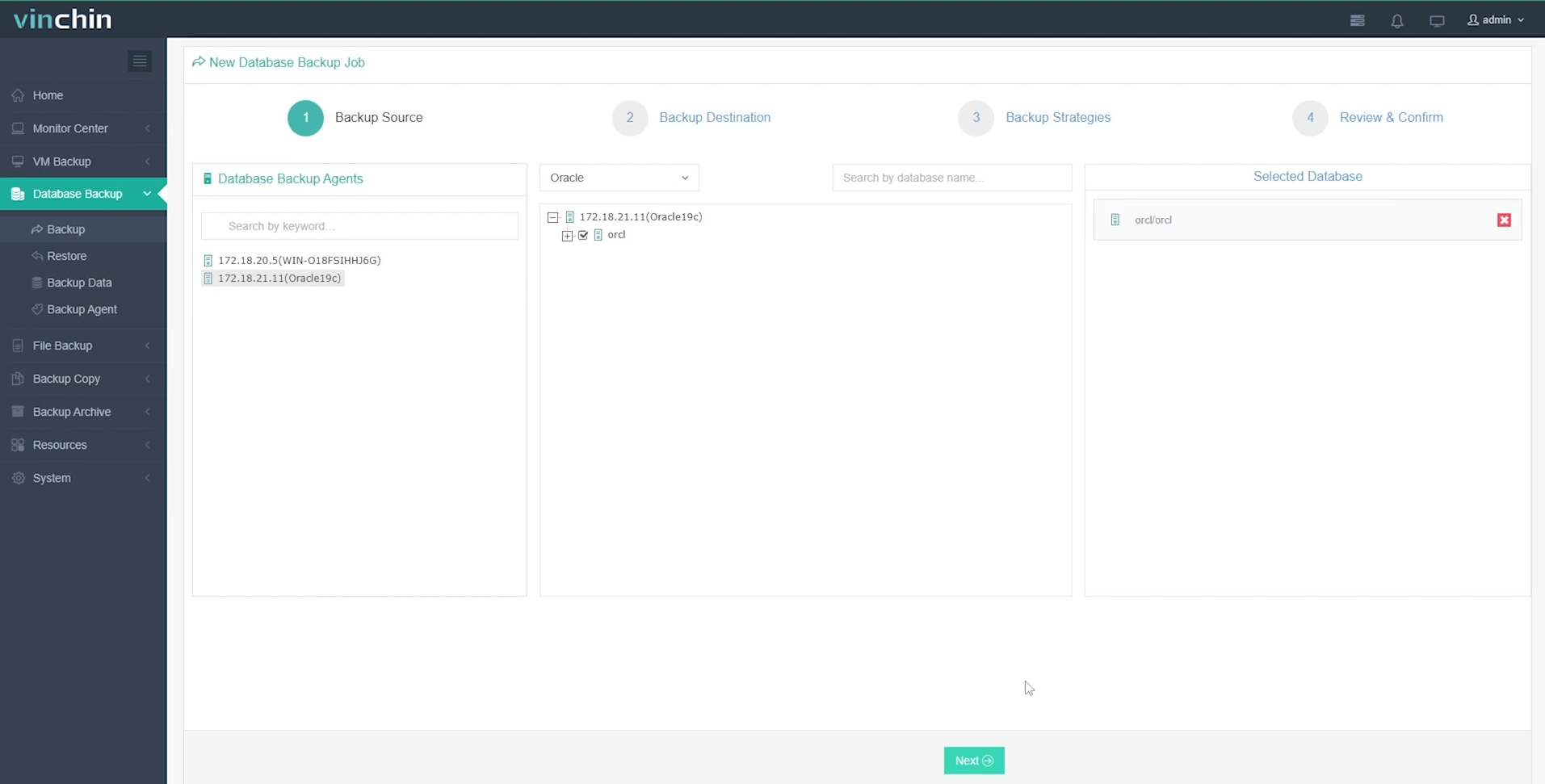
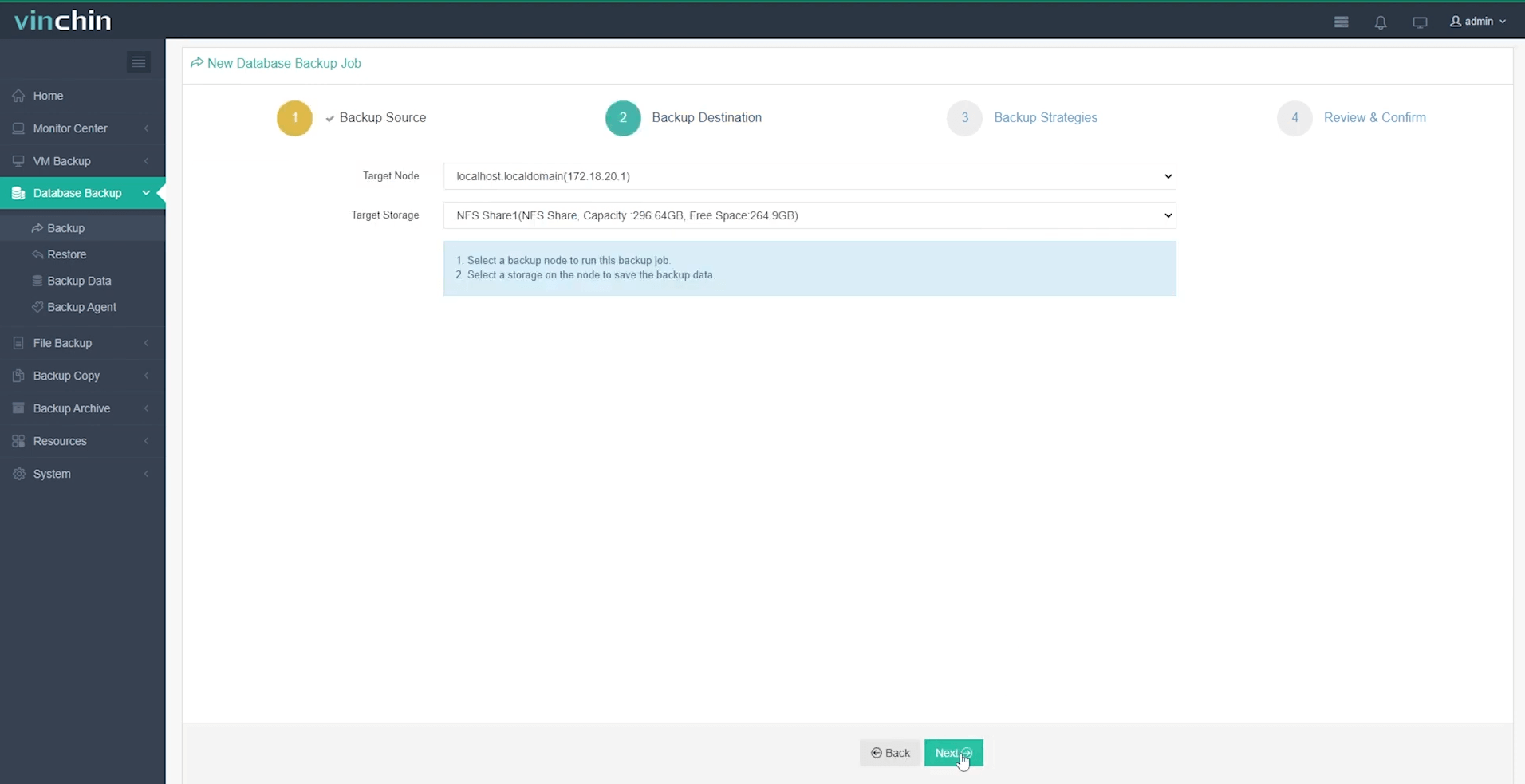
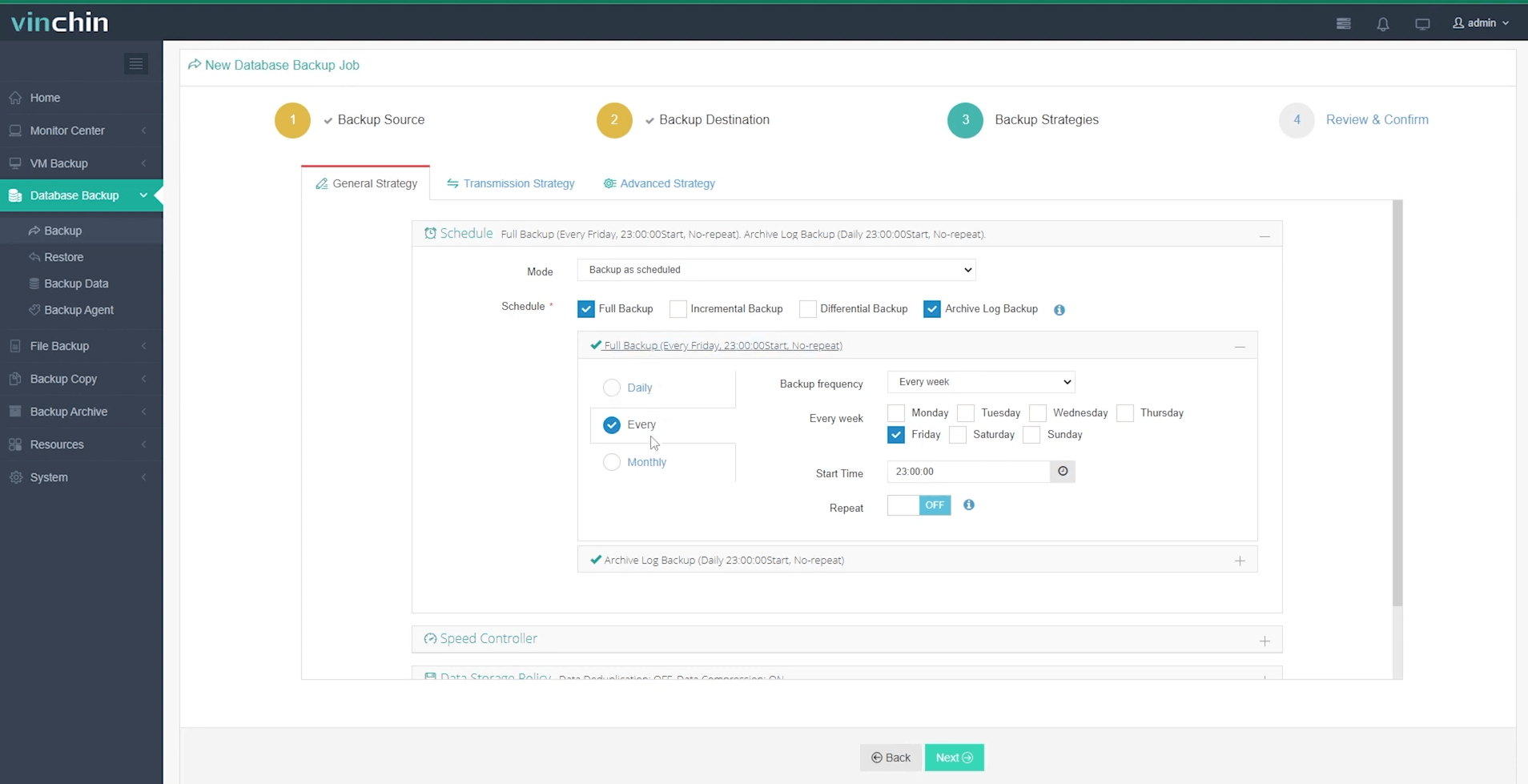
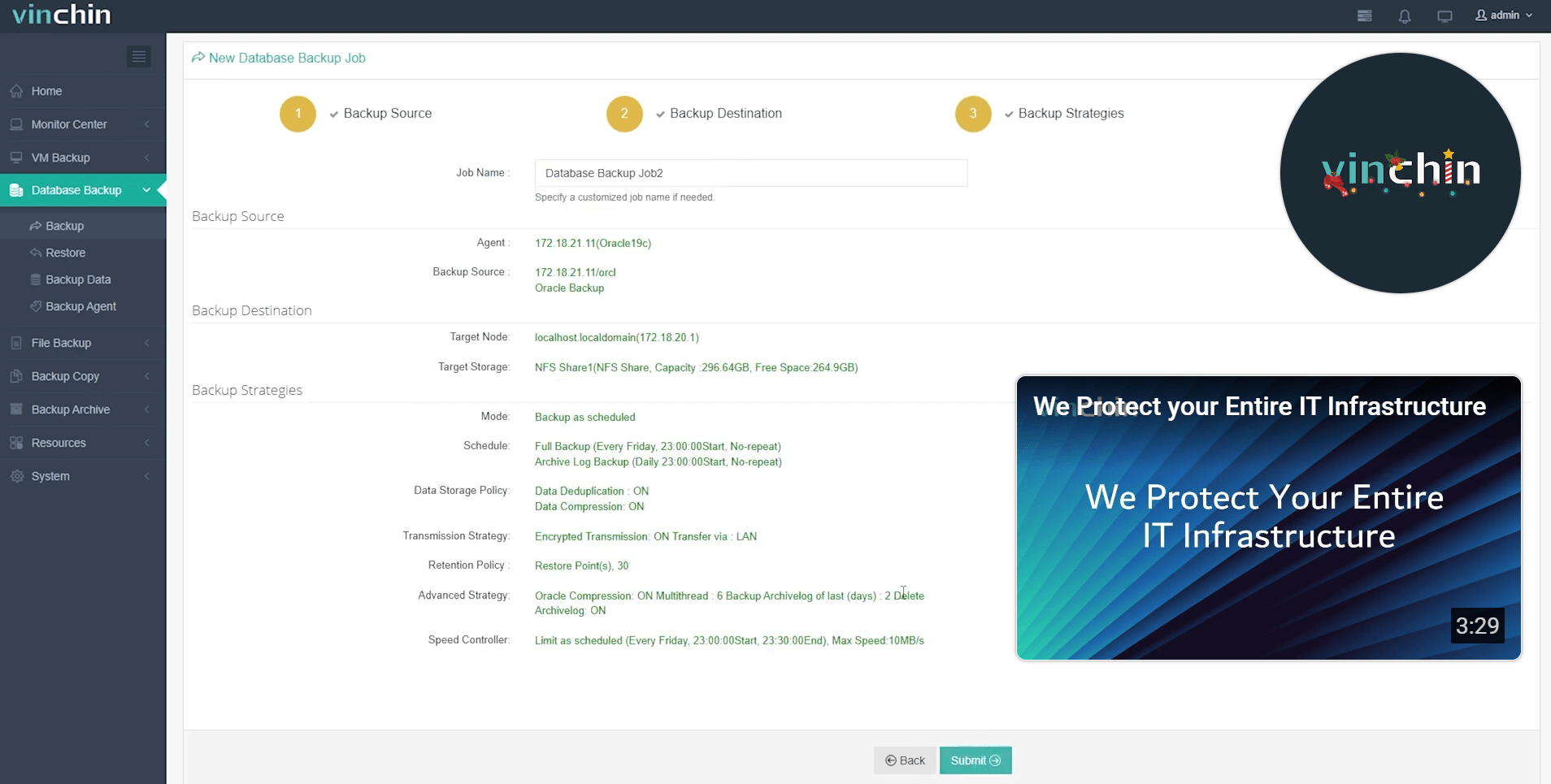
With its intuitive web console interface backing up an Oracle database takes just four streamlined steps:
Step 1: Select the Oracle database to back up
Step 2: Choose your preferred backup storage
Step 3: Define a tailored backup strategy
Step 4: Submit the job
Vinchin Backup & Recovery has earned global recognition among enterprises for reliability and ease-of-use—trusted by thousands worldwide with top industry ratings. Experience every feature free for 60 days; click download now!
rman crosscheck FAQs
Q1: Can I schedule automated rman crosschecks?
A1: Yes; use OS-level schedulers like cron (Linux/Unix) or Task Scheduler (Windows) combined with scripted commands such as CROSSCHECK BACKUP.
Q2: Does rman crosscheck detect corrupted files?
A2: No; it only verifies existence—not integrity—to check corruption use VALIDATE.
Q3: How often should I run rman crosschecks?
A3: Best practice suggests weekly runs—or immediately after major changes—to catch issues early without overloading resources.
Conclusion
The rman crosscheck command keeps Oracle catalogs accurate so restores succeed when needed most! Mastering both basic/advanced methods prevents nasty surprises later—and fits neatly into broader health-check routines alongside tools like VALIDATE/reporting obsolete items too! Vinchin makes managing enterprise-grade Oracle protection easier than ever—try us free today!