Every Oracle database needs a reliable backup and recovery plan. Oracle Recovery Manager (RMAN) is the built-in tool for this job. Whether you are new to Oracle or a seasoned administrator, understanding RMAN is essential for protecting your data and ensuring business continuity. In this article, we’ll walk through what RMAN is, why it matters, and how to use it for backup and restore operations.
What Is Oracle RMAN?
Oracle RMAN (Recovery Manager) is Oracle’s native utility for automating database backup, restore, and recovery tasks. It comes bundled with every Oracle Database installation—no extra downloads or licenses required. You can manage backups using either its command-line interface or Oracle Enterprise Manager, giving you flexibility in daily operations.
RMAN supports full and incremental backups, block-level corruption detection, backup encryption (with appropriate licensing), compression options, parallelization for speedier jobs, and more. Because it integrates tightly with the Oracle database engine itself, it’s considered the preferred method for safeguarding your data.
Why Use Oracle RMAN for Backup?
RMAN is more than just a backup tool—it’s a complete framework designed to automate many complex tasks that would otherwise require manual scripting. For example: tracking backup history automatically; managing retention policies so old backups don’t fill up storage; validating integrity so you know your data can be restored when disaster strikes.
You can run online backups while users stay connected if your database uses ARCHIVELOG mode—minimizing downtime even during critical periods. Advanced features like compression reduce storage costs; encryption protects sensitive data at rest; parallelization speeds up both backup and restore jobs on large systems.
With point-in-time recovery support built in—and granular options like restoring individual tablespaces or files—RMAN gives administrators confidence that they can recover from almost any scenario without guesswork.
Method 1: How to Perform a Full Database Backup with Oracle RMAN
A full database backup forms the backbone of any protection strategy. While RMAN makes this process straightforward, following best practices ensures your backup remains usable when needed most.
First things first: confirm your database runs in ARCHIVELOG mode so online backups capture all changes made during operation. Connect as SYSDBA using SQL*Plus:
sqlplus / as sysdba
Then check archive status:
ARCHIVE LOG LIST;
If not enabled yet—and after confirming requirements—you can switch modes by shutting down cleanly (SHUTDOWN IMMEDIATE) then mounting (STARTUP MOUNT) before running:
ALTER DATABASE ARCHIVELOG;
ALTER DATABASE OPEN;
Always consult official documentation matching your version before making changes.
Next launch the command-line client from an OS shell:
rman target /
This connects directly using operating system authentication—a secure default on most installations.
To perform a basic full backup inside the prompt:
BACKUP DATABASE;
This creates a set containing all current datafiles plus control file metadata by default. To include archived redo logs—which enables point-in-time recovery later—run:
BACKUP DATABASE PLUS ARCHIVELOG;
Want more control? Specify location and format explicitly:
BACKUP DATABASE FORMAT '/u01/backups/backup_%U.bkp';
Here %U generates unique names per piece so nothing gets overwritten accidentally—a lifesaver during busy schedules! Make sure /u01/backups exists on disk accessible by the oracle user account running services on Linux or Windows hosts alike.
For automation: schedule scripts via cron (Linux) or Task Scheduler (Windows). If you prefer graphical interfaces—or need enterprise-wide scheduling—consider using Oracle Enterprise Manager, which integrates seamlessly with RMAN workflows out-of-the-box.
Method 2: How to Restore Using Oracle RMAN
Restoring databases quickly—and correctly—is one skill every DBA must master under pressure! With proper planning though even complex recoveries become routine thanks to clear procedures built into RMAN itself.
Start by shutting down any running instance then mount only:
SHUTDOWN IMMEDIATE;
STARTUP MOUNT;
Mount mode allows access to physical structures without opening tablespaces prematurely—a key safety step.
To restore everything from latest available sets simply enter:
RESTORE DATABASE;
RECOVER DATABASE;
The first command copies backed-up files back into place while RECOVER applies archived redo logs plus incrementals until reaching consistency.
Need point-in-time rollback? Set explicit targets:
SET UNTIL TIME 'YYYY-MM-DD HH24:MI:SS';
RESTORE DATABASE;
RECOVER DATABASE;
Replace date/time string above appropriately based on incident details.
Once finished open freshly recovered system:
ALTER DATABASE OPEN RESETLOGS;
RESETLOGS starts new incarnation history after incomplete recoveries—a vital detail affecting future archiving cycles!
Partial restores are possible too:
RESTORE TABLESPACE users; RECOVER TABLESPACE users;

RESTORE DATAFILE 5; RECOVER DATAFILE 5;

-- Replace "users" or "5" as needed per situation!
Protecting Your Oracle Databases with Vinchin Backup & Recovery
For organizations seeking streamlined management beyond native tools like RMAN, Vinchin Backup & Recovery delivers comprehensive enterprise-grade protection tailored to modern environments. As a professional solution supporting today’s mainstream databases—including Oracle, MySQL, SQL Server, MariaDB, PostgreSQL, PostgresPro, and TiDB—it offers broad compatibility ideal for mixed infrastructures where multiple platforms coexist.
Vinchin Backup & Recovery stands out through features such as advanced source-side compression (for select platforms), incremental backup capabilities where supported, flexible batch processing of multiple databases at once, multi-level data compression options to optimize storage use, and robust retention policy controls including GFS schemes—all designed to maximize efficiency while meeting compliance demands. These powerful functions collectively ensure faster backups/restores, reduced resource consumption, simplified policy enforcement across workloads, and enhanced resilience against threats like ransomware thanks to integrated storage protection mechanisms.
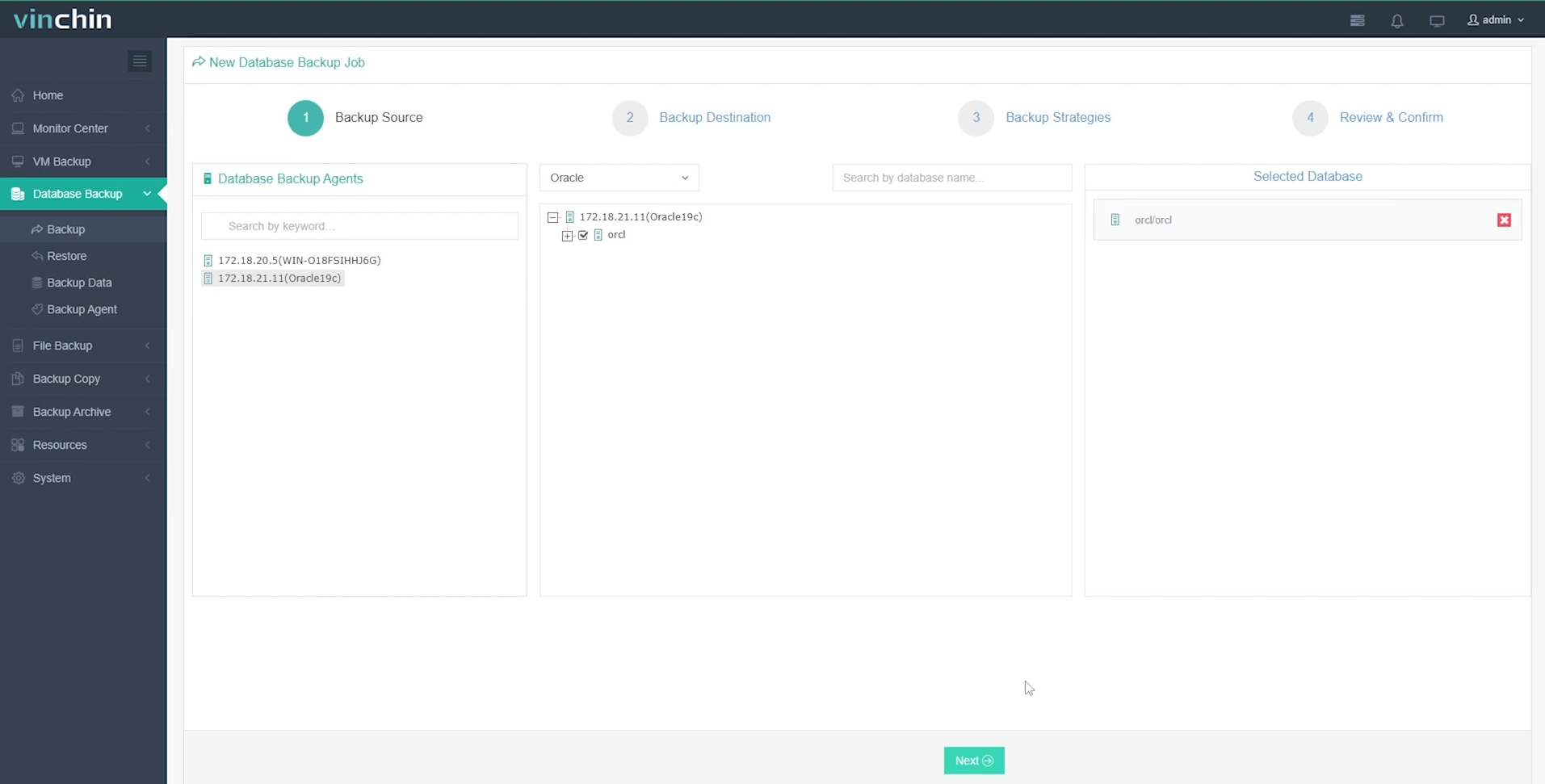
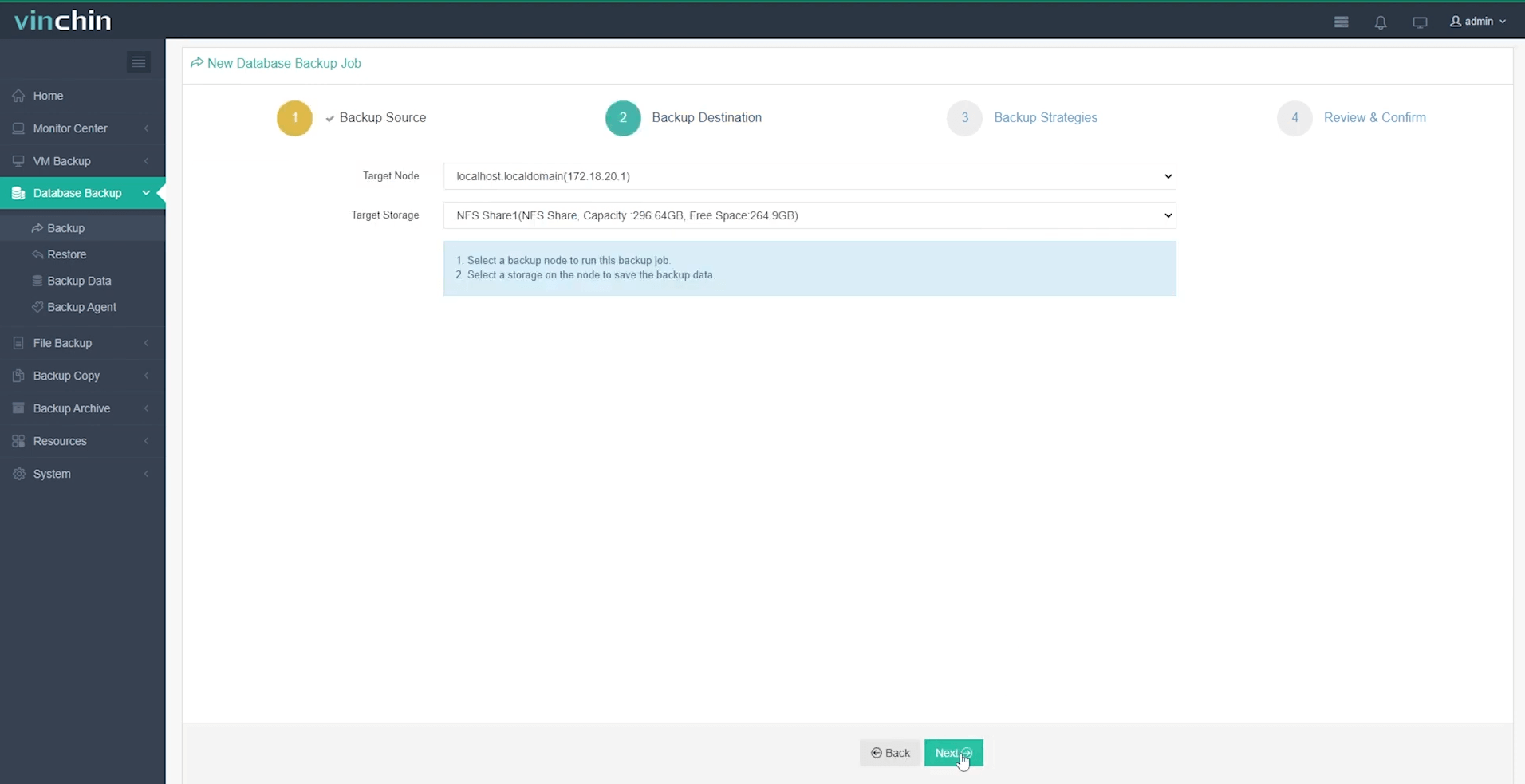
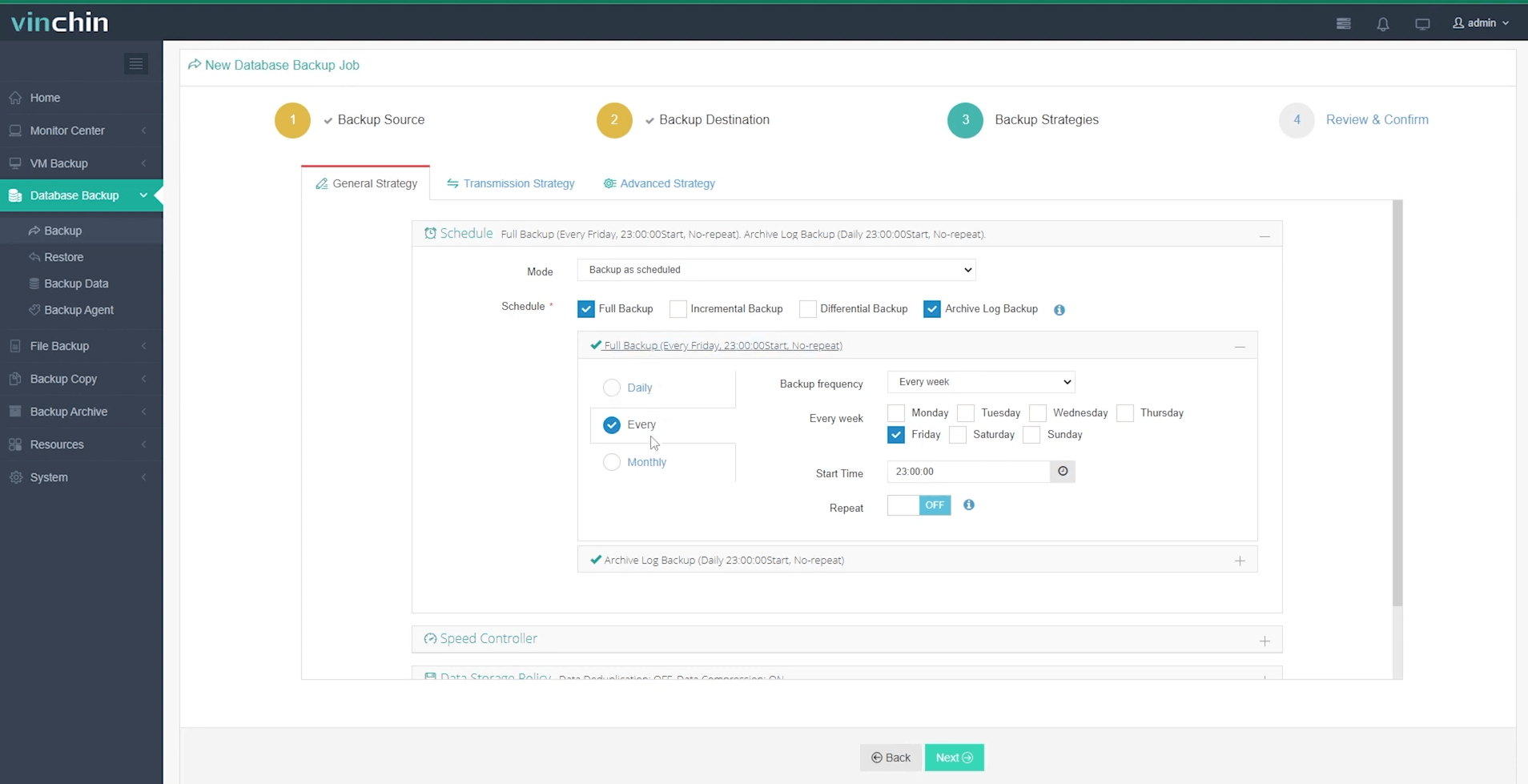
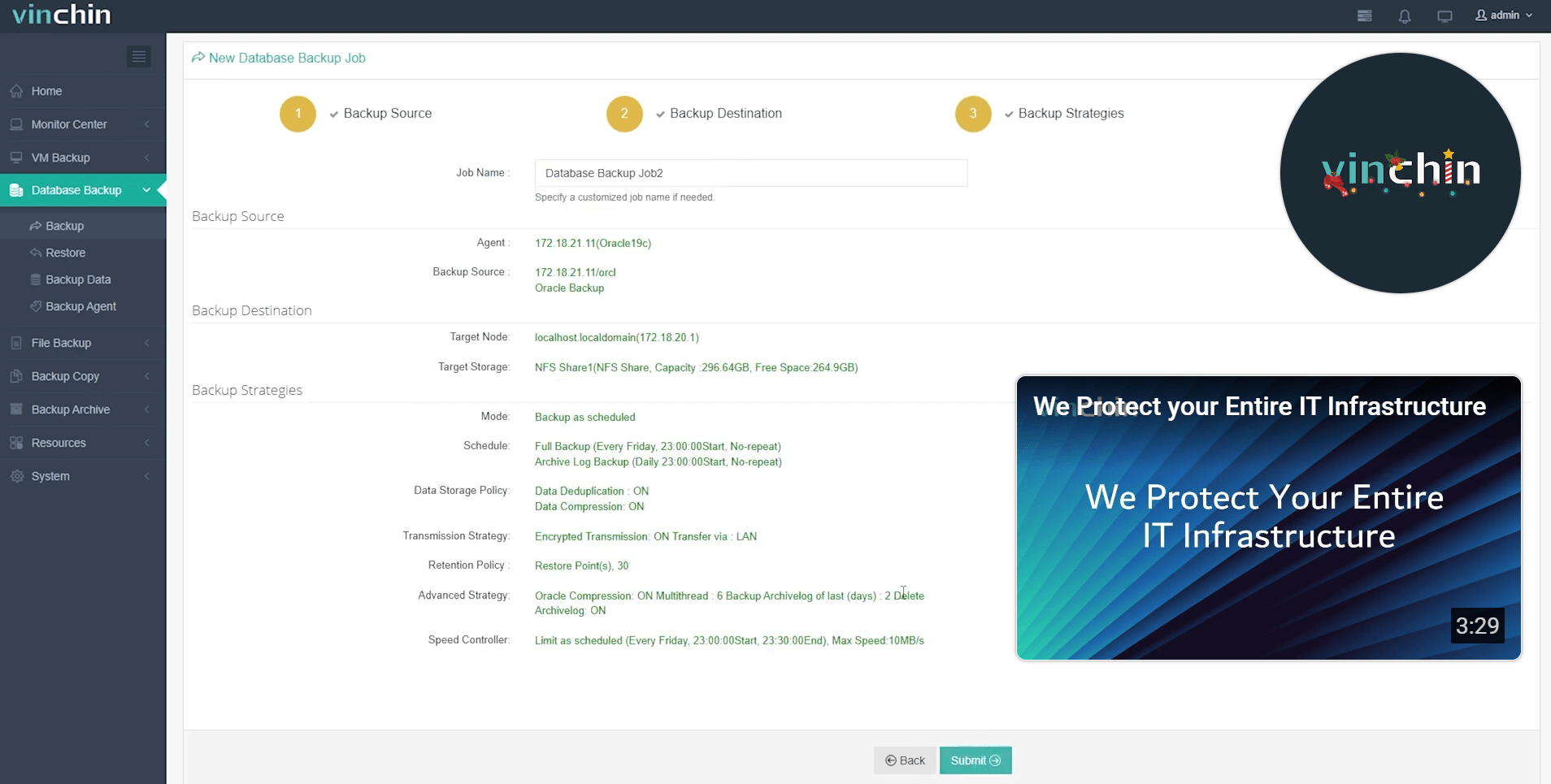
Managing backups through Vinchin Backup & Recovery’s intuitive web console requires just four straightforward steps tailored specifically for Oracle environments:
Step 1: Select the Oracle database to back up
Step 2: Choose your preferred backup storage
Step 3: Define a tailored backup strategy
Step 4: Submit the job
With its globally trusted reputation among enterprises of all sizes—and top ratings from industry reviewers—you can confidently safeguard mission-critical data using Vinchin Backup & Recovery’s unified platform. Experience every feature free for 60 days by clicking below to download now!
Oracle RMAN FAQs
Q1: Can I move my entire production environment's archive logs onto another server before restoring?
Yes—as long as you register those logs using CATALOG START WITH '/path/to/logs/' before running RECOVER commands—they’ll be recognized automatically during restoration processes.
Q2: How do I configure automatic deletion of obsolete backups?
Set retention policy via CONFIGURE RETENTION POLICY TO REDUNDANCY n then run DELETE OBSOLETE regularly within maintenance scripts—the oldest unneeded sets will be purged safely according to policy rules defined earlier!
Q3: What should I do if my control file becomes corrupted but autobackup was enabled?
Start instance NOMOUNT RESTORE CONTROLFILE FROM AUTOBACKUP ALTER DATABASE MOUNT RESTORE/RECOVER remaining objects normally—all prior metadata will be restored from last valid snapshot found automatically!
Conclusion
Oracle RMAN delivers robust automation and deep integration for reliable database protection—from simple daily jobs through advanced disaster recovery scenarios—with minimal manual effort required once configured properly.
For even greater simplicity across mixed environments consider trying Vinchin’s user-friendly enterprise-grade solution today!









