Managing Oracle databases means keeping a close eye on your archived redo logs—commonly called archivelogs. These files are essential for point-in-time recovery and disaster protection. But how do you list archivelog files quickly and accurately? In this article, we’ll walk through the main ways to list archivelogs in Oracle, explain why it matters, cover common use cases, show you how to manage old logs safely, and share best practices for deletion.
Quick answer: To list archivelog files in Oracle, run LIST ARCHIVELOG ALL; in RMAN, or query V$ARCHIVED_LOG in SQLPlus: SELECT SEQUENCE#, NAME, COMPLETION_TIME FROM V$ARCHIVED_LOG WHERE DELETED = 'NO' ORDER BY SEQUENCE#;. To check whether the database is in ARCHIVELOG mode and where logs are written, run ARCHIVE LOG LIST in SQLPlus.
What Is Archivelog in Oracle?
Archivelog mode is a setting in Oracle Database that copies filled redo log files to a safe location before they are overwritten. Each archivelog file is a copy of one filled online redo log, so together they record every change made to the database. With archivelog mode enabled, you can recover your database to any point in time—even after hardware failure or user error. Without it, recent transactions may be lost if something goes wrong.
Archivelogs are vital for business continuity because they let you restore data up to the moment of failure. They also support advanced features like Data Guard replication and help meet compliance requirements for data retention.
Why List Archivelog Files?f
Listing archivelog files is a key task for database administrators at every skill level. It helps you track which logs exist on disk or tape, which have been backed up safely, and which are ready for deletion or offloading.
By listing archivelogs regularly:
You confirm backups are complete and current.
You monitor disk space so storage never runs out unexpectedly.
You prepare logs for deletion or transfer to long-term storage.
You troubleshoot backup gaps or recovery issues before they become critical.
If you don’t check your archivelogs often enough, you might miss a backup gap or fill up your storage—leading to possible downtime or even data loss.
Method 1: List Archivelog Using SQL*Plus
SQL*Plus is Oracle’s standard command-line tool for interacting with databases at all levels—from basic queries to advanced administration tasks.
To check if your database is running in ARCHIVELOG mode—and see some details about current logging—connect as a user with SYSDBA privileges using SQL*Plus:
ARCHIVE LOG LIST
This command displays:
Whether the database uses ARCHIVELOG or NOARCHIVELOG mode
The current log sequence number
The destination where new archivelogs are stored
However, ARCHIVE LOG LIST only shows summary information—it does not display every individual file present on disk.
For detailed listings of each archived log file known by Oracle’s control file (including name and status), run this SQL query:
SELECT SEQUENCE#, NAME, APPLIED, COMPLETION_TIME
FROM V$ARCHIVED_LOG
ORDER BY SEQUENCE#;
Two things to keep in mind when reading V$ARCHIVED_LOG:
It keeps records of logs that were already deleted. Add WHERE DELETED = 'NO' to see only files that still exist.
If you archive to several destinations, each log appears once per destination. Filter by DEST_ID (for example, DEST_ID = 1) to avoid duplicates.
Here’s what these columns mean:
SEQUENCE#: Unique number assigned at creation; useful when tracking continuity
NAME: Full path of each archived log file
APPLIED: Shows YES if applied on standby systems (Data Guard); otherwise NO
COMPLETION_TIME: Timestamp when writing finished
You can filter results further—for example:
SELECT SEQUENCE#, NAME FROM V$ARCHIVED_LOG WHERE APPLIED='NO';
This lists only those logs not yet applied on standby databases—a common need during troubleshooting replication lag.
Method 2: List Archivelog Using RMAN
Recovery Manager (RMAN) is Oracle’s main tool for backup and recovery automation—including full control over listing and deleting archive logs.
To see every archived log recorded by the control file:
1. Start RMAN (rman target /)
2. Run this command:
LIST ARCHIVELOG ALL;
You’ll get output showing sequence numbers, thread numbers (in RAC), status, low and next times, and the physical location of each file known by RMAN’s catalog.
Want only those not yet backed up? List the logs that have been backed up at least once to disk, and compare them with the full list:
LIST ARCHIVELOG ALL BACKED UP 1 TIMES TO DEVICE TYPE DISK;
For tape backups through a Media Management Layer, use TO DEVICE TYPE SBT instead. To see the logs that have never been backed up directly, query the control file from SQL*Plus:
SELECT SEQUENCE#, NAME FROM V$ARCHIVED_LOG WHERE BACKUP_COUNT = 0 AND DELETED = 'NO';
This lists all archive logs that have never been backed up locally—ideal before running cleanup jobs so nothing important gets deleted by mistake.
If using tape libraries via Media Management Layer (MML), swap TO DISK with TO SBT_TAPE.
Need specific ranges? Try these examples:
LIST ARCHIVELOG FROM TIME 'SYSDATE-1';
LIST ARCHIVELOG UNTIL SEQUENCE 1500;
LIST ARCHIVELOG FROM SEQUENCE 1000 UNTIL SEQUENCE 1500;
Adjust values based on your needs—such as reviewing only yesterday’s activity (SYSDATE - 1) or focusing on certain sequence intervals after failover events.
For an overview of existing backups rather than raw files themselves:
LIST BACKUP OF ARCHIVELOG ALL;
This summarizes which archive logs have been protected already—including device type (disk/tape/cloud) and copy counts per policy settings.
Quick Reference: Commands to List Archivelogs
| What you want to see | Command |
|---|
| Archive mode, current sequence and destination | ARCHIVE LOG LIST (SQL*Plus) |
| All archived logs on record | LIST ARCHIVELOG ALL; (RMAN) |
| Logs from the last 24 hours | LIST ARCHIVELOG FROM TIME 'SYSDATE-1'; (RMAN) |
| Logs in a sequence range | LIST ARCHIVELOG FROM SEQUENCE 1000 UNTIL SEQUENCE 1500; (RMAN) |
| Logs that were never backed up | SELECT SEQUENCE#, NAME FROM V$ARCHIVED_LOG WHERE BACKUP_COUNT = 0 AND DELETED = 'NO'; (SQL*Plus) |
| Backups of archived logs | LIST BACKUP OF ARCHIVELOG ALL; (RMAN) |
| Archive destinations and their status | SELECT DEST_ID, DEST_NAME, STATUS, DESTINATION FROM V$ARCHIVE_DEST WHERE STATUS <> 'INACTIVE'; (SQL*Plus) |
Protecting Your Oracle Database with Vinchin Backup & Recovery
Beyond manual management tasks like listing and deleting archivelogs, safeguarding your Oracle environment requires robust enterprise-grade protection. Vinchin Backup & Recovery delivers comprehensive database backup capabilities tailored specifically for platforms such as Oracle—the focus here—as well as MySQL, SQL Server, MariaDB, PostgreSQL, PostgresPro, and TiDB among others.
Key features include incremental backup support (for Oracle), batch database backup operations across instances, flexible GFS retention policies ensuring compliance-ready data lifecycle management, integrity checking routines that validate recoverability automatically via SQL scripts, plus WORM protection against accidental deletions or ransomware attacks—all designed to maximize reliability while minimizing administrative overheads.
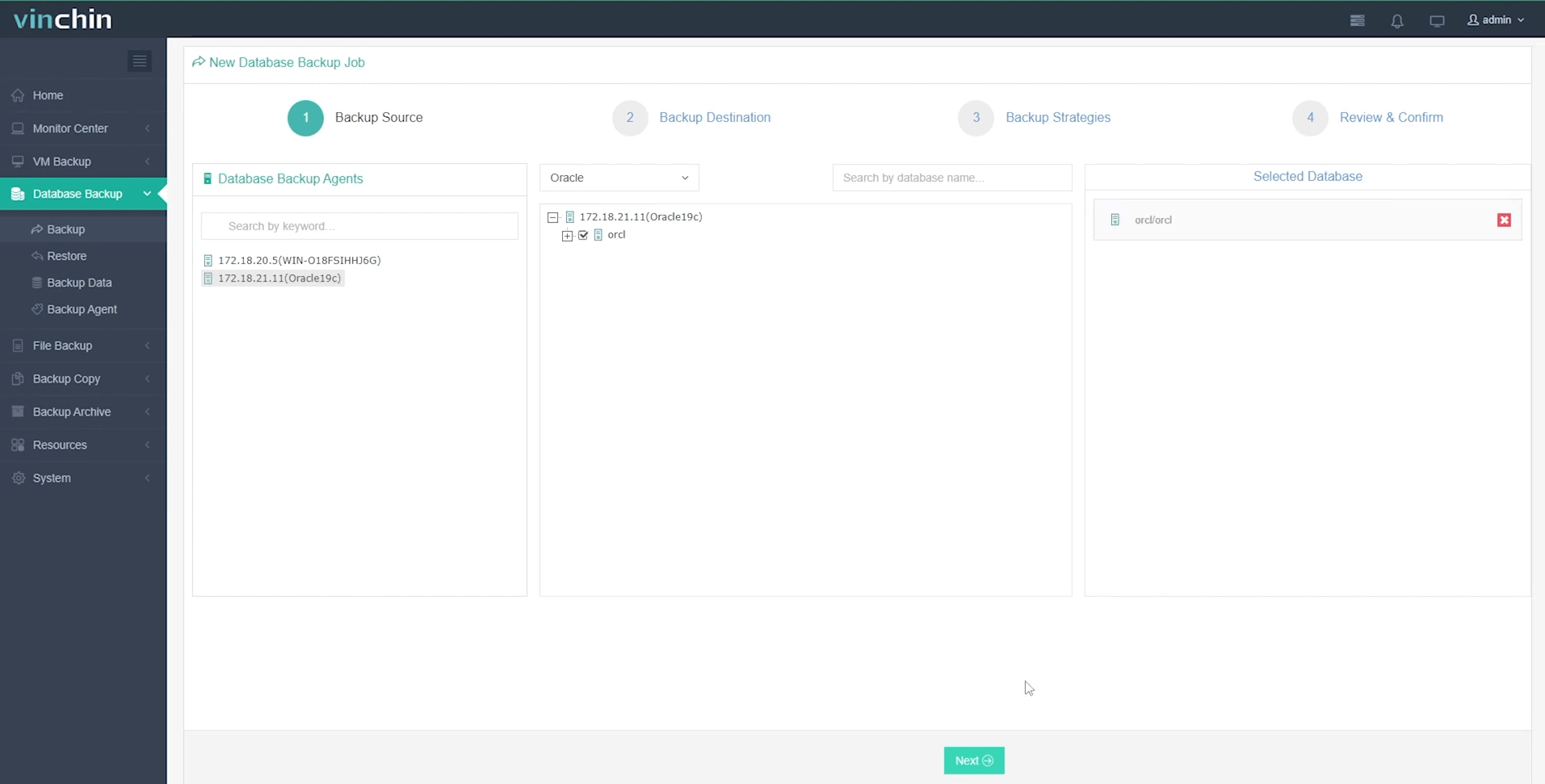
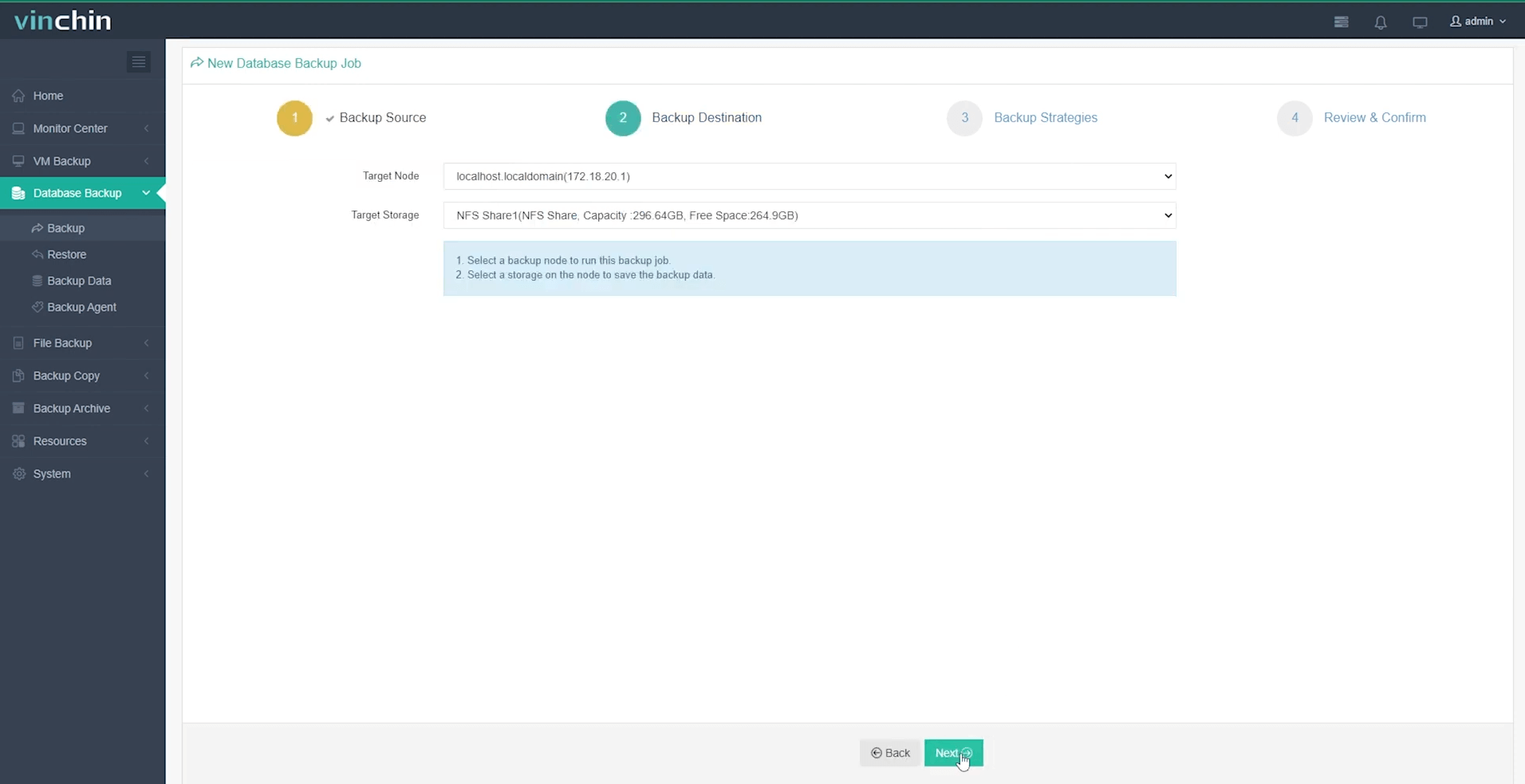
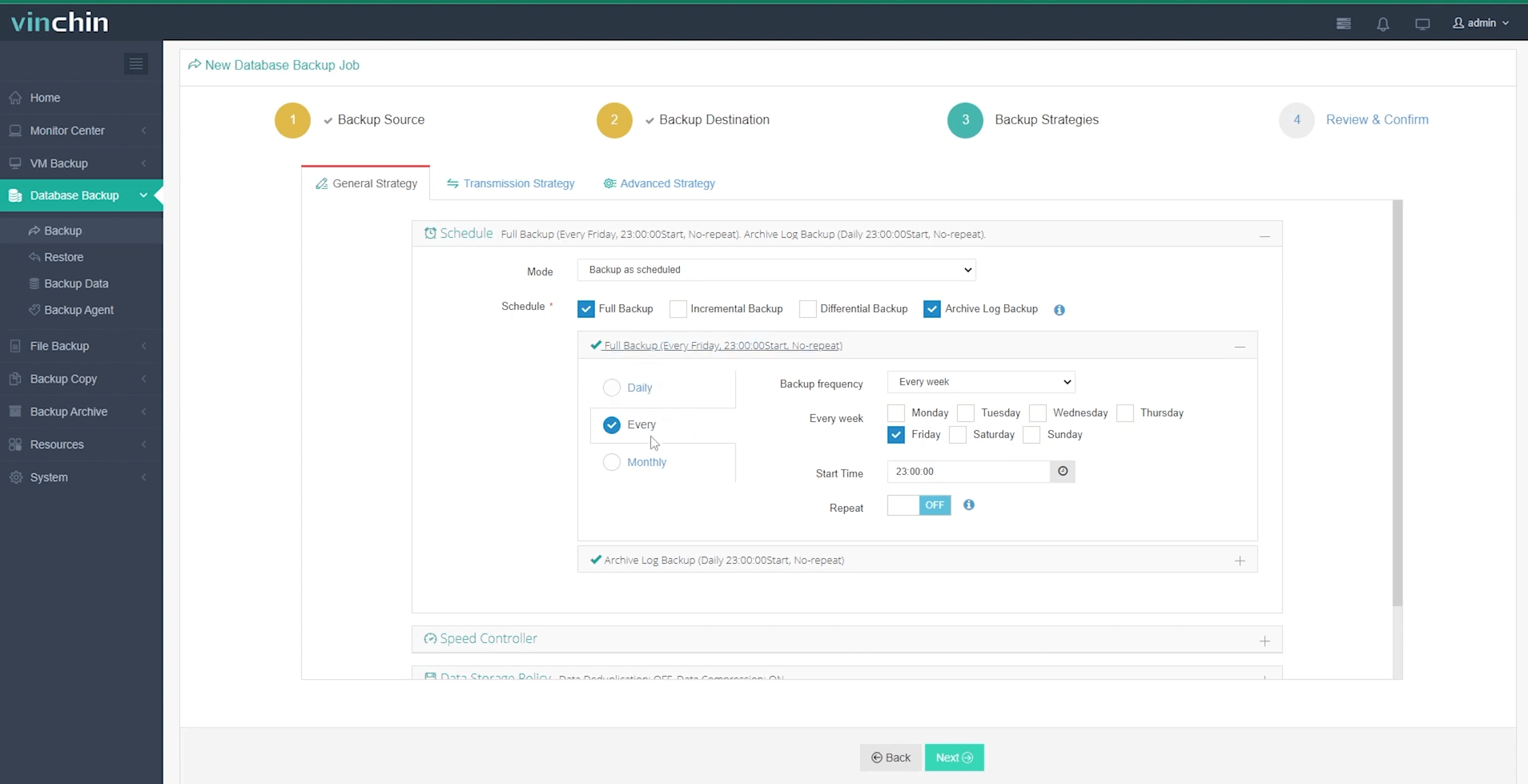
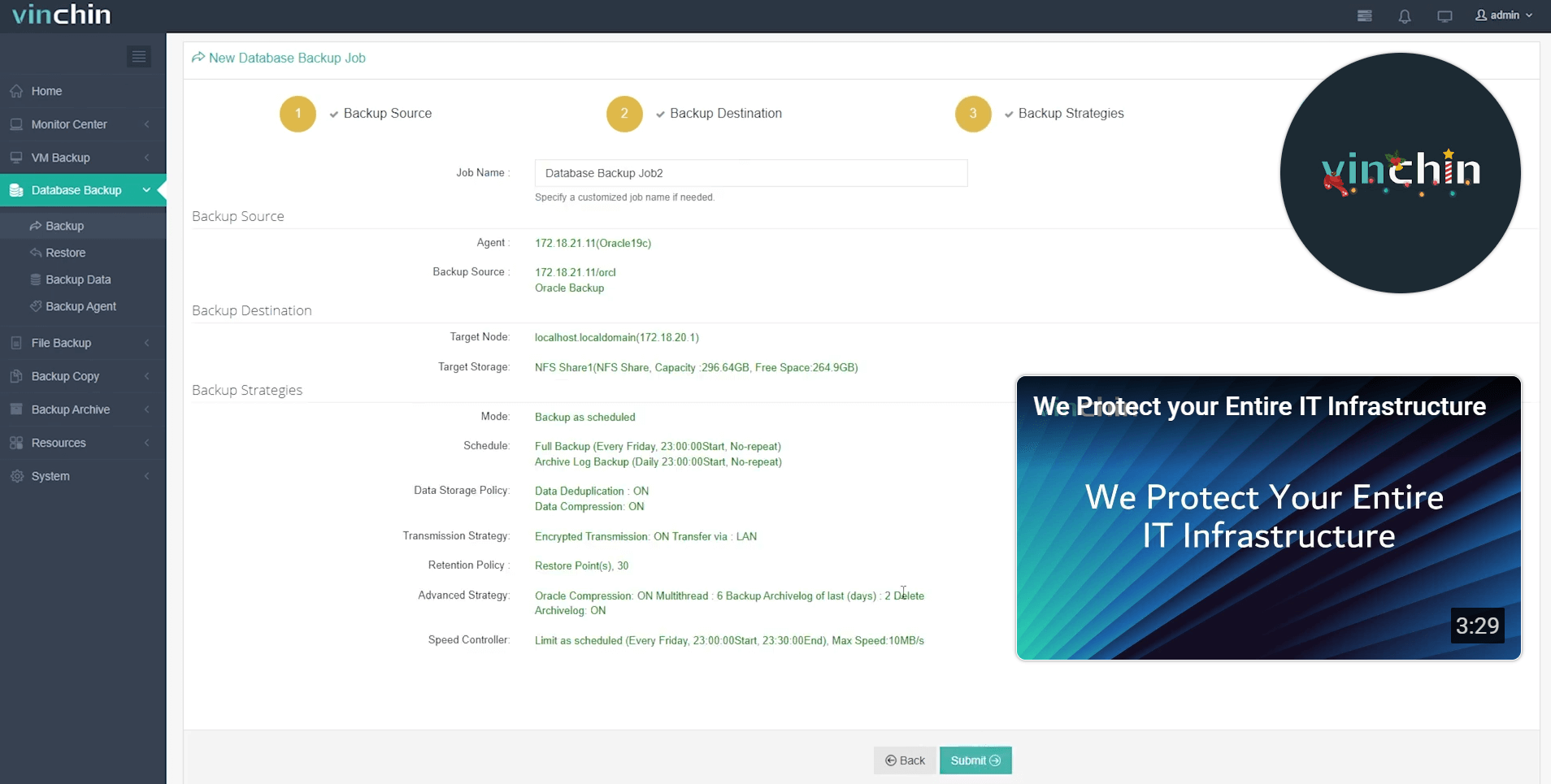
The intuitive web console streamlines complex workflows into four simple steps:
Step 1: Select the Oracle database to back up
Step 2: Choose your preferred backup storage
Step 3: Define a tailored backup strategy
Step 4: Submit the job
Vinchin Backup & Recovery enjoys global recognition among IT professionals thanks to its strong customer base and top-rated performance—try its full-featured edition free for 60 days today by clicking below!
List Archivelog FAQs
Q1: How do I automate daily listing of new archivelogs?
A1: Schedule an OS cron job running an RMAN script that includes LIST ARCHIVELOG FROM TIME 'SYSDATE-1' then email results automatically each morning.
Q2: What should I do if the archive destination fills up (ORA-00257)?
A2: When the archive destination is full, Oracle can’t archive redo logs and the database stops accepting changes with ORA-00257. Back up the archived logs, then delete those already backed up with DELETE NOPROMPT ARCHIVELOG ALL BACKED UP 1 TIMES TO DEVICE TYPE DISK;. Delete files through RMAN rather than the OS, so the control file stays accurate.
Q3: How can I find missing sequences between two points?
A3: Compare each sequence number with the previous one in V$ARCHIVED_LOG. Any row where the gap is larger than 1 means files are missing:
SELECT THREAD#, PREV_SEQ + 1 AS MISSING_FROM, SEQUENCE# - 1 AS MISSING_TO
FROM (SELECT THREAD#, SEQUENCE#, LAG(SEQUENCE#) OVER (PARTITION BY THREAD# ORDER BY SEQUENCE#) AS PREV_SEQ
      FROM V$ARCHIVED_LOG WHERE DEST_ID = 1)
WHERE SEQUENCE# - PREV_SEQ > 1;
Conclusion
Proactive archivelog management is key to Oracle health, enabling effective monitoring, disaster recovery, and compliance. With tools like SQL*Plus and RMAN, you have the essentials for success. To further simplify the protection of archives and live data, consider a solution like Vinchin—explore its features with a free trial.